2006 CHEVROLET HHR air condition
[x] Cancel search: air conditionPage 74 of 394

The passenger sensing system will turn off the right
front passenger’s frontal airbag under certain conditions.
The driver’s airbag and the side airbags (if equipped)
are not part of the passenger sensing system.
The passenger sensing system works with sensors that
are part of the right front passenger’s seat and safety
belt. The sensors are designed to detect the presence
of a properly-seated occupant and determine if
the passenger’s frontal airbag should be enabled
(may inate) or not.
Accident statistics show that children are safer if they
are restrained in the rear rather than the front seat.
General Motors recommends that child restraints
be secured in a rear seat, including an infant riding in a
rear-facing infant seat, a child riding in a forward-facing
child seat and an older child riding in a booster seat.
If your vehicle has a rear seat that will accommodate a
rear-facing child restraint, a label on your sun visor
says, “Never put a rear-facing child seat in the front.”
This is because the risk to the rear-facing child is
so great, if the airbag deploys.
{CAUTION:
A child in a rear-facing child restraint can be
seriously injured or killed if the right front
passenger’s airbag inates. This is because
the back of the rear-facing child restraint
would be very close to the inating airbag.
Even though the passenger sensing system is
designed to turn off the passenger’s frontal
airbag if the system detects a rear-facing child
restraint, no system is fail-safe, and no one
can guarantee that an airbag will not deploy
under some unusual circumstance, even
though it is turned off. We recommend that
rear-facing child restraints be secured in the
rear seat, even if the airbag is off.
If you need to secure a forward-facing child
restraint in the right front seat, always move
the front passenger seat as far back as it will
go. It is better to secure the child restraint in a
rear seat.
1-68
Page 90 of 394
Remote Vehicle Start
Your vehicle may have a remote start feature. This
feature allows you to start the engine from outside the
vehicle. It may also start the vehicle’s heating or air
conditioning systems. SeeClimate Control System on
page 3-19for additional information.
Laws in some local communities may restrict the use of
remote starters. For example, some laws may require
a person using remote start to have the vehicle in
view when doing so. Check local regulations for any
requirements on remote starting of vehicles.
/(Remote Vehicle Start):If your vehicle has the
remote vehicle start feature, the remote keyless entry
transmitter will have a button with this symbol on it.
An increased range of operation is provided with
the remote keyless entry transmitter that has the remote
vehicle start button. The vehicle can be started from
approximately 197 feet (60 m) away. However, the
operating range may be less while the engine is running
and you will need to be closer to your vehicle to turn
it off than you were to turn it on.Do not use the remote start feature if your vehicle is
low on fuel. Your vehicle may run out of fuel.
To start the engine using the remote start feature,
do the following:
1. Aim the remote keyless entry transmitter at the
vehicle.
2. Press and release the transmitter’s lock button,
then immediately press and hold the remote
vehicle start button for four seconds or until the
vehicle’s turn signal lamps ash. The vehicle’s
doors will be locked.
3. When the vehicle’s engine starts, the parking lamps
will turn on and remain on while the engine is
running.
After a remote start, the engine will automatically shut
off after 10 minutes unless a time extension has
been done or the vehicle’s key is inserted into the
ignition switch and turned to RUN.
The maximum number of remote starts between ignition
cycles with the key is two.
2-8
Page 125 of 394
OnStar®System
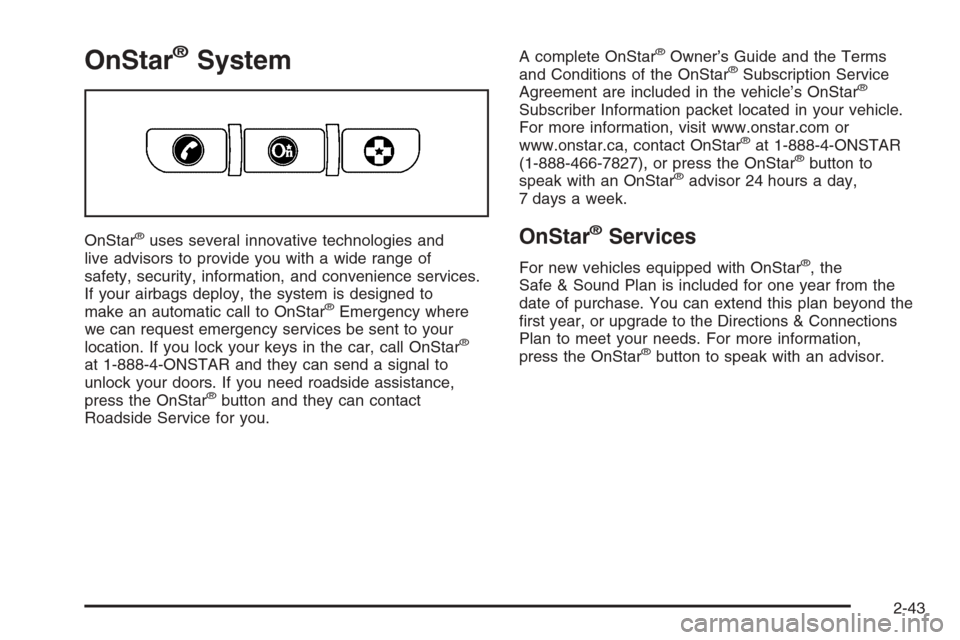
OnStar®uses several innovative technologies and
live advisors to provide you with a wide range of
safety, security, information, and convenience services.
If your airbags deploy, the system is designed to
make an automatic call to OnStar
®Emergency where
we can request emergency services be sent to your
location. If you lock your keys in the car, call OnStar
®
at 1-888-4-ONSTAR and they can send a signal to
unlock your doors. If you need roadside assistance,
press the OnStar
®button and they can contact
Roadside Service for you.A complete OnStar
®Owner’s Guide and the Terms
and Conditions of the OnStar®Subscription Service
Agreement are included in the vehicle’s OnStar®
Subscriber Information packet located in your vehicle.
For more information, visit www.onstar.com or
www.onstar.ca, contact OnStar
®at 1-888-4-ONSTAR
(1-888-466-7827), or press the OnStar®button to
speak with an OnStar®advisor 24 hours a day,
7 days a week.
OnStar®Services
For new vehicles equipped with OnStar®, the
Safe & Sound Plan is included for one year from the
date of purchase. You can extend this plan beyond the
rst year, or upgrade to the Directions & Connections
Plan to meet your needs. For more information,
press the OnStar
®button to speak with an advisor.
2-43
Page 151 of 394
Climate Controls
Climate Control System
With this system you can control the heating, cooling,
and ventilation for your vehicle.
If your vehicle has remote start and you want to warm
up or cool down the interior before you get in, leave your
climate control system on with the settings adjusted
where you want them. The next time the vehicle
is started with remote start, the climate control system
will come on and adjust the interior to the temperature
settings.
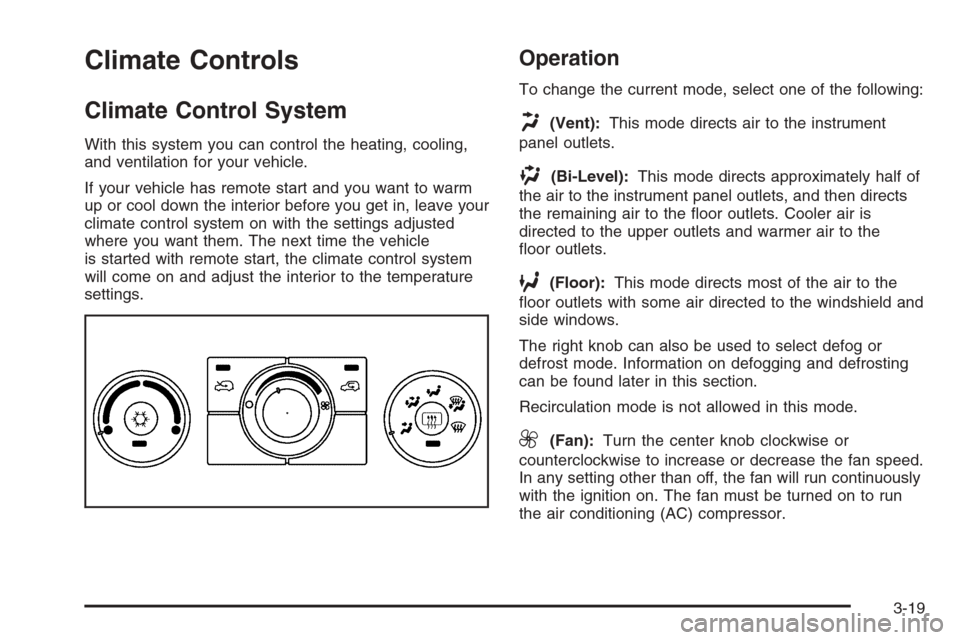
Operation
To change the current mode, select one of the following:
H(Vent):This mode directs air to the instrument
panel outlets.
)(Bi-Level):This mode directs approximately half of
the air to the instrument panel outlets, and then directs
the remaining air to the oor outlets. Cooler air is
directed to the upper outlets and warmer air to the
oor outlets.
6(Floor):This mode directs most of the air to the
oor outlets with some air directed to the windshield and
side windows.
The right knob can also be used to select defog or
defrost mode. Information on defogging and defrosting
can be found later in this section.
Recirculation mode is not allowed in this mode.
9(Fan):Turn the center knob clockwise or
counterclockwise to increase or decrease the fan speed.
In any setting other than off, the fan will run continuously
with the ignition on. The fan must be turned on to run
the air conditioning (AC) compressor.
3-19
Page 152 of 394
9(Off):To turn the fan off, turn the knob all the way
counterclockwise to the off position.
Temperature Control:Turn the left knob clockwise or
counterclockwise to increase or decrease the
temperature inside your vehicle.
@(Recirculate):Press this button to prevent outside
air and odors from entering your vehicle or to help heat or
cool the air inside your vehicle more quickly. An indicator
light above the symbol will come on in this mode. The air
conditioning compressor also comes on. This mode is not
available for oor, defog and defrost modes. When the
recirculation button is pressed, the recirculation indicator
light will ash ve times and outside air will be delivered.
Operation in this mode during periods of high humidity
and cool outside temperatures may result in increased
window fogging. If window fogging is experienced, select
the defrost mode.
;(Outside Air):Press this button to allow outside air
to circulate through your vehicle. An indicator light above
the symbol will come on in this mode.
#(Air Conditioning):Press this button to turn the
air conditioning system on or off. When this button
is pressed, an indicator light below the symbol will come
on to let you know the air conditioning is activated.On hot days, open the windows to let hot inside air
escape; then close them. This helps to reduce the time
it takes for your vehicle to cool down. It also helps
the system to operate more efficiently.
For quick cool down on hot days:
1. Select the vent mode.
2. Select the recirculation mode.
3. Select air conditioning.
4. Select the coolest temperature.
5. Select the highest fan speed.
Using these settings together for long periods of time
may cause the air inside of your vehicle to become too
dry. To prevent this from happening, after the air in
your vehicle has cooled, turn off the recirculation
by pressing the outside air button.
The air conditioning system removes moisture from the
air, so you may sometimes notice a small amount of
water dripping underneath your vehicle while idling
or after turning off the engine. This is normal.
The air conditioning compressor cannot be turned on
when the fan is off.
3-20
Page 153 of 394
Defogging and Defrosting
Fog on the inside of windows is a result of high humidity
(moisture) condensing on the cool window glass.
This can be minimized if the climate control system is
used properly. There are two modes to clear fog or
frost from your windshield and side windows. Use the
defog mode to clear the windows of fog or moisture
and warm the passengers. Use the defrost mode
to remove fog or frost from the windshield more quickly.
For best results, clear all snow and ice from the
windshield before defrosting.
Turn the right knob to select the defog or defrost mode.
-(Defog):This mode directs approximately half of
the air to the windshield and the side window outlets and
half to the oor outlets. When you select this mode
the system runs the air conditioning compressor.
To defog the windows faster, turn the temperature
control knob clockwise to the warmest setting.
Recirculation mode is not available in defog mode.
0(Defrost):This mode directs most of the air to the
windshield, with some air directed to the side window
outlets and the oor outlets. When you select this mode
the system runs the air conditioning compressor.
To defrost the windows faster, turn the temperature
control knob clockwise to the warmest setting.
Recirculation mode is not available in defog mode.
Rear Window Defogger
The rear window defogger uses a warming grid to
remove fog from the rear window.
The rear window defogger will only work when the
ignition is in RUN.
<(Rear):Press the button to turn the rear window
defogger on or off. Be sure to clear as much snow from
the rear window as possible. An indicator light below
the symbol will come on to let you know that the
rear window defogger is activated.
The rear window defogger will turn off approximately
15 minutes after the button is pressed. If turned on again,
the defogger will only run for approximately seven
minutes before turning off. If turned on again, the
defogger will only run for approximately seven minutes
before turning off. If vehicle speed is greater than
50 mph (80 km/h) and the rear defogger is active,
it will remain on as long as the speed is greater than
50 mph (80 km/h). The defogger can also be turned off by
pressing the button again or by turning off the engine.
Notice:Do not use anything sharp on the inside
of the rear window. If you do, you could cut or
damage the warming grid, and the repairs would not
be covered by your warranty. Do not attach a
temporary vehicle license, tape, a decal or anything
similar to the defogger grid.
3-21
Page 163 of 394
If the word OFF or the off symbol is lit on the airbag
status indicator, it means that the passenger sensing
system has turned off the right front passenger’s frontal
airbag. SeePassenger Sensing System on page 1-67
for more on this, including important safety information.
If, after several seconds, all status indicator lights
remain on, or if there are no lights at all, there may be a
problem with the lights or the passenger sensing
system. See your retailer for service.
{CAUTION:
If the off indicator and the airbag readiness light
ever come on together, it means that something
may be wrong with the airbag system. If this
ever happens, have the vehicle serviced
promptly, because an adult-size person sitting
in the right front passenger seat may not have
the protection of the frontal airbag. SeeAirbag
Readiness Light on page 3-28.
Charging System Light
The charging system light
will come on briey when
you turn on the ignition,
and the engine is not
running, as a check
to show you it is working.
Then it should go out when the engine is started.
If it stays on, or comes on while you are driving, you
may have a problem with the electrical charging system.
Have it checked by your GM dealer. Driving while this
light is on could drain your battery.
If you must drive a short distance with the light on, be
certain to turn off all your accessories, such as the radio
and air conditioner.
3-31
Page 167 of 394

Engine Coolant Temperature Gage
Your vehicle has an
engine coolant temperature
gage. With the ignition
turned to ON, this
gage shows the engine
coolant temperature.
If the gage pointer moves into the red area, your engine
is too hot. It means that your engine coolant has
overheated.
If you have been operating your vehicle under normal
driving conditions, you should pull off the road, stop your
vehicle and turn off the engine as soon as possible.
SeeEngine Overheating on page 5-23.
Malfunction Indicator Lamp
Check Engine Light
Your vehicle has a
computer which monitors
operation of the fuel,
ignition, and emission
control systems.
This system is called OBD II (On-Board
Diagnostics-Second Generation) and is intended to
assure that emissions are at acceptable levels for the
life of the vehicle, helping to produce a cleaner
environment. The check engine light comes on to
indicate that there is a problem and service is required.
Malfunctions often will be indicated by the system
before any problem is apparent. This may prevent more
serious damage to your vehicle. This system is also
designed to assist your service technician in correctly
diagnosing any malfunction.
Notice:If you keep driving your vehicle with this
light on, after awhile, your emission controls
may not work as well, your fuel economy may not
be as good, and your engine may not run as
smoothly. This could lead to costly repairs that
may not be covered by your warranty.
3-35