2006 BMW 325XI SPORTS WAGON seats
[x] Cancel search: seatsPage 107 of 236
Practical interior accessories
106 The cargo area cover is raised when the
rear window or tailgate is opened
*.
Before closing the rear window or tailgate,
press the cover downward until it engages.<
Expanding the cargo area
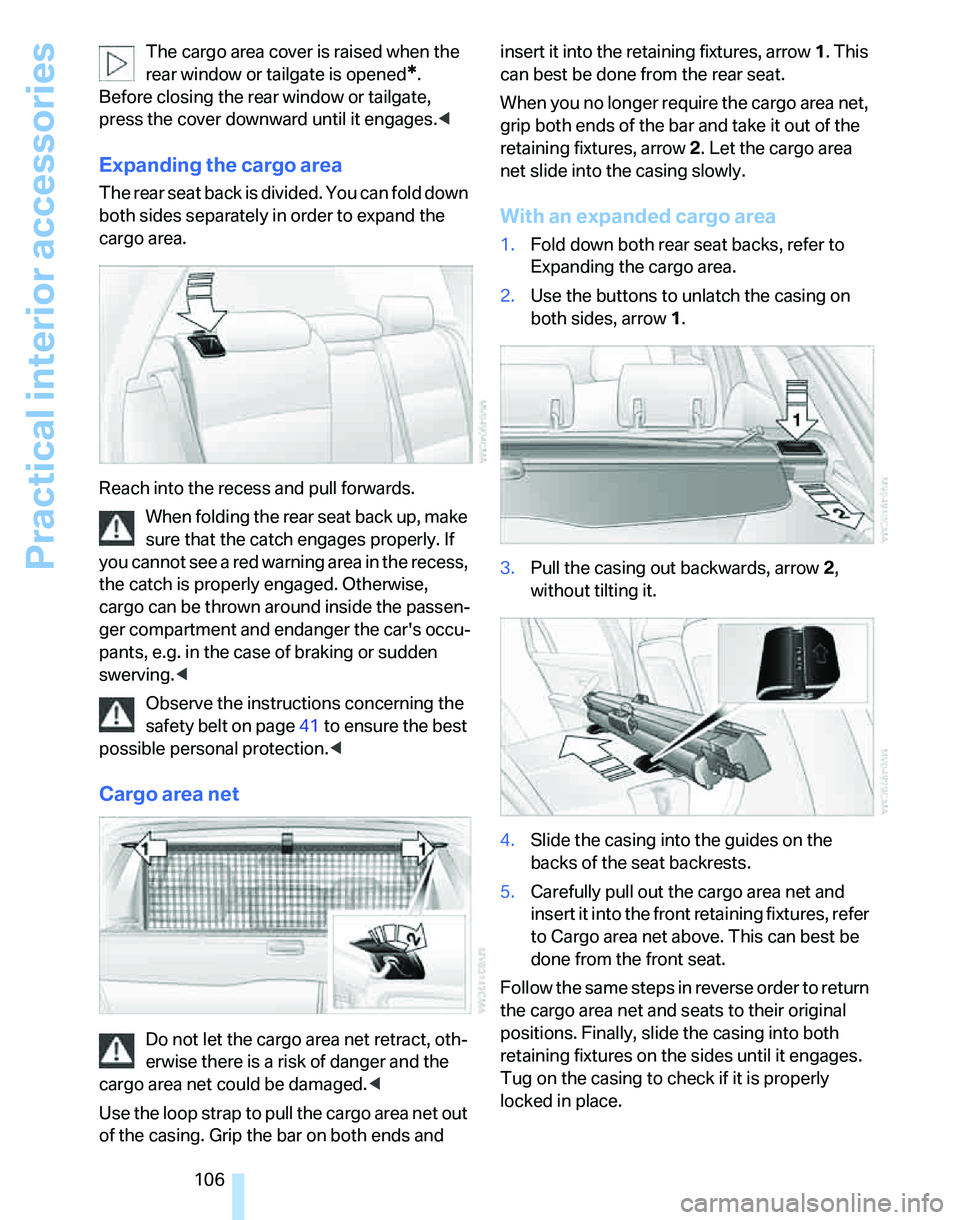
The rear seat back is divided. You can fold down
both sides separately in order to expand the
cargo area.
Reach into the recess and pull forwards.
When folding the rear seat back up, make
sure that the catch engages properly. If
you cannot see a red warning area in the recess,
the catch is properly engaged. Otherwise,
cargo can be thrown around inside the passen-
ger compartment and endanger the car's occu-
pants, e.g. in the case of braking or sudden
swerving.<
Observe the instructions concerning the
safety belt on page41 to ensure the best
possible personal protection.<
Cargo area net
Do not let the cargo area net retract, oth-
erwise there is a risk of danger and the
cargo area net could be damaged.<
Use the loop strap to pull the cargo area net out
of the casing. Grip the bar on both ends and insert it into the retaining fixtures, arrow 1. This
can best be done from the rear seat.
When you no longer require the cargo area net,
grip both ends of the bar and take it out of the
retaining fixtures, arrow 2. Let the cargo area
net slide into the casing slowly.
With an expanded cargo area
1.Fold down both rear seat backs, refer to
Expanding the cargo area.
2.Use the buttons to unlatch the casing on
both sides, arrow 1.
3.Pull the casing out backwards, arrow 2,
without tilting it.
4.Slide the casing into the guides on the
backs of the seat backrests.
5.Carefully pull out the cargo area net and
insert it into the front retaining fixtures, refer
to Cargo area net above. This can best be
done from the front seat.
Follow the same steps in reverse order to return
the cargo area net and seats to their original
positions. Finally, slide the casing into both
retaining fixtures on the sides until it engages.
Tug on the casing to check if it is properly
locked in place.
Page 109 of 236
Practical interior accessories
108 3.Open the Velcro fastener, spread the ski
bag between the front seats and insert the
skis or snowboards.
The zip fastener makes objects in the ski
bag easier to reach.
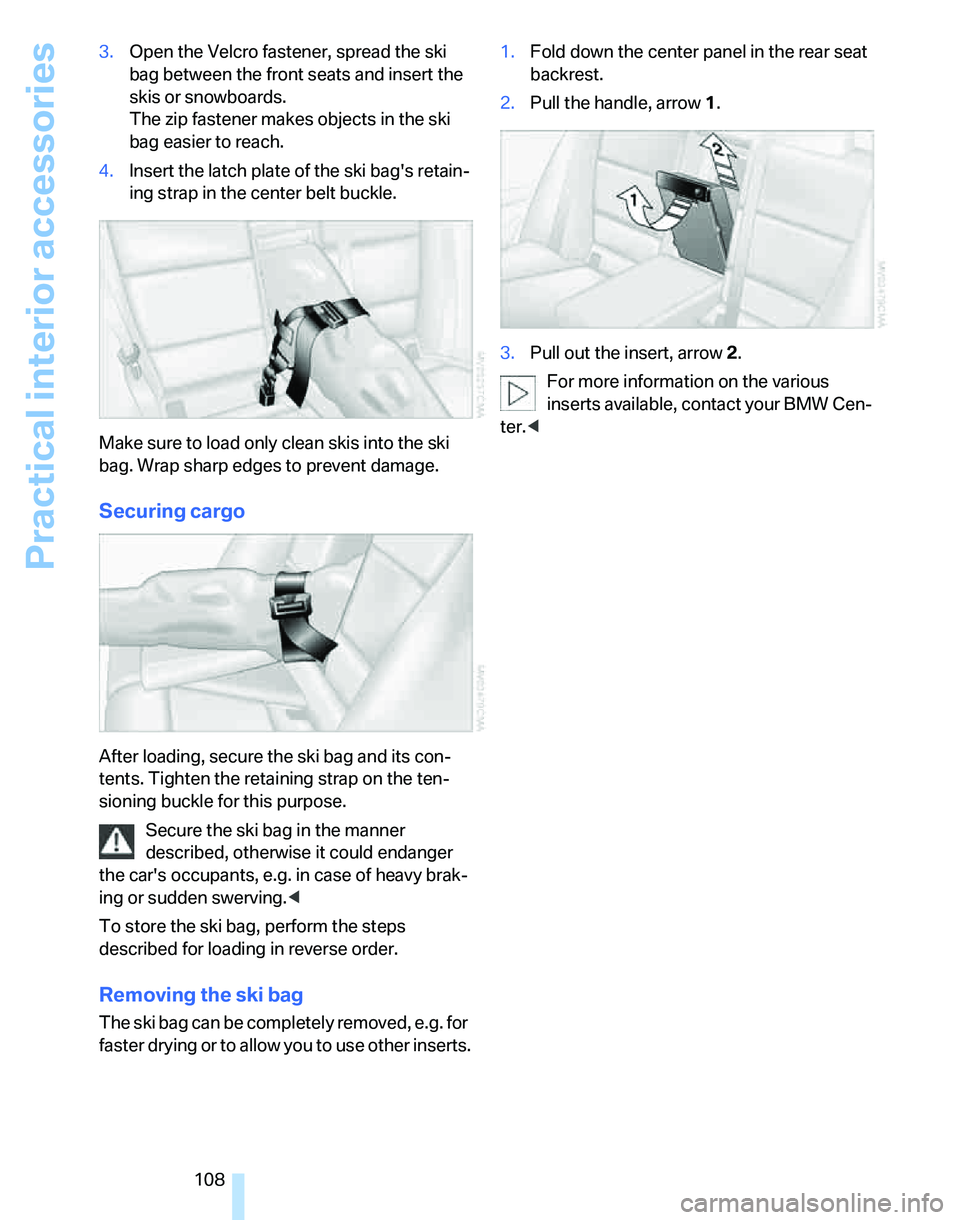
4.Insert the latch plate of the ski bag's retain-
ing strap in the center belt buckle.
Make sure to load only clean skis into the ski
bag. Wrap sharp edges to prevent damage.
Securing cargo
After loading, secure the ski bag and its con-
tents. Tighten the retaining strap on the ten-
sioning buckle for this purpose.
Secure the ski bag in the manner
described, otherwise it could endanger
the car's occupants, e.g. in case of heavy brak-
ing or sudden swerving.<
To store the ski bag, perform the steps
described for loading in reverse order.
Removing the ski bag
The ski bag can be completely removed, e.g. for
faster drying or to allow you to use other inserts.1.Fold down the center panel in the rear seat
backrest.
2.Pull the handle, arrow1.
3.Pull out the insert, arrow 2.
For more information on the various
inserts available, contact your BMW Cen-
ter.<
Page 220 of 236
Reference 219
At a glance
Controls
Driving tips
Communications
Navigation
Entertainment
Mobility
Automatic
– air distribution95
– air flow rate95
– cruise control59,61
– headlamp control90
– service notification175
– storing of stations145
Automatic climate control94
– automatic air distribution95
– settings via iDrive95
Automatic curb monitor47
"Automatic programs" with
automatic climate control96
Automatic recirculated-air
control AUC96
Automatic station search145
Automatic transmission with
Steptronic55
– interlock55,56
– overriding selector lever
lock57
– shiftlock56
– sport program56
"Automatic ventilation"98
AUTO program for automatic
climate control95
"Autostore"
– on the radio146
AUX-IN158
– port103
Average fuel consumption69
– setting the units71
Average speed68
"Avoid ferries" in
navigation131
"Avoid highways" in
navigation131
Avoid highways in
navigation131
Avoiding unintentional
alarms35
"Avoid tollroads" in
navigation131
Axle loads, refer to
Weights212
"A - Z"168B
Backrests, refer to Seats41
Backrest width adjustment43
Back seats
– refer to Rear seats
Backup lamps
– replacing bulbs200
Backup lamps, refer to Tail
lamps200
Balance, tone control141
Band-aids, refer to First-aid
pouch203
Bar, refer to Tow-starting,
towing away206
Bass, tone control141
Bass sounds, refer to Tone
control141
Bass sounds, refer to Treble
and bass141
Battery201
– charging201
– disposal37,201
– jump starting204
– temporary power failure201
Battery renewal
– remote control37
Being towed205
Belts, refer to Safety belts46
Belt tensioner, refer to Safety
belts46
Beverage holders, refer to
Cup holders104
Black ice, refer to Outside
temperature warning67
Blower, refer to Air flow
rate96
BMW Assist174
– enabling174
– services offered175
"BMW Contact"178
"BMW Contact
Numbers"178
BMW Homepage4
BMW Maintenance
System195
"BMW Service"176
"BMW Service settings"175
BMW webpage4Bottle holders, refer to Cup
holders104
Brake assist, refer to Dynamic
Brake Control82
Brake fluid194
– level too low194
– warning lamp194
Brake fluid, refer to Service
requirements72
Brake Force Display87
Brake hydraulics, refer to
Brakes194
Brake lamps
– Brake Force Display
87
– replacing bulbs200
Brake pads, breaking in112
Brake rotors114
– brakes112
– breaking in112
Brakes
– ABS82
– BMW Maintenance
System195
– brake fluid194
– brake pads194
– breaking in112
– handbrake55
– service requirements72
Brakes, refer to Braking
safely113
Brake system112
– BMW Maintenance
System195
– brake fluid194
– brake pads194
– breaking in112
– disc brakes114
Breakdown services, refer to
Roadside Assistance203
Breaking in the clutch112
Breaking in the
differential112
Break-in period112
"Brightness"on the control
display80
Bulb changing, refer to Lamps
and bulbs197
Page 222 of 236
Reference 221
At a glance
Controls
Driving tips
Communications
Navigation
Entertainment
Mobility
Checking the air pressure,
refer to Tire inflation
pressure184
Child-restraint fixing system
LATCH51
Child-restraint systems50
Child-safety lock52
Child seats50
Chrome parts, care, refer to
Caring for your vehicle
brochure
Cigarette lighter104
– socket105
Cleaning, refer to Caring for
your vehicle brochure
Cleaning headlamps58
– washer fluid59
"Climate"95
Clock67
– 12h/24h mode76
– setting time75
Closing
– from inside32
– from outside30
Clothes hooks104
Cockpit10
Cold start, refer to Starting the
engine54
Combined instrument, refer to
Instrument cluster12
Comfort Access, refer to
Convenient access35
Comfort area, refer to Around
the center console14
"Communication"166
"Communication
settings"175
Compact disc, refer to
– CD changer152
– CD player152
Compartment for remote
control, refer to Ignition
lock53
Compass101
Computer68
– displays on Control
Display69
– hour signal76
Computer, refer to iDrive16"Concert hall" tone
settings142
Condensation, refer to When
the vehicle is parked114
Configuring settings, refer to
Personal Profile29
Confirmation signals for
locking/unlocking of the
vehicle31
Connecting vacuum cleaner,
refer to Connecting
electrical appliances105
Consumption display
– average consumption69
Consumption indicator
– Energy Control68
"Continue guidance to
destination?"
133
Control Center, refer to
iDrive16
Control Display
– settings71
– switching on/off21
Control Display, refer to
iDrive16
Controller, refer to iDrive16
Controls and displays10
Control unit, refer to iDrive16
Convenience operation
– windows30
Convenience start, refer to
Starting the engine54
Convenient access35
– replacing the battery37
– what to observe before
entering a car wash36
Convenient operation
– windows with convenient
access36
– with convenient access36
Coolant193
– adding193
– checking level193
Coolant temperature67
Cooling, maximum95
Cooling fluid, refer to
Coolant193
Cornering lamps, refer to
Adaptive Head Light92Country of destination for
navigation122
Courtesy lamps93
Cross-hairs in navigation125
Cruise control59
– active61
– malfunction61
Cruising range68
Cup holders104
Curb weight, refer to
Weights212
Current consumption, refer to
Energy Control68
"Current position"136
Current position
– displaying136
– entering128
– storing128
"Customer
Relations"176,178
D
Dashboard, refer to
Cockpit10
Dashboard, refer to
Instrument cluster12
Dashboard lighting, refer to
Instrument lighting93
Data210
– capacities213
– dimensions211
– engine210
– weights212
"Date"77
Date
– setting76
– setting format77
"Date format"77
Daytime driving lamps91
"Daytime running light"92
DBC Dynamic Brake
Control82
DCC, refer to Cruise
control59
"Deactivated"45
Deactivating front passenger
airbags88
Page 225 of 236
Everything from A - Z
224 Footbrake, refer to Braking
safely113
Footwell lamps93
For your own safety5
Front airbags88
Front seat adjustment41
"FTM"86
FTM, refer to Flat Tire
Monitor85
Fuel183
– display68
– high-quality brands183
– quality183
– specifications183
– tank capacity213
Fuel clock, refer to Fuel
gauge68
Fuel consumption, refer to
Average fuel
consumption69
Fuel display, refer to Fuel
gauge68
Fuel filler door182
– releasing in the event of
electrical malfunction182
Fuses202
G
Garage door opener, refer to
Integrated universal remote
control100
Gasoline, refer to Required
fuel183
Gasoline display, refer to Fuel
gauge68
Gasoline engine, checking oil
level191
Gear indicator
– automatic transmission with
Steptronic55
Gearshift lever
– automatic transmission with
Steptronic56
– manual transmission55
Gearshifts
– with automatic
transmission56
– with manual transmission55General driving notes112
Glass sunroof, electric
– closing after electrical
malfunction39
– convenient operation30,32
– operation with convenient
access36
– remote control30
Glove compartment103
– rechargeable flashlight103
GPS navigation, refer to
Navigation system120
Grills94
Gross vehicle weight, refer to
Weights212
H
Halogen lamps
– replacing bulbs198
Handbrake55
– indicator lamp55
Hand lamp, refer to
Rechargeable flashlight103
Hands-free system14
Hazard warning flashers14
HD, refer to High Definition
Radio147
Head airbags88
Headlamp control,
automatic90
Headlamp cover198
Headlamp flasher57
– indicator lamp11,13
Headlamps
– care, refer to Caring for your
vehicle brochure
– replacing bulbs198
Head restraints43
– sitting safely41
Heated
– mirrors47
– rear window97
– seats44
Heating
– mirrors47
– rear window97
– seats44Heating while at a standstill,
refer to Using residual
heat96
Heavy loads, refer to Stowing
cargo115
Height, refer to
Dimensions211
Height adjustment
– seats42
– steering wheel48
High beams92
– headlamp flasher92
– indicator lamp13
– replacing bulbs198
High Definition Radio147
High water, refer to Driving
through water113
Highways, refer to Route
criteria131
Hills113
Holders for cups104
"Home address" in
navigation130
Homepage4
Hood190
Horn10
Hot exhaust system112
"Hour memo"76
"House number" in
destination entry124
Hydraulic brake assist, refer to
Dynamic Brake Control82
Hydroplaning113
I
IBOC, refer to High Definition
Radio147
Ice warning67
ID3 tag, refer to Information
about the track154
Page 229 of 236
Everything from A - Z
228 Parking
– vehicle54
Parking aid, refer to PDC Park
Distance Control81
Parking brake, refer to
Handbrake55
Parking lamps/low beams90
– replacing bulbs199
Parts and accessories, refer to
The individual vehicle5
Passenger-side mirror tilt
function47
"Pathway lighting"91
Pathway lighting91
"PDC"82
PDC Park Distance Control81
Personal Profile29
"Perspective"134
Phone book166
Phone numbers
– deleting from phone
book169
– dialing167
– most recent numbers168
– selecting in phone book168
– Top 8168
Placing a call, refer to
telephone owner's manual
"Play" for audio mode153
"Play"
on the radio151
Pollen
– refer to Microfilter/activated-
charcoal filter for automatic
climate control98
Position
– displaying136
– storing128
Power failure201
Power windows37
– safety switch38
Power windows, refer to
Windows37
Preselecting the switch-on
times for parked car
ventilation/heating98
"Presets", calling up on
radio144
"Presets" on the radio150Pressure, tires184
Pressure monitoring, tires85
– Flat Tire Monitor85
Protection function, refer to
Anti-trapping mechanism
– windows38
Providing medical assistance,
refer to First add pouch203
Puncture
– Flat Tire Monitor85
R
Radio
– autostore145
– controls140
– sampling stations145
– satellite radio149
– selecting the frequency
manually145
– selecting the
waveband140,144
– station search145
– station selection144
– stations with the best
reception145
– storing stations146
– switching on/off140
– tone control141
– volume141
– Weather Band147
Radio key, refer to Integrated
key/Remote control28
Radio position, refer to Radio
readiness53
Radio readiness53
– switched off53
– switched on53
Rain sensor58
"Random", random play156
"Random all" for audio
mode156
"Random directory" for audio
mode156
Reading lamps93
Rear lamps, refer to Tail
lamps200
– replacing bulbs200
Rear seat back, folding106Rear seats
– adjusting head restraints44
– folding head restraint down
and up44
– folding the backrests106
Rear turn signals
– replacing bulbs200
Rear ventilation97
Rearview mirror, refer to
Mirrors46
Rear window defroster97
Rear window roller blind, refer
to Roller sun blinds102
Rear window safety switch38
"Received calls"168
Receiving level of mobile
phone, refer to Status
information20
Reception
– radio stations147
Rechargeable flashlight103
Recirculated-air mode96
Recirculation of air, refer to
Recirculated-air mode96
Reclining seat, refer to
Backrest42
Recording times, refer to
Stopwatch79
"Redial" for mobile phone168
Refueling182
Releasing
– hood190
Remaining distance, refer to
Cruising range68
Remote control28
– battery renewal37
– convenient access35
– garage door opener100
– malfunctions31,37
– service data195
– tailgate31
"Repeat directory" for audio
mode155
"Repeat" for audio mode155
"Repeat track" for audio
mode155
Replacement remote
control28
Page 230 of 236
Reference 229
At a glance
Controls
Driving tips
Communications
Navigation
Entertainment
Mobility
Replacing bulbs, refer to
Lamps and bulbs197
Replacing tires, refer to New
wheels and tires188
Reporting an accident, refer to
Initiating an emergency
call203
Reporting safety defects6
Reserve warning, refer to Fuel
gauge68
Reservoir for washer
systems59
Reset, refer to Resetting tone
settings143
"Reset" for stopwatch80
"Reset" for tone settings143
Residual heat mode96
Restraint systems
– for children50
– refer to Safety belts46
Reverse
– CD changer156
– CD player156
Reverse gear
– automatic transmission with
Steptronic56
– manual transmission55
Road map134
"Roadside Assistance"176
Roadside
Assistance176,203
Roadside parking lamps92
– replacing bulbs199
Roadworthiness test, refer to
Service requirements72
Roller blind
– sun blinds102
Roof load capacity212
Roof-mounted luggage
rack115
Rope, refer to Tow-starting,
towing away206
Rotary/pushbutton, refer to
iDrive16Route130
– bypassing sections136
– changing130
– display133
– displaying arrow view133
– displaying map view134
– displaying town135
– list135
– selecting130
– selecting criteria130
Route selection130
RSC Runflat System
Component, refer to Run-
Flat Tires188
Runflat System Component
RSC, refer to Run-Flat
Tires188
Run-Flat Tires188
– continuing driving with a
damaged tire86
– flat tire86
– new tires188
– replacing tires188
– tire pressures184
– winter tires189
Runflat Tyres, refer to Run-
Flat Tires188
S
Safety-belt height
adjustment46
Safety belts46
– damage46
– indicator lamp46
– reminder46
– sitting safely41
Safety systems
– airbags88
– Antilock Brake System
ABS82
– Dynamic Stability Control
DSC82
– safety belts46
Safety tires, refer to Run-Flat
Tires188
Sampling tracks
– scan154Satellite radio149
– enabling149
– selecting channel150
– storing channel150
"SAT" for radio140,149
"Scan"
– sampling radio stations145
– sampling tracks on CD154
Scan
– CD changer154
– CD player154
– radio145
"Scan all" for audio mode155
"Scan directory" for audio
mode155
Screen, refer to iDrive
controls16
Screw thread for tow
fitting205
SDARS, refer to Satellite
radio149
Seat adjustment
– electric42
– mechanical42
Seat and mirror memory44
Seat belt reminder, refer to
'Fasten safety belts'
reminder46
Seats41
– adjusting the seats42
– heating44
– sitting safely41
Securing cargo108
Securing the vehicle
– from inside32
– from outside30
"Select as destination"127
"Select current speed"79
Selecting an audio source140
Selecting distance for active
cruise control63
Selecting menu items19
Selecting new scale for
navigation134
Selecting the frequency
manually145
Selecting the route130
Selection options with
navigation system130