2006 BMW 325XI SPORTS WAGON service indicator
[x] Cancel search: service indicatorPage 13 of 236

Cockpit
12
Instrument cluster
1Speedometer
2Indicator lamps for turn signals
3Indicator and warning lamps13
4Displays for active cruise control
*61
5Tachometer67
6Energy Control68
7Display for
>Clock67
>Outside temperature67
>Indicator and warning lamps778Display for
>Position of automatic transmission
*55
>Computer68
>Date of next scheduled service, and
remaining distance to be driven72
>Odometer and trip odometer67
>Checking engine oil level
*191
>Settings and information71
9Fuel gauge68
10Resetting trip odometer67
Page 73 of 236
Everything under control
72 5.Select the desired menu item and press the
controller.
6.Select the desired measurement unit and
press the controller.
Service requirements
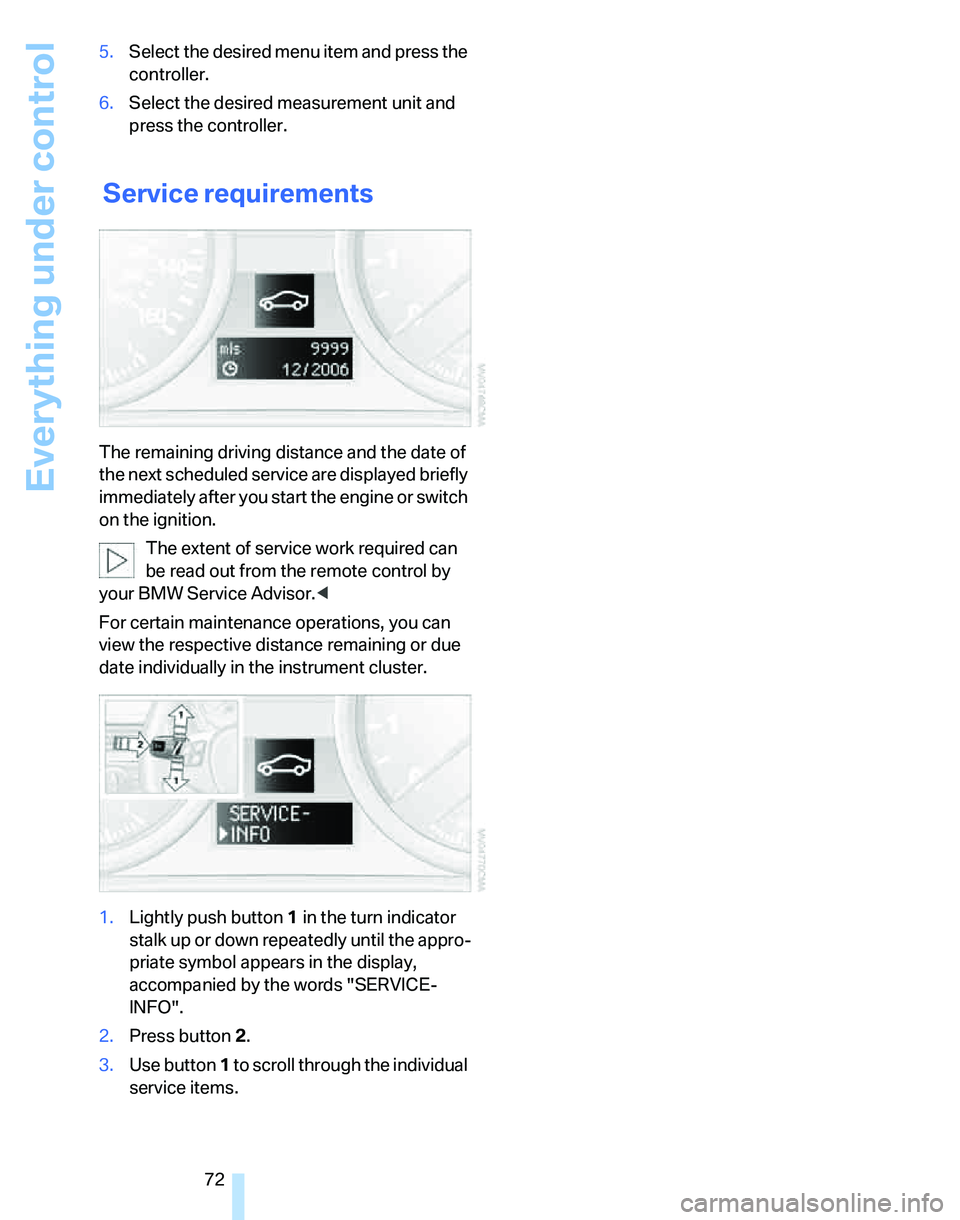
The remaining driving distance and the date of
the next scheduled service are displayed briefly
immediately after you start the engine or switch
on the ignition.
The extent of service work required can
be read out from the remote control by
your BMW Service Advisor.<
For certain maintenance operations, you can
view the respective distance remaining or due
date individually in the instrument cluster.
1.Lightly push button 1 in the turn indicator
stalk up or down repeatedly until the appro-
priate symbol appears in the display,
accompanied by the words "SERVICE-
INFO".
2.Press button 2.
3.Use button 1 to scroll through the individual
service items.
Page 79 of 236
Everything under control
78
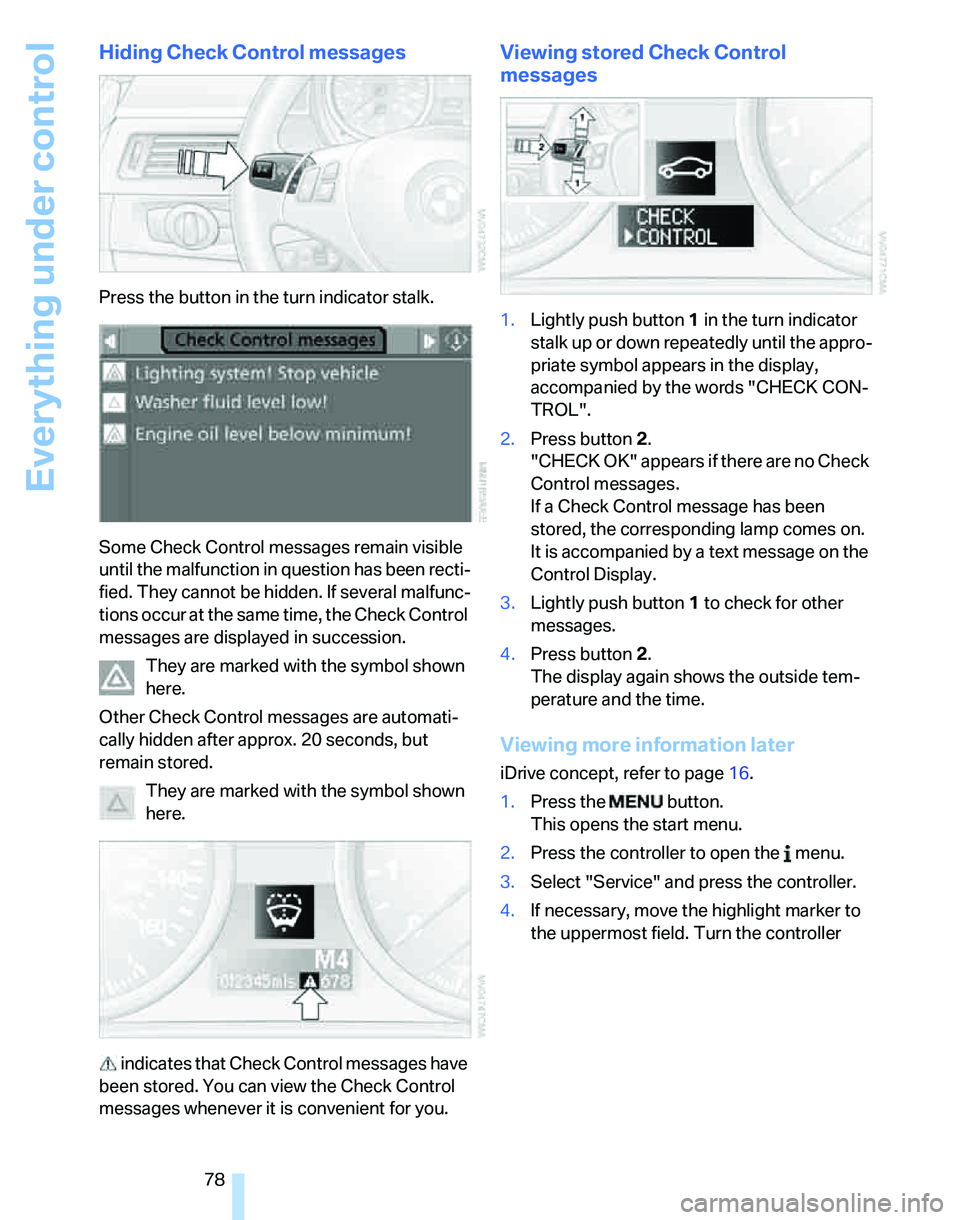
Hiding Check Control messages
Press the button in the turn indicator stalk.
Some Check Control messages remain visible
until the malfunction in question has been recti-
fied. They cannot be hidden. If several malfunc-
tions occur at the same time, the Check Control
messages are displayed in succession.
They are marked with the symbol shown
here.
Other Check Control messages are automati-
cally hidden after approx. 20 seconds, but
remain stored.
They are marked with the symbol shown
here.
indicates that Check Control messages have
been stored. You can view the Check Control
messages whenever it is convenient for you.
Viewing stored Check Control
messages
1.Lightly push button 1 in the turn indicator
stalk up or down repeatedly until the appro-
priate symbol appears in the display,
accompanied by the words "CHECK CON-
TROL".
2.Press button 2.
"CHECK OK" appears if there are no Check
Control messages.
If a Check Control message has been
stored, the corresponding lamp comes on.
It is accompanied by a text message on the
Control Display.
3.Lightly push button 1 to check for other
messages.
4.Press button 2.
The display again shows the outside tem-
perature and the time.
Viewing more information later
iDrive concept, refer to page16.
1.Press the button.
This opens the start menu.
2.Press the controller to open the menu.
3.Select "Service" and press the controller.
4.If necessary, move the highlight marker to
the uppermost field. Turn the controller
Page 89 of 236
Technology for driving comfort and safety
88
Airbags
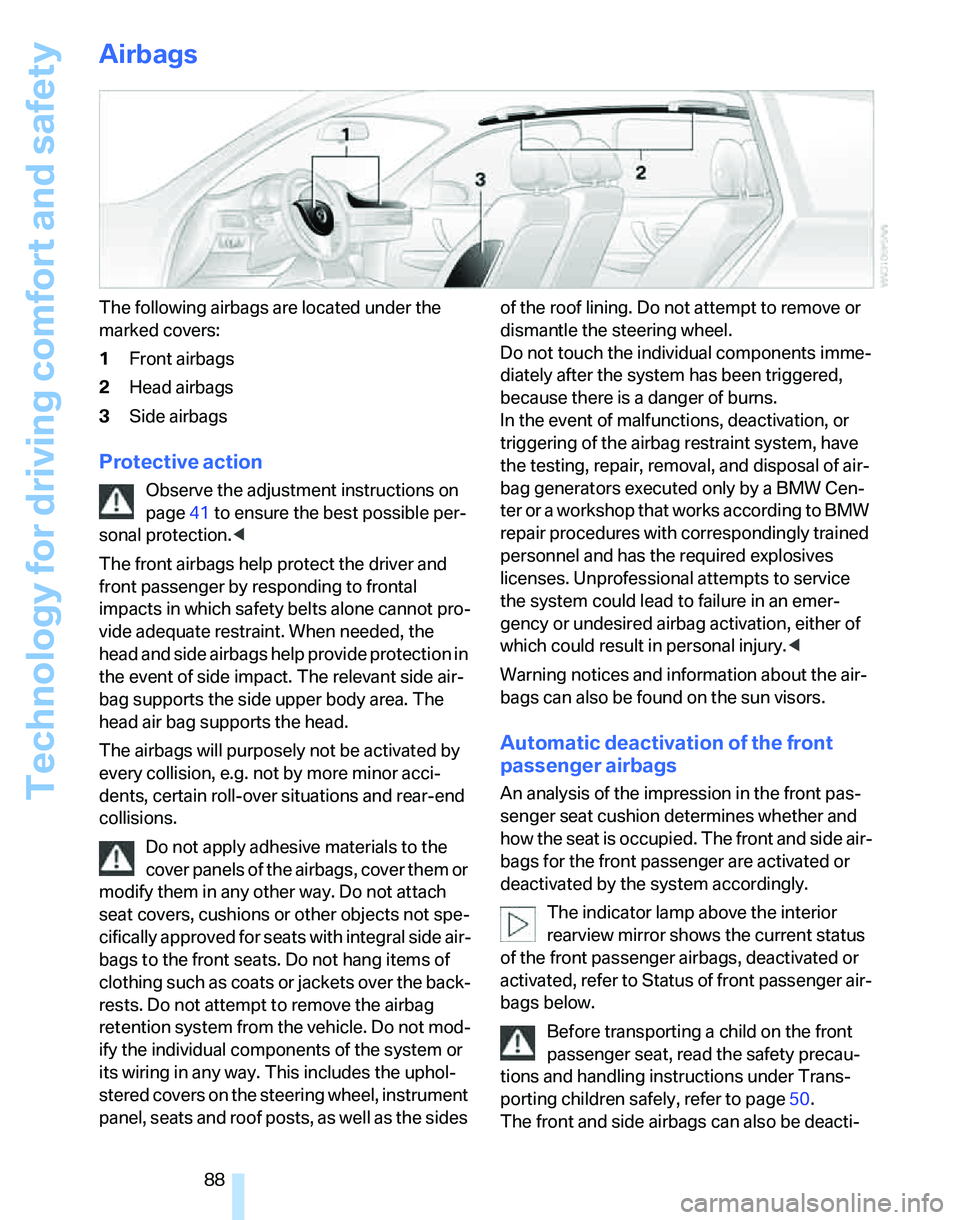
The following airbags are located under the
marked covers:
1Front airbags
2Head airbags
3Side airbags
Protective action
Observe the adjustment instructions on
page41 to ensure the best possible per-
sonal protection.<
The front airbags help protect the driver and
front passenger by responding to frontal
impacts in which safety belts alone cannot pro-
vide adequate restraint. When needed, the
head and side airbags help provide protection in
the event of side impact. The relevant side air-
bag supports the side upper body area. The
head air bag supports the head.
The airbags will purposely not be activated by
every collision, e.g. not by more minor acci-
dents, certain roll-over situations and rear-end
collisions.
Do not apply adhesive materials to the
cover panels of the airbags, cover them or
modify them in any other way. Do not attach
seat covers, cushions or other objects not spe-
cifically approved for seats with integral side air-
bags to the front seats. Do not hang items of
clothing such as coats or jackets over the back-
rests. Do not attempt to remove the airbag
retention system from the vehicle. Do not mod-
ify the individual components of the system or
its wiring in any way. This includes the uphol-
stered covers on the steering wheel, instrument
panel, seats and roof posts, as well as the sides of the roof lining. Do not attempt to remove or
dismantle the steering wheel.
Do not touch the individual components imme-
diately after the system has been triggered,
because there is a danger of burns.
In the event of malfunctions, deactivation, or
triggering of the airbag restraint system, have
the testing, repair, removal, and disposal of air-
bag generators executed only by a BMW Cen-
ter or a workshop that works according to BMW
repair procedures with correspondingly trained
personnel and has the required explosives
licenses. Unprofessional attempts to service
the system could lead to failure in an emer-
gency or undesired airbag activation, either of
which could result in personal injury.<
Warning notices and information about the air-
bags can also be found on the sun visors.
Automatic deactivation of the front
passenger airbags
An analysis of the impression in the front pas-
senger seat cushion determines whether and
how the seat is occupied. The front and side air-
bags for the front passenger are activated or
deactivated by the system accordingly.
The indicator lamp above the interior
rearview mirror shows the current status
of the front passenger airbags, deactivated or
activated, refer to Status of front passenger air-
bags below.
Before transporting a child on the front
passenger seat, read the safety precau-
tions and handling instructions under Trans-
porting children safely, refer to page50.
The front and side airbags can also be deacti-
Page 197 of 236
Maintenance
196
Socket for On-Board
Diagnosis OBD
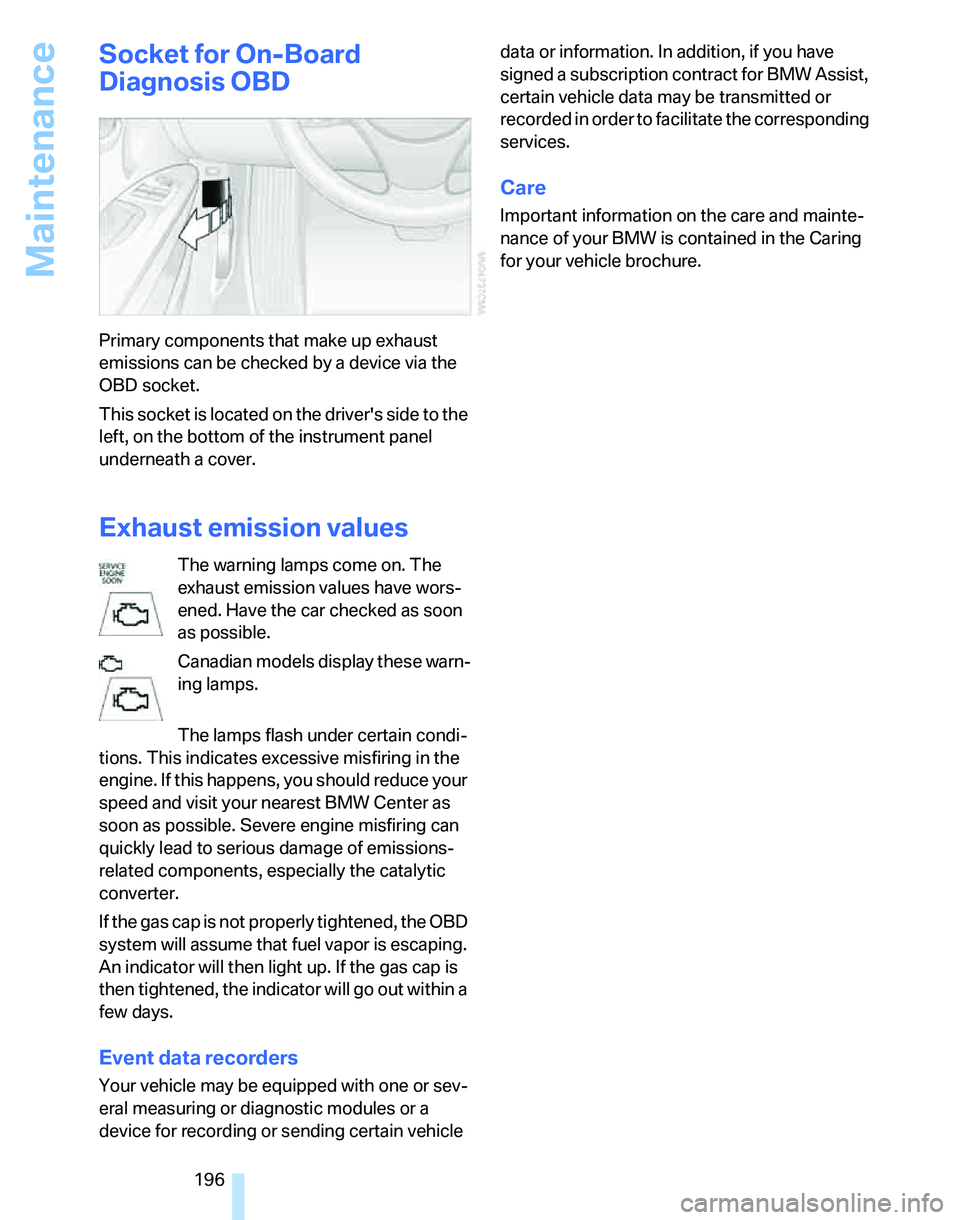
Primary components that make up exhaust
emissions can be checked by a device via the
OBD socket.
This socket is located on the driver's side to the
left, on the bottom of the instrument panel
underneath a cover.
Exhaust emission values
The warning lamps come on. The
exhaust emission values have wors-
ened. Have the car checked as soon
as possible.
Canadian models display these warn-
ing lamps.
The lamps flash under certain condi-
tions. This indicates excessive misfiring in the
engine. If this happens, you should reduce your
speed and visit your nearest BMW Center as
soon as possible. Severe engine misfiring can
quickly lead to serious damage of emissions-
related components, especially the catalytic
converter.
If the gas cap is not properly tightened, the OBD
system will assume that fuel vapor is escaping.
An indicator will then light up. If the gas cap is
then tightened, the indicator will go out within a
few days.
Event data recorders
Your vehicle may be equipped with one or sev-
eral measuring or diagnostic modules or a
device for recording or sending certain vehicle data or information. In addition, if you have
signed a subscription contract for BMW Assist,
certain vehicle data may be transmitted or
recorded in order to facilitate the corresponding
services.
Care
Important information on the care and mainte-
nance of your BMW is contained in the Caring
for your vehicle brochure.
Page 223 of 236
Everything from A - Z
222 Deadlocking, refer to
Locking30
Decommissioning the vehicle
– refer to Caring for your
vehicle brochure
Defect
– door lock32
– fuel filler door182
– panorama glass roof39
Defogging windows97
Defrosting windows97
Defrosting windows and
removing condensation
– automatic climate control97
Defrosting windshield, refer to
Defrosting windows97
Defrost position, refer to
Defrosting windows97
"Delete address book" in
navigation130
"Delete all numbers" on the
mobile phone169
"Delete data" in
navigation130
"Delete" for mobile
phone169
Destination address
– deleting129
– entering121,124
Destination for navigation
– entry121
– navigation list127
– selecting from address
book129
– selecting using
information126
– storing128Destination guidance132
– bypassing route
sections136
– canceling voice
instructions49
– changing specified
route130
– displaying route133
– displaying routes133
– distance and arrival132
– interrupting132
– starting132
– terminating/continuing132
– voice instructions135
– volume of voice
instructions135
Destination list for navigation
system127
Destinations recently driven
to127
"Dial" for mobile phone167
"Dial number"167
Digital clock67
Digital compass
101
Digital radio147
Dimensions211
Directional indicators, refer to
Turn signals57
Direction instructions, refer to
Voice instructions135
Directory for navigation, refer
to Address book128
Displacement, refer to Engine
data210
Display, refer to iDrive
controls16
Display lighting, refer to
Instrument lighting93
"Display off"21
Displays
– instrument cluster12
– on the Control Display16
Displays and controls10
"Display settings"75
Disposal
– coolant193
– remote control battery37
– vehicle battery201Distance control, refer to
Active cruise control61
Distance remaining to service,
refer to Service
requirements72
"Distance to dest."69
Distance warning, refer to
PDC Park Distance
Control81
Door key, refer to Integrated
key/remote control28
Door lock32
Door locking, confirmation
signals31
"Door locks"30
Doors, emergency
operation32
DOT Quality Grades186
Draft-free ventilation97
Drinks holders, refer to Cup
holders104
Drive-off assistant85
Driving lamps, refer to Parking
lamps/low beams90
Driving notes112
Driving route, refer to
Displaying route133
Driving stability control
systems82
Driving through water113
Driving tips, refer to Driving
notes112
Dry air, refer to Cooling
function97
DSC Dynamic Stability
Control82
DTC Dynamic Traction
Control83
– indicator lamps
83
DVD for navigation120
Dynamic Traction Control
DTC
– indicator lamps83
E
EBV Electronic brake-force
distribution82
Page 224 of 236

Reference 223
At a glance
Controls
Driving tips
Communications
Navigation
Entertainment
Mobility
Eject button, refer to Buttons
on the CD player140
Electrical malfunction
– door lock32
– fuel filler door182
– glass sunroof39
– panorama glass roof39
Electric seat adjustment42
Electronic brake-force
distribution82
Electronic oil level check191
Emergency call203
Emergency operation, refer to
Closing manually
– glass sunroof39
– panorama glass roof39
Emergency operation, refer to
Manual operation
– door lock32
– fuel filler door182
– transmission lock, automatic
transmission57
Emergency services, refer to
Roadside Assistance203
Emissions test, refer to
Service requirements72
"Enable services"175
"End call"167
Energy-conscious driving,
refer to Energy Control68
Energy Control68
Engine
– breaking in112
– data210
– overheated, refer to Coolant
temperature67
– speed210
– starting54
– starting, convenient
access35
– switching off54
Engine compartment191
Engine coolant, refer to
Coolant193Engine oil
– adding193
– BMW Maintenance
System195
– checking level191
– intervals between changes,
refer to Service
requirements72
"Engine oil level"192
Engine output, refer to Engine
data210
Engine speed210
Engine starting, refer to
Starting the engine54
"Enter address"122
Entering destination122
Entering the address124
Entering the intersection
123
"Entertainment"140
"Entertainment
settings"141,148
Environmentally friendly
driving, refer to Energy
Control68
"Equalizer", refer to Tone
control142
Equalizer, refer to Tone
control142
Error messages, refer to
Check Control77
"ESN"150
ESP Electronic Stability
Program, refer to DSC
Dynamic Stability
Control82
Event data recorders196
Exhaust system, refer to Hot
exhaust system112
Expanding the cargo area106
Exterior mirrors46
– adjusting46
– automatic dimming
feature113
– automatic heating47
External audio
device103,158Eyes
– for tow-starting and towing
away205
– for tying down loads115
F
Fader, tone control141
Failure messages, refer to
Check Control77
Failure of an electrical
consumer202
False alarm, refer to Avoiding
unintentional alarms35
Fastening safety belts, refer to
Safety belts46
Fastest route for
navigation130
Fast forward
– CD changer156
– CD player156
"Fast route" in navigation131
Filter
– refer to Microfilter/activated-
charcoal filter for automatic
climate control98
First aid pouch203
Fixture for remote control,
refer to Ignition lock53
Flashlight, refer to
Rechargeable flashlight103
Flash when locking/
unlocking31
Flat
– Run-Flat Tires188
Flat Tire Monitor FTM85
– indicating a flat tire86
– initializing the system86
– malfunction87
– snow chains85,189
– system limits85
Flat tires, refer to Tire
condition187
"FM", waveband140,144
FM, waveband144
Fog lamps92
– indicator lamp13,92
Folding rear seat back106
Page 230 of 236
Reference 229
At a glance
Controls
Driving tips
Communications
Navigation
Entertainment
Mobility
Replacing bulbs, refer to
Lamps and bulbs197
Replacing tires, refer to New
wheels and tires188
Reporting an accident, refer to
Initiating an emergency
call203
Reporting safety defects6
Reserve warning, refer to Fuel
gauge68
Reservoir for washer
systems59
Reset, refer to Resetting tone
settings143
"Reset" for stopwatch80
"Reset" for tone settings143
Residual heat mode96
Restraint systems
– for children50
– refer to Safety belts46
Reverse
– CD changer156
– CD player156
Reverse gear
– automatic transmission with
Steptronic56
– manual transmission55
Road map134
"Roadside Assistance"176
Roadside
Assistance176,203
Roadside parking lamps92
– replacing bulbs199
Roadworthiness test, refer to
Service requirements72
Roller blind
– sun blinds102
Roof load capacity212
Roof-mounted luggage
rack115
Rope, refer to Tow-starting,
towing away206
Rotary/pushbutton, refer to
iDrive16Route130
– bypassing sections136
– changing130
– display133
– displaying arrow view133
– displaying map view134
– displaying town135
– list135
– selecting130
– selecting criteria130
Route selection130
RSC Runflat System
Component, refer to Run-
Flat Tires188
Runflat System Component
RSC, refer to Run-Flat
Tires188
Run-Flat Tires188
– continuing driving with a
damaged tire86
– flat tire86
– new tires188
– replacing tires188
– tire pressures184
– winter tires189
Runflat Tyres, refer to Run-
Flat Tires188
S
Safety-belt height
adjustment46
Safety belts46
– damage46
– indicator lamp46
– reminder46
– sitting safely41
Safety systems
– airbags88
– Antilock Brake System
ABS82
– Dynamic Stability Control
DSC82
– safety belts46
Safety tires, refer to Run-Flat
Tires188
Sampling tracks
– scan154Satellite radio149
– enabling149
– selecting channel150
– storing channel150
"SAT" for radio140,149
"Scan"
– sampling radio stations145
– sampling tracks on CD154
Scan
– CD changer154
– CD player154
– radio145
"Scan all" for audio mode155
"Scan directory" for audio
mode155
Screen, refer to iDrive
controls16
Screw thread for tow
fitting205
SDARS, refer to Satellite
radio149
Seat adjustment
– electric42
– mechanical42
Seat and mirror memory44
Seat belt reminder, refer to
'Fasten safety belts'
reminder46
Seats41
– adjusting the seats42
– heating44
– sitting safely41
Securing cargo108
Securing the vehicle
– from inside32
– from outside30
"Select as destination"127
"Select current speed"79
Selecting an audio source140
Selecting distance for active
cruise control63
Selecting menu items19
Selecting new scale for
navigation134
Selecting the frequency
manually145
Selecting the route130
Selection options with
navigation system130