Page 71 of 194
RADIO67
General operation
RADIO, CD
NAME, TEL
NAV, INFO
CAR, SETUP
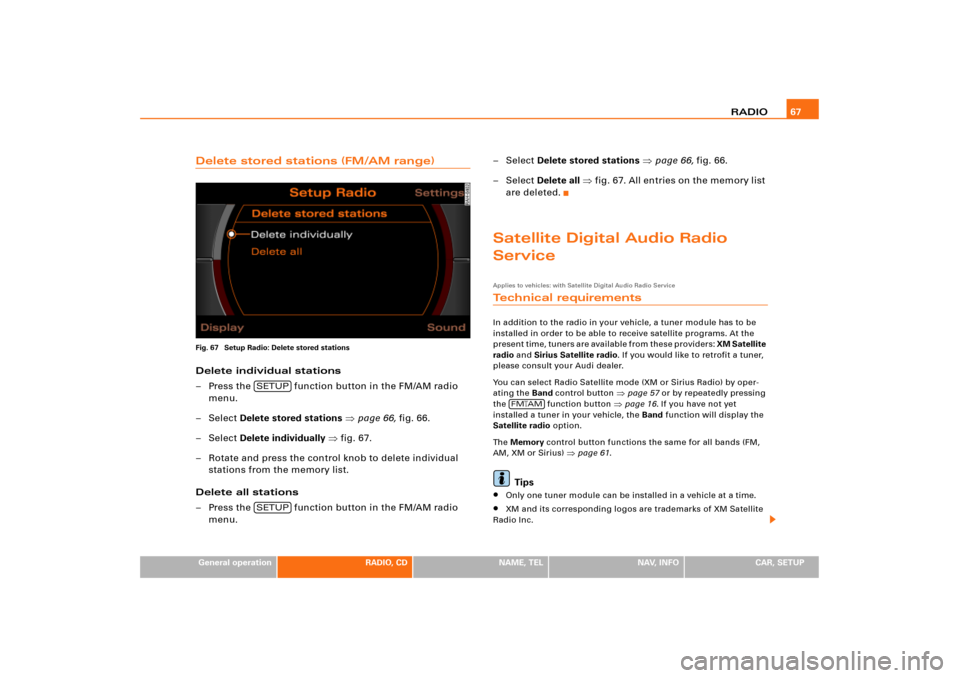
Delete stored stations (FM/AM range)Fig. 67 Setup Radio: Delete stored stationsDelete individual stations
– Press the function button in the FM/AM radio
menu.
–Select Delete stored stations �page 66, fig.66.
–Select Delete individually �fig.67.
– Rotate and press the control knob to delete individual
stations from the memory list.
Delete all stations
– Press the function button in the FM/AM radio
menu.– Select Delete stored stations �page 66, fig.66.
– Select Delete all �fig.67. All entries on the memory list
are deleted.
Satellite Digital Audio Radio
ServiceApplies to vehicles: with Satellite Digital Audio Radio ServiceTechnical requirementsIn addition to the radio in your vehicle, a tuner module has to be
installed in order to be able to receive satellite programs. At the
p r e s e n t t i m e , t u n e r s a r e a v a i l a b l e f r o m t h e s e p r o v i d e r s : XM Satellite
radio and Sirius Satellite radio. If you would like to retrofit a tuner,
please consult your Audi dealer.
You can select Radio Satellite mode (XM or Sirius Radio) by oper-
ating the Band control button
�page 57 or by repeatedly pressing
the function button
�page 16. If you have not yet
installed a tuner in your vehicle, the Band function will display the
Satellite radio option.
Th e Memory control button functions the same for all bands (FM,
AM, XM or Sirius)
�page 61.
Tips
�
Only one tuner module can be installed in a vehicle at a time.
�
XM and its corresponding logos are trademarks of XM Satellite
Radio Inc.
SETUPSETUP
FM
�AM
Page 73 of 194
RADIO69
General operation
RADIO, CD
NAME, TEL
NAV, INFO
CAR, SETUP
Applies to vehicles: with Satellite Digital Audio Radio ServiceSatellite station list
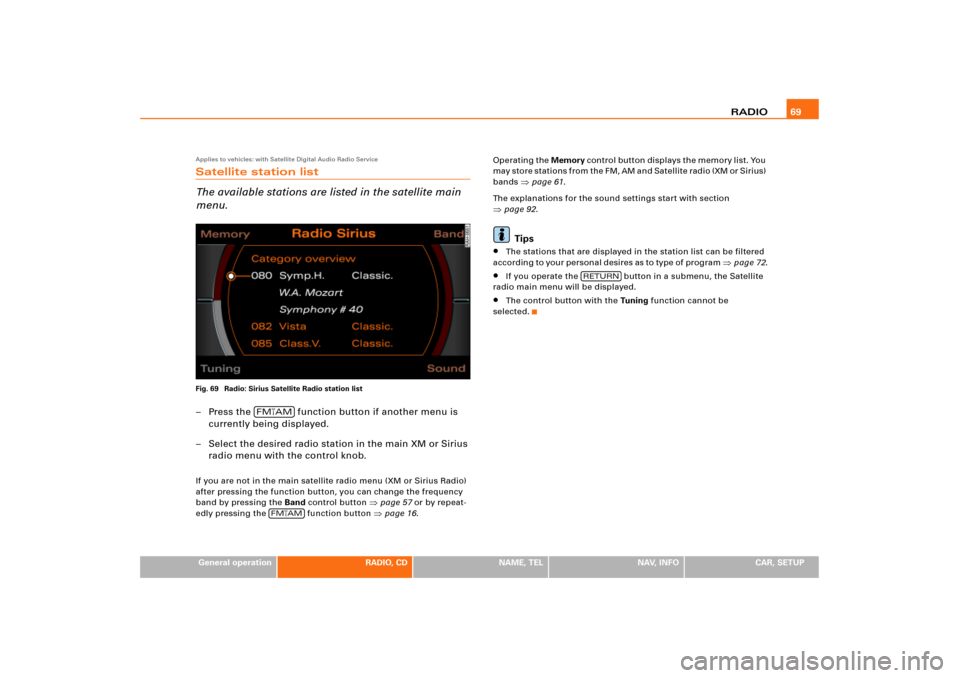
The available stations are listed in the satellite main
menu.Fig. 69 Radio: Sirius Satellite Radio station list– Press the function button if another menu is
currently being displayed.
– Select the desired radio station in the main XM or Sirius
radio menu with the control knob.If you are not in the main satellite radio menu (XM or Sirius Radio)
after pressing the function button, you can change the frequency
band by pressing the Band control button
�page 57 or by repeat-
edly pressing the function button �page 16.Operating the Memory c o n t ro l b ut t o n d i s p l a y s t h e m e m o r y l i s t . Yo u
m a y s t o r e s t a t i o n s f r o m t h e F M , A M a n d S a t e l l i t e r a d i o ( X M o r S i r i u s )
bands
�page 61.
The explanations for the sound settings start with section
�page 92.Tips
�
The stations that are displayed in the station list can be filtered
a c c o r d in g to yo u r p e r s o n a l d e s i re s as to ty p e o f p ro g ra m
�page 72.
�
If you operate the button in a submenu, the Satellite
radio main menu will be displayed.
�
The control button with the Tu n i n g function cannot be
selected.
FM�AM
FM
�AM
RETURN
Page 75 of 194
RADIO71
General operation
RADIO, CD
NAME, TEL
NAV, INFO
CAR, SETUP
– Press the function button in the satellite radio
menu.
–Select Sort station by �page 70, fig.71.
–Select Category or Channel no. �page 70, fig.71.If you select “Sort station by” Category, the station categories are
listed in the main menu in alphabetical order. Within the individual
categories the stations are listed by channel number in ascending
order.
If you select “Sor t station b y” Channel no., the stations are listed by
channel number in ascending order.
Tips
The stations that are displayed in the station list can be filtered
according to your personal desires as to type of program �page 72.
Applies to vehicles: with Satellite Digital Audio Radio ServiceStation info
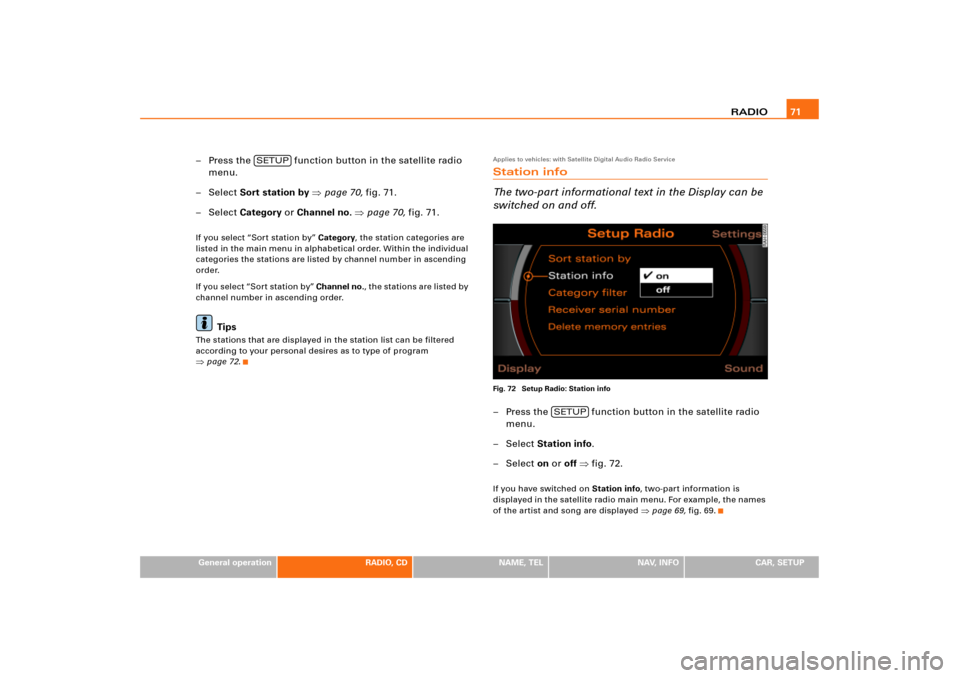
The two-part informational text in the Display can be
switched on and off.Fig. 72 Setup Radio: Station info– Press the function button in the satellite radio
menu.
– Select Station info.
– Select on or off �fig.72.If you have switched on Station info, two-part information is
displayed in the satellite radio main menu. For e xample, the names
of the artist and song are displayed
�page 69, fig.69.
SETUP
SETUP
Page 77 of 194
RADIO73
General operation
RADIO, CD
NAME, TEL
NAV, INFO
CAR, SETUP
Applies to vehicles: with Satellite Digital Audio Radio ServiceDelete stored stationsDelete individual stations
– Press the function button in the satellite radio
menu.
–Select Delete stored stations �page 71, fig.72.
–Select Delete individually.
– Rotate and press the control knob to delete individual
stations from the memory list.
Delete all stations
– Press the function button in the satellite radio
menu.
–Select Delete stored stations.
–Select Delete all. All entries on the memory list are
deleted.Applies to vehicles: with Satellite Digital Audio Radio ServiceSystem informationThe following system messages can be displayed:XM Satellite Radio
Sirius Satellite Radio
SETUPSETUP
System mes-
sages
Meaning
ANTENNA
No antenna is connected to the tuner, or
there are loose plug contacts on the
antenna cable.
UPDATING
Your system is being updating.
NO SIGNAL
The tuner is presently not receiving any
satellite signal.
LOADING
Yo u r p ro v i d e r i s s e n d i n g i n fo r ma t i o n w h ich
the system is currently storing.
OFF AIR
The station selected has shut down its pro-
gram (e.g. children's channel at night)
INVALID
The channel is invalid or not used.
System mes-
sages
Meaning
LINKING
The tuner is presently not receiving any
satellite signal.
CALL 888-539-SIRIUS
TO SUBSCRIBE
First possibility: the tuner has not been
enabled yet. Second possibility: the station
selected is not enabled, for example
because the station requires a subscrip-
tion.
Page 78 of 194
CD/SD 74CD/SDIntroductionGeneral
C D a n d M P 3 o p e r a t i o n i s s e l e c t e d b y u s i n g t h e
function button.Depending on the equipment in your vehicle, you can use the
function to play an audio CD in the DVD navigation drive,
use a CD changer*
�page 79 or the MP3 player integrated into the
Navigation System �page 83.
You switch between the CD and MP3 function by using the control
button with the Source function
�page 77.
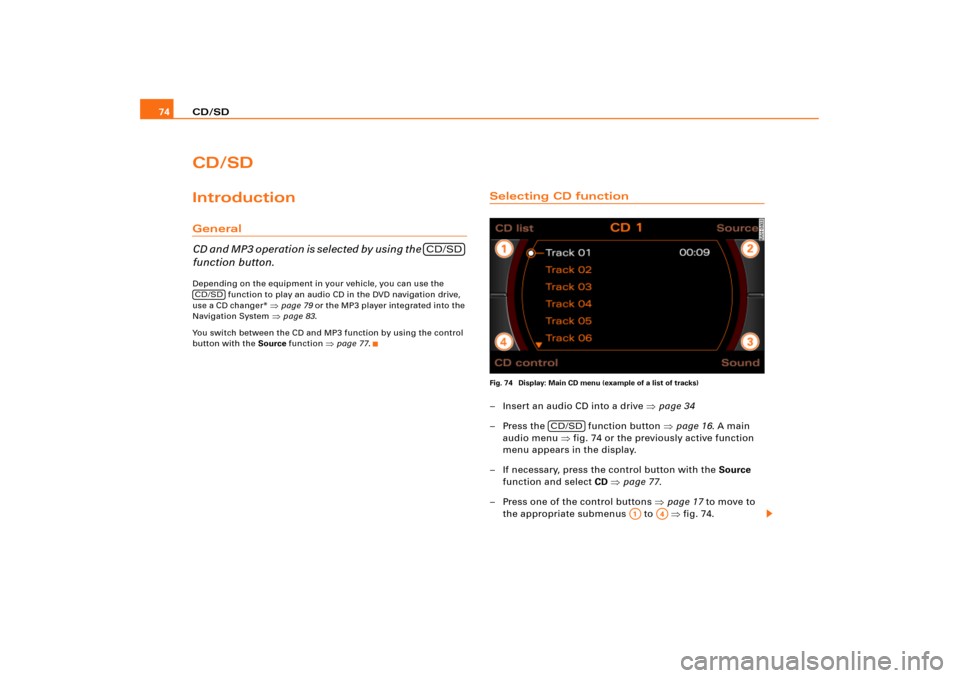
Selecting CD functionFig. 74 Display: Main CD menu (example of a list of tracks)– Insert an audio CD into a drive �page 34
– Press the function button �page 16. A main
audio menu �fig.74 or the previously active function
menu appears in the display.
– If necessary, press the control button with the Source
function and select CD �page 77.
– Press one of the control buttons �page 17 to move to
the appropriate submenus to �fig.74.
CD/SD
CD/SD
CD/SD
A1
A4
Page 79 of 194
CD/SD75
General operation
RADIO, CD
NAME, TEL
NAV, INFO
CAR, SETUP The following submenus are available in the CD
function:The following submenus are available in the CD Setup
function:
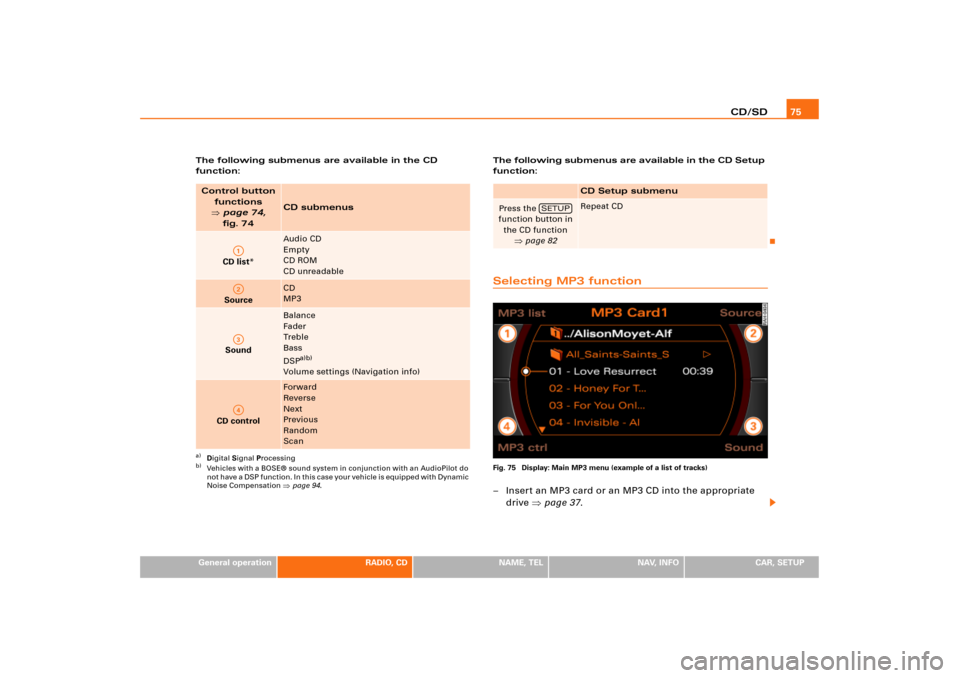
Selecting MP3 functionFig. 75 Display: Main MP3 menu (example of a list of tracks)– Insert an MP3 card or an MP3 CD into the appropriate
drive �page 37.
Control button
functions �
page 74,
fig. 74
CD submenus
CD list*
Audio CD
Empty
CD ROM
CD unreadable
Source
CD
MP3
Sound
Balance
Fader
Tr e b l e
Bass
DSP
a)b)
Volume settings (Navigation info)
a)Digital Signal Processingb)Vehicles with a BOSE® sound system in conjunction with an AudioPilot do
n o t h a v e a D S P f u n c t i o n . I n t h i s c a s e y o u r v e h i c l e i s e q u i p p e d w i t h D y n a m i c
Noise Compensation �page 94.
CD control
Forward
Reverse
Next
Previous
Random
Scan
A1A2A3A4
CD Setup submenu
Press the
function button in
the CD function
�page 82
Repeat CD
SETUP
Page 80 of 194
CD/SD 76
– Press the function button �page 16. A main
audio menu �page 74, fig.74 or the previously active
function menu appears in the display.
– If necessary, press the control button with the Source
function and select MP3 �page 77.
– Press one of the control buttons �page 17 to move to
the appropriate submenus to �page 75, fig.75.
The following submenus are available in the MP3
function:
CD/SD
A1
A�
Control button
functions �
page 74,
fig. 74
MP3 submenus
MP3 list
CD
Card 1
Card 2
Navigation DVD
Empty
Audio
CD ROM
Unreadable
Source
CD
MP3
Sound
Balance
Fader
Tr e b l e
Bass
DSP
a)b)
Volume settings (Navigation info)
a)Digital Signal Processing
MP3 ctrl
Forward
Reverse
Next
Pre viou s
Random
Scan
Name (Details)
A1A�A A�
Page 81 of 194
CD/SD77
General operation
RADIO, CD
NAME, TEL
NAV, INFO
CAR, SETUP The following submenus are available in the MP3
Setup function:
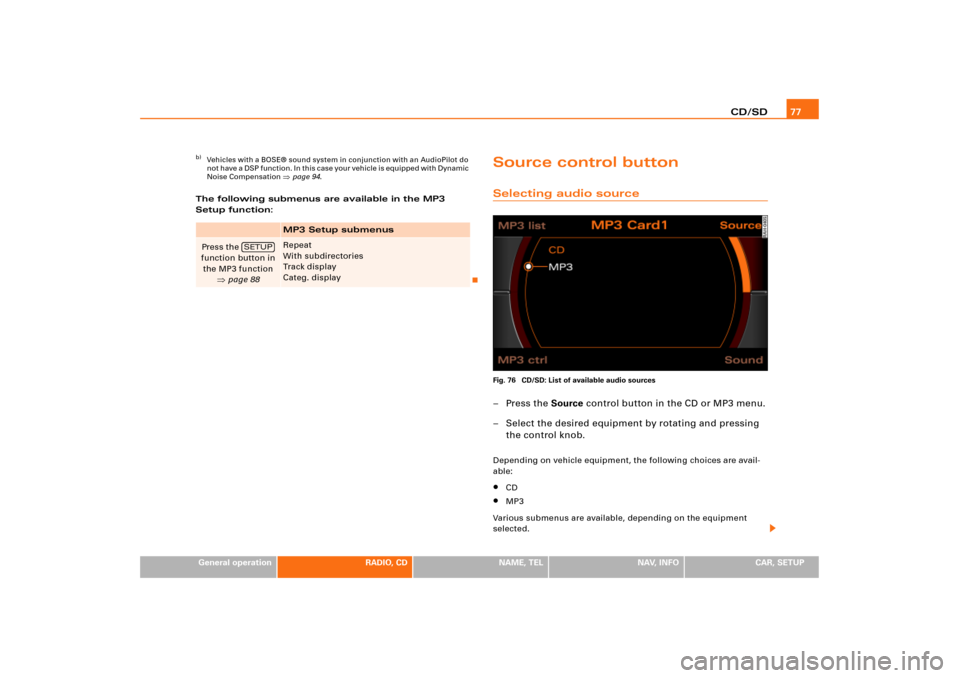
Source control buttonSelecting audio sourceFig. 76 CD/SD: List of available audio sources–Press the Source control button in the CD or MP3 menu.
– Select the desired equipment by rotating and pressing
the control knob.Depending on vehicle equipment, the following choices are avail-
able:�
CD
�
MP3
Various submenus are available, depending on the equipment
selected.
b)Vehicles with a BOSE® sound system in conjunction with an AudioPilot do
n o t h a v e a D S P f u n c t i o n . I n t h i s c a s e y o u r v e h i c l e i s e q u i p p e d w i t h D y n a m i c
Noise Compensation �page 94.
MP3 Setup submenus
Press the
function button in
the MP3 function
�page 88
Repeat
With subdirectories
Tr a c k d i s p l a y
Categ. display
SETUP