2005 SUBARU FORESTER change time
[x] Cancel search: change timePage 1 of 477

Foreword
Congratulations on choosing a SUBARU vehicle. This Owner’s Man-
ual has all the information necessary to keep your SUBARU in excel-
lent condition and to properly maintain the emission control system
for minimizing emission pollutants. We urge you to read this manual
carefully so that you may understand your vehicle and its operation.
For information not found in this Owner’s Manual, such as details
concerning repairs or adjustments, please contact the dealer from
whom you purchased your SUBARU or the nearest SUBARU dealer. The information, specifications and illustrations found in this manual
are those in effect at the time of printing. FUJI HEAVY INDUSTRIES
LTD. reserves the right to change specifications and designs at any
time without prior notice and without incurring any obligation to
make the same or similar changes on vehicles previously sold. This
Owner’s Manual applies to all models and covers all equipment, in-
cluding factory installed options. Some explanations, therefore may
be for equipment not installed in your vehicle.
Please leave this manual in the vehicle at the time of resale. The next
owner will need the information found herein.FUJI HEAVY INDUSTRIES LTD., TOKYO, JAPAN
is a registered trademark of FUJI HEAVY INDUSTRIES LTD.
© copyright 2004 FUJI HEAVY INDUSTRIES LTD.
Page 49 of 477
1-16
Seat, seatbelt and SRS airbags
„
Automatic/Emergency Locking Retrac- tor (A/ELR)
Each passenger’s seatbelt has an Automatic/Emer-
gency Locking Retractor (A/ELR). The Automatic/
Emergency Locking Retractor normally functions as
an Emergency Locking Retractor (ELR). The A/ELR
has an additional locking mode “Automatic Locking
Retractor (ALR) mode” intended to secure a child re-
straint system. When the seatbelt is once drawn out
completely and is then retracted even slightly, the re-
tractor locks the seatbelt in that position and the seat-
belt cannot be extended. As the belt is rewinding,
clicks will be heard which indicate the retractor func-
tions as an ALR. When the seatbelt is retracted fully,
the ALR mode is released.
When securing a child restraint system on the rear
seats by the use of the seatbelt, the seatbelt must be
changed over to the Automatic Locking Retractor (ALR) mode.
When the child restraint system is removed, make
sure that the seatbelt retracts fully and the retractor re-
turned to the Emergency Locking Retractor (ELR)
mode.
For instructions on how to convert the retractor to the
ALR mode and restore it to the ELR mode, see the
“Child restraint systems” section in this chapter. „
Seatbelt warning light and chime
Your vehicle is equipped with a seatbelt warning de-
vice at the driver’s seat, as required by current safety
standards.
This device causes the seatbelt warning light on the
instrument panel to light up when the ignition switch is
turned to “ON” to remind the driver to wear the seat-
belt. If the driver’s seatbelt is not fastened, the warning
light remains on and a warning chime sounds at the
same time. The warning light stays illuminated until
the driver fastens the seatbelt but the chime stops
sounding after about six seconds. „ Fastening the seatbelt
yNever use a belt that is twisted or reversed. In
an accident, this can increase the risk or sever-
ity of injury. y Keep the lap belt as low as possible on your
hips. In a collision, this spreads the force of the
lap belt over stronger hip bones instead of
across the weaker abdomen.y Seatbelts provide maximum restraint when
the occupant sits well back and upright in the
seat. To reduce the risk of sliding under the
Page 73 of 477
1-40
Seat, seatbelt and SRS airbags
hear a click.
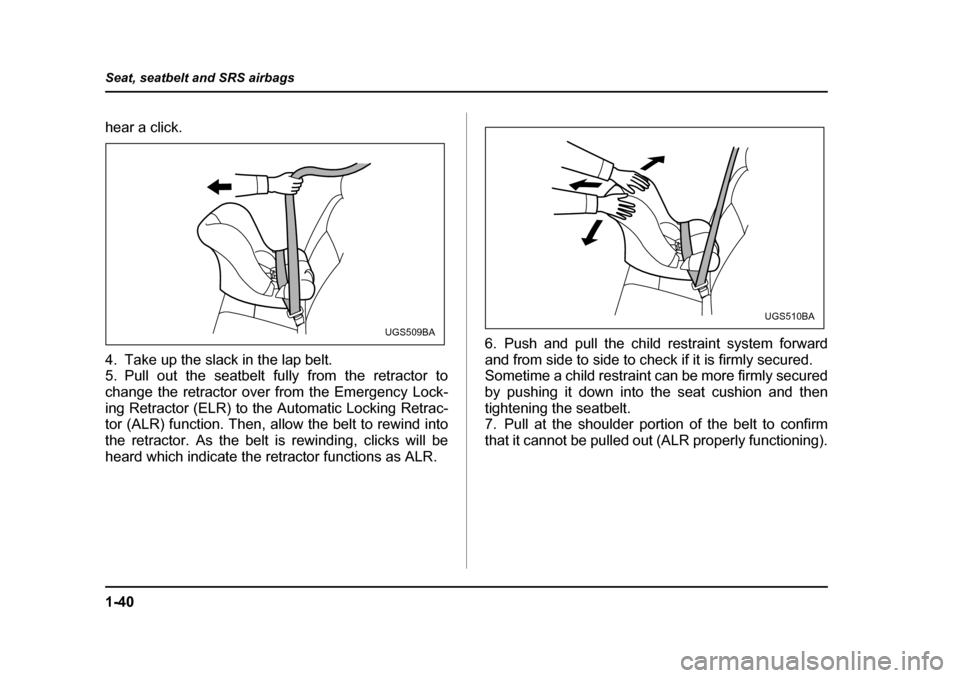
4. Take up the slack in the lap belt.
5. Pull out the seatbelt fully from the retractor to
change the retractor over from the Emergency Lock-
ing Retractor (ELR) to the Automatic Locking Retrac-
tor (ALR) function. Then, allow the belt to rewind into
the retractor. As the belt is rewinding, clicks will be
heard which indicate the retractor functions as ALR.
6. Push and pull the child restraint system forward
and from side to side to check if it is firmly secured.
Sometime a child restraint can be more firmly secured
by pushing it down into the seat cushion and then
tightening the seatbelt.
7. Pull at the shoulder portion of the belt to confirm
that it cannot be pulled out (ALR properly functioning).
UGS509BAUGS510BA
Page 75 of 477
1-42
Seat, seatbelt and SRS airbags
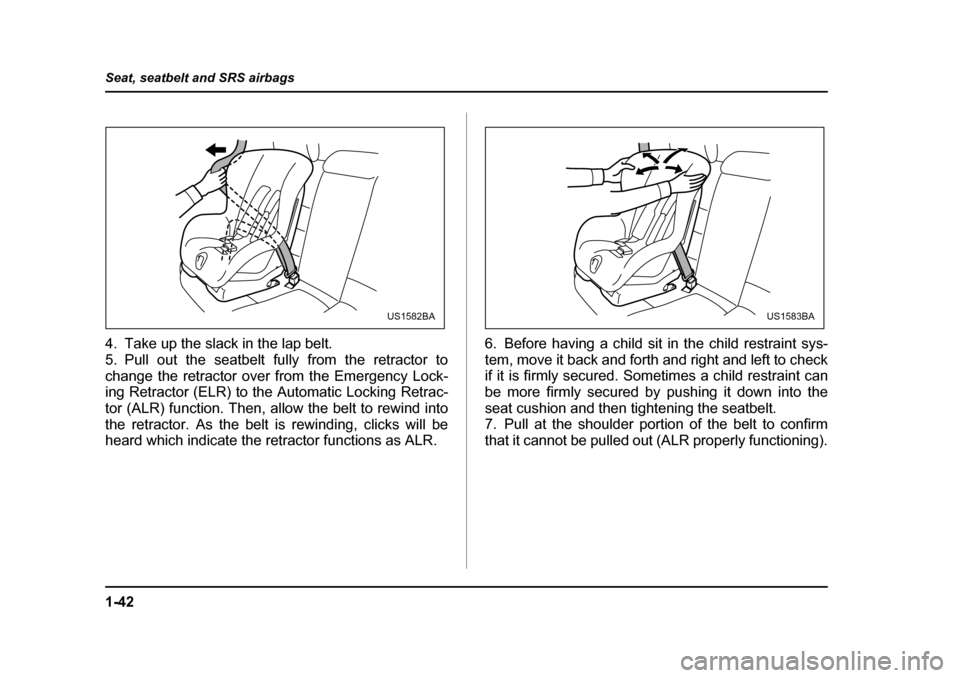
4. Take up the slack in the lap belt.
5. Pull out the seatbelt fully from the retractor to
change the retractor over from the Emergency Lock-
ing Retractor (ELR) to the Automatic Locking Retrac-
tor (ALR) function. Then, allow the belt to rewind into
the retractor. As the belt is rewinding, clicks will be
heard which indicate the retractor functions as ALR.
6. Before having a child sit in the child restraint sys-
tem, move it back and forth and right and left to check
if it is firmly secured. Sometimes a child restraint can
be more firmly secured by pushing it down into the
seat cushion and then tightening the seatbelt.
7. Pull at the shoulder portion of the belt to confirm
that it cannot be pulled out (ALR properly functioning).
US1582BAUS1583BA
Page 142 of 477

3-1
3
Instruments and controls
Ignition switch .............................................. 3-3 LOCK .................................................................. 3-3
ACC .................................................................... 3-4
ON ....................................................................... 3-4
START ................................................................ 3-4
Key reminder chime .......................................... 3-5
Ignition switch light (if equipped) .................... 3-5
Key interlock release (AT vehicles only) ........ 3-6
Hazard warning flasher ................................ 3-7
Meters and gauges ....................................... 3-7 Speedometer ..................................................... 3-7
Odometer/Trip meter ........................................ 3-7
Tachometer ........................................................ 3-8
Fuel gauge ......................................................... 3-9
Temperature gauge ........................................... 3-10
Outside temperature indicator ......................... 3-11
Warning and indicator lights ....................... 3-12 Seatbelt warning light and chime .................... 3-13
SRS airbag system warning light .................... 3-13
CHECK ENGINE warning light/Malfunction indicator lamp ................................................. 3-13
Charge warning light ........................................ 3-14
Oil pressure warning light ................................ 3-15
AT OIL TEMPerature warning light
(AT vehicles) ................................................... 3-15
ABS warning light ............................................. 3-15
Vehicle Dynamics Control warning light (if equipped)/Vehicle Dynamics Control
OFF indicator light (if equipped) ................... 3-16
Brake system warning light ............................. 3-18
Door open warning lights ................................. 3-19 Low fuel warning light ...................................... 3-19
All-Wheel Drive warning light (AT vehicles) ... 3-19
Vehicle Dynamics Control operation
indicator light (if equipped) ........................... 3-20
Shift position indicator (AT vehicles) ............. 3-20
Turn signal indicator lights .............................. 3-21
High beam indicator light ................................. 3-21
Cruise control indicator light (if equipped) .... 3-21
Cruise control set indicator light (if equipped) .................................................... 3-21
Clock .............................................................. 3-22
Light control switch ...................................... 3-23 Headlights ......................................................... 3-23
High/low beam change (dimmer) .................... 3-24
Headlight flasher ............................................... 3-24
Daytime running light system ......................... 3-25
Turn signal lever ........................................... 3-25
Illumination brightness control ................... 3-26
Parking light switch ...................................... 3-27
Fog light button (if equipped) ...................... 3-27
Wiper and washer ......................................... 3-28 Windshield wiper and washer switches ......... 3-29
Rear window wiper and washer switch .......... 3-31
Windshield wiper deicer (if equipped) ........ 3-32
Rear window defogger button ..................... 3-33
Mirrors ............................................................ 3-35 Inside mirror ...................................................... 3-35
Outside mirrors ................................................. 3-37
Tilt steering wheel ......................................... 3-39
Page 166 of 477
3-25
Instruments and controls
– CONTINUED –
more than just a few seconds.
„ Daytime running light system
The tail lights, parking lights, and side marker
lights are not turned on by the daytime running
light system. The light switch must always be
turned to the “ ” position when it is dark
outside.
The low beam headlights will automatically come on at
reduced brightness when the engine has started, un-
der the following conditions: y The parking brake is fully released.
y The light switch is in the “OFF” or “ ” position.
y The automatic transmission selector lever is set at
other than the “P” position.
Turn signal lever
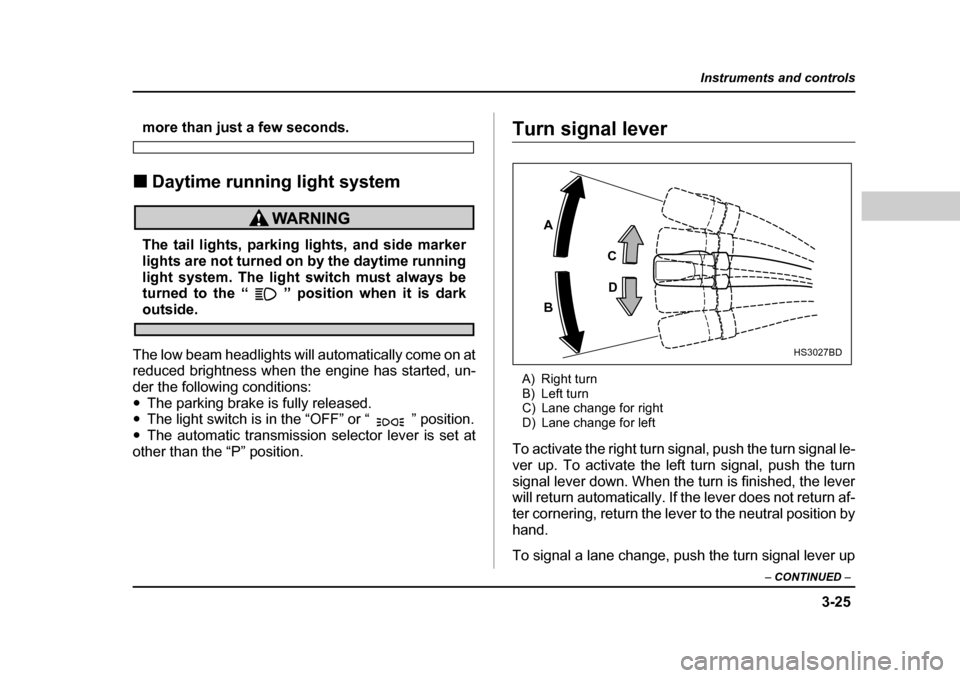
A) Right turn
B) Left turn
C) Lane change for right
D) Lane change for left
To activate the right turn signal, push the turn signal le-
ver up. To activate the left turn signal, push the turn
signal lever down. When the turn is finished, the lever
will return automatically. If the lever does not return af-
ter cornering, return the lever to the neutral position by
hand.
To signal a lane change, push the turn signal lever up
A B C
D
HS3027BD
Page 202 of 477
4-21
Climate control
– CONTINUED –
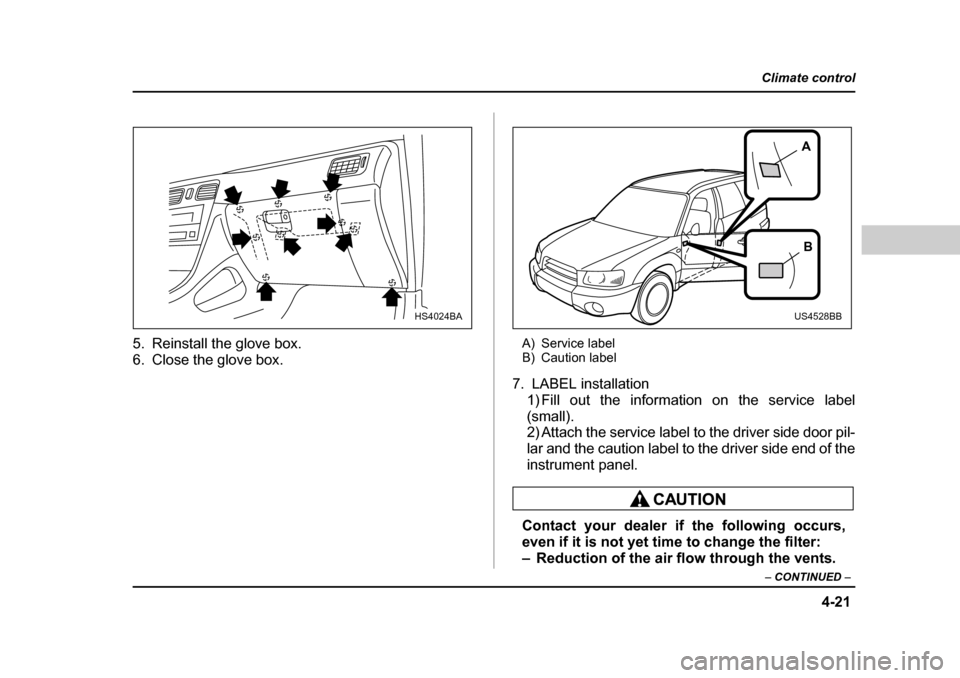
5. Reinstall the glove box.
6. Close the glove box. A) Service label
B) Caution label
7. LABEL installation 1) Fill out the information on the service label
(small).
2) Attach the service label to the driver side door pil-
lar and the caution label to the driver side end of the
instrument panel.
Contact your dealer if the following occurs,
even if it is not yet time to change the filter:
– Reduction of the air flow through the vents.
HS4024BA
A
B
US4528BB
Page 211 of 477
5-8
Audio
T
FM/AM/Weather band selection button (BAND)
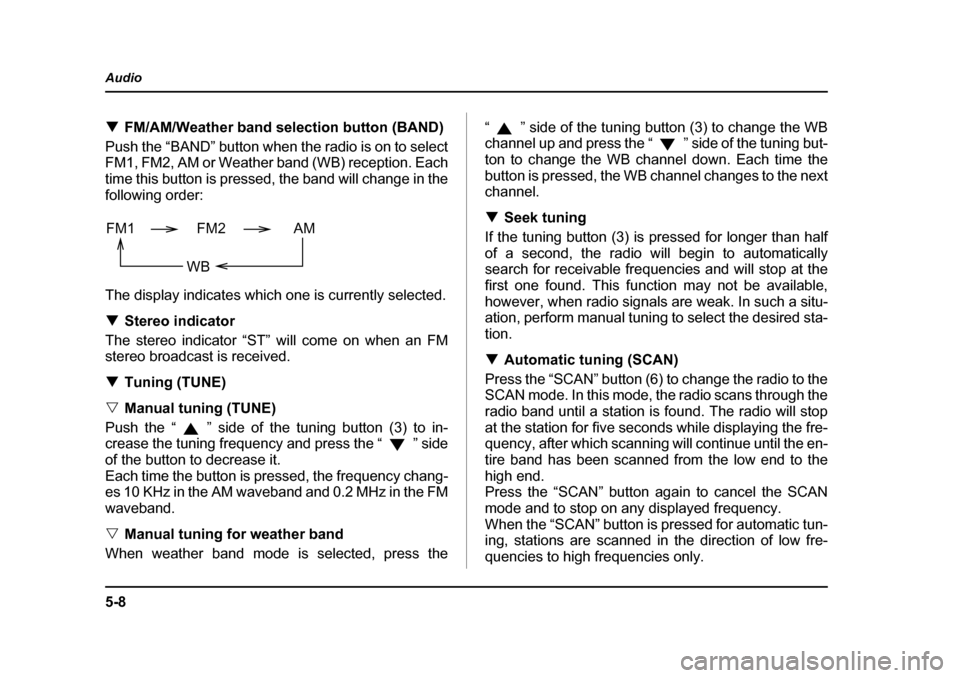
Push the “BAND” button when the radio is on to select
FM1, FM2, AM or Weather band (WB) reception. Each
time this button is pressed, the band will change in the
following order:
The display indicates which one is currently selected. T Stereo indicator
The stereo indicator “ST” will come on when an FM
stereo broadcast is received. T Tuning (TUNE)
V Manual tuning (TUNE)
Push the “ ” side of the tuning button (3) to in-
crease the tuning frequency and press the “ ” side
of the button to decrease it.
Each time the button is pressed, the frequency chang-
es 10 KHz in the AM waveband and 0.2 MHz in the FM
waveband. V Manual tuning for weather band
When weather band mode is selected, press the “ ” side of the tuning button (3) to change the WB
channel up and press the “ ” side of the tuning but-
ton to change the WB channel down. Each time the
button is pressed, the WB channel changes to the next
channel. T
Seek tuning
If the tuning button (3) is pressed for longer than half
of a second, the radio will begin to automatically
search for receivable frequencies and will stop at the
first one found. This function may not be available,
however, when radio signals are weak. In such a situ-
ation, perform manual tuning to select the desired sta-tion. T Automatic tuning (SCAN)
Press the “SCAN” button (6) to change the radio to the
SCAN mode. In this mode, the radio scans through the
radio band until a station is found. The radio will stop
at the station for five seconds while displaying the fre-
quency, after which scanning will continue until the en-
tire band has been scanned from the low end to the
high end.
Press the “SCAN” button again to cancel the SCAN
mode and to stop on any displayed frequency.
When the “SCAN” button is pressed for automatic tun-
ing, stations are scanned in the direction of low fre-
quencies to high frequencies only.
FM1 FM2 AM
WB