2005 NISSAN NAVARA display
[x] Cancel search: displayPage 1010 of 3171
EC-30
ON BOARD DIAGNOSTIC (OBD) SYSTEM
How to Erase Diagnostic Test Mode II (Self-diagnostic Results)
1. Set ECM in Diagnostic Test Mode II (Self-diagnostic results). Refer toEC-29, "How to Set Diagnostic Test
Mode II (Self-diagnostic Results)".
2. Fully depress the accelerator pedal and keep it for more than 10 seconds.
The emission-related diagnostic information has been erased from the backup memory in the ECM.
3. Fully release the accelerator pedal, and confirm the DTC 0000 is displayed.
DIAGNOSTIC TEST MODE I — BULB CHECK
In this mode, the MI on the combination meter should stay ON. If it remains OFF, check the bulb. Refer toEC-
354, "MI&DATA LINK CONNECTORS".
DIAGNOSTIC TEST MODE I — MALFUNCTION WARNING
These DTC numbers are clarified in Diagnostic Test Mode II (SELF-DIAGNOSTIC RESULTS)
DIAGNOSTIC TEST MODE II — SELF-DIAGNOSTIC RESULTS
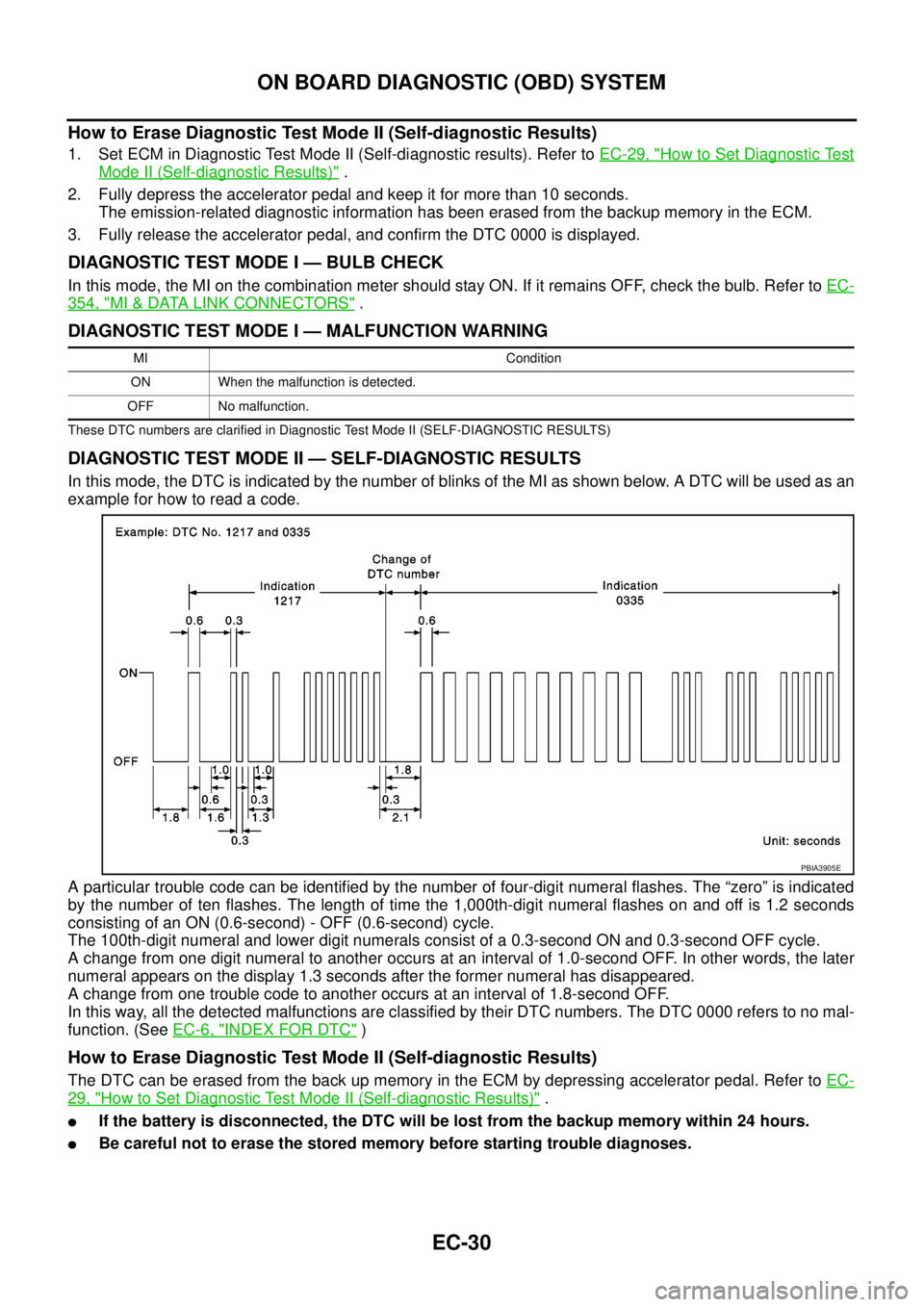
In this mode, the DTC is indicated by the number of blinks of the MI as shown below. A DTC will be used as an
example for how to read a code.
A particular trouble code can be identified by the number of four-digit numeral flashes. The “zero” is indicated
by the number of ten flashes. The length of time the 1,000th-digit numeral flashes on and off is 1.2 seconds
consisting of an ON (0.6-second) - OFF (0.6-second) cycle.
The 100th-digit numeral and lower digit numerals consist of a 0.3-second ON and 0.3-second OFF cycle.
A change from one digit numeral to another occurs at an interval of 1.0-second OFF. In other words, the later
numeral appears on the display 1.3 seconds after the former numeral has disappeared.
A change from one trouble code to another occurs at an interval of 1.8-second OFF.
In this way, all the detected malfunctions are classified by their DTC numbers. The DTC 0000 refers to no mal-
function. (SeeEC-6, "
INDEX FOR DTC")
How to Erase Diagnostic Test Mode II (Self-diagnostic Results)
The DTC can be erased from the back up memory in the ECM by depressing accelerator pedal. Refer toEC-
29, "How to Set Diagnostic Test Mode II (Self-diagnostic Results)".
lIf the battery is disconnected, the DTC will be lost from the backup memory within 24 hours.
lBe careful not to erase the stored memory before starting trouble diagnoses.
MI Condition
ON When the malfunction is detected.
OFF No malfunction.
PBIA3905E
Page 1011 of 3171
ON BOARD DIAGNOSTIC (OBD) SYSTEM
EC-31
C
D
E
F
G
H
I
J
K
L
MA
EC
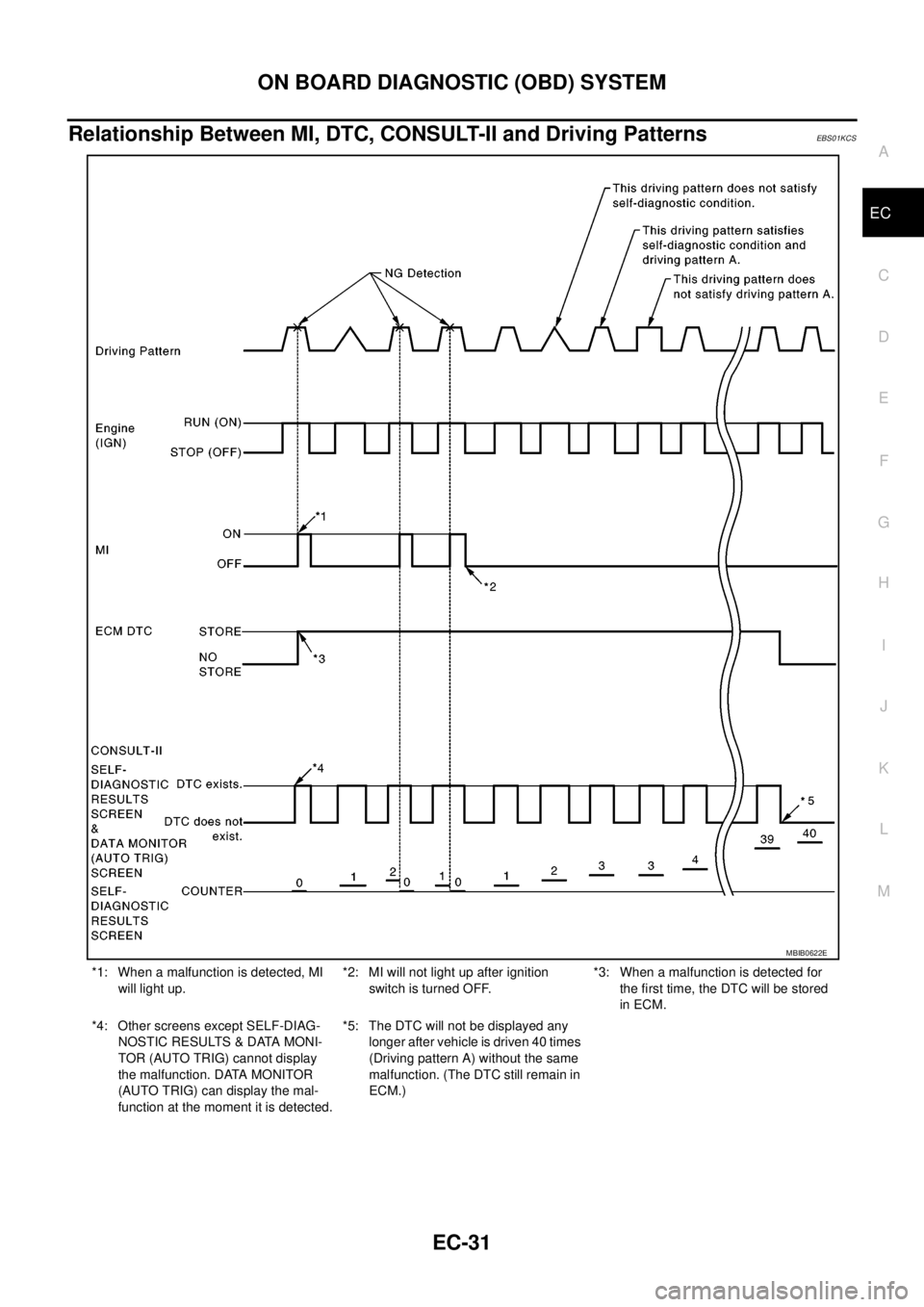
Relationship Between MI, DTC, CONSULT-II and Driving PatternsEBS01KCS
*1: When a malfunction is detected, MI
will light up.*2: MI will not light up after ignition
switch is turned OFF.*3: When a malfunction is detected for
the first time, the DTC will be stored
in ECM.
*4: Other screens except SELF-DIAG-
NOSTIC RESULTS & DATA MONI-
TOR (AUTO TRIG) cannot display
the malfunction. DATA MONITOR
(AUTO TRIG) can display the mal-
function at the moment it is detected.*5: The DTC will not be displayed any
longer after vehicle is driven 40 times
(Driving pattern A) without the same
malfunction. (The DTC still remain in
ECM.)
MBIB0622E
Page 1012 of 3171
EC-32
ON BOARD DIAGNOSTIC (OBD) SYSTEM
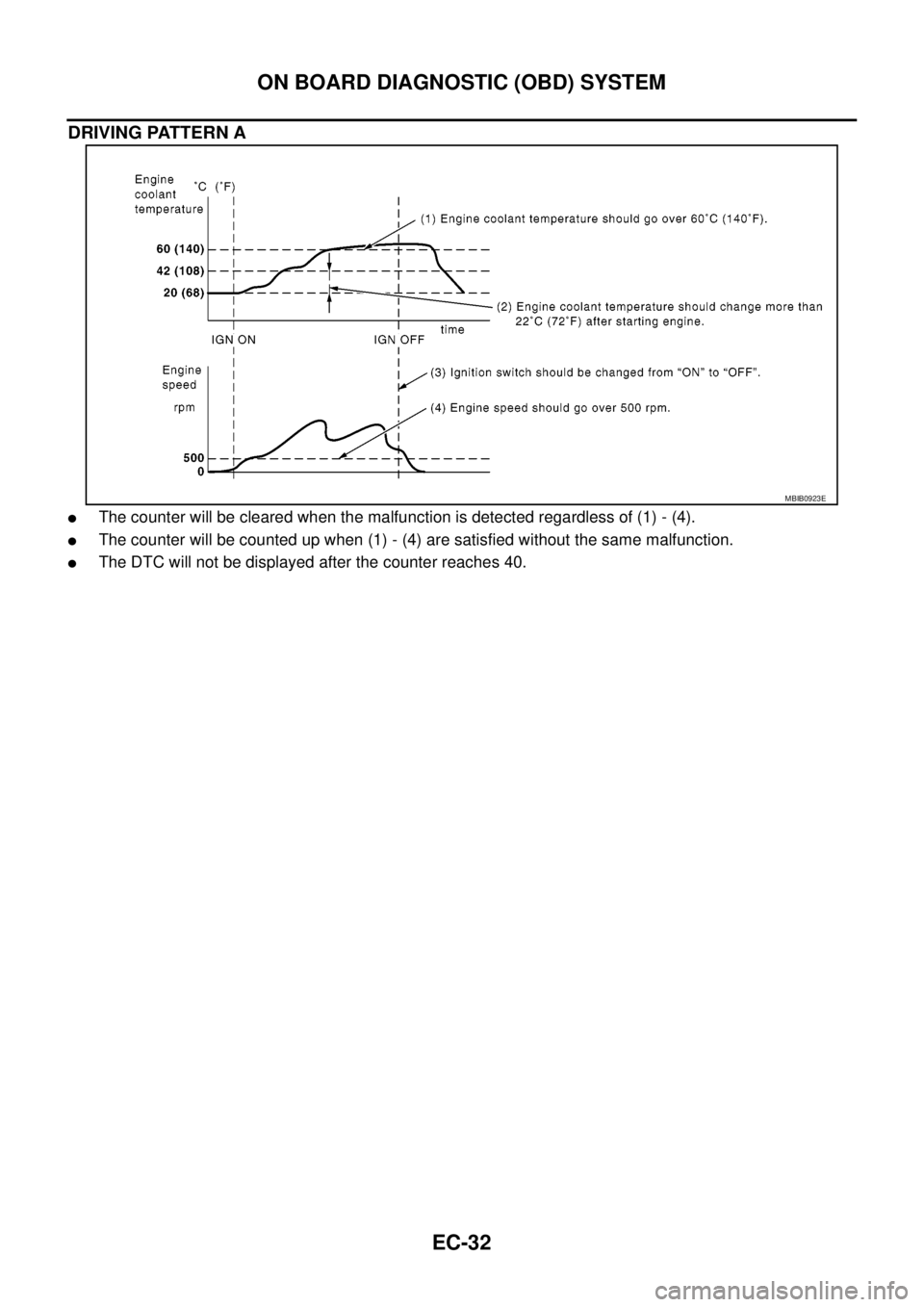
DRIVING PATTERN A
lThe counter will be cleared when the malfunction is detected regardless of (1) - (4).
lThe counter will be counted up when (1) - (4) are satisfied without the same malfunction.
lThe DTC will not be displayed after the counter reaches 40.
MBIB0923E
Page 1015 of 3171
TROUBLE DIAGNOSIS
EC-35
C
D
E
F
G
H
I
J
K
L
MA
EC
Description for Work Flow
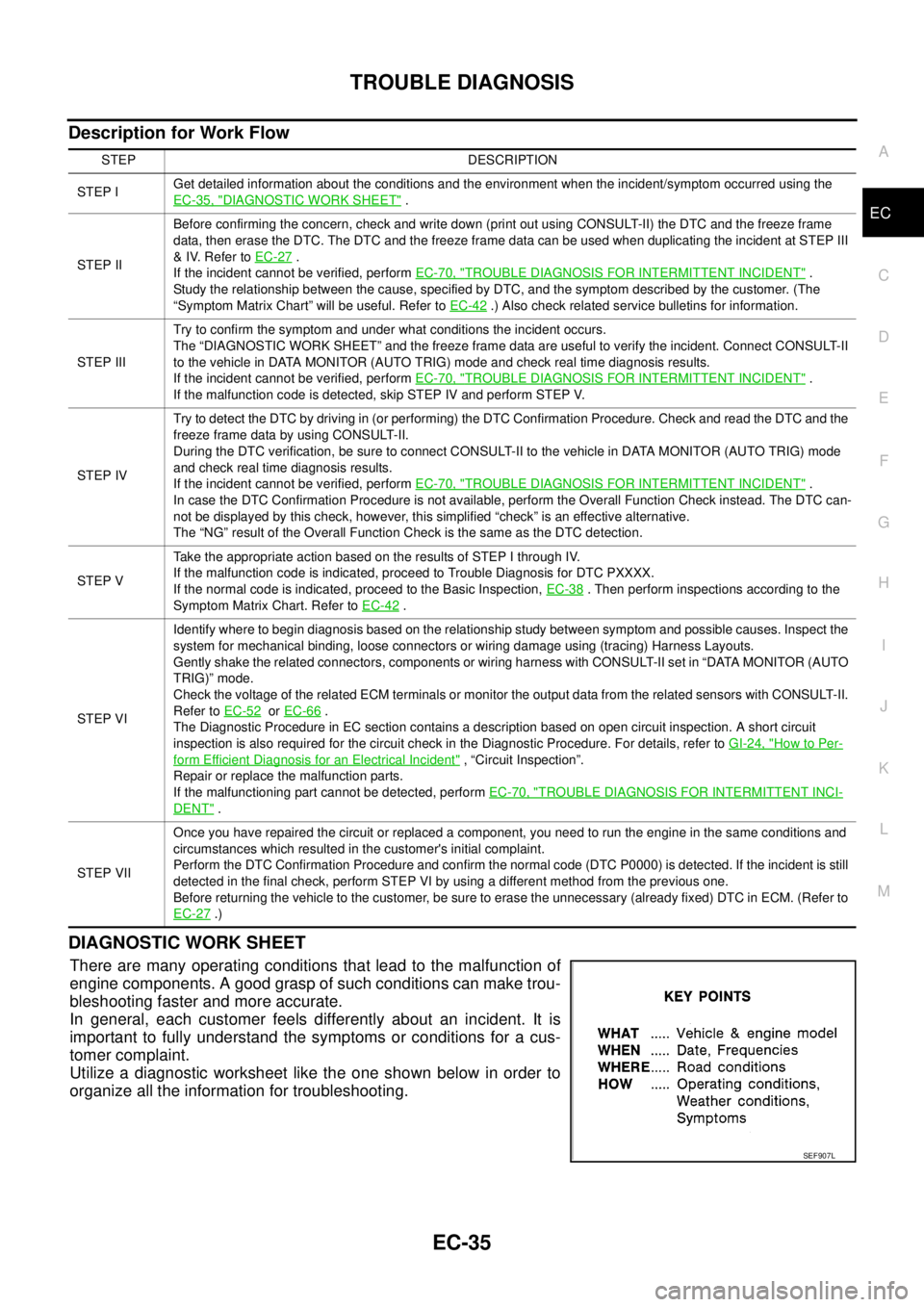
DIAGNOSTIC WORK SHEET
There are many operating conditions that lead to the malfunction of
engine components. A good grasp of such conditions can make trou-
bleshooting faster and more accurate.
In general, each customer feels differently about an incident. It is
important to fully understand the symptoms or conditions for a cus-
tomer complaint.
Utilize a diagnostic worksheet like the one shown below in order to
organize all the information for troubleshooting.
STEP DESCRIPTION
STEP IGet detailed information about the conditions and the environment when the incident/symptom occurred using the
EC-35, "
DIAGNOSTIC WORK SHEET".
STEP IIBefore confirming the concern, check and write down (print out using CONSULT-II) the DTC and the freeze frame
data, then erase the DTC. The DTC and the freeze frame data can be used when duplicating the incident at STEP III
&IV.RefertoEC-27
.
If the incident cannot be verified, performEC-70, "
TROUBLE DIAGNOSIS FOR INTERMITTENT INCIDENT".
Study the relationship between the cause, specified by DTC, and the symptom described by the customer. (The
“Symptom Matrix Chart” will be useful. Refer toEC-42
.) Also check related service bulletins for information.
STEP IIITry to confirm the symptom and under what conditions the incident occurs.
The “DIAGNOSTIC WORK SHEET” and the freeze frame data are useful to verify the incident. Connect CONSULT-II
to the vehicle in DATA MONITOR (AUTO TRIG) mode and check real time diagnosis results.
If the incident cannot be verified, performEC-70, "
TROUBLE DIAGNOSIS FOR INTERMITTENT INCIDENT".
If the malfunction code is detected, skip STEP IV and perform STEP V.
STEP IVTry to detect the DTC by driving in (or performing) the DTC Confirmation Procedure. Check and read the DTC and the
freeze frame data by using CONSULT-II.
During the DTC verification, be sure to connect CONSULT-II to the vehicle in DATA MONITOR (AUTO TRIG) mode
and check real time diagnosis results.
If the incident cannot be verified, performEC-70, "
TROUBLE DIAGNOSIS FOR INTERMITTENT INCIDENT".
In case the DTC Confirmation Procedure is not available, perform the Overall Function Check instead. The DTC can-
not be displayed by this check, however, this simplified “check” is an effective alternative.
The “NG” result of the Overall Function Check is the same as the DTC detection.
STEP VTake the appropriate action based on the results of STEP I through IV.
If the malfunction code is indicated, proceed to Trouble Diagnosis for DTC PXXXX.
If the normal code is indicated, proceed to the Basic Inspection,EC-38
. Then perform inspections according to the
Symptom Matrix Chart. Refer toEC-42
.
STEP VIIdentify where to begin diagnosis based on the relationship study between symptom and possible causes. Inspect the
system for mechanical binding, loose connectors or wiring damage using (tracing) Harness Layouts.
Gently shake the related connectors, components or wiring harness with CONSULT-II set in “DATA MONITOR (AUTO
TRIG)” mode.
Check the voltage of the related ECM terminals or monitor the output data from the related sensors with CONSULT-II.
Refer toEC-52
orEC-66.
The Diagnostic Procedure in EC section contains a description based on open circuit inspection. A short circuit
inspection is also required for the circuit check in the Diagnostic Procedure. For details, refer toGI-24, "
How to Per-
form Efficient Diagnosis for an Electrical Incident", “Circuit Inspection”.
Repair or replace the malfunction parts.
If the malfunctioning part cannot be detected, performEC-70, "
TROUBLE DIAGNOSIS FOR INTERMITTENT INCI-
DENT".
STEP VIIOnce you have repaired the circuit or replaced a component, you need to run the engine in the same conditions and
circumstances which resulted in the customer's initial complaint.
Perform the DTC Confirmation Procedure and confirm the normal code (DTC P0000) is detected. If the incident is still
detected in the final check, perform STEP VI by using a different method from the previous one.
Before returning the vehicle to the customer, be sure to erase the unnecessary (already fixed) DTC in ECM. (Refer to
EC-27
.)
SEF907L
Page 1017 of 3171
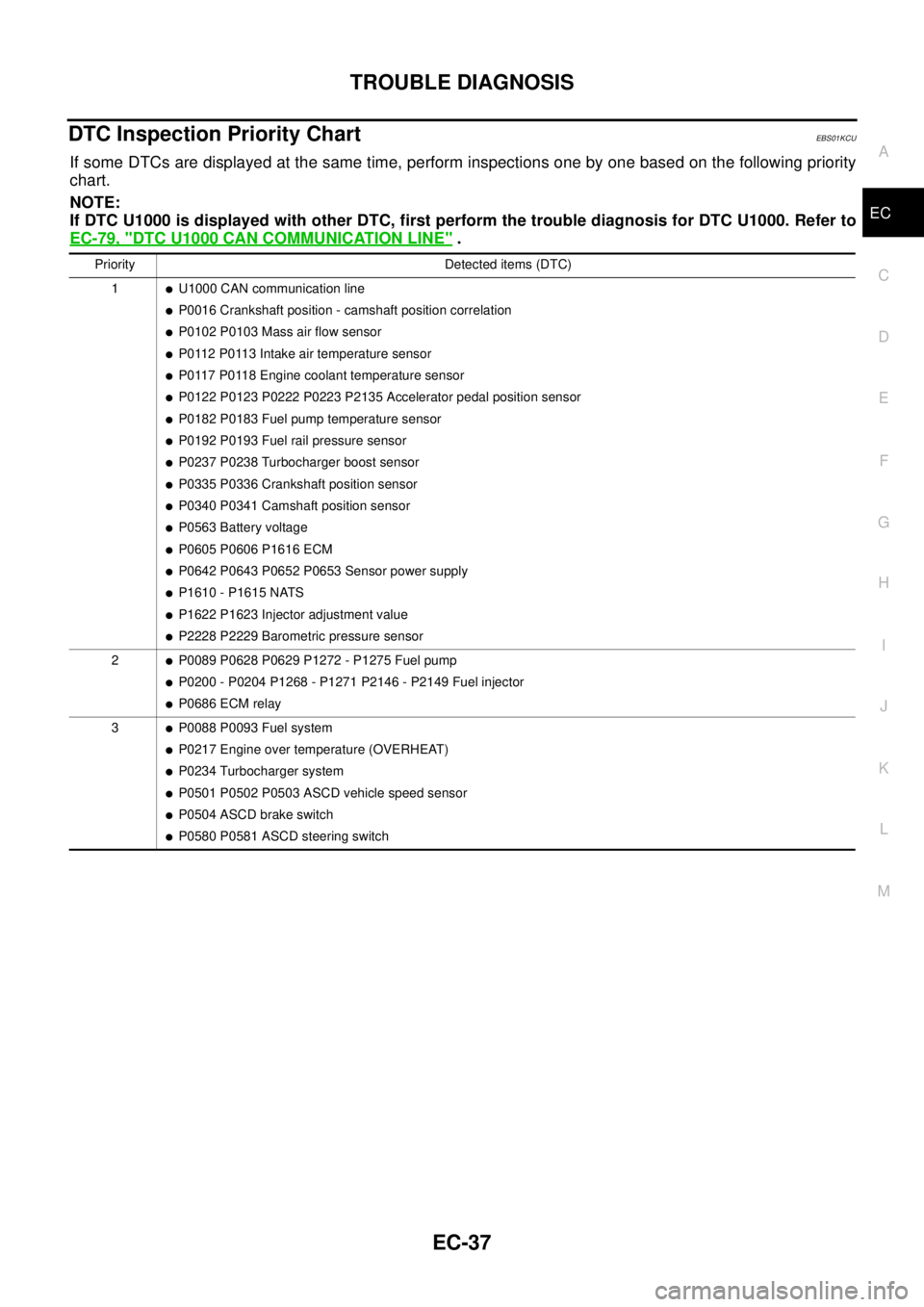
TROUBLE DIAGNOSIS
EC-37
C
D
E
F
G
H
I
J
K
L
MA
EC
DTC Inspection Priority ChartEBS01KCU
If some DTCs are displayed at the same time, perform inspections one by one based on the following priority
chart.
NOTE:
If DTC U1000 is displayed with other DTC, first perform the trouble diagnosis for DTC U1000. Refer to
EC-79, "
DTC U1000 CAN COMMUNICATION LINE".
Priority Detected items (DTC)
1
lU1000 CAN communication line
lP0016 Crankshaft position - camshaft position correlation
lP0102 P0103 Mass air flow sensor
lP0112 P0113 Intake air temperature sensor
lP0117 P0118 Engine coolant temperature sensor
lP0122 P0123 P0222 P0223 P2135 Accelerator pedal position sensor
lP0182 P0183 Fuel pump temperature sensor
lP0192 P0193 Fuel rail pressure sensor
lP0237 P0238 Turbocharger boost sensor
lP0335 P0336 Crankshaft position sensor
lP0340 P0341 Camshaft position sensor
lP0563 Battery voltage
lP0605 P0606 P1616 ECM
lP0642 P0643 P0652 P0653 Sensor power supply
lP1610 - P1615 NATS
lP1622 P1623 Injector adjustment value
lP2228 P2229 Barometric pressure sensor
2
lP0089 P0628 P0629 P1272 - P1275 Fuel pump
lP0200 - P0204 P1268 - P1271 P2146 - P2149 Fuel injector
lP0686 ECM relay
3
lP0088 P0093 Fuel system
lP0217 Engine over temperature (OVERHEAT)
lP0234 Turbocharger system
lP0501 P0502 P0503 ASCD vehicle speed sensor
lP0504 ASCD brake switch
lP0580 P0581 ASCD steering switch
Page 1042 of 3171

EC-62
TROUBLE DIAGNOSIS
WORK SUPPORT MODE
Work Item
SELF-DIAGNOSTIC MODE
Self Diagnostic Item
Regarding items detected in “SELF-DIAG RESULTS” mode, refer to —EC-6, "INDEX FOR DTC".
Freeze Frame Data
DATA MONITOR MODE
WORK ITEM DESCRIPTION USAGE
ENTER INJCTR CALIB DATA
lInjector adjustment value is written onto ECM memory. When performing Injector Adjust-
ment Value Registration.
CONFIG CLR
lASCD application status stored in ECM is initialized.
NOTE:
After the status is initialized, ECM recognizes ASCD
application status when the following condition is met.
lFor ASCD: ASCD MAIN switch is pressed.When initializing ASCD applica-
tion status stored in ECM.
INJ ADJ VAL CLR
lInjector adjustment value stored in ECM is initialized. Before changing injector adjust-
ment value stored in ECM, it is
recommended to perform this
work item.
Freeze frame data item Description
DIAG TROUBLE CODE
[PXXXX]
lThe engine control component part/control system has a trouble code, it is displayed as “PXXXX”.
(Refer toEC-6, "
INDEX FOR DTC".)
CAL/LD VALUE [%]
lThe calculated load value at the moment a malfunction is detected is displayed.
COOLANT TEMP [°C] or [°F]
lThe engine coolant temperature at the moment a malfunction is detected is displayed.
ENGINE SPEED [rpm]
lThe engine speed at the moment a malfunction is detected is displayed.
VEHICL SPEED
[km/h] or [mph]
lThe vehicle speed at the moment a malfunction is detected is displayed.
INT MANI PRES [kPa]
lThe intake manifold pressure at the moment a malfunction is detected is displayed.
MONITOR ITEMECM
INPUT
SIG-
NALMAIN
SIG-
NALSCONDITION SPECIFICATION
CKPS·RPM (TDC) [rpm]´´
lThe engine speed computed from the
crankshaft position sensor signal is
displayed.
COOLAN TEMP/S
[°C] or [°F]´´
lThe engine coolant temperature
(determined by the signal voltage of
the engine coolant temperature sen-
sor) is displayed.When the engine coolant temperature
circuit is open or short, ECM enters fail-
safe mode. The engine coolant tempera-
ture determined by the ECM is dis-
played.
VHCL SPEED SE
[km/h] or [mph]´´
lThe vehicle speed computed form the
vehicle speed signal is displayed.
FUEL TEMP SEN
[°C] or [°F]´´
lThe fuel temperature (determined by
the signal voltage of the fuel pump
temperature sensor) is displayed.
ACCEL POS SEN [V]´´
lThe accelerator pedal position sensor
1 signal voltage is displayed.This signal is converted by ECM inter-
nally. Thus, these differ from ECM termi-
nals voltage.
ACCEL SEN 2 [V]´´
lThe accelerator pedal position sensor
2 signal voltage is displayed.This signal is converted by ECM inter-
nally. Thus, these differ from ECM termi-
nals voltage.
Page 1043 of 3171
![NISSAN NAVARA 2005 Repair Workshop Manual TROUBLE DIAGNOSIS
EC-63
C
D
E
F
G
H
I
J
K
L
MA
ECACT CR PRESS [MPa]´´
lThe Fuel rail pressure (determined by
the signal voltage of the fuel rail pres-
sure sensor) is displayed.
BATTERY VOLT [V]´´](/manual-img/5/57362/w960_57362-1042.png "NISSAN NAVARA 2005 Repair Workshop Manual TROUBLE DIAGNOSIS
EC-63
C
D
E
F
G
H
I
J
K
L
MA
ECACT CR PRESS [MPa]´´
lThe Fuel rail pressure (determined by
the signal voltage of the fuel rail pres-
sure sensor) is displayed.
BATTERY VOLT [V]´´")
TROUBLE DIAGNOSIS
EC-63
C
D
E
F
G
H
I
J
K
L
MA
ECACT CR PRESS [MPa]´´
lThe Fuel rail pressure (determined by
the signal voltage of the fuel rail pres-
sure sensor) is displayed.
BATTERY VOLT [V]´´
lThe power supply voltage of ECM is
displayed.
P/N POSI SW [ON/OFF]´´
lIndicates [ON/OFF] condition from the
park/neutral position switch signal.
START SIGNAL [ON/OFF]´´
lIndicates [ON/OFF] condition from the
starter signal.
AIR COND SIG [ON/OFF]´´
lIndicates [ON/OFF] condition of the air
conditioner switch as determined by
the air conditioner signal.
BRAKE SW [ON/OFF]´´
lIndicates [ON/OFF] condition from the
stop lamp switch signal.
BRAKE SW2 [ON/OFF]´´
lIndicates [ON/OFF] condition from the
ASCD brake switch and ASCD clutch
switch signal.
IGN SW [ON/OFF]´´
lIndicates [ON/OFF] condition from
ignition switch signal.
WARM UP SW [ON/OFF]´
lIndicates [ON/OFF] condition from
heat up switch signal.
MAS AIR/FL SE [V]´´
lThe signal voltage of the mass air flow
sensor is displayed.This signal is converted by ECM inter-
nally. Thus, these differ from ECM termi-
nals voltage.
MAIN INJ WID [msec]´
lIndicates the actual fuel injection pulse
width compensated by ECM according
to the input signals.
PUMP CURRENT [mA]´
lIndicates the fuel pump power supply
current from the ECM.
GLOW RLY [ON/OFF]´
lThe glow relay control condition
(determined by ECM according to the
input signal) is displayed.
COOLING FAN
[LOW/HI/OFF]´
lIndicates the control condition of the
cooling fans (determined by ECM
according to the input signal).
LOW ... Operates at low speed
HI ... Operates at high speed
OFF ... Stopped
EGR VOL CON/V [step]´
lIndicates the EGR volume control
value computed by the ECM accord-
ing to the input signals.
lThe opening becomes larger as the
value increases.
INT/A VOLUME [mg/]
lThe intake air volume computed from
the mass air flow sensor signal is dis-
played.
BARO SEN [kPa]´´
lThe barometric pressure (determined
by the signal voltage from the absolute
pressure sensor built into the ECM) is
displayed. MONITOR ITEMECM
INPUT
SIG-
NALMAIN
SIG-
NALSCONDITION SPECIFICATION
Page 1044 of 3171
![NISSAN NAVARA 2005 Repair Workshop Manual EC-64
TROUBLE DIAGNOSIS
NOTE:
Any monitored item that does not match the vehicle being diagnosed is deleted from the display automatically.
ACTIVE TEST MODE
INT/M PRES SE [kPa]
lTurbocharger boost (de](/manual-img/5/57362/w960_57362-1043.png "NISSAN NAVARA 2005 Repair Workshop Manual EC-64
TROUBLE DIAGNOSIS
NOTE:
Any monitored item that does not match the vehicle being diagnosed is deleted from the display automatically.
ACTIVE TEST MODE
INT/M PRES SE [kPa]
lTurbocharger boost (de")
EC-64
TROUBLE DIAGNOSIS
NOTE:
Any monitored item that does not match the vehicle being diagnosed is deleted from the display automatically.
ACTIVE TEST MODE
INT/M PRES SE [kPa]
lTurbocharger boost (determined by
the signal voltage from the turbo-
charger boost sensor) is displayed.
CYL COUNT [1/2/3/4]
lThe cylinder being injected is dis-
played.
1 ... Cylinder No.1 is injected.
2 ... Cylinder No.2 is injected.
3 ... Cylinder No.3 is injected.
4 ... Cylinder No.4 is injected.
SET SW
[ON/OFF]´
lIndicates [ON/OFF] condition from
SET/COAST switch signal.
RESUME/ACC SW
[ON/OFF]´
lIndicates [ON/OFF] condition from
RESUME/ACCEL switch signal.
CANCEL SW
[ON/OFF]´
lIndicates [ON/OFF] condition from
CANCEL switch signal.
MAIN SW
[ON/OFF]´
lIndicates [ON/OFF] condition from
MAIN switch signal.
ASCD APPLY [YES/NO]
lDisplaying ASCD application status
stored in ECM.
VDC APPLY [YES/NO]
lDisplaying ESP application status
stored in ECM.
AC PRESS SEN [V]
lThe signal voltage from the refrigerant
pressure sensor is displayed.
Voltage [V]
Voltage, frequency, duty cycle or pulse
width measured by the probe.Only “#” is displayed if item is unable to
be measured.
Figures with “#”s are temporary ones.
They are the same figures as an actual
piece of data which was just previously
measured. [Hz] or [%] Frequency
[msec],[Hz]or[%]
DUTY-HI
DUTY-LOW
PLS WIDTH-HI
PLS WIDTH-LOWMONITOR ITEMECM
INPUT
SIG-
NALMAIN
SIG-
NALSCONDITION SPECIFICATION
TEST ITEM CONDITION JUDGEMENT CHECK ITEM (REMEDY)
POWER BAL-
ANCE
lEngine: After warming up, idle the
engine.
lA/C switch: OFF
lShift lever: P or N (A/T), Neutral
(M/T)
lCut off each injector signal one at
a time using CONSULT-IIEngine runs rough or dies.
lHarness and connectors
lCompression
lFuel injector
COOLING FAN *
lIgnition switch: ON
lOperate the cooling fan at LOW,
HI speed and turn OFF using
CONSULT-II.Cooling fan moves at LOW, HI
speed and stops.lHarness and connector
lCooling fan motor
lCooling fan relay
ENG COOLANT
TEMP
lEngine: Return to the original
trouble condition
lChange the engine coolant tem-
perature using CONSULT-II.If trouble symptom disappears, see
CHECK ITEM.
lHarness and connectors
lEngine coolant temperature sen-
sor
lFuel injector