Page 136 of 539
INTERIOR EQUIPMENT
11 7
14L060
�Vehicles without navigation system
The digital clock indicates the time with the ignition switch
at the “ACC” or “ON” position. To reset the hour, press the
“H” button. To reset the minutes, press the “M” button.
To adjust the time to the nearest hour, press the “:00”
button.
For example, if the “:00” button is pressed when the time is
between 9:30 − 9:59 or between 10:01 − 10:29, the time will
change to 10:00.
If the electrical power source has been disconnected from the
clock, the time display will automatically be set to 1:00.
OUTSIDE TEMPERATURE DISPLAY
14L226
� On the instrument panel (Vehicles with navigation
system)
Page 141 of 539
INTERIOR EQUIPMENT
122
GLOVE BOX
14L240
� 1Type A 2Type B 3Unlock 4Lock 5Open
To open the glove box door, pull the lever. To lock the
glove box door, insert the master key and turn it
clockwise.
With the tail lights on, the glove box light will come on when the
glove box door is open.
CAUTION
To reduce the chance of injury in case of an accident or
a sudden stop, always keep the glove box door closed
while driving.
GARAGE DOOR OPENER
The garage door opener (\b Universal
Transceiver) is manufactured under license from
HomeLink
\b and can be programmed to operate garage
doors, gates, entry doors, door locks, home lighting
systems, and security systems, etc.
(a) Programming the HomeLink\b
14L070
� 1 Buttons 2Indicator light
The HomeLink
\b in your vehicle has 3 buttons and you can
store one program for each button.
To ensure correct programming into the HomeLink
\b, install a
new battery in the hand −held transmitter prior to programming.
Page 143 of 539

INTERIOR EQUIPMENT
1244. Repeat steps 1 through 3 for each remaining HomeLink
\b
button to program another rolling code system.
Programming an entrance gate /
Programming all devices in the Canadian
market
1. Decide which of the 3 HomeLink\b buttons you want to
program.
2. Place your hand −held gate/device transmitter 25 to 75 mm
(1 to 3 in.) away from the surface of the HomeLink
\b.
Keep the indicator light on the HomeLink
\b in view while
programming.
3. Press and hold the selected HomeLink
\b button.
4. Continuously press and release (cycle) the hand−held
gate/device transmitter button every two seconds until step 5
is complete.
5. When the indicator light on the HomeLink
\b changes from a
slow to a rapid flash after 20 seconds, you can release both
buttons.
6. Test the operation of the HomeLink
\b by pressing the newly
programmed button. Check to see if the gate/device operates
correctly.
7. Repeat steps 1 through 6 for each remaining HomeLink
\b
button to program another device.
Programming other devices
To program other devices such as home security systems,
home door locks or lighting, contact your authorized Lexus
dealer for assistance.
Reprogramming a button
Individual HomeLink\b
buttons c annot be erased, however, to
reprogram a single button, follow the procedure “Programming
the HomeLink
\b”.
(b) Operating the HomeLink\b
To operate the HomeLink\b, press the appropriate HomeLink\b
button to activate the programmed device. The HomeLink\b
indicator light should come on. The HomeLink\b continues to
send the signal for up to 20 seconds as long as the button is
pressed.
Page 150 of 539
INTERIOR EQUIPMENT
131
CAUTION
To reduce the chance of injury in case of an accident or
a sudden stop, always keep the auxiliary boxes closed
while driving.
TRUNK STORAGE EXTENSION
14L241
� 1Type A 2Type B
3Unlock 4Lock 5Open
Pull down the center armrest in the rear seat. Pull the lever
and open the door.
Be sure to use “LEXUS Genuine Sports Gear, Bag” or carry
long objects (ski boards, poles, etc.) properly.
For installation and handling of the “LEXUS Genuine Sports
Gear”, follow the instructions provided with goods.
You can use a container as an accessory box. To lock the box,
insert the master key and turn it clockwise.
Page 151 of 539
INTERIOR EQUIPMENT
132
CAUTION
To reduce the chance of injury in case of an accident or
a sudden stop, always keep the container closed while
driving.
14L223
� 1From passenger compartment side
2From trunk side
To extend a storage space, push the button on the door to
unlock and then push the door from the passenger side or pull
it from the trunk side.
See “Cargo and luggage” on page 394 for precautions to
observe in loading luggage.
CAUTION
Be sure to close the door when the trunk storage
extension is not in use. Luggage or cargo in the trunk
may be thrown into the passenger compartment in a
sudden stop or crash resulting in injury.
Page 154 of 539
INTERIOR EQUIPMENT
135
CAUTION
To reduce the chance of injury in case of an accident or
sudden stop while driving, always keep the cool box
closed when it is not in use.
FLOOR MAT
14L227
Use a floor mat of the correct size.
If the floor carpet and floor mat have 2 holes, then they are
designed for use with locking clips. Fix the floor mat with
locking clips into the holes in the floor carpet.
Page 157 of 539
INTERIOR EQUIPMENT
138
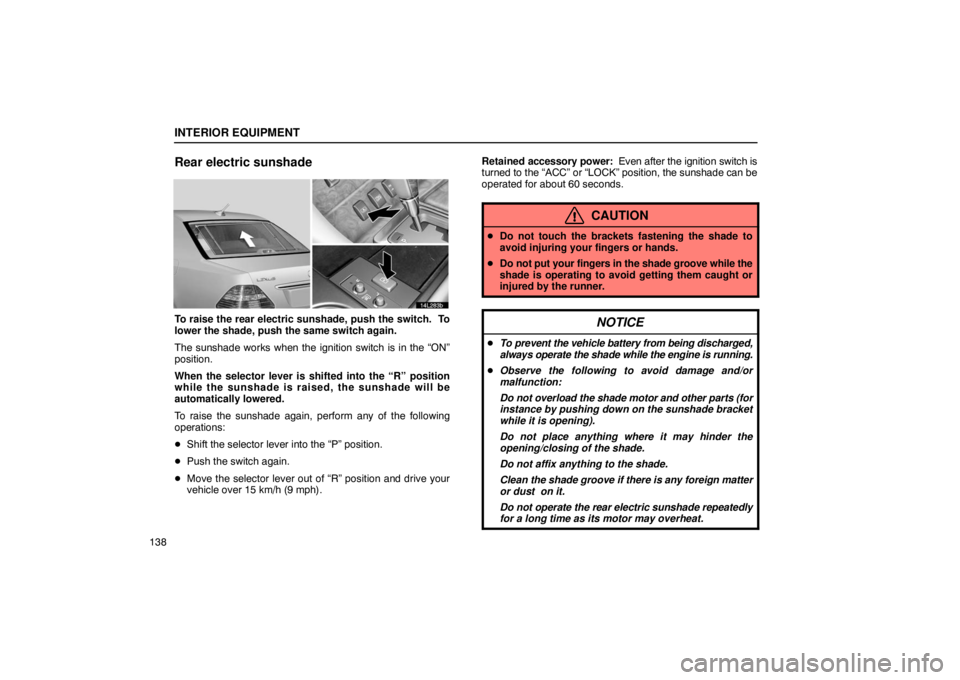
Rear electric sunshade
14L283b
To raise the rear electric sunshade, push the switch. To
lower the shade, push the same switch again.
The sunshade works when the ignition switch is in the “ON”
position.
When the selector lever is shifted into the “R” position
while the sunshade is raised, the sunshade will be
automatically lowered.
To raise the sunshade again, perform any of the following
operations:
�Shift the selector lever into the “P” position.
� Push the switch again.
� Move the selector lever out of “R” position and drive your
vehicle over 15 km/h (9 mph). Retained accessory power: Even after the ignition switch is
turned to the “ACC” or “LOCK” position, the sunshade can be
operated for about 60 seconds.
CAUTION
� Do not touch the brackets fastening the shade to
avoid injuring your fingers or hands.
� Do not put your fingers in the shade groove while the
shade is operating to avoid getting them caught or
injured by the runner.
NOTICE
�To prevent the vehicle battery from being discharged,
always operate the shade while the engine is running.
� Observe the following to avoid damage and/or
malfunction:
Do not overload the shade motor and other parts (for
instance by pushing down on the sunshade bracket
while it is opening).
Do not place anything where it may hinder the
opening/closing of the shade.
Do not affix anything to the shade.
Clean the shade groove if there is any foreign matter
or dust on it.
Do not operate the rear electric sunshade repeatedly
for a long time as its motor may overheat.
Page 161 of 539
EXTERIOR EQUIPMENT
142
HOOD
15L089
1. To open the hood, pull the hood lock release lever
under the instrument panel. The hood will spring up
slightly.
15L097
2. Insert your fingers under the hood, push up the
auxiliary catch lever and lift the hood.
Before closing the hood, check to see that you have not
forgotten any tools, rags, etc. Then lower the hood and make
sure it locks.
CAUTION
Before driving, be sure that the hood is closed and
locked securely. Otherwise, the hood may open
unexpectedly while driving and an accident may occur.


