2005 LEXUS ES300 ECU
[x] Cancel search: ECUPage 936 of 969

DIAGNOSTIC TESTER IMMOBILIZER FUNCTIONS ± SS005-01 Revised July 6, 2001
Page 5 of 14
2. Transponder Code Registration
This function allows the normal registration of additional transponder keys (Master or
Sub) using a registered Master Key.
NOTE:
This function requires the use of one registered Master Key. The use of a Sub Key will
NOT complete Transponder Code Registration. Attempting registration of additional
keys with only a Sub Key will result in errors and incomplete registration.
HINT:
The Immobilizer key blanks are preconfigured as Master or Sub Keys. Master Key
blanks cannot be registered as Sub Keys nor can Sub Key blanks be registered as
Master Keys. Also, the flat key is now enabled as a full function Master Key that must
be registered.
A. Insert a registered Master Key into the ignition cylinder and turn to the ON position.
B. Follow the screen flow in Figure 2 to register new Master or Sub keys. It is
possible to register up to 5 Master Keys and 3 Sub Keys.
C. Be sure to follow the instructions on key insertion, ignition ON/OFF and key
removal exactly as described on the Diagnostic Tester.
Blinks Code 2±2Code 2±1
1.8 sec
0.2
sec0.25 sec
0.25
sec1 sec
0.5
sec0.25 sec
0.25
sec1 sec
0.5
sec
HINT:
The security indicator light reveals the following information:
Always ON and NO key in IG
* = Transponder ECU in Auto Registration mode
Blinking and NO key in IG = Normal operation
Blinking Code 21 = Transponder Code Registration failed
Blinking Code 22 = Attempt was made to register an already
registered Transponder Code
* Immediately after the transponder ECU is installed, the security indicator will blink.
Operation
Procedure
(Continued)
TRANSPONDER
CODE
REGISTRATION
Page 939 of 969

DIAGNOSTIC TESTER IMMOBILIZER FUNCTIONS ± SS005-01 Revised July 6, 2001
Page 8 of 14
4. Transponder ECU Reset
This function allows the registration of a new Master Key even if all original Master
Keys are lost. Once the Immobilizer system is reset, all previous registered keys will
be erased. Use a new transponder Master Key to complete Transponder ECU Reset.
Immobilizer Reset
The Immobilizer Reset function is a 4-step process:
A. Using the Diagnostic Tester, retrieve a ªSeed Numberº through the OBD/MOBD
Immobilizer function.
A ªSeed Numberº is a unique number provided by the Diagnostic Tester and
validated at TMS in order to return a Passcode.
B. Using the TIS (Technical Information System) workstation, select Immobilizer
Reset, and complete the request form to retrieve a ªPasscode Number.º
A ªPasscode Numberº is a unique number required by the Diagnostic Tester
to reset the ECU allowing it to accept a new Master Key.
C. Enter the ªPasscode Numberº received from TIS into the Diagnostic Tester,
register any additional customer keys, and close auto registration mode.
D. Confirm successful Immobilizer reset and new Master Key registration.Operation
Procedure
(Continued)
TRANSPONDER
ECU RESET
Page 940 of 969
DIAGNOSTIC TESTER IMMOBILIZER FUNCTIONS ± SS005-01 Revised July 6, 2001
Page 9 of 14
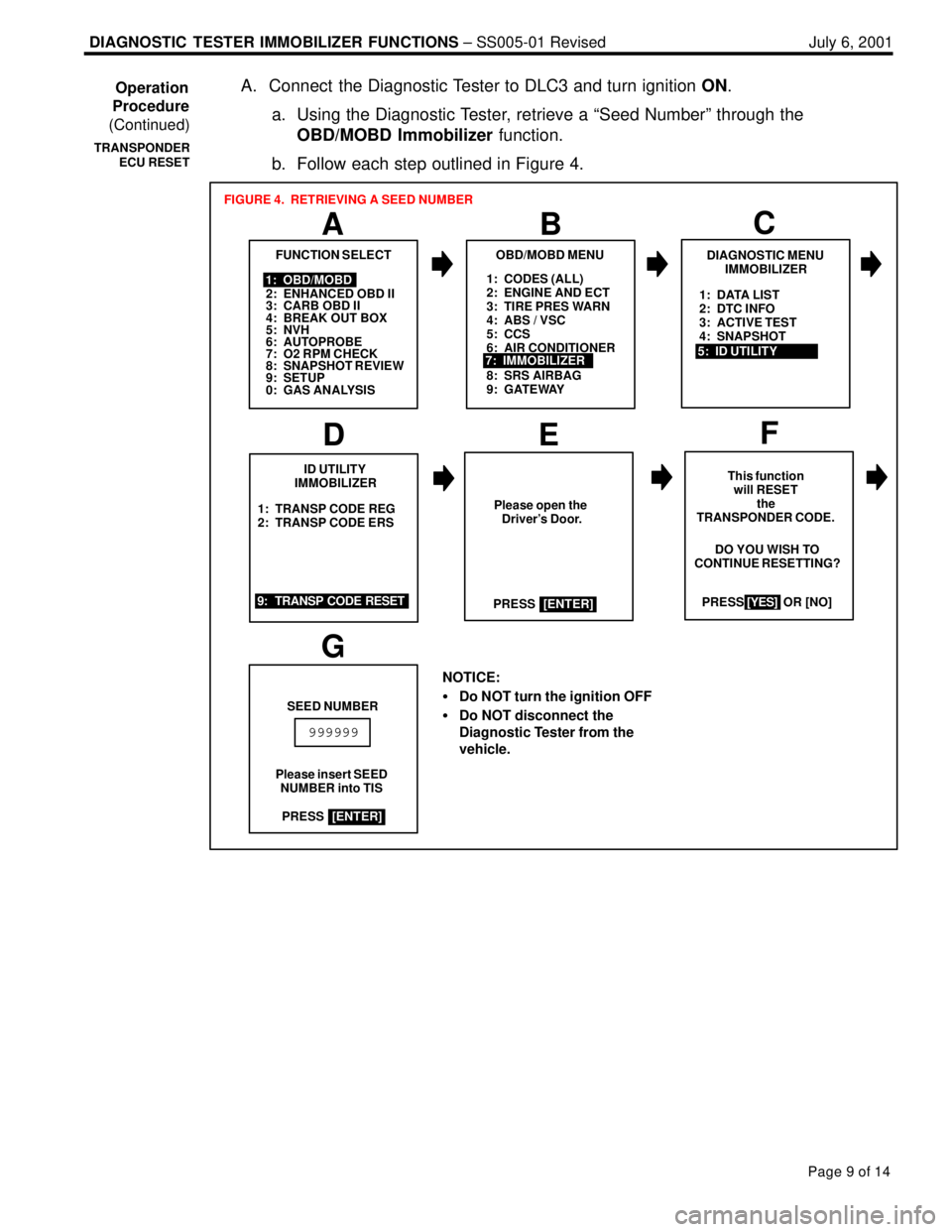
A. Connect the Diagnostic Tester to DLC3 and turn ignition ON.
a. Using the Diagnostic Tester, retrieve a ªSeed Numberº through the
OBD/MOBD Immobilizer function.
b. Follow each step outlined in Figure 4.
1: CODES (ALL)
2: ENGINE AND ECT
3: TIRE PRES WARN
4: ABS / VSC
5: CCS
6: AIR CONDITIONER
8: SRS AIRBAG
9: GATEWAY
A
FUNCTION SELECT
B
1: OBD/MOBD
2: ENHANCED OBD II
3: CARB OBD II
4: BREAK OUT BOX
5: NVH
6: AUTOPROBE
7: O2 RPM CHECK
8: SNAPSHOT REVIEW
9: SETUP
0: GAS ANALYSIS
OBD/MOBD MENU
7: IMMOBILIZER
FIGURE 4. RETRIEVING A SEED NUMBER
1: TRANSP CODE REG
2: TRANSP CODE ERS
D
ID UTILITY
IMMOBILIZER
EF
This function
will RESET
the
TRANSPONDER CODE.
PRESS [YES] OR [NO]
9: TRANSP CODE RESETDO YOU WISH TO
CONTINUE RESETTING?
NOTICE:
Do NOT turn the ignition OFF
Do NOT disconnect the
Diagnostic Tester from the
vehicle.
[YES]
G
SEED NUMBER
Please insert SEED
NUMBER into TIS
999999
Please open the
Driver's Door.
PRESS
[ENTER]
PRESS
[ENTER]
C
DIAGNOSTIC MENU
IMMOBILIZER
5: ID UTILITY1: DATA LIST
2: DTC INFO
3: ACTIVE TEST
4: SNAPSHOT
Operation
Procedure
(Continued)
TRANSPONDER
ECU RESET
Page 941 of 969
DIAGNOSTIC TESTER IMMOBILIZER FUNCTIONS ± SS005-01 Revised July 6, 2001
Page 10 of 14
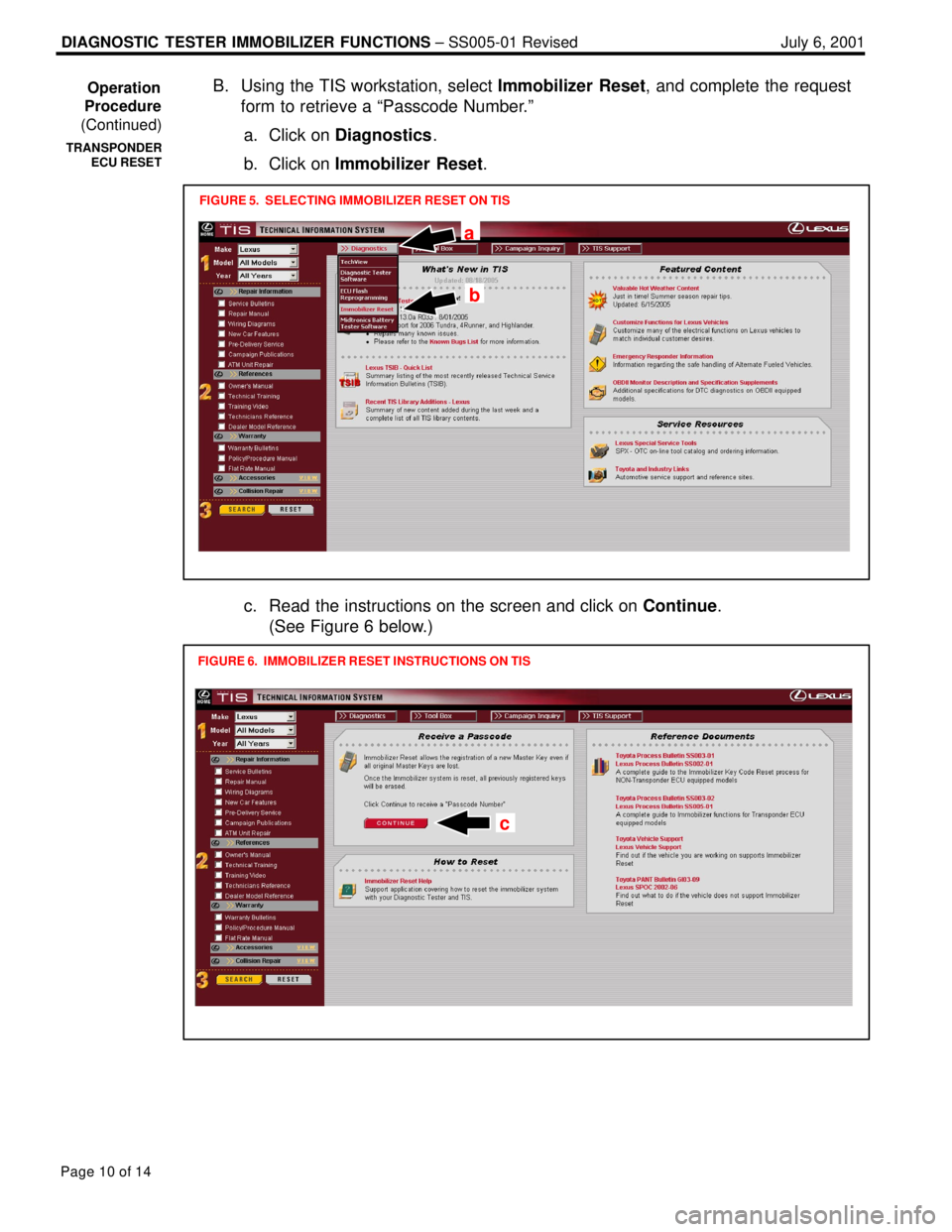
B. Using the TIS workstation, select Immobilizer Reset, and complete the request
form to retrieve a ªPasscode Number.º
a. Click on Diagnostics.
b. Click on Immobilizer Reset.
FIGURE 5. SELECTING IMMOBILIZER RESET ON TIS
a
b
c. Read the instructions on the screen and click on Continue.
(See Figure 6 below.)
FIGURE 6. IMMOBILIZER RESET INSTRUCTIONS ON TIS
c
Operation
Procedure
(Continued)
TRANSPONDER
ECU RESET
Page 942 of 969
DIAGNOSTIC TESTER IMMOBILIZER FUNCTIONS ± SS005-01 Revised July 6, 2001
Page 11 of 14
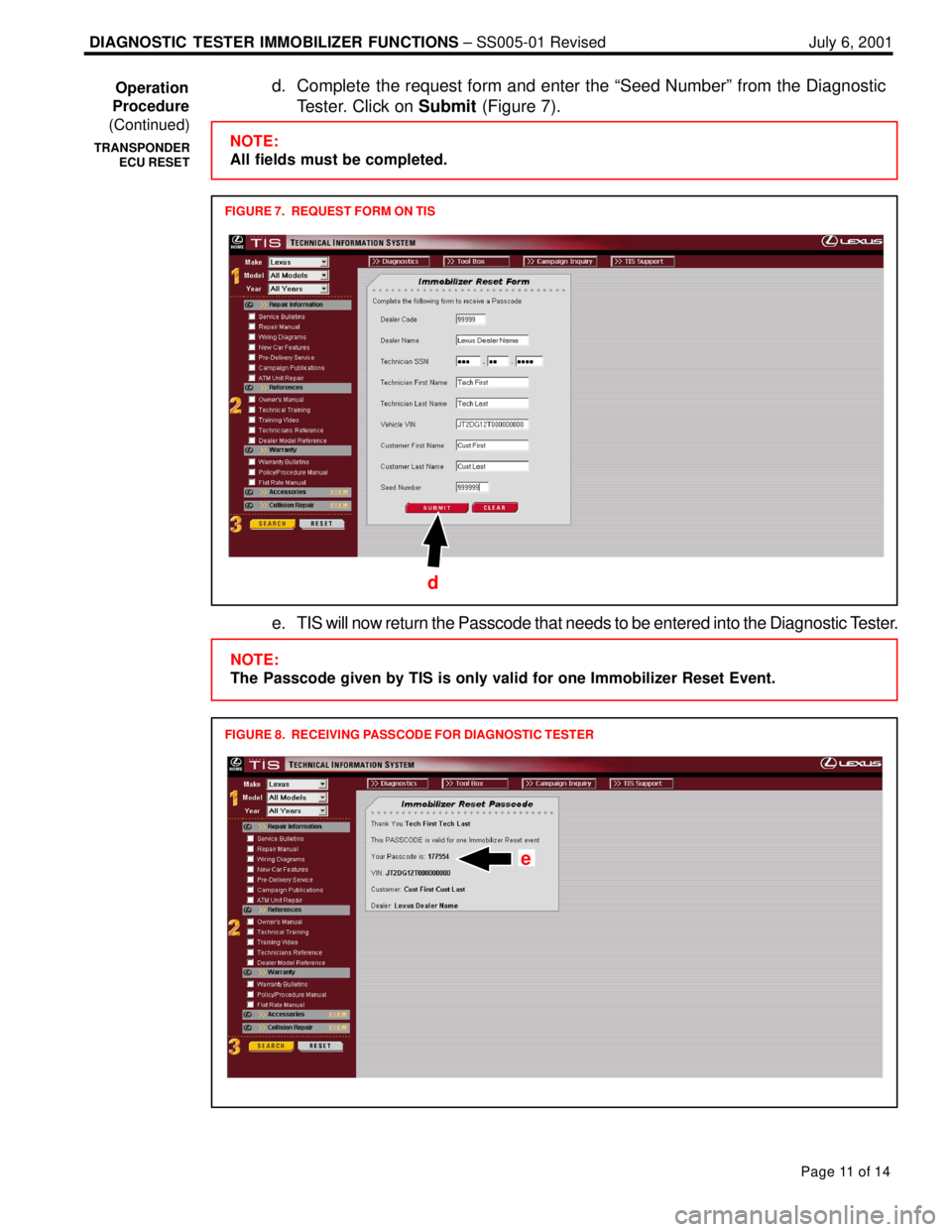
d. Complete the request form and enter the ªSeed Numberº from the Diagnostic
Tester. Click on Submit (Figure 7).
FIGURE 7. REQUEST FORM ON TIS
NOTE:
All fields must be completed.
d
e. TIS will now return the Passcode that needs to be entered into the Diagnostic Tester.
FIGURE 8. RECEIVING PASSCODE FOR DIAGNOSTIC TESTER
NOTE:
The Passcode given by TIS is only valid for one Immobilizer Reset Event.
e
Operation
Procedure
(Continued)
TRANSPONDER
ECU RESET
Page 943 of 969
DIAGNOSTIC TESTER IMMOBILIZER FUNCTIONS ± SS005-01 Revised July 6, 2001
Page 12 of 14
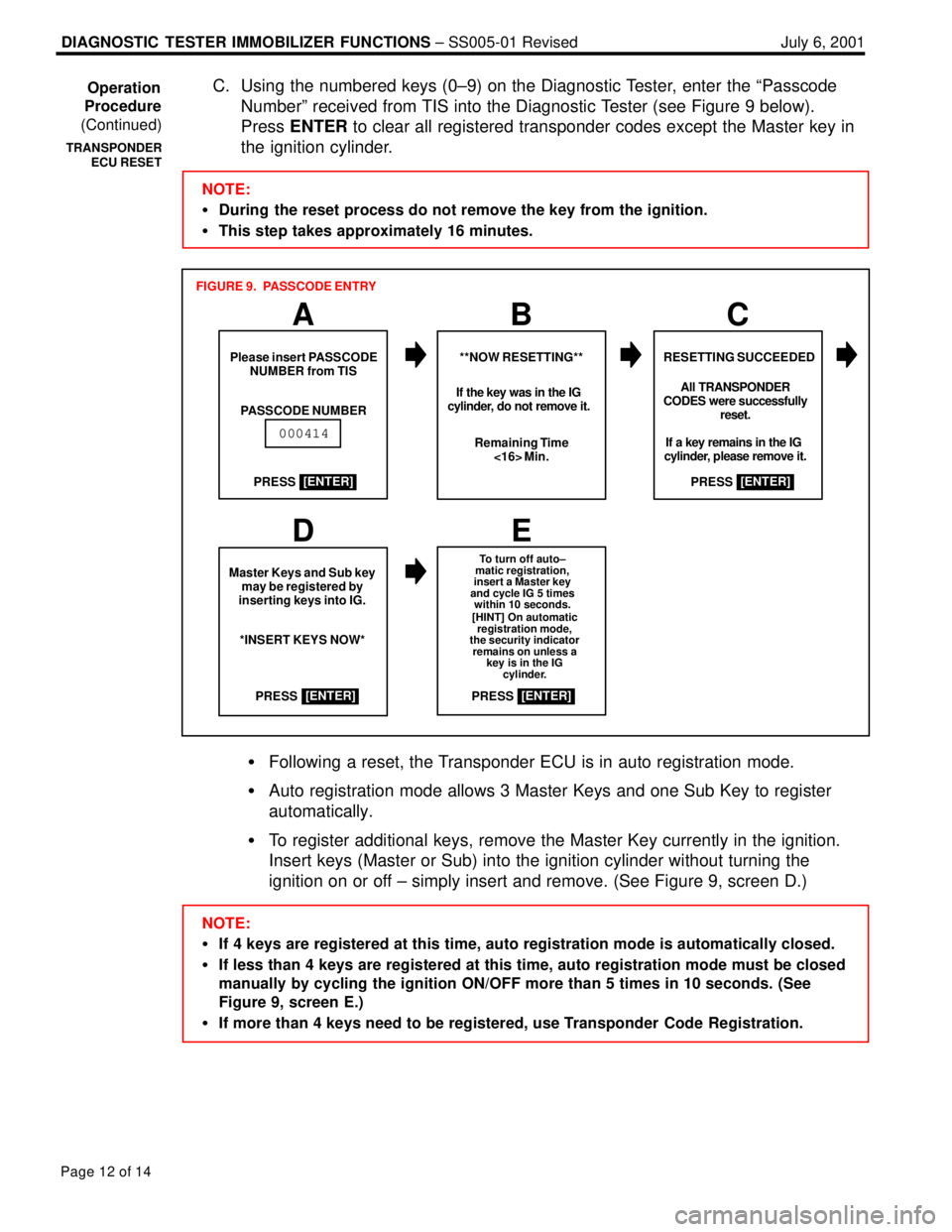
C. Using the numbered keys (0±9) on the Diagnostic Tester, enter the ªPasscode
Numberº received from TIS into the Diagnostic Tester (see Figure 9 below).
Press ENTER to clear all registered transponder codes except the Master key in
the ignition cylinder.
NOTE:
During the reset process do not remove the key from the ignition.
This step takes approximately 16 minutes.
ABC
RESETTING SUCCEEDEDPlease insert PASSCODE
NUMBER from TIS
PASSCODE NUMBER**NOW RESETTING**
Remaining Time
<16> Min.
000414
FIGURE 9. PASSCODE ENTRY
All TRANSPONDER
CODES were successfully
reset.
If a key remains in the IG
cylinder, please remove it. If the key was in the IG
cylinder, do not remove it.
PRESS
[ENTER]
PRESS[ENTER]
Master Keys and Sub key
may be registered by
inserting keys into IG.
*INSERT KEYS NOW*
To turn off auto±
matic registration,
insert a Master key
and cycle IG 5 times
within 10 seconds.
[HINT] On automatic
registration mode,
the security indicator
remains on unless a
key is in the IG
cylinder.
PRESS[ENTER]
PRESS[ENTER]
DE
Following a reset, the Transponder ECU is in auto registration mode.
Auto registration mode allows 3 Master Keys and one Sub Key to register
automatically.
To register additional keys, remove the Master Key currently in the ignition.
Insert keys (Master or Sub) into the ignition cylinder without turning the
ignition on or off ± simply insert and remove. (See Figure 9, screen D.)
NOTE:
If 4 keys are registered at this time, auto registration mode is automatically closed.
If less than 4 keys are registered at this time, auto registration mode must be closed
manually by cycling the ignition ON/OFF more than 5 times in 10 seconds. (See
Figure 9, screen E.)
If more than 4 keys need to be registered, use Transponder Code Registration. Operation
Procedure
(Continued)
TRANSPONDER
ECU RESET
Page 944 of 969
DIAGNOSTIC TESTER IMMOBILIZER FUNCTIONS ± SS005-01 Revised July 6, 2001
Page 13 of 14
D. Verify that keys are registered correctly by starting the engine with each newly
registered key.
NOTE:
If the vehicle starts, the new key code was registered correctly.
If the vehicle does not start with any key, perform the Immobilizer Reset function
again.
If only one of the registered keys will not start the vehicle, attempt to register the
key again following the Transponder Code Registration procedure (page 5 of
this bulletin).
5. Transponder ECU Replacement
When the Transponder ECU is replaced, the transponder keys must be registered,
auto registration closed, and ECU communication completed.
A. Replacement transponder ECUs are in auto registration mode. This allows
transponder keys to automatically register as they are inserted into the ignition
cylinder. It is possible to automatically register 3 Master Keys, and 1 Sub Key.
NOTE:
If 4 keys are registered at this time, auto registration mode is closed.
If less than 4 keys are registered at this time, auto registration mode must be closed
manually by cycling the ignition ON/OFF more than 5 times in 10 seconds.
If more than 4 keys need to be registered, use Transponder Code Registration
procedure (page 5 of this bulletin).
B. Once auto registration mode is closed, ECU Communication must be performed
between the transponder ECU and the Engine ECU. Complete ECU
communication using the following steps:
a. Insert registered Master Key into the ignition cylinder.
b. Turn ignition ON (engine OFF).
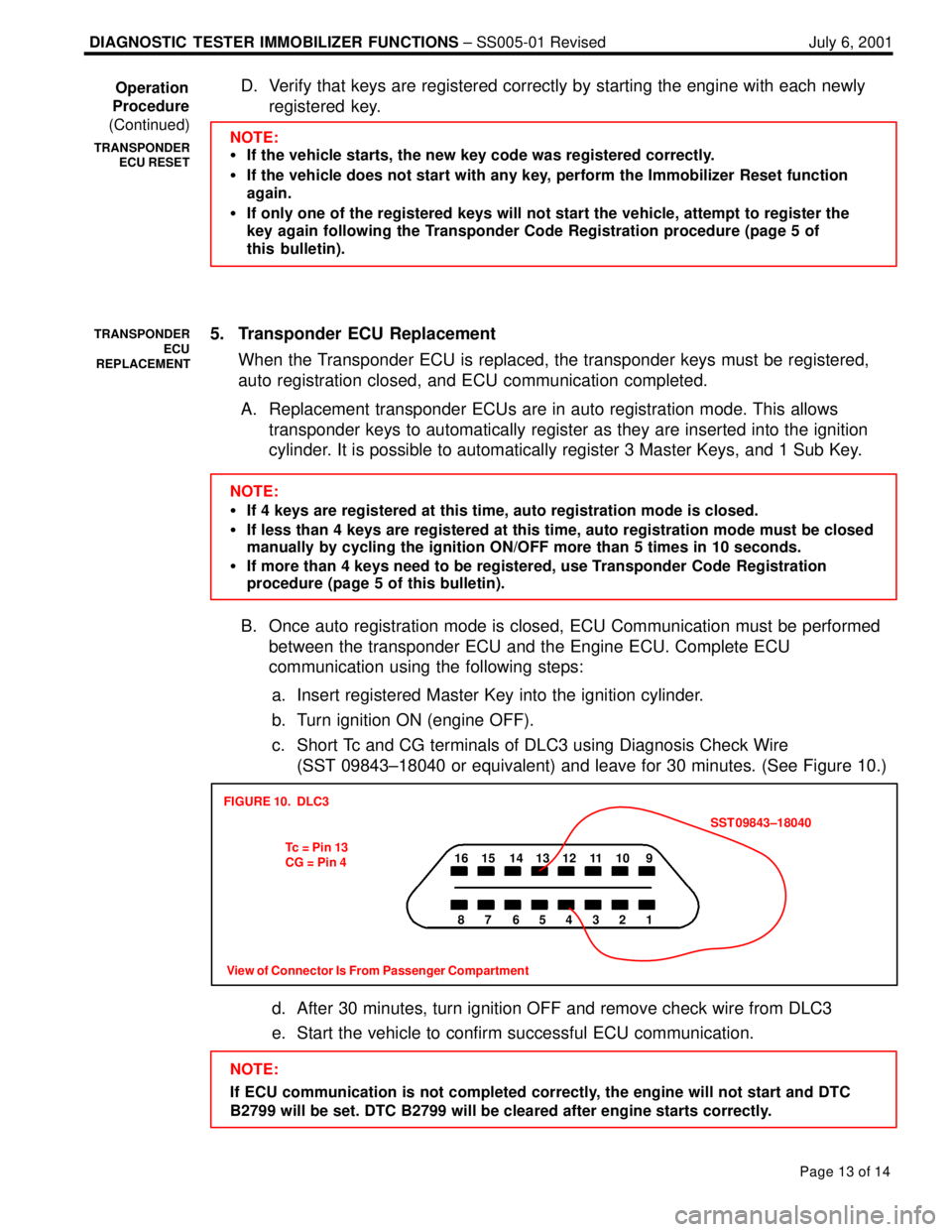
c. Short Tc and CG terminals of DLC3 using Diagnosis Check Wire
(SST 09843±18040 or equivalent) and leave for 30 minutes. (See Figure 10.)
16 15 14 13 12 11 10 9
87 654321
View of Connector Is From Passenger Compartment
FIGURE 10. DLC3
Tc = Pin 13
CG = Pin 4SST 09843±18040
d. After 30 minutes, turn ignition OFF and remove check wire from DLC3
e. Start the vehicle to confirm successful ECU communication.
NOTE:
If ECU communication is not completed correctly, the engine will not start and DTC
B2799 will be set. DTC B2799 will be cleared after engine starts correctly. Operation
Procedure
(Continued)
TRANSPONDER
ECU RESET
TRANSPONDER
ECU
REPLACEMENT
Page 945 of 969
DIAGNOSTIC TESTER IMMOBILIZER FUNCTIONS ± SS005-01 Revised July 6, 2001
Page 14 of 14
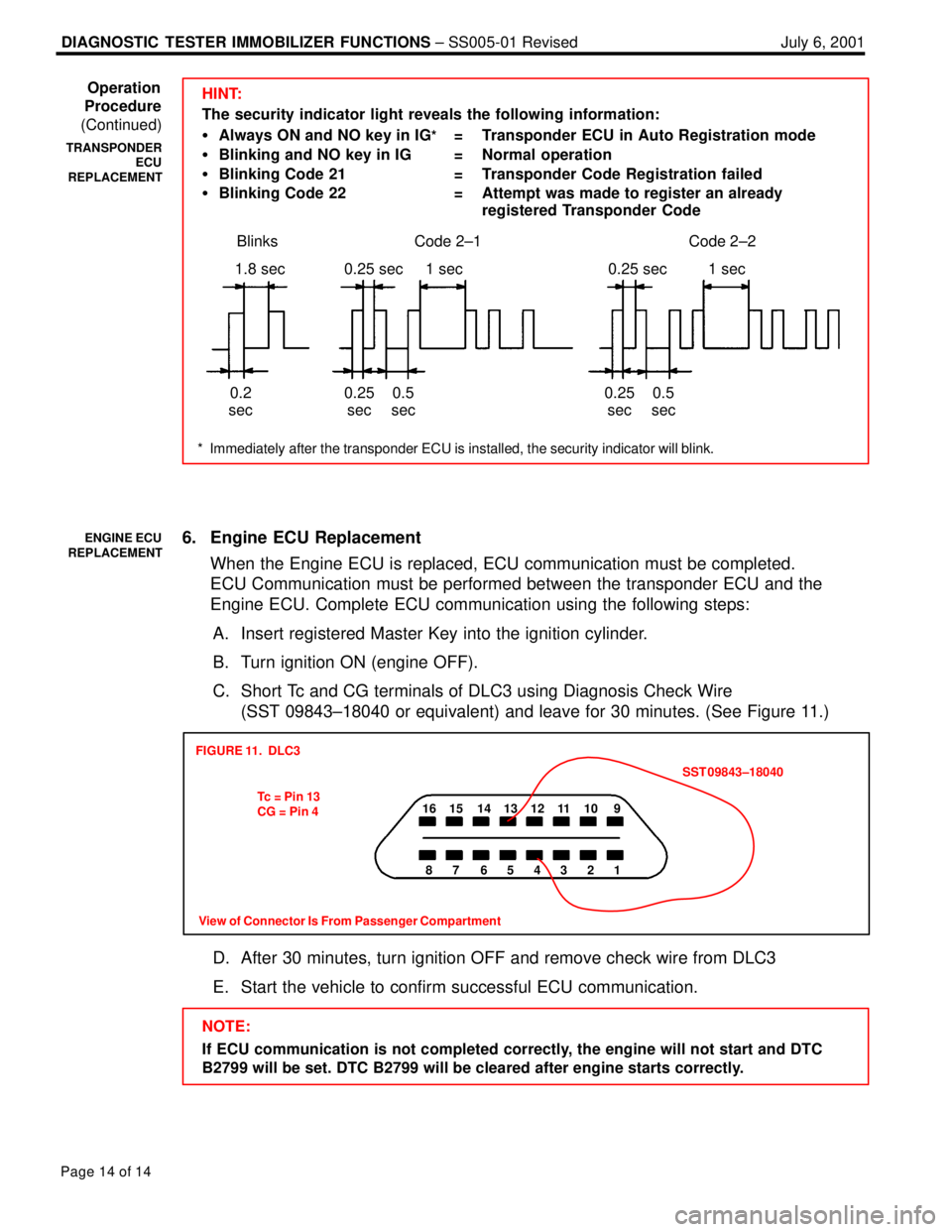
HINT:
The security indicator light reveals the following information:
Always ON and NO key in IG
* = Transponder ECU in Auto Registration mode
Blinking and NO key in IG = Normal operation
Blinking Code 21 = Transponder Code Registration failed
Blinking Code 22 = Attempt was made to register an already
registered Transponder Code
* Immediately after the transponder ECU is installed, the security indicator will blink.
Blinks Code 2±2Code 2±1
1.8 sec
0.2
sec0.25 sec
0.25
sec1 sec
0.5
sec0.25 sec
0.25
sec1 sec
0.5
sec
6. Engine ECU Replacement
When the Engine ECU is replaced, ECU communication must be completed.
ECU Communication must be performed between the transponder ECU and the
Engine ECU. Complete ECU communication using the following steps:
A. Insert registered Master Key into the ignition cylinder.
B. Turn ignition ON (engine OFF).
C. Short Tc and CG terminals of DLC3 using Diagnosis Check Wire
(SST 09843±18040 or equivalent) and leave for 30 minutes. (See Figure 11.)
16 15 14 13 12 11 10 9
87 654321
FIGURE 11. DLC3
Tc = Pin 13
CG = Pin 4SST 09843±18040
View of Connector Is From Passenger Compartment
D. After 30 minutes, turn ignition OFF and remove check wire from DLC3
E. Start the vehicle to confirm successful ECU communication.
NOTE:
If ECU communication is not completed correctly, the engine will not start and DTC
B2799 will be set. DTC B2799 will be cleared after engine starts correctly. Operation
Procedure
(Continued)
TRANSPONDER
ECU
REPLACEMENT
ENGINE ECU
REPLACEMENT