Page 894 of 969
PRE±DELIVERY SERVICE (PDS) INFORMATION FOR ES 330 ± PD002-03 August 26, 2003
Page 7 of 9
INITIAL CALIBRATION OF COMPASS (Continued)
1. Turn the ignition switch to the ªONº
position and check that the direction
(N, NE, E, SE, S, SW, W, NW)
appears on the compass display.
NOTE:
Pushing the ªCOMPº switch turns on
or off the compass display.
2. Push the ªCOMPº switch for
approximately 3 seconds until the
zone number (1 ± 15) appears on the
display. Then push the switch to
select the number of the zone where
the vehicle is located.
See the map below for zone reference.
Hawaii: 5
Puerto Rico: 10
A. Samoa: 5
Guam: 8
Saipan: 8
Taiwan: 9
Korea: 10 North America
ITEM NO. 5:
Compass
Calibration
Procedure
Page 895 of 969

PRE±DELIVERY SERVICE (PDS) INFORMATION FOR ES 330 ± PD002-03 August 26, 2003
Page 8 of 9
INITIAL CALIBRATION OF COMPASS (Continued)
3. Check that the direction appears
several seconds after adjustment.
4. Start the engine and push the switch
for about 6 seconds until ªCº appears
on the display.
5. Drive the vehicle slowly at 5 mph, or
less, in a circle until the direction is
displayed. If there is not enough space
to drive in a circle, drive around the
block until the direction is displayed.
After driving in circles 1 to 3 times,
calibration is complete with the direction
shown on the display.
NOTE:
Do not perform calibration of the compass in a place where the earth's magnetic
field is subject to interference by artificial magnetic fields (underground parking,
under a steel tower, between buildings, roof parking, near a railroad crossing, near
a large vehicle, etc.)
During calibration, do not operate electric systems (moon roof, power windows,
etc.) as they may interfere with the calibration.
ITEM NO. 5:
Compass
Calibration
Procedure
(Continued)
Page 900 of 969

Lexus Supports ASE CertificationPage 1 of 3
Title:
INITIAL CALIBRATION OF COMPASS
DURING PDS
Models:
'05 ± '06 ES 330
Technical Service
Information Bulletin
August 22, 2005
PD034-05
The compass indicates the direction that the vehicle is heading by detecting the
direction and strength of the Earth's magnetic field and processing this data using
the compass sensor and microcomputer.
Detection of the direction and strength of the Earth's magnetic field varies according to
the area in which the vehicle is used and is affected by the residual magnetism of the
vehicle. For this reason, the geographic direction displayed may also deviate from the
direction determined by the Earth's magnetic field according to the area in which the
vehicle is used.
Perform the initial calibration of the compass in your dealership prior to delivery
to customers.
ªCOMPº Switch
Compass
2005 ± 2006 model year ES 330 vehicles.
OP CODEDESCRIPTIONTIMEOFPT1T2
N/ANot Applicable to Warranty±±±±
PRE-DELIVERY SERVICE
Introduction
Applicable
Vehicles
Warranty
Information
Page 901 of 969
INITIAL CALIBRATION OF COMPASS DURING PDS ± PD034-05 August 22, 2005
Page 2 of 3
1. Turn the ignition switch to the ªONº
position and check that the direction
(N, NE, E, SE, S, SW, W, NW)
appears on the compass display.
NOTE:
Pushing the ªCOMPº switch turns the
compass display ON or OFF.
2. Push the ªCOMPº switch for
approximately 3 seconds until the
zone number (1 ± 15) appears on the
display. Then push the switch to
select the number of the zone where
the vehicle is located.
See the map below for zone reference.
Hawaii: 5
Puerto Rico: 10
A. Samoa: 5
Guam: 8
Saipan: 8
Taiwan: 9
Korea: 10 North America
Compass
Calibration
Procedure
Page 902 of 969

INITIAL CALIBRATION OF COMPASS DURING PDS ± PD034-05 August 22, 2005
Page 3 of 3
3. Check that the direction appears
several seconds after adjustment.
4. Start the engine and push the switch
for about 6 seconds until ªCº appears
on the display.
5. Drive the vehicle slowly at 5 mph
(8 km/h), or less, in a circle until the
direction is displayed. If there is not
enough space to drive in a circle,
drive around the block until the
direction is displayed.
After driving in 1 to 3 circles,
calibration is complete with the
direction shown on the display.
NOTE:
Do NOT perform calibration of the compass in a place where the Earth's magnetic
field is subject to interference by artificial magnetic fields (underground parking,
under a steel tower, between buildings, roof parking, near a railroad crossing, near
a large vehicle, etc.)
During calibration, do NOT operate electric systems (moon roof, power windows,
etc.) as they may interfere with the calibration. Compass
Calibration
Procedure
(Continued)
Page 915 of 969
BATTERY MAINTENANCE FOR IN±STOCK VEHICLES & PRE±DELIVERY ± PG009-02 September 12, 2002
Page 2 of 4
TOOLS & EQUIPMENTMANUFACTURERPART NUMBER
Fast Battery Charger**AssociatedASE6003
Fast Battery Charger**ChristieCAPPDQ
** These tools can be ordered through the Lexus Approved Dealer Equipment program by calling
1±800±368±6787.
NOTE:
The ªFast Battery Chargersº listed above have been tested and approved by Lexus.
These state±of±the±art ªsmartº chargers were designed to charge batteries at an
accelerated rate, without the possibility of damage. Using non±microprocessor
controlled battery chargers for fast charging purposes can damage the battery.
All vehicles are to be inspected according to the procedures listed below using the
MICROPRO 815 battery tester no more than 48 hours prior to customer vehicle delivery.
PRIOR TO TESTING:
If necessary, remove battery surface charge by turning on high beam headlights for 60
seconds, then let battery voltage recover for one minute.
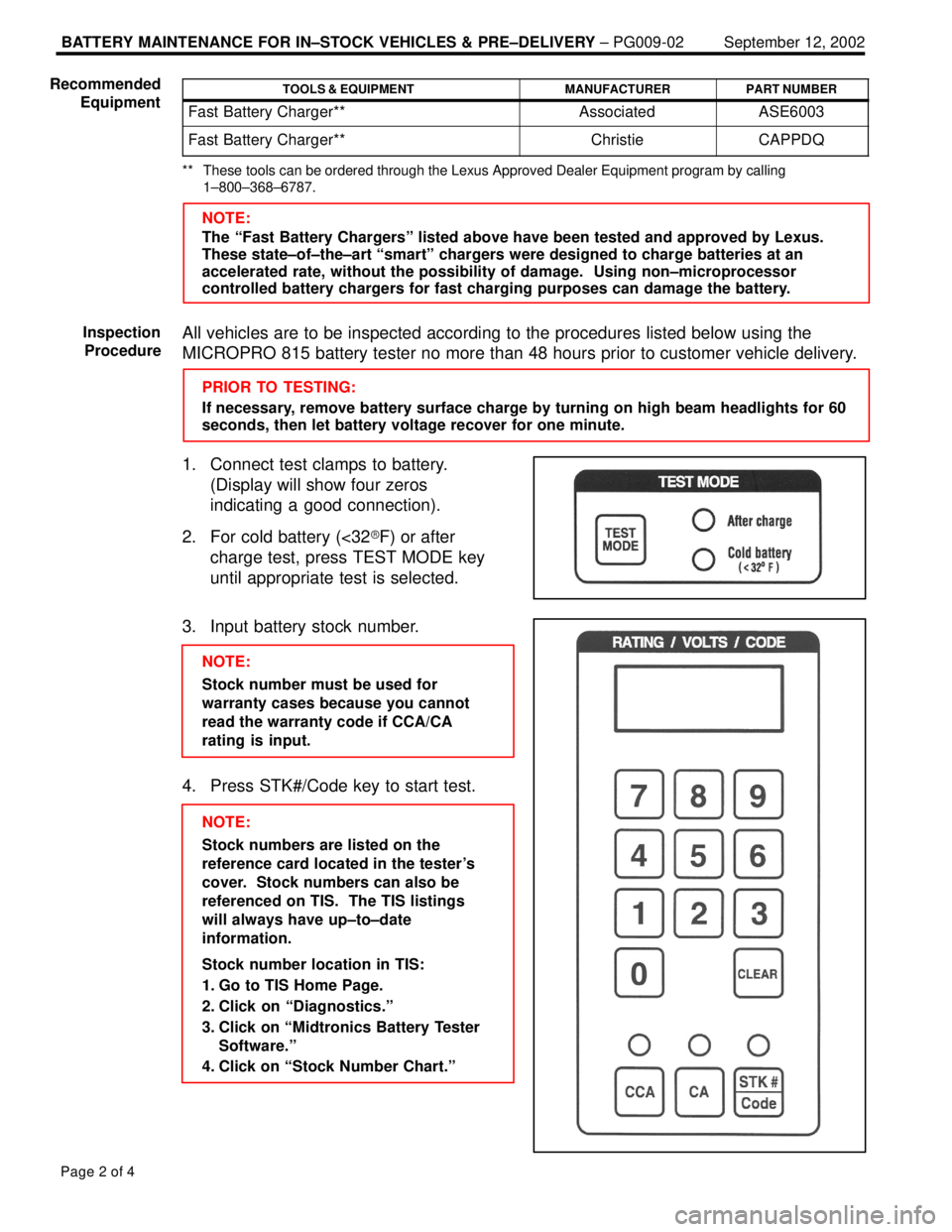
1. Connect test clamps to battery.
(Display will show four zeros
indicating a good connection).
2. For cold battery (<32�F) or after
charge test, press TEST MODE key
until appropriate test is selected.
3. Input battery stock number.
NOTE:
Stock number must be used for
warranty cases because you cannot
read the warranty code if CCA/CA
rating is input.
4. Press STK#/Code key to start test.
NOTE:
Stock numbers are listed on the
reference card located in the tester's
cover. Stock numbers can also be
referenced on TIS. The TIS listings
will always have up±to±date
information.
Stock number location in TIS:
1. Go to TIS Home Page.
2. Click on ªDiagnostics.º
3. Click on ªMidtronics Battery Tester
Software.º
4. Click on ªStock Number Chart.º Recommended
Equipment
Inspection
Procedure
Page 921 of 969
FAILURE TO INITIALIZE CAN INTERFACE MODULE ± SS001-05 Revised March 11, 2005
Page 4 of 6
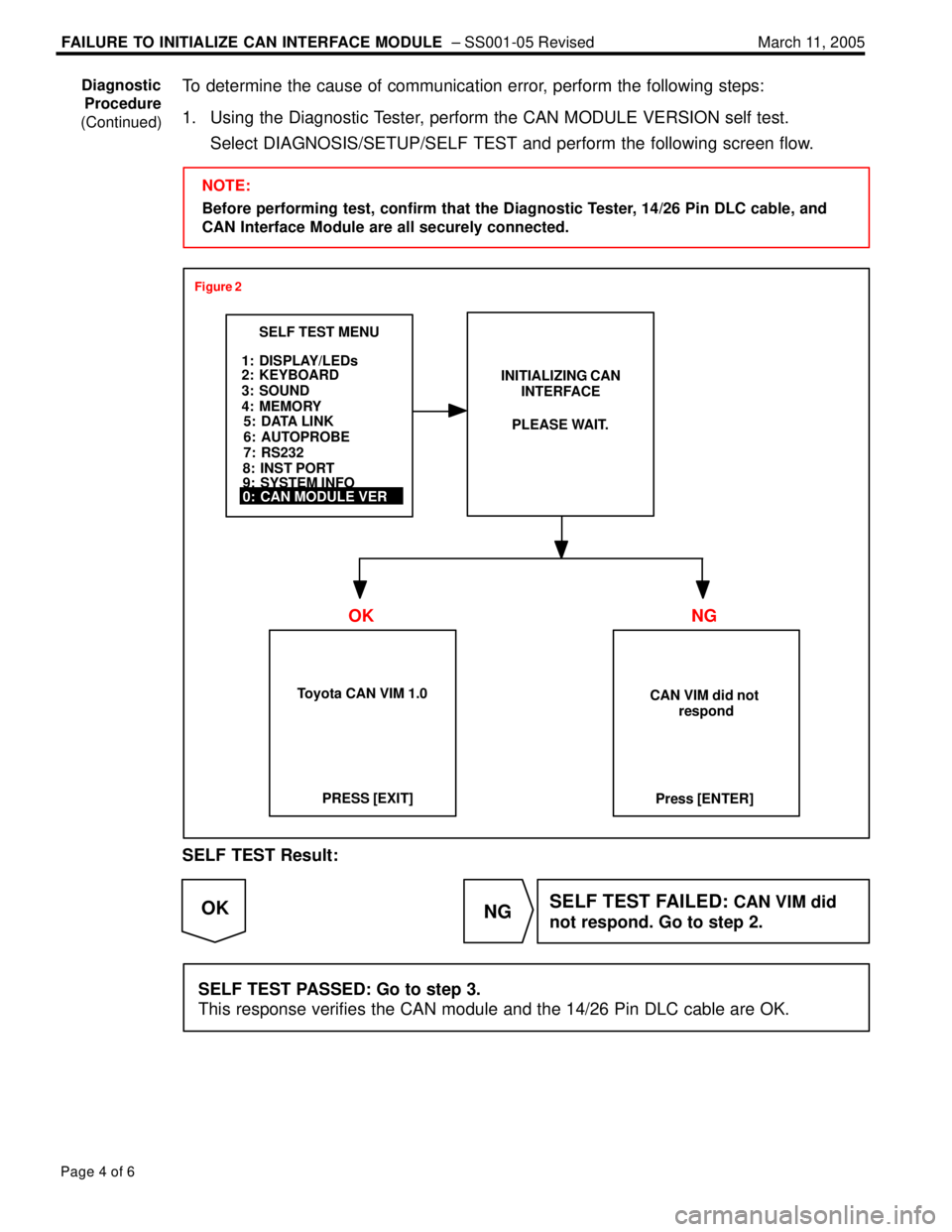
To determine the cause of communication error, perform the following steps:
1. Using the Diagnostic Tester, perform the CAN MODULE VERSION self test.
Select DIAGNOSIS/SETUP/SELF TEST and perform the following screen flow.
NOTE:
Before performing test, confirm that the Diagnostic Tester, 14/26 Pin DLC cable, and
CAN Interface Module are all securely connected.
SELF TEST MENU
1: DISPLAY/LEDs
2: KEYBOARD
3: SOUND
4: MEMORYINITIALIZING CAN
INTERFACE
0: CAN MODULE VER5: DATA LINK
6: AUTOPROBE
7: RS232
8: INST PORT
9: SYSTEM INFOPLEASE WAIT.
CAN VIM did not
respond
Press [ENTER] Toyota CAN VIM 1.0PRESS [EXIT]
Figure 2
OK NG
SELF TEST Result:
NG OKSELF TEST FAILED: CAN VIM did
not respond. Go to step 2.
SELF TEST PASSED: Go to step 3.
This response verifies the CAN module and the 14/26 Pin DLC cable are OK.
Diagnostic
Procedure
(Continued)
Page 922 of 969
FAILURE TO INITIALIZE CAN INTERFACE MODULE ± SS001-05 Revised March 11, 2005
Page 5 of 6
2. Perform the Data Link Self Test (Figure 3).
5: DATA LINK
6: AUTOPROBE
7: RS2325: DATA LINK
SELF TEST MENU
1: DISPLAY/LEDs
2: KEYBOARD
3: SOUND
4: MEMORYDATA LINK SELF±TEST
8: INST PORT
9: SYSTEM INFO
The Data Link Self Test
Adapter (P/N 02001607)
is included in the Lexus
Diagnostic Tool Set
(P/N LEX220036)
Install Data Link
Self±Test Adapter
to the end of the
Data Link Cable
DATA LINK SELF±TEST
Press [EXIT]**FAILED**PRESS [EXIT]
Press [ENTER]
DATA LINK SELF±TEST
Now testing the
data link.
Press [EXIT] to QUITTo test cable
integrity, please
flex cable
repeatedly.
(15±20 seconds)
DATA LINK SELF±TEST
PASSED
FAILED
SDL 1
Check Self±Test
Adapter Installation
Figure 3
NG OK
DATA LINK SELF TEST Result:
NG OK
DATA LINK TEST FAILED:
Replace 14/26 Pin DLC cable
(P/N 02001637).
DATA LINK TEST PASSED: Replace CAN Interface Module (P/N 01002744).
Diagnostic
Procedure
(Continued)