2005 Hyundai Azera ESP
[x] Cancel search: ESPPage 88 of 297

1
FEATURES OF YOUR HYUNDAI
71
The needle on the engine coolant tem- perature gauge should stay in the nor-mal range. If it moves across the dial to "H" (Hot), pull over and stop as soon as possible and turn off the engine. Thenopen the hood and check the coolant level (See "If the engine overheats" on the page 3-4.) and the water pumpdrive belt . If you suspect cooling sys- tem trouble, have your cooling system checked by a Hyundai dealer as soonas possible. B300A01A-GAT SPEEDOMETER Your Hyundai's speedometer is cali- brated in kilometers per hour or milesper hour.B300A01TG
B300A02TG
Conventional Type
Supervision Type
!
B290A03A-AAT ENGINE COOLANT TEMPERATURE GAUGE
WARNING:
Never remove the radiator cap when the engine is hot. The engine cool-ant is under pressure and could erupt and cause severe burns. Wait until the engine is cool before re-moving the radiator cap. B290A01TG
Conventional Type Supervision Type
Page 92 of 297
1
FEATURES OF YOUR HYUNDAI
75
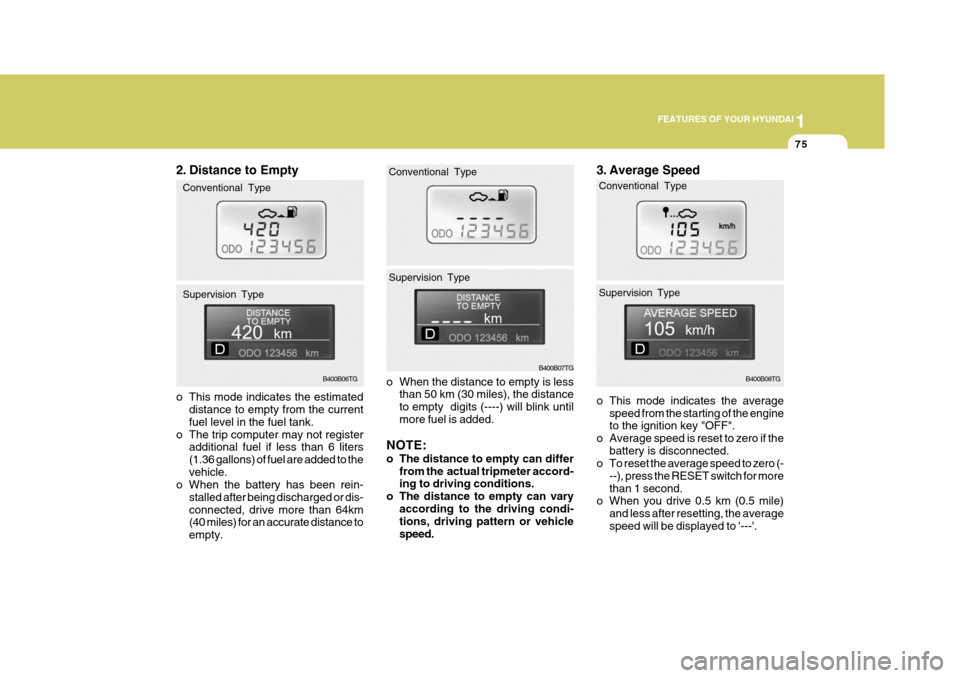
o When the distance to empty is less than 50 km (30 miles), the distance to empty digits (----) will blink untilmore fuel is added.
NOTE:
o The distance to empty can differ from the actual tripmeter accord- ing to driving conditions.
o The distance to empty can vary
according to the driving condi-tions, driving pattern or vehicle speed.
B400B07TG
Conventional TypeB400B08TG
3. Average Speed
o This mode indicates the average
speed from the starting of the engine to the ignition key "OFF".
o Average speed is reset to zero if the battery is disconnected.
o To reset the average speed to zero (-
--), press the RESET switch for more than 1 second.
o When you drive 0.5 km (0.5 mile)
and less after resetting, the averagespeed will be displayed to '---'.
Conventional Type Supervision Type
Supervision Type
2. Distance to Empty
o This mode indicates the estimated
distance to empty from the current fuel level in the fuel tank.
o The trip computer may not register additional fuel if less than 6 liters(1.36 gallons) of fuel are added to thevehicle.
o When the battery has been rein-
stalled after being discharged or dis-connected, drive more than 64km (40 miles) for an accurate distance to empty.B400B06TG
Conventional Type Supervision Type
Page 111 of 297
1FEATURES OF YOUR HYUNDAI
94
oON In the "ON" position, the light stays on at all times.
CAUTION:
Do not leave this button pressed foran extended period of time when the vehicle is not running.
!
!
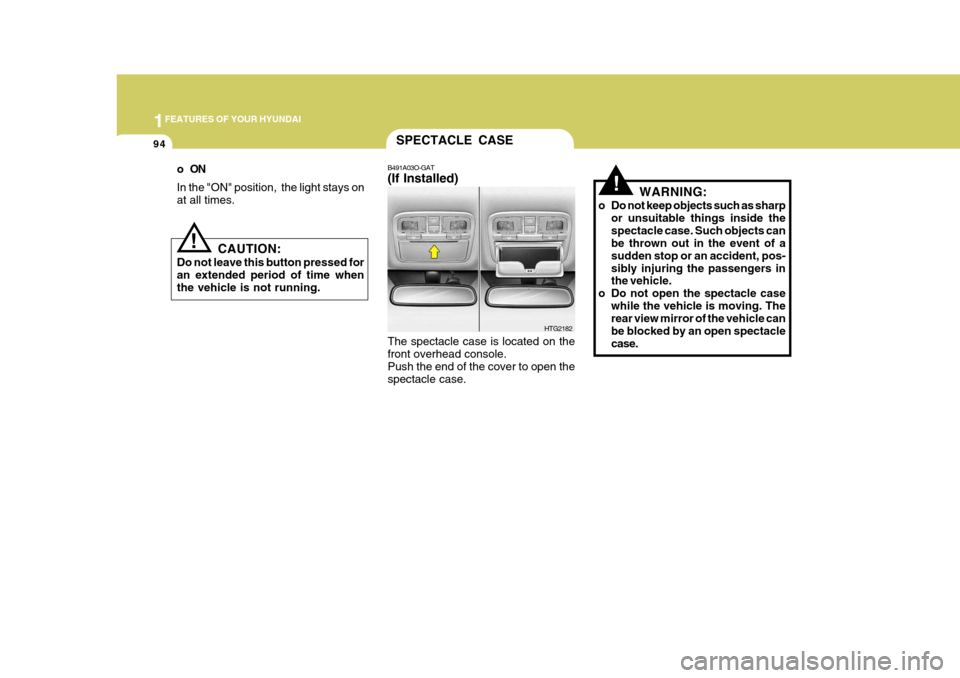
SPECTACLE CASE
B491A03O-GAT (If Installed) The spectacle case is located on the front overhead console. Push the end of the cover to open thespectacle case. WARNING:
o Do not keep objects such as sharp or unsuitable things inside thespectacle case. Such objects can be thrown out in the event of a sudden stop or an accident, pos-sibly injuring the passengers in the vehicle.
o Do not open the spectacle case while the vehicle is moving. Therear view mirror of the vehicle can be blocked by an open spectaclecase.
HTG2182
Page 114 of 297
1
FEATURES OF YOUR HYUNDAI
97
!
CAUTION:
o Do not operate the switch continu- ously for an unnecessary length of time.
o Scraping ice from the mirror face
could cause permanent damage.To remove any ice, use a sponge, soft cloth or approved de-icer.!
WARNING:
Be careful when judging the size or distance of any object seen in the passenger side rearview mirror. It is a convex mirror with a curvedsurface. Any objects seen in this mirror are closer than they appear.
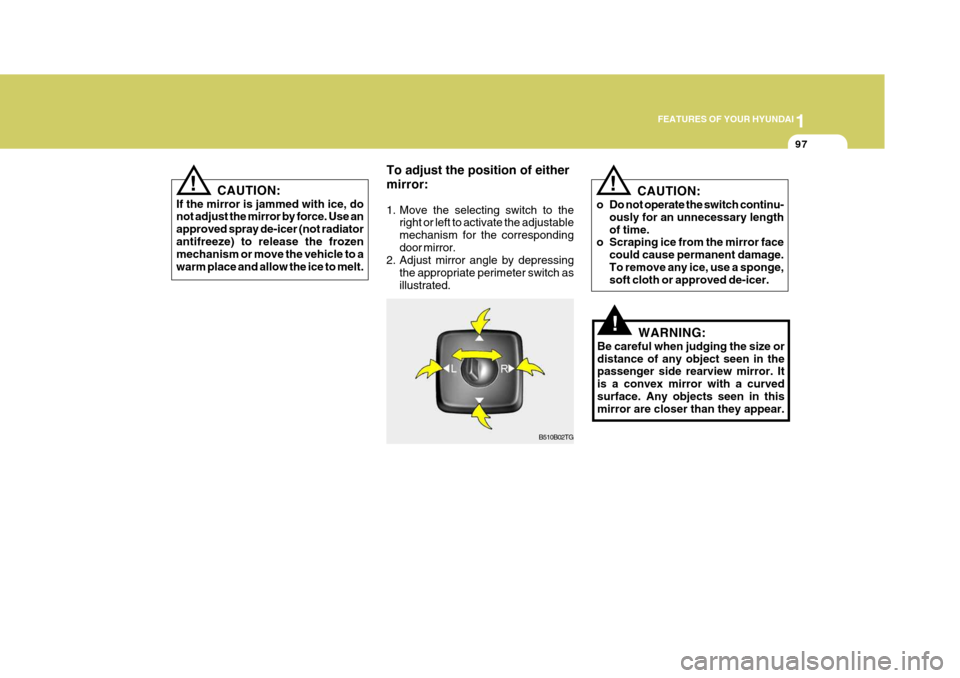
To adjust the position of either mirror:
1. Move the selecting switch to the
right or left to activate the adjustable mechanism for the correspondingdoor mirror.
2. Adjust mirror angle by depressing
the appropriate perimeter switch asillustrated.
B510B02TG
! CAUTION:
If the mirror is jammed with ice, do not adjust the mirror by force. Use an approved spray de-icer (not radiatorantifreeze) to release the frozen mechanism or move the vehicle to a warm place and allow the ice to melt.
Page 121 of 297
1FEATURES OF YOUR HYUNDAI
104
o Automotive fuels are flammable/
explosive materials. When refuel- ing, please note the following guidelines carefully. Failure tofollow these guidelines may re- sult in severe personal injury, se- vere burns or death by fire orexplosion.
- Before refueling always note thelocation of the Emergency Gaso- line Shut-Off, if available, at the gas station facility.
- Before touching the fuel nozzle
or fuel filler cap, you shouldeliminate potentially dangerous static electricity discharge bytouching another metal part of the front of the vehicle, a safe distance away from the fuel fillerneck, nozzle, or other gas source.
- Do not get back into a vehicle
once you have begun refueling.Do not touch, rub or slide against any item or fabric (polyester,satin, nylon, etc.) capable of pro- ducing static electricity. Static electricity discharge can ignitefuel vapors resulting in explo- sion.If you must re-enter the vehicle,
you should once again elimi- nate potentially dangerous static electricity discharge by touch-ing a metal part of the vehicle, away from the fuel filler neck, nozzle or other gasoline source.
- When using a portable fuel con- tainer be sure to place the con-tainer on the ground prior torefueling. Static electricity dis- charge from the container can ignite fuel vapors causing a fire.Once refueling has begun, con- tact with the vehicle should be maintained until the filling iscomplete. Use only portable fuel containers designed to carry and store gasoline.
- Do not use cellular phones around a gas station or whilerefueling any vehicle. Electriccurrent and/or electronic inter- ference from cellular phones can potentially ignite fuel vaporscausing a fire. If you must use your cellular phone use it in a place away from the gas station. - When refueling always shut the
engine off. Sparks produced byelectrical components related tothe engine can ignite fuel va- pors causing a fire. Always in- sure that the engine is OFF be-fore and during refueling. Once refueling is complete, check to make sure the fuel filler cap anddoor are securely closed, before starting the engine.
- Do not light any fire around a gas station. DO NOT use matchesor a lighter and DO NOT SMOKE or leave a lit cigarette in yourvehicle while at a gas station especially during refueling. Automotive fuel is highly flam-mable and can, when ignited, result in explosion by flames.
- If a fire breaks out during refuel- ing, leave the vicinity of the ve-hicle, and immediately contact the manager of the gas stationor contact the police and local fire department. Follow any safety instructions they provide.
Page 128 of 297

1
FEATURES OF YOUR HYUNDAI
111
B660F01TG-GAT To Reset at a Slower Speed
B660B02TG
B660E01NF-GAT To Reset at a Faster Speed
1. Push the control switch "RESUME
(ACCEL)" and hold it. If the control switch "RESUME(ACCEL)" is selected, the cruise "SET" indicator in the instrument cluster will illuminate.
2. Accelerate to desired speed and release the control switch. Whilethe control switch is held, the ve-hicle will gradually gain speed. 1. Push the control switch "SET
(COAST)" and hold it. While thecontrol switch is pushed, the vehiclespeed will gradually decrease. If the "SET(COAST)" switch is se- lected, the cruise "SET" indicatorlight in the instrument cluster will illuminate.
2. When the desired speed is obtained, release the control switch.
If the control switch "RESUME (ACCEL)" is selected, the cruise "SET"indicator in the instrument cluster will illuminate.
!WARNING:
o Keep the cruise control ON/OFF switch off when not using the cruise control.
o Use the cruise control system only when traveling on open high-ways in good weather.
o Do not use the cruise control when it may not be safe to keepthe car at a constant speed, forinstance, driving in heavy or vary- ing traffic, or on slippery (rainy, icy or snow-covered) or windingroads or over 6% up-hill or down- hill roads.
o Pay particular attention to the driving conditions whenever us-ing the cruise control system.
o During normal cruise control op- eration, when the "SET" switchis activated or reactivated after applying the brakes, the cruisecontrol will energize after ap- proximately 3 seconds. This de- lay is normal.
Page 155 of 297

1FEATURES OF YOUR HYUNDAI
138
!
MIDDLE Control To increase the MIDDLE, rotate the knob clockwise, while to decrease the MIDDLE, rotate the knob counterclock- wise. TREBLE Control To increase the TREBLE, rotate the knob clockwise, while to decrease theTREBLE, rotate the knob counterclock- wise. FADER Control Turn the control knob clockwise to emphasize rear speaker sound (front speaker sound will be attenuated).When the control knob is turned coun- terclockwise, front speaker sound will be emphasized (rear speaker sound willbe attenuated). BALANCE Control Rotate the knob clockwise to empha- size right speaker sound (Left speaker sound will be attenuated). When the control knob is turned counter clockwise, left speaker sound will beemphasized (Right speaker sound will be attenuated). 8. PRESET STATION Select But-
tons
Six (6) stations for AM (MW, LW), FM1 and FM2 respectively can be preset in the electronic memory circuit. HOW TO PRESET STATIONS Six AM and twelve FM stations may be programmed into the memory of theradio. Then, by simply pressing the
band select button and/or one of the six station select buttons, you may recallany of these stations instantly. To program the stations, follow these steps:
o Press band selector to set the band for AM (MW, LW), FM1 and FM2.
o Select the desired station to be stored
by seek or manual tuning.
o Determine the preset station select
button you wish to use to access thatstation. o Press the station select button for
more than two seconds. Beep soundwill be heard while depressing the button. You should then release the button, and proceed to program thenext desired station. A total of 24 stations can be programmed by se-
lecting one AM (MW, LW) and twoFM station per button.
o When completed, any preset station
may be recalled by selecting AM,FM1 or FM2 band and the appropri-ate station button.
CAUTION:
o Do not place beverages close to the audio system. The playback mechanism may be damaged if you spill them.
o Do not impact on the audio sys- tem, or the playback mechanism
could be damaged.
Page 162 of 297

1
FEATURES OF YOUR HYUNDAI
145
!
MIDDLE Control To increase the MIDDLE, rotate the knob clockwise, while to decrease theMIDDLE, rotate the knob counterclock- wise. TREBLE Control To increase the TREBLE, rotate the knob clockwise, while to decrease the TREBLE, rotate the knob counterclock-wise. FADER Control Turn the control knob clockwise to emphasize rear speaker sound (frontspeaker sound will be attenuated). When the control knob is turned coun- terclockwise, front speaker sound willbe emphasized (rear speaker sound will be attenuated). BALANCE Control Rotate the knob clockwise to empha- size right speaker sound. (Left speaker sound will be attenuated) When the control knob is turned counterclockwise, left speaker sound will beemphasized (Right speaker sound will be attenuated).
8. PRESET STATION Select But-
tons
Six (6) stations for AM (MW, LW), FM1 and FM2 respectively can be preset in the electronic memory circuit. HOW TO PRESET STATIONS Six AM and twelve FM stations may be programmed into the memory of the radio. Then, by simply pressing the
band select button and/or one of the six
station select buttons, you may recall any of these stations instantly. To program the stations, follow thesesteps:
o Press band selector to set the band for AM (MW, LW), FM and FM2.
o Select the desired station to be stored by seek or manual tuning.
o Determine the preset station select button you wish to use to access thatstation. o Press the station select button for
more than two seconds. Beep sound will be heard while depressing the button. You should then release the button, and proceed to program thenext desired station. A total of 24 stations can be programmed by se- lecting one AM (MW, LW) and twoFM station per button.
o When completed, any preset station
may be recalled by selecting AM (MW, LW), FM1 or FM2 band and theappropriate station button.
CAUTION:
o Do not place beverages close to the audio system. The playback mechanism may be damaged if you spill them.
o Do not impact on the audio sys- tem, or the playback mechanismcould be damaged.