2005 Hyundai Azera ESP
[x] Cancel search: ESPPage 172 of 297

1
FEATURES OF YOUR HYUNDAI
155
6. Best Station Memory (BSM) Button
When the BSM button is pressed, the six channels from the highest electricfield intensity are selected next and stored in memory. The stations se- lected are stored in the sequence fre-quency from the first preset key. 7. EQ Button Press the EQ button to select the CLAS- SIC, POPS, ROCK, JAZZ and DE- FEAT MODE for the desired tone qual- ity. Each press of the button changesthe display as follows; HOW TO PRESET STATIONS Six AM(MW, LW) and twelve FM sta- tions may be programmed into thememory of the radio. Then, by simply pressing the AM(MW, LW) / FM select button and/or one of the six stationselect buttons, you may recall any of these stations instantly. To program the stations, follow these steps:
o Press AM(MW, LW)/FM selector to
set the band for AM(MW, LW), FM1and FM2.
o Select the desired station to be stored by seek or manual tuning.
o Determine the preset station select button you wish to use to access that station.
o Press the station select button for more than two seconds. A selectbutton indicator will show in the dis- play indicating which select buttonyou have depressed. The frequency display will flash after it has been stored into the memory. You shouldthen release the button, and proceed to program the next desired station. A total of 24 stations can be pro-grammed by selecting one AM(MW, LW) and two FM station per button. o When completed, any preset station
may be recalled by selecting AM(MW, LW), FM1 or FM2 band and the appropriate station button.
8. PRESET STATION Select But- tons
Six (6) stations for AM(MW, LW), FM1and FM2 respectively can be preset in the electronic memory circuit.
! CAUTION
o Do not place beverages close to the audio system. The audio sys- tem mechanism may be damaged if you spill them.
o Do not strike or allow anything to
impact the audio system, damageto the system mechanisms could occur.
CLASSIC POPS ROCK JAZZ DE-
FEAT
Page 185 of 297
2
Engine Exhaust Can Be Dangerous! ............................ 2-2
Before Starting the Engine ............................................ 2-3
Key Positions ................................................................ 2-4Starting ......................................................................... 2-5
Automatic Transaxle ..................................................... 2-5Anti-Lock Brake System (ABS) ................................... 2-10
Electronic Stability Program (ESP) ..............................2-11
Back Warning System ................................................. 2-12
Good Braking Practices .............................................. 2-13
Driving for Economy .................................................... 2-14
Smooth Cornering ........................................................ 2-16
Winter Driving .............................................................. 2-16
Trailer or Vehicle Towing ............................................. 2-19
DRIVING YOUR HYUNDAI
2
Page 193 of 297
2
DRIVING YOUR HYUNDAI
9
o Do not "ride" the brakes. This can
cause them to overheat and mal- function. Instead, when you are driv- ing down a long hill, slow down and shift to a lower gear. When you dothis, engine braking will help slow the car.
o Slow down before shifting to a lower gear. Otherwise, the lower gear maynot be engaged.
o Always use the parking brake. Do not depend on placing the transaxlein "P" to keep the car from moving.
o Exercise extreme caution when driv- ing on a slippery surface. Be espe-cially careful when braking, acceler- ating or shifting gears. On a slipperysurface, an abrupt change in ve- hicle speed can cause the drive wheels to lose traction and the ve-hicle to go out of control.
C090N03O-AAT Good Driving Practices
o Never move the gear selector lever
from "P" or "N" to any other position with the accelerator pedal de- pressed.
o Never move the gear selector lever into "P" when the vehicle is in mo-tion.
o Be sure the car is completely stopped before you attempt to shift into "R".
o Never take the car out of gear and coast down a hill. This may be ex- tremely hazardous. Always leave the car in gear when moving.
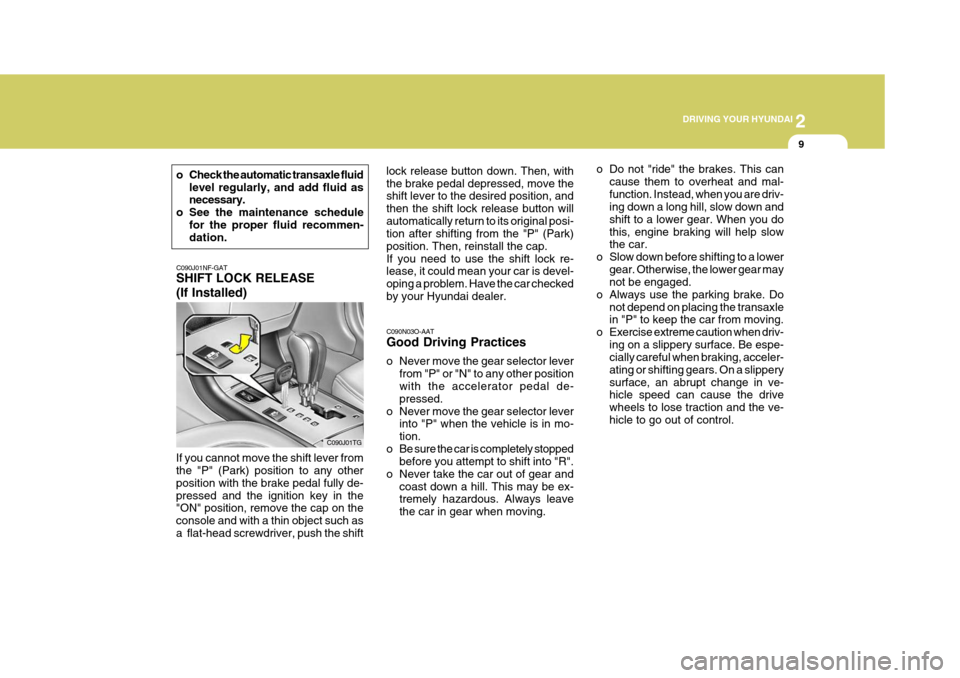
C090J01NF-GAT SHIFT LOCK RELEASE (If Installed)
If you cannot move the shift lever from the "P" (Park) position to any other position with the brake pedal fully de-pressed and the ignition key in the "ON" position, remove the cap on the console and with a thin object such asa flat-head screwdriver, push the shift C090J01TGlock release button down. Then, withthe brake pedal depressed, move the shift lever to the desired position, and then the shift lock release button willautomatically return to its original posi- tion after shifting from the "P" (Park) position. Then, reinstall the cap.If you need to use the shift lock re- lease, it could mean your car is devel- oping a problem. Have the car checkedby your Hyundai dealer.
o Check the automatic transaxle fluid
level regularly, and add fluid as necessary.
o See the maintenance schedule for the proper fluid recommen-dation.
Page 194 of 297
2 DRIVING YOUR HYUNDAI
10
!!
ANTI-LOCK BRAKE SYSTEM (ABS)
C120A01FC-GAT (If Installed) The Anti-Lock Brake System (ABS) is designed to prevent wheel lock-upduring sudden braking or on hazard- ous road surfaces. The ABS control module monitors the wheel speed andcontrols the pressure applied to each brake. Thus, in emergency situations or on slick roads, ABS will increasevehicle control during braking. NOTE:
o A click sound may be heard in the
engine compartment when the ve- hicle begins to move after the en- gine is started. These conditionsare normal and indicate that the anti-lock brake system (Electronic Stability Program) is functioningproperly.
o During ABS (ESP) operation, a
slight pulsation may be felt in thebrake pedal when the brakes are applied. Also, a noise may be heard in the engine compartment whilebraking. These conditions are nor- mal and indicate that the anti-lock brake system (Electronic StabilityProgram System) is functioning properly. WARNING:
ABS (ESP) will not prevent accidents due to improper or dangerous driv-ing maneuvers. Even though vehicle control is improved during emer- gency braking, always maintain a safe distance between you and ob- jects ahead. Vehicle speeds should always be reduced during extreme road conditions. The braking distance for cars equipped with an anti-lock braking system (Electronic Stability Program System) may be longer than for those without it in the following road con- ditions. During these conditions the vehicle should be driven at reduced speeds.
o Rough, gravel or snow-covered roads.
o With tire chains installed.
o On roads where the road surface is pitted or has different surfaceheight.
The safety features of an ABS (ESP)equipped vehicle should not be tested by high speed driving or cornering. This could endanger the safety of yourself or others.
WARNING:
o Avoid high cornering speeds.
o Do not make quick steering wheel movements, such as sharp lane changes or fast, sharp turns.
o Always wear your seat belts.
In a collision, an unbelted personis significantly more likely to die than a person wearing a seat belt.
o The risk of rollover is greatly in-
creased if you lose control ofyour vehicle at highway speeds.
o Loss of control often occurs if
two or more wheels drop off theroadway and the driver oversteers to reenter the roadway.
o In the event your vehicle leaves the roadway, do not steer sharply.Instead, slow down before pullingback into the travel lanes.
o Never exceed posted speed limits.
o Excessive depressing of the ac-
celerator pedal in slippery driv- ing conditions such as pulling out of deep snow or mud maycause severe damage to the transaxle. Rocking the vehicle is not recommended. Rather, usean appropriate towing method.
Page 195 of 297
2
DRIVING YOUR HYUNDAI
11
!
CAUTION:
Driving with varying tire or wheel size may cause the ESP system to malfunction. When replacing tires, make sure they are the same size asyour original tires. WARNING:
Electronic stability program is onlya driving aid; all normal precau- tions for driving in inclement weather and on slippery road sur-faces should be observed.!
ELECTRONIC STABILITY PROGRAM (ESP)
C310A01JM-AAT (If Installed) ESP checks where you are steering and where the vehicle is actually go-ing. ESP applies the brakes at indi- vidual wheels and intervenes in the engine management system to stabi-lize the vehicle. The Electronic Stability Program (ESP) system is an electronic system de- signed to help the driver maintain ve- hicle control under adverse conditions.It is not a substitute for safe driving practices. Factors including speed, road conditions and driver steeringinput can all affect whether ESP will be effective in preventing a loss of con- trol. It is still your responsibility to driveand corner at reasonable speeds and to leave a sufficient margin of safety.
B310A01TG-1
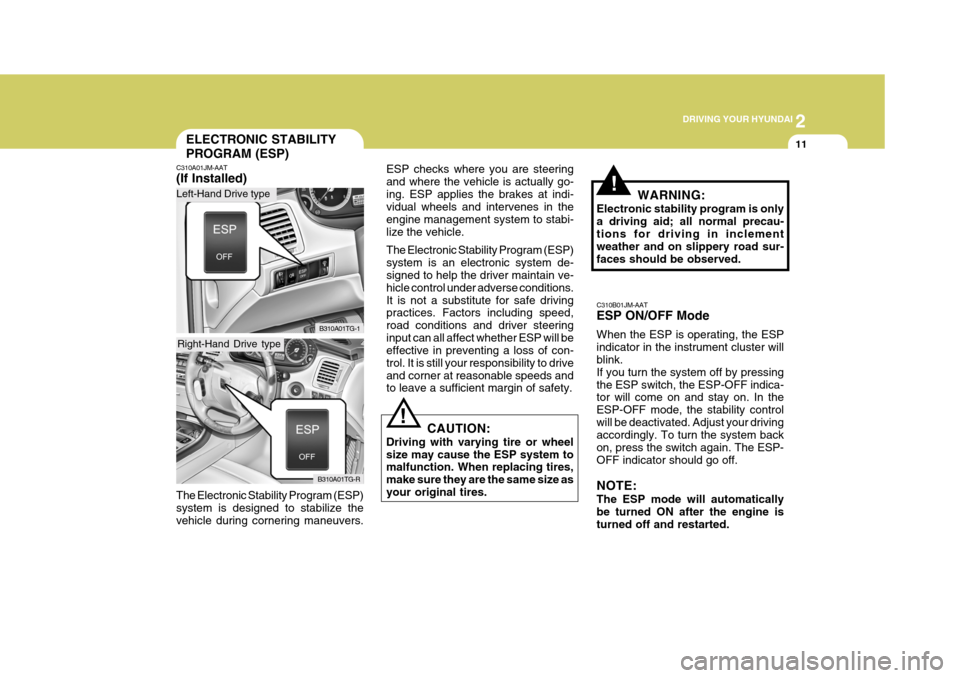
C310B01JM-AAT ESP ON/OFF Mode When the ESP is operating, the ESP indicator in the instrument cluster will blink. If you turn the system off by pressingthe ESP switch, the ESP-OFF indica- tor will come on and stay on. In the ESP-OFF mode, the stability controlwill be deactivated. Adjust your driving accordingly. To turn the system back on, press the switch again. The ESP-OFF indicator should go off. NOTE: The ESP mode will automatically be turned ON after the engine is turned off and restarted.
The Electronic Stability Program (ESP) system is designed to stabilize thevehicle during cornering maneuvers.
B310A01TG-R
Left-Hand Drive type
Right-Hand Drive type
Page 196 of 297

2 DRIVING YOUR HYUNDAI
12
C310D01JM-AAT Indicators and Warning The indicators should illuminate when the ignition key is turned to ON orSTART but should go out after three seconds. If the indicators do not illuminate, orthe ESP or ESP-OFF indicator does not go out after 3 seconds, have the vehicle checked by an authorizeddealer. Should there be any unusual condi- tions in the device while driving, ESP- OFF indicator illuminates as a warn- ing.If ESP-OFF indicator illuminates, pull your car to a safe place and stop the engine.Then, start the engine again to check if the ESP-OFF indicator goes out. If the indicator remains lit even after the engine has been started, have your car checked by an authorizedHyundai dealer.
BACK WARNING SYSTEM
C400A01P-GAT (If Installed) The back warning system assists the driver during backward movement ofthe vehicle by chiming if any object is sensed within the distance of 1200 mm (47 in.) behind the vehicle. Thissystem is only a supplemental system. Sensor
HTG2187 NOTE:
o Back warning system should only
be considered as a supplemen- tary function. The driver mustcheck the rearview.
o The audible warning signal can
be different depending on theobjects.
o The audible warning signal might
not activate in case the sensor isfrozen or stained with dirt or mud.
o There is a chance of malfunction
of the back warning system whendriving in uneven surfaces such as woods, gravel road, jagged road, or gradient.
o Do not push, or scratch the sur- face of the sensor. This will likelydamage the covering.
o The sensor system might not rec- ognize sharp objects, thick win-ter clothes or sponges whichabsorb the frequency.
o Clean dirty sensors with a soft
sponge and clean water.
o When more than two objects are sensed at the same time, the clos-est one will be recognized first.
Page 198 of 297

2 DRIVING YOUR HYUNDAI
14DRIVING FOR ECONOMY
o Don't coast down hills with the car out of gear. This is extremely haz- ardous. Keep the car in gear at all times, use the brakes to slow down, then shift to a lower gear so thatengine braking will help you main- tain a safe speed.
o Don't "ride" the brake pedal. Rest- ing your foot on the brake pedalwhile driving can be dangerous be- cause it can result in the brakesoverheating and losing their effec- tiveness. It also increases the wear of thebrake components.
o If a tire goes flat while you are
driving, apply the brakes gently andkeep the car pointed straight ahead while you slow down. When you are moving slowly enough for it to besafe to do so, pull off the road and stop in a safe place.
o If your car is equipped with an auto- matic transaxle, don't let your carcreep forward. To avoid creeping forward, keep your foot on the brakepedal when the car is stopped.
o Use caution when parking on a hill.
Engage the parking brake and placethe gear selector lever in "P" (auto- matic transaxle) or in first or reversegear (manual transaxle). If your caris facing downhill, turn the front wheels into the curb to help keep the car from rolling. If your car is facinguphill, turn the front wheels away from the curb to help keep the car from rolling. If there is no curb or if itis required by other conditions to keep the car from rolling, block the wheels.
o Under some conditions your park- ing brake can freeze in the engagedposition. This is most likely to hap-pen when there is an accumulation of snow or ice around or near the rear brakes or if the brakes are wet.If there is a risk that the parking brake may freeze, apply it only tem- porarily while you put the gear se-lector lever in "P" (automatic) or in first or reverse gear (manual transaxle) and block the rear wheelsso the car cannot roll. Then release the parking brake.
o Do not hold the vehicle on the up- grade with the accelerator pedal.This can cause the transaxle to overheat. Always use the brakepedal or parking brake. C140A01A-AAT You can save fuel and get more miles from your car if you follow these sug- gestions:
o Drive smoothly. Accelerate at a
moderate rate. Don't make "jack- rabbit" starts or full-throttle shiftsand maintain a steady cruising speed. Don't race between stop- lights. Try to adjust your speed tothat of the other traffic so you don't have to change speeds unneces- sarily. Avoid heavy traffic wheneverpossible. Always maintain a safe distance from other vehicles so you can avoid unnecessary braking. Thisalso reduces brake wear.
o Drive at a moderate speed. The
faster you drive, the more fuel yourcar uses. Driving at a moderate speed, especially on the highway, is one of the most effective ways toreduce fuel consumption.
o Don't "ride" the brake or clutch pedal.
This can increase fuel consumptionand also increase wear on these components. In addition, driving with
Page 199 of 297

2
DRIVING YOUR HYUNDAI
15
o Keep your car clean. For maximum service, your Hyundai should be kept clean and free of corrosive materials. It is especially important that mud, dirt, ice, etc. not be al-lowed to accumulate on the under- side of the car. This extra weight can result in increased fuel con-sumption and also contribute to cor- rosion.
o Travel lightly. Don't carry unneces- sary weight in your car. Weight re-duces fuel economy.
o Don't let the engine idle longer than necessary. If you are waiting (andnot in traffic), turn off your engine and restart only when you're readyto go.
o Remember, your Hyundai does not
require extended warm-up. As soonas the engine is running smoothly, you can drive away. In very cold weather, however, give your enginea slightly longer warm-up period.
your foot resting on the brake pedalmay cause the brakes to overheat,which reduces their effectiveness and may lead to more serious con- sequences.
o Take care of your tires. Keep them inflated to the recommended pres-sure. Incorrect inflation, either toomuch or too little, results in unnec- essary tire wear. Check the tire pres- sures at least once a month.
o Be sure that the wheels are aligned correctly. Improper alignment canresult from hitting curbs or drivingtoo fast over irregular surfaces. Poor alignment causes faster tire wear and may also result in other prob-lems as well as greater fuel con- sumption.
o Keep your car in good condition. For
better fuel economy and reducedmaintenance costs, maintain your car in accordance with the mainte-nance schedule in Section 5. If you drive your car in severe conditions, more frequent maintenance is re-quired (see Section 5 for details). o Don't "lug" or "over-rev" the engine.
Lugging is driving too slowly in too high a gear resulting in the engine bucking. If this happens, shift to alower gear. Over-revving is racing the engine beyond its safe limit. This can be avoided by shifting atthe recommended speeds.
o Use your air conditioning sparingly.
The air conditioning system is oper-ated by engine power so your fuel economy is reduced when you use it.