Page 61 of 205
�µ
�µ
�µ �µ
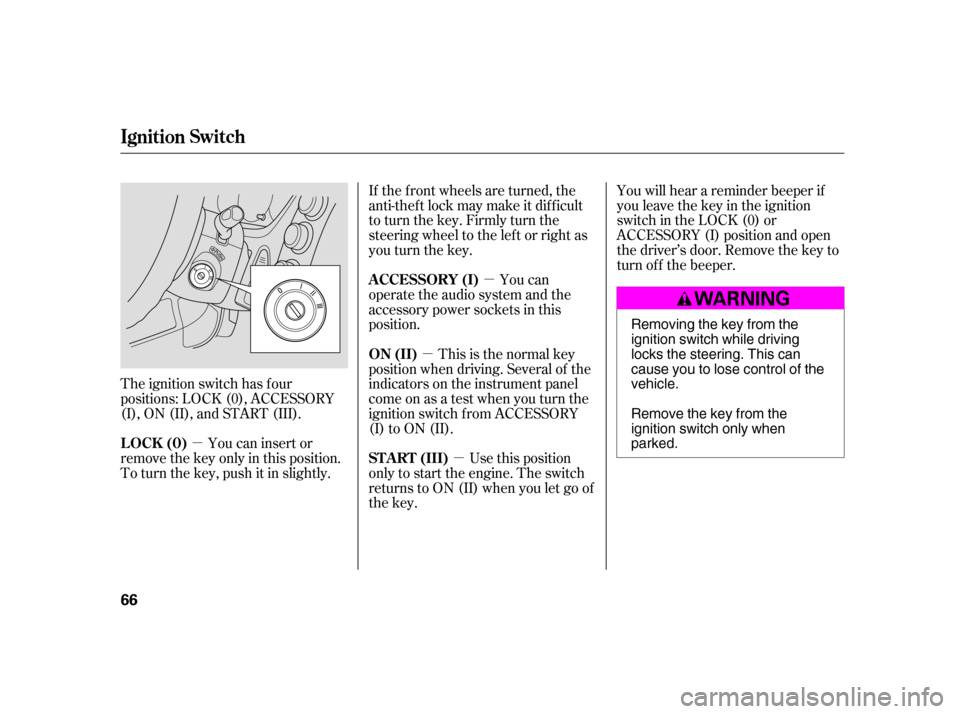
The ignition switch has f our
positions: LOCK (0), ACCESSORY
(I), ON (II), and START (III). If the f ront wheels are turned, the
anti-thef t lock may make it dif f icult
to turn the key. Firmly turn the
steering wheel to the lef t or right as
you turn the key.
You can
operate the audio system and the
accessory power sockets in this
position.
Use this position
only to start the engine. The switch
returns to ON (II) when you let go of
the key. You will hear a reminder beeper if
you leave the key in the ignition
switch in the LOCK (0) or
ACCESSORY (I) position and open
thedriver’sdoor.Removethekeyto
turn of f the beeper.
You can insert or
remove the key only in this position.
To turn the key, push it in slightly. This is the normal key
position when driving. Several of the
indicators on the instrument panel
come on as a test when you turn the
ignition switch f rom ACCESSORY
(I) to ON (II).
A CCESSORY (I)
ST A RT (III)
LOCK (0) ON (II)
Ignition Switch
66 Removing the key from the
ignition switch while driving
locks the steering. This can
cause you to lose control of thevehicle.
Remove the key from the
ignition switch only whenparked.
�����—�����—�
���y�
�������������y���
�(���)�������y���������y
Page 83 of 205

Air conditioning, as it cools, removes
moisture from the air. When used in
combination with the heater, it
makes the interior warm and dry.
This setting is suitable f or all driving
conditions whenever the outside
temperature is above 32°F (0°C).To remove f og f rom the inside of the
windows:
Select . The system
automatically switches to Fresh
Air mode and turns on the A/C.
The A/C indicator will not come
on in U.S. vehicles.
Select .
Set the f an and temperature
controls to maximum level.
To clear the windows f aster, you can
close the dashboard corner vents by
rotating the wheel below each vent.
This sends more warm air to the
windshield def roster vents. Once the
windshield is clear, select Fresh Air
mode to avoid f ogging the windows.
For your saf ety, make sure you have
a clear view through all the windows
bef ore driving.
Turn the fan on.
Turn on the air conditioning.
Select and Fresh Air mode.
Adjust the temperature control
dial or buttons to your pref erence.
Set the f an to high.
Select . The system
automatically switches to f resh air
mode and turns on the A/C. The
A/C indicator will not come on in
U.S. vehicles.
Adjust the temperature control
dial so the airflow feels warm.
Select to help clear the
rear window.
To increase airf low to the
windshield, close the corner vents.
When you switch to another mode
f rom , the A/C stays on.
Press the A/C button to turn it of f .
1.2.3.4.
1. 2. 3.
1.2. 3. 4.5.
Vents, Heating, and A/C
Dehumidif y the Interior T o Def og and Def rost T o Remove Exterior Frost or Ice
From the Windows
Features
89
�����—�����—�
���y�
����
��������y���
�(���)�������y���������y
Page 99 of 205
Cruise control allows you to maintain
asetspeedabove25mph(40km/h)
without keeping your f oot on the
accelerator pedal. It should be used
f or cruising on straight, open
highways. It is not recommended f or
city driving, winding roads, slippery
roads, heavy rain, or bad weather.Accelerate to the desired cruising
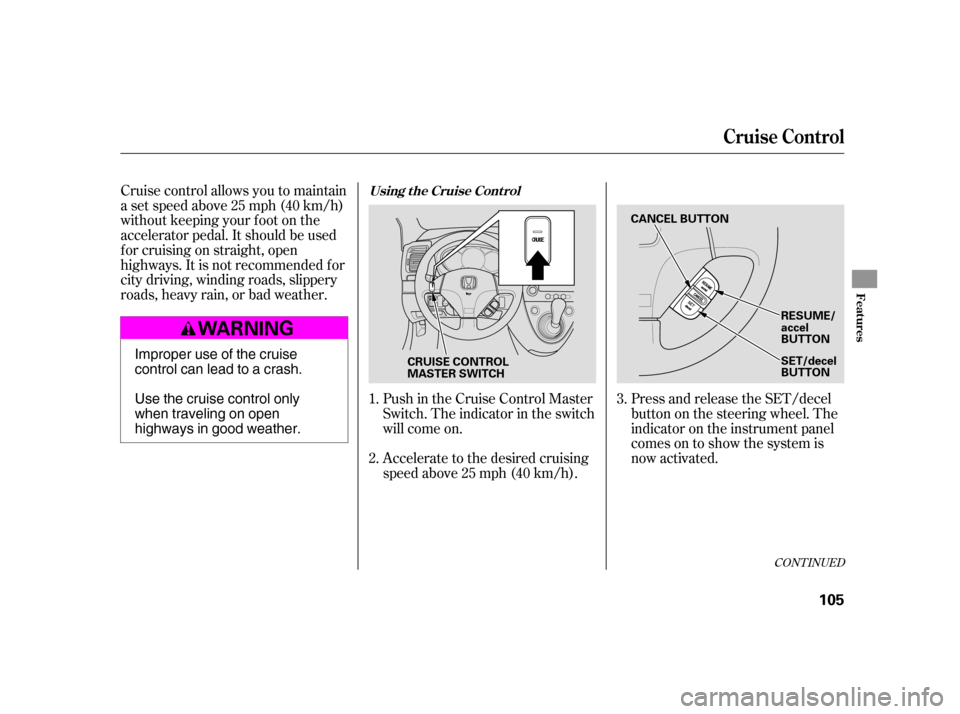
speedabove25mph(40km/h).Press and release the SET/decel
buttononthesteeringwheel.The
indicator on the instrument panel
comes on to show the system is
now activated.
Push in the Cruise Control Master
Switch. The indicator in the switch
will come on.
1. 2. 3.
CONT INUED
Cruise Control
Using t he Cruise Cont rol
Features
105
RESUME/ accel
BUTTON
SET/decel
BUTTON
CANCEL BUTTON
CRUISE CONTROL
MASTER SWITCH
Improper use of the cruise
control can lead to a crash.
Use the cruise control only
when traveling on open
highways in good weather.
�����—�����—�
���y�
����
����
���y���
�(���)�������y���
�����y
Page 101 of 205

Even with the cruise control turned
on, you can still use the accelerator
pedal to speed up f or passing. Af ter
completing the pass, take your foot
of f the accelerator pedal. The vehicle
will return to the set cruising speed.
Resting your f oot on the brake or
clutch pedal causes the cruise
control to cancel.Youcancancelthecruisecontrolin
any of these ways:
Tap the brake or clutch pedal.
Push the CANCEL button on the
steering wheel.
Push the Cruise Control Master
Switch. When you push the CANCEL
button, or tap the brake or clutch
pedal, the system remembers the
previously-set cruising speed. To
return to that speed, accelerate to
above25mph(40km/h)andthen
press and release the RESUME/
accel button. The CRUISE
CONTROL indicator comes on.
The vehicle will accelerate to the
same cruising speed as bef ore.
Pressing the Cruise Control Master
Switch turns the system completely
of f and erases the previous cruising
speed.
Cruise Control
Cancelling t he Cruise Cont rolResuming the Set Speed
Features
107
�����—�����—�
���y�
����
��������y���
�(���)�������y���
�
���y
Page 109 of 205

Some examples are:If you plan to modif y your vehicle,
consult your dealer.
Removing parts f rom your vehicle,
or replacing components with
non-Honda components could
seriously af f ect your vehicle’s
handling, stability, and reliability.
Lowering your vehicle with a
non-Honda suspension kit that
signif icantly reduces ground
clearance can allow the
undercarriage to hit speed bumps
or other raised objects, which
could cause the airbags to deploy.
Raising your vehicle with a
non-Honda suspension kit can
af f ect the handling and stability.
Non-Honda wheels, because they
are a universal design, can cause
excessive stress on suspension
components. Larger or smaller wheels and tires
can interf ere with the operation of
your vehicle’s anti-lock brakes and
other systems.
Modif ying your steering wheel or
any other part of your vehicle’s
saf ety systems could make the
systems inef f ective.
Modif ying Your Vehicle
A ccessories and Modif ications
116
�����—�����—�
���y�
����
��������y���
�(���)�������y���
�
���y
Page 114 of 205
Make sure all windows, mirrors,
and outside lights are clean and
unobstructed. Remove f rost, snow,
or ice.Check the seat adjustment (see
page ).
Check the adjustment of the
inside and outside mirrors (see
page ).
Check the steering wheel
adjustment (see page ).
Make sure the doors and the
hatch are securely closed and
locked.When you start the engine, check
the gauges and indicator lights in the
instrument panel (see page ).
Fasten your seat belt. Check that
your passengers have f astened
their seat belts (see page ).
Youshoulddothefollowingchecks
and adjustments bef ore you drive
your vehicle.
Check that the hood is f ully closed.
Check that the hatch is f ully
closed.
Visually check the tires. If a tire
looks low, use a gauge to check its
pressure.
Check that any items you may be
carrying are stored properly or
f astened down securely.
1. 2. 3. 4. 5. 6. 7. 8. 9.
71
63 51
79
10. 16
Preparing to Drive
122
�����—�����—�
���y�
����
��������y���
�(���)�������y���
�����y
Page 118 of 205

If the vehicle is f acing uphill, turn
the f ront wheels away f rom the
curb, and put the transmission in
f irst gear.
If the vehicle is f acing downhill,
turn the front wheels toward the
curb, and put the transmission in
reverse gear.
Make sure the parking brake is
f ully released bef ore driving away.
Driving with the parking brake
partially set can overheat or
damage the rear brakes.Your vehicle is not designed to tow a
trailer, attempting to do so can void
your warranties.
Never park over dry leaves, tall
grass, or other f lammable
materials. The hot three way
catalytic converter could cause
these materials to catch on fire.
Lock the doors.
Place any packages, valuables, etc.
in the cargo area, or take them
with you.
Turn of f the lights.
Make sure the moonroof and the
windows are closed.
Always use the parking brake when
you park your vehicle. Make sure
the parking brake is set f irmly or
your vehicle may roll if it is parked
on an incline.
Towing a Trailer
Parking T ips
Parking
Parking, Towing a Trailer
126
�����—�����—�
���y�
����
��������y���
�(���)�������y���
�����y
Page 119 of 205

Resting your f oot on the pedal keeps
the brakes applied lightly, builds up
heat, and reduces their ef f ectiveness.
It also keeps your brake lights on all
the time, conf using drivers behind
you.
Constant application of the brakes
when going down a long hill builds
up heat and reduces their ef f ective-
ness. Use the engine to assist the
brakes by taking your f oot of f the
accelerator and downshif ting to a
lower gear.Check the brakes after driving
through deep water. Apply the
brakes moderately to see if they f eel
normal. If not, apply them gently and
f requently until they do. Be extra
cautious in your driving.
If the brake pads need replacing, you
will hear a distinctive, metallic
screeching sound when you apply
the brake pedal. If you do not have
the brake pads replaced, they will
screech all the time. It is normal f or
the brakes to occasionally squeal or
squeak when you apply them.
Your vehicle is equipped with disc
brakes at all f our wheels. A power
assist helps reduce the ef f ort needed
on the brake pedal. The ABS helps
you retain steering control when
braking very hard.
The hydraulic system that operates
the brakes has two separate circuits.
Each circuit works diagonally across
the vehicle (the lef t-f ront brake is
connected with the right-rear brake,
etc.). If one circuit should develop a
problem, you will still have braking
at two wheels.
Braking System
Brake Wear Indicators
Braking System Design
Driving
127
�����—�����—�
���y�
����
��������y���
�(���)�������y���
�����y