Page 7 of 289

The most important things you need
to know about your airbags are:They are designed to supplement
the seat belts.
To do
their job, airbags must inf late with
tremendous f orce. So while
airbags help save lives, they can
cause minor injuries or more
serious or even fatal injuries if
occupants are not properly
restrained or sitting properly. Always wear
your seat belt properly, and sit
upright and as f ar back f rom the
steering wheel as possible while
allowing f ull control of the vehicle. A
f ront passenger should move their
seat as far back from the dashboard
as possible. The rest of this section gives more
detailed inf ormation about how you
can maximize your saf ety.
Remember, however, that no saf ety
system can prevent all injuries or
deaths that can occur in a severe
crash, even when seat belts are
properly worn and the airbags deploy.
Your Vehicle’s Saf ety Features
Airbags do not replace seat belts.
A irbags of f er no prot ect ion in rearimpact s, or minor f ront al or sidecollisions.
A irbags can pose hazards. What you should do:
10
�����—�����—�����y�
�������������y���
�(���%�������y�����
���y
Page 9 of 289

If you sit too close to the steering
wheel or dashboard, you can be
seriously injured by an inf lating f ront
airbag, or by striking the steering
wheel or dashboard.
The National Highway Traffic Safety
Administration and Transport
Canada recommend that drivers
allow at least 10 inches (25 cm)
between the center of the steering
wheel and the chest. In addition to
adjusting the seat, you can adjust the
steering wheel in and out (see page). Adjust the driver’s seat-back to a
comf ortable, upright position,
leaving ample space between your
chest and the airbag cover in the
center of the steering wheel.
Passengers with adjustable seat-
backs should also adjust their seat-
back to a comf ortable, upright
position.
If you cannot get f ar enough away
f rom the steering wheel and still
reach the controls, we recommend
that you investigate whether some
type of adaptive equipment may help. Once your seat is adjusted correctly,
rock it back and f orth to make sure
the seat is locked in position.
See page f or how to adjust the
f ront seats.
72
81
Protecting A dults and Teens
Adjust the Seat-Backs
3.
12
Sitting too close to a front
airbag can result in serious
injury or death if the front
airbags inflate.
Always sit as far back from the
front airbags as possible.
�����—�����—�����y�
�������������y���
�(���%�������y�����
���y
Page 17 of 289

Your airbag system includes:Two SRS (Supplemental Restraint
System) f ront airbags. The driver’s
airbag is stored in the center of
the steering wheel; the f ront
passengers’airbagisstoredinthe
dashboard. Both are marked ‘‘SRS
AIRBAG’’ (see page ).
Two side airbags, one f or the
driver and one f or a f ront
passenger. The airbags are stored
in the outer edges of the seat-
backs. Both are marked ‘‘SIDE
AIRBAG’’ (see page ).
Two side curtain airbags, one f or
each side of the vehicle. The
airbags are stored in the ceiling
above the side windows. The f ront
and rear pillars are marked ‘‘SIDE
CURTAIN AIRBAG’’ (see page ). 22
27 25
A irbag System Components
Additional Inf ormation About Your Airbags
20
(1)
(2)
(3) (4)(5)
(8)
(7)
(10) (11)
(9)
(6) (4)
(7)
(8)
(10)(5)
(12)
(6) Driver’s Seat Position Sensor
(7) Front Passenger’s Weight Sensors
(8) Front Impact Sensors
(9) Passenger Airbag Off Indicator
(10) Side Impact Sensors (1) Driver’s Airbag
(2) Front Passenger’s Airbag
(3) Control Unit
(4) Front Seat Belt Tensioners
(5) Side Airbags
(11) Occupant Position Detection System (OPDS) Sensors
(12) SRS Indicator
�����—�����—�����y�
���������
���y���
�(���%�������y���������y
Page 54 of 289

This indicator normally comes on f or
a f ew seconds when you turn the
ignition switch to ON (II). If it comes
on at any other time, there is a
problem in the ABS. If this happens,
have your vehicle checked at a
dealer. With this indicator on, your
vehicle still has normal braking
ability but no anti-lock f unction. For
more inf ormation, see page .This indicator has three f unctions: This indicator normally comes on f or
a f ew seconds when you turn the
ignition switch to ON (II). If it comes
on and stays on with the TCS
activation indicator, there is a
problem with the TCS. For more
inf ormation on the TCS, see page.
This indicator also comes on f or a
f ew seconds when you turn the
ignition switch to ON (II). If it comes
on and stays on at any other time, or
it does not come on when you turn
the ignition switch to ON (II), there
is a problem with the TCS. Take the
vehicle to your dealer to have it
checked. See page f or more
inf ormation on the TCS. If itcomesonandstaysonwhen
the TCS is on, it indicates that
there is a problem in the TCS.
It f lashes when the TCS is
regulating wheelspin.
Itcomesonasareminderthatyou
have turned off the traction
control system (TCS).
1. 2. 3.
185 187
187On all V6 models On all V6 models
Instrument Panel Indicators
Anti-lock Brake System
(A BS) Indicator T CS A ctivation Indicator T raction Control System
(T CS) Indicator
58
�����—�����—�����y�
�������������y���
�(���%�������y�������
�y
Page 62 of 289
�Î
�Î
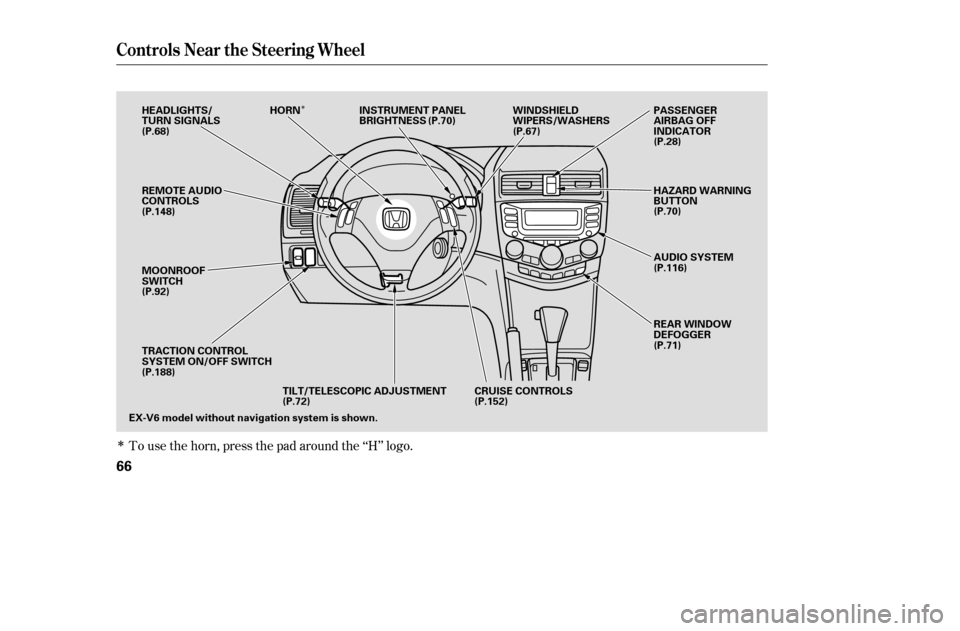
To use the horn, press the pad around the ‘‘H’’ logo.
Controls Near the Steering Wheel
66
EX-V6 model without navigation system is shown.CRUISE CONTROLS
TILT/TELESCOPIC ADJUSTMENT
REMOTE AUDIO
CONTROLS
MOONROOF
SWITCH
TRACTION CONTROL
SYSTEM ON/OFF SWITCH
HEADLIGHTS/
TURN SIGNALS
HORN INSTRUMENT PANEL
BRIGHTNESS WINDSHIELD
WIPERS/WASHERS
REAR WINDOW
DEFOGGER
AUDIO SYSTEM
HAZARD WARNING
BUTTON
PASSENGER
AIRBAG OFF
INDICATOR
(P.68) (P.70)
(P.67)
(P.28)
(P.70)
(P.116)
(P.71)
(P.152)
(P.72)
(P.188)
(P.92)
(P.148)
�����—�����—�����y�
�������������y���
�(���%�������y���������y
Page 68 of 289
Push the lever up to lock the
steering wheel in position.
Make sure you have securely
locked the steering wheel in place
by trying to move it up, down, in,
and out.
Insert the key in the ignition
switch, and unlock the steering
column.
Push the lever under the steering
column all the way down. Move the steering wheel so it
points toward your chest, not
towardyourface.Makesureyou
can see the instrument panel
gauges and indicators.
Make any steering wheel adjustment
bef ore you start driving.
3. 4. 5.
2.
1.
Steering Wheel A djustment
72
Adjusting the steering wheel
position while driving may
cause you to lose control of the
vehicle and be seriously injured
inacrash.
Adjust the steering wheel only
when the vehicle is stopped.
�����—�����—�����y�
�������������y���
�(���%�������y���������y
Page 71 of 289

�µ�µ
�µ
�µ
The ignition switch has f our
positions: LOCK (0), ACCESSORY
(I), ON (II), and START (III). If the f ront wheels are turned, the
anti-theft lock may make it difficult
to turn the key. Firmly turn the
steering wheel to the lef t or right as
you turn the key.
You can insert or
remove the key only in this position.
To turn the key, push it in slightly. If
your vehicle has an automatic
transmission, the shif t lever must
also be in park. You will hear a reminder beeper if
you leave the key in the ignition
switch in the LOCK (0) or
ACCESSORY (I) position and open
the driver’s door. Remove the key to
turn of f the beeper.
If your vehicle has an automatic
transmission, the shif t lever must be
in Park bef ore you can remove the
key f rom the ignition switch.
You can
operate the audio system and the
accessory power sockets in this
position.
This is the normal key
position when driving. Several of the
indicators on the instrument panel
come on as a test when you turn the
ignition switch f rom ACCESSORY
(I) to ON (II).
Use this position
only to start the engine. The switch
returns to ON (II) when you let go of
the key.
Ignition Switch
LOCK (0) A CCESSORY (I)
ON (II)
ST A RT (III)
Inst rument s and Cont rols
75
Removing the key from the
ignition switch while driving
locks the steering. This can
cause you to lose control.
Remove the key from the
ignition switch only whenparked.
�����—�����—�����y�
�������������y���
�(���%�������y���������y
Page 106 of 289

�Û�Ý
In the AUTO mode, the vehicle’s
interior temperature is
independently regulated f or the
driver and passenger. If the driver’s
side of the vehicle is getting too
much sun, the system will adjust to a
lower temperature.
Select . The system
automatically switches to f resh air
mode and turns on the A/C. The
A/C indicator will not come on if it
was off to start with.
Select .
Set the f an and temperature
controls to maximum level.
The automatic climate control
system adjusts the f an speed and
airflow levels to maintain the interior
temperature you select.
Press the Auto button. With
navigation system, the indicator in
the button comes on.
To clear the windows f aster, you can
close the dashboard corner vents by
rotating the wheel below each vent.
This sends more warm air to the
windshield def roster vents. Once the
windshield is clear, select f resh air
mode to avoid f ogging the windows.
For your saf ety, make sure you have
a clear view through all the windows
bef ore driving. Set the desired temperature by
pressing the to raise the
temperature or the to lower the
temperature. The selected
temperature will show in the upper
display.
Set the desired temperature by
turning the temperature control
dial. You will see AUTO in the
system’s display.
1.
1.
2.3. 2.
CONT INUED
With navigation system
Without navigation system
On EX with Leather and EX-V6 models
EX with Leather and EX-V6 models withnavigation system
Vents, Heating, and A/C
T o Remove Exterior Frost or Ice
From the Windows Automatic Climate Control
Features
111
�����—�����—�����y�
�������������y���
�(���%�������y���
�
���y