Page 120 of 289

�µ
CONT INUED
The ignition must be in the
ACCESSORY (I) or ON (II) position.
Turn the system on:When in the satellite radio mode,
you can use any of three methods to
f ind channels: TUNE, SEEK/SKIP
(CATEGORY), and SCAN.
Turn the TUNE knob to change
channels. Turn the knob right f or
higher numbered channels and lef t
f or lower numbered channels.
Press the TUNE bar to change
channel selections. Press f or
higher numbered channels and
f or lower numbered channels.
Push any of the f ollowing: PWR/
VOL knob, the CD/AUX (XM), or
AUDIO button.
Push any of the f ollowing: PWR/
VOL knob or the CD/AUX (XM)
button.
Turn the PWR/VOL knob to adjust
the volume.
Satellite radio is
available in U.S.
models only.
XM
is a registered trademark of
XM Satellite Radio, Inc.
Your vehicle is capable of receiving XM
Satellite Radio anywhere in the
United States except Hawaii and
Alaska. It is not available in Canada.
Vehicles with navigation system
Vehicles without navigation system Vehicles with navigation system
Vehicles without navigation system
Satellite Digital Radio To Select a Channel
TUNE
To Play XMSatellite Radio
Playing t he XMSatellite Radio
Features
U.S. EX wit h L eat her and EX-V6
models
125
�����—�����—�����y�
�������������y���
�(���%�������y���
�����y
Page 123 of 289

Depending on where you drive, you
may experience reception problems.
Interf erence can be caused by any of
these conditions:Driving on the south side of an
east/west mountain road
Driving on the north side of a
large commercial truck on an
east/west road
Driving in the tunnels
Driving on a road beside a vertical
wall, steep clif f , or hill to the south
of you
Driving on the lower level of a
multi-tiered road
Driving on a single lane road
alongside dense trees taller than
50 f t. (15 m) to the south of you
There may also be other geographic
situations that could af f ect satellite
radio reception. If your XM Radio service has expired
or you purchased your vehicle f rom
a previous owner, you can listen to a
sampling of the broadcasts available
on XM Satellite Radio. With the
ignition switch in the ACCESSORY
(I) or ON (II) position, push the
PWR/VOL knob to turn on the audio
system, and press the CD/AUX
(XM) button. A variety of music
types and styles will play.As required by the FCC:
Changes or modif ications not expresslyapproved by the party responsible f orcompliance could void the user’sauthority to operate the equipment.Receiving Satellite Radio Service
Playing t he XMSatellite Radio
128
�����—�����—�����y�
�������������y���
�(���%�������y���
���
�y
Page 127 of 289
Playing a CD
132
PWR/VOL KNOBUPPER DISPLAY
DISC AND TRACK NUMBERS
CH/DISC BARCD SLOT
EJECT BUTTON
RANDOM ICON
LOAD BUTTON
SCAN BUTTON
DISC
SCANICON TRACK
SCAN ICON
SEEK/
SKIP BAR
CD
LOAD INDICATORAUDIO DISPLAY BUTTON
CD/AUX/SATELLITE
RADIO BUTTON
TRACK
REPEATICON
DISC
REPEATICON
EX with Leather and EX-V6 models
with navigation system (U.S. only)
�����—�����—�����y�
�������������y���
�(���%�������y���
�����y
Page 128 of 289

To load or play CDs, the ignition
switch must be in the ACCESSORY
(I) or ON(II) position.
You operate the CD player/CD
changer with the same controls used
for the radio. To select the CD
player/CD changer, press the CD
button. The number of the track
playing is shown in the display. With
the in-dash CD changer, the disc and
track numbers are displayed. The
system will continuously play a CD
until you change modes.
Insert a CD into the CD slot. The
drive will pull the CD in the rest of
the way to play it. When the system
reaches the end of the disc, it will
return to the beginning and play the
disc again.To play the radio when a CD is
playing, press the AM/FM button.
Press the CD button again to switch
back to the CD player.
To play the tape when a CD is
playing, insert a tape in the player
(optional). If a tape is in the player,
press the AUX button. Press the CD
button again to switch back to the
CD player. The cassette player is
optional on all U.S. models.
You can also play 3-inch (8-cm) discs
without using an adapter ring. To listen to satellite radio when a CD
is playing, press the CD/AUX (XM)
button.
If you turn the system of f while a CD
is playing, either with the PWR/VOL
knob or by turning off the ignition,
the disc will stay in the drive. When
youturnthesystembackon,theCD
will begin playing where it lef t of f .Your vehicle’s in-dash CD changer
hold up to six discs.
The disc number/icon f or an
empty position is highlighted and
the red indicator starts blinking.
To load only one CD, press and
release the LOAD button.
Press the LOAD button until you
hear a beep and see ‘‘LOAd’’ in the
display (in the upper display on
vehicles with navigation system).
1. 2.
CONT INUED
On models with Satellite Radio
LX model
Playing a CD
To Play a CD
L oading CDs in t he In-dash CD ChangerFeatures
133
Do not use discs with adhesive labels.
The label can curl up and cause the
disc to jam in the unit.
�����—�����—�����y�
���������
�
�y���
�(���%�������y���
�����y
Page 131 of 289

�µ�µ
�µ �µ�Û
�Ý
When you touch the
RANDOM icon on the audio display,
the system plays the tracks on the
current CD in random order. You
will see RANDOM highlighted on
the audio screen and RDM in the
upper display. To turn this f eature
of f , touch RANDOM again or select
a dif f erent disc icon. When you touch the
DISC RPT icon on the audio display,
the system continuously replays the
current CD. You will see DISC RPT
highlighted on the audio screen and
D-RPT in the upper display. Touch
the icon to turn the feature off.
Each time you
press and release the , the
player skips f orward to the
beginning of the next track. Press
and release the , to skip
backward to the beginning of the
current track. Press it twice to skip
to the beginning of the previous track.
To move rapidly within a track, press
andholdthe or .
Press the or to
select an icon and play the disc.
Press the eject button ( ) to
remove the CD. If you eject the CD,
but do not remove it f rom the slot,
the system will automatically reload
the CD af ter 15 seconds and put it in
pause mode. To begin playing, press
the CD button.
Press the AM/FM button to switch
to the AM/FM radio while a CD is
playing. To play the CD, press the
CD button. PresstheAM/FMorCD/AUX
(XM) button to switch to the AM/
FM radio or satellite radio while a
CD is playing. To play the CD, press
the CD button again.
If a tape is in the optional tape player,
press the AUX button to switch to
the tape while a CD is playing. Press
the CD button again to switch back
to the CD player.
If you turn the system of f while a CD
is playing, either with the PWR/VOL
knob or by turning off the ignition,
the disc will stay in the drive. When
youturnthesystembackon,theCD
will begin playing where it lef t of f .
On LX model
Except EX with Leather and EX-V6models in the U.S. On EX with Leather and EX-V6
models in the U.S.
Playing a CD
RANDOM
DISC RPT
SEEK /SK IP CH/DISC
To Stop Playing a CD
136
�����—�����—�����y�
�������������y���
�(���%�������y���
�����y
Page 137 of 289
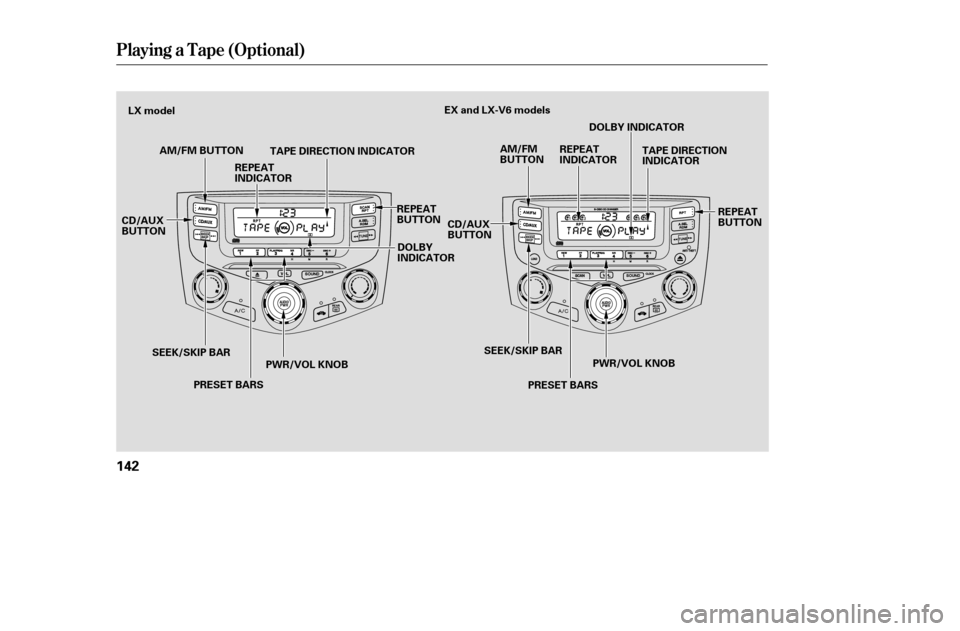
Playing a T ape (Opt ional)
142
AM/FM BUTTONAM/FM
BUTTON
PRESET BARS
CD/AUX
BUTTON
TAPE DIRECTION INDICATOR
SEEK/SKIP BAR PWR/VOL KNOB TAPE DIRECTION
INDICATOR
CD/AUX
BUTTON
SEEK/SKIP BAR PRESET BARS PWR/VOL KNOB
EX and LX-V6 models
LX model
REPEAT
BUTTONREPEAT
INDICATOR
DOLBY
INDICATOR DOLBY INDICATOR
REPEAT
BUTTON
REPEAT
INDICATOR
�����—�����—�����y�
�������������y���
�(���%�������y���
�����y
Page 138 of 289
CONT INUED
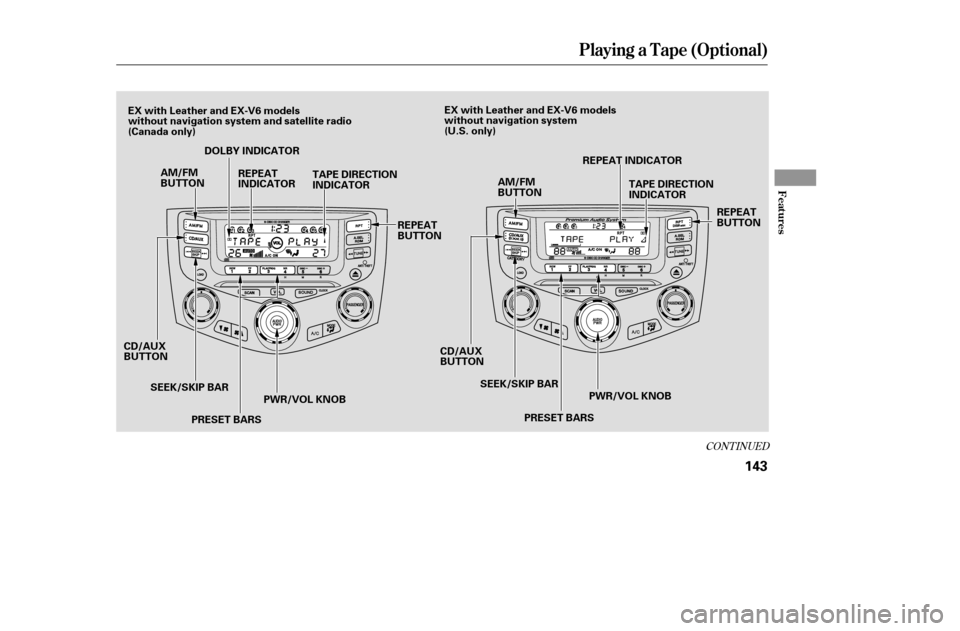
Playing a T ape (Opt ional)
Features
143
AM/FM
BUTTON
PRESET BARS
CD/AUX
BUTTON
SEEK/SKIP BAR PWR/VOL KNOB CD/AUX
BUTTON
SEEK/SKIP BAR
PRESET BARS PWR/VOL KNOB
AM/FM
BUTTON
TAPE DIRECTION
INDICATOR
TAPE DIRECTION
INDICATOR
DOLBY INDICATOR
REPEAT
INDICATOR
REPEAT
BUTTON REPEAT INDICATOR
REPEAT
BUTTON
EX with Leather and EX-V6 models
without navigation system and sate
llite radio
(Canada only) EX with Leather and EX-V6 models
without navigation system
(U.S. only)
�����—�����—�����y�
�������������y���
�(���%�������y���
�����y
Page 139 of 289
Playing a T ape (Opt ional)
144
PWR/VOL KNOBAUDIO DISPLAY BUTTON
TUNE/SOUND KNOBUPPER DISPLAY
CD/DISC BAR
FF ICON
REW ICON SEEK/SKIP BAR TAPE DIRECTION INDICATOR
PLAY/PROG ICON NOISE REDUCTION (NR) ICON
REPEAT INDICATOR
CD/AUX (XM)
BUTTON REPEAT ICON
EX with Leather and EX-V6 models
with navigation system (U.S. only)
�����—�����—�����y�
�������������y���
�(���%�������y���
�����y