2005 CHRYSLER VOYAGER Bcm
[x] Cancel search: BcmPage 430 of 2339
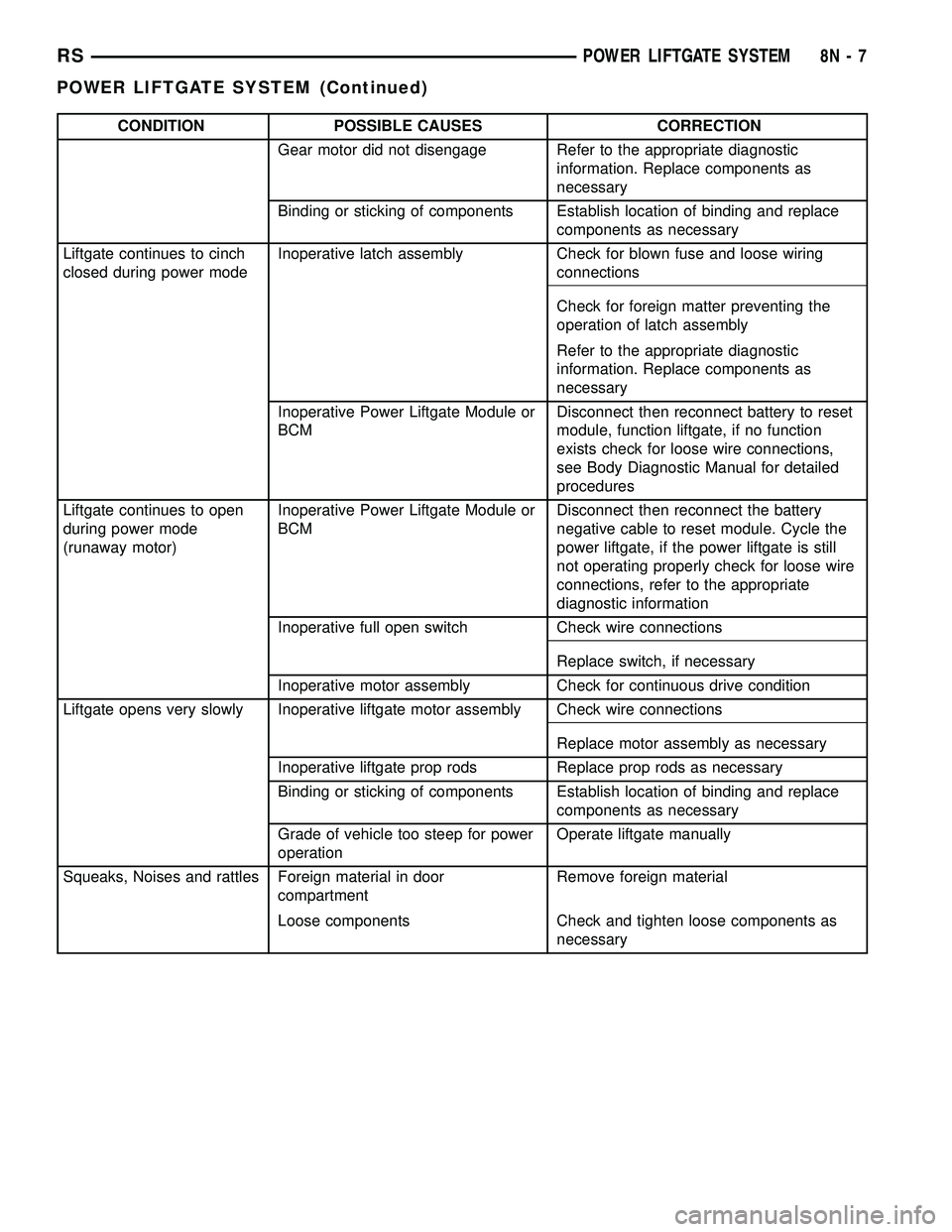
CONDITION POSSIBLE CAUSES CORRECTION
Gear motor did not disengage Refer to the appropriate diagnostic
information. Replace components as
necessary
Binding or sticking of components Establish location of binding and replace
components as necessary
Liftgate continues to cinch
closed during power modeInoperative latch assembly Check for blown fuse and loose wiring
connections
Check for foreign matter preventing the
operation of latch assembly
Refer to the appropriate diagnostic
information. Replace components as
necessary
Inoperative Power Liftgate Module or
BCMDisconnect then reconnect battery to reset
module, function liftgate, if no function
exists check for loose wire connections,
see Body Diagnostic Manual for detailed
procedures
Liftgate continues to open
during power mode
(runaway motor)Inoperative Power Liftgate Module or
BCMDisconnect then reconnect the battery
negative cable to reset module. Cycle the
power liftgate, if the power liftgate is still
not operating properly check for loose wire
connections, refer to the appropriate
diagnostic information
Inoperative full open switch Check wire connections
Replace switch, if necessary
Inoperative motor assembly Check for continuous drive condition
Liftgate opens very slowly Inoperative liftgate motor assembly Check wire connections
Replace motor assembly as necessary
Inoperative liftgate prop rods Replace prop rods as necessary
Binding or sticking of components Establish location of binding and replace
components as necessary
Grade of vehicle too steep for power
operationOperate liftgate manually
Squeaks, Noises and rattles Foreign material in door
compartmentRemove foreign material
Loose components Check and tighten loose components as
necessary
RSPOWER LIFTGATE SYSTEM8N-7
POWER LIFTGATE SYSTEM (Continued)
Page 433 of 2339
INSTALLATION
(1) Position the engage actuator in the vehicle and
connect the engage actuator electrical connector.
(2) Install the two engage actuator retaining
screws.
(3) Manually disengage the actuator.
(4) Install the left rear D-pillar trim on the vehi-
cle, (Refer to 23 - BODY/INTERIOR/LEFT D-PILLAR
TRIM PANEL - INSTALLATION).
(5) Connect the battery negative cable.
(6) Using an appropriate scan tool, check and
erase any power liftgate control module diagnostic
trouble codes.
(7) Verify power liftgate system and engage actua-
tor operation. Cycle the power liftgate through one
complete open and close cycle.
EXTERIOR HANDLE SWITCH
DESCRIPTION
The exterior handle switch is an electronic release
switch mounted to the rear license plate lamp hous-
ing assembly, located just above the license plate.
This switch controls the power liftgate release func-
tion and is also capable of reversing the power lift-
gate when it is in motion. A full power open cycle
cannot be performed using this switch, only one of
the power open command switches (key fob and over-
head console mounted) can be used to perform a full
power open cycle. The exterior handle switch is a ser-
viceable component.
OPERATION
When the exterior handle switch is depressed, with
the liftgate in the closed position, a message is sent
to the Body Control Module (BCM). The BCM then
sends a signal to the power liftgate control module
via the Programmable Communication Interface
(PCI) data bus circuit. The power liftgate control
module then sends a signal to the power latch
mounted actuator, which moves the liftgate from the
primary closed and latched position to the open and
movable position. If the liftgate is not pulled open
once the latch releases within a few seconds, the
latch will cinch closed again.
REMOVAL
(1) Disconnect and isolate the battery negative
cable.
(2) Open the liftgate and remove the liftgate trim
panel, (Refer to 23 - BODY/DECKLID/HATCH/LIFT-
GATE/TAILGATE/TRIM PANEL - REMOVAL).
(3) Remove the rear lamp bar assembly from the
vehicle.(4) Locate the two wires going to the exterior han-
dle switch. Cut the tie strap and trace the wires to
the large electrical connector and back the wires out
of the large connector and through the grommet.
Take care to mark the location of the wire ter-
minals in relation to the large connector so
that they are positioned in the appropriate cav-
ities upon switch installation.
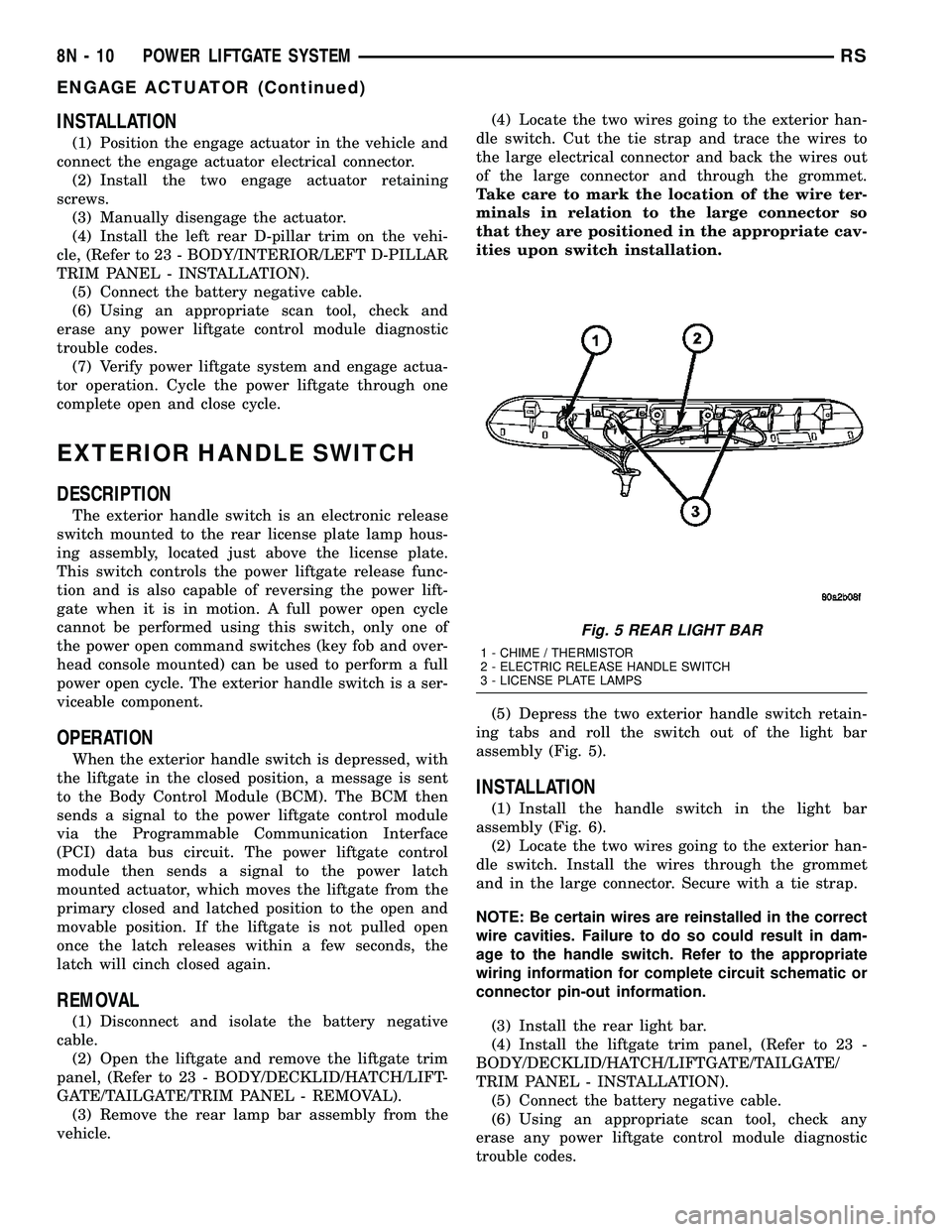
(5) Depress the two exterior handle switch retain-
ing tabs and roll the switch out of the light bar
assembly (Fig. 5).
INSTALLATION
(1) Install the handle switch in the light bar
assembly (Fig. 6).
(2) Locate the two wires going to the exterior han-
dle switch. Install the wires through the grommet
and in the large connector. Secure with a tie strap.
NOTE: Be certain wires are reinstalled in the correct
wire cavities. Failure to do so could result in dam-
age to the handle switch. Refer to the appropriate
wiring information for complete circuit schematic or
connector pin-out information.
(3) Install the rear light bar.
(4) Install the liftgate trim panel, (Refer to 23 -
BODY/DECKLID/HATCH/LIFTGATE/TAILGATE/
TRIM PANEL - INSTALLATION).
(5) Connect the battery negative cable.
(6) Using an appropriate scan tool, check any
erase any power liftgate control module diagnostic
trouble codes.
Fig. 5 REAR LIGHT BAR
1 - CHIME / THERMISTOR
2 - ELECTRIC RELEASE HANDLE SWITCH
3 - LICENSE PLATE LAMPS
8N - 10 POWER LIFTGATE SYSTEMRS
ENGAGE ACTUATOR (Continued)
Page 443 of 2339

POWER LOCKS
TABLE OF CONTENTS
page page
POWER LOCKS
DESCRIPTION.........................20
OPERATION...........................21
DOOR CYLINDER LOCK SWITCH - EXPORT
DESCRIPTION.........................22
OPERATION...........................22
DIAGNOSIS AND TESTING
DOOR CYLINDER LOCK SWITCH -
EXPORT............................22
REMOVAL.............................22
INSTALLATION.........................22
DOOR LOCK MOTOR
DIAGNOSIS AND TESTING
DOOR LOCK MOTOR..................23
DOOR LOCK SWITCH
DIAGNOSIS AND TESTING
DOOR LOCK SWITCH..................23
REMOVAL.............................23INSTALLATION.........................23
KEYLESS ENTRY TRANSMITTER
DIAGNOSIS AND TESTING
KEYLESS ENTRY TRANSMITTER.........24
STANDARD PROCEDURE
STANDARD PROCEDURE - HORN CHIRP
PREFERENCE........................24
STANDARD PROCEDURE - BATTERY
REPLACEMENT.......................24
STANDARD PROCEDURE - REMOTE
KEYLESS ENTRY TRANSMITTER
PROGRAMMING......................24
SPECIFICATIONS
SPECIFICATIONS - TRANSMITTER RANGE . 24
SPECIFICATIONS - BATTERY............24
SLIDING DOOR LOCK MOTOR
REMOVAL.............................25
INSTALLATION.........................25
POWER LOCKS
DESCRIPTION
POWER LOCKS
The power lock system allows all of the doors to be
locked or unlocked electrically by operating a switch
on either front door trim panel. The power lock sys-
tem receives non-switched battery current through a
fuse in the Integrated Power Module (IPM), so that
the power locks remain operational, regardless of the
ignition switch position.
The Body Control Module (BCM) locks the doors
automatically when the vehicle is driven beyond the
speed of 25.7 Km/h (15 mph), all doors are closed, the
accelerator pedal is depressed and the door lock actu-
ation had not been previously activated. The rolling
door lock feature is customer programmable.
This vehicle also offers several customer program-
mable features, which allows the selection of several
optional electronic features to suit individual prefer-
ences.
The power lock system for this vehicle can also be
operated remotely using the available Remote Key-
less Entry (RKE) system radio frequency transmit-
ters, if equipped.
AUTOMATIC DOOR LOCKS
When enabled, this feature will lock all of the door
locks if all of the doors are closed and the vehicle
speed goes above 25.7 km/h (15 mph). If a door
unlock has occurred, then the BCM will perform
another auto lock, if the doors did not electrically
unlock, another auto lock will not occur.
DOOR LOCK INHIBIT
When the key is in the ignition (in any switch posi-
tion) and either front door is opened, the door lock
switches LOCK functions are disabled. The
UN-LOCK functions are still functional. This protects
against locking the vehicle with the key still in the
ignition. The RKE key fob will still lock the doors.
After the key is removed from the ignition or the
doors are closed, the power door locks will operate
normally.
REMOTE KEYLESS ENTRY
The Remote Keyless Entry (RKE) system allows
the use of a remote battery-powered radio transmit-
ter to communicate with the BCM to actuate the
power lock system.
The RKE transmitters are also equipped with a
Panic button. If the Panic button on the RKE trans-
mitter is depressed, the horn will sound and the
exterior lights will flash on the vehicle for about
three minutes, or until the Panic button is depressed
8N - 20 POWER LOCKSRS
Page 444 of 2339
a second time. Pressing the Panic button also acti-
vates the courtesy lamps. Pressing the Panic button
again stops the exterior lamps from flashing and the
horn from sounding. However, the courtesy lamps
will remain illuminated until either the BCM times
out lamp operation or until the turning of the igni-
tion. The panic feature will operate if the ignition is
ON, but only if the Panic button is pressed prior to
starting the vehicle. A vehicle speed of about 25.7
km/h (15 miles-per-hour) will also cancel the panic
event.
The RKE system can also perform other functions
on this vehicle. If the vehicle is equipped with the
optional Vehicle Theft Security System (VTSS), the
RKE transmitter will arm the VTSS when the Lock
button is depressed, and disarm the VTSS when the
Unlock button is depressed.
The RKE system includes two transmitters when
the vehicle is shipped from the factory, but the sys-
tem can retain the vehicle access codes of up to a
total of eight transmitters. If an RKE transmitter is
inoperative or lost, new transmitter vehicle access
codes can be programmed into the system using a
DRB IIItscan tool.
This vehicle also offers several customer program-
mable features, which allows the selection of several
optional electronic features to suit individual prefer-
ences. Customer programmable feature options
affecting the RKE system include:
²Automatic Door Lock- Customer programma-
ble feature that allows the BCM to perform an auto-
matic door lock if the vehicle speed is above 25.7
km/h (15 miles-per-hour).
²Automatic Door Unlock On Exit- Customer
programmable feature that allows the BCM to per-
form an automatic door unlock if the vehicle speed is
0, vehicle in park and driver door is opened.
²Flash Lights with Lock and Unlock- Allows
the option of having the park lamps flash as an opti-
cal verification that the RKE system received a valid
Lock request or Unlock request from the RKE trans-
mitter, or having no optical verification.
²Programming Additional Transmitters-
Allows up to a total of four transmitter vehicle access
codes to be stored.
²Remote Unlock Sequence- Allows the option
of having only the driver side front door unlock when
the RKE transmitter Unlock button is depressed the
first time. The remaining doors unlock when the but-
ton is depressed a second time within 5 seconds of
the first unlock press. Another option is having all
doors unlock upon the first depression of the RKE
transmitter Unlock button.
²Sound Horn on Lock- Allows the option of
having the horn sound a short chirp as an audible
verification that the RKE system received a validLock request from the RKE transmitter, or having no
audible verification.
OPERATION
POWER LOCKS
The Body Control Module (BCM) locks or unlocks
the doors when an actuation input signal from a door
lock switch, Central Lock key cylinder or Remote
Keyless Entry (RKE) is received. The BCM turns on
the output drivers and provides a voltage level to the
door lock motor for a specified time.
REMOTE KEYLESS ENTRY
The RKE transmitter uses radio frequency signals
to communicate with the SKREEM module. The
SKREEM is on the PCI bus. When the operator
presses a button on the transmitter, it sends a spe-
cific request to the SKREEM. In turn, the SKREEM
sends the appropriate request over the PCI bus to
the following:
²Integrated Power Module (IPM)- to activate
the park lamps, the headlamps and the horn for the
horn chirp.
²Power Liftgate Module (PLGM)- to control
the liftgate lock and unlock functions.
After pressing the lock button on the RKE trans-
mitter, all of the door locks will lock, the illuminated
entry will turn off (if all doors are closed) and the
vehicle theft security system (if equipped) will arm.
Pressing the unlock button one time will unlock
the driver door, or all doors based on the customer
programmable feature enabled, the illuminated entry
will turn on the courtesy lamps and the vehicle theft
security system (if equipped) will disarm. Pressing
the unlock button a second time, the remaining door
locks will unlock.
If the vehicle is equipped with the memory system,
the memory message will identify which transmitter
(1 or 2) sent the signal.
ROLLING CODE
The rolling code feature changes part of the trans-
mitter message each time that it is used. The trans-
mitter message and the receiver message increment
together. Under certain conditions with a rolling code
system, such as pressing a button on the RKE trans-
mitter over 255 times outside of receiver range or
replacing the battery, the receiver and transmitter
can fall out of synchronization. To re-synchronize,
press and release the UNLOCK button on the RKE
transmitter repeatedly (it may take up to eight
cycles) while listening carefully for the power door
locks in the vehicle to cycle, indicating that resyn-
chronization has occurred.
RSPOWER LOCKS8N-21
POWER LOCKS (Continued)
Page 445 of 2339

The lock function works from the RKE transmitter
even in an out of synchronization condition, therefore
it could be verified by pressing the LOCK button on
the RKE key fob.
DOOR CYLINDER LOCK
SWITCH - EXPORT
DESCRIPTION
The Door Cylinder Lock Switch (If equipped) is
used to:
²Unlock/Lock all the doors via the Central Lock-
ing feature.
²Arm/Disarm the Vehicle Theft Security System.
²Trigger the Illuminated Entry feature.
The door cylinder lock switch is mounted to the
rear of the driver door lock cylinder. When installed
on the rear of the cylinder, there is a tab on the lock
cylinder that aligns with the switch to prevent it
from turning. An anti-rotating device. The door cylin-
der lock switch is a one time use switch. Once it is
removed from the rear of the door lock cylinder, it
may not be reinstalled and a new switch must be
used.
OPERATION
When the Door Cylinder Lock Switch is turned
either way using the door key cylinder, the BCM
reads a direct message signal from the switch.
If turning the key cylinder once, toward the front
of the vehicle, this will:
(1) Mechanically unlock the door lock.
(2) Disarm the Vehicle Theft Security System (if
equipped).
(3) Turn on the Illuminated Entry (if equipped) for
approximately 30 seconds.
If the key cylinder is turned to the unlock position
(toward the front of vehicle) twice within two sec-
onds, all the doors and liftgate will unlock (if
equipped with the central locking feature).
To lock the vehicle using the door cylinder lock
switch, turn the key cylinder toward the rear of the
vehicle once. This will lock the door that you are
using the key on. If equipped with the central locking
feature, this will lock all the other doors and liftgate.
Furthermore, this will arm the vehicle theft security
system and turn off the illuminated entry.
DIAGNOSIS AND TESTING
DOOR CYLINDER LOCK SWITCH - EXPORT
Any diagnosis of the power lock system
should begin with the use of the DRB IIItdiag-
nostic tool. For information on the use of theDRB IIIt, refer to the appropriate Diagnostic
Service Manual.
For complete circuit diagrams, refer to the appro-
priate wiring information.
(1) Visually inspect the switch for proper installa-
tion. Make sure it is seated on the rear of the key
cylinder, with the tab of the door key cylinder prop-
erly aligned with the slot on the door cylinder lock
switch.
(2) Disconnect the switch at the harness connector
and check the resistance in each switch position.
CAUTION: Do not disconnect the switch from the
rear of the door key cylinder. This switch is a one
time use switch. Once it is removed from the rear of
the switch, it is not reusable and must be replaced.
Test the switch at the harness connector.
DOOR CYLINDER LOCK SWITCH RESISTANCE
SWITCH POSITION RESISTANCE VALUE
COUNTERCLOCKWISE 5.4K OHMS
NEUTRAL 18.4K OHMS
CLOCKWISE 2K OHMS
REMOVAL
(1) Disconnect and isolate the battery negative
cable.
(2) Remove the door trim panel of the effected door
cylinder lock switch (Refer to 23 - BODY/DOOR -
FRONT/TRIM PANEL - REMOVAL).
(3) Close the door window.
(4) Disconnect the door cylinder lock switch wire
connector from the door harness, and wiring clip
from the impact beam.
(5) Remove the outer door handle from the door.
(6) Remove the switch from the key cylinder in the
door handle and remove from vehicle.
INSTALLATION
(1) Install the switch on the key cylinder in the
door handle.
(2) Install the door handle.
(3) Connect the door cylinder lock switch wire con-
nector to the door harness, and the wiring clip to the
impact beam.
(4) Install the door trim panel of the affected door
cylinder lock switch (Refer to 23 - BODY/DOOR -
FRONT/TRIM PANEL - INSTALLATION).
(5) Connect the battery negative cable.
(6) Verify system operation.
8N - 22 POWER LOCKSRS
POWER LOCKS (Continued)
Page 455 of 2339

(Refer to 8 - ELECTRICAL/HEATED SEATS -
DESCRIPTION) for more information on the heated
seat option. (Refer to 8 - ELECTRICAL/POWER
SEATS - DESCRIPTION - MEMORY SEAT SYS-
TEM) for more information on the memory seat sys-
tem.
The power seat system includes the following com-
ponents:
²Power seat recliners
²Power seat switches
²Power seat tracks
²Circuit breaker
The power seat system with memory and heated
seat options includes the following components:
²Power seat recliner
²Power seat switch
²Power seat track.
²Memory Seat Mirror Module (MSMM)
²Memory set switch
²Heated Seat Module (HSM)
²Heated seat switch
²Electronic Vehicle Information Center (EVIC)
MEMORY SYSTEM
The memory system is able to store and recall the
driver side power seat positions (including the power
recliner position), power adjustable pedal positions
and the driver outside mirror position for two driv-
ers. On vehicles equipped with a factory radio, the
memory system is also able to store and recall radio
station presets for two drivers. The memory system
also will store and recall the last station listened to
for each driver, even if it is not one of the preset sta-
tions.
The memory system will automatically return to
its preset settings when the corresponding numbered
button of the memory switch is depressed, or when
the doors are unlocked using the corresponding
Remote Keyless Entry (RKE) transmitter. A customer
programmable feature of the memory system allows
the RKE recall of memory features to be disabled, if
desired. This programmable feature is internal in the
Electronic Vehicle Information Center (EVIC) mod-
ule, which is located in the overhead console.
A Memory Seat Mirror Module (MSMM) is used to
control and integrate the many electronic functions
and features included in the memory seat and mirror
systems.
The memory system includes the following compo-
nents:
²Memory Seat Mirror Module (MSMM)
²Memory set switch
²Position potentiometers on the driver outside
side view mirror
²Position potentiometers on the power adjustable
pedal motor²Position potentiometers on the driver side power
seat track and power seat recliner motors
²Electronic Vehicle Information Center (EVIC)
²Radio receiver (if PCI data bus capable)
Certain functions of the memory system rely upon
resources shared with other electronic modules in the
vehicle over the Programmable Communications
Interface (PCI) data bus network. Initial diagnosis of
these electronic modules or the PCI data bus network
requires the use of a DRBIIItor equivalent scan tool
and the proper Diagnostic Procedures information. If
this method does not prove conclusive, the proper
wiring schematics and the service manual diagnostic
information are required.
The other electronic modules that may affect mem-
ory system operation are:
²Body Control Module (BCM)- (Refer to 8 -
ELECTRICAL/ELECTRONIC CONTROL MOD-
ULES/BODY CONTROL/CENTRAL TIMER MODUL
- DESCRIPTION) for additional information.
²Powertrain Control Module (PCM)- (Refer
to 8 - ELECTRICAL/ELECTRONIC CONTROL
MODULES/POWERTRAIN CONTROL MODULE -
DESCRIPTION) for additional information.
²Transmission Control Module (TCM)- (Refer
to 8 - ELECTRICAL/ELECTRONIC CONTROL
MODULES/TRANSMISSION CONTROL MODULE -
DESCRIPTION) for additional information.
(Refer to 8 - ELECTRICAL/HEATED SEATS -
DESCRIPTION) for additional information on the
heated seat system. (Refer to 8 - ELECTRICAL/
POWER LOCKS - DESCRIPTION) for additional
information on the RKE system.
OPERATION
POWER SEAT SYSTEM
The power seat system receives battery current
through fuse #22 in the Integrated Power Module
(IPM) and a circuit breaker under the front seats,
regardless of the ignition switch position.
When a power seat switch control knob or knobs
are actuated, a battery feed and a ground path are
applied through the switch contacts to the appropri-
ate power seat track adjuster motor. The selected
adjuster motor operates to move the seat track
through its drive unit in the selected direction until
the switch is released, or until the travel limit of the
seat track is reached. When the switch is moved in
the opposite direction, the battery feed and ground
path to the motor are reversed through the switch
contacts. This causes the adjuster motor to run in the
opposite direction.
No power seat switch should be held applied in any
direction after the seat track has reached its travel
limit. The power seat adjuster motor each contain a
8N - 32 POWER SEAT SYSTEMRS
POWER SEAT SYSTEM (Continued)
Page 459 of 2339

REMOVAL
(1) Disconnect and isolate the battery negative
cable.
(2) Using a push pin remover or other suitable
wide flat-bladed tool, gently pry the power seat and
power recliner switch knobs off of the switch levers
(Fig. 4).
(3) Remove the screws that secure the outboard
seat cushion side cover to the seat cushion frame,
(Refer to 23 - BODY/SEATS/SEAT CUSHION SIDE
COVERS - REMOVAL).
(4) Pull the outboard seat cushion side cover away
from the seat cushion frame far enough to access the
power seat switch wire harness connector.
(5) Disconnect the power seat wire harness connec-
tor from the power seat switch connector receptacle.
(6) Remove the screws that secure the power seat
switch to the inside of the outboard seat cushion side
cover.
(7) Remove the power seat switch from the out-
board seat cushion side cover.
INSTALLATION
(1) Position the power seat switch onto the out-
board seat cushion side cover.
(2) Install and tighten the screws that secure the
power seat switch to the inside of the outboard seat
cushion side cover. Tighten the screws to 1.5 N´m (14
in. lbs.).
(3) Reconnect the power seat wire harness connec-
tor to the power seat switch connector receptacle.(4) Install the outboard seat cushion side cover,
(Refer to 23 - BODY/SEATS/SEAT CUSHION SIDE
COVERS - INSTALLATION).
(5) Install the power seat and power recliner
switch knobs onto the switch control levers.
(6) Reconnect the battery negative cable.
MEMORY SWITCH
DESCRIPTION
Vehicles equipped with the memory system have a
memory switch mounted to the driver side front door
trim panel (Fig. 5). This switch is used to set and recall
all of the memory system settings for up to two drivers.
The memory switch is a resistor multiplexed unit that
is hard wired to the Body Control Module (BCM). The
BCM sends out the memory system set and recall
requests to the other electronic modules over the Pro-
grammable Communications Interface (PCI) data bus.
The memory switch cannot be adjusted or repaired
and, if faulty or damaged, it must be replaced.
OPERATION
The memory switch has three momentary switch
buttons labeled Set, 1 and 2. When the memory set
switch is depressed, a resistance value is sent to the
Body Control Module (BCM) via hard wired connec-
tions. When the memory system is in ªsetº mode a
chime will be generated by the BCM.
Fig. 4 REMOVING SWITCH CONTROL KNOBS -
TYPICAL
Fig. 5 MEMORY SWITCH LOCATION
1 - MEMORY SWITCH
2 - SWITCH BEZEL
8N - 36 POWER SEAT SYSTEMRS
SEAT SWITCH (Continued)
Page 460 of 2339

DIAGNOSIS AND TESTING
MEMORY SWITCH
(1) Remove the memory switch from the drivers
door panel (Refer to 8 - ELECTRICAL/POWER
SEATS/MEMORY SET SWITCH - REMOVAL).
(2) Using an ohmmeter, check the continuity of the
memory select switch MUX circuit between the C2
wire harness connector for the Body Control Module
(BCM) and the wire harness connector for the mem-
ory switch. There should be continuity. If OK, go to
Step 3. If not OK, repair the open or shorted MUX
circuit as required.
(3) Using an ohmmeter, check the continuity of the
memory select switch return circuit between the C2
wire harness connector for the BCM and the wire
harness connector for the memory switch. There
should be continuity. If OK, go to Step 4. If not OK,
repair the open or shorted return circuit as required.
(4) Using an ohmmeter, test the resistances of the
memory switch, refer to the MEMORY SWITCH
TEST TABLE. If OK, (Refer to 8 - ELECTRICAL/
POWER SEATS - DIAGNOSIS AND TESTING -
MEMORY SYSTEM). If not OK, replace the memory
switch, (Refer to 8 - ELECTRICAL/POWER SEATS/
MEMORY SET SWITCH - REMOVAL).
MEMORY SWITCH TEST TABLE
MEMORY
SWITCH
POSITIONRESISTANCE
BETWEEN
PINSRESISTANCE
RANGE
(OHMS)
NEUTRAL 1&2 24650 5%
(24.65 k)
MEMORY 1 1&2 6850 5%
(6.85 k)
MEMORY 2 1&2 2100 5%
(2.10 k)
SET 1&2 4490 5%
(4.49 k)
REMOVAL
(1) Disconnect and isolate the battery negative
cable.
(2) Remove the front door trim panel switch bezel
from the driver side front door. Using a thin flat-
bladed pry tool, gently pry the switch bezel away
from the drivers door trim panel.
(3) Disconnect the memory switch wire harness
connector from the memory switch.
(4) Remove the two screws that secure the memory
switch to the back of the driver side front door trim
panel switch bezel.
(5) Remove the memory switch.
INSTALLATION
(1) Position the memory switch and install and
tighten the two screws that secure the memory
switch to the back of the driver side front door trim
panel switch bezel. Tighten the screws to 2.2 N´m (20
in. lbs.).
(2) Reconnect the memory switch wire harness
connector to the memory switch.
(3) Install the trim panel switch bezel onto the
driver side front door.
(4) Reconnect the battery negative cable.
POWER SEAT TRACK
DESCRIPTION
The power seat option includes an electrically oper-
ated power seat track located under the front seat. If
equipped with Memory System, the front power seat
track on the driver side of the vehicle also provides
the mounting location for the Memory Seat/Mirror
Module (MSMM). The power seat circuit breakers are
mounted on the rear of the power seat track, just
behind the seat rear trim panel. The lower half of the
power seat track is secured to the floor panel via four
studs and nuts that must be accessed from the
underside of the vehicle. Four bolts secure the bot-
tom of the seat cushion pan to the upper half of the
power seat track unit. Four additional bolts secure
the seat back frame to the power seat track unit.
The eight-way power seat track unit includes four
reversible electric motors that are secured to the
upper half of the track unit. Each motor moves the
seat adjuster through a combination of worm-drive
gearboxes and screw-type drive units. Each of the
four power seat track motors used on models
equipped with the optional memory system incorpo-
rate a position potentiometer integral to the motor
assembly, which electronically monitors the motor
position. This enables the memory system to function
by referencing the motor positions programmed into
the memory seat/mirror module.
The front and rear of the seat are operated by two
separate vertical adjustment motors. These motors
can be operated independently of each other, tilting
the entire seat assembly forward or rearward. They
can also be operated in unison by selecting the
proper power seat switch functions, which will raise
or lower the entire seat assembly. A third motor is
the horizontal adjustment motor, which moves the
seat track in the forward and aft directions. The
forth motor is the recliner adjustment motor, which
moves the seat back in the forward and rearward
directions.
The four-way power seat track unit includes two
reversible electric motors that are secured to the
RSPOWER SEAT SYSTEM8N-37
MEMORY SWITCH (Continued)