2005 CHEVROLET VENTURE ESP
[x] Cancel search: ESPPage 155 of 470

Remote Driver Unlock Control
This feature allows you to customize the UNLOCK
button on the remote keyless entry transmitter.
Programmable Modes
Mode 1:Remote All Doors Unlock. When you press
UNLOCK on your remote keyless entry transmitter,
all doors and the liftgate will unlock.
Mode 2:Remote Driver’s Door Unlock Only. When you
press UNLOCK on your remote keyless entry
transmitter once, the driver’s door will unlock. When you
press UNLOCK on your remote keyless entry
transmitter again within ve seconds, all doors and the
liftgate will unlock.
Your vehicle was originally programmed to Mode 2.
The mode may have been changed since then.
To determine the current mode, or to change the mode,
do the following:
1. Follow the instructions forEntering Programming
Mode on page 2-55.
2. Press UNLOCK on the remote keyless entry
transmitter.3. Count the number of chimes you hear. The number
of chimes indicates the vehicle’s current
programmed mode. If you do not wish to change
the current mode, you can either exit the
programming mode by following the instructions
later in this section or program the next feature
available on your vehicle.
4. Press UNLOCK to change the current mode.
5. Press UNLOCK until you hear the number of chimes
corresponding to the mode selection you want.
The mode you selected is now set. You can either exit
the programming mode by following the instructions
later in this section or program the next feature available
on your vehicle.
2-59
Page 157 of 470
Your vehicle was originally programmed to Mode 4.
The mode may have been changed since then.
To determine the current mode, or to change the mode,
do the following:
1. Follow the instructions forEntering Programming
Mode on page 2-55.
2. Press LOCK on the remote keyless entry
transmitter.
3. Count the number of chimes you hear. The number
of chimes indicates the vehicle’s current
programmed mode. If you do not wish to change
the current mode, you can either exit the
programming mode by following the instructions
later in this section or program the next feature
available on your vehicle.
4. Press LOCK to change the current mode.
5. Press LOCK until you hear the number of chimes
corresponding to the mode selection you want.
The mode you selected is now set. You can either exit
the programming mode by following the instructions
later in this section or program the next feature available
on your vehicle.Content Theft-Deterrent System
This feature allows you to turn the content theft deterrent
on and off.
Programmable Modes
Mode 1, Mode 2 and Mode 4:Feature On. If anyone
opens a door or the liftgate while your content
theft-deterrent system is armed, an alarm will sound and
your parking lamps will ash for up to two minutes.
Mode 3:Feature Off. Your content theft-deterrent
system is always disarmed.
Your vehicle was originally programmed to Mode 4.
The mode may have been changed since then.
To determine the current mode, or to change the mode,
do the following:
1. Follow the instructions forEntering Programming
Mode on page 2-55.
2. Turn the parking lamps on, then off.
2-61
Page 158 of 470
3. Count the number of chimes you hear. The number
of chimes indicates the vehicle’s current
programmed mode. If you do not wish to change
the current mode, you can either exit the
programming mode by following the instructions
later in this section or program the next feature
available on your vehicle.
4. Turn the parking lamps on, then off to change the
current mode.
5. Turn the parking lamps on, then off until you hear
the number of chimes corresponding to the mode
selection you want.
The mode you selected is now set. You can either exit
the programming mode by following the instructions
later in this section or program the next feature available
on your vehicle.Arming and Disarming the Content
Theft-Deterrent System
To arm or disarm the content theft-deterrent system, the
system must be turned on by using Modes 1, 2, or 4
listed previously.
This feature allows you to customize the arming and
disarming of the content-theft deterrent system.
Programmable Modes
Mode 1:Power Door Lock Switch Arming Off
The system will arm when you lock the doors with
your key or remote keyless entry transmitter. The
key must be removed from the ignition when
you lock the doors or the content theft-deterrent
system will not arm.
The system will disarm when you unlock the doors
with your key or remote keyless entry transmitter.
2-62
Page 160 of 470
3. Press the button with the horn symbol on the
remote keyless entry transmitter.
4. Count the number of chimes you hear. The number
of chimes indicates the vehicle’s current
programmed mode. If you do not wish to change
the current mode, you can either exit the
programming mode by following the instructions
later in this section or program the next feature
available on your vehicle.
5. Press the panic button to change the current mode.
6. Press the panic button until you hear the number
of chimes corresponding to the mode selection
you want.
7. Remove your key from the door key cylinder.
The mode you selected is now set. You can either exit
the programming mode by following the instructions
next in this section or program the next feature available
on your vehicle.Exiting Programming Mode
To exit programming mode, turn the key from
ACCESSORY to OFF and put the BCM PRGRM fuse
back into the instrument panel fuse block.
After programming a feature, you can exit the
programming mode at anytime. Also, if your vehicle is
equipped with the content theft-deterrent system,
remember to arm the system before exiting.
2-64
Page 174 of 470
Exterior Lamps
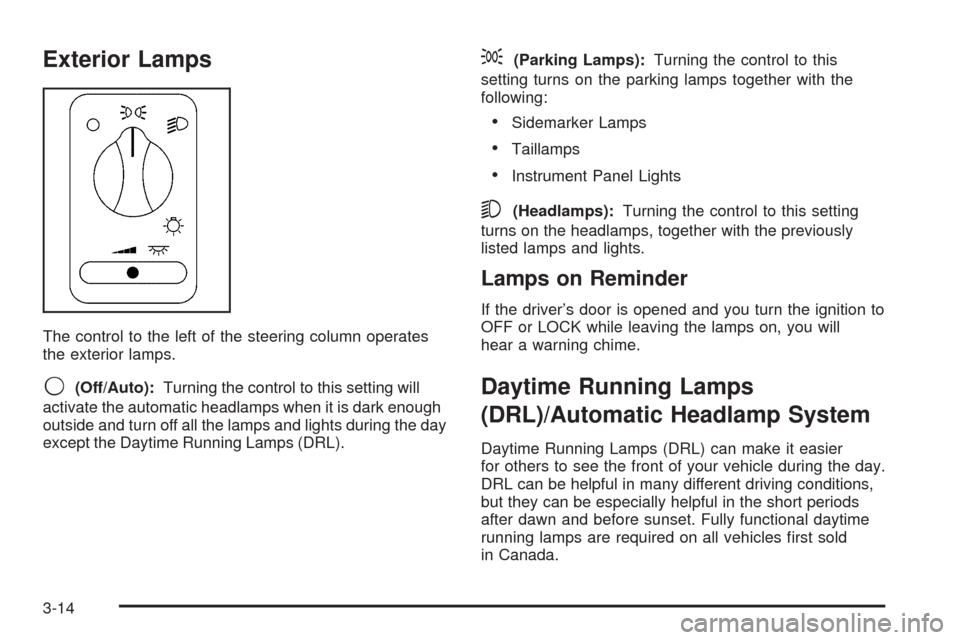
The control to the left of the steering column operates
the exterior lamps.
9(Off/Auto):Turning the control to this setting will
activate the automatic headlamps when it is dark enough
outside and turn off all the lamps and lights during the day
except the Daytime Running Lamps (DRL).
;(Parking Lamps):Turning the control to this
setting turns on the parking lamps together with the
following:
Sidemarker Lamps
Taillamps
Instrument Panel Lights
5(Headlamps):Turning the control to this setting
turns on the headlamps, together with the previously
listed lamps and lights.
Lamps on Reminder
If the driver’s door is opened and you turn the ignition to
OFF or LOCK while leaving the lamps on, you will
hear a warning chime.
Daytime Running Lamps
(DRL)/Automatic Headlamp System
Daytime Running Lamps (DRL) can make it easier
for others to see the front of your vehicle during the day.
DRL can be helpful in many different driving conditions,
but they can be especially helpful in the short periods
after dawn and before sunset. Fully functional daytime
running lamps are required on all vehicles rst sold
in Canada.
3-14
Page 264 of 470
To load more than one CD but less than six, complete
Steps 1 through 3. When nished loading CDs, the
radio will begin to play the last CD loaded.
If more than one CD has been loaded, a number for
each CD will be displayed.
Playing a Specic Loaded CD
For every CD loaded, a number will appear on the
display. To play a specic CD, rst press the CD AUX
button, then press the numbered pushbutton that
corresponds to the CD. A small bar will appear under
the CD number that is playing and the track number will
appear.
If an error appears on the display, see “CD Messages”
later in this section.
LOAD CD
Z(Eject):Press the CD eject side of this
button to eject a CD(s). You will hear a beep and the
indicator light will ash to let you know when a CD
is being ejected.
REMOVE CD will appear on the display. The CD can
be removed. If the CD is not removed, after 25 seconds,
the CD will be automatically pulled back into the
player. If the CD is pushed back into the player, before
the 25 second time period is complete, the player
will sense an error and will try to eject the CD several
times before stopping.Do not repeatedly press the CD eject button to eject a
CD after trying to push it in manually. The player’s
25-second eject timer will reset at each press of eject,
causing the player to not eject the CD until the
25-second time period has elapsed.
Once the player stops and the CD is ejected, remove
the CD. After removing the CD, push the PWR knob off
and then on again, or wait for the system to reset.
This will clear the CD-sensing feature and enable CDs
to be loaded into the player again.
{REV (Reverse):Press and hold this button to
reverse quickly within a track. You will hear sound at a
reduced volume. Release this button to play the
passage. The elapsed time of the track will appear on
the display.
FWD
|(Forward):Press and hold this button to
advance quickly within a track. You will hear sound at a
reduced volume. Release this button to play the
passage. The elapsed time of the track will appear on
the display.
3-104
Page 279 of 470
SEEK TYPE:Press this button to go to a station with
the last selected PTY and the last selected PTY
will appear on the display, if it is not already showing. If
a station with the selected PTY is not found, the
radio will return to the original station. If both PTY and
TRAF are on, the radio will search for stations with
the selected PTY and traffic announcements.
PRESET:Press this button to play stations that are
programmed on the radio preset pushbuttons.
MODE:Press this button to switch between FM1, FM2,
AM, or XM1 or XM2 (if equipped).
When a CD is playing, press this button to listen to the
radio. The inactive CD will remain safely inside the
radio for future listening.
MUTE:Press this button to silence the system. Press it
again, or any other radio button, to turn the sound on.
QVOLR(Volume):Press the up or the down arrow
to increase or to decrease the volume.
Radio Reception
AM
The range for most AM stations is greater than for FM,
especially at night. The longer range can cause
station frequencies to interfere with each other. Static
can occur on AM stations caused by things like
storms and power lines. Try reducing the treble to
reduce this noise.
FM Stereo
FM stereo will give the best sound, but FM signals will
reach only about 10 to 40 miles (16 to 65 km). Tall
buildings or hills can interfere with FM signals, causing
the sound to fade in and out.
XM™ Satellite Radio Service
XM™ Satellite Radio Service gives digital radio
reception from coast to coast. Just as with FM, tall
buildings or hills can interfere with satellite radio signals,
causing the sound to fade in and out. The radio may
display NO SIGNAL to indicate interference.
3-119
Page 286 of 470
It is the amount of alcohol that counts. For example, if
the same person drank three double martinis (3 ounces
or 90 ml of liquor each) within an hour, the person’s
BAC would be close to 0.12 percent. A person
who consumes food just before or during drinking will
have a somewhat lower BAC level.
There is a gender difference, too. Women generally
have a lower relative percentage of body water
than men. Since alcohol is carried in body water, this
means that a woman generally will reach a higher BAC
level than a man of her same body weight will when
each has the same number of drinks.
The law in most U.S. states, and throughout Canada,
sets the legal limit at 0.08 percent. In some other
countries, the limit is even lower. For example, it is
0.05 percent in both France and Germany. The
BAC limit for all commercial drivers in the United States
is 0.04 percent.
The BAC will be over 0.10 percent after three to
six drinks (in one hour). Of course, as we have seen, it
depends on how much alcohol is in the drinks, and
how quickly the person drinks them.
But the ability to drive is affected well below a BAC of
0.10 percent. Research shows that the driving skills
of many people are impaired at a BAC approaching
0.05 percent, and that the effects are worse at night. All
drivers are impaired at BAC levels above 0.05 percent.Statistics show that the chance of being in a collision
increases sharply for drivers who have a BAC of
0.05 percent or above. A driver with a BAC level of
0.06 percent has doubled his or her chance of having a
collision. At a BAC level of 0.10 percent, the chance
of this driver having a collision is 12 times greater; at a
level of 0.15 percent, the chance is 25 times greater!
The body takes about an hour to rid itself of the alcohol in
one drink. No amount of coffee or number of cold
showers will speed that up. “I will be careful” is not the
right answer. What if there is an emergency, a need to
take sudden action, as when a child darts into the street?
A person with even a moderate BAC might not be able to
react quickly enough to avoid the collision.
There is something else about drinking and driving that
many people do not know. Medical research shows that
alcohol in a person’s system can make crash injuries
worse, especially injuries to the brain, spinal cord, or
heart. This means that when anyone who has been
drinking — driver or passenger — is in a crash, that
person’s chance of being killed or permanently disabled
is higher than if the person had not been drinking.
4-4