2005 CHEVROLET UPLANDER remote control
[x] Cancel search: remote controlPage 251 of 460
To use the auxiliary audio and video inputs, connect an
external auxiliary device such as a camcorder to the
RCA jacks and turn on both the auxiliary device power
and the power on the front of the RSE player.
If a disc is present when the RSE power is turned on,
the player will automatically begin playing the disc
and the user will need to press the AUX button on the
remote control or on the DVD player faceplate to switch
the system between the DVD player and the auxiliary
device. See “DVD Player” and “Remote Control” later in
this section for more information.
Audio Output
Audio from the DVD player or auxiliary devices can be
heard through the following possible sources:
Vehicle Speakers
Wireless Headphones
Wired Headphones (not included)
Vehicle Speakers
Only one audio source can be heard through the
vehicle’s speakers at a time.
The RSE system or an auxiliary device can be heard
through all of the vehicle’s speakers when the following
occurs:
A DVD or auxiliary device is playing
The front audio system is on and the CD AUX
button is pressed to enable the RSE system
DVD will appear on the radio display when the RSE
system is on.
To turn the vehicles speakers on and off, press the CD
AUX button on the radio. The audio from the RSE
system can be heard through the wireless headphones
and the vehicles speakers at the same time. The
volume on the radio may vary when switching between
the radio, CD, DVD, MP3, or an auxiliary device.
3-99
Page 252 of 460
Video Screen
The video screen is located in the overhead console.
To use the video screen, do the following:
1. Push forward on the release button and the screen
will fold down.
2. Adjust its position as desired.
When the video screen is not in use, push it up into its
stowed and latched position.
Notice:Directly touching the video screen may
damage it. Do not touch the screen. See “Cleaning
the Video Screen” later in this section for more
information.
DVD Player
The DVD player is located in the overhead console.
The DVD player can be controlled by the buttons on the
DVD player and/or by the buttons on the remote
control. See “Remote Control” later in this section for
more information.
The RSE system DVD player is only compatible with
DVDs of the appropriate region code for the country that
the vehicle was sold. The DVD region code is printed
on the jacket of most DVDs.
Standard audio CDs, CD-R, CD-RW, enhanced CDs,
video CDs, and CD-ROM with MP3 media are supported
by this DVD player. DVD+R, DVD+RW, and copy
protected CDs may or may not be supported by the
DVD player. The DVD player does not support
DVD-RAM, DVD-ROM, DVD-R, DVD-R/W, and DVD
audio media. An error message will appear on the
display if this type of media is inserted into the DVD
player.
If an error message appears on the video screen, see
“DVD Messages” later in this section.
3-100
Page 254 of 460

Playing a Disc
To play a disc, gently insert the disc, with the label side
up, into the loading slot. The DVD player will continue
loading the disc and the player will automatically start if
the vehicle is in ACCESSORY, ON, or RAP.
If a disc is already in the player, make sure that the
DVD player is on, then press the play/pause button on
the player faceplate or on the remote control. You
can also, press the CD AUX button on the radio
faceplate, until RSE appears on the display, to start
playing a disc.
Some DVDs will not allow fast forwarding or skipping of
the copyright information or previews. Some DVDs
will begin playing after the previews have nished. If the
DVD does not begin playing at the main title, refer to
the on-screen instructions.
Stopping and Resuming Playback
To stop playing a disc, press and release the stop
button on the DVD player faceplate or the remote
control.
To resume playback, press the play/pause button on
the DVD player faceplate or the remote control.
The movie should resume play from where it was last
stopped if the disc has not been ejected.
If the disc has been ejected, the disc will resume play at
the beginning of the disc.
Ejecting a Disc
Press the eject button on the DVD player faceplate,
when the disc is stopped, to eject the disc. There is not
an eject button on the remote control.
If a disc is ejected from the player, but not removed, the
DVD player will reload the disc after a short period
of time.
Remote Control
The RSE system will include a remote control (batteries
not included). To use the remote control, aim it at the
transmitter window next to the RSE faceplate and press
the desired button. Direct sunlight or very bright light
may affect the ability of the transmitter to receive signals
from the remote control. If the remote control does
not seem to be working, the batteries may need to be
replaced. See “Battery Replacement” later in this
section. Objects blocking the line of sight will affect the
function of the remote control.
Notice:Storing the remote control in a hot area or
in direct sunlight may damage it, and the repairs
would not be covered by your warranty. Keep
the remote control stored in a cool, dry place.
3-102
Page 255 of 460
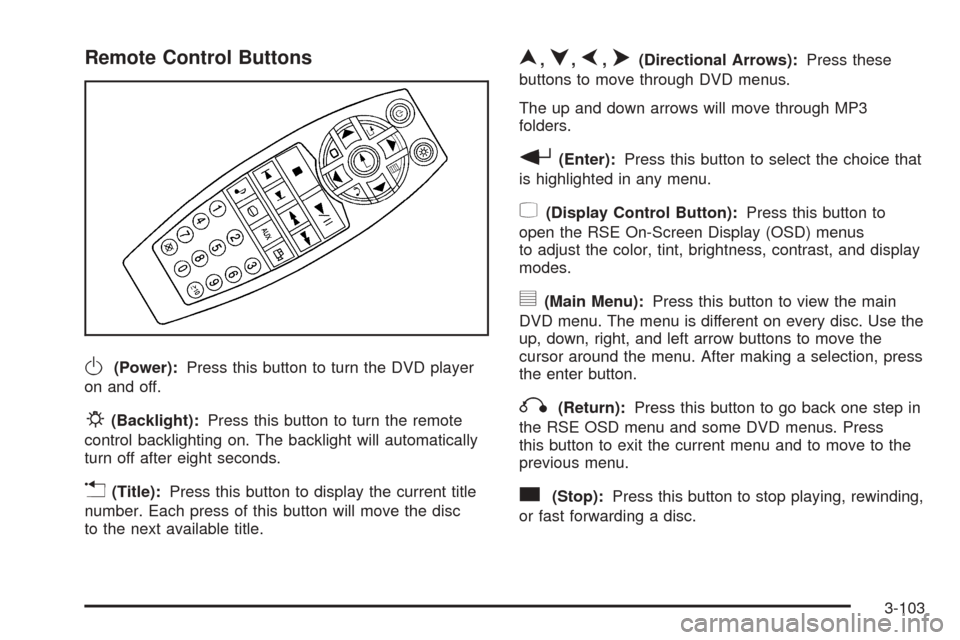
Remote Control Buttons
O(Power):Press this button to turn the DVD player
on and off.
P(Backlight):Press this button to turn the remote
control backlighting on. The backlight will automatically
turn off after eight seconds.
v(Title):Press this button to display the current title
number. Each press of this button will move the disc
to the next available title.
n,q,p,o(Directional Arrows):Press these
buttons to move through DVD menus.
The up and down arrows will move through MP3
folders.
r(Enter):Press this button to select the choice that
is highlighted in any menu.
z(Display Control Button):Press this button to
open the RSE On-Screen Display (OSD) menus
to adjust the color, tint, brightness, contrast, and display
modes.
y(Main Menu):Press this button to view the main
DVD menu. The menu is different on every disc. Use the
up, down, right, and left arrow buttons to move the
cursor around the menu. After making a selection, press
the enter button.
q(Return):Press this button to go back one step in
the RSE OSD menu and some DVD menus. Press
this button to exit the current menu and to move to the
previous menu.
c(Stop):Press this button to stop playing, rewinding,
or fast forwarding a disc.
3-103
Page 257 of 460

RSE On-Screen Display (OSD) Menu
To use the RSE OSD menu when using a DVD or an
auxiliary device, do the following:
To access this menu, press the display button on the
remote control. Once the menu is on the screen, use the
directional arrows and the enter button to navigate the
screen. This menu will let you select default preferences
for video format, language preference, brightness,
color, contrast, and tint. Not all DVDs support all the
feature defaults in the setup menus. If a feature is not
supported, the defaults will be provided by the DVD
media. To exit this menu, press the display or the return
button on the remote control or wait for the menu to
time out.
The default language selection will apply to all
future DVDs.
To use the RSE OSD menu when using a CD or an
MP3, do the following:
Make sure that a CD or an MP3 is loaded in the RSE
system and that the system is not in auxiliary, then press
the display button on the remote control. Once the
menu is on the screen, use the directional arrows and
the enter button to navigate the screen.This menu will let you select default preferences for
language and playback settings. To exit this menu,
press the display or the return button on the remote
control or wait for the menu to time out.
Battery Replacement
To change the remote control batteries, do the following:
1. Slide the battery door, located on the back of the
remote control, down.
2. Replace the two AA batteries in the compartment.
Make sure that they are installed correctly, using
the diagram on the inside of the battery
compartment.
3. Close the battery door.
If the remote control is to be stored for a long period of
time, remove the batteries and keep them in a cool,
dry place.
3-105
Page 259 of 460

Problem Recommended Action
The language in the
audio or on the screen
is wrong.Press the main menu
button on the remote
control and change the
audio or language selection
on the DVD menu. To
change the language
preference, press the
display button to access the
RSE OSD menu. See “RSE
OSD” earlier in this section.
The remote control does
not work.Point the remote control
directly at the face of the
DVD unit. The batteries
could be weak or put in
wrong. The parental control
button might have been
pressed, the power
indicator lights will ash.
How do I get subtitles
on or off?Press the subtitle button on
the remote control to select
subtitle option or go to the
DVDs main menu and
follow the screen prompts.
The auxiliary source is
running but there is no
picture or sound.Press and release the AUX
button on the remote
control or the DVD player to
get to auxiliary input. Check
to make sure that the
auxiliary source is
connected to the inputs
properly.Problem Recommended Action
The audio or video skips
or jumps.The DVD could be dirty or
scratched. Try cleaning
the disc.
The fast forward, fast
reverse, previous, and
next functions do
not work.Some commands that do
one thing for DVDs will not
always work or perform the
same function for audio,
audio discs, or games.
These functions may also
be disabled when the DVD
is playing the copyright
information or the previews.
When RSA is on, these
buttons control RSA
functions.
My disc is stuck in the
player. The eject button
does not work.Press the eject button on
the DVD player. Turn the
ignition off, then on again,
then press the eject button
on the DVD player. Do not
attempt to force or remove
the disc from the player. If
the problem persists, return
to your GM dealer for
further assistance.
I lost the remote control
and/or the headphones.Contact your GM dealer for
assistance.
3-107
Page 262 of 460
Rear Seat Audio (RSA)
If your vehicle has rear seat audio (RSA), this feature
allows rear seat passengers to listen to and control any
of the following audio sources: AM/FM tuner, front
CD player, and XM™ Satellite Radio Service (if
equipped). However, the rear seat passengers can only
control the sources that the front seat passengers
are not listening to. For example, rear seat passengers
may listen to a CD in the front radio and control it
while the driver listens to the radio through the front
speakers. The rear seat passengers have control of the
volume for each set of headphones.
The front seat audio controls always have priority over
the RSA controls. If the front seat passengers switch
the source for the main radio to a remote source,
the RSA will not be able to control the remote source.
You can operate the RSA when the main radio is off.
The DVD or auxiliary device will always be available on
channel (CHA or CH1) of the wireless headphones.
All other RSA sources are available on CHB or CH2 of
the wireless headphones, as well as the wired
headphones. If the RSA is off, the wired headphones
will provide DVD or auxiliary device audio. The rear seat
passengers will not be able to listen to XM, on CHB
or CH2, if the front passenger is listening to a DVD or
auxiliary device.
The remote control will not operate any of the RSA
features.
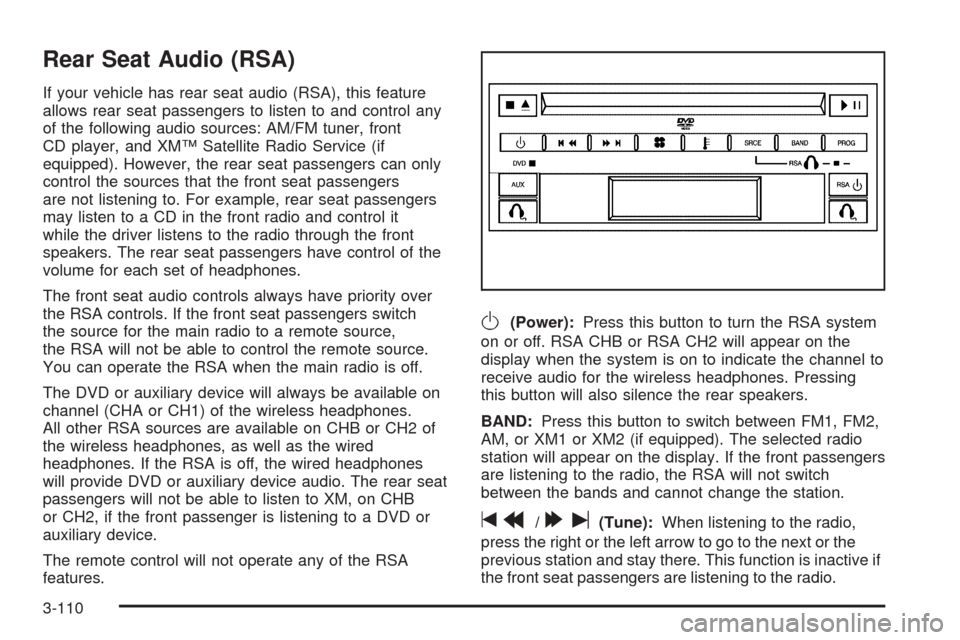
O(Power):Press this button to turn the RSA system
on or off. RSA CHB or RSA CH2 will appear on the
display when the system is on to indicate the channel to
receive audio for the wireless headphones. Pressing
this button will also silence the rear speakers.
BAND:Press this button to switch between FM1, FM2,
AM, or XM1 or XM2 (if equipped). The selected radio
station will appear on the display. If the front passengers
are listening to the radio, the RSA will not switch
between the bands and cannot change the station.
tr/[u(Tune):When listening to the radio,
press the right or the left arrow to go to the next or the
previous station and stay there. This function is inactive if
the front seat passengers are listening to the radio.
3-110
Page 263 of 460

When a CD is playing, press the left arrow to go to the
start of the current track or to the previous track. Press
the right arrow to go to the next track on the CD. This
function is inactive if the front seat passengers are
listening to a CD.
PROG (Program):Press this button to select the next
preset station stored on the radio. Each press of
this button will take you to the next preset station. This
function is inactive if the front seat passengers are
listening to the radio.
When a CD is playing in the single CD player, press this
button to select the next track. This function is inactive if
the front seat passengers are listening to a CD.
When a CD is playing in the six-disc CD changer, press
this button to select the next CD, if multiple CDs are
loaded. This function is inactive if the front seat
passengers are listening to a CD.
SRCE (Source):Press this button to switch between
playing the AM/FM tuner, front CD player, and XM™
Satellite Radio Service (if equipped). If one of the
sources are not loaded, the system will skip over the
source when this button is pressed.
X(Headphone):Press the right or the left headphone
button to enable volume control of the wired headphone
connected to the corresponding jack. Press the right
and left arrow buttons to change the volume.
rj(Parental Control):This button is located behind
the video screen, below the auxiliary jacks. Press this
button while using RSA, or when a DVD or CD is playing
to blank the video screen and to mute the audio. The
power indicator lights on the DVD player will ash.
Turning on the parental control will also disable all other
button operations from the remote control and the
DVD player, except for the eject button. Press this
button again to restore operation of the RSA, DVD
player, and remote control.
This button may also be used to turn the DVD player
power on and automatically resume play if the vehicle is
on and a disc is in the player. If no disc is in the
player then the system will power up in auxiliary mode.
3-111