2005 CHEVROLET EQUINOX buttons
[x] Cancel search: buttonsPage 29 of 364
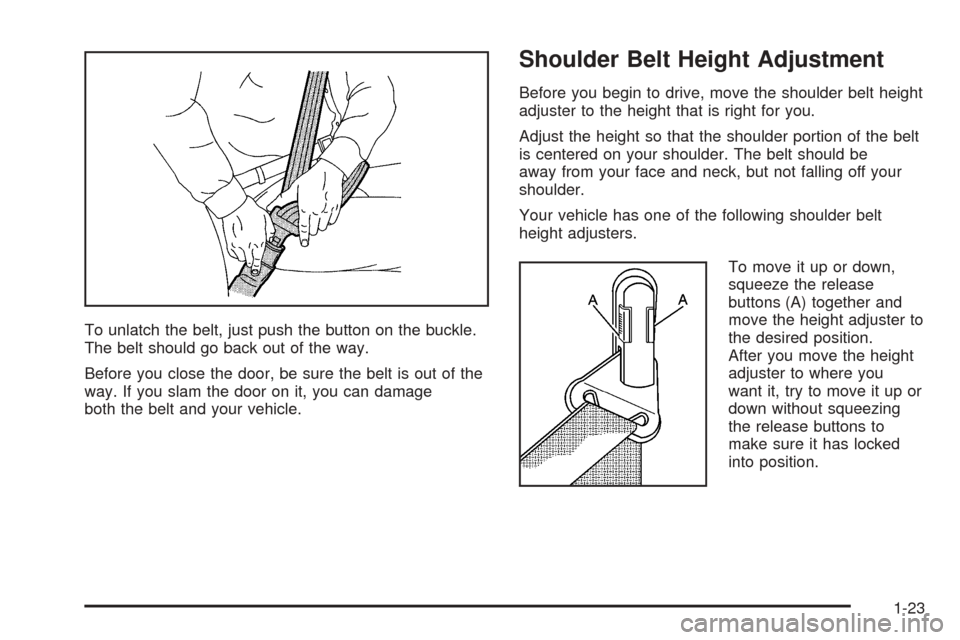
To unlatch the belt, just push the button on the buckle.
The belt should go back out of the way.
Before you close the door, be sure the belt is out of the
way. If you slam the door on it, you can damage
both the belt and your vehicle.
Shoulder Belt Height Adjustment
Before you begin to drive, move the shoulder belt height
adjuster to the height that is right for you.
Adjust the height so that the shoulder portion of the belt
is centered on your shoulder. The belt should be
away from your face and neck, but not falling off your
shoulder.
Your vehicle has one of the following shoulder belt
height adjusters.
To move it up or down,
squeeze the release
buttons (A) together and
move the height adjuster to
the desired position.
After you move the height
adjuster to where you
want it, try to move it up or
down without squeezing
the release buttons to
make sure it has locked
into position.
1-23
Page 74 of 364
Resynchronization
This is used to keep the transmitter of the vehicle
communicating with the receiver of the vehicle.
Resynchronization may be required due to the security
method used by this system.
Your vehicle has an automatic resynchronization
function built into the system. If your transmitter is not
working properly and you have to manually
resynchronize, press the lock and unlock buttons at the
same time for seven seconds while you are near
your vehicle. The doors will lock or unlock, depending
on their starting position. If they do not, contact
your dealer for service.
Doors and Locks
Door Locks
{CAUTION:
Unlocked doors can be dangerous.
Passengers — especially children — can
easily open the doors and fall out of a
moving vehicle. When a door is locked, the
handle will not open it. You increase the
chance of being thrown out of the vehicle
in a crash if the doors are not locked. So,
wear safety belts properly and lock the
doors whenever you drive.
Young children who get into unlocked
vehicles may be unable to get out. A child
can be overcome by extreme heat and can
suffer permanent injuries or even death
from heat stroke. Always lock your vehicle
whenever you leave it.
Outsiders can easily enter through an
unlocked door when you slow down or
stop your vehicle. Locking your doors can
help prevent this from happening.
2-6
Page 82 of 364
Content Theft-Deterrent Personalization
To change the mode that your vehicle is programmed to,
do the following:
1. Turn the ignition to RUN or ACC.
2. Press the panic alarm button on the transmitter
slowly four times within ve seconds.
3. You must complete one of the following within
three seconds to change the mode.
To select the active arming mode, press the
lock button on the transmitter once within
three seconds. A chime will sound two times
to acknowledge that the active arming mode has
been selected.
To select the passive arming mode, press the
lock button on the transmitter twice within
three seconds. A chime will sound three times to
acknowledge that the passive arming mode
has been selected.
To select the security system disable mode,
press the unlock button on the transmitter
once within three seconds. A chime will sound
one time to acknowledge that the security system
disabled mode has been selected.If you accidentally set off the alarm when entering or
exiting the vehicle, you can shut it off by pressing either
the lock or unlock button once on the remote keyless
entry transmitter. The panic alarm button needs to
be pressed twice to turn off the alarm. There is
a ten second pre-alarm grace period indicated by a
rapid beeping. By pressing the transmitter buttons as
indicated above, you can disarm the system before
the horn begins to sound and the exterior lights begin
to ash.
If you hear three horn chirps when you press the unlock
button on the transmitter, that means the vehicle’s
alarm was triggered while you were away.
2-14
Page 115 of 364
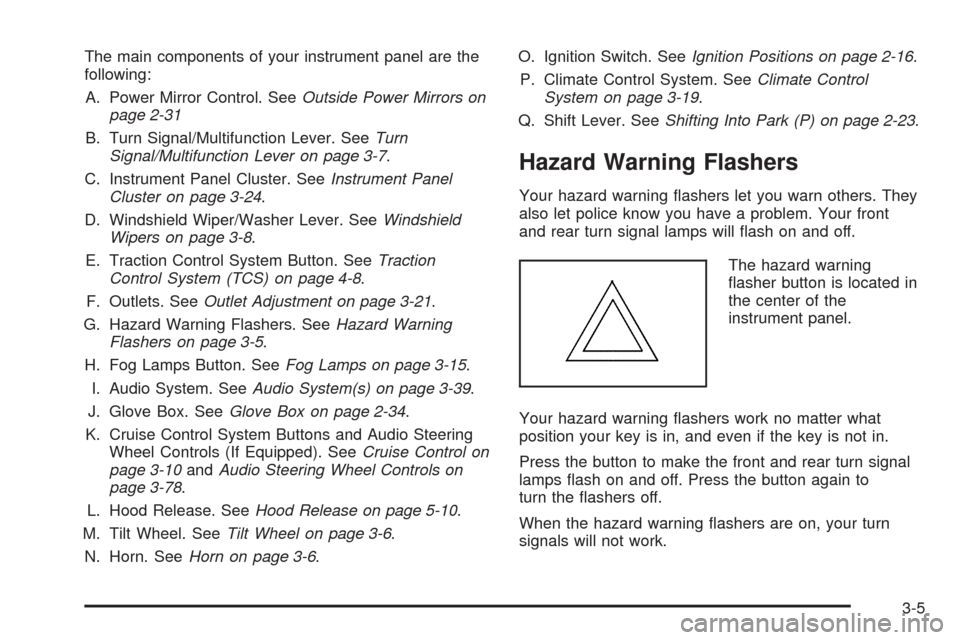
The main components of your instrument panel are the
following:
A. Power Mirror Control. SeeOutside Power Mirrors on
page 2-31
B. Turn Signal/Multifunction Lever. SeeTurn
Signal/Multifunction Lever on page 3-7.
C. Instrument Panel Cluster. SeeInstrument Panel
Cluster on page 3-24.
D. Windshield Wiper/Washer Lever. SeeWindshield
Wipers on page 3-8.
E. Traction Control System Button. SeeTraction
Control System (TCS) on page 4-8.
F. Outlets. SeeOutlet Adjustment on page 3-21.
G. Hazard Warning Flashers. SeeHazard Warning
Flashers on page 3-5.
H. Fog Lamps Button. SeeFog Lamps on page 3-15.
I. Audio System. SeeAudio System(s) on page 3-39.
J. Glove Box. SeeGlove Box on page 2-34.
K. Cruise Control System Buttons and Audio Steering
Wheel Controls (If Equipped). SeeCruise Control on
page 3-10andAudio Steering Wheel Controls on
page 3-78.
L. Hood Release. SeeHood Release on page 5-10.
M. Tilt Wheel. SeeTilt Wheel on page 3-6.
N. Horn. SeeHorn on page 3-6.O. Ignition Switch. SeeIgnition Positions on page 2-16.
P. Climate Control System. SeeClimate Control
System on page 3-19.
Q. Shift Lever. SeeShifting Into Park (P) on page 2-23.
Hazard Warning Flashers
Your hazard warning ashers let you warn others. They
also let police know you have a problem. Your front
and rear turn signal lamps will ash on and off.
The hazard warning
asher button is located in
the center of the
instrument panel.
Your hazard warning ashers work no matter what
position your key is in, and even if the key is not in.
Press the button to make the front and rear turn signal
lamps ash on and off. Press the button again to
turn the ashers off.
When the hazard warning ashers are on, your turn
signals will not work.
3-5
Page 120 of 364
Cruise Control
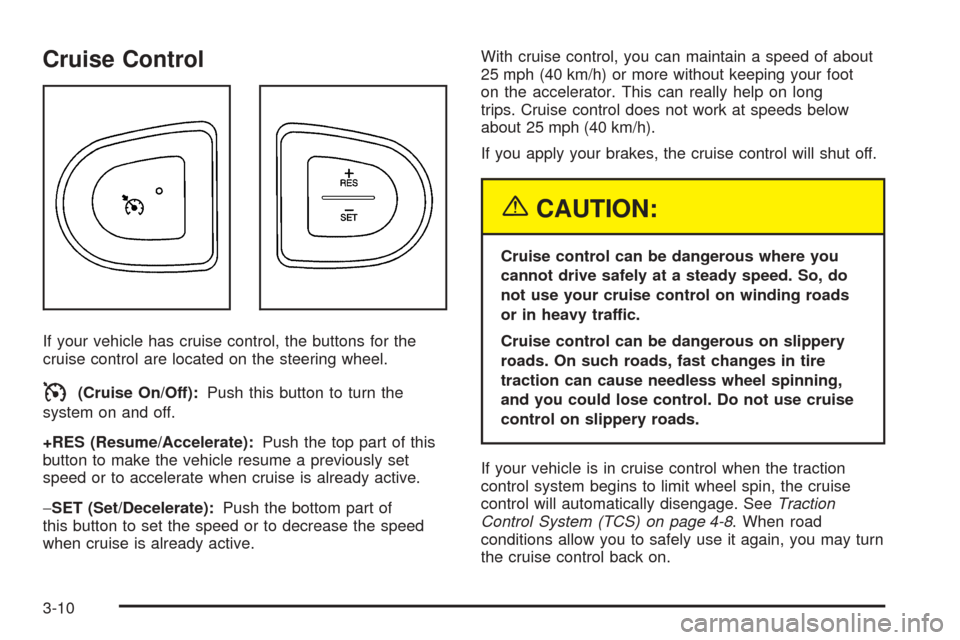
If your vehicle has cruise control, the buttons for the
cruise control are located on the steering wheel.
I(Cruise On/Off):Push this button to turn the
system on and off.
+RES (Resume/Accelerate):Push the top part of this
button to make the vehicle resume a previously set
speed or to accelerate when cruise is already active.
−SET (Set/Decelerate):Push the bottom part of
this button to set the speed or to decrease the speed
when cruise is already active.With cruise control, you can maintain a speed of about
25 mph (40 km/h) or more without keeping your foot
on the accelerator. This can really help on long
trips. Cruise control does not work at speeds below
about 25 mph (40 km/h).
If you apply your brakes, the cruise control will shut off.
{CAUTION:
Cruise control can be dangerous where you
cannot drive safely at a steady speed. So, do
not use your cruise control on winding roads
or in heavy traffic.
Cruise control can be dangerous on slippery
roads. On such roads, fast changes in tire
traction can cause needless wheel spinning,
and you could lose control. Do not use cruise
control on slippery roads.
If your vehicle is in cruise control when the traction
control system begins to limit wheel spin, the cruise
control will automatically disengage. SeeTraction
Control System (TCS) on page 4-8. When road
conditions allow you to safely use it again, you may turn
the cruise control back on.
3-10
Page 130 of 364
You can also select modes by using the following
buttons:
@(Recirculate):Press the bottom right button to
recirculate cabin air through the vehicle. It can be used
to prevent outside air and odors from entering your
vehicle or to help heat or cool the air inside your vehicle
more quickly. An indicator light above the button will
come on in this mode. Operation in this mode during
periods of high humidity and cool outside temperatures
may result in increased window fogging. If window
fogging is experienced, select the defrost mode.
#(Air Conditioning):Press this button to turn the
air-conditioning system on or off. When this button
is pressed, an indicator light above the button will come
on to let you know the air conditioning is activated.
Air-conditioning can be selected in any mode as long as
the fan switch is on.
The air-conditioning system removes moisture from the
air, so you may sometimes notice a small amount of
water dripping underneath your vehicle while idling
or after turning off the engine. This is normal.
Defogging and Defrosting
Fog or frost on the inside of windows is a result of high
humidity (moisture) condensing on the cool window
glass. This can be minimized if the climate control
system is used properly. Use the defog mode to clear
the windows of fog or moisture and warm the
passengers. Use the defrost mode to remove fog or
frost from the windshield more quickly. When you select
either of these modes (or the oor mode which also
helps defog the windows slightly), the system runs the
air-conditioning compressor and cancels recirculation
mode to dry the air; however, the recirculation light will
stay on. For best results, clear all snow and ice from
the windshield before defrosting.
Turn the right knob to select the defog or defrost mode.
-(Defog):This mode directs half of the air to the
windshield and the side window outlets and half to the
oor outlets.
0(Defrost):This mode directs most of the air to the
windshield and the side window outlets, with some
air directed to the oor outlets.
3-20
Page 152 of 364
Then as you drive, automatic volume increases the
volume, as necessary, to overcome noise at any speed.
The volume level should always sound the same to
you as you drive. AUTO VOL NONE will appear on the
display if the radio cannot determine the vehicle
speed or if the engine is not running. To turn automatic
volume off, press this button until AUTO VOL OFF
appears on the display.
DISP (Display):For RDS, press the DISP knob to
change what appears on the display while using RDS.
The display options are station name, RDS station
frequency, PTY, and the name of the program
(if available).
For XM™ (if equipped), press the DISP knob while in
XM™ mode to retrieve four different categories of
information related to the current song or channel: Artist,
Song Title, Category or PTY, Channel Number/
Channel Name.
Finding a Station
BAND:Press this button to switch between FM1, FM2,
AM, or XM1 or XM2 (if equipped). The display will
show the selection.
ADJ (Adjust):Turn this knob to select radio stations.
xSEEKw:Press the down or up arrow to go to the
previous or to the next station and stay there.To scan stations, press and hold either arrow for
two seconds until SCAN appears on the display and
you hear a beep. The radio will go to a station, play for
a few seconds, then go on to the next station. Press
either arrow again to stop scanning. If no station can be
found during scan, NOT FOUND will appear on the
display and the radio will go back to the last tuned
station.
The radio will only seek and scan stations with a strong
signal that are in the selected band.
1–6 (Preset Pushbuttons):Press this button to play
stations that are programmed on the radio preset
pushbuttons.
The radio will only seek preset stations with a strong
signal that are in the selected band.
Setting Preset Stations
Up to 30 stations (six FM1, six FM2, and six AM,
six XM1 and six XM2 (if equipped)), can be programmed
on the six numbered pushbuttons, by performing the
following steps:
1. Turn the radio on.
2. Press BAND to select FM1, FM2, AM, or XM1
or XM2.
3. Tune in the desired station.
4. Press AUTO EQ to select the equalization.
3-42
Page 153 of 364
5. Press and hold one of the six numbered
pushbuttons until you hear a beep. Whenever that
numbered pushbutton is pressed, the station
that was set will return and the equalization that
was selected will be stored for that pushbutton.
6. Repeat the steps for each pushbutton.
Setting the Tone
(Bass/Midrange/Treble)
P
/Q(Bass/Treble):Press this button until BASS, MID,
or TREBLE appears on the display. Turn the ADJ
knob to increase or to decrease. The display will show
the bass, mid, or treble level. If a station is weak or
noisy, decrease the treble.
To adjust bass, midrange, or treble to the middle
position, select BASS, MID, or TREBLE. Then press
and hold this button for more than two seconds. You will
hear one beep and the tone control will be adjusted to
the middle position.
To adjust all tone controls to the middle position, push
and hold the tone button when no tone control is
displayed. ALL CENTERED will appear on the display
and you will hear one beep. The bass, midrange,
and treble will be adjusted to the middle position.
AUTO EQ (Automatic Equalization):Press this button
to select customized equalization settings designed
for country, jazz, talk, pop, rock, and classical.To return to the manual mode, press and release the
AUTO EQ button until TONE Custom appears on
the display. You can also manually adjust the bass,
midrange, and treble using the tone button.
Adjusting the Speakers (Balance/Fade)
S
(Balance/Fade):To adjust the balance
between the right and the left speakers, push and
release the balance and fade button until BAL appears
on the display. Turn the ADJ knob to move the
sound toward the right or the left speakers.
To adjust the fade between the front and the rear
speakers, push and release the balance and fade button
until FADE appears on the display. Turn the ADJ
knob to move the sound toward the front or the rear
speakers.
To adjust the balance and the fade to the middle
position, select BAL or FADE. Then press and hold this
button for more than two seconds. You will hear a
beep and the speaker control will be adjusted to the
middle position.
To adjust both speaker controls to the middle position,
push and hold the tone button when no speaker
control is displayed. ALL CENTERED will appear on the
display and you will hear a beep. The balance and
fade will be adjusted to the middle position.
3-43