2005 CHEVROLET EQUINOX light
[x] Cancel search: lightPage 72 of 364
Remote Keyless Entry System
Operation
With this feature, you can lock and unlock the doors
from about 26 feet (8 m) away using the remote keyless
entry transmitter supplied with your vehicle.
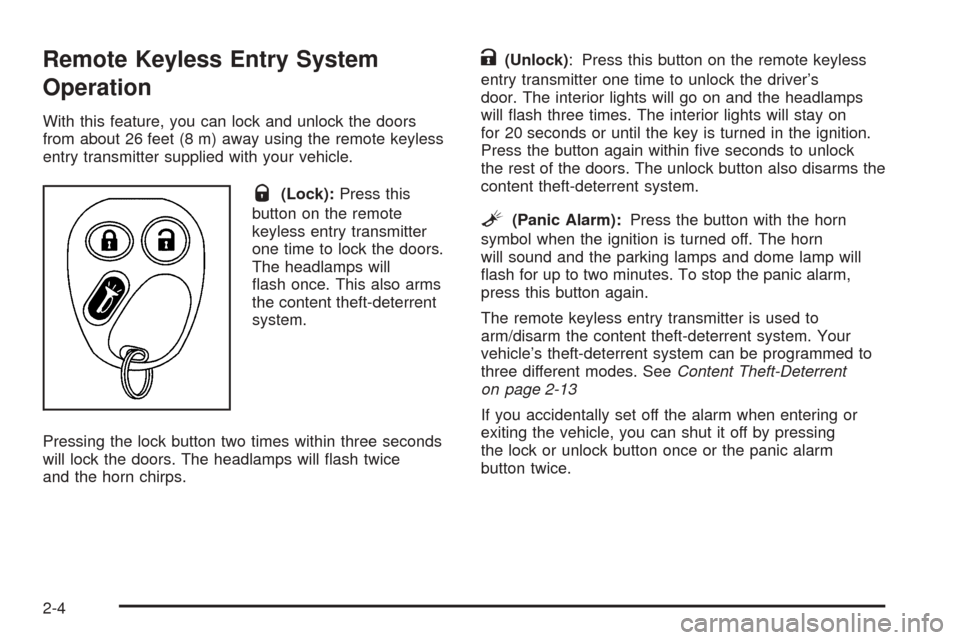
Q(Lock):Press this
button on the remote
keyless entry transmitter
one time to lock the doors.
The headlamps will
ash once. This also arms
the content theft-deterrent
system.
Pressing the lock button two times within three seconds
will lock the doors. The headlamps will ash twice
and the horn chirps.
K(Unlock): Press this button on the remote keyless
entry transmitter one time to unlock the driver’s
door. The interior lights will go on and the headlamps
will ash three times. The interior lights will stay on
for 20 seconds or until the key is turned in the ignition.
Press the button again within ve seconds to unlock
the rest of the doors. The unlock button also disarms the
content theft-deterrent system.
L(Panic Alarm):Press the button with the horn
symbol when the ignition is turned off. The horn
will sound and the parking lamps and dome lamp will
ash for up to two minutes. To stop the panic alarm,
press this button again.
The remote keyless entry transmitter is used to
arm/disarm the content theft-deterrent system. Your
vehicle’s theft-deterrent system can be programmed to
three different modes. SeeContent Theft-Deterrent
on page 2-13
If you accidentally set off the alarm when entering or
exiting the vehicle, you can shut it off by pressing
the lock or unlock button once or the panic alarm
button twice.
2-4
Page 81 of 364
Visor Vanity Mirrors
Your vehicle has covered visor vanity mirrors on both
the driver’s and passenger’s side.
Theft-Deterrent Systems
Vehicle theft is big business, especially in some cities.
Although your vehicle has a number of theft-deterrent
features, we know that nothing we put on it can make it
impossible to steal.
Content Theft-Deterrent
Your vehicle is equipped
with a content
theft-deterrent alarm
system.
The remote keyless entry transmitter is used to
arm/disarm the content theft-deterrent system. See
Remote Keyless Entry System Operation on page 2-4.
Your vehicle’s theft-deterrent system can be
programmed to three different modes.Active Arming:The system will arm when the lock
button on the remote keyless entry transmitter is
pressed. The security system light will come on steady
for thirty seconds. During this time you can still get
back into the vehicle without triggering the alarm. Once
the light starts ashing the system is armed. The
system will disarm when the unlock button on the
transmitter is pressed.
Passive Arming:The system will arm itself one minute
after the ignition is turned off and the driver’s door
has been opened and closed. If the lock button on the
transmitter is pressed before the minute has passed, the
system will arm immediately. The system will disarm
when the unlock button is pressed.
Security System Disable:The system will not arm.
2-13
Page 82 of 364
Content Theft-Deterrent Personalization
To change the mode that your vehicle is programmed to,
do the following:
1. Turn the ignition to RUN or ACC.
2. Press the panic alarm button on the transmitter
slowly four times within ve seconds.
3. You must complete one of the following within
three seconds to change the mode.
To select the active arming mode, press the
lock button on the transmitter once within
three seconds. A chime will sound two times
to acknowledge that the active arming mode has
been selected.
To select the passive arming mode, press the
lock button on the transmitter twice within
three seconds. A chime will sound three times to
acknowledge that the passive arming mode
has been selected.
To select the security system disable mode,
press the unlock button on the transmitter
once within three seconds. A chime will sound
one time to acknowledge that the security system
disabled mode has been selected.If you accidentally set off the alarm when entering or
exiting the vehicle, you can shut it off by pressing either
the lock or unlock button once on the remote keyless
entry transmitter. The panic alarm button needs to
be pressed twice to turn off the alarm. There is
a ten second pre-alarm grace period indicated by a
rapid beeping. By pressing the transmitter buttons as
indicated above, you can disarm the system before
the horn begins to sound and the exterior lights begin
to ash.
If you hear three horn chirps when you press the unlock
button on the transmitter, that means the vehicle’s
alarm was triggered while you were away.
2-14
Page 83 of 364
Passlock®
Your vehicle is equipped with the
Passlock®theft-deterrent system.
This light will come on for
the theft-deterent system
and is located on the
instrument panel cluster.
Passlock
®is a passive theft-deterrent system.
Passlock®enables fuel if the ignition lock cylinder is
turned with a valid key. If a correct key is not used or the
ignition lock cylinder is tampered with, fuel is disabled.
If the engine stalls and the security light ashes,
wait until the light stops ashing before trying to restart
the engine. Remember to release the key from
START as soon as the engine starts.
If the engine is running and the security light comes on,
you will be able to restart the engine if you turn the
engine off. However, your Passlock
®system is
not working properly and must be serviced by your
dealer. Your vehicle is not protected by Passlock
®at this
time. You may also want to check the fuses. See your
dealer for service.
Starting and Operating Your
Vehicle
New Vehicle Break-In
Notice:Your vehicle does not need an elaborate
break-in. But it will perform better in the long run if
you follow these guidelines:
Do not drive at any one speed, fast or slow, for
the rst 500 miles (805 km). Do not make
full-throttle starts.
Avoid making hard stops for the rst 200 miles
(322 km) or so. During this time your new
brake linings are not yet broken in. Hard stops
with new linings can mean premature wear
and earlier replacement. Follow this breaking-in
guideline every time you get new brake
linings.
Do not tow a trailer during break-in. SeeTowing
a Trailer on page 4-36for more information.
2-15
Page 84 of 364
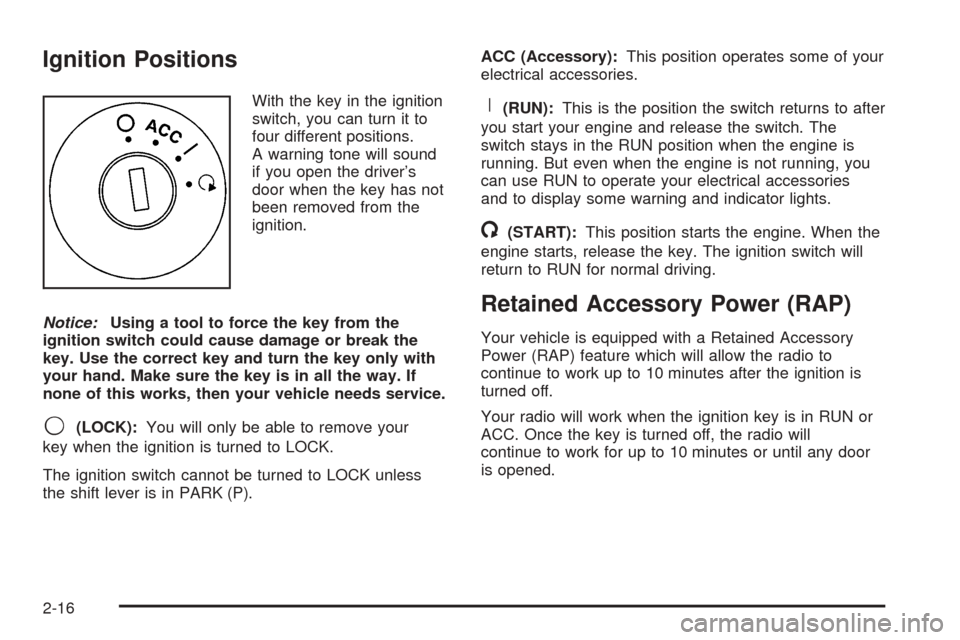
Ignition Positions
With the key in the ignition
switch, you can turn it to
four different positions.
A warning tone will sound
if you open the driver’s
door when the key has not
been removed from the
ignition.
Notice:Using a tool to force the key from the
ignition switch could cause damage or break the
key. Use the correct key and turn the key only with
your hand. Make sure the key is in all the way. If
none of this works, then your vehicle needs service.
9(LOCK):You will only be able to remove your
key when the ignition is turned to LOCK.
The ignition switch cannot be turned to LOCK unless
the shift lever is in PARK (P).ACC (Accessory):This position operates some of your
electrical accessories.
R(RUN):This is the position the switch returns to after
you start your engine and release the switch. The
switch stays in the RUN position when the engine is
running. But even when the engine is not running, you
can use RUN to operate your electrical accessories
and to display some warning and indicator lights.
/(START):This position starts the engine. When the
engine starts, release the key. The ignition switch will
return to RUN for normal driving.
Retained Accessory Power (RAP)
Your vehicle is equipped with a Retained Accessory
Power (RAP) feature which will allow the radio to
continue to work up to 10 minutes after the ignition is
turned off.
Your radio will work when the ignition key is in RUN or
ACC. Once the key is turned off, the radio will
continue to work for up to 10 minutes or until any door
is opened.
2-16
Page 89 of 364
LOW TWO (L2):This position gives you more power
but lower fuel economy. You can use LOW TWO (L2) on
hills. It can help control your speed as you go down
steep mountain roads, but then you would also want to
use your brakes off and on.
Notice:Do not drive in LOW TWO (L2) for more
than 25 miles (40 km), or at speeds over 55 mph
(90 km/h), or you can damage your transaxle.
Use AUTOMATIC OVERDRIVE (D) or LOW FOUR (L4)
as much as possible. Do not shift into LOW
TWO (L2) unless you are going slower than 65 mph
(105 km/h) or you can damage your engine.
Notice:Spinning the tires or holding the vehicle in
one place on a hill using only the accelerator
pedal may damage the transaxle. If you are stuck,
do not spin the tires. When stopping on a hill,
use the brakes to hold the vehicle in place.Transaxle Overheating
If the transaxle uid temperature rises above 284°F
(140°C) or rises rapidly, the Engine Coolant
Temperature Warning Light will ash. SeeEngine
Coolant Temperature Warning Light on page 3-31for
more information. When the transaxle overheats it
will go into a protection mode and will default shift into
fth gear if in the AUTOMATIC OVERDRIVE (D)
position, or second gear if in the LOW TWO (L2)
position. Continue driving the vehicle in either position
depending on the required vehicle speed and load. Once
the uid temperature lowers to the normal temperature
range, the transaxle will return to the normal shift
patterns. Towing or driving on long hills can cause the
transaxle uid temperature to be higher than normal.
If the transaxle uid temperature will not cool, you may
need to pull over and check the transaxle uid level.
You should also check the engine coolant temperature.
If it is hot, seeEngine Overheating on page 5-24.
2-21
Page 90 of 364
Parking Brake
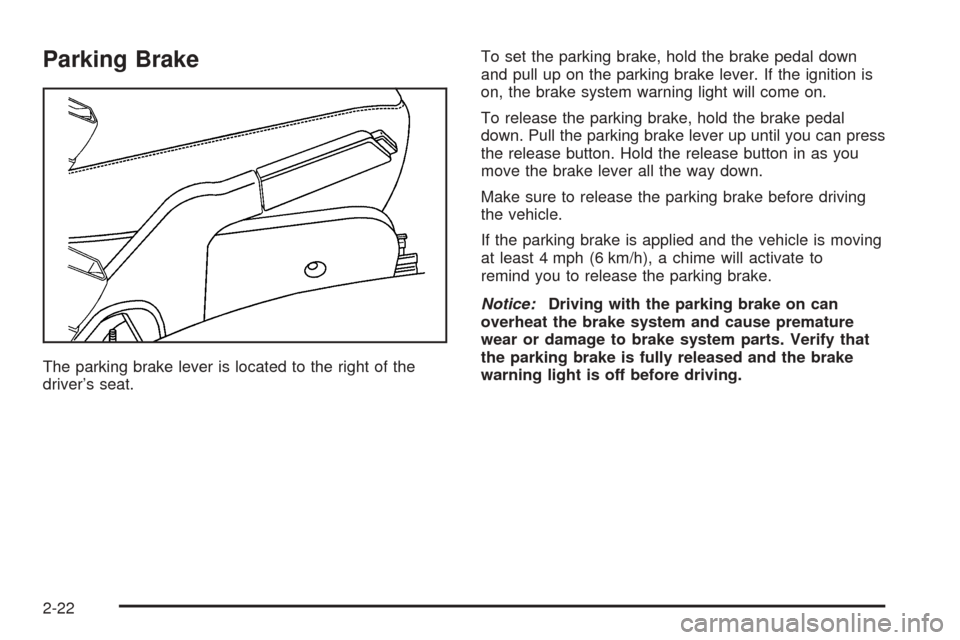
The parking brake lever is located to the right of the
driver’s seat.To set the parking brake, hold the brake pedal down
and pull up on the parking brake lever. If the ignition is
on, the brake system warning light will come on.
To release the parking brake, hold the brake pedal
down. Pull the parking brake lever up until you can press
the release button. Hold the release button in as you
move the brake lever all the way down.
Make sure to release the parking brake before driving
the vehicle.
If the parking brake is applied and the vehicle is moving
at least 4 mph (6 km/h), a chime will activate to
remind you to release the parking brake.
Notice:Driving with the parking brake on can
overheat the brake system and cause premature
wear or damage to brake system parts. Verify that
the parking brake is fully released and the brake
warning light is off before driving.
2-22
Page 95 of 364
Mirrors
Manual Rearview Mirror
To adjust the angle of the mirror, move the mirror to a
position that allows you see to out of the back window.
To adjust the height of the mirror, adjust the arm
that connects the mirror to the windshield.
To reduce glare from lights behind you, move the lever
toward you to the night position.
Automatic Dimming Rearview Mirror
with OnStar
®, Compass and
Temperature Display
If the vehicle has this feature, an automatic dimming
mirror automatically dims to the proper level to minimize
glare at night from lights behind your vehicle. For
more information about OnStar
®, seeOnStar®System
on page 2-32.
The mirror also includes a dual display in the upper
right corner of the mirror face. The compass reading and
the outside temperature will both appear in the display
at the same time.
Y(On/Off):This is the on/off button.
Automatic Dimming Mirror Operation
The automatic dimming mirror function is turned on each
time the ignition is started. A light near the on/off
button will come on to indicate the automatic dimming
is on.
Press the on/off button for about four seconds to
manually turn the automatic dimming function on or off.
Temperature and Compass Display
Press the on/off button, located to the far left, to cycle
between °F, °C and off.
If the display reads CAL, the compass needs to be
calibrated. For more information, see “Compass
Calibration” later in this section.
If an abnormal temperature reading is displayed for an
extended period of time, please consult your dealer.
Under certain circumstances, a delay in updating
the temperature is normal.
2-27