2004 VOLKSWAGEN BEETLE air
[x] Cancel search: airPage 120 of 138

Downloaded from www.Manualslib.com manuals search engine ssis t an Issue unnecessary warn
ut unwanted braking inter-
h n ils f m ti n is impaired, e .g . If
sili " f the radar sensor has been
hil the ehicle is in motion, Front As
t r a t to persons, animals and
r s ing or a proaching in the same
li."f ' ll.'v.
ig. 1 7 1 In t11e instrumen t cluster display: dis
h-m e ammg d1splay
arnin lamp
Lit up , Possible cause :::) ~
r:l Tl1o br ake p dal tr ave l decrcas ~
L!J A ss is t tr iggers til e br ak s. Th, 111 When ~rr
the bmke p dal f el s tiff er. ay ma e
rn
Aut om atic br aking intervention by F . rontA s 1s t can be stopped by depres ing the d~~~
the acce l rator, or throug h a steering interv enh~n
r:l D eac tivate Front Assis t if it doe not fun,
L!J as describ ed in tl1is chapter, e .g . if mu11,~;:
unw ant ed inte rventions occur. Have the s Sttlm
checked by a qualifi ed workshop. Volkswagen rec
ornm ends using a Volk swagen dealer hip for t11s
purpose .
r-fl1 First read and observe the introductory
l-W1 information and safe ty warnings! on
page 235 .
I
Collts ion warning .a) The system detects a
potential
collision with a veh1cle in front
I =:-page 237 .
Solution 1
. . I Depress thtl Brake or take avoiding action I brake pedal.
a) tspla e>d tn colour on an mstrumen t cluster wtth colou r dtspla y.
i tan e warning in the instrument cluster
di play
If tl'e safe d1stance to the veh1cle in front drops be
l the mmimum le el, a distance warning will ap
pear in the instrumen t cluster display ~Fig. 171.
In reas e the distance.
ailure to observe illuminated warning lamps
and displays can cause accidents and seri
us Injuries.
• Never ignore illuminated warning lamps
and displays.
Whtle driving
. ' tne disp!J'
r:l Whe n Fron t As sist is sw1t c h ed or' erWntten
L!J in the instrumen t cluster can be ovg an111·
. 1 f nctio ns. e · by d1splays related to ot 1e r u
coming telephone cal
l.
Page 121 of 138

Downloaded from www.Manualslib.com manuals search engine I~
Fig . 172 In the front bumper. radar se sor
r-f'n :irst rea~ and observe the introductory
L....Wl mformat1on and safety warnings on
page 235.
A radar sensor 1s fi tted to the front burr per o mo
tor the traffic situa 1on ~ F19 6 Ver e st-a el
hng ahead can thus be detected u;> o a c stance o
a p
proximate ly 120 m
The area mo mto nng sys em {Fron Ass s:) ... no
function if the radar sensor •s ltl'pa•red e g d e o
heavy ra1n. spra y or snow T~e If'S rurren d ster
d1sptay shows th e message Front ss i s t : no
sensor view!. Clean he ra ar sensors as re
QUired ~
as soon as the radar sensor as no longet IM?a ·ed
The message m the 1ns rument cJ .... s•er d s~.a,
goes out , and F ren t Ass•st can be reac ed
~tro ng reflected rad•ahon of the radar s:g"aJ e g
In multt -storey car par s. or ~ e'l near me!a IC ob
!ects such as ra1ls in t he road or meta1 pLa~es used 10 roadworks , can 1mpa1r th e funct.o of F oo ~ SIS\.
The area in fron t of and around the radar sensor
must not be covered by objects such as stickers or
auxiliary headlights, as this can impair the function
of Front Assist.
Any structural modifications to the vehicle, e .g .
l
owering the vehicle or making alterations to the
front end tri m , can impair the function of Front As
sist. Structural mod1fictions should therefore only
be carried out by a qualifie d workshop. Volkswa
gen recommends using a Volkswagen dealership
for th is purpose.
Incorrectly performed repa irs to the fron t end of the
vehic le can alter the position of the radar sensor
and therefore tmpai r the functi on of Front Assist.
Repair work should therefore only be carrie d out
y a qualified workshop. Volkswagen recommends
u sm g a Volkswagen dealership for this purpose.
CD
Switch off Front Assist if you suspect that the
radar sensor has been damaged or its positio n
has been altered. This can help to prevent fur
ther damage. Have the radar sensor realigned.
• The radar sensor could be moved if it is hit
for example in parking manoeuvres. Readjust-'
ing the sensor could impair the performance of
t h e system or cause it to be switched off.
• Repair work on the radar sensor w ill require
special knowledge and tools. Volkswagen rec
ommends using a Volkswagen dealership for
this purpose.
• Remove snow with a brush, and remove ice
preferably with a solvent-free de-leer spray.
m ~irst read and observe t h e introductory
P Information and safety warnings on age 235 .
me area monitoring system (Front Ass1 s t) i s auter
_ atJcally activ e once the ign1t1on 1s s wi ched on
-Page 163 .
The pnor wam1ng and d 1stance warn ing are auto
ma 1call y deact1va ed when Front Ass 1st i s deacti
vated
Vol swagen recommends that Front Ass1 st is
sw itched
~n at ~11 t imes. E xcept ions ~page 238,
Temporan ly switch off the area momtoring s ystem
(Front Ass tst) m the follow ing sttuattons.
Driver assist systems 237
Page 123 of 138

Downloaded from www.Manualslib.com manuals search engine ere is oncomin g traffic . • If
en loads or attachment parts on other vehi-
• tru e to the side, rear or above the normal .e s h. I ~-ers s of he ve ICe.
C ity emergency brake function
rl'i1 First read and observe the introductory
L-WJ information and safety warnings A on
page 235 .
e city emerg ency brake function is part of the
a'Ba monitorin g system (Front Assist) and is act ive
"' .en Front Ass ist is s witched on.
The c· emerg ency brake function gathers in for
ma ·on on the traffic situation up to a distance of
about 10 m in front of the vehicle with in a speed
ra ge of abo ut 5 km/h (3 mph) to 30 km /h
( 9 mph).
e system prepare s the vehicle for emergency
bra in g if it detects a possib le colli sion with a vehi -
eahead ~~-
If the dr iver does not react to a possib le serious
collis ion, the s ystem can autom atically stop the ve
h i
cle with bra ke pressure with increas ing intensit y
so as to reduce the s peed in a possib le co llision .
Hence the s ys tem can help min im ise the conse
quences of an accident.
A WARNING
The intelligent technology of the city emer
gency brake function cannot change the laws
of physics. The driver is always responsible
for braking in time.
• Adapt your speed and distance from the
Vehicles ahead to suit visibility, weather, road
an d traffic conditions.
• The city emergency brake function cannot
Prevent accidents and serious injuries by itself '---" ----------------------------~
• The city emergency brake function can
carry out unwanted brake interventions in
certain complex driving situations, e.g. at
traffic islands, building sites and metal
tracks.
• Front Assist can issue unnecessary warn
ings and carry out unwanted braking inter
ventions when its function is impaired, e .g . if
the position of the radar sensor has been
changed.
• While the vehicle is in motion, Front As
sist does not react to persons, animals and
vehicles crossing or approaching in the same
lane.
m The brake pedal travel decreases when the
~ city emergency brake function is triggered .
This
may make the brake pedal feel stiffer.
m Automatic brake intervention by the city
~ emergency brake fun ction can be stopped by
using the clutch , the accelerator or steering inter
vent ion.
m The city emergency brake function can brake
~ the vehicle to a standstill. The vehicle will not
be held permanently by the braking system. De
press the brake.
m Switch off Front Assist and the city emergen
~ cy brake functio n in the event of multiple un
wanted interventions . Proceed to a qualified work
shop . Volkswagen recommends using a Volkswa-
gen dealership for this purpose .
Page 124 of 138
![VOLKSWAGEN BEETLE 2004 Owners Manual Downloaded from www.Manualslib.com manuals search engine TrJffi c sign recognition
CJll Introduction
TlliS l~t1pter onlain inform atio n on th e follo w ing
sull]tl t ·:
Di::lf ily .. · · ·](/manual-img/18/55751/w960_55751-123.png "VOLKSWAGEN BEETLE 2004 Owners Manual Downloaded from www.Manualslib.com manuals search engine TrJffi c sign recognition
CJll Introduction
TlliS l~t1pter onlain inform atio n on th e follo w ing
sull]tl t ·:
Di::lf ily .. · · ·")
Downloaded from www.Manualslib.com manuals search engine TrJffi c sign recognition
CJll Introduction
TlliS l~t1pter onlain inform atio n on th e follo w ing
sull]tl t ·:
Di::lf i'ly .. · · · · · · · · · · · · · · · · · · · · . . . . . . . . . . 24 4
un tion ...... · · · · · · · · · . · . . . . . . . . . . . . . . 244
Th tr ·JniC ign r cog nition sy ste m can he lp th e
driver ell k th spe d limits or overtaki ng restric
tions liH :ll curre ntly apply fo r him.
Th traffic igns and add ition al information recog
nis d by the yste m are sh own in the instru ment
clusl r disp la y and the infot ainm ent system display
(navigation syste m m ap disp lay).
Availability:
At the t im e th at this Owne r's M anual went to prin t,
the traffic sig n recog nition system was available i n
the following co untries:
Andorra, Austri a, Belgium, Czech Republ ic, Den
mark, Germany, Finland , France, Irel and , Italy ,
Liechte nste in, Luxembourg, Monaco, Netherland s,
N o
rway, Poland, Portugal, S an Marino, Spain ,
Sweden, Swi tze rland, Unit ed K ingdom, V atica n
City.
Additional information and warnings:
• Exterio r vie w s ~page 6
• Volkswagen in formation system ~page 26
• lnfota inm ent sy ste m ~page 31
• Navigatio n system ~Booklet Na vigati on syste m
A WARNING ~ ---
Do not let the extra convenience afforded by
~he traffic sign recognition system tempt you
Into taking any risks when driving -this can
~ause accidents. The system is not a ~ubsti-
ute for the full concentration of the dnver.
• . Adapt your speed and driving style to suit
VIsibil ity, weather, road and traffic conditions.
A WARNING (C ontinued )
• Poor visibility, darkness, snow, rain and
fog can cause traffic signs to be not dis
played or be incorrectly displayed by the sys
tem.
• If the camera's field of view is dirty, cov
ered or damaged, the function of the traffic
sign recognition system may be impaired.
A WARN ING
Driving recommendations and traffic symbols
displayed by the traffic sign recognition sys
tem may differ from the current traffic situa
tion.
• Not all traffic signs can be recognised by
the system and displayed correctly.
•
Traffic s igns and traffic regulations have
priority over the recommendations and dis
plays provided by the traffic sign recognition
system.
Please observe the following points in order to
avoid impairing the proper function of the sys
tem:
• Regularly clean the camera's field of view,
and keep it free from snow and ice.
• Do not cover the camera's field of view.
• Check the area of the windscreen that is in
the camera's field of v iew for damage.
• The use of old map data in the navigation
system can lead to incorrect display of the traf
fic signs.
• The traffic sign recognition system has only
limited ava ilability in waypoint navigation mode
{waypoint navigation) of the navigation system.
43
Page 127 of 138
Downloaded from www.Manualslib.com manuals search engine J DFW«Z
Driving Mode Selection
o:n Introduction
This chapte r con ta in s inform ation on the following
subje cts :
Function an d ope ratio n . . . . . . . . . . . . . . . . . . .
248
Adjusting the driving mode to suit yo ur
r equir em ents . . . . . . . . . . . . . . . . . . . . . . . . . . .
250
Th e driver can use Driving Mode Selection to acti
vate a variety
of vehicle settings as required .
Additional information and warnings:
• Lights ~page 105
•
lnfo ta in ment system ~page 31
• Changing gear ~page 169
Function and operation
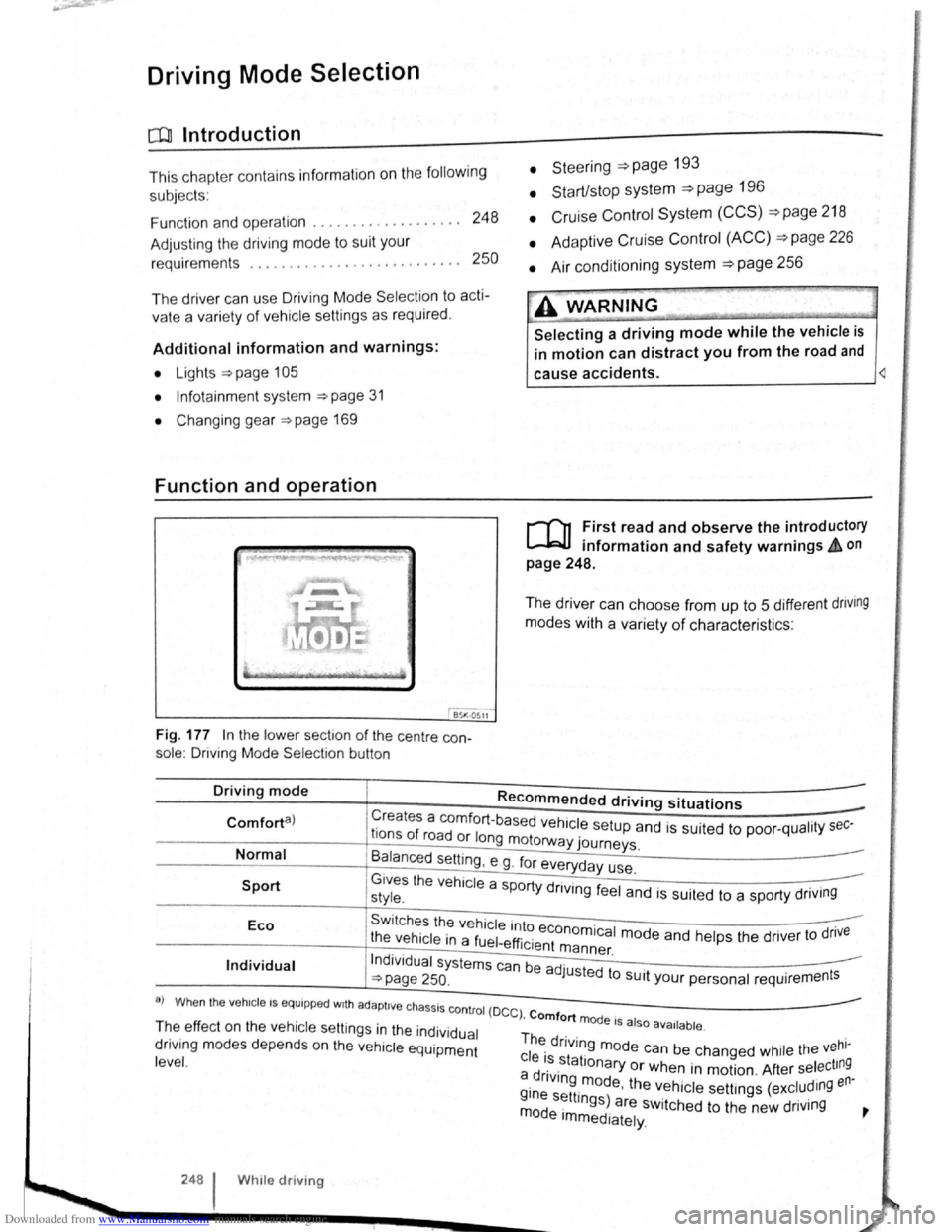
Fig. 177 In the lo we r sect1o n of the centre con
sole : Driving Mode Selectio n button
• Steeri ng =>page 193
• Start/stop system =>page 196
• Cruise Con trol System (CCS) =>page 218
• Adaptive Cruise Control (ACC) =>page 226
• Air conditioning system =>page 256
A WARNING
Selecting a driving mode while the vehicle is
in motion can distract you from the road and
cause accidents. ~
r-f"n First read and observe the introductory
L-lr:JJ information and safety warnings & on
page 248.
The driver can choose from up to 5 different dnving
modes with a variety of characteris ti cs :
Driving mode Recommended driving situations
Creates a comfort-ba se d h 1 . Comforta) r f ve ICe setup and is suited to poo r-qualit y sec-Ions o road or long motorway journeys.
Normal
Sport
B~lanced setting , e g . fo r everyday use.
G1ves the vehicle a sport d .. style. Y rtvlng feel and is suited to a sporty driv1ng
Eco Swi tches the vehicle into . .
t he vehicle in a fuel-effi . economica l mode and he lp s the drive r to dnve 1c1ent m ann er
Individual Indi vidua l systems can be ad ·u · . ~page 250. J sted to SUit your personal requir ement s
a) Wh en the veh1c le I S equipp ed w1th ad apti ve chassis co ntro l (D
C C) , Comfort mode I I T~e ef fec t o n th e vehicle se ttin gs in the individual Th . . 5 a 50 ava1lable .
dnv1ng m od es depends on the vehi cle equipment ~ dnvlng mode can be chang ed whil e the vehl-
l eve
l. c le ~~.stationary or when in motion . After select ing a dnv1ng m od th en· i . e, e ve h icle se tt ings (excludmg
~~~ s~ttmgs) are switched to the new driving ~ e Immediately.
248 W h1le driv ing
Page 128 of 138
Downloaded from www.Manualslib.com manuals search engine J J
' ·, ' '~
' i '
traff ic c ond itions allow, briefly take your foot
When accle rator to activate the newly selected off the . . .
9 mode fo r the eng me. dnvm
daptive chassis control (DCC)
~h·le the vehicle is in motion , the DCC constantly
d.
1
sts the suspensio n characteristics to match the
a J~ surface and the cu rrent driving situation, in
~~~ordance with the preset vehicle setti ngs.
If there is a fault in the DCC, th e ~ symbol appears
in the instrument cluste r display along with the
message Fault: damper control.
Steering
In Sport mode, power steerin~ is r~duced and the
effort required to stee r the vehicle mcreases. The
vehicle's driving response becomes more agile.
Powertrain (engine and gearbox)
The engine and gearbox will give either a more dy
namic or more balanced response to the move
ment of the accelerato r, depending on th e selec ted
driving mode . In vehicles with an automatic gear
box, the gear shift po ints and the coasting mode
will also change . An active cruise contro l sys tem
(CCS) can affec t the acceleration response.
Adaptive Cruise Control (ACC)
When the ACC is active, accele ratio n and deceler
ation of the vehicle becomes more ecological or
sporty.
Dynamic bend lighting and automatic main
beam assist
The dynamic bend lighting and the automatic main
beam assist will give either a more dynamic or
more balanced respo nse to the current driving sit
uation, depe nding on the selected driving m ode.
Air conditioning system
In Eco mode , the air cond itio ning will be set to run
even more economica lly.
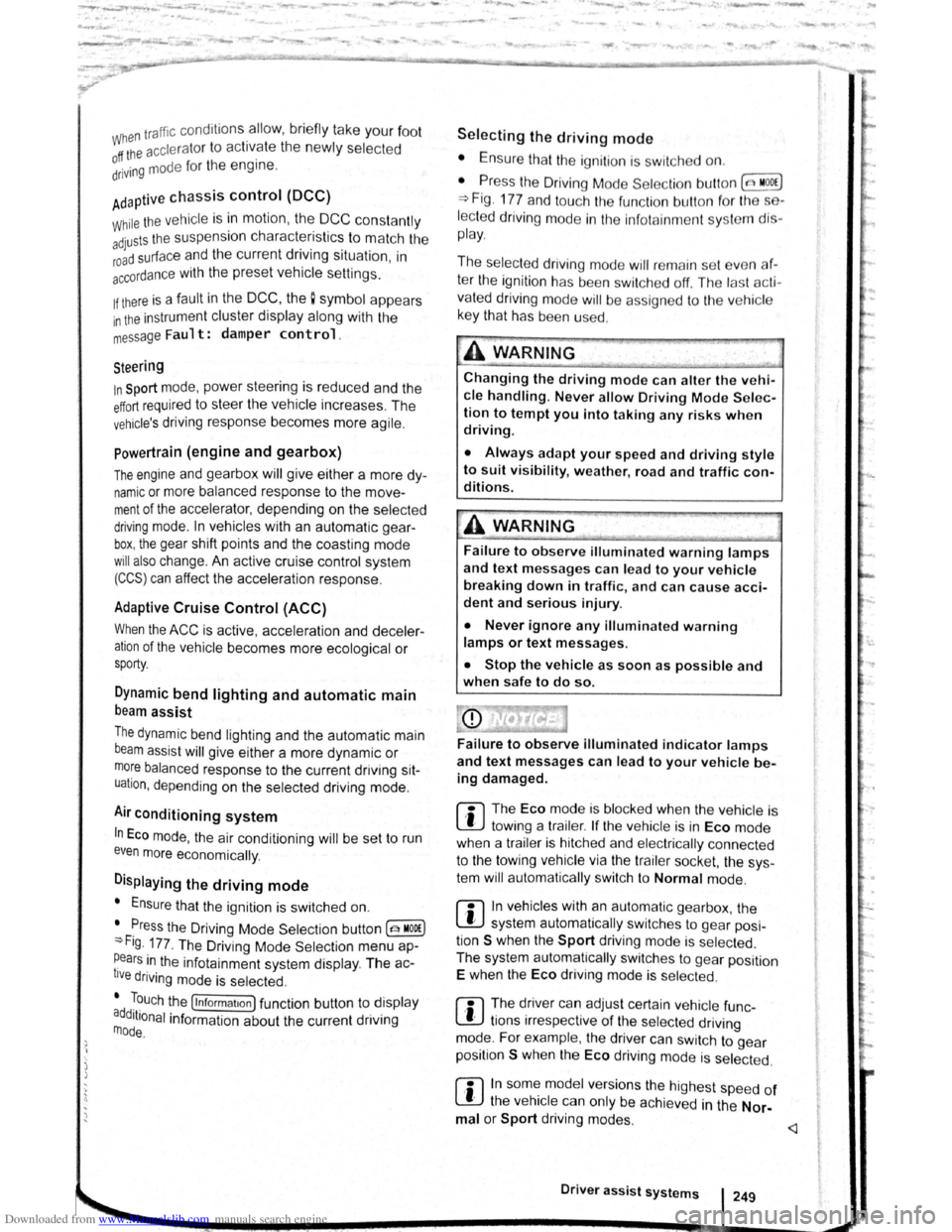
Displaying the driving mode
• Ensure that the ignition is switched on.
• Press the Driving Mode Selection button(~ MOD£)
~Fig. 177 . The Driving Mode Selec tio n menu ap
~ears in the infotainment system display. The ac
tive driving mode is selected .
• Touch the (Informa tion ) function button to disp lay
additional information about the current driving
rnode.
..,...,_ . _ ..
-
Selecting the driving mode
• Ensure that the igniti on 1s swit c hed on.
• Press the Driving Mode Se lection button (t:'t wooe)
~Fig. 177 and touch the fun ction button for the se·
lected driving mode in the lnfota inm ent system dis
pla y.
The selec te d driving mode
will re m ain set e ve n a f
t e r the ignition has bee n swi tc he d off . Th e las t acti ·
va ted driving mode will be assigned to the ve hic le
key that h as been use d.
Changing the driving mode can alter the vehi
cle handling. Never allow Driving Mode S elec
tion to tempt you into taking any risks when
driving.
• Always adapt your speed and driving style
to suit visibility, weather, road and traffic con
ditions.
It A WARNING . ~
Failure to observe illuminated w arning lamps
and text messages can lea d to your vehicle
breaking down in traffic, and can cause acci
dent and serious injury.
• Never ignore any illuminated warning
lamps or text messages.
• Stop the vehicle as soon as possible and
when safe to do so.
---
Failure to observe illuminated indicator lamps
and text messages can lead to your vehicle be
ing damaged.
r::l The Eco mode is blocked when the ve hicle is
l!J towi ng a trai le r. If the vehi cle is in Eco mode
when a trailer is hitched and electrica lly connected
to the towing
ve hicle via th e trailer socket. the sys
tem will automatica lly swi tch to
Normal mode.
r::l In vehicles with an automa tic gearbox, the
l!J system automatically switches to gear posi
tion S when the
Sport drivin g mode is se lected .
The syste m aut omatically switches to
gear position
E when the
Eco driving mode is se lected .
r::l The driver can adjust certain vehicle fun c
l!J tions irrespective of the selected driving
mode . For examp le, the driver can swi tc h to
gear
position
S wh en the Eco driving mode is selected.
r::l In some model ve rsions the highest speed of
l!J th e veh ic le ca n only be achie ved in the Nor-
mal or Sport driving modes.
Page 129 of 138
Downloaded from www.Manualslib.com manuals search engine Adjusting the driving mode to suit your requirements
r-f'n First read and observe the introductory
L-Wl information and safety warnings~ on
page 248.
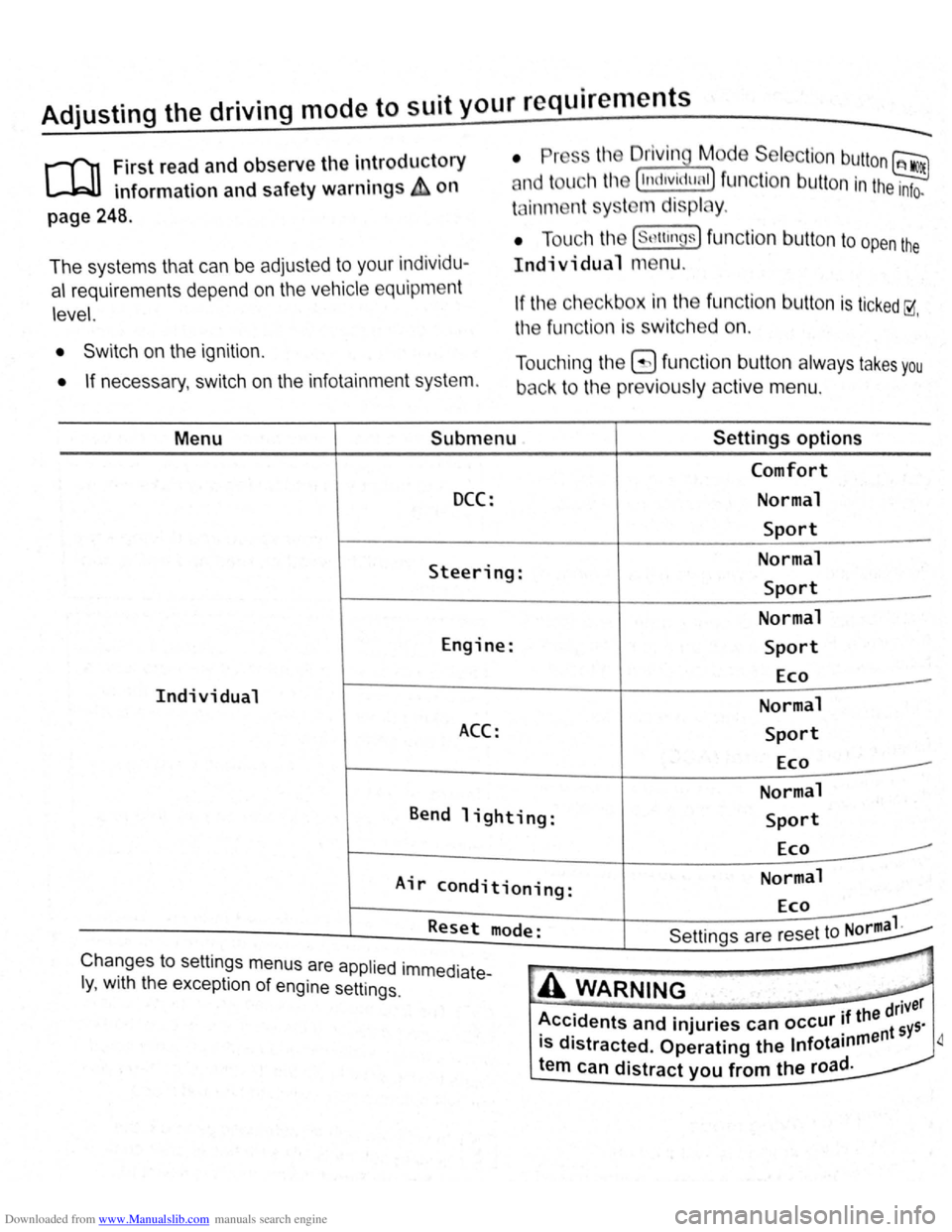
The systems that can be adjust ed to your indiv id u
al requiremen ts depend on the ve hicle equipm e
nt
le vel. If th e c heckb o x in the function butt on is ticked~
th e fun ctio n is swi tc h e d on. '
• Switch on the ignition .
• If necessary , switch on the infota inment syst em. T
o uch ing the
8 function button always ta ke s you
back t o the previously active menu .
Menu Submenu Settings options
Comfort
DCC: Normal
Sport
Steering: Normal Sport
Normal
Engine: Sport
Eco
Individual Normal
ACC: Sport
Eco
Normal
Bend lighting: Sport
Eco -
Air conditioning: Normal Eco
Reset
mode:
-
Sett ings are reset to Norma 1. --""' Chang es to settmgs menus are applied . .
I ·th th · lmmedlate-y
, Wl e except1on of engine setting S. A WARNING
Page 135 of 138
Downloaded from www.Manualslib.com manuals search engine L):.C' o-1 jflrtlhrll \'lr, r1111 1!11 llllliulll pri)(IH'I i . n
•
1 •f1•1\llll l ptt~pc,llitl, ( n ;! f llUtll rtf h n, k Ancl 1 filliP < ·~ • <~'' , .,11, ;1 1'1,,, tnln lllr) 1 :1 < ' \Ill n m llln h n t11n
;~iw:IY· 'l ,1111• 11 ''' (l;llllnlll,l rmd ''I'Pit
1 nnd rt)plft~ lr:~lllC'1' "1
'
<'(', I• H I 1\ltll : tulc 11 11: •) l' tnt,;,' l: IIHl 'lllf: H :o .
• l<,: tll\1;1 i l lo tdd l1t1 Gl< d1HHI1 Vt) l I Ill n th
;llld fl<, :lll t\:lltn 1<,1110 tld ,
• lrc,nt tiH ifl\1\II<'F lth, P
• Alv :l y • ttppl l'l t't lll lll t) :111d • 11 fl proch t I
lt\,lll<,l ~p:lllii!JI llttd 1lw:1 • 11~0, dty ottn n or
11 11\111~'' 'klth ll~ttll:i ft 11 ft tn fluff. o n o t npply
ck,;tninu '"'d ':11 pr dut ~t dlt < tly to th le 1tll r .
• ho111 u f,,,,.,, ·tnill', t iGII , Ink , b 11-p o lnt p n
u1k llp$lk'l--, ~11<) "11 111n l" . . qt~lcf..ly po , sl-
bla.
C lonnlng •
l
ook f1 r th p ig m ent. Use a sp ec ia l colo ur ed
ln Alh er er m to re fr es h the colo ur wh ere necess a
ry .
• Wlp it o ff with a soft cloth.
C leaning
V o lk sw oge n reco mmend s that y ou u se a damp
o llo n o r w oo l c loth f o r g ene ra l c lea ning purposes.
Do no t lo t the wate r soa k thro ug h the leathe r or
• ofl k Int o the sea ms.
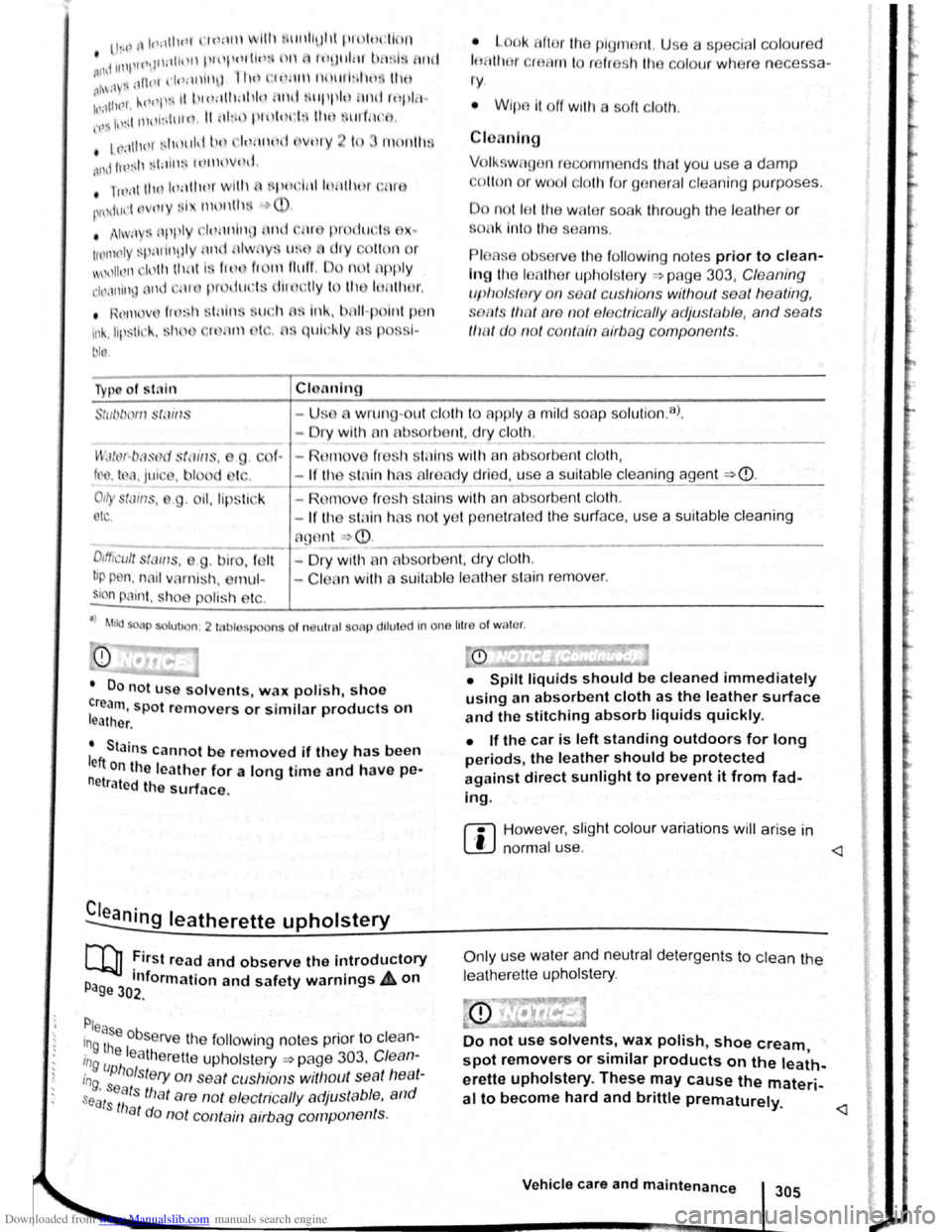
P lease obsorve the f ollo win g no tes prior to clean
In g th e leathe r uph ols ter y -?page 303, Cleaning
u p ho ls te ry on sea t cu shi ons with out sea t h
eating ,
soRts tlw t are not elec trica lly adju stable, and sea ts
th at d o not co ntain airbag comp on ents.
-
U:.;o w run g-out c loth to app ly a mild so a p so luti on .8l.
-ry w ith fln ab . orbe~t. dry ~l?lh:....
. ---------------
I' ; llut-b :ISt)d SfdiiiS, . C f. - R( m v fr sh tn in s with an absorb ent cloth,
lP . t d . jui' . h i d tc . - If th st in has Alread y dried, use a suitable c leaning age nt ~CD.
011y st~1 1w, . • il, lip tick - R mov fr sl1 sln in s with an absorbe nt cloth.
I . -If 111 stni n hAS no t y et p enetr ate d the surf ace, u se a suitable cleaning
nt
4
C l n wit11 a suit abl e leathe r stain r e mov er.
CD
• Do not u se solvents, w ax polish, shoe
cream, spot removers or similar products on leather . •
Spilt liquids should be cleaned immediately
using an absorbent cloth as the leather surface
and the stitching absorb liquids quickly.
• Stains cannot b
e removed If the y has been
left on the leather for a long time and have pe·
netrated th e surface.
• If the car is left standing outdoors for long
periods, the leather should be protected
against direct sunlight to prevent it from fad
ing.
r:l However, slight colour variations will arise in
L!J norma l use .
COJ First read and observe the introductory
P Information and safety warnings A on age 302
.
Please . in Obse rv e the following notes pnor to clea n-
in~ the leatherette upholstery ~page 303. Cle an
in uphols te ry on sea t cushio ns witllout se at heat
s
ag, seat s tha t are not e lectrica lly adjustable , and
ats tha t do no t cont Ain airbag componen ts.
Only use water and neutral detergents to clean the
leat her ette upholstery .
Do not use solvents, wax polish, shoe cream • spot removers or similar products on the leath-
erette upholstery. These may cause the materi
al to become hard and brittle prematurely.
Vehicle care and maintenance 305