Page 86 of 168

85 Telephone*
Phone book
� Phone book
The phone book contains all entries of the
mobile phone memory. On the COMAND control unit:�
Press the soft key in the Telephone
main menu (
�page 77).
The phone book appears on the dis-
play. The first list entry is highlighted
automatically.
On the multifunction steering wheel:
�
Switch the multifunction display in the
instrument cluster to the Telephone
main display (
�page 24).
�
Pressj or k.
A phone book entry appears on the
multifunction display; scroll up or down
as required.
COMAND phone book display
An example display for the phone book is
shown above. It shows a list of the phone
book entries whose names start with the
letter B. Displayed in the status bar is the
number of the highlighted name, in this ex-
ample 18005551212.
iIf a GSM phone is used, the phone book
contains all entries of the telephone
phone book.Opening the phone book
iVarious icons may be assigned to the
phone numbers, depending on the en-
try made on the telephone:
Home number
Work number
Fax number
Main number
Mobile number
Pager number
The name of the category assigned to
the phone number, e.g. Home, appears
in the multifunction display in the in-
strument cluster.
Page 87 of 168

86 Telephone*Phone bookThe following options are now available:�
Switching the phone book display from
COMAND (
�page 86).
�
Selecting a phone book entry and call
initiation (
�page 86).
�
Deleting a phone book entry from CO-
MAND (
�page 87).
Switching the phone book display
�
Open the phone book from COMAND
(�page 85).
�
Press the 123 soft key.
This switches the display to number
display. The name of the highlighted
entry is shown in the status bar;
or
�
Press the ABC soft key.
This switches the display to name dis-
play. The number of the highlighted en-
try is shown in the status bar.
On the COMAND control unit
�
Open the Phone Book main menu
(�page 85).
As described in the “COMAND phone
book display” section (
�page 85), a
list of phone book entries appears, be-
ginning with a specific first letter (ini-
tial).Changing initials:
�
Press� or � once or repeatedly.
Each time you press the button, the
display changes to the next letter up or
down. At the end of the list of letters is
the category Other.
This category combines all entries
without a name, or entries whose
names start with a special character
(e.g. * or #).
Selecting an entry:
�
If necessary, change the initial letter
(�page 86).
�
Select an entry. You can scroll through
the list using � or �.
If you press and hold either one of the
buttons, the scrolling up or down accel-
erates.
Selecting a phone book entry and es-
tablishing the connection
Page 88 of 168

87 Telephone*
Phone book
Establishing a connection: �
Press�.
The telephone initiates the connection
with the appropriate number.
On the multifunction steering wheel
�
Switch the multifunction display in the
instrument cluster to the Telephone
main display (
�page 77).
�
Pressj or k repeatedly until
the desired entry is shown in the multi-
function display.
�
Presss
.
The telephone initiates the call to the
selected number.
�
Select the phone book entry to be de-
leted from COMAND (
�page 86).
�
Press the Delete soft key.
The delete prompt is displayed.
�
Use� to select the menu item Yes.
�
Press�.
The entry is deleted.Entries from the following lists can be
stored as phone book entries on the SIM
card:
�
Accepted and missed calls list
(�page 80).
�
Dialed calls list.
�
Select the desired entry in one of the
lists mentioned above.
�
Press the Save soft key.
The Entry menu appears.
Deleting a phone book entry
Adding a new phone book entry iThe Save soft key does not function
when attempting to store an entry al-
ready present in the phone book.
��
Page 89 of 168
88 Telephone*Phone book
The field Name is selected automatically
and contains either no name or the
name last entered.
The field Number automatically incor-
porates the telephone number.
Entering/editing a name or number
Data can be entered into a field using the
12 button keypad (keys� - $), or via a
Selection menu.Entry via 12 button keypad:
�
Use� - $ to enter the data directly
(�page 143).
Entry via Selection menu:
�
Press the Keypad soft key.
The Selection menu appears.
�
Enter the data via the Selection menu
(�page 142).
�
Press�.
When making an entry, you can choose
a number category from a list.
�
Use� or � to select the desired
category.
�
Press�.
The system will store the entry under
its name. If no name has been assigned
to the entry, it is stored under the cate-
gory Other.
Page 90 of 168
89 Telephone*
SMS (Mail)
� SMS (Mail)
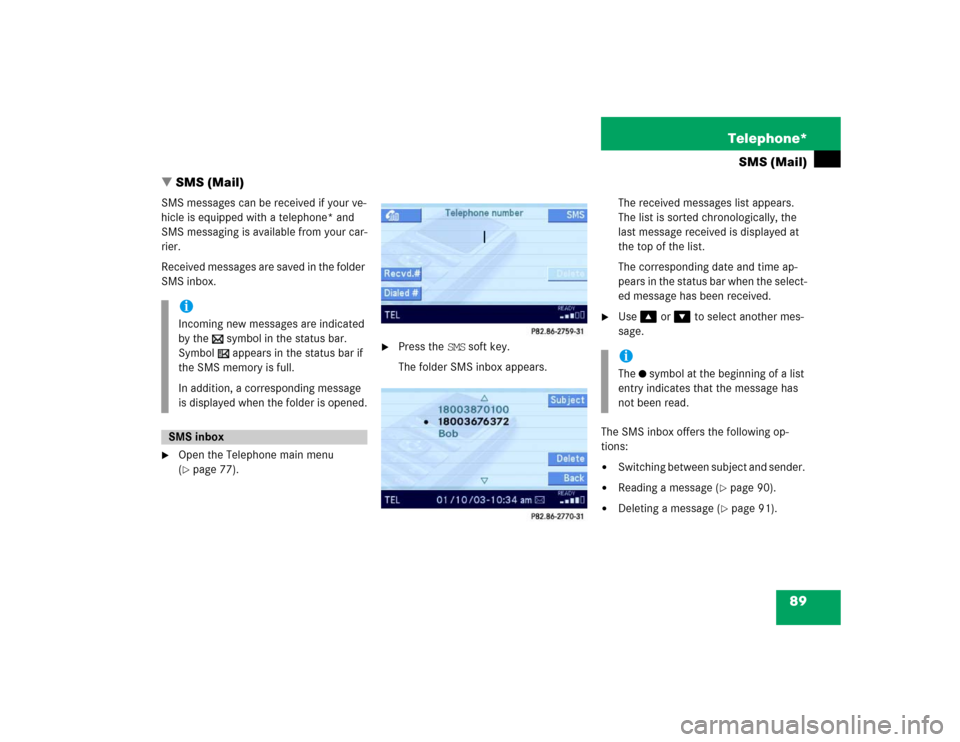
SMS messages can be received if your ve-
hicle is equipped with a telephone* and
SMS messaging is available from your car-
rier.
Received messages are saved in the folder
SMS inbox.�
Open the Telephone main menu
(�page 77).
�
Press the SMS soft key.
The folder SMS inbox appears.The received messages list appears.
The list is sorted chronologically, the
last message received is displayed at
the top of the list.
The corresponding date and time ap-
pears in the status bar when the select-
ed message has been received.
�
Use� or � to select another mes-
sage.
The SMS inbox offers the following op-
tions:
�
Switching between subject and sender.
�
Reading a message (
�page 90).
�
Deleting a message (
�page 91).
iIncoming new messages are indicated
by the symbol in the status bar.
Symbol appears in the status bar if
the SMS memory is full.
In addition, a corresponding message
is displayed when the folder is opened.SMS inbox
iThe symbol at the beginning of a list
entry indicates that the message has
not been read.
Page 91 of 168

90 Telephone*SMS (Mail)Switching between subject and sender
The incoming SMS can be displayed with
the sender or the subject. Selection of the
sender prompts the system to display the
telephone number. �
In the SMS inbox (
�page 89) press the
Subject soft key:
The first characters of the message
text appears;
or
�
In the SMS inbox press the Sender soft
key:
The name(s) or phone number(s) of the
message sender(s) appear(s).
�
In the SMS inbox (
�page 89), use�
or � to select a message.
�
Press�.
The message text appears.
�
To scroll through the message text,
press� or � as required.
Switching between content and sender
�
Press the Contents soft key.
The sender’s name appears if it is
saved in the phone book. If not, only
the phone number appears;
or
�
Press the Sender soft key.
The message text appears.
iThe sender’s number only appears if it
has been transmitted.
The sender’s name only appears if, in
addition, the number and the name are
stored in the phone book (
�page 85).
Reading a message
Page 92 of 168
91 Telephone*
SMS (Mail)
�
In the SMS inbox (
�page 89), use�
or ��to select the message to be de-
leted.
�
Press the Delete soft key.
A delete prompt is displayed.
�
Use� to select the menu item Yes.
�
Press�.
The message is now deleted.
�
Press the Back soft key.
This returns you to the Telephone main
menu.Deleting a message Exiting from the SMS menu
Page 143 of 168

142 ServiceData entryFor various occasions, data such as names
or telephone numbers can be entered.
Examples:�
New phone book entry
�
New destination memory entry
The following entry methods can be used:
�
Using a Selection menu
(�page 142), or
�
using the 12 button keypad
(�page 143).
The Selection menu is displayed automati-
cally when pressing the corresponding key
in a menu that allows this method of data
entry. The following might be displayed, for
example, if you establish a new entry in the
phone book.Switching characters
Upper and lower case characters, accent-
ed characters, special characters and
numbers can be entered.
To select lower or upper case, or to select
special characters, use the following shift
fields on the display:
= upper case
= lower case
= special characters
�
Use� and � or ��to select one
of the shift fields.
�
Press�.
Entering characters
�
Use�, �, �, or � to select the
character to be entered.
�
Press�.
The character is entered.
Entry via Selection menu
ABCabc...
iSymbol “ ” represents a space.

