Page 52 of 168
51 Audio
CD changer* operation
The status of a magazine compartment can
also be seen when selecting a CD in the CD
Selection menu (
�page 56).
The CD slot 1 for loading CDs into the CD
changer is located above the buttons 2.
Loading options:
�
Loading all six magazine compart-
ments (
�page 52)
�
Loading a single magazine compart-
ment Loading a single magazine compart-
ment
�
Access the CD changer* (
�page 49).
�
Briefly press the button 2 of the emp-
ty magazine compartment to be load-
ed.
�
Wait until the LED in the button 2
flashes green.
This indicates that the CD changer* re-
quests a CD.
�
Insert an audio CD into the CD slot 1
within approx. 15 seconds. The label of
the CD must face up.The CD is retracted. The red LED in the
corresponding magazine compartment
button 2 lights up continuously. The
system starts playing the CD.
�
Retract the CD changer* (
�page 49).
The loading procedure is completed.
iButton LED off:
Magazine compartment empty
Button LED continuously red:
Magazine compartment loaded with a
CD
iLoading a magazine slot will stop the
playback of a CD in the changer*.
Page 53 of 168
52 AudioCD changer* operationLoading all six magazine compart-
ments
Initial situation: all magazine compart-
ments empty.
The CD changer* loads all magazine com-
partments beginning with compartment 1.�
Access the CD changer* (
�page 49).
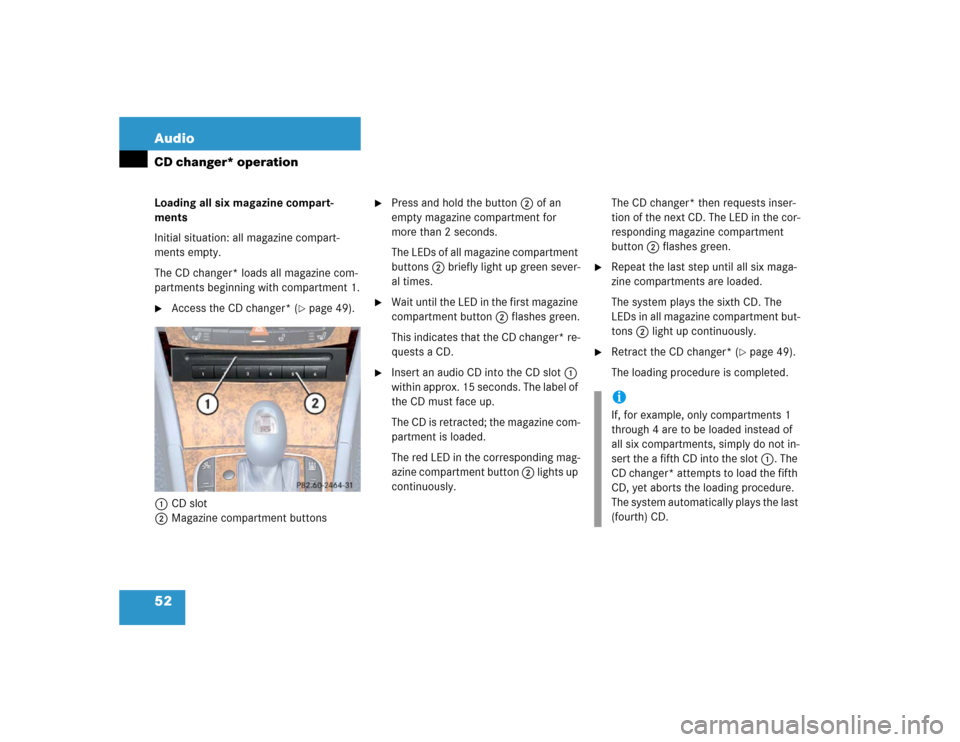
1CD slot
2Magazine compartment buttons
�
Press and hold the button 2 of an
empty magazine compartment for
more than 2 seconds.
The LEDs of all magazine compartment
buttons 2 briefly light up green sever-
al times.
�
Wait until the LED in the first magazine
compartment button 2 flashes green.
This indicates that the CD changer* re-
quests a CD.
�
Insert an audio CD into the CD slot 1
within approx. 15 seconds. The label of
the CD must face up.
The CD is retracted; the magazine com-
partment is loaded.
The red LED in the corresponding mag-
azine compartment button 2 lights up
continuously. The CD changer* then requests inser-
tion of the next CD. The LED in the cor-
responding magazine compartment
button 2 flashes green.
�
Repeat the last step until all six maga-
zine compartments are loaded.
The system plays the sixth CD. The
LEDs in all magazine compartment but-
tons 2 light up continuously.
�
Retract the CD changer* (
�page 49).
The loading procedure is completed.
iIf, for example, only compartments 1
through 4 are to be loaded instead of
all six compartments, simply do not in-
sert the a fifth CD into the slot 1. The
CD changer* attempts to load the fifth
CD, yet aborts the loading procedure.
The system automatically plays the last
(fourth) CD.
Page 54 of 168
53 Audio
CD changer* operation
The following options are available:�
Ejecting all CDs (
�page 54)
�
Ejecting one CD
Ejecting one CD
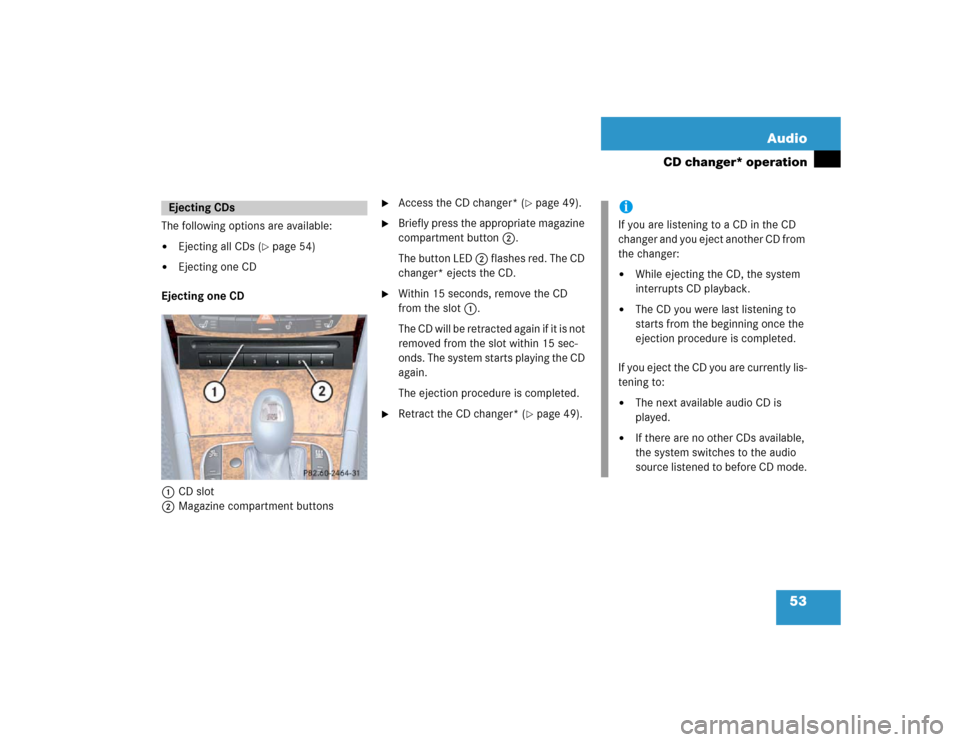
1CD slot
2Magazine compartment buttons
�
Access the CD changer* (
�page 49).
�
Briefly press the appropriate magazine
compartment button 2.
The button LED 2 flashes red. The CD
changer* ejects the CD.
�
Within 15 seconds, remove the CD
from the slot 1.
The CD will be retracted again if it is not
removed from the slot within 15 sec-
onds. The system starts playing the CD
again.
The ejection procedure is completed.
�
Retract the CD changer* (
�page 49).
Ejecting CDs
iIf you are listening to a CD in the CD
changer and you eject another CD from
the changer:�
While ejecting the CD, the system
interrupts CD playback.
�
The CD you were last listening to
starts from the beginning once the
ejection procedure is completed.
If you eject the CD you are currently lis-
tening to:
�
The next available audio CD is
played.
�
If there are no other CDs available,
the system switches to the audio
source listened to before CD mode.
Page 55 of 168
54 AudioCD changer* operationEjecting all CDs �
Access the CD changer* (
�page 49).
�
Press and hold the button of a loaded
magazine compartment 2 for more
than 2 seconds.
The button LEDs of all loaded magazine
compartments will briefly flash red,
several times.
The CD changer* ejects the CDs one
after another.
�
Within 15 seconds, remove each CD
from the slot 1.
The CD will be retracted again if it is not
removed from the slot within 15 sec-
onds. The system starts playing the CD
again.The ejection procedure is completed when
all CDs are removed, or when the proce-
dure is aborted by the CD changer*.
�
Retract the CD changer* (
�page 49).
�
Open the Audio main menu
(�page 34).
�
Press the CDC soft key.
The CD changer* main menu appears.
You will hear the CD listened to last. If
the CD listened to last is no longer
available, the unit plays the next avail-
able audio CD.If the CD contains CD text data, the CD
changer* main menu will show the
name of the CD and the title of the
track currently playing.
The status bar also contains the follow-
ing:
�
the track number and total number
of tracks
�
elapsed playing time of the track
CD changer* main menuiThe CDC soft key will only be vis-
ible if a CD changer* is connect-
ed.
iIf no audio CD is inserted, the system
will not switch to CD changer* mode.
The message No CD appears briefly.
The system switches back to the Audio
main menu.�
Load an audio CD into the
CD changer* (
�page 49).
Page 56 of 168

55 Audio
CD changer* operation
1CD name
2Elapsed track playing time
3Track number/Total tracks
4Track title
If the CD does not contain any CD text da-
ta, the number of the CD and the track
number are displayed instead of the name
of the CD and the track title. The numbers 1 through 6 are assigned to
the CDs in the CD changer*.
Available choices:
�
Selecting via direct entry of the CD
number (
�page 55)
�
Selecting via CD Selection menu
(�page 56)
�
Selecting via CD list
Selecting via CD list
The CD list contains all loaded CDs. Only
one entry is visible at a time.
The entry appears above the track display.
It shows the number of the current CD.
�
Use� or � to select another CD
from the list.
The CD is changed. The newly selected
CD is played.
Selecting via direct entry of the CD
number
�
Press one of the � - � keys.
The CD changer* switches to the ap-
propriate CD.
Selecting CDsiSelection is possible only if two or
more audio CDs are loaded.
Only loaded CDs can be selected.
iThe CD fails to be changed if you select
a CD that is not loaded.
Page 57 of 168

56 AudioCD changer* operationSelecting via CD Selection menu �
Press the Magaz. soft key.
The CD Selection menu appears.
�
Use� or � to select a CD.
Only loaded CDs can be selected.
�
Press�.
The CD is changed.The following options are available:
�
Selecting via track list (
�page 57)
�
Selecting via manual entry of the track
number (
�page 57)
�
Selecting via scan search (
�page 57)
�
Selecting via track skip
Selecting via track skip
On the COMAND control unit
�
Open the CD changer* main menu
(�page 54).
�
Press��for forward skipping.
or
�
Press� for backward skipping.On the multifunction steering wheel
�
Switch the multifunction display in the
instrument cluster to the audio display
(�page 23).
�
Pressj for forward skipping.
or
�
Pressk for backward skipping.
iIf the CD in the CD changer*
contains CD text data, the CD
selection menu shows the name
of the CD.
Selecting a track
iForward skipping:
The next track is played.
Backward skipping:
The system skips back to the beginning
of the track if more than approx. 10
seconds playing time of the track cur-
rently playing have elapsed.
The system skips back to the beginning
of the previous track if less than 10
seconds playing time of the track cur-
rently playing have elapsed.
Page 58 of 168

57 Audio
CD changer* operation
Selecting via track list
The track list contains all tracks of the cur-
rent CD. Only one list entry is visible at a
time, it is the number of the track currently
playing.�
Use� or � to select another track
from the list.
�
Press� or do not change the selec-
tion.
The selected track is played.Selecting via manual entry of the track
number
�
Open the CD changer* main menu
(�page 54).
�
Press�.
The track input display appears. The
number of tracks on the CD is dis-
played.
Entry example: Track 1
�
Press�.Entry example: Track 12
�
Press� and " in quick succession.
�
Wait approx. 3 seconds after entering
the number.
The selected track is played. The CD
main menu appears.
Selecting via scan search
During scan search, each track on the cur-
rent CD is played for approx. 8 seconds.
The scan search starts playing each track
on the current CD for approx. 8 seconds.
It stops automatically at the track listened
to before the scan search was started.
It is also possible to end the scan search
manually. iEntries beyond the number of available
tracks on the CD are not possible.
Page 59 of 168

58 AudioCD changer* operationStarting scan search �
Press the Scan soft key.
Terminating scan search manually
�
Press the Scan soft key.
The track playing at the time the scan
is terminated remains playing.
�
Open the CD changer* main menu
(�page 54).
�
Press and hold� or �.
�
For stop release� or �.The following options are available:
�
Normal sequence
�
Repeat track
�
Repeat CD
�
Track mix
�
CD mix
Explanation of the playback options
�
Normal sequenceThe tracks are played in the normal se-
quence (e.g. track 1, 2, 3 etc.).
If only one CD is loaded, the last track is
followed by again playing the first track.
If several CDs are loaded in the CD chang-
er*, the last track on a CD in the changer
will be followed by the first track of the
next CD in the changer.
The CDs are changed in their normal se-
quence (e.g. CD 1, 2, 3 etc.).
�
Repeat track
The current track will be repeated until
this function is deactivated.
�
Repeat CD
The current CD will be repeated until
this function is deactivated.
�
Track mix
The tracks are played in random order
(e.g. track 3, 8, 5 etc.).
If several CDs are loaded in the CD
changer*, the last track on a CD in the
changer will be followed by the first
track of the next CD in the changer.
The CDs are changed in their normal
sequence (e.g. CD 1, 2, 3, etc.).
iWhen you start the scan search, play-
back option Normal sequence is acti-
vated automatically.Fast forward/reverse
Playback options
iIt is only possible to select this function
if at least two audio CDs are loaded in
the CD changer.