Page 92 of 243
85 Telephone*
Important notes
Multifunction display
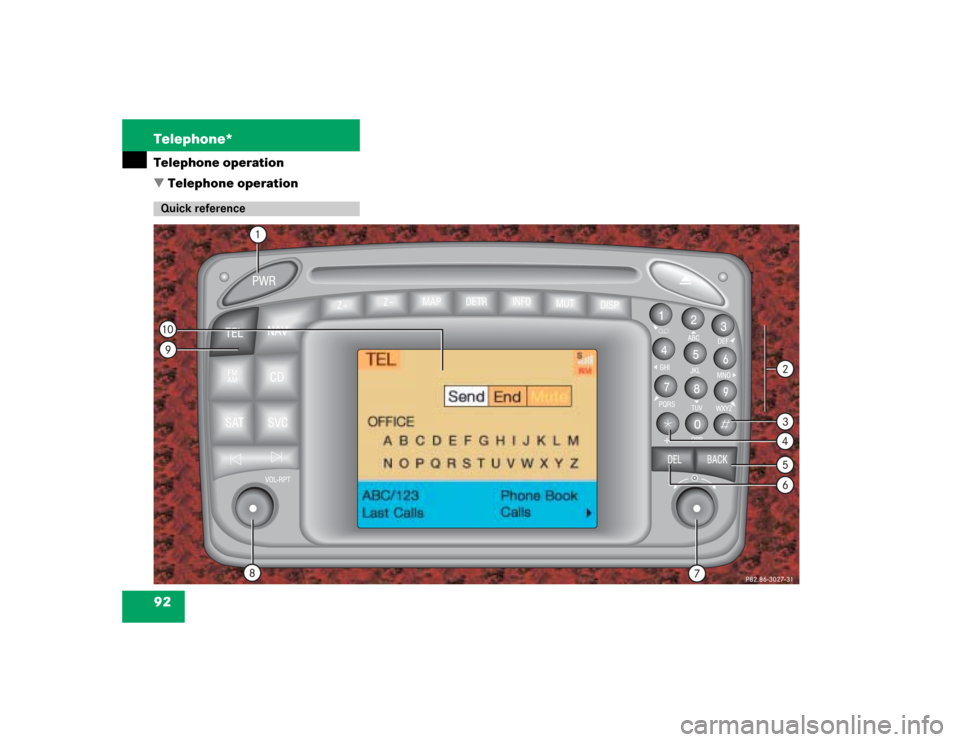
Telephone operation
SMS function
Emergency call
Service numbers
Page 93 of 243

86 Telephone*Important notes
� Important notesIn chapter “Telephone”, you will find de-
tailed information regarding the telepho-
ne*, including emergency call, SMS
function and service numbers.
1 Observe all legal requirements�
Please read the chapter “Telephone”
first before attempting to operate your
telephone.
�
Always drive with extreme caution
when you operate the telephone
hands-free.
�
For safety reasons, you should not use
the mobile telephone handset to make
a call while driving the vehicle.
If the signal strength is very weak (dis-
play in the symbol field of all menus):
Wait until reception improves before
making a call.
Warning
G
Some jurisdictions prohibit the driver from
using a cellular telephone while driving a ve-
hicle. Whether or not prohibited by law, for
safety reasons, the driver should not use the
cellular telephone while the vehicle is in mo-
tion. Stop the vehicle in a safe location be-
fore answering or placing a call.
If you nonetheless choose to use the cellular
phone while driving, please use the hands-
free device and be sure to pay attention to
the traffic situation at all times. Use the cel-
lular phone
1 only when road, weather and
traffic conditions permit.
Never operate radio transmitters equipped
with a built-in or attached antenna (i.e.
without being connected to an external an-
tenna) from inside the vehicle while the en-
gine is running. Doing so could lead to
malfunction of the vehicle’s electronic sys-
tems, possibly resulting in an accident and
personal injury.
!Radio transmitters, such as a portable
telephone or a citizens band unit
should only be used inside the vehicle
if they are connected to a separate ex-
terior antenna that has been approved
by Mercedes-Benz.
Page 94 of 243

87 Telephone*
Important notes
�
Close the windows and reduce all out-
side noise as much as possible when
you use hands-free operation.
�
A brief disconnection from the cellular
network is not a malfunction, as this
can occur when the network switches
areas. The phone will automatically try
to sign on to a network again.
�
If the message “Locked. Please enter
code” appears, enter the unlock code
to enable all telephone functions
(�page 96).
�
If a menu other than the telephone
menu is displayed on the COMAND
screen, the display will change if an
outgoing call is sent out via the multi-
function steering wheel.In the following situations, it is not possible
or not yet possible to use the telephone:
�
The telephone is already unlocked but
is not or not yet registered in the net-
work.
The message “No Service” appears.
The telephone will try to register into
an existing network. If the network is
available, the telephone will be ready
for use.
The above message also appears �
if the network is no longer available
due to weak signals
�
if you try to make a call (message
appears for 8 seconds)
�
The message “Telephone is being acti-
vated. Please wait.” appears.
COMAND prepares the telephone for
use. Select other system functions, e.g.
radio, by pressing the corresponding
button or wait until the telephone is ac-
tive.
�
One of the two messages “No telepho-
ne” or “Telephone not connected” ap-
pears.
Please connect the telephone.
�
The message “Telephone defective”
appears.
Please contact an authorized
Mercedes-Benz Center.
Page 95 of 243
88 Telephone*Important notesIn the following situation, it is not yet pos-
sible to use the functions “Dial number
from phone book”, “Redial” and
“Speed-dial”:�
The mobile telephone has been
plugged into its holder correctly, the
COMAND operating unit has been swit-
ched on and the phone book download
function has been actuated (see Tele-
phone Operation Guide).
Once the download process has been
completed, the above functions be-
come available. It is not possible to make a call when one
of the following messages appears:
�
“System busy, redial?”
Dialing has failed because system is
busy.
�
“No service, redial?”
Dialing has failed because network
cannot be received.
�
“Phone off”
Tele Aid is active, the telephone func-
tion will switch on automatically after
Tele Aid is ended.
Page 96 of 243
89 Telephone*
Multifunction display
� Multifunction display
�
Turn the electronic key in the steering
lock to position “1” or “2”, refer to ve-
hicle operating instructions.
1
2
5
3
4
P82.85-9290-31
Function
Page
1
Multifunction display on
the speedometer
2
Using the control system
Adjusting the dial/idle
tone volume during a call
I lowering
J raising
3
To make a call
K Accept an incoming
call
Start dialing opera-
tion
Activate the redial
memory
97
103
109
L End a call
Interrupt dialing
The message
READY
appears
97
101
4
Changing from system to
system, displaying network
provider
E next
H previous
5
Pages through the phone
book in alphabetical order
F forward
G backwardFunction
Page
Page 97 of 243
90 Telephone*Multifunction displayDisplay overview
Page 98 of 243
91 Telephone*
Multifunction display
Function
Page
1
The telephone is switched off
Switching telephone operati-
on on
96
2
Entering the unlock code
96
3
The system is searching for
the corresponding network
96
4
The telephone is ready for use
103
5
The vehicle is currently out-
side the transmission or re-
ception range
Function
Page
6
Phone book is empty and/or
has not been loaded into the
COMAND telephone memory
103
7
Name selected from the
phone book
103
8
Dialing begins
104
9
Dialing is completed and the
name is displayed.
The display will remain until
you end the call
104
Function
Page
a
Reception strength is indica-
ted by up to 5 bars for a con-
nected and functional
telephone.
97
b
Number of the memory locati-
on and the name stored here
103
c
Call time
104
Page 99 of 243
92 Telephone*Telephone operation
� Telephone operationQuick reference