Page 110 of 374

NOTE:When driving uphill, at elevations above 2,000
ft. (610 meters), or when the vehicle is heavily loaded
(especially when towing) the vehicle may slow below the
SET speed. (If the vehicle speed drops below 30 mph (48
km/h), the Speed Control will automatically disengage).
If this happens, you can push down on the accelerator
pedal to maintain the desired speed.
A full throttle (high RPM) acceleration, while the system
is engaged, will cause the system to disengage.
Vehicles may exhibit several 4-3 downshifts under the
above conditions. To reduce the frequency of the down-
shifts and to improve vehicle performance, it is advisable
to lock out overdrive. Press the O/D OFF button on the
right side of the shift lever.WARNING!
Leaving the Speed Control on when not in use is
dangerous. You could accidentally set the system or
cause it to go faster than you want. You could lose
control and have an accident. Always turn the system
off when you are not using it.
OVERHEAD CONSOLE Ð IF EQUIPPED
The overhead console contains dome/reading lights, an
optional universal garage door opener (HomeLinkt), an
optional sunroof switch, and an Electronic Vehicle Infor-
mation Center (EVIC) that consists of the following:
²Compass/temperature display
²Trip information displays
²Vehicle information warning message displays
²Customer programmable features
110 UNDERSTANDING THE FEATURES OF YOUR VEHICLE
Page 118 of 374
Headlamp Delay
When this feature is selected the driver can choose, when
exiting the vehicle, to have the headlamps remain on for
30, 60, or 90 seconds, or not remain on. Pressing the STEP
button when in this display will select 30, 60, 90, or OFF.
Service Interval
When this feature is selected a service interval between
2,000 miles (3 200 km) and 6,000 miles (10 000 km) in 500
mile (800 km) increments may be selected. Pressing the
STEP button when in this display will select distances
between 2,000 miles (3 200 km) and 6,000 miles (10 000
km) in 500 mile (800 km) increments.
Reset Service Distance (Displays Only if Service
Interval was Changed)
When this feature is selected the current accumulated
service distance can be reset to the newly selected service
interval. Pressing the STEP button when in this display
will select ªYesº or ªNo.º
Low Fuel Chime?
When this feature is selected a chime will sound when
the ªLow Fuel Indicator Lightº is displayed in the
instrument panel cluster. Pressing the STEP button when
in this display will select ªYesº or ªNo.º
Retrain Tire Sensors? (Available with TPM System
Only)
When this feature is selected, the TPM system will start
the retraining procedure (Refer to Training Procedure
below). Pressing the STEP button when in this display
will select ªYesº or ªNo.º Then, press the MENU button
to enter selection.
WARNING!
Death or serious injury can occur if magnetically
sensitive devices are exposed to this magnet. Mag-
nets can affect pacemakers.
118 UNDERSTANDING THE FEATURES OF YOUR VEHICLE
Page 121 of 374
a resettable function is currently being displayed (Aver-
age Economy, Trip Miles, and Time Elapsed). A single
chime will sound to indicate that a reset has occurred.
Global Reset
If the RESET button is pressed twice within 3 seconds
while in any of the three resettable displays, the RESET
button will reset all three displays.
A chime (two beeps) will sound to indicate that a reset
has occurred.
Menu Button
Press the Menu button to scroll through the following
screens: LANGUAGE, DISPLAY U.S. OR METRIC,
AUTO DOOR LOCKS, AUTO UNLOCK ON EXIT, RE-
MOTE UNLOCK DRIV DOOR 1ST, SOUND HORN
WITH LOCK, FLASH LIGHTS WITH LOCKS, HEAD-
LAMP DELAY, SERVICE INTV, LOW FUEL CHIME,
TRAIN REMOTE, and RETRAIN TIRE SENSORS.
C/T Button
Press the C/T button to display the outside temperature
and one of eight compass readings to indicate the direc-
tion the vehicle is facing.
WARNING!
Even if the display still reads a few degrees above
32ÉF (0ÉC), the road surface may be icy, particularly
in woods or on bridges. Drive carefully under such
conditions to prevent an accident and possible per-
sonal injury or property damage.
Step Button
Press the STEP button to cycle through all of the displays.
The displays are: Average Miles/GAL, Miles To Empty,
Trip Miles, Time Elapsed, Miles To Service, Tire PSI, and
Blank Screen.
UNDERSTANDING THE FEATURES OF YOUR VEHICLE 121
3
Page 125 of 374

CAUTION!
Changes or modifications not expressively approved
by the party responsible for compliance could void
the user's authority to operate this equipment.
GARAGE DOOR OPENER Ð IF EQUIPPED
Equipped in vehicles that have the optional Electronic
Vehicle Information Center (EVIC)
The HomeLinktWireless Control System provides a
convenient way to replace up to three hand-held radio-
frequency (RF) transmitters used to activate devices such
as gate operators, garage door openers, entry door locks,
security systems, even home lighting. Additional
HomeLink information can be found at:
www.homelink.comor by calling1-800-355-3515.
WARNING!
Before programming HomeLink to a garage door
opener or gate operator, make sure that people and
objects are out of the way of the device to prevent
potential harm or damage. When programming a
garage door opener, it is advised to park outside of
the garage. Do not use HomeLink with any garage
door opener that lacks safety stop and reverse fea-
tures as required by U.S. federal safety standards
(this includes any garage door opener model manu-
factured before April 1, 1982). A garage door that
cannot detect an object - signaling the door to stop
and reverse - does not meet current U.S. federal
safety standards. For more information, contact
HomeLink at: www.homelink.com or by calling:
1-800-355-3515.
UNDERSTANDING THE FEATURES OF YOUR VEHICLE 125
3
Page 126 of 374

Retain the original transmitter of the RF device you are
programming for use in other vehicles as well as for
future HomeLink programming. It is also suggested that
upon the sale of the vehicle, the programmed HomeLink
buttons be erased for security purposes. To erase the
programmed buttons, perform the procedure shown
below under9When Your Vehicle Is New9, or, for assis-
tance, contact HomeLink at:www.homelink.comor by
calling:1-800-355-3515.
When Your Vehicle Is New
Prior to programming HomeLink for the first time the
factory test codes must be erased. To erase HomeLink
memory, press and hold the two outer HomeLink buttons
(buttons one and three). The message CLEARING
CHANNELS will appear on the HomeLink display. After
approximately 20 seconds, the message CHANNELS
CLEARED will appear on the EVIC display. Do not hold
the buttons for longer than 30 seconds.
Programming HomeLink
NOTE:It is recommended that a new battery be placed
in the hand-held transmitter of the device being pro-
grammed to HomeLink for quicker training and accurate
transmission of the radio frequency signal.
WARNING!
Vehicle exhaust contains carbon monoxide, a danger-
ous gas. Do not run the vehicle's engine while
programming HomeLink. Exhaust gas can cause se-
rious injury or death.
126 UNDERSTANDING THE FEATURES OF YOUR VEHICLE
Page 127 of 374
WARNING!
Your motorized door or gate will open and close
while you are programming HomeLink. Do not
program HomeLink if people or pets are in the path
of the door or gate. A moving door or gate can cause
serious injury or death to people and pets or damage
to objects.
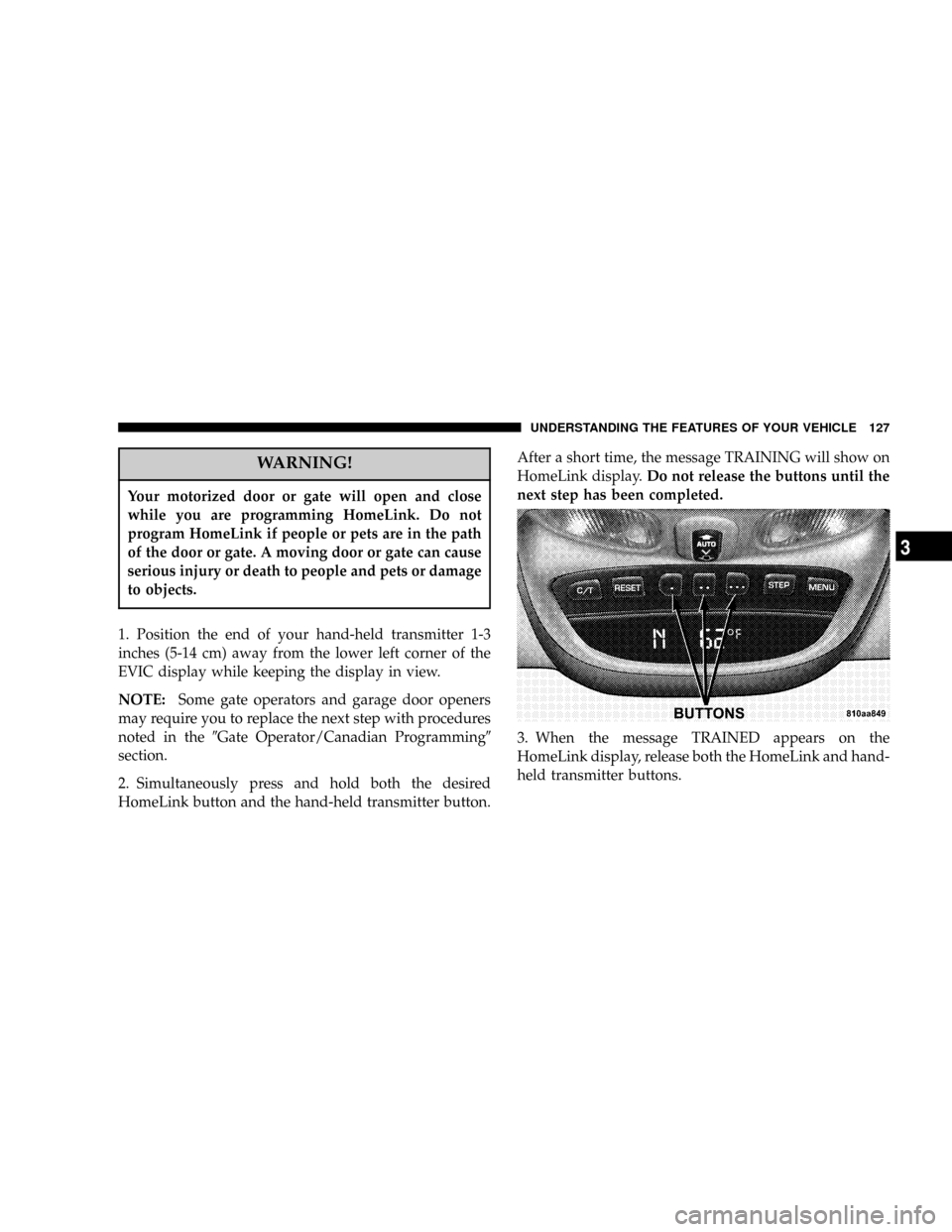
1. Position the end of your hand-held transmitter 1-3
inches (5-14 cm) away from the lower left corner of the
EVIC display while keeping the display in view.
NOTE:Some gate operators and garage door openers
may require you to replace the next step with procedures
noted in the9Gate Operator/Canadian Programming9
section.
2. Simultaneously press and hold both the desired
HomeLink button and the hand-held transmitter button.After a short time, the message TRAINING will show on
HomeLink display.Do not release the buttons until the
next step has been completed.
3. When the message TRAINED appears on the
HomeLink display, release both the HomeLink and hand-
held transmitter buttons.
UNDERSTANDING THE FEATURES OF YOUR VEHICLE 127
3
Page 132 of 374

Express Open Feature
During the Express Open operation, any movement of
the switch will stop the sunroof and it will remain in a
partial open position. Again, momentarily pressing the
switch rearward will activate the Express Open Feature.
To close the sunroof, hold the switch in the forward
position. Again, any release of the switch will stop the
movement and the sunroof will remain in a partial open
condition until the switch is pushed forward again. The
sunroof is not completely closed until the rear of the
sunroof glass moves upward at the end of it's travel.
The sunshade can be opened manually. It will also open
as the sunroof opens. The sunshade cannot be closed if
the sunroof is open.WARNING!
²In an accident, there is a greater risk of being
thrown from a vehicle with an open sunroof. You
could also be seriously injured or killed. Always
fasten your seat belt properly and make sure all
passengers are properly secured too.
²Do not allow small children to operate the sun-
roof. Never allow fingers or other body parts, or
any object to project through the sunroof opening.
Injury may result.
Sunroof Maintenance
Use only a non-abrasive cleaner and a soft cloth to clean
the glass panel.
132 UNDERSTANDING THE FEATURES OF YOUR VEHICLE
Page 138 of 374
WARNING!
In an accident a cargo cover loose in the vehicle
could cause injury. It could fly around in a sudden
stop and strike someone in the vehicle. Do not store
the cargo cover on the cargo floor or in the passenger
compartment. Remove the cover from the vehicle
when taken from its mounting. Do not store in the
vehicle.
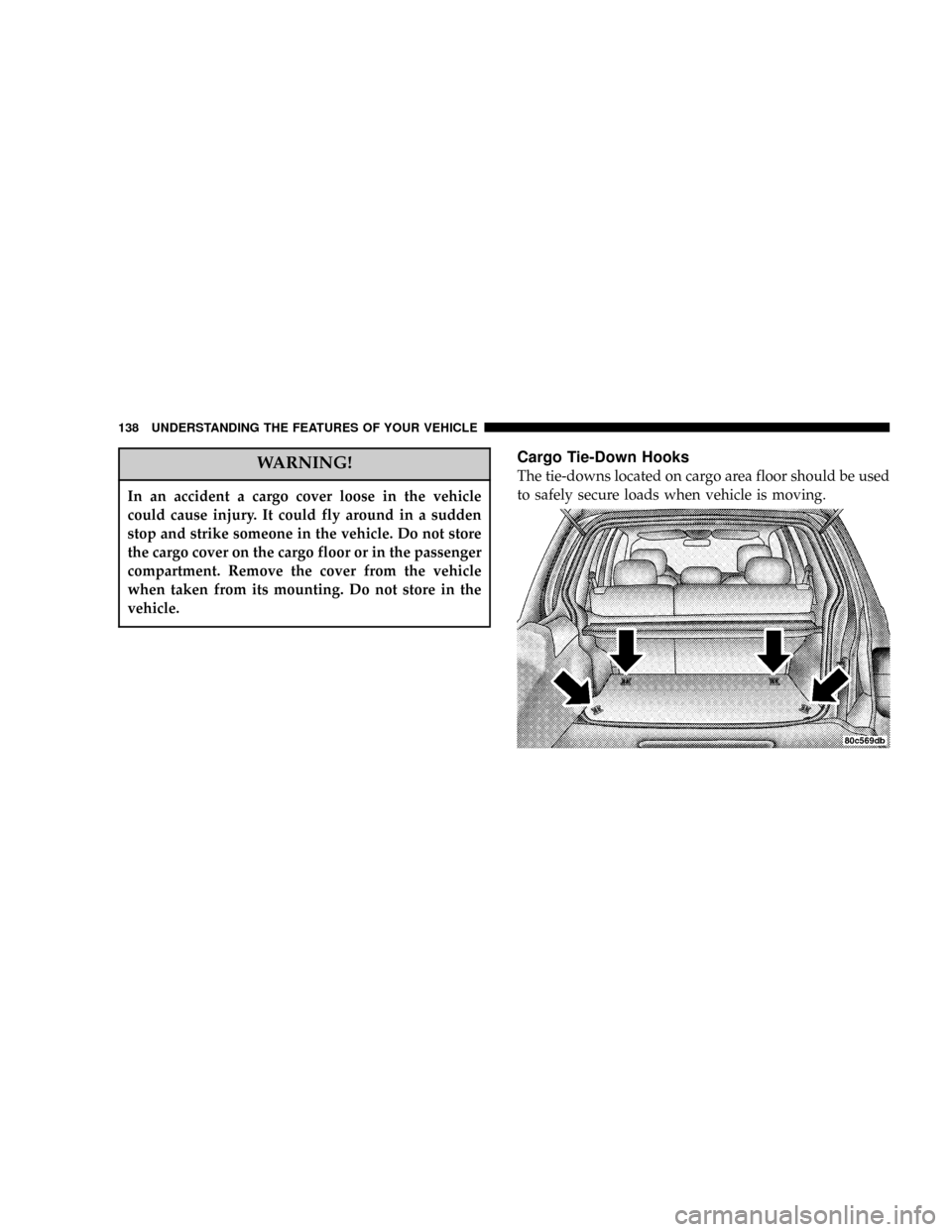
Cargo Tie-Down Hooks
The tie-downs located on cargo area floor should be used
to safely secure loads when vehicle is moving.
138 UNDERSTANDING THE FEATURES OF YOUR VEHICLE