Page 155 of 374

14. Cruise Indicator Light
This indicator lights when the speed control
system is turned ON.
15. Oil Pressure Warning Light
Shows low engine oil pressure. The light will come
on and remain on when the ignition switch is
turned from the OFF to the ON position, and the light
will turn off after the engine is started. If the bulb does
not come on, have the system checked by your autho-
rized dealer.
If the warning light comes on and remains on while
driving, stop the vehicle and shut off the engine. DO
NOT OPERATE THE VEHICLE UNTIL THE CAUSE IS
CORRECTED. Also, a single chime will sound.
16. Transmission Temperature Warning Light
This light indicates that there is excessive trans-
mission fluid temperature that might occur with
severe usage such as trailer towing or snow plowing. Ifthis light comes on, stop the vehicle and run the engine at
idle or faster, with the transmission in N (Neutral) until
the light goes off.
17. Part Time Indicator Light Ð If Equipped
This light alerts the driver that the vehicle is in
the PART TIME four±wheel drive high range
mode, and the front and rear driveshafts are
mechanically locked together forcing the front and rear
wheels to rotate at the same speed.
18. Brake Warning Light
This light monitors various brake functions,
including brake fluid level and parking brake
application. If the light comes on, it may indi-
cate that the parking brake is applied, or there
is a low brake fluid level. On vehicles equipped with
Anti-Lock brakes (ABS), it may also indicate an ABS
malfunction that could lead to reduced braking perfor-
mance.
UNDERSTANDING YOUR INSTRUMENT PANEL 155
4
Page 156 of 374
WARNING!
Driving a vehicle with the BRAKE warning light on
is dangerous. A significant decrease in braking per-
formance or vehicle stability during braking may
occur. It will take you longer to stop the vehicle or
will make your vehicle harder to control. You could
have an accident. Have the vehicle checked immedi-
ately.
The operation of the BRAKE warning light can be
checked by turning the ignition switch from the OFF
position to the ON position. The light should illuminate
for approximately two seconds. The light should then
turn off unless the parking brake is applied or a brake
fault is detected. If the light does not illuminate, have the
light inspected by an authorized dealer.Also, the light will come on when the parking brake is
applied with the ignition switch in the ON position.
NOTE:This light shows only that the parking brake is
applied. It does not show the degree of brake application.
If the parking brake is off and the light remains on, have
the brake system inspected as soon as possible.
19. Full Time Indicator Light Ð If Equipped
This light alerts the driver that the vehicle is in
the FULL TIME four±wheel drive mode, and
employs the inter-axle differential which al-
lows the front and rear wheels to rotate at
different speeds.
20. Security Alarm System Indicator Light Ð If
Equipped
This light will flash rapidly for approximately 16 seconds
after all of the doors are locked and closed to signal that
156 UNDERSTANDING YOUR INSTRUMENT PANEL
Page 157 of 374

the system is arming. After the alarm successfully arms,
the light will flash at a slower rate to indicate the alarm
is set.
21. Fuel Gage
When the ignition key is in the ON position, the pointer
will show the level of fuel remaining in the fuel tank. A
small arrow indicates the side of the vehicle where the
filler cap (gas cap) is located.
22. Sentry Key Indicator Light Ð If Equipped
Refer to ªSentry Key Immobilizer Systemº in
Section 2 of this manual for more information.
23. Low Fuel Warning Light
When the fuel level reaches approximately 2.7 U.S.
Gallons (10L) this light will come on and remain on
until fuel is added. The ªLow Fuel Warning Lightº
may turn on and off again, especially during and afterhard braking, accelerations, or turns. This occurs due to
the shifting of the fuel in the tank. Also, a single chime
will sound.
24. Airbag Warning Light
This indicator lights and remains lit for 6 to 8
seconds when the ignition is first turned on. If the
light doesn't come on, stays on, or comes on while
driving, have the airbag system checked by an autho-
rized dealer.
25. O/D (Overdrive) Off Indicator Light
This light will illuminate when the O/D OFF
button has been selected. The O/D OFF button is
located on the gear shift lever.
26. Seat Belt Indicator Light
When the ignition switch is first turned ON, this
light will turn on for 5 to 8 seconds as a bulb check.
During the bulb check, if the driver's seat belt is
unbuckled, a chime will sound. After the bulb check or
UNDERSTANDING YOUR INSTRUMENT PANEL 157
4
Page 158 of 374

when driving, if the driver seat belt remains unbuckled,
the Seat Belt Warning Light will flash or remain on
continuously. Refer to9Enhanced Driver Seat Belt Re-
minder System (BeltAlertŸ)9in the Occupant Restraints
section for more information.
27. Light Bar Indicator Light Ð If Equipped
This light indicates when the light bar lamps
are on.
ELECTRONIC DIGITAL CLOCK
The clock and radio each use the display panel built into
the radio. A digital readout shows the time in hours and
minutes whenever the ignition switch is in the ON or
ACC position and the time button is pressed.
When the ignition switch is in the OFF position, or when
the radio frequency is being displayed, time keeping is
accurately maintained.
Clock Setting Procedure
1. Turn the ignition switch to the ON or ACC position
and press the time button. Using the tip of a ballpoint pen
or similar object, press either the hour (H) or minute (M)
buttons on the radio.
2. Press the H button to set hours or the M button to set
minutes. The time setting will increase each time you
press a button.
RADIO GENERAL INFORMATION
Radio Broadcast Signals
Your new radio will provide excellent reception under
most operating conditions. Like any system, however, car
radios have performance limitations, due to mobile op-
eration and natural phenomena, which might lead you to
believe your sound system is malfunctioning. To help
158 UNDERSTANDING YOUR INSTRUMENT PANEL
Page 165 of 374
Random can be cancelled by pressing the button a second
time or by ejecting the CD from the changer.
CD Diagnostic Indicators
When driving over a very rough road, the CD player may
skip momentarily. Skipping will not damage the disc or
the player, and play will resume automatically.
As a safeguard and to protect your CD player, one of the
following warning symbols may appear on your display.
A CD HOT symbol indicates the player is too hot.CD HOT will pause the operation. Play can be resumed
when the operating temperature is corrected or another
MODE is selected.
An ERR symbol will appear on the display if the laser is
unable to read the Disc data for the following reasons:
²Excessive vibration
²Disc inserted upside down
²Damaged disc
²Water condensation on optics
UNDERSTANDING YOUR INSTRUMENT PANEL 165
4
Page 172 of 374
Random Play (RND)
Press the Random button to play the tracks on the
selected disc in random order for an interesting change of
pace.
Random can be cancelled by pressing the button a second
time or by ejecting the CD from the changer.
CD Diagnostic Indicators
When driving over a very rough road, the CD player may
skip momentarily. Skipping will not damage the disc or
the player, and play will resume automatically.
As a safeguard and to protect your CD player, one of the
following warning symbols may appear on your display.A CD HOT symbol indicates the player is too hot.
CD HOT will pause the operation. Play can be resumed
when the operating temperature is corrected or another
MODE is selected.
An ERR symbol will appear on the display if the laser is
unable to read the Disc data for the following reasons:²Excessive vibration
²Disc inserted upside down
²Damaged disc
²Water condensation on optics
172 UNDERSTANDING YOUR INSTRUMENT PANEL
Page 210 of 374
STARTING PROCEDURES
Before starting your vehicle, adjust your seat, adjust both
inside and outside mirrors, and fasten your seat belts.
WARNING!
Do not leave children or animals inside parked
vehicles in hot weather. Interior heat build up may
cause serious injury or death.
Manual Transmission
Apply the parking brake, place the gearshift control lever
in N (Neutral) and depress the clutch pedal before
starting vehicle. This vehicle is equipped with a clutch
interlocking ignition system.4WD Models Only
In 4L mode, this vehicle will start regardless of whether
or not the clutch pedal is pressed to the floor. This feature
enhances off-road performance by allowing the vehicle to
start when in 4L without having to depress the clutch
pedal. The 4 LO MODE indicator light will illuminate
when the transfer case has been shifted into this mode.
Automatic Transmission
Start the engine with the selector lever in the N (Neutral)
or P (Park) position. Apply the brake before shifting to
any driving range.
Normal Starting
Normal starting of either a cold or a warm engine is
obtained without pumping or depressing the accelerator
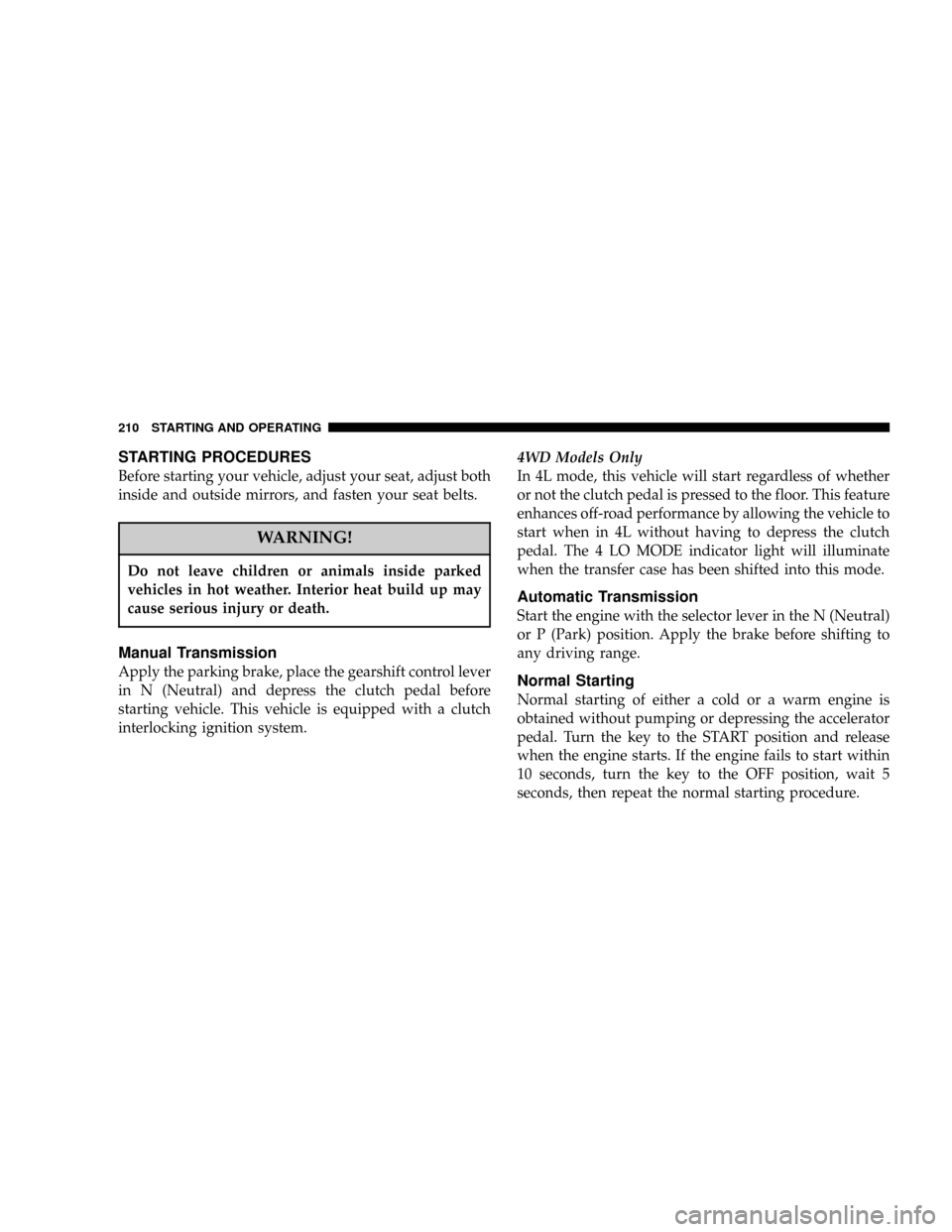
pedal. Turn the key to the START position and release
when the engine starts. If the engine fails to start within
10 seconds, turn the key to the OFF position, wait 5
seconds, then repeat the normal starting procedure.
210 STARTING AND OPERATING
Page 211 of 374
WARNING!
Never pour fuel or other flammable liquids into the
throttle body air inlet opening in an attempt to start
the vehicle. This could result in a flash fire causing
serious personal injury.
Extreme Cold Weather
To insure reliable starting at temperatures below ±20ÉF
(±29ÉC), use of an externally powered electric engine
block heater (available from your dealer) is recom-
mended.
If Engine Fails to Start
If the engine fails to start after you have followed the
ªNormal Startingº or ªExtreme Cold Weatherº proce-
dures, it may be flooded. Push the accelerator pedal all
the way to the floor and hold it there while cranking the
engine. This should clear any excess fuel in case the
engine is flooded.
CAUTION!
To prevent damage to the starter, do not crank the
engine for more than 15 seconds at a time. Wait 10 to
15 seconds before trying again.
STARTING AND OPERATING 211
5