Page 3638 of 4449
FRONT FOG LAMP
LT-83
C
D
E
F
G
H
I
J
L
MA
B
LT
Revision: 2004 November 2004 FX35/FX45
Refer to LT-79, "Wiring Diagram — F/FOG —" .
OK or NG
OK >> GO TO 2.
NG >> If fuse is blown, be sure to eliminate cause of malfunction before installing new fuse. Refer to PG-
3, "POWER SUPPLY ROUTING CIRCUIT" .
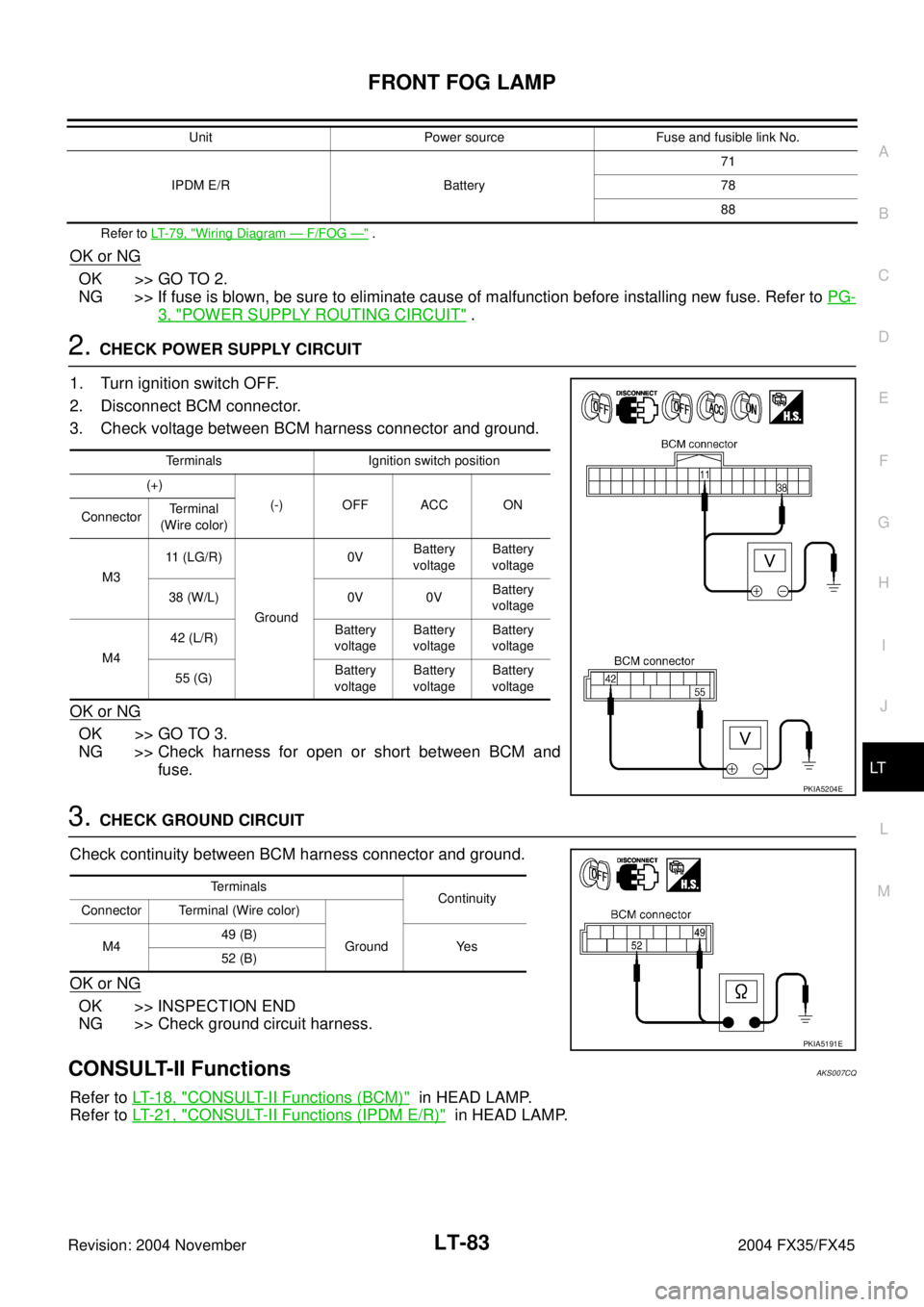
2. CHECK POWER SUPPLY CIRCUIT
1. Turn ignition switch OFF.
2. Disconnect BCM connector.
3. Check voltage between BCM harness connector and ground.
OK or NG
OK >> GO TO 3.
NG >> Check harness for open or short between BCM and
fuse.
3. CHECK GROUND CIRCUIT
Check continuity between BCM harness connector and ground.
OK or NG
OK >> INSPECTION END
NG >> Check ground circuit harness.
CONSULT-II FunctionsAKS007CQ
Refer to LT- 1 8 , "CONSULT-II Functions (BCM)" in HEAD LAMP.
Refer to LT- 2 1 , "
CONSULT-II Functions (IPDM E/R)" in HEAD LAMP.
IPDM E/R Battery71
78
88 Unit Power source Fuse and fusible link No.
Terminals Ignition switch position
(+)
(-) OFF ACC ON
ConnectorTerminal
(Wire color)
M311 (LG/R)
Ground0VBattery
voltageBattery
voltage
38 (W/L) 0V 0VBattery
voltage
M442 (L/R)Battery
voltageBattery
voltageBattery
voltage
55 (G)Battery
voltageBattery
voltageBattery
voltage
PKIA5204E
Terminals
Continuity
Connector Terminal (Wire color)
M449 (B)
Ground Yes
52 (B)
PKIA5191E
Page 3653 of 4449
LT-98
TURN SIGNAL AND HAZARD WARNING LAMPS
Revision: 2004 November 2004 FX35/FX45
How to Proceed With Trouble DiagnosisAKS007D2
1. Confirm the symptom or customer complaint.
2. Understand operation description and function description. Refer to LT- 8 9 , "
System Description" .
3. Perform.preliminary check. Refer to LT- 9 9 , "
Preliminary Check" .
4. Check symptom and repair or replace the cause of malfunction.
5. Do turn signal and hazard warning lamps operate normally? If YES: GO TO 6. If NO: GO TO 4.
6. INSPECTION END
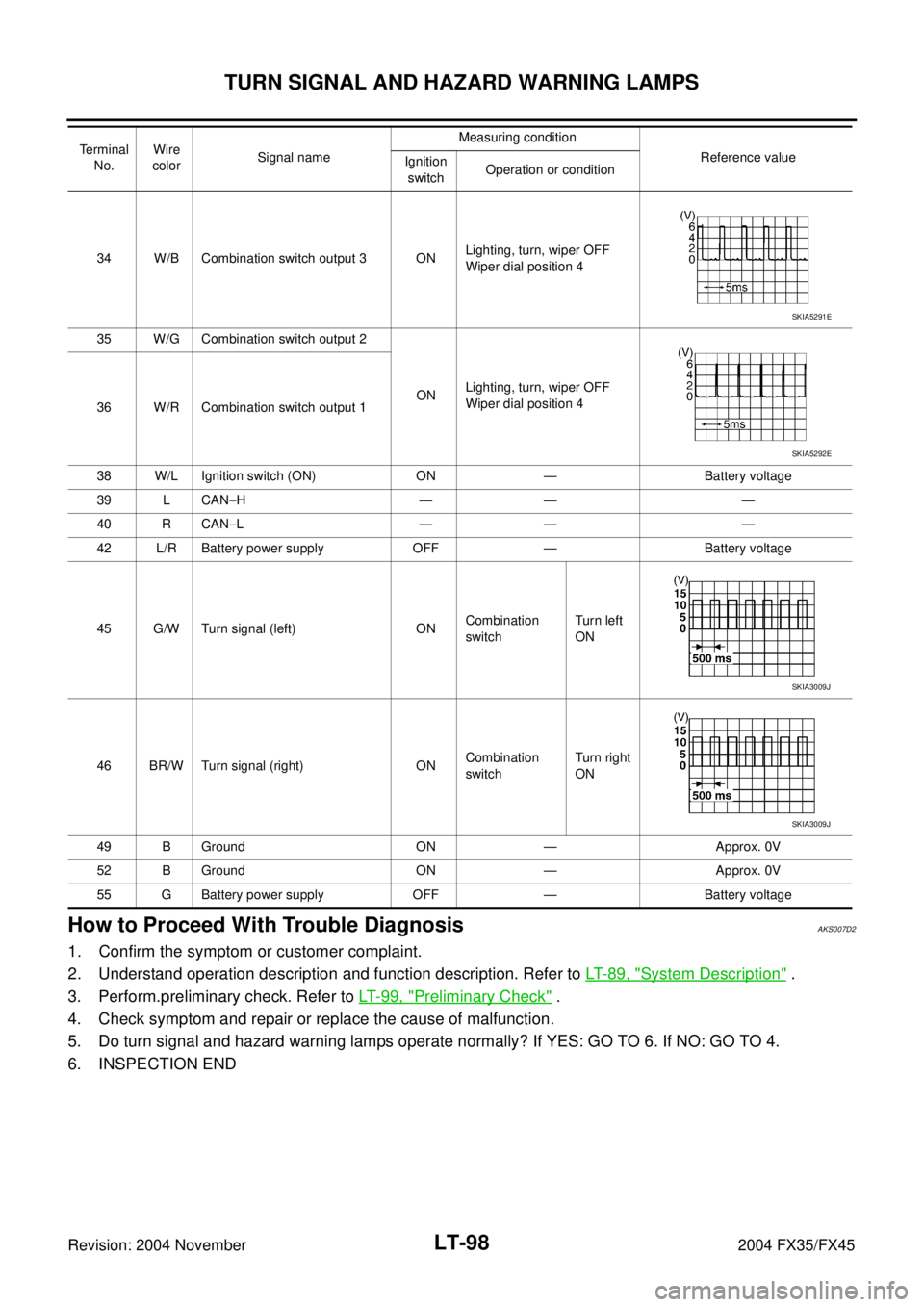
34 W/B Combination switch output 3 ONLighting, turn, wiper OFF
Wiper dial position 4
35 W/G Combination switch output 2
ONLighting, turn, wiper OFF
Wiper dial position 4
36 W/R Combination switch output 1
38 W/L Ignition switch (ON) ON — Battery voltage
39 L CAN−H—— —
40 R CAN−L—— —
42 L/R Battery power supply OFF — Battery voltage
45 G/W Turn signal (left) ONCombination
switchTurn le ft
ON
46 BR/W Turn signal (right) ONCombination
switchTurn right
ON
49 B Ground ON — Approx. 0V
52 B Ground ON — Approx. 0V
55 G Battery power supply OFF — Battery voltage Terminal
No.Wire
colorSignal nameMeasuring condition
Reference value
Ignition
switchOperation or condition
SKIA5291E
SKIA5292E
SKIA3009J
SKIA3009J
Page 3654 of 4449
TURN SIGNAL AND HAZARD WARNING LAMPS
LT-99
C
D
E
F
G
H
I
J
L
MA
B
LT
Revision: 2004 November 2004 FX35/FX45
Preliminary CheckAKS007D3
CHECK POWER SUPPLY AND GROUND CIRCUIT
1. CHECK FUSES
�Check fuses for blown-out.
Refer to LT-94, "Wiring Diagram — TURN —" .
OK or NG
OK >> GO TO 2.
NG >> If fuse is blown, be sure to eliminate cause of malfunction before installing new fuse. Refer to PG-
3, "POWER SUPPLY ROUTING CIRCUIT" .
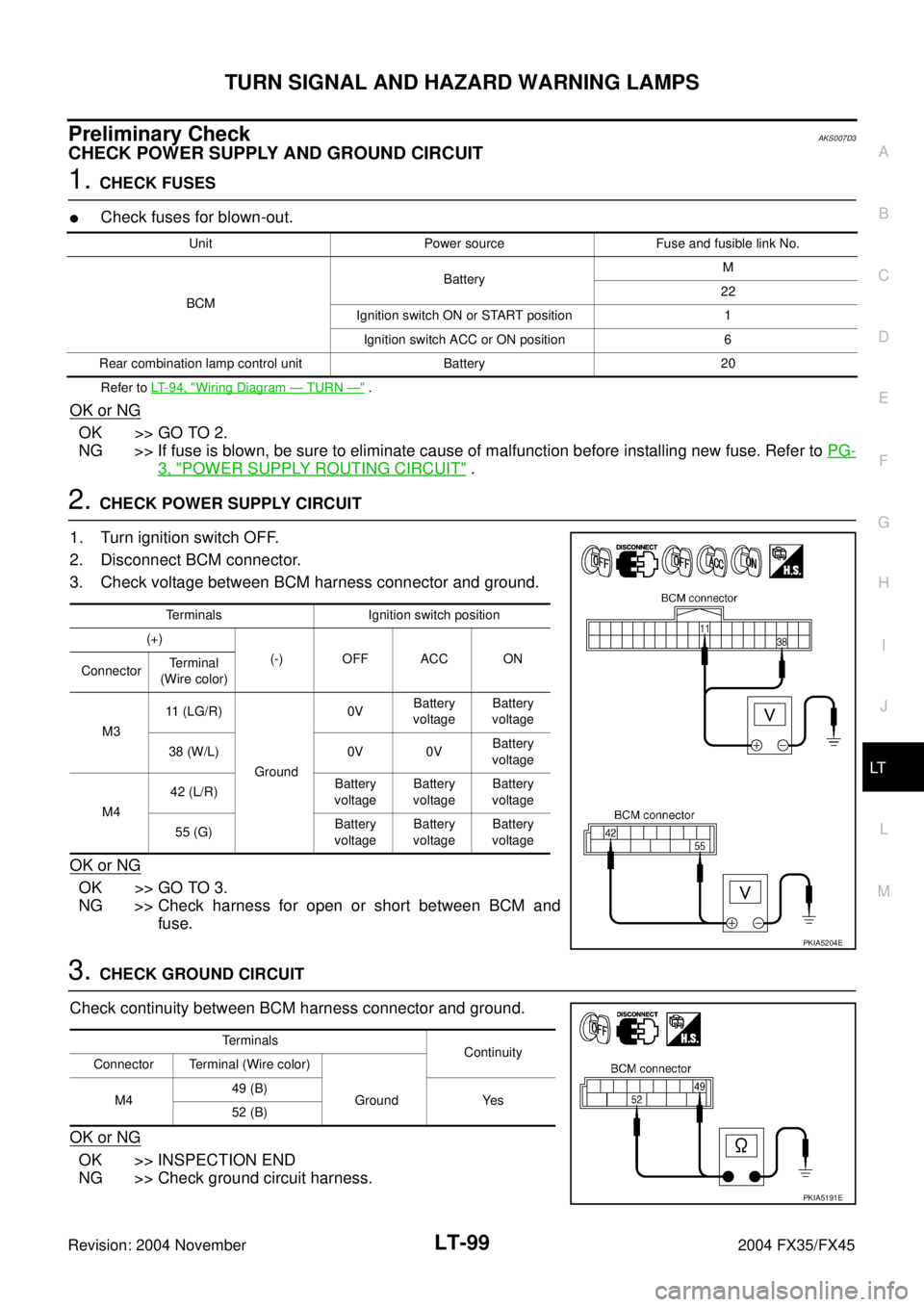
2. CHECK POWER SUPPLY CIRCUIT
1. Turn ignition switch OFF.
2. Disconnect BCM connector.
3. Check voltage between BCM harness connector and ground.
OK or NG
OK >> GO TO 3.
NG >> Check harness for open or short between BCM and
fuse.
3. CHECK GROUND CIRCUIT
Check continuity between BCM harness connector and ground.
OK or NG
OK >> INSPECTION END
NG >> Check ground circuit harness.
Unit Power source Fuse and fusible link No.
BCMBatteryM
22
Ignition switch ON or START position 1
Ignition switch ACC or ON position 6
Rear combination lamp control unit Battery 20
Terminals Ignition switch position
(+)
(-) OFF ACC ON
ConnectorTerminal
(Wire color)
M311 (LG/R)
Ground0VBattery
voltageBattery
voltage
38 (W/L) 0V 0VBattery
voltage
M442 (L/R)Battery
voltageBattery
voltageBattery
voltage
55 (G)Battery
voltageBattery
voltageBattery
voltage
PKIA5204E
Terminals
Continuity
Connector Terminal (Wire color)
M449 (B)
Ground Yes
52 (B)
PKIA5191E
Page 3659 of 4449
LT-104
TURN SIGNAL AND HAZARD WARNING LAMPS
Revision: 2004 November 2004 FX35/FX45
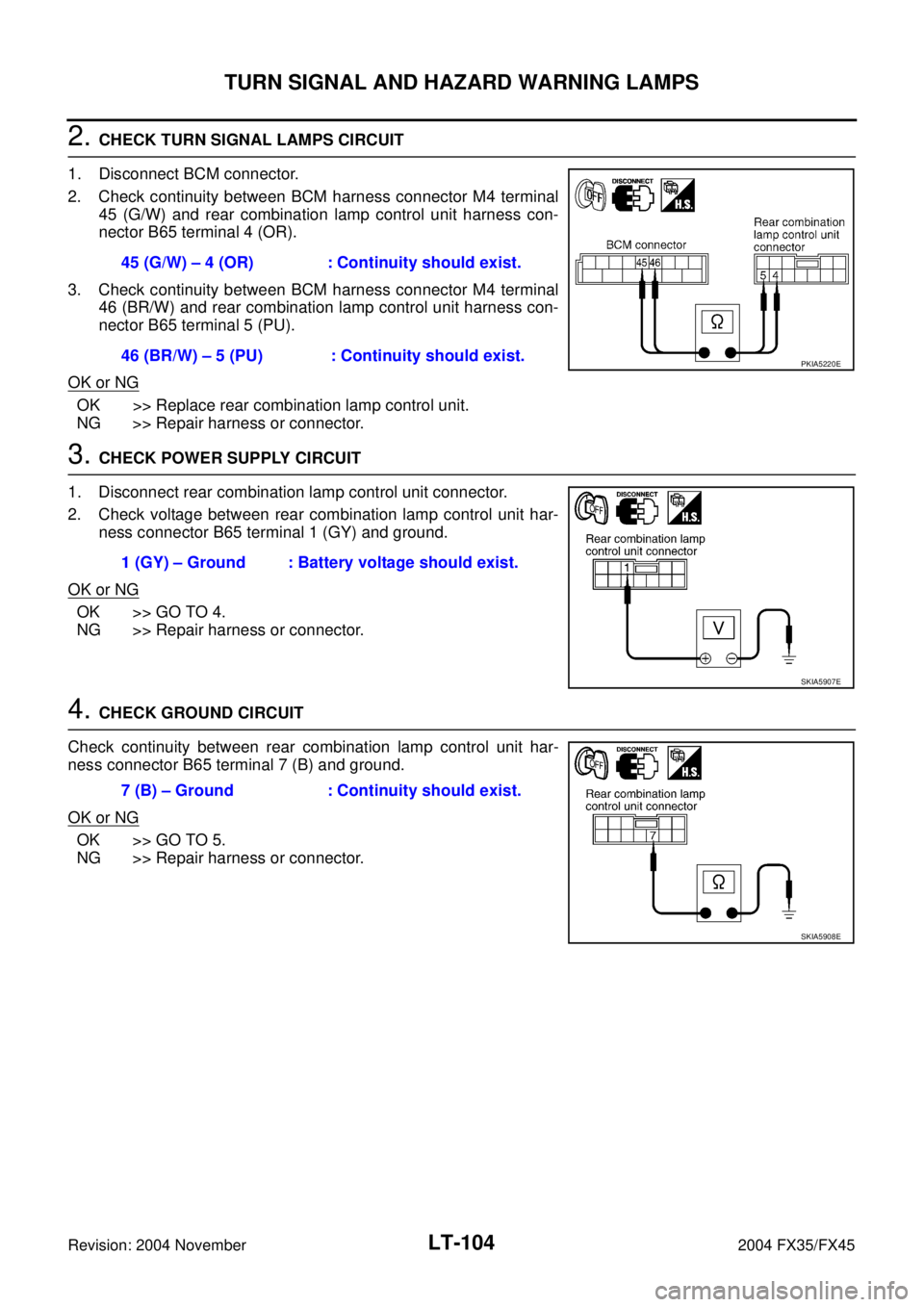
2. CHECK TURN SIGNAL LAMPS CIRCUIT
1. Disconnect BCM connector.
2. Check continuity between BCM harness connector M4 terminal
45 (G/W) and rear combination lamp control unit harness con-
nector B65 terminal 4 (OR).
3. Check continuity between BCM harness connector M4 terminal
46 (BR/W) and rear combination lamp control unit harness con-
nector B65 terminal 5 (PU).
OK or NG
OK >> Replace rear combination lamp control unit.
NG >> Repair harness or connector.
3. CHECK POWER SUPPLY CIRCUIT
1. Disconnect rear combination lamp control unit connector.
2. Check voltage between rear combination lamp control unit har-
ness connector B65 terminal 1 (GY) and ground.
OK or NG
OK >> GO TO 4.
NG >> Repair harness or connector.
4. CHECK GROUND CIRCUIT
Check continuity between rear combination lamp control unit har-
ness connector B65 terminal 7 (B) and ground.
OK or NG
OK >> GO TO 5.
NG >> Repair harness or connector.45 (G/W) – 4 (OR) : Continuity should exist.
46 (BR/W) – 5 (PU) : Continuity should exist.
PKIA5220E
1 (GY) – Ground : Battery voltage should exist.
SKIA5907E
7 (B) – Ground : Continuity should exist.
SKIA5908E
Page 3676 of 4449
STOP LAMP
LT-121
C
D
E
F
G
H
I
J
L
MA
B
LT
Revision: 2004 November 2004 FX35/FX45
Stop Lamp Does Not OperateAKS007IJ
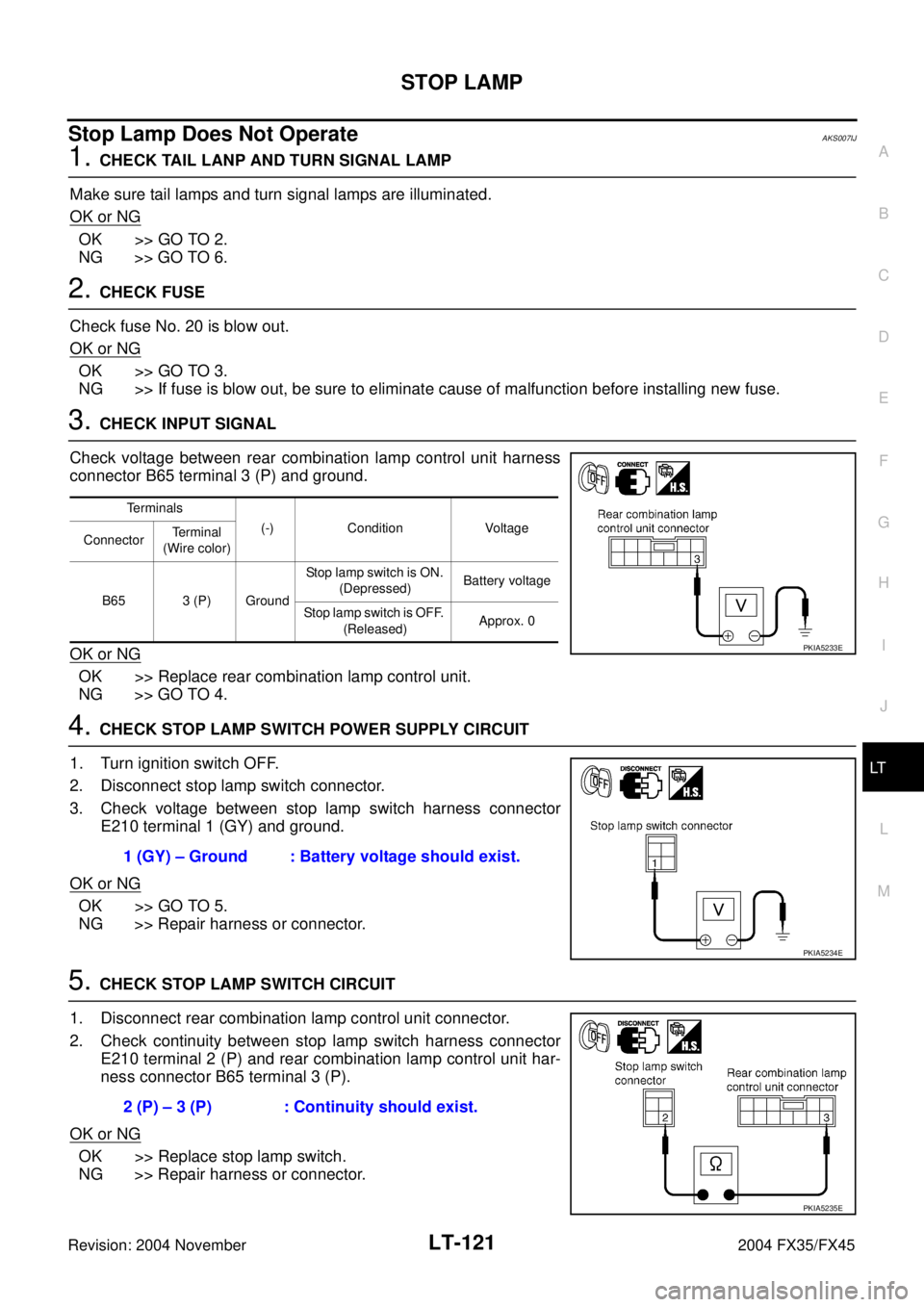
1. CHECK TAIL LANP AND TURN SIGNAL LAMP
Make sure tail lamps and turn signal lamps are illuminated.
OK or NG
OK >> GO TO 2.
NG >> GO TO 6.
2. CHECK FUSE
Check fuse No. 20 is blow out.
OK or NG
OK >> GO TO 3.
NG >> If fuse is blow out, be sure to eliminate cause of malfunction before installing new fuse.
3. CHECK INPUT SIGNAL
Check voltage between rear combination lamp control unit harness
connector B65 terminal 3 (P) and ground.
OK or NG
OK >> Replace rear combination lamp control unit.
NG >> GO TO 4.
4. CHECK STOP LAMP SWITCH POWER SUPPLY CIRCUIT
1. Turn ignition switch OFF.
2. Disconnect stop lamp switch connector.
3. Check voltage between stop lamp switch harness connector
E210 terminal 1 (GY) and ground.
OK or NG
OK >> GO TO 5.
NG >> Repair harness or connector.
5. CHECK STOP LAMP SWITCH CIRCUIT
1. Disconnect rear combination lamp control unit connector.
2. Check continuity between stop lamp switch harness connector
E210 terminal 2 (P) and rear combination lamp control unit har-
ness connector B65 terminal 3 (P).
OK or NG
OK >> Replace stop lamp switch.
NG >> Repair harness or connector.
Terminals
(-) Condition Voltage
ConnectorTerminal
(Wire color)
B65 3 (P) GroundStop lamp switch is ON.
(Depressed)Battery voltage
Stop lamp switch is OFF.
(Released)Approx. 0
PKIA5233E
1 (GY) – Ground : Battery voltage should exist.
PKIA5234E
2 (P) – 3 (P) : Continuity should exist.
PKIA5235E
Page 3677 of 4449
LT-122
STOP LAMP
Revision: 2004 November 2004 FX35/FX45
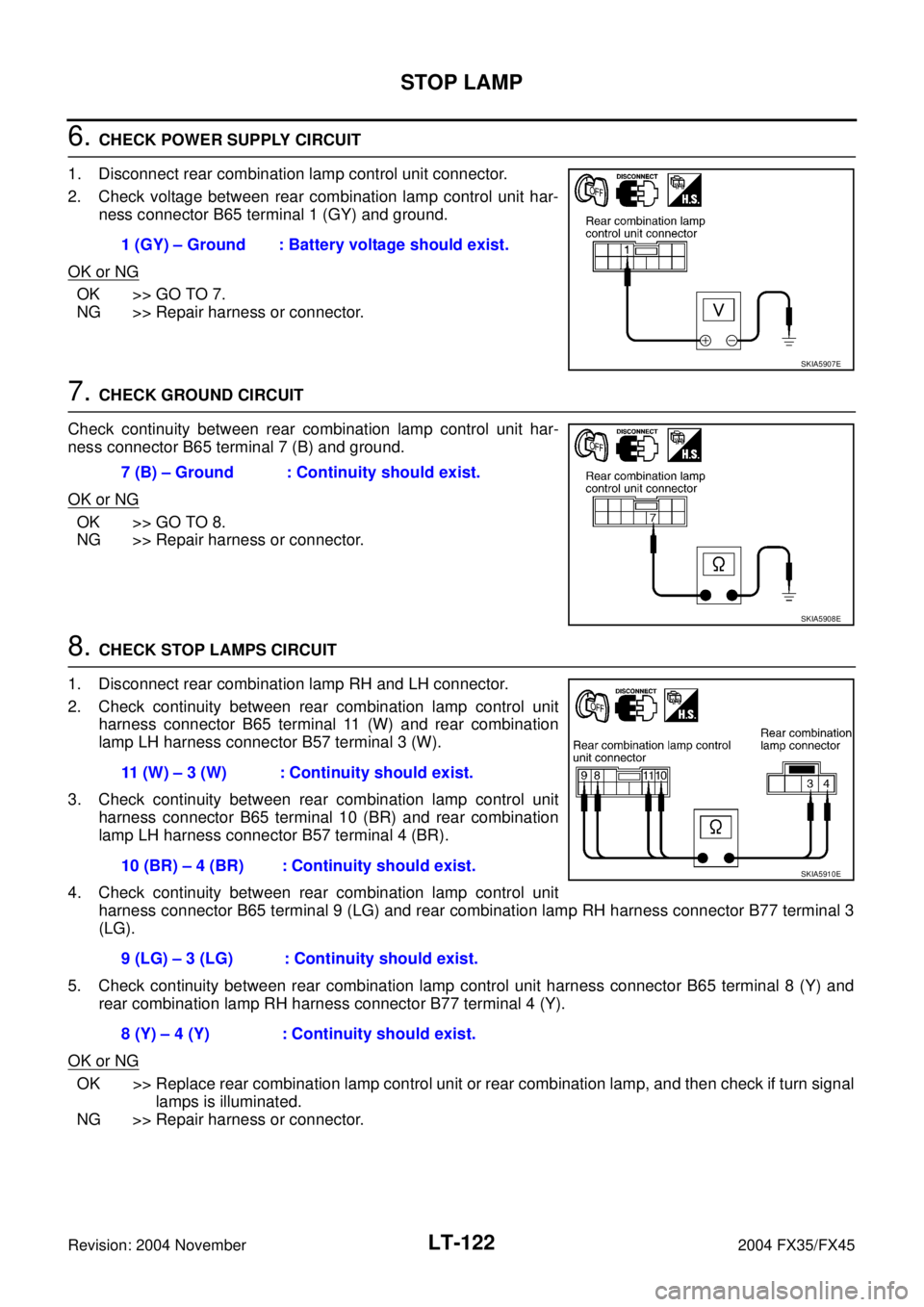
6. CHECK POWER SUPPLY CIRCUIT
1. Disconnect rear combination lamp control unit connector.
2. Check voltage between rear combination lamp control unit har-
ness connector B65 terminal 1 (GY) and ground.
OK or NG
OK >> GO TO 7.
NG >> Repair harness or connector.
7. CHECK GROUND CIRCUIT
Check continuity between rear combination lamp control unit har-
ness connector B65 terminal 7 (B) and ground.
OK or NG
OK >> GO TO 8.
NG >> Repair harness or connector.
8. CHECK STOP LAMPS CIRCUIT
1. Disconnect rear combination lamp RH and LH connector.
2. Check continuity between rear combination lamp control unit
harness connector B65 terminal 11 (W) and rear combination
lamp LH harness connector B57 terminal 3 (W).
3. Check continuity between rear combination lamp control unit
harness connector B65 terminal 10 (BR) and rear combination
lamp LH harness connector B57 terminal 4 (BR).
4. Check continuity between rear combination lamp control unit
harness connector B65 terminal 9 (LG) and rear combination lamp RH harness connector B77 terminal 3
(LG).
5. Check continuity between rear combination lamp control unit harness connector B65 terminal 8 (Y) and
rear combination lamp RH harness connector B77 terminal 4 (Y).
OK or NG
OK >> Replace rear combination lamp control unit or rear combination lamp, and then check if turn signal
lamps is illuminated.
NG >> Repair harness or connector.1 (GY) – Ground : Battery voltage should exist.
SKIA5907E
7 (B) – Ground : Continuity should exist.
SKIA5908E
11 (W) – 3 (W) : Continuity should exist.
10 (BR) – 4 (BR) : Continuity should exist.
9 (LG) – 3 (LG) : Continuity should exist.
8 (Y) – 4 (Y) : Continuity should exist.
SKIA5910E
Page 3692 of 4449
PARKING, LICENSE PLATE AND TAIL LAMPS
LT-137
C
D
E
F
G
H
I
J
L
MA
B
LT
Revision: 2004 November 2004 FX35/FX45
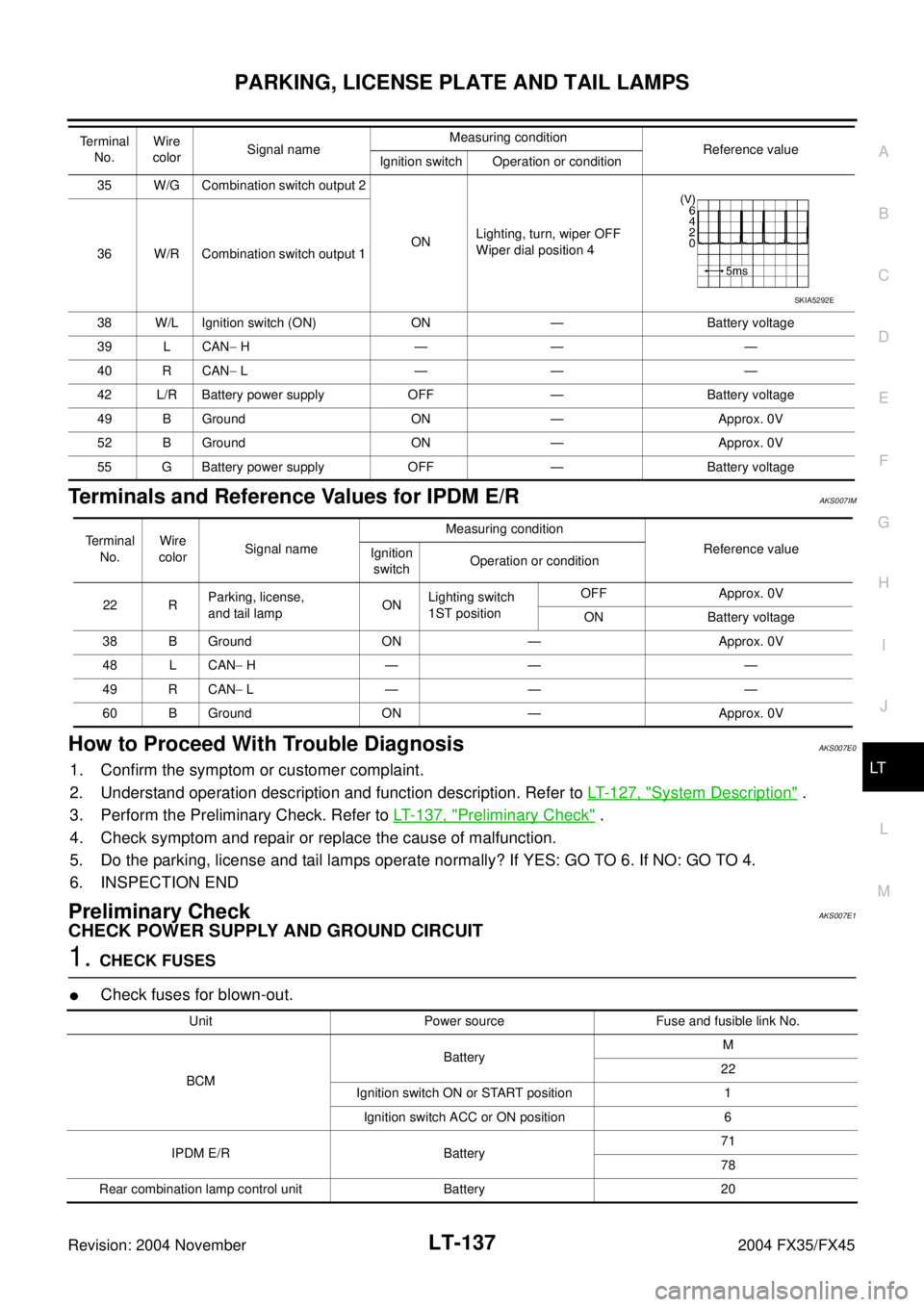
Terminals and Reference Values for IPDM E/RAKS007IM
How to Proceed With Trouble DiagnosisAKS007E0
1. Confirm the symptom or customer complaint.
2. Understand operation description and function description. Refer to LT- 1 2 7 , "
System Description" .
3. Perform the Preliminary Check. Refer to LT- 1 3 7 , "
Preliminary Check" .
4. Check symptom and repair or replace the cause of malfunction.
5. Do the parking, license and tail lamps operate normally? If YES: GO TO 6. If NO: GO TO 4.
6. INSPECTION END
Preliminary CheckAKS007E1
CHECK POWER SUPPLY AND GROUND CIRCUIT
1. CHECK FUSES
�Check fuses for blown-out.
35 W/G Combination switch output 2
ONLighting, turn, wiper OFF
Wiper dial position 4
36 W/R Combination switch output 1
38 W/L Ignition switch (ON) ON — Battery voltage
39 L CAN− H—— —
40 R CAN− L—— —
42 L/R Battery power supply OFF — Battery voltage
49 B Ground ON — Approx. 0V
52 B Ground ON — Approx. 0V
55 G Battery power supply OFF — Battery voltage Te r m i n a l
No.Wire
colorSignal nameMeasuring condition
Reference value
Ignition switch Operation or condition
SKIA5292E
Terminal
No.Wire
colorSignal nameMeasuring condition
Reference value
Ignition
switchOperation or condition
22 RParking, license,
and tail lampONLighting switch
1ST positionOFF Approx. 0V
ON Battery voltage
38 B Ground ON — Approx. 0V
48 L CAN− H—— —
49 R CAN− L—— —
60 B Ground ON — Approx. 0V
Unit Power source Fuse and fusible link No.
BCMBatteryM
22
Ignition switch ON or START position 1
Ignition switch ACC or ON position 6
IPDM E/R Battery71
78
Rear combination lamp control unit Battery 20
Page 3693 of 4449
LT-138
PARKING, LICENSE PLATE AND TAIL LAMPS
Revision: 2004 November 2004 FX35/FX45
Refer to LT- 1 3 1 , "Wiring Diagram — TAIL/L —" .
OK or NG
OK >> GO TO 2.
NG >> If fuse is blown, be sure to eliminate cause of malfunction before installing new fuse. Refer to PG-
3, "POWER SUPPLY ROUTING CIRCUIT" .
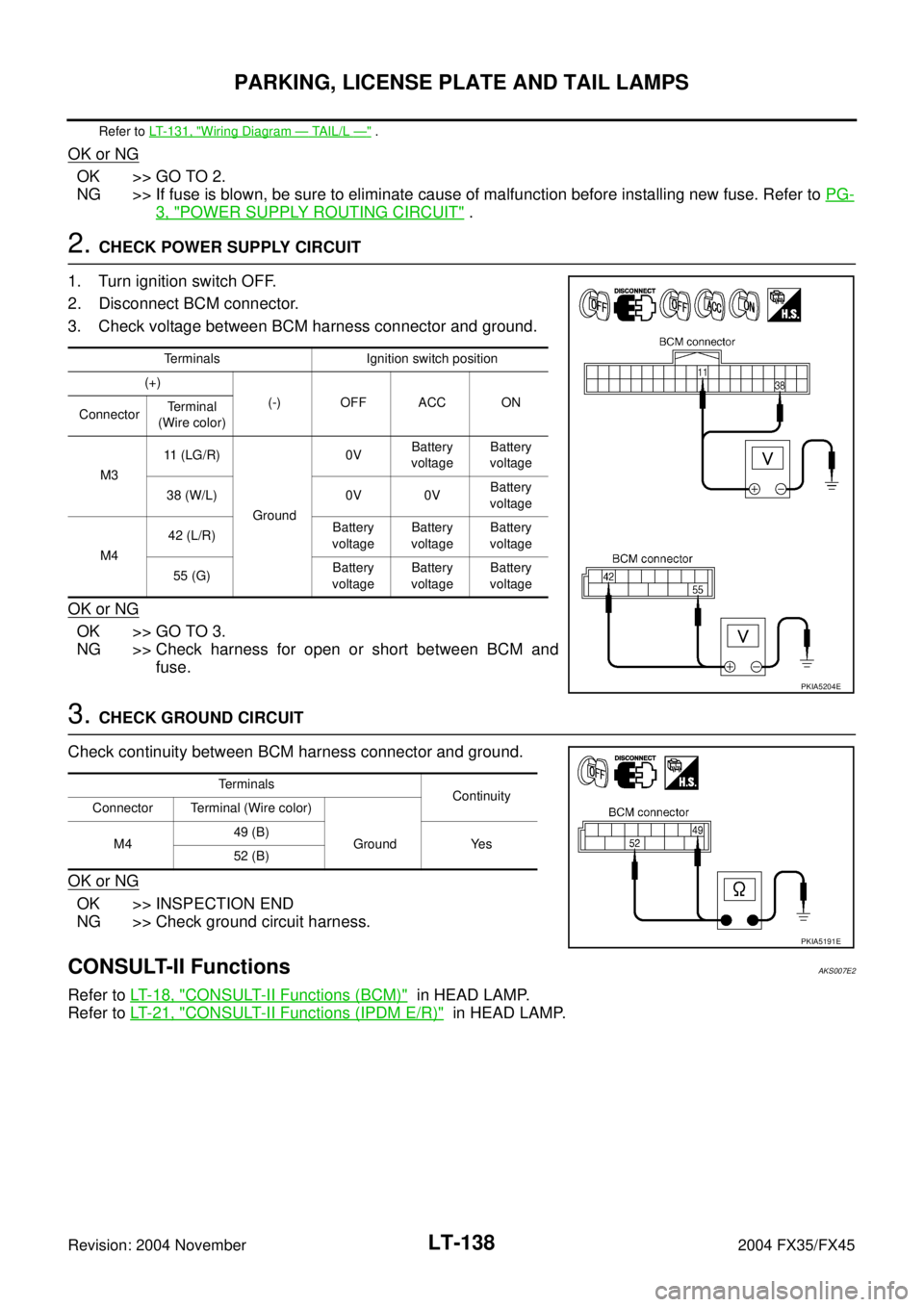
2. CHECK POWER SUPPLY CIRCUIT
1. Turn ignition switch OFF.
2. Disconnect BCM connector.
3. Check voltage between BCM harness connector and ground.
OK or NG
OK >> GO TO 3.
NG >> Check harness for open or short between BCM and
fuse.
3. CHECK GROUND CIRCUIT
Check continuity between BCM harness connector and ground.
OK or NG
OK >> INSPECTION END
NG >> Check ground circuit harness.
CONSULT-II FunctionsAKS007E2
Refer to LT- 1 8 , "CONSULT-II Functions (BCM)" in HEAD LAMP.
Refer to LT- 2 1 , "
CONSULT-II Functions (IPDM E/R)" in HEAD LAMP.
Terminals Ignition switch position
(+)
(-) OFF ACC ON
ConnectorTerminal
(Wire color)
M311 (LG/R)
Ground0VBattery
voltageBattery
voltage
38 (W/L) 0V 0VBattery
voltage
M442 (L/R)Battery
voltageBattery
voltageBattery
voltage
55 (G)Battery
voltageBattery
voltageBattery
voltage
PKIA5204E
Terminals
Continuity
Connector Terminal (Wire color)
M449 (B)
Ground Yes
52 (B)
PKIA5191E