Page 622 of 4449

AUDIO
AV-31
C
D
E
F
G
H
I
J
L
MA
B
AV
Revision: 2004 November 2004 FX35/FX45
*1: BOSE system and with VQ engine or with sunroof, ICC system, Navigation system or DVD player
*2: Except for above
*3: BOSE system only
Terminals and Reference Value for BOSE Speaker Amp.AKS00BMO
Terminal
(Wire color)
ItemSignal
input/
outputCondition
Reference valueExample of
symptom
+–Igni-
tion
switchOperation
1 (R) GroundBattery power
supply Input OFF – Battery voltageSystem does not
work properly.
9 (LG) 10 (B/Y)Audio sound
signal rear LHOutput ON
Receive audio
signalNo sound from
rear door speaker
LH.
11 (OR) 12 (B/P)Audio sound
signal rear RHOutput ONNo sound from
rear door speaker
RH.
13 (L) 14 (B/W)Audio sound
signal front LHOutput ON
Receive audio
signalNo sound from
front door
speaker LH and
instrument
speaker LH.
15 (BR) 16 (B/R)Audio sound
signal front RHOutput ONNo sound from
front door
speaker RH and
instrument
speaker RH.
17 (B) GroundGround
(Power)– ON – Approx. 0VBOSE speaker
amp. dose not
work properly.
18
(R/L)2 (B)Audio sound
signal (Instru-
ment CEN-
TER)Output ONReceive audio
signalNo sound from
instrument
speaker CEN-
TER.
19 (W) 3 (B) Woofer signal Output ONReceive audio
signalNo sound from
woofer.
20 (G) 4 (G/W) Tweeter signal Output ONReceive audio
signalNo sound from
tweeter.
22 (P) GroundAmp ON sig-
nal (woofer)Output ON – Approx. 12VWoofer does not
work properly.
SKIA0177E
SKIA0177E
SKIA0177E
SKIA0177E
SKIA0177E
Page 624 of 4449

AUDIO
AV-33
C
D
E
F
G
H
I
J
L
MA
B
AV
Revision: 2004 November 2004 FX35/FX45
Terminals and Reference Value for A/C and AV SwitchAKS00A2B
Terminal No.
(Wire color)
ItemSignal
input/
outputCondition
Vo l ta g eExample of
symptom
+–Igni-
tion
switchOperation
1 (W/L) GroundBattery power
supply Input OFF – Battery voltageSystem does not
work properly.
2 (LG/R) GroundACC power-
supplyInput ACC – Battery voltageSystem does not
work properly.
3 (R/L) GroundIllumination
signal Input OFFLighting switch is
ONApprox. 12VA/C and AV
switch illumina-
tion does not
come on when
lighting switch is
ON. Lighting switch is
OFFApprox. 0V
4 (R/Y) GroundIllumination
control signalOutput ONIllumination control
switch is operated
by lighting switch in
1st or 2nd position.Changes between approx.0V
and approx.12VA/C and AV
switch illumina-
tion does not
come on when
lighting switch is
ON.
5 (B) Ground Ground – ON – Approx. 0V –
6 (B/R) GroundCommunica-
tion signal (+)Input/
OutputON –System does not
work properly.
7–Shield
ground –– – – –
8 (W/R) GroundCommunica-
tion signal (–)Input/
OutputON –System does not
work properly.
12 (R/G) GroundRemote con-
troller AInput ONPress MODE switch. Approx. 0V
Steering wheel
audio controls
do not function. Press SEEK UP
switch.Approx. 1.7V
Press VOL UP
switch.Approx. 3.3V
Except for above Approx. 5V
13 (G/W) GroundRemote con-
troller BInput ONPress POWER
switch.Approx. 0V
Steering wheel
audio controls
do not function. Press SEEK DOWN
switch.Approx. 1.7V
Press VOL DOWN
switch.Approx. 3.3V
Except for above Approx. 5V
14 (B/Y) –Remote con-
troller ground–– – –Steering wheel
audio controls
do not function.
SKIA0175E
SKIA0176E
Page 625 of 4449
AV-34
AUDIO
Revision: 2004 November 2004 FX35/FX45
Terminals and Reference Value for WooferAKS00AM2
Terminal No.
(Wire color)
ItemSignal
input/
outputCondition
VoltageExample of
symptom
+–Igni-
tion
switchOperation
1 (G/R) GroundBattery power
supplyInput OFF – Battery voltageNo sound from
woofer.
2 (B) Ground Ground – ON – Approx.0VNo sound from
woofer.
5 (P) GroundAmp ON sig-
nal Input ACC – Approx. 12VNo sound from
woofer.
7 (W) 8 (B)Woofer sound
signalInput ACC Receve audio signal No sound from
foofer.
SKIA0177E
Page 626 of 4449

AUDIO
AV-35
C
D
E
F
G
H
I
J
L
MA
B
AV
Revision: 2004 November 2004 FX35/FX45
A/C and AV Switch Self-Diagnosis FunctionAKS00BMP
It can check ON/OFF operation of each switch in the A/C and AV switch and diagnose the input signals to the
audio steering wheel switch.
STARTING THE SELF-DIAGNOSIS MODE
1. Turn ignition switch from OFF to ACC.
2. Within 10 seconds press and hold the switches “MUTE/II ” and
“PREV ” simultaneously for 3 seconds.
DIAGNOSIS FUNCTION
The following are checked:
�All the indicators (LED) in the A/C and AV switch.
�Continuity of the switches by sounding the buzzer when the A/C and AV switch is pressed.
�Continuity of harness between A/C and AV switch and audio steering wheel switch.
EXITING THE SELF-DIAGNOSIS MODE
�Turn ignition switch OFF.
Trouble DiagnosisAKS00BMQ
The majority of the audio malfunctions are the result of outside causes (bad CD/cassette, electromagnetic
interference, etc.). Check the symptoms below to diagnose the malfunction.
MALFUNCTION WITH RADIO, TAPE AND CD (BASE SYSTEM)
Make sure that operation excepting audio system can be done with A/C and AV switch. If not, refer AV- 8 4 , "A/
C and AV Switch Does Not Operate" to repair malfunctioning parts.
SKIA4972E
Symptom Check item
Inoperative
�Audio unit power supply circuit. Refer to AV- 3 9 , "Power Supply Circuit
Inspection" .
�Audio communication line (With out navigation system). Refer to , AV- 8 2 ,
"Audio Communication Line Inspection" .
�Audio communication line (With navigation system). Refer to AV-131, "Self-
Diagnosis Mode (DCU)" .
�A/C and AV switch. Refer to AV-41, "A/C and AV Switch Inspection" .
�Audio unit
Audio steering wheel switch dose not operate
�Audio steering wheel switch. Refer to AV- 4 0 , "Audio Steering Wheel Switch
Inspection" .
�A/C and AV switch. Refer to AV-41, "A/C and AV Switch Inspection" .
One or several speaker does not sound
�Front door speaker
�Rear door speaker
�Audio unit
Poor sound
�Audio unit
�Speaker
Noisy
�Audio unit
�Each electrical equipment
Page 627 of 4449

AV-36
AUDIO
Revision: 2004 November 2004 FX35/FX45
MALFUNCTION WITH RADIO, TAPE AND CD (BOSE SYSTEM)
Make sure that operation excepting audio system can be done with A/C and AV switch. If not, refer AV- 8 4 , "A/
C and AV Switch Does Not Operate" (without navigation system), AV- 1 3 1 , "Self-Diagnosis Mode (DCU)" (with
navigation system) to repair malfunctioning parts.
Symptom Check item
Inoperative
�Audio unit power supply circuit. Refer to AV- 3 9 , "Power Supply Circuit
Inspection" .
�Audio communication line (Without navigation system). Refer to AV- 8 2 ,
"Audio Communication Line Inspection" .
�Audio communication line (With navigation system). Refer to AV-131, "Self-
Diagnosis Mode (DCU)" .
�A/C and AV switch. Refer to AV- 4 1 , "A/C and AV Switch Inspection" .
�Audio unit
Audio steering wheel switch dose not operate
�Audio steering wheel switch. Refer to AV-40, "Audio Steering Wheel Switch
Inspection" .
�A/C and AV switch. Refer to AV- 4 1 , "A/C and AV Switch Inspection" .
One or several speaker does not sound
�BOSE speaker amp. power supply and ground circuit. Refer to AV- 3 9 ,
"Power Supply Circuit Inspection" .
�Front door speaker
�Rear door speaker
�BOSE speaker amp.AV- 4 2 , "BOSE Speaker Amp. Inspection" .
�Audio unit
Woofer does not sound
�Woofer
�BOSE speaker amp
Speed sensitive volume system dose not work
�Vehicle speed signal. Refer to AV- 4 2 , "Vehicle Speed Signal Inspection" .
�Audio unit
Poor sound
�Audio unit
�BOSE speaker amp
�Speaker
�Woofer
Noisy
�Audio unit
�BOSE speaker amp
�Each electrical equipment
Page 630 of 4449

AUDIO
AV-39
C
D
E
F
G
H
I
J
L
MA
B
AV
Revision: 2004 November 2004 FX35/FX45
Power Supply Circuit InspectionAKS00BMS
1. CHECK FUSE
�Make sure that the following fuses of the BOSE speaker amp., woofer, and audio unit are not blown.
OK or NG
OK >> GO TO 2
NG >> If fuse is blown, be sure to eliminate cause of malfunction before installing new fuse. Refer to PG-
3, "POWER SUPPLY ROUTING CIRCUIT" .
2. CHECK POWER SUPPLY CIRCUIT
1. Check voltage between the audio unit harness connector terminals and ground.
2. Turn ignition switch OFF.
3. Check voltage between BOSE speaker amp. harness connector
terminal or woofer harness connector terminal and ground.
OK or NG
OK >>�INSPECTION END (Audio unit is OK)
�GO TO 3 (BOSE speaker amp. and woofer).
NG >>
�Repair harness or connector.
Unit Signal Fuse No.
Audio unitBattery power supply 32
ACC power supply 6
BOSE speaker amp. Battery power supply 17
Woofer Battery power supply 32
UnitTerminal No.
Ignition switch Voltage (+)
(-)
Connec-
torTerminal
(Wire
color)
Audio
unitM586 (W/L) Ground OFF Battery voltage
10 (LG/R) Ground ACC Battery voltage
PKIA3814E
UnitTerminal No.
Ignition
switchVoltage (+)
(-)
ConnectorTerminal
(Wire color)
BOSE
speaker
amp.B212 1 (R) Ground OFF Battery voltage
Woofer B223 1 (GY) Ground OFF Battery voltage
SKIA8931E
Page 632 of 4449

AUDIO
AV-41
C
D
E
F
G
H
I
J
L
MA
B
AV
Revision: 2004 November 2004 FX35/FX45
3. CHECK SPIRAL CABLE
1. Disconnect spiral cable connector (Audio steering wheel switch harness side).
2. Check continuity between spiral cable connector terminal 24,
31, 32 and terminal 20, 17, 16.
OK or NG
OK >> GO TO 4
NG >> Replace spiral cable.
4. CHECK AUDIO STEERING WHEEL SWITCH
Check resistance audio steering wheel switch connector M203 ter-
minals.
OK or NG
OK >> Replace A/C and AV switch.
NG >> Replace audio steering wheel switch.
A/C and AV Switch InspectionAKS00BMU
1. A/C AND AV SWITCH SELF-DIAGNOSIS FUNCTION
1. Start A/C and AV switch self-diagnosis function. Refer to AV- 3 5 , "
A/C and AV Switch Self-Diagnosis Func-
tion" .
2. Operate A/C and AV switch.
Does the A/C and AV switch is operated normally?
YES >> INSPECTION END (System is OK)
NO >> GO TO 2.
2. CHECK A/C AND AV SWITCH POWER SUPPLY AND GROUND
Check A/C and AV switch power supply and gruoud circuit. Refer to AV- 8 0 , "
Power Supply and Ground Circuit
Check for A/C and AV Switch" (Without Navigation System), AV- 1 4 9 , "Power Supply and Ground Circuit
Check for A/C and AV Switch" (With Navigation System).
OK or NG
OK >> Replace A/C and AV switch.
NG >> Repair malfunctioning parts.24 – 20 : Continuity should exist.
31 – 17 : Continuity should exist.
32 – 16 : Continuity should exist.
SKIB0521E
Terminal Switch name ConditionResistance
(Ω)
16
17Power Depress power switch. Approx. 0
Seek down Depress seek down switch. Approx. 165
Volume (down) Depress volume down switch. Approx. 652
20Mode Depress mode switch. Approx. 0
Seek up Depress seek up switch. Approx. 165
Volume (up) Depress volume up switch. Approx. 652
SKIA9400E
Page 642 of 4449
AUDIO ANTENNA
AV-51
C
D
E
F
G
H
I
J
L
MA
B
AV
Revision: 2004 November 2004 FX35/FX45
Terminals and Reference Value for Audio UnitAKS007WW
Antenna Amp. InspectionAKS007WX
1. CHECK ANTENNA FEEDER
Check with visual observation if antenna feeder between audio unit and antenna amp. has disconnection or
malfunction on the mounting part (engagement, looseness of shield earth, etc.).
OK or NG
OK >> GO TO 2
NG >> Replace antenna feeder.
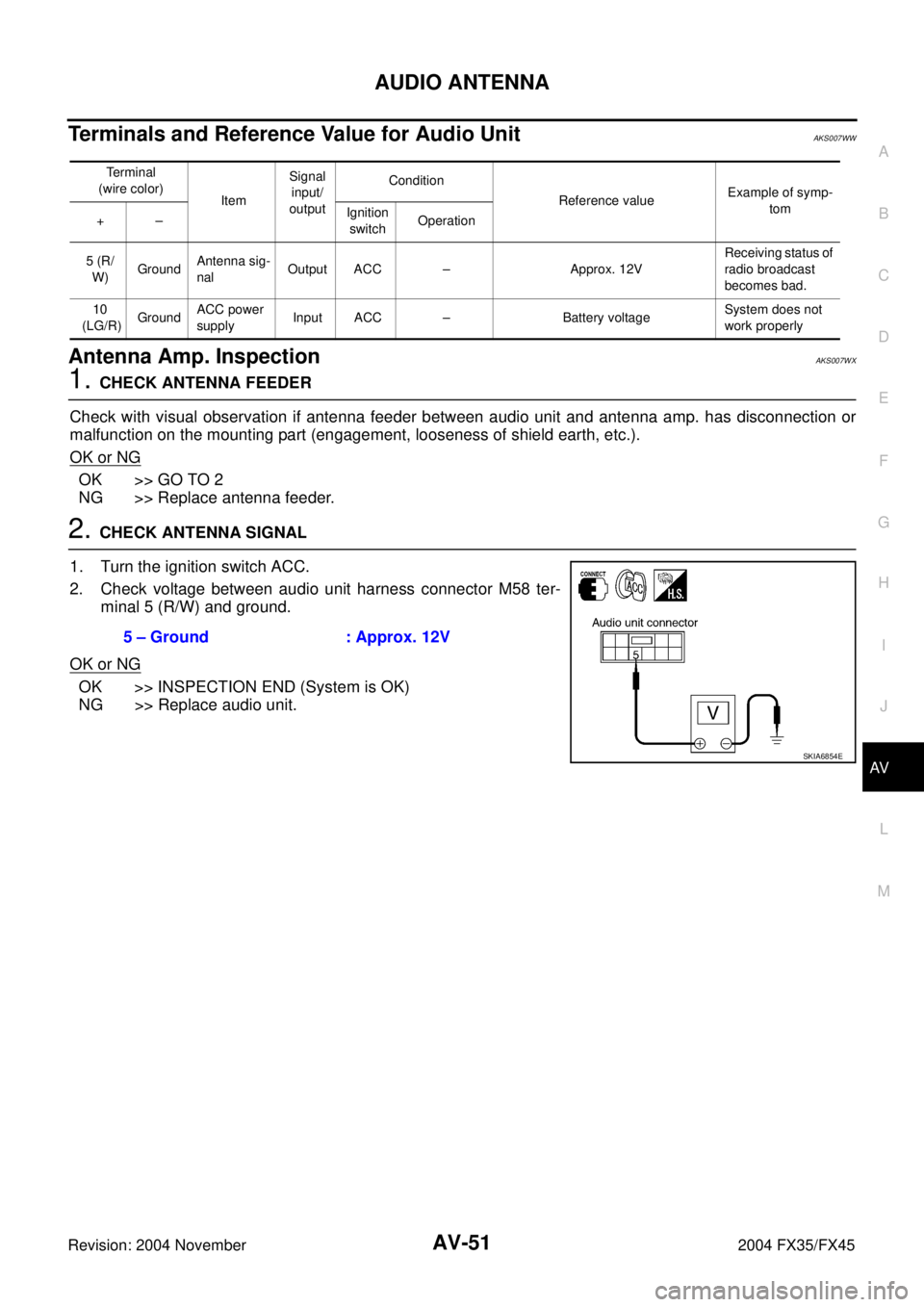
2. CHECK ANTENNA SIGNAL
1. Turn the ignition switch ACC.
2. Check voltage between audio unit harness connector M58 ter-
minal 5 (R/W) and ground.
OK or NG
OK >> INSPECTION END (System is OK)
NG >> Replace audio unit.
Terminal
(wire color)
ItemSignal
input/
outputCondition
Reference valueExample of symp-
tom
+–Ignition
switchOperation
5 (R/
W)GroundAntenna sig-
nalOutput ACC – Approx. 12VReceiving status of
radio broadcast
becomes bad.
10
(LG/R)GroundACC power
supplyInput ACC – Battery voltageSystem does not
work properly
5 – Ground : Approx. 12V
SKIA6854E
