Page 51 of 296
A child seat with a tether can be
installed in any seating position in
the second or third row.
Since a tether can provide additional
security to the lap/shoulder belt
installation, we recommend using a
tether whenever one is required or
available. (Tethers are required in
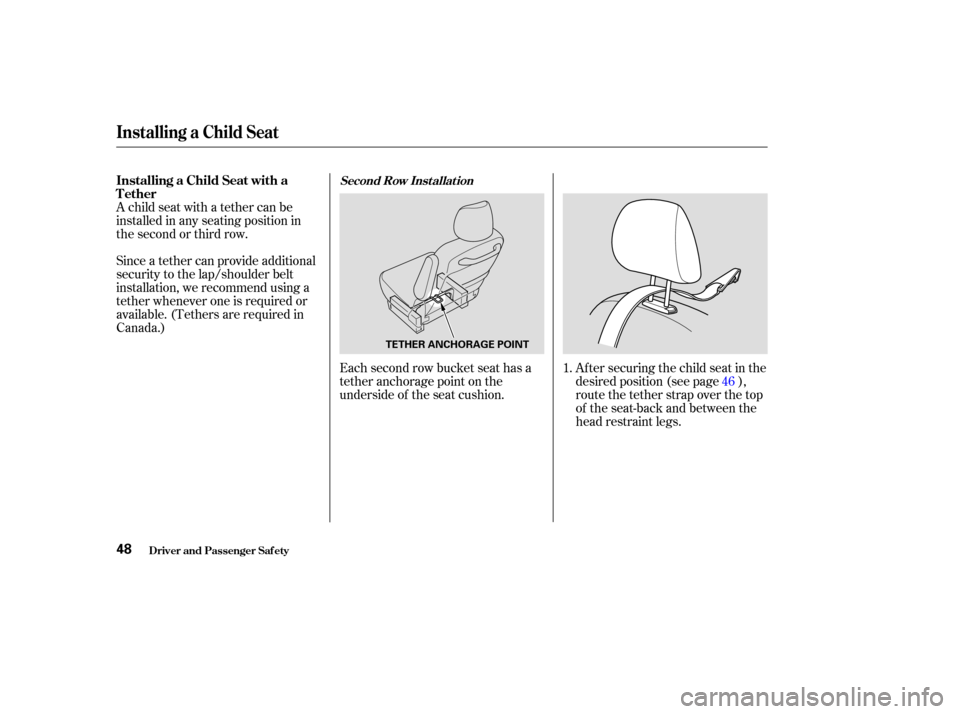
Canada.)Each second row bucket seat has a
tether anchorage point on the
underside of the seat cushion. Af ter securing the child seat in the
desired position (see page ),
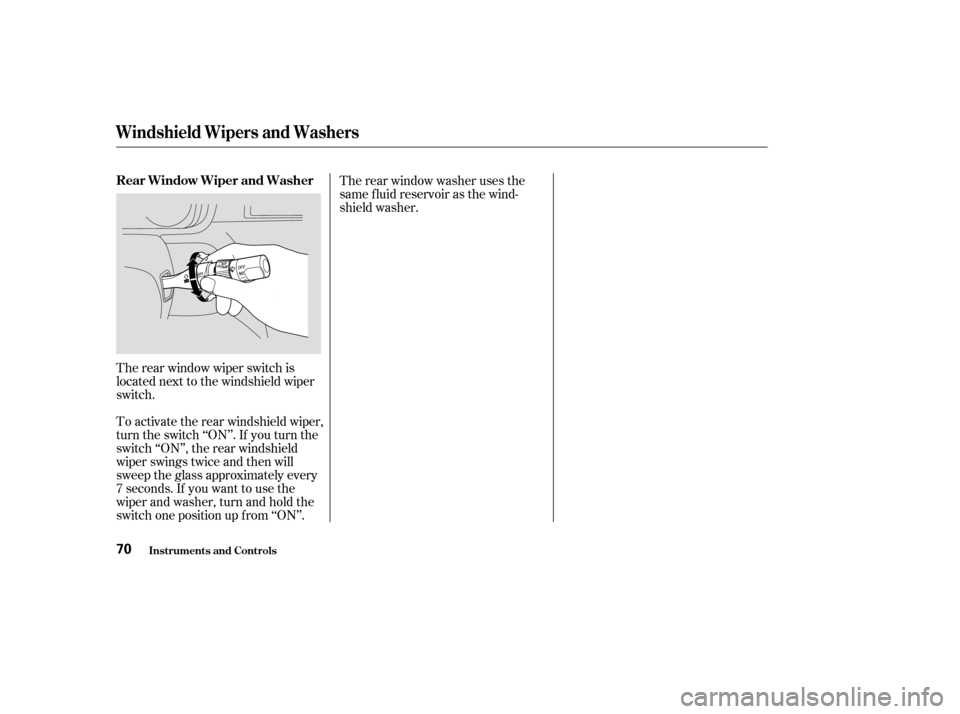
route the tether strap over the top
of the seat-back and between the
head restraint legs.
1.
46
Installing a Child Seat
Driver and Passenger Saf ety
Installing a Child Seat with a
TetherSecond Row Inst allat ion
48
TETHER ANCHORAGE POINT
Page 52 of 296
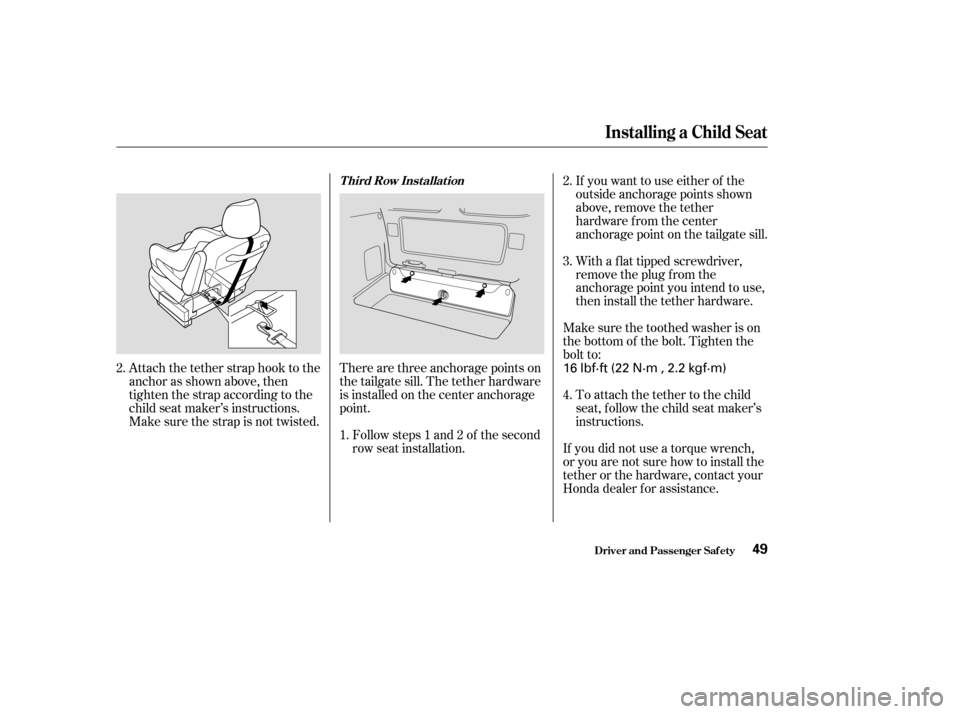
Attach the tether strap hook to the
anchor as shown above, then
tighten the strap according to the
child seat maker’s instructions.
Make sure the strap is not twisted.Followsteps1and2of thesecond
row seat installation.
There are three anchorage points on
the tailgate sill. The tether hardware
is installed on the center anchorage
point. If you want to use either of the
outside anchorage points shown
above, remove the tether
hardware f rom the center
anchorage point on the tailgate sill.
With a f lat tipped screwdriver,
remove the plug f rom the
anchorage point you intend to use,
then install the tether hardware.
Make sure the toothed washer is on
the bottom of the bolt. Tighten the
bolt to:
To attach the tether to the child
seat, f ollow the child seat maker’s
instructions.
If you did not use a torque wrench,
or you are not sure how to install the
tether or the hardware, contact your
Honda dealer f or assistance.
2. 2.
1. 3.
4.
Installing a Child Seat
Driver and Passenger Saf ety
T hird Row Inst allat ion
49
16 lbf·ft (22 N·m , 2.2 kgf·m)
Page 63 of 296

The instrument panel has many
indicators to give you important
inf ormation about your vehicle.
See page .
The engine can be severely damaged
if this indicator f lashes or stays on
when the engine is running. For
more inf ormation, see page .
If this indicator comes on when the
engine is running, the battery is not
being charged. For more inf ormation,
see page .This indicator has two f unctions:
If it remains lit af ter you f ully
release the parking brake while
the engine is running, or if it
comes on while driving, there
could be a problem with the brake
system. For more inf ormation, see
page . This indicator comes on when you
turn the ignition switch to ON (II). It
reminds you and your passengers to
f asten your seat belts. A beeper also
sounds if you have not f astened your
seat belt.
If you do not f asten your seat belt,
the beeper will stop af ter a f ew
seconds but the indicator stays on
until you do. Both the indicator and
the beeper stay of f if you f asten your
seat belt bef ore turning on the
ignition.
This indicator comes on when you
turn the ignition switch to ON (II).
It is a reminder to check the
parking brake. Driving with the
parking brake not f ully released
can damage the brakes and tires.
253
252
252 254
Inst rument s and Cont rols
Malf unction Indicator
Lamp
L ow Oil Pressure
Indicator
Charging System
IndicatorParking Brake and Brake System
Indicator
Seat Belt Reminder
Indicator
Instrument Panel Indicators
60
U.S. Canada
Page 64 of 296

This indicator comes on when you
turn the ignition switch to ON (II). If
it comes on at any other time, it
indicates a potential problem with
your f ront airbags or automatic seat
belt tensioners. This indicator will
also alert you to a potential problem
with your side airbags, passenger’s
side airbag automatic cutoff system,
driver’s seat position sensor, or f ront
passenger’s weight sensors. For
more inf ormation, see page .This indicator comes on when you
turn the ignition switch to ON (II). If
it comes on at any other time, it
indicates that the passenger’s side
airbag has automatically shut off.
For more inf ormation, see page .
This indicator normally comes on f or
a f ew seconds when you turn the
ignition switch to ON (II), and when
the ignition switch is turned to
START (III). If it comes on at any
other time, there is a problem in the
ABS. If this happens, have your
vehicle checked by your Honda
dealer. With this indicator on, your
vehicle still has normal braking
ability but no anti-lock. For more
inf ormation, see page .
30 31
190
Instrument Panel Indicators
Inst rument s and Cont rols
Supplemental Restraint
System Indicator Side Airbag Of f Indicator
Anti-lock Brake System (ABS)
Indicator
61
Canada
U.S.
Page 65 of 296

This indicator has three f unctions:Itcomesonasareminderthatyou
have turned off the Traction
Control System.
It f lashes when the TCS is
regulating wheelspin.
If itcomesonandstaysonwhen
the Traction Control System is on,
it indicates that there is a problem
in the TCS.
This indicator also comes on when
you turn the ignition to ON (II) and
goes of f af ter the engine starts. See
page f or more inf ormation on
the TCS. This indicator comes on f or a f ew
seconds when you turn the ignition
switch to ON (II). It will then go of f
if you have inserted a properly-coded
ignition key. If it is not a properly-
coded key, the indicator will blink
and the engine will not start (see
page ).
This indicator also blinks several
times when you turn the ignition
switch f rom ON (II) to ACCESSORY
(I) or LOCK (0).
This indicator comes on f or a f ew
seconds when you turn the ignition
switch to ON (II). If it comes on at
any other time, there is a problem in
the power sliding door system. With
this indicator on, move the main
switch on the dashboard to the OFF
position, and have the system
checked by your Honda dealer as
soon as possible. You can still open
or close each sliding door manually.
For more inf ormation on the power
sliding doors, see page .
1.
2.
3.
192 76
84EX and EX-L models only
Instrument Panel Indicators
Inst rument s and Cont rols
Traction Control System
(T CS) IndicatorImmobilizer System
IndicatorPower Sliding Door
Indicator
62
Page 68 of 296

This indicator reminds you that it is
time to take your vehicle in for
scheduled maintenance.
Ref er to the Maintenance Schedules
f or Normal and Severe Driving
Conditions on pages and .Between 6,000 miles (9,600 km) and
7,500 miles (12,000 km), it will light
f or 2 seconds when you f irst turn the
ignition switch to ON (II), and then
f lash f or 10 seconds.
If you exceed 7,500 miles (12,000
km) without having the scheduled
maintenance perf ormed, this
indicator will remain on as a constant
reminder.
Your dealer will reset this indicator
af ter completing the scheduled
maintenance. If this maintenance is
done by someone other than your
Honda dealer, reset the indicator as
f ollows.
Turn of f the engine. Hold the button for about 10
seconds until the indicator goes
of f .
For the f irst 6,000 miles (9,600 km)
af ter the Maintenance Required
Indicator is reset, it will come on f or
2 seconds when you turn the ignition
switch to ON (II).
Press and hold the Select/Reset
buttonintheinstrumentpanel,
then turn the ignition switch to
ON (II).
1. 2.
3.
205 206
Maintenance Required Indicator
Inst rument s and Cont rols
Maintenance Required
Indicator
65
SELECT/RESET BUTTON
Page 73 of 296
The rear window wiper switch is
located next to the windshield wiper
switch.
To activate the rear windshield wiper,
turn the switch ‘‘ON’’. If you turn the
switch ‘‘ON’’, the rear windshield
wiper swings twice and then will
sweep the glass approximately every
7 seconds. If you want to use the
wiper and washer, turn and hold the
switch one position up f rom ‘‘ON’’.Therearwindowwasherusesthe
same f luid reservoir as the wind-
shield washer.
Windshield Wipers and Washers
Inst rument s and Cont rols
Rear Window Wiper and Washer
70
Page 75 of 296

The lights will turn on again when
you unlock or open the driver’s door.
If you unlock the door, but do not
open it within 15 seconds, the lights
will go off. With the driver’s door
open, you will hear a lights-on
reminder chime.
With the headlight switch off, the
high beam headlights and the high
beam indicator come on with
reduced brightness when you turn
the ignition switch to ON (II) and
release the parking brake. They
remain on until you turn the ignition
of f , even if you set the parking brake.
The headlights revert to normal
operation when you turn them on
with the switch.The knob on the instrument panel
controls the brightness of the instru-
ment panel lights. Turn the knob to
adjust the brightness.
This feature activates if you leave
the headlight switch in the ‘‘ ’’
or ‘‘ ’’ position, remove the key,
then open and close the driver’s door.
If you remove the key f rom the
ignition switch with the headlight
switch on, but do not open the door
and get out, the lights will turn of f
af ter 10 minutes. This turns of f the headlights,
parking lights, taillights, side marker
lights, license plate lights, and
instrument panel lights within 15
seconds of removing the key f rom
the ignition switch and closing the
driver’s door.
On EX and EX-L models
Headlights, Instrument Panel Brightness
Inst rument s and Cont rols
Automatic Lighting Of f Feature
Daytime Running L ights
(Canadian Models)Instrument Panel Brightness
72
INSTRUMENT PANEL
BRIGHTNESS CONTROL KNOB