2004 GMC CANYON light
[x] Cancel search: lightPage 138 of 420

Daytime Running Lamps
Daytime Running Lamps (DRL) can make it easier
for others to see the front of your vehicle during the day.
DRL can be helpful in many different driving conditions,
but they can be especially helpful in the short periods
after dawn and before sunset. Fully functional daytime
running lamps are required on all vehicles rst sold
in Canada.
The DRL system will come on when the following
conditions are met:
The ignition is on.
The exterior lamps control is in AUTO.
The automatic transmission is not in PARK (P).
The light sensor determines it is daytime.
When the DRL are on, only your DRL lamps will be on.
The taillamps, sidemarkers and other lamps will not
be on. The instrument panel will not be lit up either.
When it begins to get dark, the automatic headlamp
system will switch from DRL to the headlamps.
As with any vehicle, you should turn on the regular
headlamp system when you need it.
Fog Lamps
If your vehicle has fog lamps you can use them for
better vision in foggy or misty conditions. Your parking
lamps and/or low-beam headlamps must be on for
your fog lamps to work.
The fog lamp button is
located near the exterior
lamps control.
Press the button to turn the fog lamps on while the
headlamps or parking lamps are on. Press the button
again to turn them off. An indicator light will glow in the
button when the fog lamps are on.
Remember, fog lamps alone will not give off as much
light as your headlamps. Never use your fog lamps
in the dark without turning on the headlamps.
The fog lamps will go off whenever your high-beam
headlamps come on. When the high beams go off,
the fog lamps will come on again.
The fog lamps will be cancelled after the ignition is
turned off. If you still want to use the fog lamps after you
restart the vehicle, you will need to press the fog lamp
button again.
3-14
Page 139 of 420
Cargo Lamps
If your vehicle is equipped with cargo lamps, you can
use them if you need more light in the cargo area of your
vehicle. The dome lamps must be on before you can
turn on the cargo lamps.
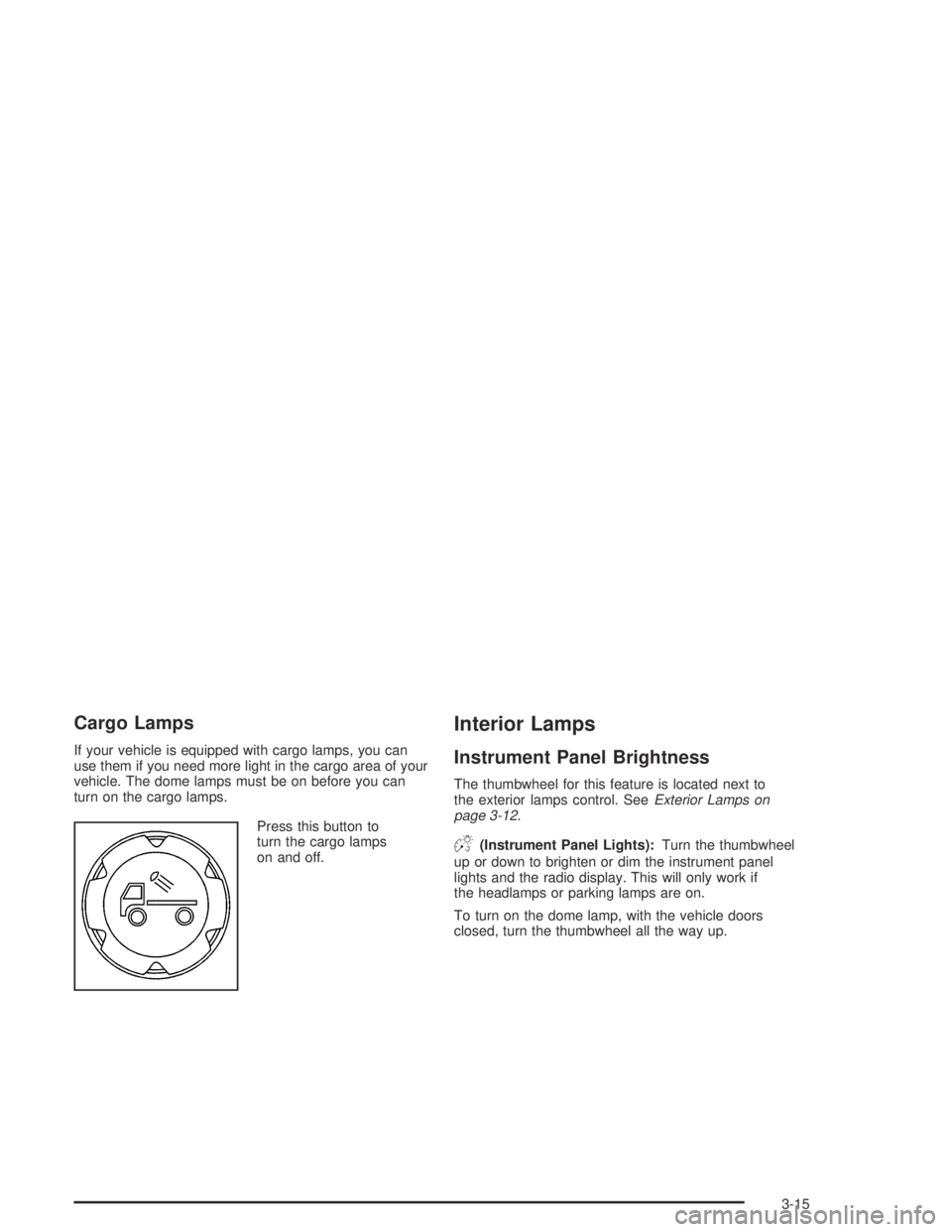
Press this button to
turn the cargo lamps
on and off.
Interior Lamps
Instrument Panel Brightness
The thumbwheel for this feature is located next to
the exterior lamps control. SeeExterior Lamps on
page 3-12.
D(Instrument Panel Lights):Turn the thumbwheel
up or down to brighten or dim the instrument panel
lights and the radio display. This will only work if
the headlamps or parking lamps are on.
To turn on the dome lamp, with the vehicle doors
closed, turn the thumbwheel all the way up.
3-15
Page 140 of 420
Dome Lamp
The dome lamp will come on when you open a door.
You can also turn the dome lamp on by turning the
thumbwheel all the way up. In this position, the dome
lamp will remain on whether a door is opened or closed.
E(Dome Override):Press this button, located
below the exterior lamp control, to turn the dome lamp
off even when a door is opened. To return the lamp
to automatic operation, press the button again.
Exit Lighting
With exit lighting, the interior lamps will come on when
you remove the key from the ignition. The lamps will not
come on if the dome override button is pressed in.
Battery Run-Down Protection
This feature shuts off the dome lamp if it is left on for
more than 20 minutes when the ignition is in LOCK.
This will keep your battery from running down.
Accessory Power Outlets
Your vehicle may have an accessory power outlet.
With accessory power outlets you can plug in auxiliary
electrical equipment such as a cellular telephone or
CB radio.
Your vehicle may have two accessory power outlets
located on the lower part of the instrument panel below
the climate control system and there may be one
located on the rear of the center console. A small cap
must be pulled down to access an accessory power
outlet. When not using an outlet be sure to cover it with
the protective cap.
Notice:Leaving electrical equipment on for
extended periods will drain the battery. Always turn
off electrical equipment when not in use and do
not plug in equipment that exceeds the maximum
amperage rating.
Certain electrical accessories may not be compatible
with the accessory power outlet and could result
in blown vehicle or adapter fuses. If you experience a
problem, see your dealer for additional information
on accessory power outlets.
3-16
Page 141 of 420
Notice:Adding any electrical equipment to your
vehicle may damage it or keep other components
from working as they should. The repairs would not
be covered by your warranty. Check with your
dealer before adding electrical equipment.
When adding electrical equipment, be sure to follow the
proper installation instructions included with the
equipment.
Notice:Improper use of the power outlet can cause
damage not covered by your warranty. Do not
hang any type of accessory or accessory bracket
from the plug because the power outlets are
designed for accessory power plugs only.Ashtrays and Cigarette Lighter
Your vehicle may have an ashtray and cigarette lighter.
Your ashtray is located at the front of your center
console area.
Notice:If you put papers or other ammable items
in the ashtray, hot cigarettes or other smoking
materials could ignite them and possibly damage
your vehicle. Never put ammable items in the
ashtray.
To use the lighter, press it in all the way, and let go.
When it’s ready, it will pop back out by itself.
Notice:Holding a cigarette lighter in while it is
heating will not allow the lighter to back away from
the heating element when it is hot. Damage from
overheating may occur to the lighter or heating
element, or a fuse could be blown. Do not hold a
cigarette lighter in while it is heating.
3-17
Page 143 of 420
Mode Knob
The right knob on the control panel is used to direct the
airow inside your vehicle. Turn the knob to select
one of the following modes:
H(Vent):Select this mode to direct air to the
instrument panel outlets.
\(Bi-Level):Select this mode to direct approximately
half of the air to the instrument panel outlets, and the
remaining air to the oor outlets and the defroster
and side window outlets. Cooler air is directed to the
upper outlets and warmer air to the oor outlets.
[(Floor):Select this mode to direct air to the oor
outlets. Recirculation does not work in this mode.
Mode Buttons
@
(Recirculation):If your vehicle has air
conditioning, you will have the recirculation feature.
This mode recirculates air inside the cabin, and prevents
outside air from coming in the vehicle. It can be used
to prevent outside odors from entering your vehicle and
cool the air inside your vehicle more quickly. Press this
button to turn the recirculation mode on or off.
An indicator light on the button will come on to let you
know the recirculation mode is activated.
Recirculation is only available in the bi-level and vent
modes. If you push the recirculation button while
the system is in any other mode, the light on the button
will ash to indicate that recirculation is not available.
3-19
Page 144 of 420
#(Air Conditioning):Your vehicle may have air
conditioning. Press this button to turn the air-conditioning
system on or off. An indicator light on the button will
come on to let you know the air conditioning is activated.
When the system is on, this setting cools and
dehumidies the air entering your vehicle.
The air conditioning will not function if the fan is
turned off.
You may notice a slight change in engine performance
when the air conditioning compressor shuts off and
turns on again. This is normal. The system is designed
to make adjustments to help with fuel economy while
still maintaining the selected temperature.
The air conditioning system removes moisture from the
air, so you may sometimes notice a small amount of
water dripping underneath your vehicle while idling
or after turning off the engine. This is normal.Defogging and Defrosting
Fog on the inside of windows is a result of high humidity
(moisture) condensing on the cool window glass.
This can be minimized if the climate control system is
used properly. There are two modes to clear fog or frost
from your windshield and side windows. Use the defog
mode to clear the windows of fog or moisture and warm
the passengers. Use the defrost mode to remove fog or
frost from the windshield more quickly. For best results,
clear all snow and ice from the windshield before
defrosting.
Turn the mode knob on the climate control panel
clockwise to select the defog or defrost modes.
/(Floor/Defog):This mode directs the air to the
windshield, the side window outlets, and to the
oor outlets. When you select this mode, the system
runs the air conditioning compressor unless the outside
temperature is near freezing or below. Recirculation
is not available in this mode.
0(Defrost):This mode directs most of the air to the
windshield, and the side window outlets. When you
select this mode, the system runs the air conditioning
compressor unless the outside temperature is near, or
below freezing. Recirculation is not available in this
mode.
Do not drive the vehicle until all the windows are clear.
3-20
Page 146 of 420

Warning Lights, Gages,
and Indicators
This part describes the warning lights and gages that
may be on your vehicle. The pictures will help you
locate them.
Warning lights and gages can signal that something is
wrong before it becomes serious enough to cause
an expensive repair or replacement. Paying attention
to your warning lights and gages could also save you
or others from injury.
Warning lights come on when there may be or is a
problem with one of your vehicle’s functions. As you
will see in the details on the next few pages, some
warning lights come on briey when you start the engine
just to let you know they are working. If you are
familiar with this section, you should not be alarmed
when this happens.Gages can indicate when there may be or is a problem
with one of your vehicle’s functions. Often gages
and warning lights work together to let you know when
there is a problem with your vehicle.
When one of the warning lights comes on and stays on
when you are driving, or when one of the gages shows
there may be a problem, check the section that tells you
what to do about it. Please follow this manual’s advice.
Waiting to do repairs can be costly — and even
dangerous. So please get to know your warning lights
and gages. They are a big help.
Your vehicle may also have a DIC that works along with
the warning lights and gages. SeeDriver Information
Center (DIC) on page 3-37for more information.
3-22
Page 148 of 420
Speedometer and Odometer
Your speedometer lets you see your speed in both
miles per hour (mph) and kilometers per hour (km/h).
Your odometer shows how far your vehicle has
been driven, in either miles (used in the United States)
or kilometers (used in Canada).
The odometer mileage can be checked without the
vehicle running. Simply press the trip information stem.
See “Odometer” underDIC Controls and Displays
on page 3-37for more information.
You may wonder what happens if your vehicle needs a
new odometer installed. If the new one can be set to
the mileage total of the old odometer, then it must
be. But if it cannot, then it is set at zero, and a label
must be put on the driver’s door to show the old mileage
reading when the new odometer was installed.
Trip Odometer
Your vehicle has a trip odometer that can tell you how
far your vehicle has been driven since you last set
the trip odometer to zero.
To view the trip odometer, press the trip odometer reset
stem until TRIP is displayed. To reset the current trip
odometer, hold the reset stem. See “Trip Odometer”
underDIC Controls and Displays on page 3-37for
more information.
Tachometer
The tachometer displays the engine speed in revolutions
per minute (rpm).
Notice:If you operate the engine with the
tachometer in the shaded warning area, your vehicle
could be damaged, and the damages would not
be covered by your warranty. Do not operate
the engine with the tachometer in the shaded
warning area.
Safety Belt Reminder Light
When the key is turned to ON or START, a chime will
come on for several seconds to remind people to fasten
their safety belts, unless the driver’s safety belt is
already buckled.
The safety belt light will
also come on and stay on
for several seconds,
then it will ash until the
driver’s safety belt is
buckled.
If the driver’s belt is already buckled, neither the chime
nor the light will come on.
3-24