2004 GMC CANYON fuel cap
[x] Cancel search: fuel capPage 1 of 420

Seats and Restraint Systems........................... 1-1
Front Seats
............................................... 1-3
Rear Seats
............................................... 1-9
Safety Belts
.............................................1-11
Child Restraints
.......................................1-31
Air Bag Systems
......................................1-60
Restraint System Check
............................1-73
Features and Controls..................................... 2-1
Keys
........................................................ 2-2
Doors and Locks
....................................... 2-7
Windows
.................................................2-12
Theft-Deterrent Systems
............................2-14
Starting and Operating Your Vehicle
...........2-16
Mirrors
....................................................2-36
OnStar
®System
......................................2-41
Storage Areas
.........................................2-42
Instrument Panel............................................. 3-1
Instrument Panel Overview
.......................... 3-2
Climate Controls
......................................3-18
Warning Lights, Gages, and Indicators
........3-22
Driver Information Center (DIC)
..................3-37
Audio System(s)
.......................................3-42Driving Your Vehicle....................................... 4-1
Your Driving, the Road, and Your Vehicle
........ 4-2
Towing
...................................................4-47
Service and Appearance Care.......................... 5-1
Service
..................................................... 5-3
Fuel
......................................................... 5-5
Checking Things Under the Hood
...............5-10
Rear Axle
...............................................5-47
Four-Wheel Drive
.....................................5-48
Front Axle
...............................................5-49
Bulb Replacement
....................................5-50
Windshield Wiper Blade Replacement
.........5-55
Tires
......................................................5-57
Appearance Care
.....................................5-94
Vehicle Identication
...............................5-103
Electrical System
....................................5-103
Capacities and Specications
...................5-108
Maintenance Schedule..................................... 6-1
Maintenance Schedule
................................ 6-2
Customer Assistance and Information.............. 7-1
Customer Assistance and Information
........... 7-2
Reporting Safety Defects
...........................7-10
Index.................................................................1
2004 GMC Canyon Owner ManualM
Page 156 of 420

If the Light is Flashing
The following may prevent more serious damage to
your vehicle:
Reducing vehicle speed.
Avoiding hard accelerations.
Avoiding steep uphill grades.
If you are towing a trailer, reduce the amount of
cargo being hauled as soon as it is possible.
If the light stops ashing and remains on steady,
see “If the Light Is On Steady” following.
If the light continues to ash, when it is safe to do so,
stop the vehicle.Find a safe place to park your vehicle.
Turn the key off, wait at least 10 seconds and restart
the engine. If the light remains on steady, see “If the
Light Is On Steady” following. If the light is still ashing,
follow the previous steps, and see your dealer for
service as soon as possible.
If the Light Is On Steady
You may be able to correct the emission system
malfunction by considering the following:
Did you recently put fuel into your vehicle?
If so, reinstall the fuel cap, making sure to fully
install the cap. SeeFilling Your Tank on page 5-7.
The diagnostic system can determine if the fuel cap has
been left off or improperly installed. A loose or missing
fuel cap will allow fuel to evaporate into the atmosphere.
A few driving trips with the cap properly installed
should turn the light off.
Did you just drive through a deep puddle of water?
If so, your electrical system may be wet. The condition
will usually be corrected when the electrical system
dries out. A few driving trips should turn the light off.
3-32
Page 160 of 420

Daytime Running Lamps
Indicator Light
This light turns on
whenever the Daytime
Running Lamps are on.
See “Daytime Running Lamps (DRL)” underExterior
Lamps on page 3-12for more information.
Fuel Gage
When the ignition is on,
the fuel gage tells you
about how much fuel you
have remaining in the
fuel tank.Here are four things that some owners ask about.
None of these indicate a problem with your fuel gage:
At the gas station, the gas pump shuts off before
the gage reads full.
It takes a little more or less fuel to ll up than the
gage indicated. For example, the gage may have
indicated the tank was half full, but it actually took a
little more or less than half the tank’s capacity to
ll the tank.
The gage moves a little when you turn a corner or
speed up.
The gage does not go back to empty when you turn
off the ignition.
When the fuel in the fuel tank is low, you will see a
LOW FUEL message on the Driver Information
Center (DIC) display. SeeDIC Warnings and
Messages on page 3-39for more information.
3-36
Page 164 of 420

BRAKES
This message will be displayed on the DIC if there is a
problem with your brakes. Check your brakes as
soon as possible and have your vehicle serviced.
SeeBrakes on page 5-38andBrake System Warning
Light on page 3-28for more information. Press and
release the reset stem to acknowledge the message and
clear it from the DIC display.
CHANGE OIL
This message will be displayed on your DIC when the
oil needs to be changed. Check the oil in your vehicle as
soon as possible and have your vehicle serviced. See
Engine Oil on page 5-13andScheduled Maintenance on
page 6-4for more information. Press the reset stem
to acknowledge the message and clear it from the
display.
DOORS
This message will be displayed on your DIC when one
of your doors is ajar. You should check all the doors
on your vehicle to make sure they are closed. Press the
reset stem to acknowledge the message and clear it
from the display.
ENG (Engine) HOT
This message will be displayed on your DIC when your
engine coolant temperature is hot. Check your engine
coolant temperature gage. SeeEngine Coolant
Temperature Gage on page 3-30for more information.
You should have your vehicle serviced as soon as
possible if you suspect your engine is overheating. See
Engine Overheating on page 5-28for more information.
FLUID
This message will be displayed on the DIC if your brake
uid is low. Check the brake uid as soon as possible
and have your vehicle serviced. SeeBrakes on
page 5-38for more information. Press the reset stem to
acknowledge the message and clear it from the DIC
display.
FUEL CAP
This message will be displayed if your vehicle’s fuel cap
is either off or loose. You should pull over and check
to see if your vehicle’s fuel cap is secure as soon
as possible. You may also see the check engine light
on the instrument panel cluster. SeeMalfunction
Indicator Lamp on page 3-30for more information.
Press the reset stem to acknowledge the message and
clear it from the display.
3-40
Page 248 of 420
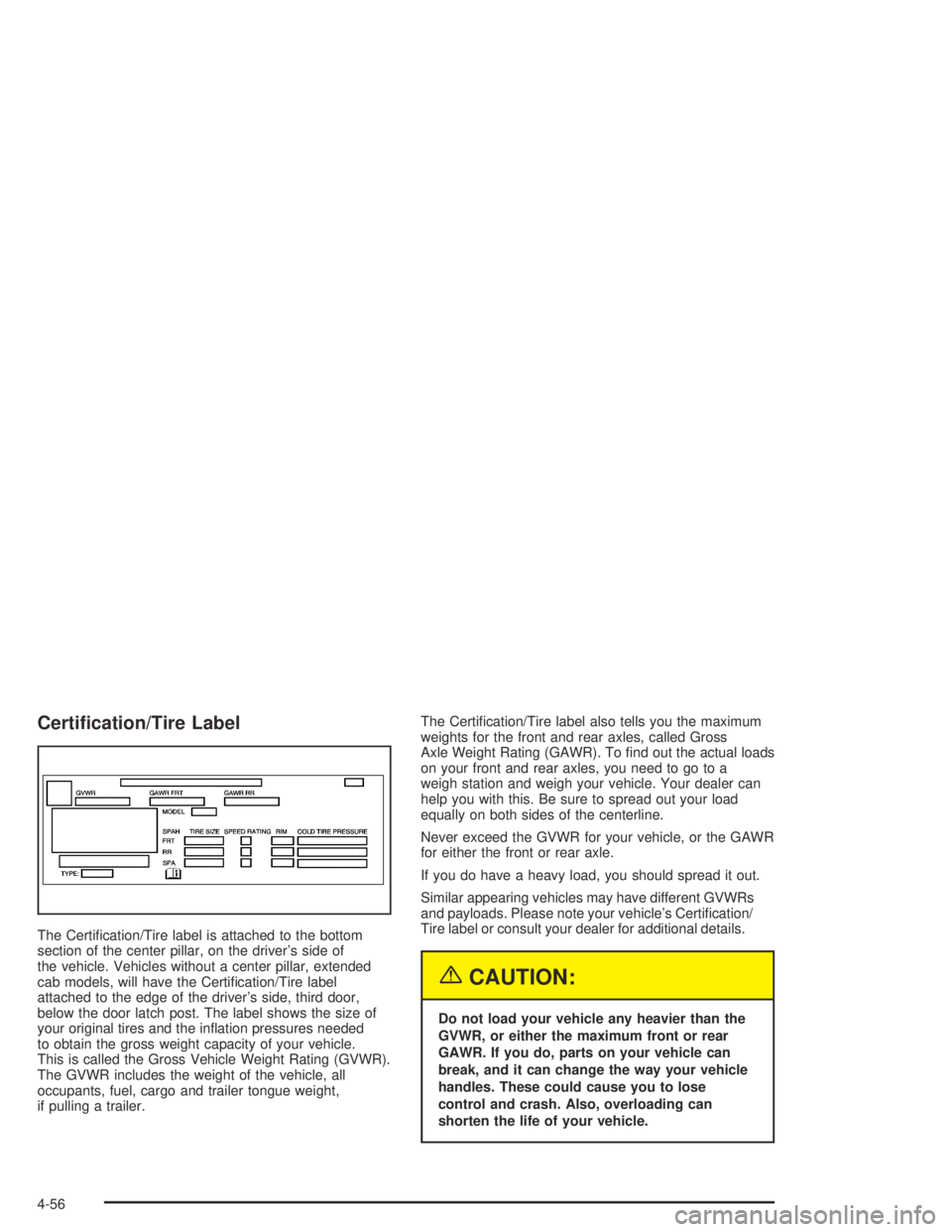
Certication/Tire Label
The Certication/Tire label is attached to the bottom
section of the center pillar, on the driver’s side of
the vehicle. Vehicles without a center pillar, extended
cab models, will have the Certication/Tire label
attached to the edge of the driver’s side, third door,
below the door latch post. The label shows the size of
your original tires and the ination pressures needed
to obtain the gross weight capacity of your vehicle.
This is called the Gross Vehicle Weight Rating (GVWR).
The GVWR includes the weight of the vehicle, all
occupants, fuel, cargo and trailer tongue weight,
if pulling a trailer.The Certication/Tire label also tells you the maximum
weights for the front and rear axles, called Gross
Axle Weight Rating (GAWR). To nd out the actual loads
on your front and rear axles, you need to go to a
weigh station and weigh your vehicle. Your dealer can
help you with this. Be sure to spread out your load
equally on both sides of the centerline.
Never exceed the GVWR for your vehicle, or the GAWR
for either the front or rear axle.
If you do have a heavy load, you should spread it out.
Similar appearing vehicles may have different GVWRs
and payloads. Please note your vehicle’s Certication/
Tire label or consult your dealer for additional details.
{CAUTION:
Do not load your vehicle any heavier than the
GVWR, or either the maximum front or rear
GAWR. If you do, parts on your vehicle can
break, and it can change the way your vehicle
handles. These could cause you to lose
control and crash. Also, overloading can
shorten the life of your vehicle.
4-56
Page 252 of 420
Towing a Trailer
{CAUTION:
If you do not use the correct equipment and
drive properly, you can lose control when you
pull a trailer. For example, if the trailer is too
heavy, the brakes may not work well — or even
at all. You and your passengers could be
seriously injured. Pull a trailer only if you have
followed all the steps in this section. Ask your
dealer for advice and information about towing
a trailer with your vehicle.
Notice:Pulling a trailer improperly can damage
your vehicle and result in costly repairs that would
not be covered by your warranty. Always follow
the instructions in this section and check with your
dealer for more information about towing a trailer
with your vehicle.To identify what the vehicle trailering capacity is for your
vehicle, you should read the information in “Weight of
the Trailer” that appears later in this section.
If yours was built with trailering options, as many are,
it’s ready for heavier trailers. But trailering is different
than just driving your vehicle by itself. Trailering means
changes in handling, acceleration, braking, durability
and fuel economy. Successful, safe trailering takes
correct equipment, and it has to be used properly.
That’s the reason for this part. In it are many time-tested,
important trailering tips and safety rules. Many of
these are important for your safety and that of your
passengers. So please read this section carefully before
you pull a trailer.
4-60
Page 265 of 420

Service............................................................5-3
Doing Your Own Service Work.........................5-4
Adding Equipment to the Outside of Your
Vehicle......................................................5-4
Fuel................................................................5-5
Gasoline Octane............................................5-5
Gasoline Specications....................................5-5
California Fuel...............................................5-6
Additives.......................................................5-6
Fuels in Foreign Countries...............................5-7
Filling Your Tank............................................5-7
Filling a Portable Fuel Container.....................5-10
Checking Things Under the Hood....................5-10
Hood Release..............................................5-11
Engine Compartment Overview.......................5-12
Engine Oil...................................................5-13
Engine Air Cleaner/Filter................................5-18
Automatic Transmission Fluid.........................5-19
Manual Transmission Fluid.............................5-22
Hydraulic Clutch (Manual Transmission)...........5-24
Engine Coolant.............................................5-25
Radiator Pressure Cap..................................5-28Engine Overheating.......................................5-28
Cooling System............................................5-30
Engine Fan Noise.........................................5-35
Power Steering Fluid.....................................5-36
Windshield Washer Fluid................................5-37
Brakes........................................................5-38
Battery........................................................5-41
Jump Starting...............................................5-42
Rear Axle.......................................................5-47
Four-Wheel Drive............................................5-48
Front Axle......................................................5-49
Bulb Replacement..........................................5-50
Halogen Bulbs..............................................5-50
Headlamps..................................................5-50
Front Turn Signal, Sidemarker and
Daytime Running Lamps.............................5-52
Center High-Mounted Stoplamp (CHMSL).........5-53
Taillamps, Turn Signal, Stoplamps and
Back-up Lamps.........................................5-53
Replacement Bulbs.......................................5-54
Windshield Wiper Blade Replacement..............5-55
Section 5 Service and Appearance Care
5-1
Page 272 of 420

The tethered fuel cap is located behind a hinged door
on the driver’s side of your vehicle.While refueling, hang the cap by the tether from the
hook on the fuel ller door.
To remove the fuel cap, turn it slowly to the left
(counterclockwise).
5-8