Page 99 of 296
REAR SEATS
Folding down the 60/40 rear seats (if equipped)
If the rear seat is equipped with adjustable head restraints, they should
be placed in the full down position before folding the seat back down.
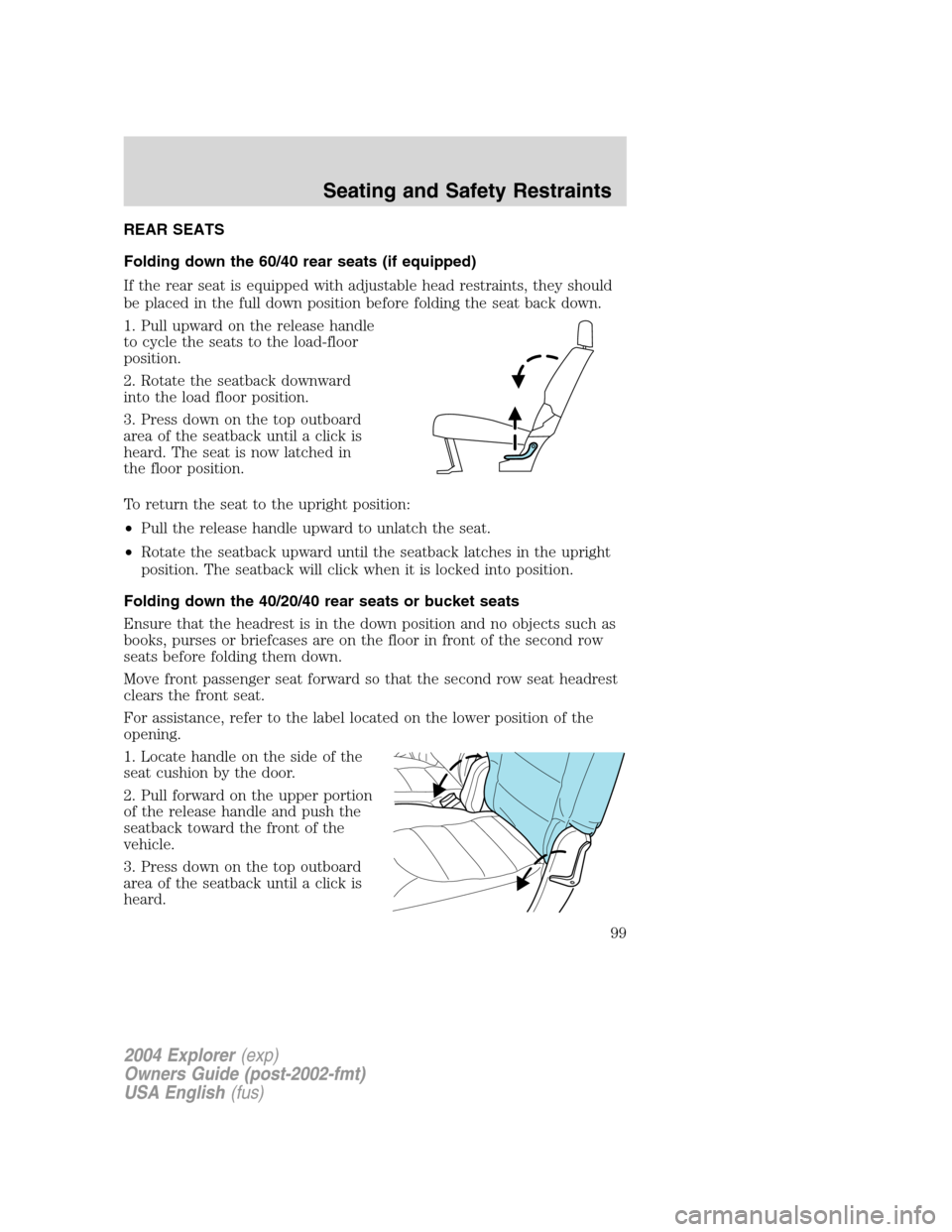
1. Pull upward on the release handle
to cycle the seats to the load-floor
position.
2. Rotate the seatback downward
into the load floor position.
3. Press down on the top outboard
area of the seatback until a click is
heard. The seat is now latched in
the floor position.
To return the seat to the upright position:
•Pull the release handle upward to unlatch the seat.
•Rotate the seatback upward until the seatback latches in the upright
position. The seatback will click when it is locked into position.
Folding down the 40/20/40 rear seats or bucket seats
Ensure that the headrest is in the down position and no objects such as
books, purses or briefcases are on the floor in front of the second row
seats before folding them down.
Move front passenger seat forward so that the second row seat headrest
clears the front seat.
For assistance, refer to the label located on the lower position of the
opening.
1. Locate handle on the side of the
seat cushion by the door.
2. Pull forward on the upper portion
of the release handle and push the
seatback toward the front of the
vehicle.
3. Press down on the top outboard
area of the seatback until a click is
heard.
2004 Explorer(exp)
Owners Guide (post-2002-fmt)
USA English(fus)
Seating and Safety Restraints
99
Page 101 of 296
Your seats are equipped with an Interlock Safety Mechanism which will
not allow the seats to return to a usable position if the seat is not fully
latched to the floor!
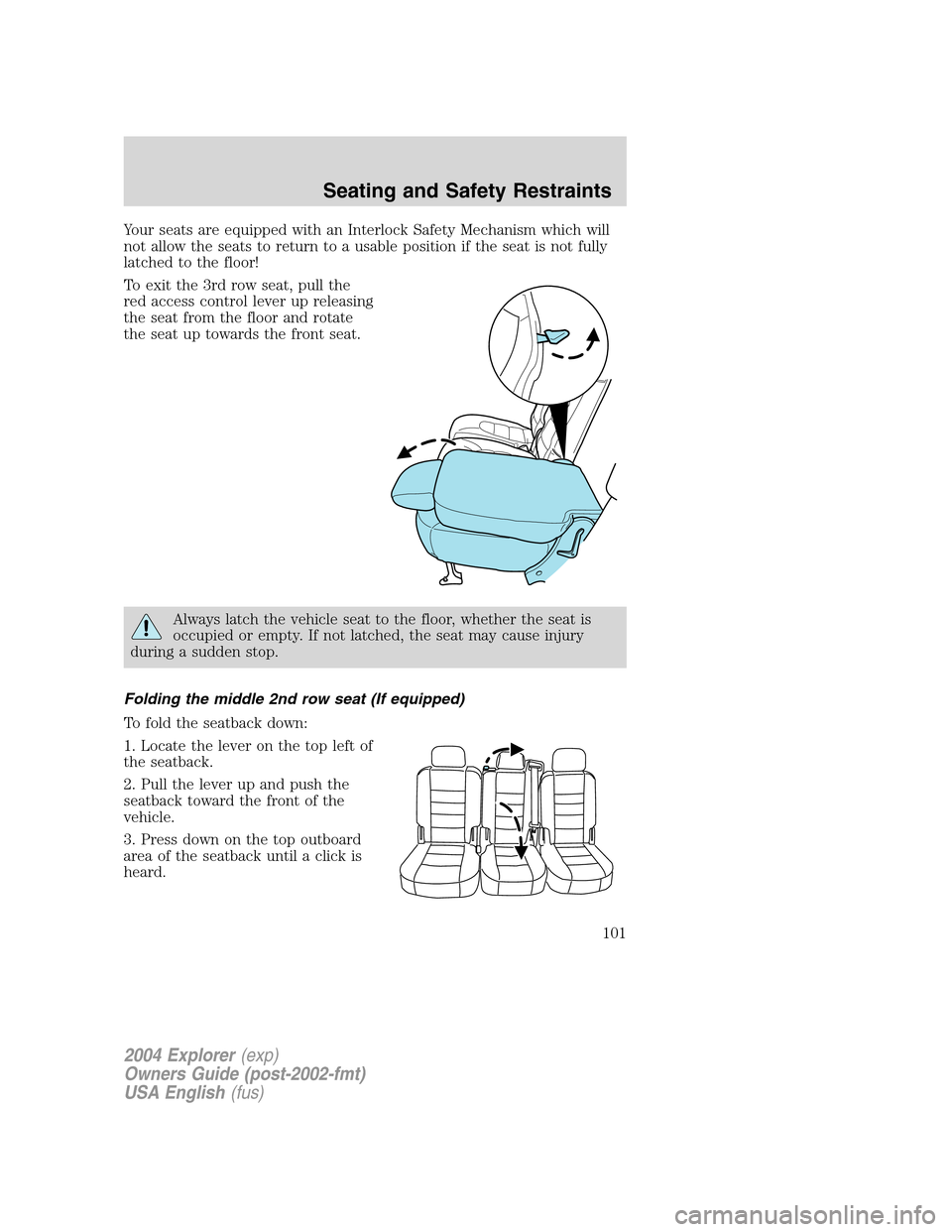
To exit the 3rd row seat, pull the
red access control lever up releasing
the seat from the floor and rotate
the seat up towards the front seat.
Always latch the vehicle seat to the floor, whether the seat is
occupied or empty. If not latched, the seat may cause injury
during a sudden stop.
Folding the middle 2nd row seat (If equipped)
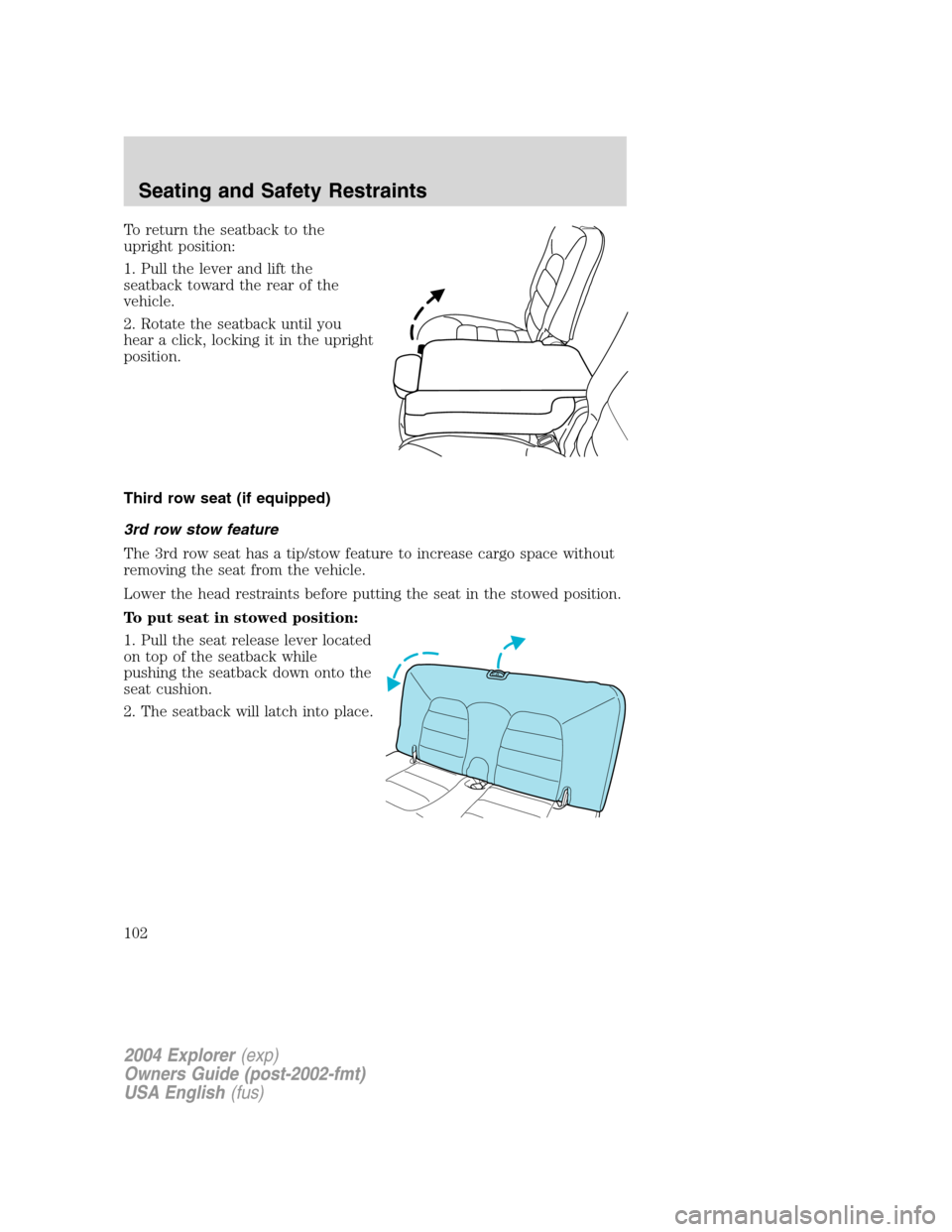
To fold the seatback down:
1. Locate the lever on the top left of
the seatback.
2. Pull the lever up and push the
seatback toward the front of the
vehicle.
3. Press down on the top outboard
area of the seatback until a click is
heard.
2004 Explorer(exp)
Owners Guide (post-2002-fmt)
USA English(fus)
Seating and Safety Restraints
101
Page 102 of 296
To return the seatback to the
upright position:
1. Pull the lever and lift the
seatback toward the rear of the
vehicle.
2. Rotate the seatback until you
hear a click, locking it in the upright
position.
Third row seat (if equipped)
3rd row stow feature
The 3rd row seat has a tip/stow feature to increase cargo space without
removing the seat from the vehicle.
Lower the head restraints before putting the seat in the stowed position.
To put seat in stowed position:
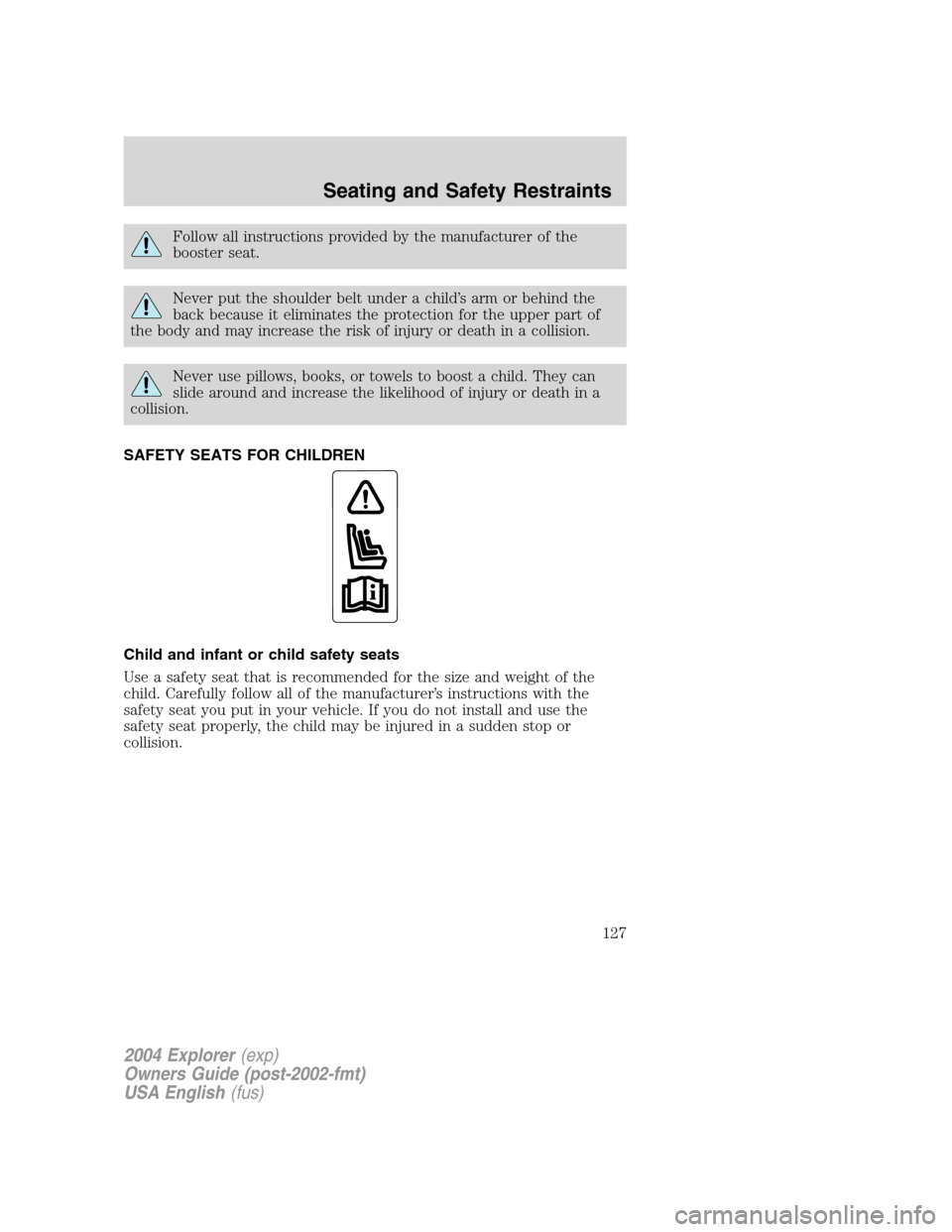
1. Pull the seat release lever located
on top of the seatback while
pushing the seatback down onto the
seat cushion.
2. The seatback will latch into place.
2004 Explorer(exp)
Owners Guide (post-2002-fmt)
USA English(fus)
Seating and Safety Restraints
102
Page 117 of 296

Never place your arm over the air bag module as a deploying air
bag can result in serious arm fractures or other injuries.
To properly position yourself away from the air bag:
•Move your seat to the rear as far as you can while still reaching the
pedals comfortably.
•Recline the seat slightly one or two degrees from the upright position.
Do not put anything on or over the air bag module. Placing
objects on or over the air bag inflation area may cause those
objects to be propelled by the air bag into your face and torso causing
serious injury.
Do not attempt to service, repair, or modify the air bag
supplemental restraint systems or its fuses. See your Ford or
Lincoln Mercury dealer.
Modifications to the front end of the vehicle, including frame,
bumper, front end body structure and non-Ford tow hooks may
effect the performance of the air bag sensors increasing the risk of
injury. Do not modify the front end of the vehicle with anything other
than authorized Ford accessories for your vehicle.
Additional equipment may affect the performance of the air bag
sensors increasing the risk of injury. Please refer to the Body
Builders Layout Book for instructions about the appropriate installation
of additional equipment.
2004 Explorer(exp)
Owners Guide (post-2002-fmt)
USA English(fus)
Seating and Safety Restraints
117
Page 127 of 296
Follow all instructions provided by the manufacturer of the
booster seat.
Never put the shoulder belt under a child’s arm or behind the
back because it eliminates the protection for the upper part of
the body and may increase the risk of injury or death in a collision.
Never use pillows, books, or towels to boost a child. They can
slide around and increase the likelihood of injury or death in a
collision.
SAFETY SEATS FOR CHILDREN
Child and infant or child safety seats
Use a safety seat that is recommended for the size and weight of the
child. Carefully follow all of the manufacturer’s instructions with the
safety seat you put in your vehicle. If you do not install and use the
safety seat properly, the child may be injured in a sudden stop or
collision.
2004 Explorer(exp)
Owners Guide (post-2002-fmt)
USA English(fus)
Seating and Safety Restraints
127
Page 131 of 296
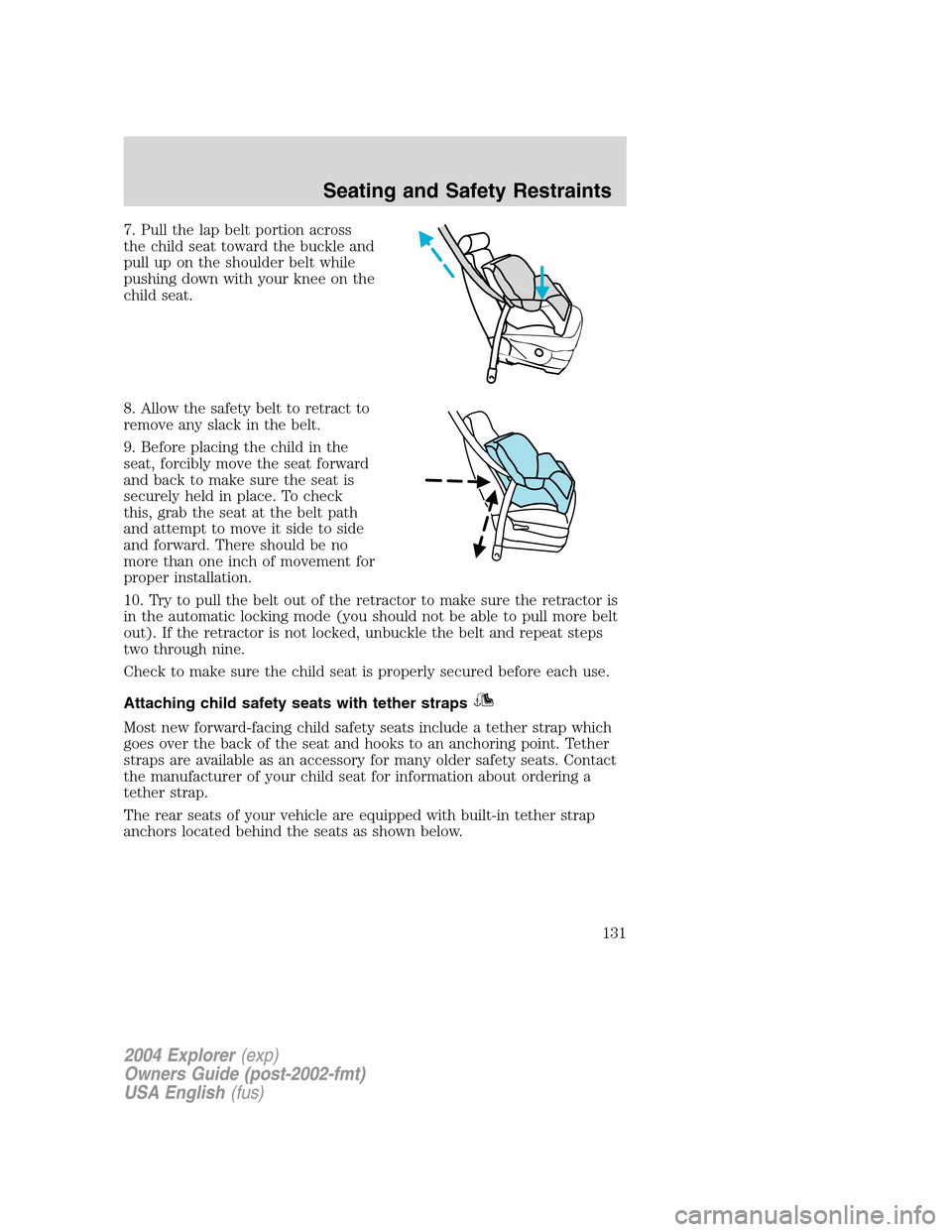
7. Pull the lap belt portion across
the child seat toward the buckle and
pull up on the shoulder belt while
pushing down with your knee on the
child seat.
8. Allow the safety belt to retract to
remove any slack in the belt.
9. Before placing the child in the
seat, forcibly move the seat forward
and back to make sure the seat is
securely held in place. To check
this, grab the seat at the belt path
and attempt to move it side to side
and forward. There should be no
more than one inch of movement for
proper installation.
10. Try to pull the belt out of the retractor to make sure the retractor is
in the automatic locking mode (you should not be able to pull more belt
out). If the retractor is not locked, unbuckle the belt and repeat steps
two through nine.
Check to make sure the child seat is properly secured before each use.
Attaching child safety seats with tether straps
Most new forward-facing child safety seats include a tether strap which
goes over the back of the seat and hooks to an anchoring point. Tether
straps are available as an accessory for many older safety seats. Contact
the manufacturer of your child seat for information about ordering a
tether strap.
The rear seats of your vehicle are equipped with built-in tether strap
anchors located behind the seats as shown below.
2004 Explorer(exp)
Owners Guide (post-2002-fmt)
USA English(fus)
Seating and Safety Restraints
131
Page 144 of 296
Driving conditions which may activate AdvanceTrac�include:
•Taking a turn too fast
•Maneuvering quickly to avoid an accident, pedestrian or obstacle
•Hitting a patch of ice
•Changing lanes on a snow-rutted road
•Entering a snow-free road from a snow-covered side street, or vice
versa
•Entering a paved road from a gravel road, or vice versa
•Hitting a curb while turning
•Driving on slick surfaces
•Cornering while towing a heavily loaded trailer (refer toTrailer
Towingin this chapter)
The AdvanceTrac�system automatically turns on when the engine is
started. However, the system does not function when the vehicle is
traveling in R (Reverse) or, if equipped with four-wheel drive, in 4L (4X4
LOW). In R (Reverse) or in 4L (4X4 LOW), ABS and the traction
enhancement feature will continue to function.
The AdvanceTrac�button allows
the driver to control the availability
of the AdvanceTrac�system.
AdvanceTrac�system status is
indicated by a warning indicator
light with a “sliding car” icon in the instrument cluster that will flash
when the system is active and an indicator light in the control button
that will illuminate when the system is turned off. In vehicles with a
message center, the message “ADVANCETRAC OFF” will be displayed.
If a failure is detected in the AdvanceTrac�system, the warning
indicator light in the instrument cluster will stay on. If the warning
indicator light in the instrument cluster remains on while the engine is
running, have the system serviced immediately.
Pressing the control once will disable the AdvanceTrac�stability
enhancement and the engine power reduction portion of the traction
enhancement feature; the brake portion of the traction enhancement
feature will still function normally. Pressing and holding the control for
more than five seconds will disable the AdvanceTrac�stability
enhancementandtraction enhancement feature. If the vehicle is stuck
in snow or mud or when driving in deep sand, switching off the
AdvanceTrac�system may be beneficial so the wheels are allowed to
2004 Explorer(exp)
Owners Guide (post-2002-fmt)
USA English(fus)
Driving
144
Page 150 of 296
R (Reverse)
With the gearshift lever in R (Reverse), the vehicle will move backward.
Always come to a complete stop before shifting into and out of R
(Reverse).
N (Neutral)
With the gearshift lever in N (Neutral), the vehicle can be started and is
free to roll. Hold the brake pedal down while in this position.
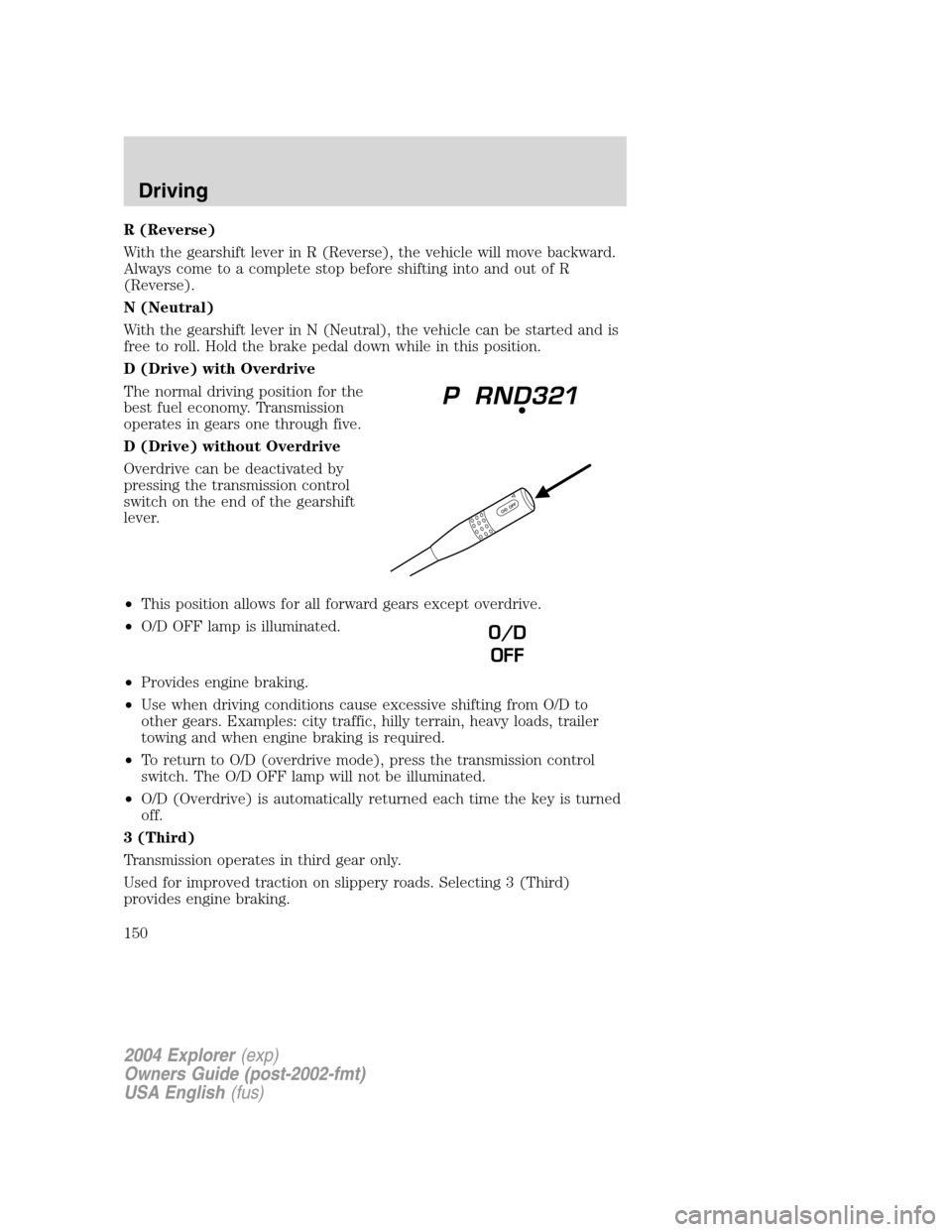
D (Drive) with Overdrive
The normal driving position for the
best fuel economy. Transmission
operates in gears one through five.
D (Drive) without Overdrive
Overdrive can be deactivated by
pressing the transmission control
switch on the end of the gearshift
lever.
•This position allows for all forward gears except overdrive.
•O/D OFF lamp is illuminated.
•Provides engine braking.
•Use when driving conditions cause excessive shifting from O/D to
other gears. Examples: city traffic, hilly terrain, heavy loads, trailer
towing and when engine braking is required.
•To return to O/D (overdrive mode), press the transmission control
switch. The O/D OFF lamp will not be illuminated.
•O/D (Overdrive) is automatically returned each time the key is turned
off.
3 (Third)
Transmission operates in third gear only.
Used for improved traction on slippery roads. Selecting 3 (Third)
provides engine braking.
O/D
OFF
2004 Explorer(exp)
Owners Guide (post-2002-fmt)
USA English(fus)
Driving
150