2004 FORD CROWN VICTORIA jump start
[x] Cancel search: jump startPage 2 of 248
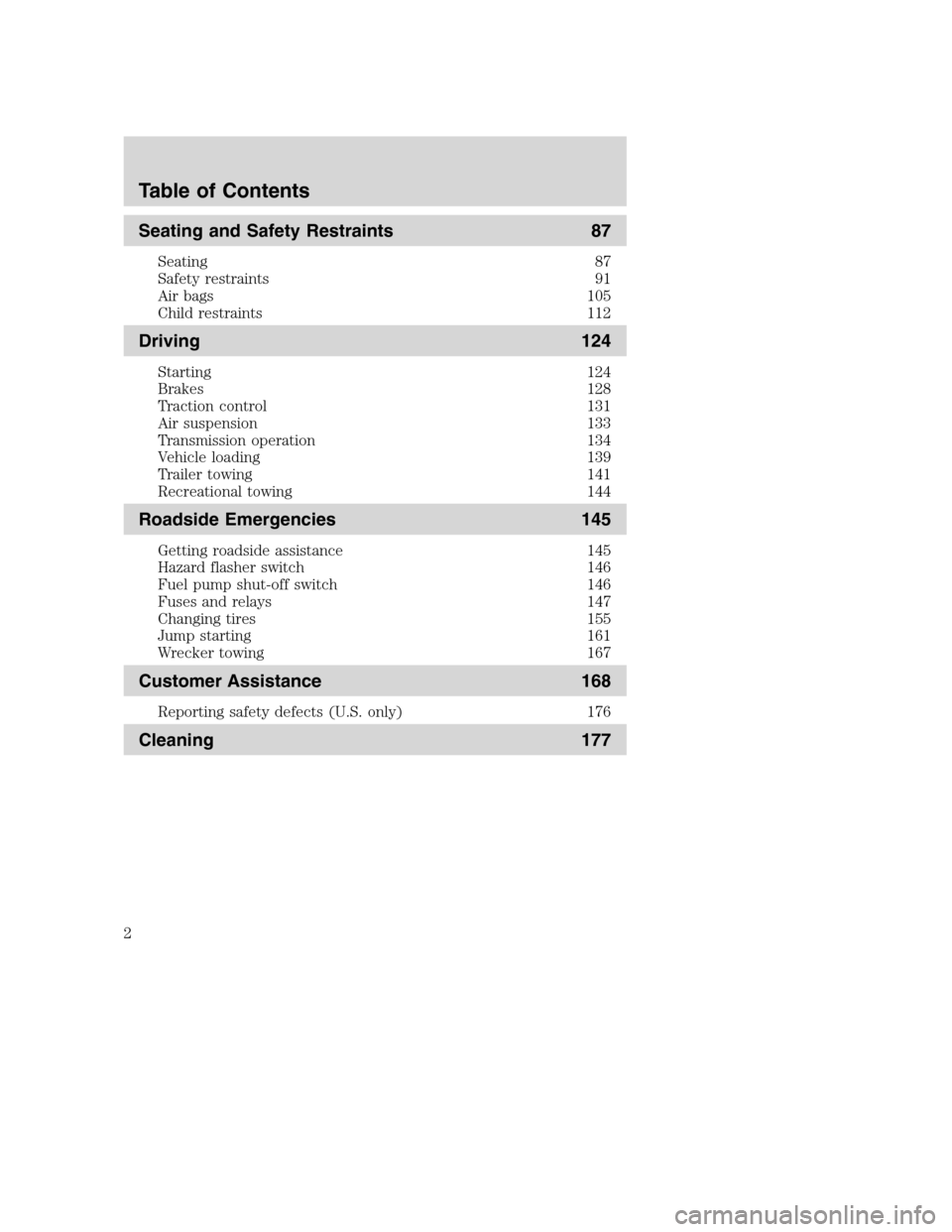
Seating and Safety Restraints 87
Seating 87
Safety restraints 91
Air bags 105
Child restraints 112
Driving 124
Starting 124
Brakes 128
Traction control 131
Air suspension 133
Transmission operation 134
Vehicle loading 139
Trailer towing 141
Recreational towing 144
Roadside Emergencies 145
Getting roadside assistance 145
Hazard flasher switch 146
Fuel pump shut-off switch 146
Fuses and relays 147
Changing tires 155
Jump starting 161
Wrecker towing 167
Customer Assistance 168
Reporting safety defects (U.S. only) 176
Cleaning 177
Table of Contents
2
Page 145 of 248
GETTING ROADSIDE ASSISTANCE
To fully assist you should you have a vehicle concern, Ford Motor
Company offers a complimentary roadside assistance program. This
program is separate from the New Vehicle Limited Warranty. The service
is available:
•24–hours, seven days a week
•for the New Vehicle Limited Warranty period of three years or
36,000 miles (60,000 km), whichever occurs first on Ford and Mercury
vehicles, and four years or 50,000 miles (80,000 km) on Lincoln
vehicles.
Roadside assistance will cover:
•changing a flat tire
•jump-starts
•lock-out assistance
•limited fuel delivery
•towing of your disabled vehicle to the nearest Ford Motor Company
dealership, or your selling dealer if within 35 miles (56.3 km) of the
nearest Ford Motor Company dealership (one tow per disablement).
Even non-warranty related tows, like accidents or getting stuck in the
mud or snow, are covered (some exclusions apply, such as impound
towing or repossession).
Canadian customers refer to your Owner Information Guide for
information on:
•coverage period
•exact fuel amounts
•towing of your disabled vehicle
•emergency travel expense reimbursement
•travel planning benefits
USING ROADSIDE ASSISTANCE
Complete the roadside assistance identification card and place it in your
wallet for quick reference. In the United States, this card is found in the
Owner Guide portfolio in the glove compartment in Ford vehicles and is
mailed to you if you own a Mercury or Lincoln. In Canada, the card is
found in the Owner Information Guide in the glove compartment.
U.S. Ford or Mercury vehicle customers who require roadside assistance,
call 1–800–241–3673; Lincoln vehicle customers call 1–800–521–4140.
2004 Crown Victoria(cro)
Owners Guide (post-2002-fmt)
USA English(fus)
Roadside Emergencies
Roadside Emergencies
145
Page 161 of 248
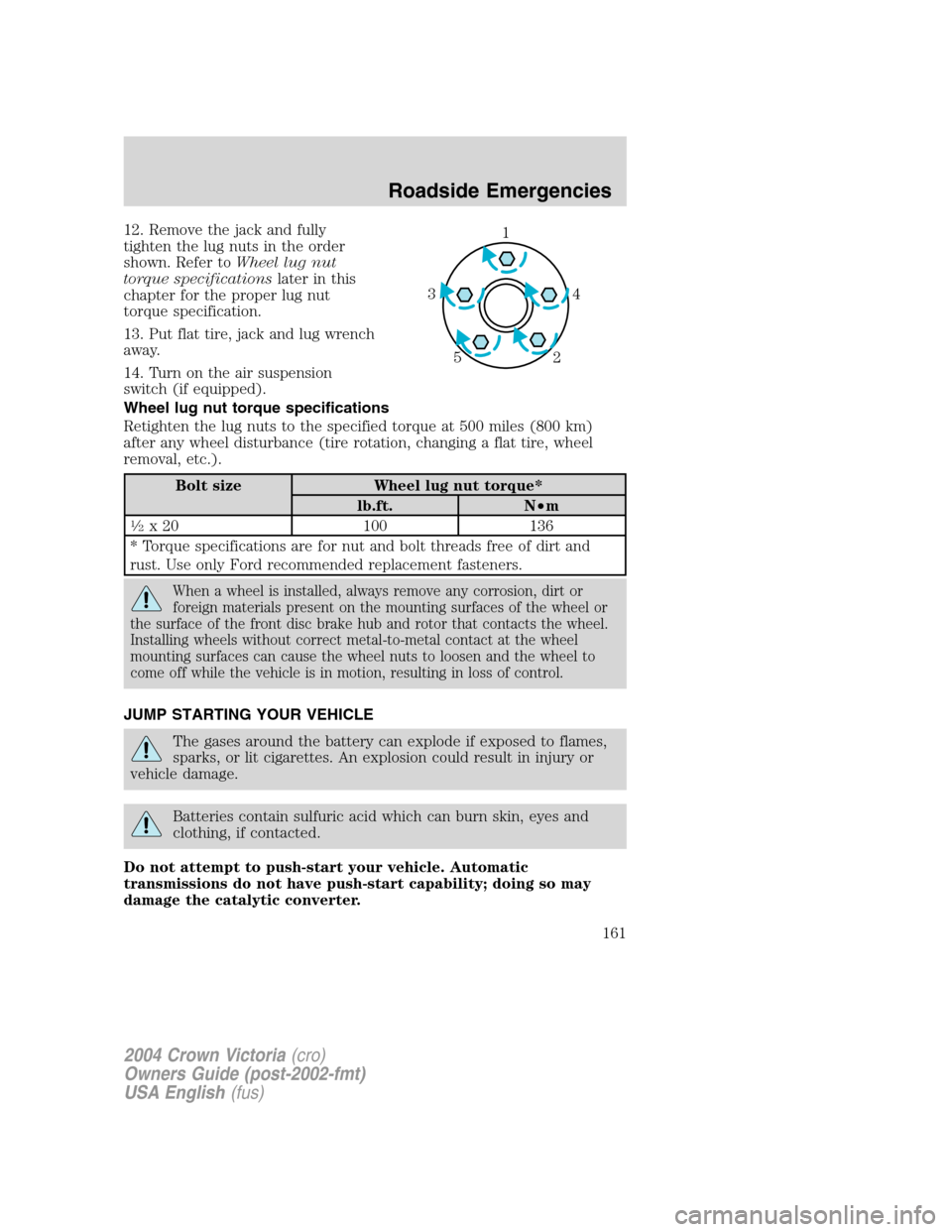
12. Remove the jack and fully
tighten the lug nuts in the order
shown. Refer toWheel lug nut
torque specificationslater in this
chapter for the proper lug nut
torque specification.
13. Put flat tire, jack and lug wrench
away.
14. Turn on the air suspension
switch (if equipped).
Wheel lug nut torque specifications
Retighten the lug nuts to the specified torque at 500 miles (800 km)
after any wheel disturbance (tire rotation, changing a flat tire, wheel
removal, etc.).
Bolt size Wheel lug nut torque*
lb.ft. N•m
1⁄2x 20 100 136
* Torque specifications are for nut and bolt threads free of dirt and
rust. Use only Ford recommended replacement fasteners.
When a wheel is installed, always remove any corrosion, dirt or
foreign materials present on the mounting surfaces of the wheel or
the surface of the front disc brake hub and rotor that contacts the wheel.
Installing wheels without correct metal-to-metal contact at the wheel
mounting surfaces can cause the wheel nuts to loosen and the wheel to
come off while the vehicle is in motion, resulting in loss of control.
JUMP STARTING YOUR VEHICLE
The gases around the battery can explode if exposed to flames,
sparks, or lit cigarettes. An explosion could result in injury or
vehicle damage.
Batteries contain sulfuric acid which can burn skin, eyes and
clothing, if contacted.
Do not attempt to push-start your vehicle. Automatic
transmissions do not have push-start capability; doing so may
damage the catalytic converter.
1
4 3
2 5
2004 Crown Victoria(cro)
Owners Guide (post-2002-fmt)
USA English(fus)
Roadside Emergencies
161
Page 162 of 248
Preparing your vehicle
When the battery is disconnected or a new battery is installed, the
transmission must relearn its shift strategy. As a result, the transmission
may have firm and/or soft shifts. This operation is considered normal and
will not affect function or durability of the transmission. Over time, the
adaptive learning process will fully update transmission operation.
1.Use only a 12–volt supply to start your vehicle.
2. Do not disconnect the battery of the disabled vehicle as this could
damage the vehicle’s electrical system.
3. Park the booster vehicle close to the hood of the disabled vehicle
making sure the two vehiclesdo nottouch. Set the parking brake on
both vehicles and stay clear of the engine cooling fan and other moving
parts.
4. Check all battery terminals and remove any excessive corrosion before
you attach the battery cables. Ensure that vent caps are tight and level.
5. Turn the heater fan on in both vehicles to protect any electrical
surges. Turn all other accessories off.
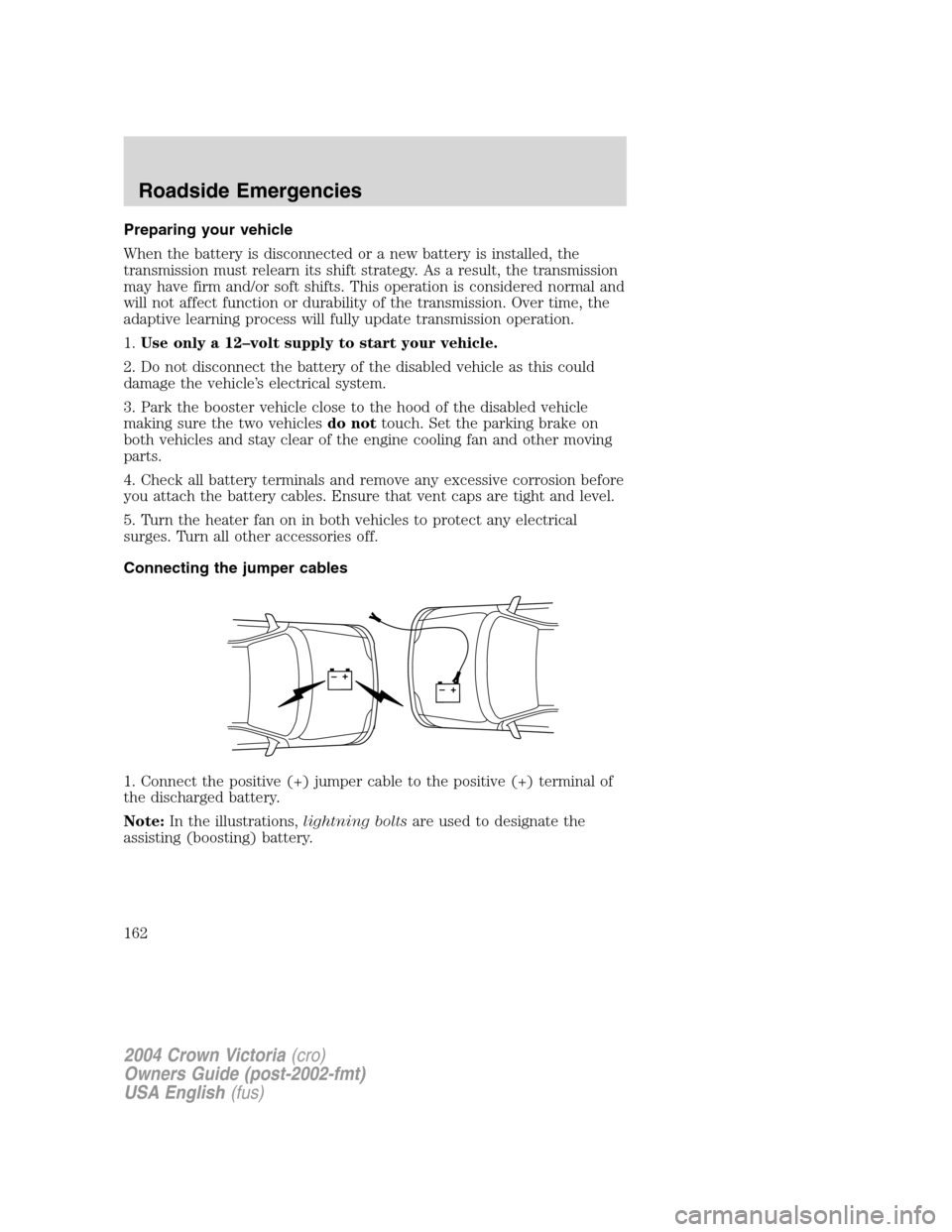
Connecting the jumper cables
1. Connect the positive (+) jumper cable to the positive (+) terminal of
the discharged battery.
Note:In the illustrations,lightning boltsare used to designate the
assisting (boosting) battery.
+–+–
2004 Crown Victoria(cro)
Owners Guide (post-2002-fmt)
USA English(fus)
Roadside Emergencies
162
Page 164 of 248
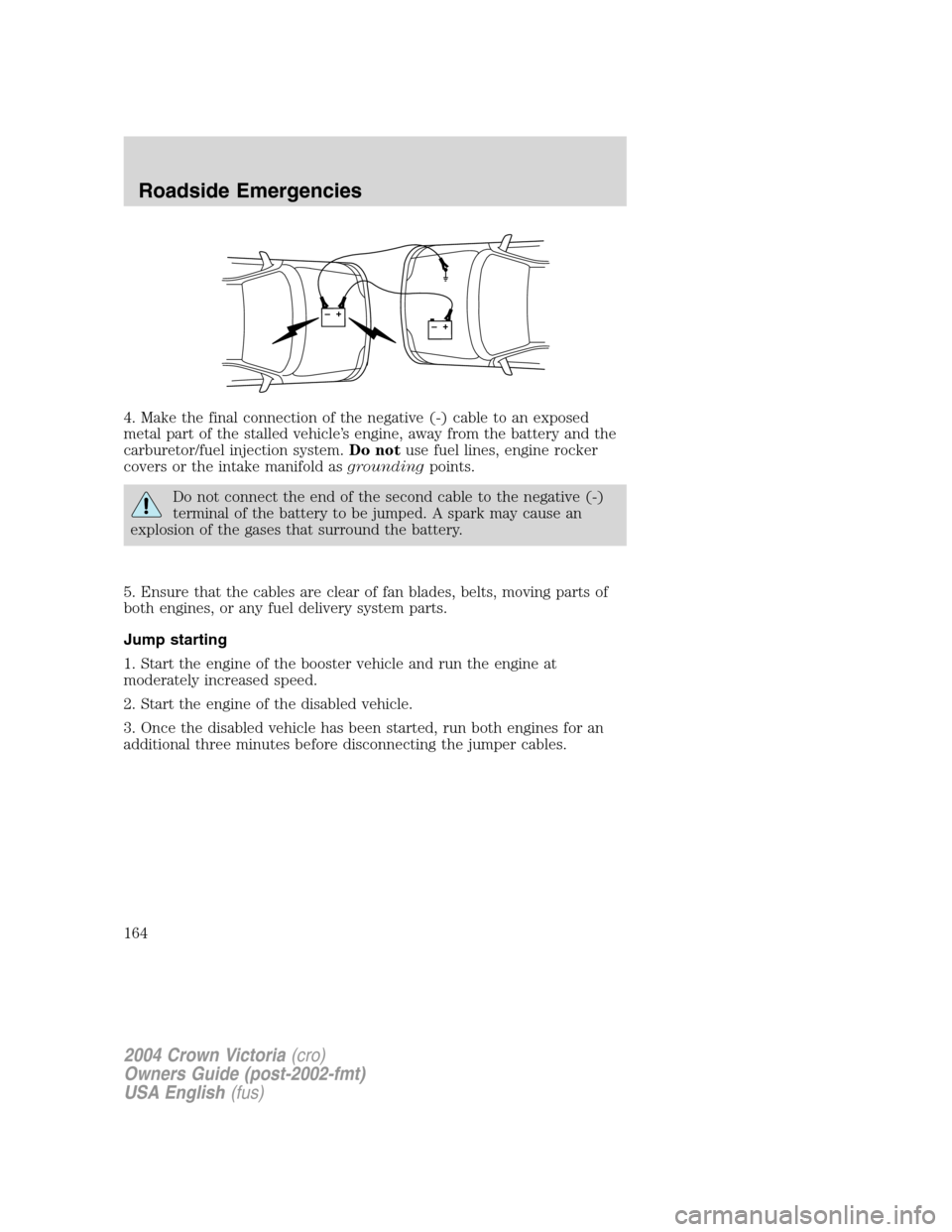
4. Make the final connection of the negative (-) cable to an exposed
metal part of the stalled vehicle’s engine, away from the battery and the
carburetor/fuel injection system.Do notuse fuel lines, engine rocker
covers or the intake manifold asgroundingpoints.
Do not connect the end of the second cable to the negative (-)
terminal of the battery to be jumped. A spark may cause an
explosion of the gases that surround the battery.
5. Ensure that the cables are clear of fan blades, belts, moving parts of
both engines, or any fuel delivery system parts.
Jump starting
1. Start the engine of the booster vehicle and run the engine at
moderately increased speed.
2. Start the engine of the disabled vehicle.
3. Once the disabled vehicle has been started, run both engines for an
additional three minutes before disconnecting the jumper cables.
+–+–
2004 Crown Victoria(cro)
Owners Guide (post-2002-fmt)
USA English(fus)
Roadside Emergencies
164
Page 166 of 248
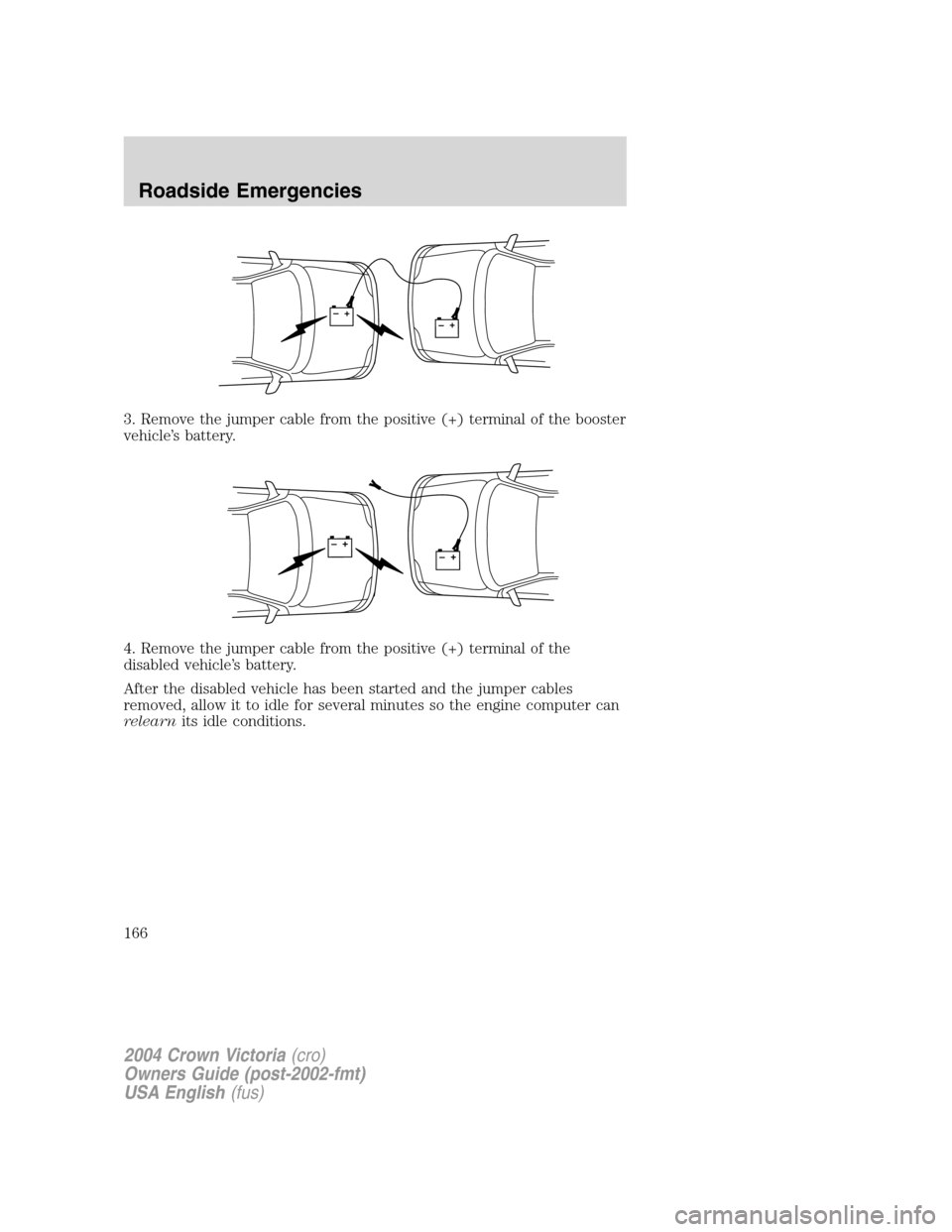
3. Remove the jumper cable from the positive (+) terminal of the booster
vehicle’s battery.
4. Remove the jumper cable from the positive (+) terminal of the
disabled vehicle’s battery.
After the disabled vehicle has been started and the jumper cables
removed, allow it to idle for several minutes so the engine computer can
relearnits idle conditions.
+–+–
+–+–
2004 Crown Victoria(cro)
Owners Guide (post-2002-fmt)
USA English(fus)
Roadside Emergencies
166
Page 238 of 248
washing ....................................177
waxing .....................................177
wheels ......................................178
wiper blades ............................179
Climate control (see Air
conditioning or Heating) ............35
Clock adjust
AM/FM .......................................27
AM/FM/CD .................................24
AM/FM/Tape ..............................28
AM/FM/Tape/CD .......................22
Compass, electronic
set zone adjustment .................51
Console ........................................72
overhead ..............................49–50
Controls
power seat .................................90
steering column ........................63
Coolant
checking and adding ..............192
refill capacities ................196, 227
specifications ..................228, 230
Cruise control
(see Speed control) ....................60
Customer Assistance ................145
Ford accessories for your
vehicle .....................................182
Ford Extended Service Plan .170
Getting assistance outside
the U.S. and Canada ..............174
Getting roadside assistance ...145
Getting the service
you need .................................168
Ordering additional owner’s
literature .................................175
The Dispute Settlement
Board .......................................170
Utilizing the Mediation/
Arbitration Program ...............173D
Daytime running lamps
(see Lamps) ................................38
Defrost
rear window ..............................37
Dipstick
automatic transmission
fluid ..........................................209
engine oil .................................186
Doors
lubricant specifications ..........228
Driving under special
conditions ..................................138
through water .........................138
E
Electronic message center .........68
Emergencies, roadside
jump-starting ..........................161
Emission control system ..........206
Engine ........................................230
cleaning ...................................178
coolant .....................................192
fail-safe coolant ......................197
idle speed control ...................190
lubrication
specifications ..................228, 230
refill capacities ........................227
service points ..........................185
starting after a collision .........146
Engine block heater .................127
Engine oil ..................................186
change oil soon warning,
message center .......................186
checking and adding ..............186
dipstick ....................................186
filter, specifications ........189, 226
2004 Crown Victoria(cro)
Owners Guide (post-2002-fmt)
USA English(fus)
Index
238
Page 239 of 248
recommendations ...................189
refill capacities ........................227
specifications ..................228, 230
Exhaust fumes ..........................128
F
Fail safe cooling ........................197
Floor mats ...................................72
Fluid capacities .........................227
Fuel ............................................198
calculating fuel economy .53, 203
cap ...........................................200
capacity ...................................227
choosing the right fuel ...........201
comparisons with EPA fuel
economy estimates .................206
detergent in fuel .....................202
filling your vehicle
with fuel ..................198, 200, 203
filter, specifications ........203, 226
fuel pump shut-off switch .....146
improving fuel economy ........203
octane rating ...................202, 230
quality ......................................202
running out of fuel .................202
safety information relating
to automotive fuels ................198
Fuses ..................................147–148
G
Garage Door Opener
(see Homelink wireless
control system) ...........................64
Gas cap (see Fuel cap) ............200
Gas mileage
(see Fuel economy) .................203
Gauges .........................................15
H
Hazard flashers .........................146Head restraints ...........................87
Headlamps ...................................38
aiming ........................................40
autolamp system .......................38
bulb specifications ....................41
daytime running lights .............38
flash to pass ..............................39
high beam .................................39
replacing bulbs .........................42
turning on and off ....................38
Heating
heating and air
conditioning system ...........34–35
HomeLink universal
transceiver (see
Garage door opener) ............54, 67
Homelink wireless control
system ..........................................64
Hood ..........................................184
I
Ignition ...............................124, 230
Infant seats
(see Safety seats) .....................115
Inspection/maintenance
(I/M) testing ..............................208
Instrument panel
cleaning ...................................180
cluster ........................................10
lighting up panel and
interior .......................................39
J
Jack ............................................155
positioning ...............................155
storage .....................................155
Jump-starting your vehicle ......161
2004 Crown Victoria(cro)
Owners Guide (post-2002-fmt)
USA English(fus)
Index
239