2004 DODGE RAM 2500 DIESEL reset
[x] Cancel search: resetPage 154 of 426

Every time a preset button is used a corresponding
button number will be displayed.
Balance
The balance control adjusts the left-to-right speaker bal-
ance. Press the BAL button in and it will pop out. Adjust
the balance and push the button back in.
Fade
The fade control provides for balance between the front
and rear speakers. Press the FADE button in and it will
pop out. Adjust the balance and push the button back in.
Bass and Treble Tone Control
The tone controls consist of 2 separate bands. The bass
band is on the left, and the treble band is on the right.
Each band is adjusted by a slider control with a detent at
the mid-position. Moving the control up or down in-
creases or decreases amplification of that band. The mid
position provides a balanced output.
AM/FM Selection
Press the AM/FM button to change from AM to FM. The
operating mode will be displayed next to the station
frequency. The display will show ST when a stereo
station is received in the FM mode.
Mode Button
Press the MODE button to select between the cassette
tape player, CD changer, or the Satellite Radio (if
equipped). When the Satellite Radio (if equipped) is
selected ªSAº will appear in your radio display.
A CD or tape may remain in the player while in the
Satellite or radio mode.
Cassette Player Features
With ignition OFF and the sound system OFF, you can
eject the tape cassette by pushing the EJECT button.
154 UNDERSTANDING YOUR INSTRUMENT PANEL
Page 160 of 426
Program Type Radio Display
News News
Nostalgia Nostalga
Oldies Oldies
Personality Persnlty
Public Public
Rhythm and Blues R & B
Religious Music Rel Musc
Religious Talk Rel Talk
Rock Rock
Soft Soft
Soft Rock Soft Rck
Soft Rhythm and Blues Soft R&B
Sports Sports
Talk Talk
Top 40 Top 40
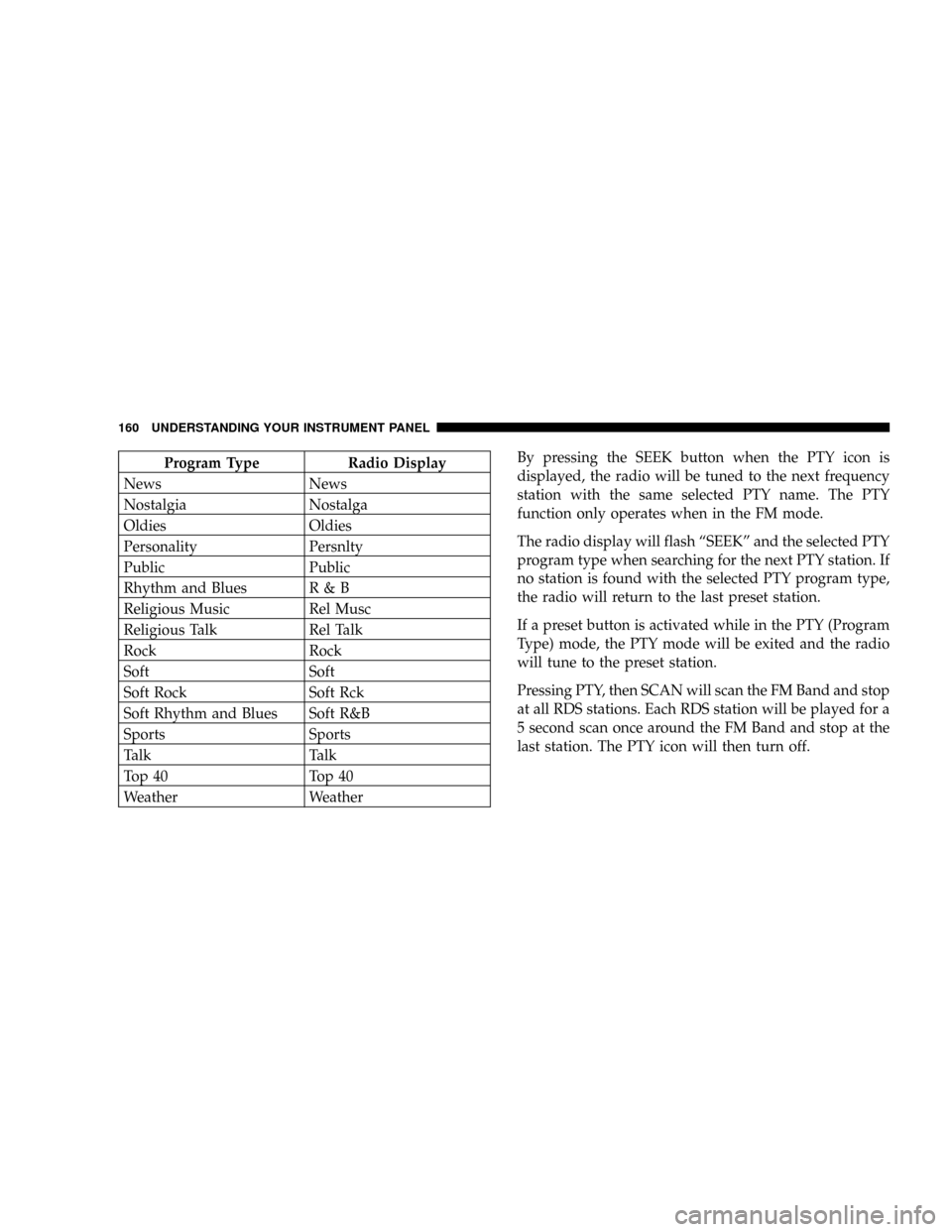
Weather WeatherBy pressing the SEEK button when the PTY icon is
displayed, the radio will be tuned to the next frequency
station with the same selected PTY name. The PTY
function only operates when in the FM mode.
The radio display will flash ªSEEKº and the selected PTY
program type when searching for the next PTY station. If
no station is found with the selected PTY program type,
the radio will return to the last preset station.
If a preset button is activated while in the PTY (Program
Type) mode, the PTY mode will be exited and the radio
will tune to the preset station.
Pressing PTY, then SCAN will scan the FM Band and stop
at all RDS stations. Each RDS station will be played for a
5 second scan once around the FM Band and stop at the
last station. The PTY icon will then turn off.
160 UNDERSTANDING YOUR INSTRUMENT PANEL
Page 170 of 426

AM/FM Selection
Press the AM/FM button to change from AM to FM. The
operating mode will be displayed next to the station
frequency. The display will show ST when a stereo
station is received.
To Set The Radio Push-Button Memory
When you are receiving a station that you wish to
commit to push-button memory, press the SET button.
SET 1 will show in the display window. Select the ª1±5º
button you wish to lock onto this station and press and
release that button. If a button is not selected within 5
seconds after pressing the SET button, the station will
continue to play but will not be locked into push-button
memory.
You may add a second station to each push-button by
repeating the above procedure with this exception: Press
the SET button twice and SET 2 will show in the display
window. Each button can be set for SET 1 and SET 2 inboth AM and FM. This allows a total of 10 AM and 10 FM
stations to be locked into push-button memory. The
stations stored in SET 2 memory can be selected by
pressing the push-button twice. Every time a preset
button is used a corresponding button number will be
displayed.Time
Press the TIME button to change the display between
radio frequency and time.
General Information
This radio complies with Part 15 of FCC rules and with
RSS-210 of Industry Canada. Operation is subject to the
following conditions:
1. This device may not cause harmful interference,
2. This device must accept any interference received,
including interference that may cause undesired opera-
tion.
170 UNDERSTANDING YOUR INSTRUMENT PANEL
Page 177 of 426

5 seconds after pressing the SET RND button, the station
will continue to play but will not be locked into push-
button memory.
You may add a second station to each push-button by
repeating the above procedure with this exception: Press
the SET button twice and SET 2 will show in the display
window. Each button can be set for SET 1 and SET 2 in
both AM and FM. This allows a total of 12 AM and 12 FM
stations to be locked into push-button memory. The
stations stored in SET 2 memory can be selected by
pressing the corresponding push-button twice. Every
time a preset button is used, a corresponding button
number will be displayed.
Time Button
Press the TIME button to change the display between
radio frequency and time.
General Information
This radio complies with Part 15 of FCC rules and with
RSS-210 of Industry Canada. Operation is subject to the
following conditions:
1. This device may not cause harmful interference,
2. This device must accept any interference received,
including interference that may cause undesired opera-
tion.
NOTE:Changes or modifications not expressively ap-
proved by the party responsible for compliance could
void the user's authority to operate the equipment.
CD Player Operation
NOTE:The ignition switch must be in the ON or ACC
position and the Power / Volume control pushed ON
before the CD player will operate.
UNDERSTANDING YOUR INSTRUMENT PANEL 177
4
Page 181 of 426

By pressing the SEEK button when the PTY icon is
displayed, the radio will be tuned to the next frequency
station with the same selected PTY name. The PTY
function only operates when in the FM mode.
The radio display will flash ªSEEKº and the selected PTY
program type when searching for the next PTY station. If
no station is found with the selected PTY program type,
the radio will return to the last station.
If a preset button is activated while in the PTY (Program
Type) mode, the PTY mode will be exited and the radio
will tune to the preset station.
By pressing the SCAN button when the PTY icon is
displayed, the radio will stop at every PTY station on the
band and list each corresponding program type in the
radio display.
Time
Press the TIME button to change the display from
elapsed CD playing time to time of day.
REMOTE SOUND SYSTEM CONTROLS Ð IF
EQUIPPED
The remote sound system controls are located on the rear
surface of the steering wheel. Reach behind the wheel to
access the switches.
The right hand control is a rocker type switch with a
button in the center. Pressing the top of the switch will
UNDERSTANDING YOUR INSTRUMENT PANEL 181
4
Page 208 of 426

²After the WAIT TO START light goes off, turn the
ignition key to START. Do not press the accelerator
during starting.
²Check to see that there is oil pressure.
²Allow the engine to idle at fast idle for about three
minutes until the manifold heaters have completed
the post-heat cycle.
²Release the parking brake and drive.
NOTE:Engine idle speed will automatically increase to
1000 rpm at low coolant temperatures to improve engine
warm-up.
NOTE:If the engine stalls or if the ignition switch is left
On for more than 2 minutes after the WAIT TO START
light goes out, reset the grid heaters by turning the
ignition switch to Off and the back On. Repeat steps 3
through 7 of the normal starting procedure.
For Extremely Cold Weather Starting (Engine
Temperature Below 0ÉF (- 18ÉC)
In extremely cold weather below 0ÉF (- 18ÉC) it may be
beneficial to cycle the manifold heaters twice before
attempting to start the engine. This can be accomplished
by turning the ignition OFF and then back ON after the
WAIT TO START light has gone off, but before the engine
is started. However, repeated cycling of the manifold
heaters will result in damage to the heater elements or
reduced battery voltage.
NOTE: If multiple pre-heat cycles are used before
starting, additional engine run time may be required to
maintain battery state of charge at a satisfactory level.
²If the engine stalls after the initial start, the ignition
must be turned to the OFF position and then to the ON
position to recycle the manifold heaters.
NOTE:Excessive white smoke and poor engine perfor-
mance will result if manifold heaters are not recycled.
208 STARTING AND OPERATING
Page 284 of 426

of the plow. Front end tow-in should be checked and
reset if necessary at the beginning and end of the
snowplow season. This will help prevent uneven tire
wear.
The blade should be lowered whenever the vehicle is
parked.
Maintain and operate your vehicle and snowplow equip-
ment following the recommendations provided by the
specific snowplow manufacturer.
Over the Road Operation With Snowplow
Attached
The blade restricts air flow to the radiator and causes the
engine to operate at higher than normal temperatures.
Therefore, when transporting the plow, angle the blade
completely and position it as low as road or surface
conditions permit. Do not exceed 40 mph (64 km/h). The
operator should always maintain a safe stopping distance
and allow adequate passing clearance.
Methods For Removing Snow
Operating Tips
Under ideal snow plowing conditions, 20 mph (32 km/h)
should be maximum operating speed. The operator
should be familiar with the area and surface to be
cleaned. Reduce speed and use extreme caution when
plowing unfamiliar areas or under poor visibility.
284 STARTING AND OPERATING
Page 333 of 426
A visual inspection of the air cleaner filter element is
never recommended under normal circumstances. A
badly restricted element may appear clean while a soiled
element may be quite effective in filtering particles
without restricting air flow. Rely on the Filter MinderŸ
to determine when a filter change is necessary.
After a new filter element is inserted, press the rubber
button on the top of the Filter MinderŸ. This action will
reset the yellow disc to the clean position.CAUTION!
When using an engine cleaner or a degreaser, be sure
to wrap and tape the Filter MinderŸ to protect the
plastic housing from damage and discoloration.
NOTE:Many aftermarket performance air filter ele-
ments do not adequately filter the air entering the engine.
Use of such filters can severely damage your engine and
such damage is not covered by the manufacturer's war-
ranty.
MAINTAINING YOUR VEHICLE 333
7