2004 CHEVROLET MALIBU remote start
[x] Cancel search: remote startPage 164 of 426
The following display messages may appear on your
vehicle’s audio display by pressing the MENU button:
OIL LIFE RESET:When this option is displayed
you can reset the Oil Life Monitor system. To reset the
system to 100%, press and hold the ENTER button
for at least one second. An ACKNOWLEDGED display
message will appear for three seconds or until the
next button is pressed. This will tell you the system has
been reset.
UNITS:When UNITS appears on the display, press the
ENTER button to move between Metric or English.
When you have made your choice, press the MENU
button to record your selection. The initial setting
from the factory is English.
If you choose English, all information will be displayed
in English units. For example, distance in miles and fuel
economy in miles per gallon is displayed.
If you choose metric, all information will be displayed in
metric units. For example, distance in kilometers and
fuel economy in liters per 100 kilometers is displayed.
The unit measurement will also change the trip
odometer, temperature and average fuel economy
displays.REMOTE START:The remote start feature, if
equipped, can be enabled or disabled. When REMOTE
START appears on the display, press the ENTER
button to move between OFF and ON. When you have
made your choice, press the MENU button to record
your selection. The initial setting from the factory is ON.
LOCK HORN:If your vehicle has remote keyless
entry, this feature which allows the vehicle’s horn to
chirp every time the LOCK button on the remote
keyless entry transmitter is pressed, can be enabled or
disabled. When LOCK HORN appears on the display,
press the ENTER button to move between ON and OFF.
When you have made your choice, press the MENU
button to record your selection. The initial setting from
the factory is ON.
UNLOCK HORN:If your vehicle has remote keyless
entry, this feature which allows the vehicle’s horn
to chirp every time the UNLOCK button on the remote
keyless entry transmitter is pressed, can be enabled
or disabled. When UNLOCK HORN appears on
the display, press the ENTER button to move between
ON and OFF. When you have made your choice,
press the MENU button to record your selection.
The initial setting from the factory is OFF.
3-48
Page 167 of 426
DOOR AJAR:This message is displayed if one or
more of the vehicle’s doors are not closed properly.
When this message appears, you should make sure
that the door is closed completely.
ENGINE DISABLED:This message is displayed if the
starting of the engine is disabled. Have y our vehicle
serviced by your dealership immediately.
ENG PWR REDUCED:This message informs you that
the vehicle has reduced engine power to avoid
damaging the engine.
ICE POSSIBLE:This message appears when the
outside air temperature is cold enough to create icy
road conditions.
KEY FOB BATT LOW:This message is displayed if
the remote keyless entry transmitter battery is low.
LOW COOLANT:This message is displayed when
there is a low level of engine coolant. Have the cooling
system serviced by a technician as soon as possible.
LOW FUEL:This message is displayed when your
vehicle is low on fuel. You should rell the tank as soon
as possible. You will also see a low fuel warning light
on the instrument panel cluster.LOW WASHER FLUID:This message is displayed
when your vehicle is low on windshield washer uid.
You should rell the tank as soon as possible.
POWER STEERING:This message is displayed if a
problem has been detected with the electric power
steering. Have your vehicle serviced immediately.
PUSH PARK PEDAL:This message is displayed if
the parking brake is left engaged and you try to
drive away.
SERVICE AIR BAG:There is a problem with the air
bag system when this message appears. Let only
a qualied technician work on your vehicle. Have your
vehicle serviced by your dealership immediately.
TRUNK OR GATE AJAR:This message is displayed
when the trunk lid or liftgate of your vehicle is not closed
completely. You should make sure that the trunk lid or
liftgate is closed completely.
3-51
Page 184 of 426
xSEEKw:Press the down arrow to go to the start
of the current track if it has been playing for more
than eight seconds. If you press this arrow more than
once, the player will continue moving backward
through the CD.
Press the up arrow to go to the start of the next track.
If you press this arrow more than once, the player
will continue moving forward through the CD.
If you hold either arrow for more than two seconds,
the CD will enter CD scan mode and the CD will play
the rst 10 seconds of each track. Press either
arrow again to stop scanning.
DISP (Display):Press this knob to see how long the
current track has been playing. T, the track number,
and the elapsed time of the track will appear on the
display. To change the default on the display (time or
elapsed time), press the knob until you see the display
you want, then hold the knob for two seconds. The radio
will produce one beep and the selected display will now
be the default. Pressing this button will also display text
on commercially recorded CDs (if available).AUTO TONE/AUTO EQ (Automatic Equalization):
Press this button to select the desired equalization
setting while playing a CD. The equalization will
be automatically recalled whenever you play a CD.
For more information, see AUTO TONE/AUTO EQ
listed previously in this section.
BAND:Press this button to listen to the radio when a
CD is playing. The inactive CD will remain safely
inside the radio for future listening.
SRCE (Source):Press this button to play a CD or to
access a remote device (if installed) when listening
to the radio.
EJECT /
Z(Eject):Press this button to eject a CD.
Eject may be activated with either the ignition or
radio off. CDs may be loaded with the radio and ignition
off if this button is pressed rst.
3-68
Page 197 of 426
The elapsed time of the track will appear on the display.
RPT (Repeat):Press this button once to hear a track
over again. REPEAT ON and RPT will appear on
the display. The current track will continue to repeat.
Press RPT again to turn off repeat play. REPEAT OFF
will appear on the display and RPT will disappear
from the display.
RDM (Random):Press this button to hear the tracks in
random, rather than sequential, order. T#, RANDOM,
and RDM will appear on the display. T and the
track number will appear on the display when each
track starts to play. Press RDM again to turn off random
play. RANDOM OFF will appear on the display and
RDM will disappear from the display.
xSEEKw:Press the down arrow to go to the start of
the current track if it has been playing for more than eight
seconds. If you press this arrow more than once, the
player will continue moving backward through the CD.
Press the up arrow to go to the start of the next track.
If you press this arrow more than once, the player will
continue moving forward through the CD.
If you hold either arrow for more than two seconds, the
CD will enter CD scan mode and the CD will play the rst
10 seconds of each track. Press either arrow again to
stop scanning.DISP (Display):Press this knob to see how long the
current track has been playing. T, the track number, and
the elapsed time of the track will appear on the display.
To change the default on the display (time or elapsed
time), press the knob until you see the display you want,
then hold the knob for two seconds. The radio will
produce one beep and the selected display will now be
the default. Pressing this button will also display text on
commercially recorded CDs (if available).
AUTO TONE/AUTO EQ (Automatic Equalization):
Press this button to select the desired equalization
setting while playing a CD. The equalization will
be automatically recalled whenever you play a CD.
For more information, see AUTO TONE/AUTO EQ listed
previously in this section.
BAND:Press this button to listen to the radio when a
cassette tape or CD is playing. The tape or CD will
remain safely inside the radio for future listening.
SRCE (Source):Press this button to play a tape,
CD, or a remote device (if installed) when listening to
the radio. The inactive tape or CD will remain safely
inside the radio for future listening.
EJECT /
Z(Eject):Press this button, located to the
left of the CD slot, to eject a CD. Eject may be activated
with either the ignition or radio off. CDs may be loaded
with the radio and ignition off if this button is pressed rst.
3-81
Page 216 of 426
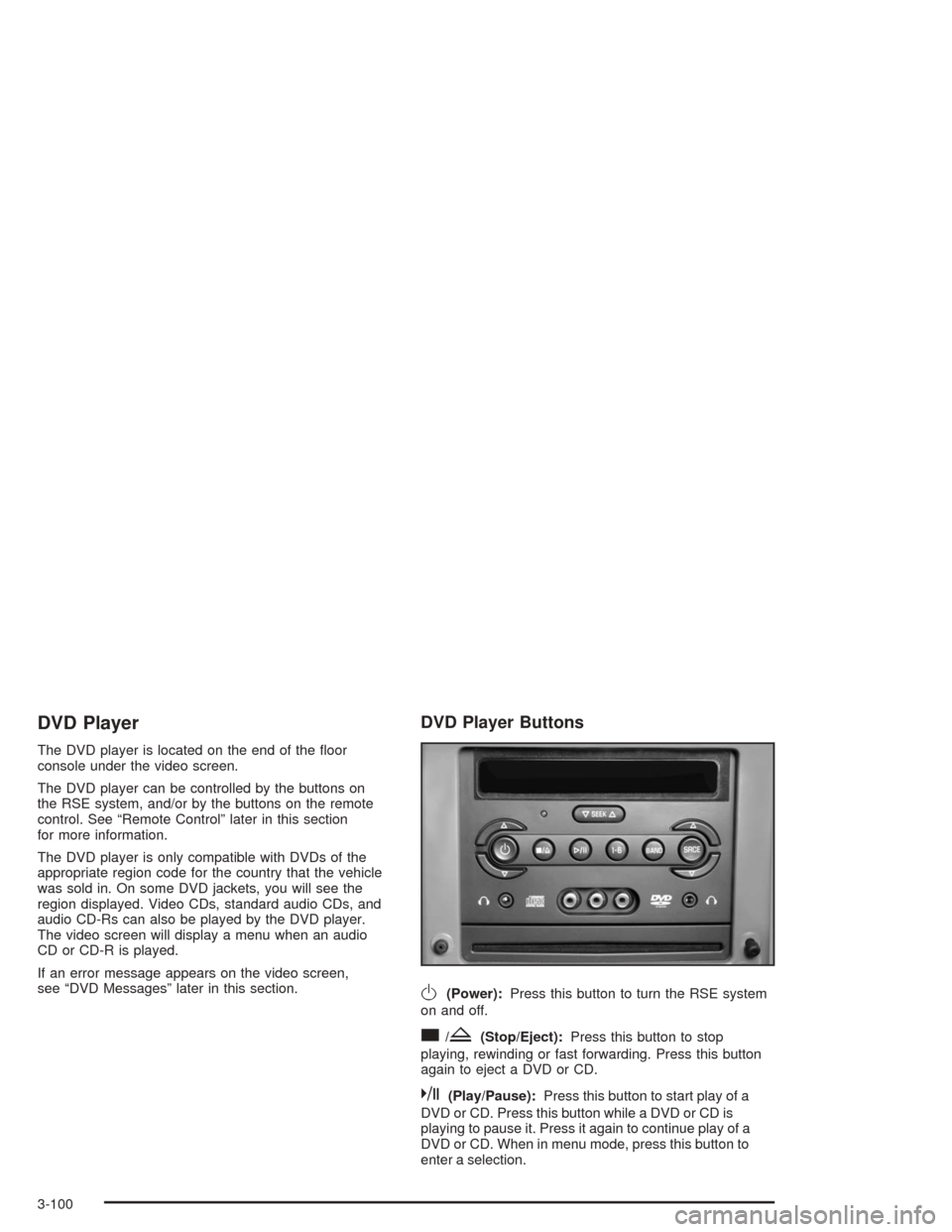
DVD Player
The DVD player is located on the end of the oor
console under the video screen.
The DVD player can be controlled by the buttons on
the RSE system, and/or by the buttons on the remote
control. See “Remote Control” later in this section
for more information.
The DVD player is only compatible with DVDs of the
appropriate region code for the country that the vehicle
was sold in. On some DVD jackets, you will see the
region displayed. Video CDs, standard audio CDs, and
audio CD-Rs can also be played by the DVD player.
The video screen will display a menu when an audio
CD or CD-R is played.
If an error message appears on the video screen,
see “DVD Messages” later in this section.
DVD Player Buttons
O(Power):Press this button to turn the RSE system
on and off.
c/Z(Stop/Eject):Press this button to stop
playing, rewinding or fast forwarding. Press this button
again to eject a DVD or CD.
k(Play/Pause):Press this button to start play of a
DVD or CD. Press this button while a DVD or CD is
playing to pause it. Press it again to continue play of a
DVD or CD. When in menu mode, press this button to
enter a selection.
3-100
Page 217 of 426
1–6 (Preset Pushbuttons):This button is inactive
when in DVD mode.
BAND:Press this button to switch between FM1,
FM2, or AM, XM1 or XM2 (48 contiguous US states,
if equipped). If the front seat passengers are listening
to the DVD player, the rear seat passengers cannot
select XM1 or XM2.
SRCE (Source):Press this button to switch between
playing a cassette tape or a CD.
xSEEKw:Press the down arrow to go to the
beginning of the current chapter or track if more than
ve seconds have played. Press the up arrow to
go to the next chapter or track. This button may not
work when the DVD is playing the copyright information
or the previews.
xw(Volume):Press the up or down arrow to
increase or decrease the volume on the wired
headphones (not included). The arrows on the left side
are for the left headphone and the arrows on the
right side are for the right headphone.
Playing a Disc
To play a disc, gently insert the disc with the label side
up into the loading slot. The DVD player will continue
loading the disc and the player will automatically start if
the vehicle is in run, accessory or RAP.
If a disc is already in the player, make sure that the
DVD player is on, then press the play/pause button on
the player faceplate or on the remote control.
Some DVDs will not allow you to fast forward or skip
the copyright information or previews. Some DVDs will
begin playing after the previews have nished. If the
DVD does not begin playing at the main title, refer to the
on-screen instructions.
3-101
Page 220 of 426
z(Set-up Menu):Press this button to adjust the
color, tint, brightness, contrast, and display mode
(normal, full, or zoom). The dynamic range compression
feature can be used to reduce loud audio and increase
low audio produced by some DVDs.
e(Audio):Press this button to display a menu that
will only appear when a DVD is being played. The format
and content of this function is dependent on the disc.
r(Fast Reverse):Press this button to fast reverse
the DVD or CD. To stop fast reversing, press this button
again. This button may not work when the DVD is
playing the copyright information or the previews.
SRCE (Source):Press this button to toggle between
the DVD player and an auxiliary source.
c(Stop):Press this button to stop playing, rewinding,
or fast forwarding a DVD or CD. Press this button
twice to return to the beginning of the DVD.
t(Previous Track/Chapter):Press this button to
return to the start of the current track or chapter. Press
this button again to return to the previous track or
chapter. This button may not work when the DVD is
playing the copyright information or the previews.
1 through 0 (Numeric Keypad):The remote control
numeric keypad provides you with the capability of direct
chapter, title, and track number selection.
\:Press this button, within 3 seconds after inputting
a numeric selection to clear all numeric inputs. Press
this button before inputting the number.
}10:Press the button, to select chapter, title, and
track numbers greater than 9. Press this button before
inputting the number.
P(Illumination):Press this button to turn the remote
control backlight on. The backlight will time out after
about 7 to 10 seconds if no other button is pressed while
the backlight is on.
y(Main DVD Menu):Press this button to access
the DVD menu. The DVD menu is different on every
DVD. Use the up, down, left, and right arrow buttons to
move the cursor around the DVD menu. After making
a selection press the enter button. This button only
operates when using a DVD.
r(Enter):Press this button to select the choices
that are highlighted in any menu.
q(Return):Press this button to exit the current
active menu and return to the previous menu. This
button will operate only when a DVD is being played
and a menu is active.
3-104
Page 221 of 426
|(Camera Angle):This button changes camera
angles on DVDs that have this feature when a DVD is
playing. The format and content of this function is
dependent on the disc.
{(Subtitle):This button turns on subtitles and
moves through subtitle options when a DVD is playing.
The format and content of this function is dependent
on the disc.
[(Fast Forward):Press this button to fast forward
the DVD or CD. To stop fast forwarding, press this
button again. This button may not work when the DVD
is playing the copyright information or the previews.
s(Play/Pause):Press this button to start play of a
DVD or CD. Press this button while a DVD or CD is
playing to pause it. Press this button again to continue
the play of the DVD or CD.
Slow Play:When the DVD is playing, press the pause
button then press the fast forward button. The DVD
will continue playing in a slow play mode. To cancel
slow play mode, press the play/pause button.
u(Next Track/Chapter):Press this button to advance
to the beginning of the next track or chapter. This
button may not work when the DVD is playing the
copyright information or the previews.
Setup Menu
To access the setup menu, ensure that a DVD disc is in
the player and the video is stopped. Press the display
button. Once the menu is activated, use the remote
control directional arrows and the enter button to
navigate the screen icons.
Picture Preferences
The USER PREFERENCE SETTINGS menu allows you
to modify the default viewing preferences from the
display. Use the remote control up and down arrow
buttons to select. The movie may stop while selections
are being made.
TV Shape:The default video screen display may be
selected from 4:3 letterbox, 4:3 panscan, or 16:9.
Black Level Shift:The default black level to the video
screen may be adjusted.
Video Shift:The default position of the video on the
display may be adjusted.
Color Settings:The default color setting of the video
screen may be selected from Personal, Rich, Natural,
Soft, or Animation.
Personal Color:The default setting for Saturation,
Brightness, and Contrast may be adjusted.
3-105