2004 CHEVROLET MALIBU maintenance schedule
[x] Cancel search: maintenance schedulePage 1 of 426
Seats and Restraint Systems........................... 1-1
Front Seats
............................................... 1-2
Rear Seats
............................................... 1-7
Safety Belts
.............................................1-10
Child Restraints
.......................................1-31
Air Bag Systems
......................................1-52
Restraint System Check
............................1-60
Features and Controls..................................... 2-1
Keys
........................................................ 2-3
Doors and Locks
......................................2-10
Windows
.................................................2-16
Theft-Deterrent Systems
............................2-18
Starting and Operating Your Vehicle
...........2-22
Mirrors
....................................................2-35
OnStar
®System
......................................2-38
HomeLink®Transmitter
.............................2-40
Storage Areas
.........................................2-44
Sunroof
..................................................2-48
Instrument Panel............................................. 3-1
Instrument Panel Overview
.......................... 3-4
Climate Controls
......................................3-21
Warning Lights, Gages, and Indicators
........3-31Driver Information Center (DIC)
..................3-45
Audio System(s)
.......................................3-52
Driving Your Vehicle....................................... 4-1
Your Driving, the Road, and Your Vehicle
..... 4-2
Towing
...................................................4-31
Service and Appearance Care.......................... 5-1
Service
..................................................... 5-3
Fuel
......................................................... 5-5
Checking Things Under the Hood
...............5-12
Bulb Replacement
....................................5-45
Windshield Wiper Blade Replacement
.........5-49
Tires
......................................................5-50
Appearance Care
.....................................5-78
Vehicle Identication
.................................5-86
Electrical System
......................................5-87
Capacities and Specications
.....................5-96
Maintenance Schedule..................................... 6-1
Maintenance Schedule
................................ 6-2
Customer Assistance and Information.............. 7-1
Customer Assistance and Information
........... 7-2
Reporting Safety Defects
...........................7-11
Index................................................................ 1
2004 Chevrolet Malibu Owner ManualM
Page 158 of 426
This can happen if you have recently replaced your
battery or if your battery has run down. The diagnostic
system is designed to evaluate critical emission
control systems during normal driving. This may take
several days of routine driving. If you have done this and
your vehicle still does not pass the inspection for lack
of OBD system readiness, your GM dealer can prepare
the vehicle for inspection.
Oil Pressure Light
If you have a low engine
oil pressure problem,
this light will stay on after
you start your engine,
or come on and you will
hear a chime when you
are driving.
This indicates that your engine is not receiving enough
oil. The engine could be low on oil, or could have
some other oil problem. Have it xed immediately.When the ignition is on but the engine is not running,
the light will come on as a test to show you it is working,
but the light will go out when the engine is running.
If it doesn’t come on with the ignition on, you may have
a problem with the bulb. Have it xed right away.
{CAUTION:
Do not keep driving if the oil pressure is low.
If you do, your engine can become so hot that
it catches re. You or others could be burned.
Check your oil as soon as possible and have
your vehicle serviced.
Notice:Lack of proper engine oil maintenance
may damage the engine. The repairs would not
be covered by your warranty. Always follow
the maintenance schedule in this manual for
changing engine oil.
3-42
Page 166 of 426
LANGUAGE:To select your choice of language,
use the ENTER button to move between the optional
languages.
The languages are English, French, German and
Spanish.
Choosing a language will display all of the information
on the DIC in the desired language.
When you have made your choice, press the MENU
button for at least one second to record your selection.
The initial setting from the factory is ENGLISH.
ENTER:The ENTER button is used to reset certain
functions and turn off or acknowledge messages on the
DIC display. The ENTER button also toggles through
the options available in each personalization menu.
DIC Warnings and Messages
These messages will appear if there is a problem
sensed in one of your vehicle’s systems.
Any message will clear when the vehicle’s condition is no
longer present. The warning message will come back on
the next time the vehicle is turned off and back on if the
condition is still present. With most messages, a warning
chime will sound when the message is displayed.
Your vehicle may have other warning messages.AUTO LIGHTS OFF:This message is displayed if
the automatic headlamp system is disabled with
the headlamp switch.
AUTO LIGHTS ON:This message is displayed if
the automatic headlamp system is enabled with the
headlamp switch.
BRAKE FLUID:This message will display if the ignition
is in ON to inform the driver that the brake uid level
is low. Have the brake system serviced by a technician
as soon as possible.
CHANGE OIL SOON:This message is displayed when
the life of the engine oil has expired and it should be
changed within 200 miles.
When you acknowledge the Change Engine Oil message
by clearing it from the display, you still must reset the
engine oil life monitor separately. SeeEngine Oil on
page 5-17andScheduled Maintenance on page 6-4
for more information.
CHECK GAS CAP:This message will appear if the
gas cap has not been fully tightened. You should
recheck your gas cap to ensure that it’s on properly.
A few driving trips with the cap properly installed should
turn the display off.
3-50
Page 340 of 426
How to Check
Use a good quality pocket-type gage to check tire
pressure. You can’t tell if your tires are properly inated
simply by looking at them. Radial tires may look properly
inated even when they’re underinated. Check the tire’s
ination pressure when the tires are cold. Cold means
your vehicle has been sitting for at least three hours or
driven no more than 1 mile (1.6 km).
Remove the valve cap from the tire valve stem.
Press the tire gage rmly onto the valve to get a
pressure measurement. If the cold tire ination pressure
matches the recommended pressure on the Tire and
Loading Information label, no further adjustment is
necessary. If the ination pressure is low, add air
until you reach the recommended amount.
If you overll the tire, release air by pushing on the
metal stem in the center of the tire valve. Recheck
the tire pressure with the tire gage.
Be sure to put the valve caps back on the valve stems.
They help prevent leaks by keeping out dirt and
moisture.
Tire Inspection and Rotation
Tires should be rotated every 5,000 to 8,000 miles
(8 000 to 13 000 km).
Any time you notice unusual wear, rotate your tires as
soon as possible and check wheel alignment. Also check
for damaged tires or wheels. SeeWhen It Is Time for
New Tires on page 5-59andWheel Replacement on
page 5-62for more information.
The purpose of regular rotation is to achieve more
uniform wear for all tires on the vehicle. The rst rotation
is the most important. SeeScheduled Maintenance
on page 6-4, for scheduled rotation intervals.
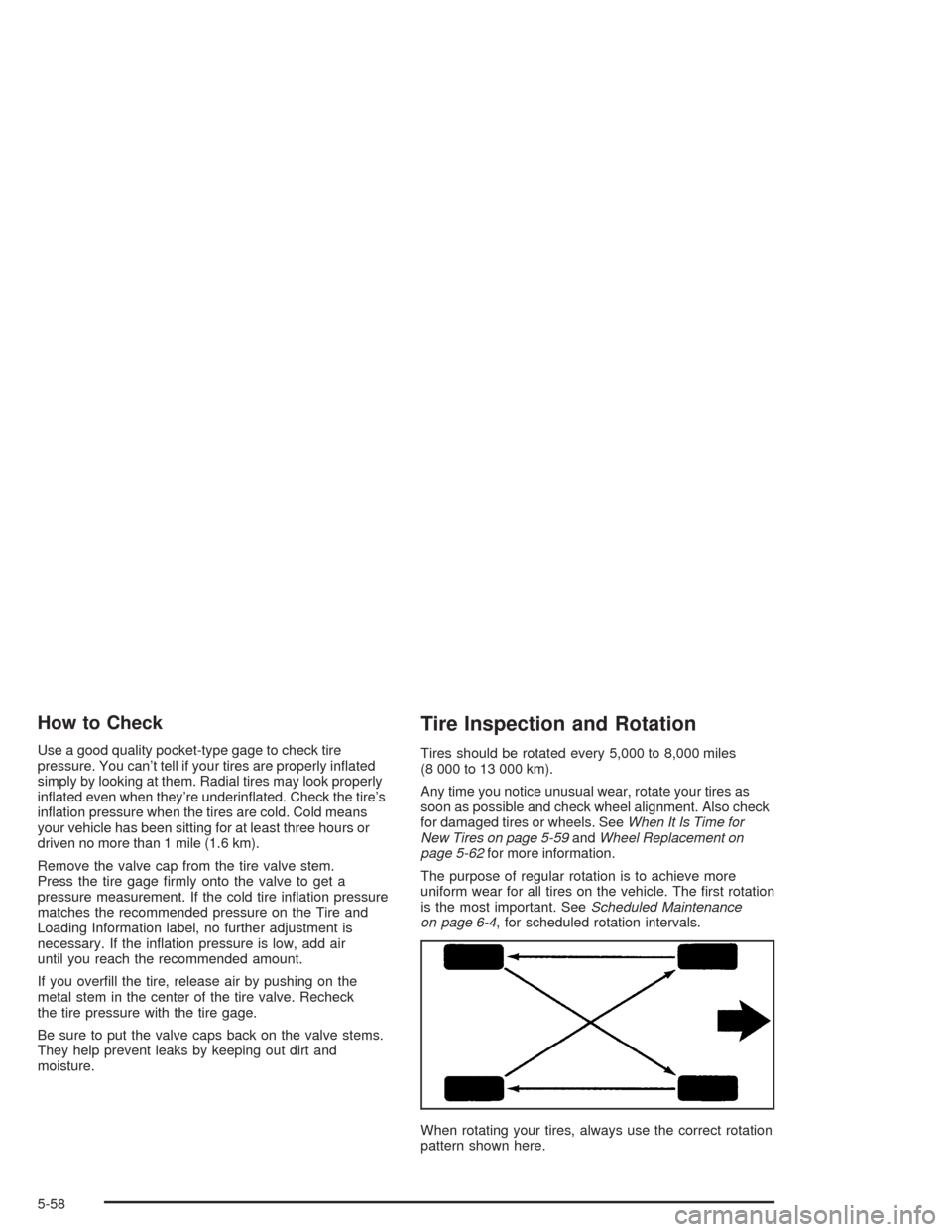
When rotating your tires, always use the correct rotation
pattern shown here.
5-58
Page 379 of 426
Maintenance Schedule......................................6-2
Introduction...................................................6-2
Maintenance Requirements..............................6-2
Your Vehicle and the Environment....................6-2
Using Your Maintenance Schedule....................6-3
Scheduled Maintenance...................................6-4
Additional Required Services............................6-6
Maintenance Footnotes...................................6-7Owner Checks and Services............................6-9
At Each Fuel Fill............................................6-9
At Least Once a Month...................................6-9
At Least Once a Year...................................6-10
Recommended Fluids and Lubricants...............6-12
Normal Maintenance Replacement Parts..........6-13
Engine Drive Belt Routing..............................6-14
Maintenance Record.....................................6-15
Section 6 Maintenance Schedule
6-1
Page 380 of 426
Maintenance Schedule
Introduction
Important: Keep engine oil at the proper level and
change as recommended.
Have you purchased the GM Protection Plan? The Plan
supplements your new vehicle warranties. See your
Warranty and Owner Assistance booklet or your dealer
for details.
Maintenance Requirements
Notice:Maintenance intervals, checks, inspections,
replacement parts and recommended uids and
lubricants as prescribed in this manual are
necessary to keep your vehicle in good working
condition. Any damage caused by failure to follow
scheduled maintenance may not be covered by
warranty.
Your Vehicle and the Environment
Proper vehicle maintenance not only helps to keep your
vehicle in good working condition, but also helps the
environment. All recommended maintenance is
important. Improper vehicle maintenance can even
affect the quality of the air we breathe. Improper uid
levels or the wrong tire ination can increase the level of
emissions from your vehicle. To help protect our
environment, and to keep your vehicle in good condition,
be sure to maintain your vehicle properly.
6-2
Page 381 of 426
Using Your Maintenance Schedule
We at General Motors want to help you keep your
vehicle in good working condition. But we do not know
exactly how you will drive it. You may drive very
short distances only a few times a week. Or you may
drive long distances all the time in very hot, dusty
weather. You may use your vehicle in making deliveries.
Or you may drive it to work, to do errands or in many
other ways.
Because of all the different ways people use their
vehicles, maintenance needs vary. You may need more
frequent checks and replacements. So please read
the following and note how you drive. If you have any
questions on how to keep your vehicle in good condition,
see your GM Goodwrench dealer.
This schedule is for vehicles that:
carry passengers and cargo within recommended
limits. You will nd these limits on the tire and
loading information label. SeeLoading Your Vehicle
on page 4-34.
are driven on reasonable road surfaces within legal
driving limits.
use the recommended fuel. SeeGasoline Octane
on page 5-5.The services inScheduled Maintenance on page 6-4
should be performed when indicated. SeeAdditional
Required Services on page 6-6andMaintenance
Footnotes on page 6-7for further information.
{CAUTION:
Performing maintenance work on a vehicle can
be dangerous. In trying to do some jobs, you
can be seriously injured. Do your own
maintenance work only if you have the
required know-how and the proper tools and
equipment for the job. If you have any doubt,
see your GM Goodwrench dealer to have a
qualied technician do the work.
Some maintenance services can be complex. So,
unless you are technically qualied and have the
necessary equipment, you should have your GM
Goodwrench dealer do these jobs.
When you go to your GM Goodwrench dealer for your
service needs, you will know that GM-trained and
supported service technicians will perform the work
using genuine GM parts.
If you want to get service information, seeService
Publications Ordering Information on page 7-12.
6-3
Page 382 of 426
Owner Checks and Services on page 6-9tells you what
should be checked, when to check it and what you
can easily do to help keep your vehicle in good
condition.
The proper replacement parts, uids and lubricants to
use are listed inRecommended Fluids and Lubricants
on page 6-12andNormal Maintenance Replacement
Parts on page 6-13. When your vehicle is serviced,
make sure these are used. All parts should be replaced
and all necessary repairs done before you or anyone
else drives the vehicle. We recommend the use of
genuine GM parts.
Scheduled Maintenance
When the Change Oil Soon message in the Driver
Information Center (DIC) comes on, it means that
service is required for your vehicle. Have your vehicle
serviced as soon as possible within the next 600
miles (1 000 km). It is possible that, if you are driving
under the best conditions, the engine oil life system may
not indicate that vehicle service is necessary for over
a year. However, your engine oil and lter must be
changed at least once a year and at this time the system
must be reset. Your GM Goodwrench dealer has
GM-trained service technicians who will perform this
work using genuine GM parts and reset the system.If the engine oil life system is ever reset accidentally,
you must service your vehicle within 3,000 miles
(5 000 km) since your last service. Remember to reset
the oil life system whenever the oil is changed. See
Engine Oil on page 5-17for information on the Engine
Oil Life System and resetting the system.
When the Change Oil Soon message appears, certain
services, checks and inspections are required. Required
services are described in the following for
“MaintenanceI” and “MaintenanceII.” Generally, it is
recommended that your rst service be MaintenanceI,
your second service be MaintenanceIIand that you
alternate MaintenanceIand MaintenanceIIthereafter.
However, in some cases, MaintenanceIImay be
required more often.
MaintenanceI— Use MaintenanceIif the message
comes on within ten months since vehicle was
purchased or MaintenanceIIwas performed.
MaintenanceII— Use MaintenanceIIif the previous
service performed was MaintenanceI. Always use
MaintenanceIIwhenever the message comes on ten
months or more since the last service or if the message
has not come on at all for one year.
6-4