2004 CHEVROLET KODIAK ignition
[x] Cancel search: ignitionPage 102 of 366

To set the hand lever parking brake, hold the regular
brake pedal down with your right foot. Pull up on
the handle with your right hand, until it stops.
If the ignition is on when the parking brake is set, the
brake system warning light will come on.
To release the foot pedal parking brake, hold the
regular brake pedal down. Pull the brake release handle,
located just above the parking brake pedal, to release
the parking brake.
To release the hand lever parking brake, hold the
regular brake pedal down and push down on the handle
until it stops.
If the ignition is on when the parking brake is released,
the brake system warning light will go off.
Propshaft Park Brake Burnish
Procedure
It is recommended that the propshaft-mounted parking
brake be burnished as part of the new vehicle
break-in. The parking brake will work best after it has
been burnished following these instructions:
Make 10 stops, using the parking brake hand lever or
foot pedal, from 20 mph (32 km/h) about 2 1/2 miles
(4 km) apart. Between stops, drive the vehicle at 20 mph
(32 km/h) to allow the brake to cool.Notice:Driving with the parking brake on can
damage the transmission and brake system parts.
Verify that the parking brake is fully released and the
brake warning light is off before driving.
Rear Wheel Park Brake Burnish
Procedure
It is recommended that the rear wheel mounted parking
brake be burnished as part of the new vehicle
break-in. The parking brake will work best after it has
been burnished following these instructions:
Make one or two stops using the parking brake hand
lever of foot pedal from 55 mph (92 km/h) to a stop with
moderate apply. Each stop should occur within 1/4 of
a mile.
Notice:Driving with the parking brake on can
overheat the brake system and cause premature
wear or damage to brake system parts. Verify that
the parking brake is fully released and the brake
warning light is off before driving.
2-34
Page 122 of 366
Reducing Speed While Using Cruise
Control
Press in the button at the end of the lever until you
reach the lower speed you want, then release it.
To slow down in very small amounts, tap the button
briefly. Each time you do this, you’ll go 1 mph (1.6 km/h)
slower.
Passing Another Vehicle While Using
Cruise Control
Use the accelerator pedal to increase your speed.
When you take your foot off the pedal, your vehicle will
slow down to the cruise control speed you set earlier.
Using Cruise Control on Hills
How well your cruise control will work on hills depends
upon your speed, load and the steepness of the
hills. When going up steep hills, you may want to step
on the accelerator pedal to maintain your speed.
When going downhill, you may have to brake or shift to
a lower gear to keep your speed down. Of course,
applying the brake or clutch takes you out of cruise
control. Many drivers find this to be too much trouble
and don’t use cruise control on steep hills.
Ending Cruise Control
There are four different ways to turn off the cruise
control:
•Step lightly on the brake pedal (manual and
automatic transmissions).
•Press the clutch pedal to the floor (manual
transmissions).
•Move the cruise switch to off, or
•Shift the transmission to NEUTRAL (N).
Erasing Speed Memory
When you turn off the ignition, your cruise control set
speed memory is erased.
3-12
Page 123 of 366

Exterior Lamps
The control located to the left of the steering column
operates the exterior lamps.
The exterior lamp control has four positions:
OFF:Turning the control to this position turns off all
lamps except the Daytime Running Lamps (DRL).
;(Parking Lamps):Turning the control to this
position turns on the parking lamps, together with the
following:
•Marker Lamps
•Taillamps
•License Plate Lamps
•Instrument Panel Lights
O(Headlamps):Turning the control to this position
turns on the headlamps, together with the previously
listed lamps and lights.
You can switch your headlamps from low to high beam
by pulling the turn signal/multifunction lever toward
you. Pull the lever toward you again to return to
low beam.
A circuit breaker protects your headlamps. If you have
an electrical overload, your headlamps will flicker on and
off. Have your headlamp wiring checked right away if
this ever happens.
Headlamps On Reminder
If you have this system, a tone will sound when your
headlamps and/or parking lamps are turned on and your
ignition is in LOCK or ACCESSORY.
3-13
Page 124 of 366

Daytime Running Lamps
Daytime Running Lamps (DRL) can make it easier for
others to see the front of your vehicle during the
day. DRL can be helpful in many different driving
conditions, but they can be especially helpful in the short
periods after dawn and before sunset. Fully functional
daytime running lamps are required on all vehicles
first sold in Canada.
The DRL system will make your headlamps come on at
reduced brightness when the following conditions are met:
•The ignition is on,
•the exterior lamp control is off, and
•the parking brake is released.
When the DRL are on, only your headlamps will be on.
The taillamps, sidemarker and other lamps won’t be
on. Your instrument panel won’t be lit up either.
When it begins to get dark,
your DRL indicator light is
a reminder to turn the
headlamps on. The other
lamps that come on
with your headlamps, will
also come on.
When you turn the headlamps off, the regular lamps will
go off, and your low-beam headlamps will change to
the reduced brightness of DRL.To idle your vehicle with the DRL off, set the parking
brake. The DRL will stay off until you release the
parking brake.
As with any vehicle, you should turn on the regular
headlamp system when you need it.
Marker Lamp Defeat Switch
If your vehicle has this feature, you can manually blink
the marker and clearance lamps.
The marker lamp defeat
switch is located in the
instrument panel
switchbank.
Press and hold the bottom of the switch to turn off the
marker and clearance lamps. When you release
the switch, the marker and clearance lamps will come
back on.
3-14
Page 126 of 366
Illuminated Entry
The delayed illumination feature will allow you to enter
or exit your vehicle with the lights on for about
20 seconds, after the door is closed or the ignition is
cycled.
Reading Lamps
If your vehicle has reading lamps, press the button next
to the lamp to turn the lamp on or off.
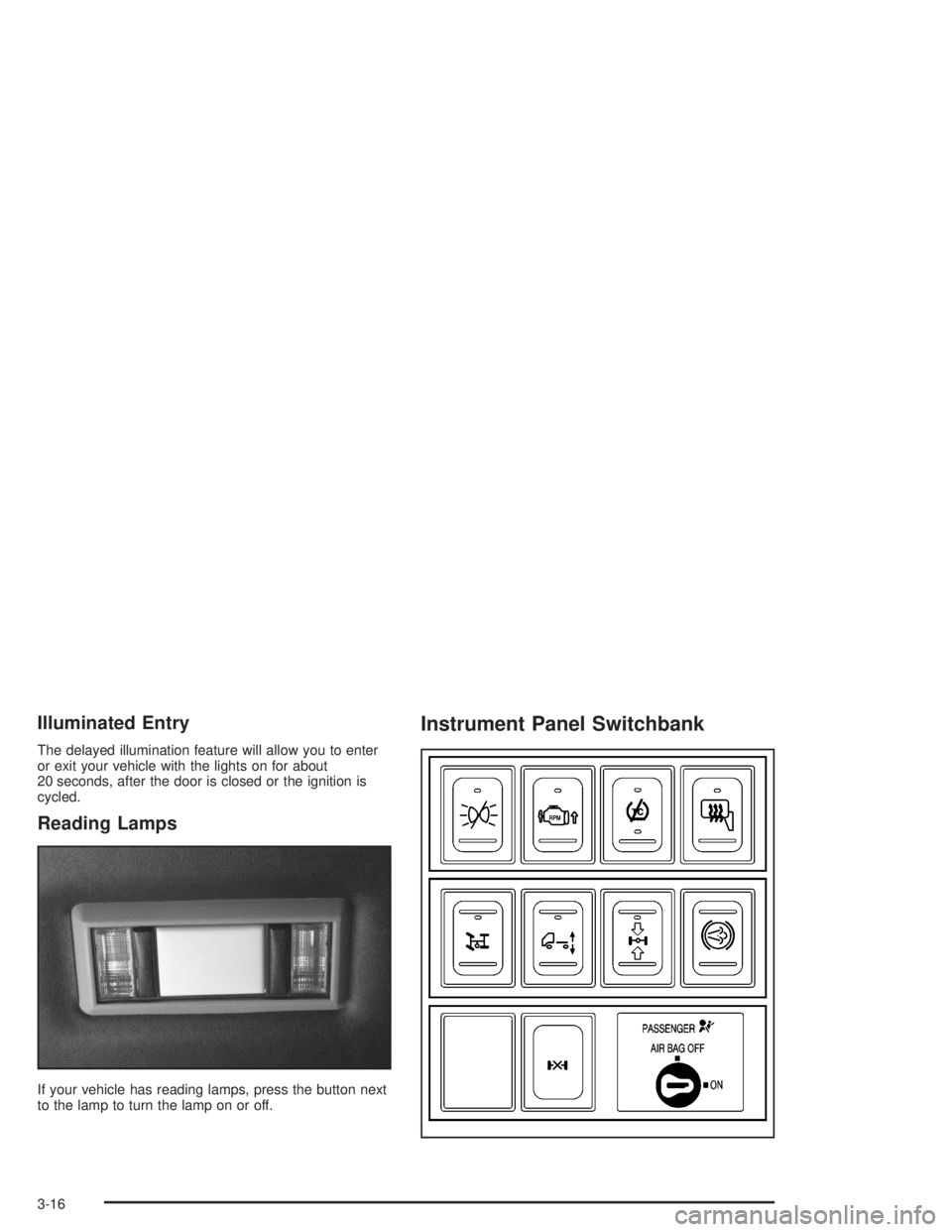
Instrument Panel Switchbank
3-16
Page 131 of 366

Turn the mode knob on the right of the climate control
panel to select the defog or defrost mode.
-(Defog):With this setting, the outside air comes out
of both the floor and defroster outlets. Adjust the
temperature knob for warmer or cooler air. The air
conditioning compressor may operate in this setting to
dehumidify the air.
0(Defrost):This setting operates the defroster. Most
of the air comes out near the windshield, with some
going to the floor outlets and front side windows. The air
conditioning compressor may operate in this setting to
dehumidify the air.
The defog setting is useful for cold weather with a large
number of passengers or very humid conditions to
help keep the windshield clear. Use defrost to remove
fog or ice from the windshield quickly in extremely
cold conditions. The temperature knob should be in the
red area and the fan control toward high. Do not
drive the vehicle until all the windows are clear.
Rear Window Defogger
The rear window defogger uses a warming grid to
remove fog or frost from the rear window.Be sure to clear as much snow from the rear window as
possible.
Press this button which is
located near the fan
control to turn the rear
window defogger on or off.
An indicator light in the
button will come on when
the rear window defogger
is working.
The rear window defogger will only work when the
ignition is RUN.
The rear window defogger will turn off several minutes
after the button is pressed. The defogger can also
be turned off by pressing the button again or by turning
off the engine.
Notice:Don’t use anything sharp on the inside of
the rear window. If you do, you could cut or damage
the warming grid, and the repairs wouldn’t be
covered by your warranty. Do not attach a temporary
vehicle license, tape, a decal or anything similar
to the defogger grid.
3-21
Page 135 of 366

Speedometer and Odometer
Your speedometer lets you see your speed in both
miles per hour (mph) and kilometers per hour (km/h).
Your odometer shows how far your vehicle has
been driven, in either miles (used in the United States)
or kilometers (used in Canada).
Trip Odometer
The trip odometer can tell you how far your vehicle
has been driven since you last set the trip odometer
to zero.
While the engine is running, press the reset button,
located to the right of the trip odometer, to toggle
between the trip odometer and the regular odometer.
Holding the reset button for two seconds while the
engine is running and the trip odometer is displayed,
will reset it.
To display the odometer reading with the ignition off,
press the reset button.
Engine Speed Limiting
All engines have electronic engine speed limiting.
The engine limited speeds range between
2,900 and 4,400 rpm depending on engine
option content.
Engine Road Speed Governor
This system controls maximum vehicle speed
automatically and reduces engine power until vehicle
speed gets down to maximum governed speed.
A 75 mph (120 km/h) road speed governor is standard
for most models, but can be programmed to any
speed below that default setting. Other models have a
default setting of 80 to 85 mph (128 to 136 km/h).
You may have a label on the headliner of your vehicle
with more information on your engine road speed
governor. See your dealer for assistance with
programming your engine limited speed.
3-25
Page 137 of 366

Air Bag Readiness Light
If your vehicle has air bags, there is an air bag readiness
light on the instrument panel, which shows the airbag
symbol. The system checks the air bag’s electrical
system for malfunctions. The light tells you if there is an
electrical problem. The system check includes the air
bag sensors, the air bag modules, the wiring, the
passenger air bag suppression circuit and the crash
sensing and diagnostic module. For more information on
the air bag system, seeAir Bag System on page 1-48.
This light will come on
when you start your
vehicle, and it will flash for
a few seconds. Then
the light should go out.
This means the system
is ready.
If the air bag readiness light stays on after you start the
vehicle or comes on when you are driving, your air
bag system may not work properly. Have your vehicle
serviced right away.The air bag readiness light should flash for a few
seconds when you turn the ignition key to RUN or
START. If the light doesn’t come on then, have it fixed
so it will be ready to warn you if there is a problem.
{CAUTION:
If the air bag readiness light stays on after you
start your vehicle, it means the air bag system
may not be working properly. The air bags in
your vehicle may not inate in a crash, or they
could even inate without a crash. To help
avoid injury to yourself or others, have your
vehicle serviced right away if the air bag
readiness light stays on after you start
your vehicle.
3-27