2004 CHEVROLET CORVETTE change time
[x] Cancel search: change timePage 138 of 384
Automatic Operation
AUTO (Automatic):Press the AUTO button to place
the entire system in the automatic mode. When
automatic operation is active, the system will
automatically control the inside temperature, the air
delivery mode and the fan speed.
After a five-second display of the current settings, only
the word AUTO and the outside temperature will be
shown on the digital display unless the system is set to
full cold 60°F (16°C) or full hot 90°F (32°C), then the
word AUTO will not display. The system will operate to
achieve your comfort set temperature as quickly as
possible. The AUTO control system works best with the
windows up and the removable roof installed or the
convertible top up.1. Press the AUTO button.
2. Adjust the temperature to a comfortable setting
between 60°F (16°C) or full hot 90°F (32°C).
Choosing the coldest or warmest temperature
setting will not cause the system to heat or cool any
faster. If you set the system at the coldest or
warmest temperature setting, the system will remain
in manual mode at that temperature and it will not
go into automatic mode.
In cold weather, the system will start at reduced fan
speeds at avoid blowing cold air into your vehicle
until warmer air is available. The system will
start out blowing air at the floor but may change
modes automatically as the vehicle warms up
to maintain the chosen temperature setting. The
length of time needed for warm up will depend on
the outside temperature and the length of time
that has elapsed since your vehicle was last driven.
3. Wait for the system to regulate. This may take from
10 to 30 minutes. Then adjust the temperature, if
necessary.
Do not cover the solar sensor located in the center of
the instrument panel, near the windshield. For more
information on the solar sensor, see “Sensor” later in
this section.
3-24
Page 142 of 384
#A/C (Air Conditioning):Press this button to
override the automatic system and turn the
air-conditioning system on or off. When A/C is pressed,
an indicator light in the button will come on to let you
know that the air conditioning is activated. When
in AUTO, the air-conditioning compressor will come on
automatically, as necessary.
Air conditioning does not operate at temperatures below
about 35°F to 40°F (2°C to 4°C). In temperatures
above 40°F (4°C), the air conditioning cannot be turned
off in defrost and defog, as it helps to remove moisture
from the vehicle. It also helps to keep the windows clear.
You may notice a slight change in engine performance
when the air-conditioning compressor shuts off and
turns on again. This is normal. The system is designed
to make adjustments to help with fuel economy while
still maintaining the selected temperature.
On hot days, open the windows to let hot inside air
escape; then close them. This helps to reduce the time
it takes for your vehicle to cool down. It also helps
the system to operate more efficiently.For quick cool down on hot days, do the following:
1. Select the vent mode.
2. Select recirculation mode.
3. Select the A/C.
4. Select the coolest temperature.
5. Select the highest fan speed.
Using these settings together for long periods of time
may cause the air inside of your vehicle to become too
dry. To prevent this from happening, after the air in
your vehicle has cooled, turn the recirculation mode off.
The air-conditioning system removes moisture from
the air, so you may sometimes notice a small amount of
water dripping underneath your vehicle while idling or
after turning off the engine. This is normal.
3-28
Page 161 of 384
Here are five things that some owners ask about. All
these things are normal and do not indicate that
anything is wrong with the fuel gage.
•At the gas station, the gas pump shuts off before
the gage reads F (full).
•It takes more (or less) fuel to fill up than the gage
reads. For example, the gage reads half full, but it
took more (or less) than half of the tank’s
capacity to fit it.
•The gage pointer may move while cornering,
braking or speeding up.
•The gage may not indicate E (empty) when the
ignition is turned off.
•The gage reading may change slightly within the
first several minutes after starting the vehicle.You can use the Driver Information Center (DIC) to
display more detailed fuel information. Each time you
press FUEL, one of the following will appear in the
Driver Information Center (DIC).
•AVERAGE:The fuel economy calculated for the
current tank of fuel, or since you last reset the
display.
•INST (Instant):The fuel economy calculated for
your current driving conditions.
•RANGE:The distance you can drive before
refueling.
You should reset the fuel information display every time
you refuel. To reset the display, press FUEL until
AVERAGE appears. Then, press RESET on the Driver
Information Center (DIC).
3-47
Page 162 of 384
Driver Information Center (DIC)
The Driver Information Center (DIC) will display
information about how your vehicle is functioning, as
well as warning messages if a system problem is
detected. The DIC display area is located in the
instrument panel cluster below the speedometer and
tachometer, directly above the steering column.
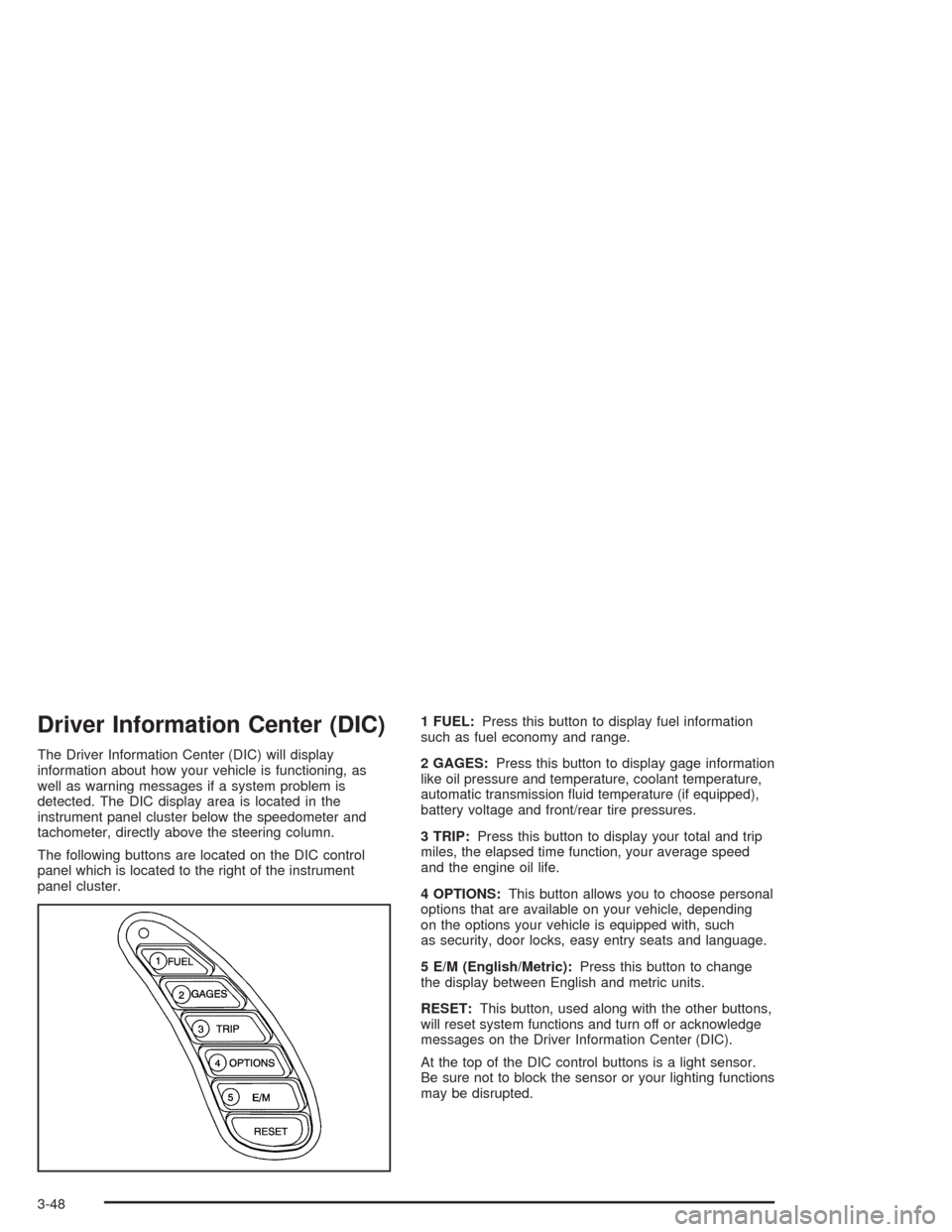
The following buttons are located on the DIC control
panel which is located to the right of the instrument
panel cluster.1 FUEL:Press this button to display fuel information
such as fuel economy and range.
2 GAGES:Press this button to display gage information
like oil pressure and temperature, coolant temperature,
automatic transmission fluid temperature (if equipped),
battery voltage and front/rear tire pressures.
3 TRIP:Press this button to display your total and trip
miles, the elapsed time function, your average speed
and the engine oil life.
4 OPTIONS:This button allows you to choose personal
options that are available on your vehicle, depending
on the options your vehicle is equipped with, such
as security, door locks, easy entry seats and language.
5 E/M (English/Metric):Press this button to change
the display between English and metric units.
RESET:This button, used along with the other buttons,
will reset system functions and turn off or acknowledge
messages on the Driver Information Center (DIC).
At the top of the DIC control buttons is a light sensor.
Be sure not to block the sensor or your lighting functions
may be disrupted.
3-48
Page 164 of 384
The average fuel economy is viewed as a long-term
approximation of your overall driving conditions. If you
press RESET in this mode while you’re driving, the
system will begin figuring fuel economy from that point
in time.
Press FUEL again to display instantaneous fuel
economy, such as:
•INST. 20.1 MPG or
•INST. 5.3 L/100 km
Press FUEL again to display the range, such as:
•RANGE 20 MI or
•RANGE 32 km
The range calculates the remaining distance you can
drive without refueling. It’s based on fuel economy and
the fuel remaining in the tank.
If the range is lower than 30 miles (48 km), the display
will read RANGE LOW.
The fuel economy data used to determine fuel range is
an average of recent driving conditions. As your
driving conditions change, this data is gradually updated.
Resetting the fuel range causes the fuel economy
data to be updated immediately. Press RESET to reset
the fuel range.
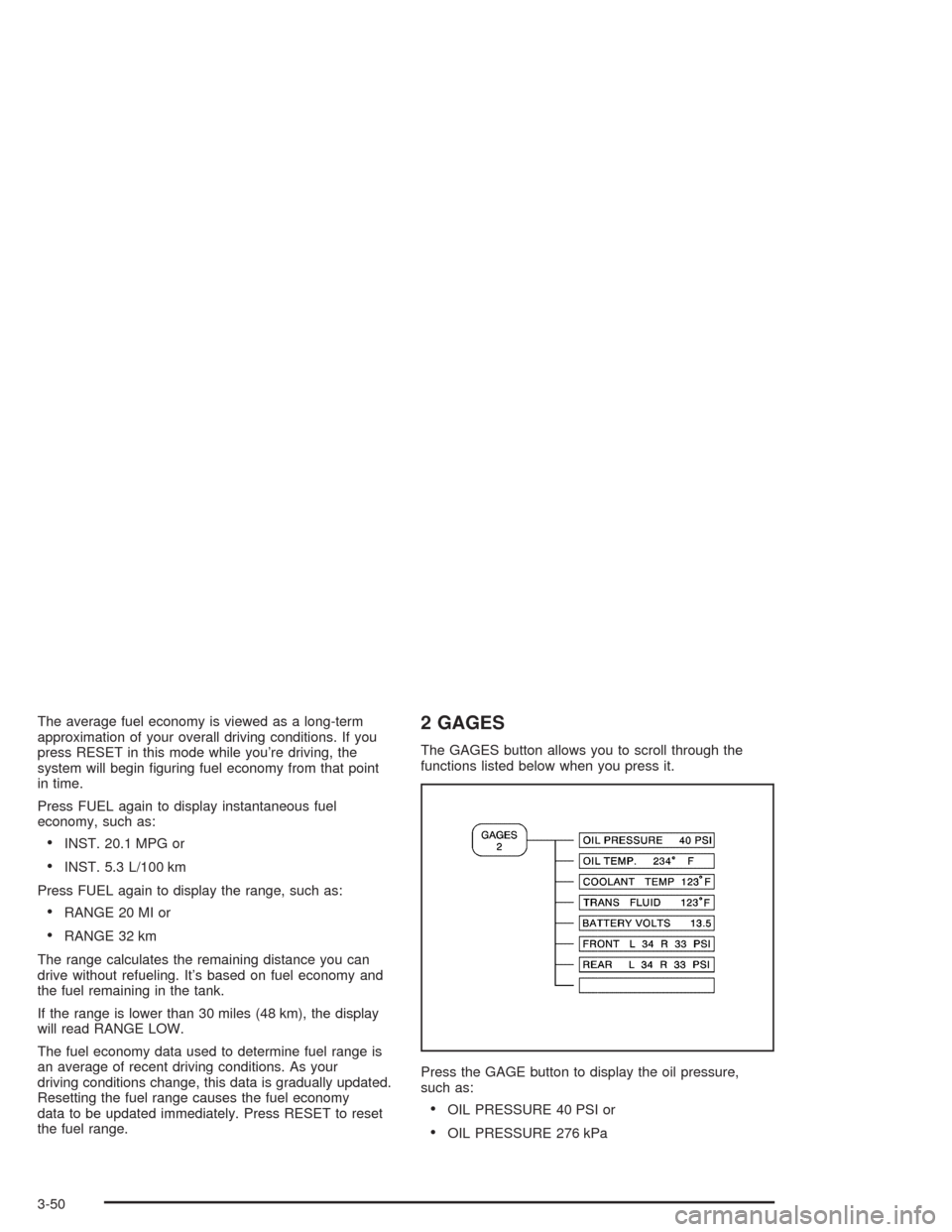
2 GAGES
The GAGES button allows you to scroll through the
functions listed below when you press it.
Press the GAGE button to display the oil pressure,
such as:
•OIL PRESSURE 40 PSI or
•OIL PRESSURE 276 kPa
3-50
Page 167 of 384
Elapsed Time
Press the TRIP button until ELAP. TIME is displayed,
such as ELAP. TIME 00:00:00.00.
When the ignition is in ON, the Driver Information
Center (DIC) can be used as a stopwatch. The display
can show hours, minutes, seconds and hundredths
of a second. The elapsed time indicator will record up to
99 hours, 59 minutes and 59 seconds, then it will
reset to zero and continue counting. (Hundredths are
shown up to 59 minutes, 59 seconds and
99 hundredths). The display appears as ELAP. TIME
00:00:00.00 in the elapsed time function.
You can start or stop the elapsed time by pressing
RESET. To reset the elapsed time to zero, stop the timer
by pressing RESET. Then press and hold RESET
until ELAP. TIME 00:00:00.00 appears in the DIC.
Average Speed
Press the TRIP button until the average speed is
displayed, such as:
•AVERAGE SPEED 62 MPH or
•AVERAGE SPEED 100 km/h
Press reset in this mode to start calculating the average
speed. Press and hold RESET to clear.
Engine Oil Life
Press the TRIP button until the engine oil life is
displayed, such as OIL LIFE REMAIN 89%.
This is an estimate of the engine oil’s remaining useful
life. It will show 100% when the system is reset after
an oil change. It will alert you to change your oil
on a schedule consistent with your driving conditions.
When the remaining oil life is low, the system will
alert you with the message CHANGE OIL SOON.
When the oil life is down to zero, you will receive the
message CHANGE OIL NOW.
Remember, you must reset the OIL LIFE yourself after
each oil change. It will not reset itself. Also, be
careful not to reset the OIL LIFE accidentally at any
time other than when the oil has just been changed. It
can’t be reset accurately until the next oil change.
To reset the system, see “How to Reset the Change Oil
Soon Message” underEngine Oil on page 5-13.
Also, seeEngine Oil on page 5-13andScheduled
Maintenance on page 6-4.
3-53
Page 168 of 384
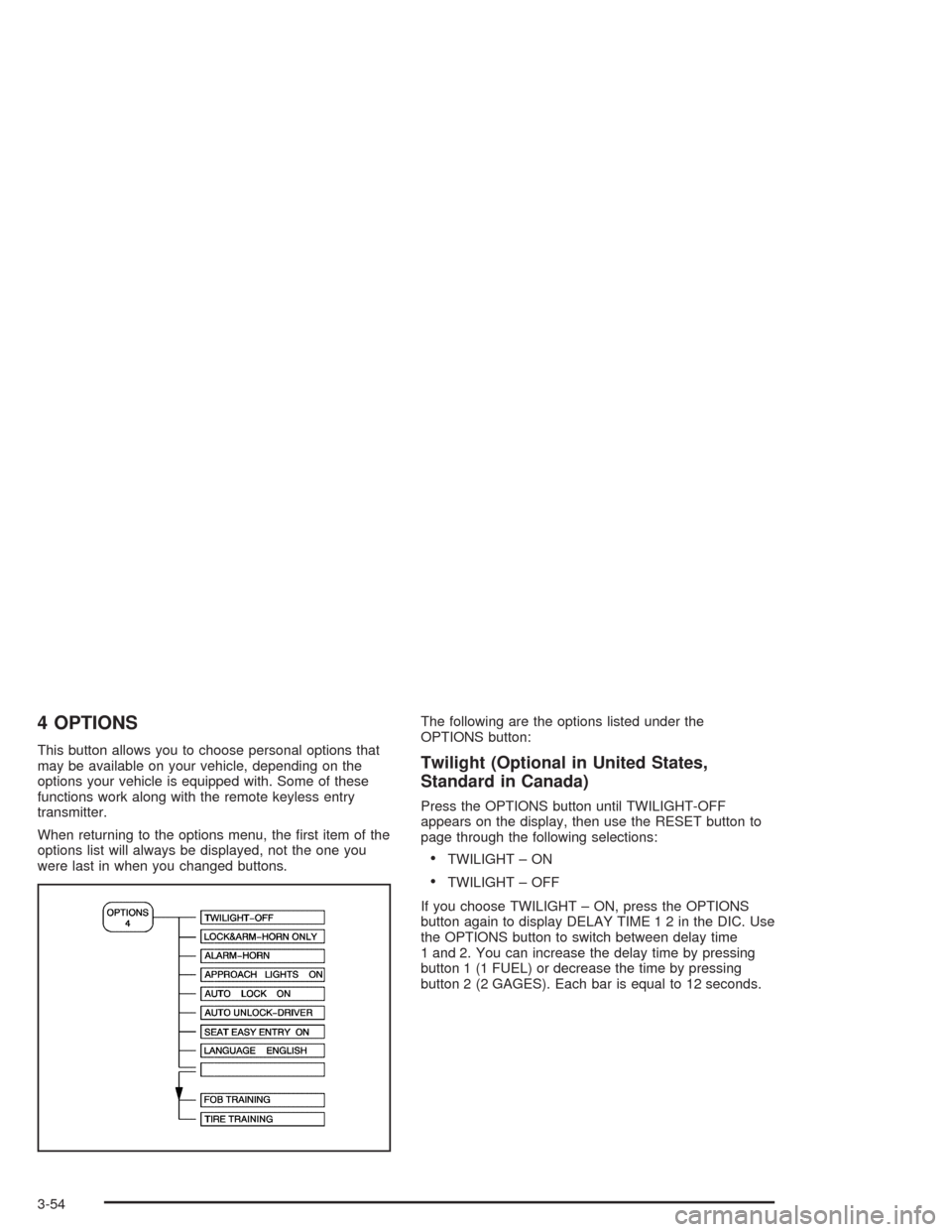
4 OPTIONS
This button allows you to choose personal options that
may be available on your vehicle, depending on the
options your vehicle is equipped with. Some of these
functions work along with the remote keyless entry
transmitter.
When returning to the options menu, the first item of the
options list will always be displayed, not the one you
were last in when you changed buttons.The following are the options listed under the
OPTIONS button:Twilight (Optional in United States,
Standard in Canada)
Press the OPTIONS button until TWILIGHT-OFF
appears on the display, then use the RESET button to
page through the following selections:
•TWILIGHT – ON
•TWILIGHT – OFF
If you choose TWILIGHT – ON, press the OPTIONS
button again to display DELAY TIME 1 2 in the DIC. Use
the OPTIONS button to switch between delay time
1 and 2. You can increase the delay time by pressing
button 1 (1 FUEL) or decrease the time by pressing
button 2 (2 GAGES). Each bar is equal to 12 seconds.
3-54
Page 174 of 384
FLAT TIRE (Except Z06):You will hear two chimes
when this message is displayed followed by the
message MAX SPEED 55 MPH (90 km/h). If this
message appears, do not drive your vehicle above this
limit. The next message to appear is REDUCED
HANDLING. Adjust your driving accordingly. To
acknowledge these warnings, press RESET. After you
press RESET, a message will reappear every
10 minutes until this condition changes. This message
indicates that the pressure in one of your tires is
lower than 5 psi (34 kPa). Next to the FLAT TIRE
message, you can see either LF (left front), LR (left
rear), RF (right front) or RR (right rear) to indicate to you
which tire is flat. You can receive more than one tire
pressure message at a time. To read other messages
that may have been sent at the same time, press
RESET. If a tire pressure message appears on the DIC,
stop as soon as you can. Have the tire pressures
checked and set to those shown on your Tire Loading
Information Label. SeeExtended Mobility Tires
(Except Z06) on page 5-61andInation - Tire Pressure
on page 5-62.
{CAUTION:
When the LOW TIRE PRESSURE or FLAT TIRE
message is displayed on the Driver Information
Center, your vehicle’s handling capabilities will
be reduced during severe maneuvers. If you
drive too fast, you could lose control of your
vehicle. You or others could be injured. Don’t
drive over 55 mph (90 km/h) when the LOW
TIRE PRESSURE or FLAT TIRE message is
displayed. Drive cautiously and check your tire
pressures as soon as you can.
3-60