Page 23 of 345
’03 TUNDRA_U (L/O 0307)
14
2003 TUNDRA from Jul. ’03 Prod. (OM 34430U)
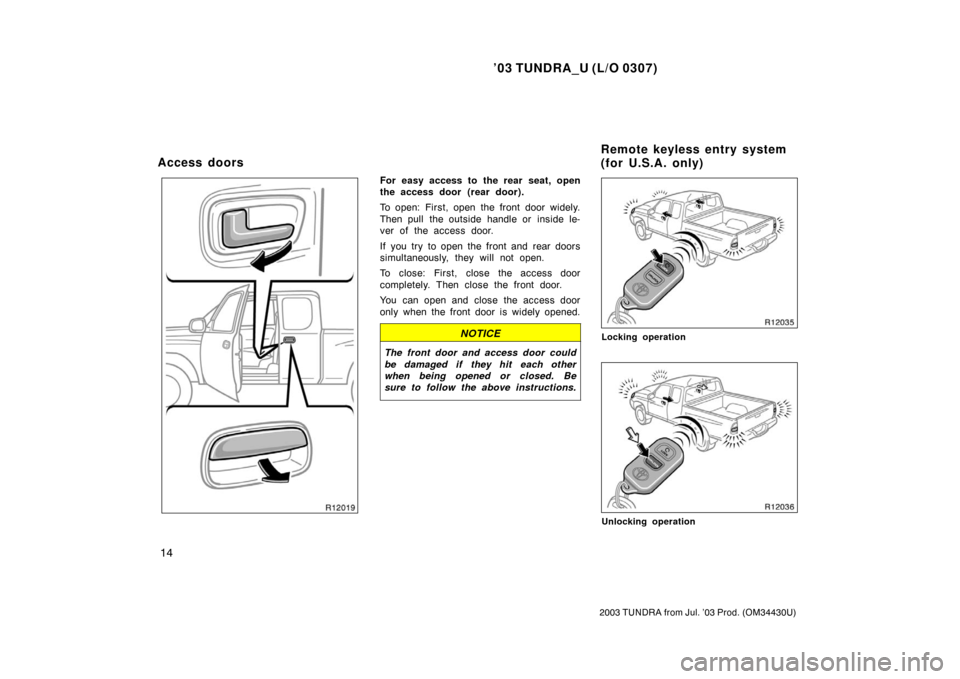
For easy access to the rear seat, open
the access door (rear door).
To open: First, open the front door widely.
Then pull the outside handle or inside le-
ver of the access door.
If you try to open the front and rear doors
simultaneously, they will not open.
To close: First, close the access door
completely. Then close the front door.
You can open and close the access door
only when the front door is widely opened.
NOTICE
The front door and access door could
be damaged if they hit each other
when being opened or closed. Be
sure to follow the above instructions.
Locking operation
Unlocking operation
Access doors Remote keyless entry system
(for U.S.A. only)
Page 24 of 345
’03 TUNDRA_U (L/O 0307)
15
2003 TUNDRA from Jul. ’03 Prod. (OM 34430U)
The remote keyless entry system is
designed to lock or unlock all the
doors or activate the “PANIC” mode
from a distance within approximately 1
m (3 ft.) of the vehicle.
LOCKING AND UNLOCKING THE
DOORS
To lock and unlock all the doors, push
the switches of the transmitter slowly
and securely.
To lock: Push the “LOCK” switch. All the
doors are locked simultaneously. At this
time one beep will be heard, and the tail
lights and front side marker lights will
flash once.
Check to see that the doors are securely
locked.
If any door is not securely closed, locking
cannot be performed by the “LOCK”
switch and a beep will sound continuously
for 5 seconds. However, if the key is in
the ignition, a beep will not sound.
To stop the beep, close all the doors se-
curely or push the “UNLOCK” switch. To unlock: Push the “UNLOCK” switch
once to unlock the driver’s door alone.
Pushing the switch twice within 3 seconds
unlocks all the doors simultaneously. Each
time the “UNLOCK” switch is pushed, two
beeps will be heard, and the tail lights
and front side marker lights will flash
twice.
When the “UNLOCK” switch is pressed,
the interior light and ignition switch light
come on. The lights remain on for about
30 seconds unless any door is opened
and closed.
You have 30 seconds to open a door after
using the wireless remote unlock feature.
If a door is not opened by then, all the
doors will be automatically locked again
and one beep will be heard, and the tail
lights and front side marker lights will
flash once.
If the “LOCK” or “UNLOCK” switch is kept
pressed in, the locking or unlocking opera-
tion is not repeated. Release the switch
and then push again.
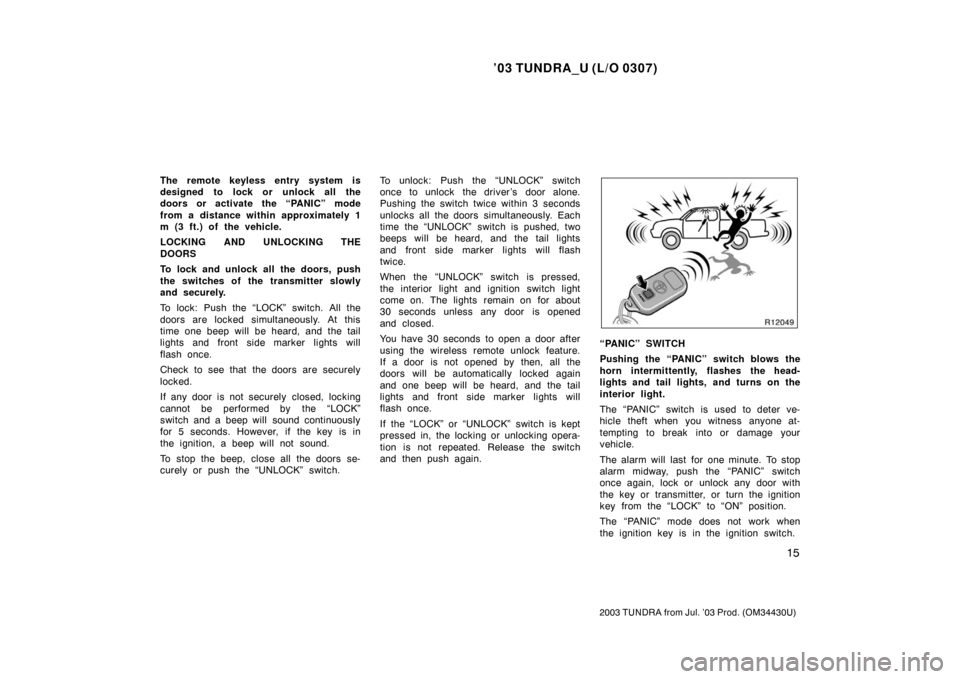
“PANIC” SWITCH
Pushing the “PANIC” switch blows the
horn intermittently, flashes the head-
lights and tail lights, and turns on the
interior light.
The “PANIC” switch is used to deter ve-
hicle theft when you witness anyone at-
tempting to break into or damage your
vehicle.
The alarm will last for one minute. To stop
alarm midway, push the “PANIC” switch
once again, lock or unlock any door with
the key or transmitter, or turn the ignition
key from the “LOCK” to “ON” position.
The “PANIC” mode does not work when
the ignition key is in the ignition switch.
Page 28 of 345
’03 TUNDRA_U (L/O 0307)
19
2003 TUNDRA from Jul. ’03 Prod. (OM 34430U)
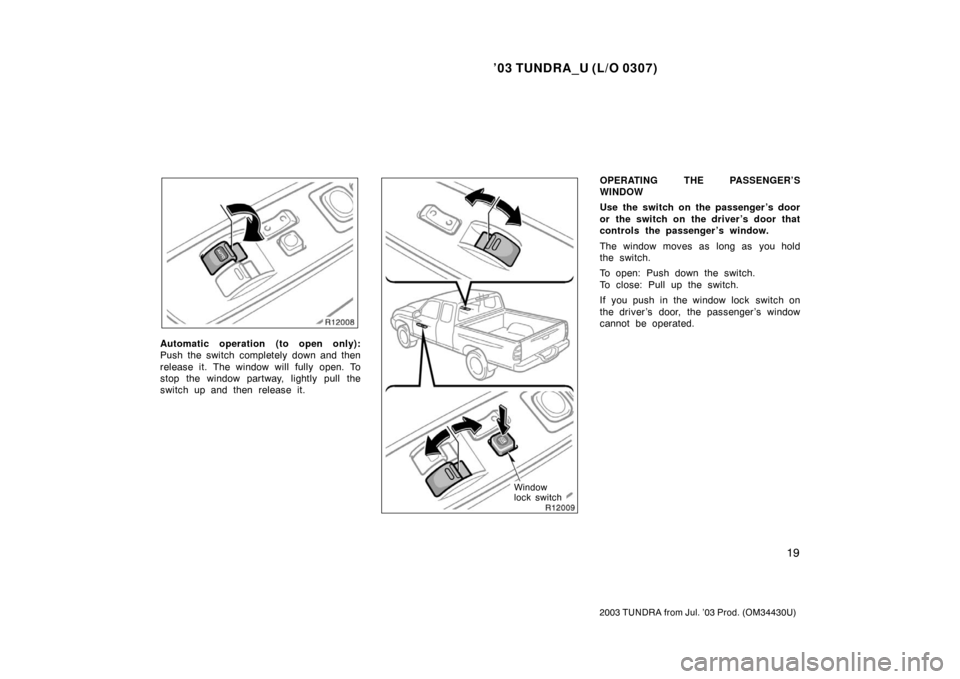
Automatic operation (to open only):
Push the switch completely down and then
release it. The window will fully open. To
stop the window partway, lightly pull the
switch up and then release it.
Window
lock switch
OPERATING THE PASSENGER’S
WINDOW
Use the switch on the passenger ’s door
or the switch on the driver’s door that
controls the passenger ’s window.
The window moves as long as you hold
the switch.
To open: Push down the switch.
To close: Pull up the switch.
If you push in the window lock switch on
the driver ’s door, the passenger ’s window
cannot be operated.
Page 29 of 345
’03 TUNDRA_U (L/O 0307)
20
2003 TUNDRA from Jul. ’03 Prod. (OM 34430U)
CAUTION
To avoid serious personal injury, you
must do the following.
�Before you close the power win-
dows, always make sure there is
nobody around the power windows.
You must also make sure the
heads, hands and other parts of the
bodies of all occupants are kept
completely inside the vehicle. If
someone’s neck, head or hands get
caught in a closing window, it
could result in a serious injury.
When anyone closes the power win-
dows, make sure he or she oper-
ates the windows safely.
�When small children are in the ve-
hicle, never let them use the power
window switches without supervi-
sion. Use the window lock switch to
prevent them from making unex-
pected use of the switches.
�Be sure to remove the ignition key
when you leave your vehicle.
�Never leave anyone (particularly a
small child) alone in your vehicle,
especially with the ignition key still
inserted. Otherwise, he/she could
use the power window switches and
get trapped in a window. Unat-
tended person (particularly a small
child) can be involved in a serious
accident.
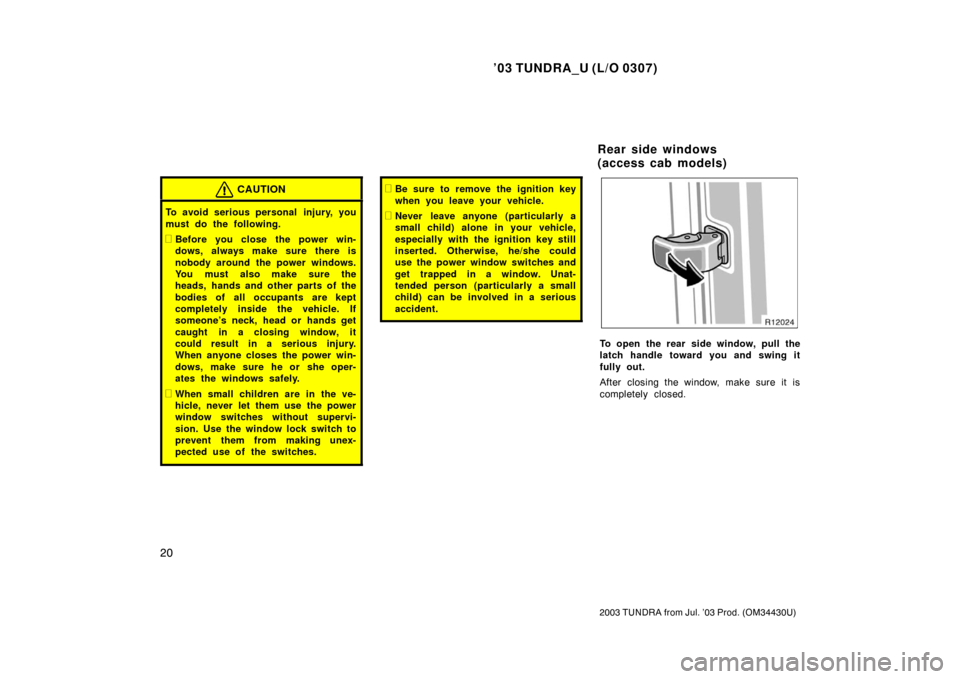
To open the rear side window, pull the
latch handle toward you and swing it
fully out.
After closing the window, make sure it is
completely closed.
Rear side windows
(access cab models)
Page 32 of 345
’03 TUNDRA_U (L/O 0307)
23
2003 TUNDRA from Jul. ’03 Prod. (OM 34430U)
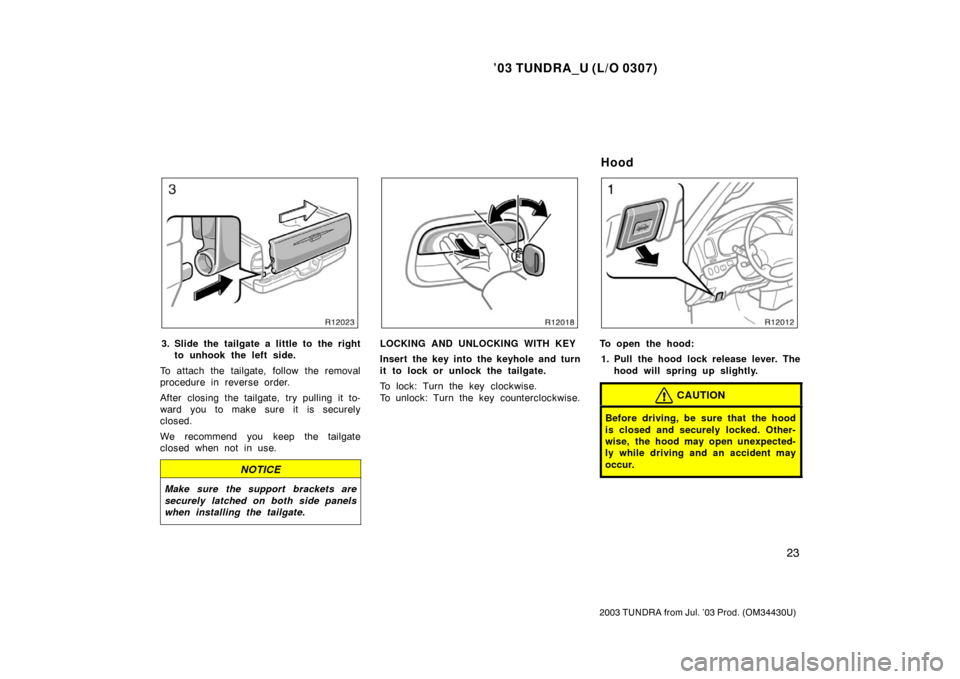
3. Slide the tailgate a little to the right
to unhook the left side.
To attach the tailgate, follow the removal
procedure in reverse order.
After closing the tailgate, try pulling it to-
ward you to make sure it is securely
closed.
We recommend you keep the tailgate
closed when not in use.
NOTICE
Make sure the support brackets are
securely latched on both side panels
when installing the tailgate.
LOCKING AND UNLOCKING WITH KEY
Insert the key into the keyhole and turn
it to lock or unlock the tailgate.
To lock: Turn the key clockwise.
To unlock: Turn the key counterclockwise.To open the hood: 1. Pull the hood lock release lever. The hood will spring up slightly.
CAUTION
Before driving, be sure that the hood
is closed and securely locked. Other-
wise, the hood may open unexpected-
ly while driving and an accident may
occur.
Hood
Page 33 of 345
’03 TUNDRA_U (L/O 0307)
24
2003 TUNDRA from Jul. ’03 Prod. (OM 34430U)
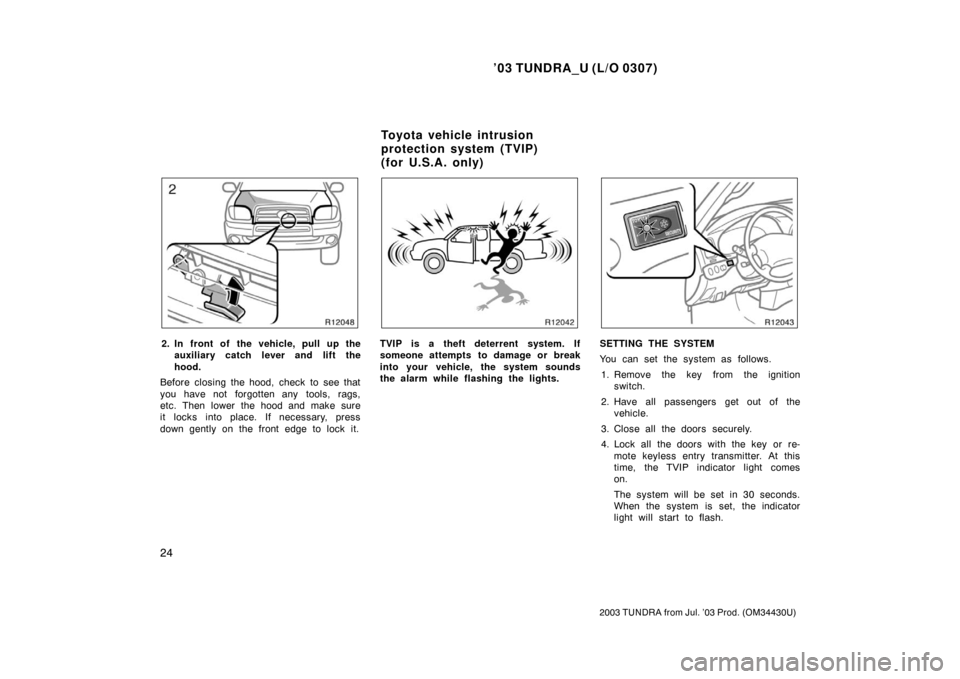
2. In front of the vehicle, pull up the
auxiliary catch l ever and lift the
hood.
Before closing the hood, check to see that
you have not forgotten any tools, rags,
etc. Then lower the hood and make sure
it locks into place. If necessary, press
down gently on the front edge to lock it.TVIP is a theft deterrent system. If
someone attempts to damage or break
into your vehicle, the system sounds
the alarm while flashing the lights.SETTING THE SYSTEM
You can set the system as follows.
1. Remove the key from the ignition switch.
2. Have all passengers get out of the vehicle.
3. Close all the doors securely.
4. Lock all the doors with the key or re- mote keyless entry transmitter. At this
time, the TVIP indicator light comes
on.
The system will be set in 30 seconds.
When the system is set, the indicator
light will start to flash.
Toyota vehicle intrusion
protection system (TVIP)
(for U.S.A. only)
Page 34 of 345

’03 TUNDRA_U (L/O 0307)
25
2003 TUNDRA from Jul. ’03 Prod. (OM 34430U)
5. Make sure that the indicator light
flashes. Then you may leave the ve-
hicle.
Never leave anyone in the vehicle when
you set the system because unlocking
from the inside activates the alarm.
Activating the alarm
If the system detects a threat to the
vehicle, blows the horn intermittently
for one minute while flashing head-
lights, tail lights and front side marker
lights, and turns on the interior light.
The system detects a threat under any of
the following conditions:
�Either of the front doors is unlocked by
means other than the key or remote
keyless entry transmitter.
If the key is not in the ignition switch,
all the doors will be automatically
locked again.
�Any of the doors is forcibly opened.
�The side windows are tapped or bro-
ken.
�The battery terminal is disconnected
and then reconnected.
�The ignition is hotwired. After one minute, the alarm automatically
stops and the indicator light starts flashing
again.
Reactivating the alarm
Once set, until you cancel the system, the
system automatically resets the alarm af-
ter the alarm has stopped.
The alarm will activate again under the
same circumstances described in “Activat-
ing the alarm”.
Stopping the alarm
You can stop the alarm in either of the
following ways:
�Unlock any of the doors with the key
or remote keyless entry transmitter.
�Place the ignition switch in the “ON”
position.
CANCELLING THE SYSTEM
You can cancel the system as described
in “Stopping the alarm”.
If you cancel the system by unlocking any
of the doors but no door is opened within
30 seconds, all the doors lock automati-
cally and the system will be set again. NOTE: If your vehicle’s tail lights and
front side marker lights turn on
and the buzzer sounds for 2 sec-
onds when the system is can-
celed, the trigger memory was ac-
tivated; an alarm was triggered
while you were away from the ve-
hicle.
TESTING THE SYSTEM
You can check the system operation as
follows.
1. Open all the windows.
2. Set the system as described in “SETTING THE SYSTEM”.
3. Unlock the driver’s door with the inside lock knob. The system should activate
and the alarm should sound.
4. Stop the alarm as described in “Stop- ping the alarm”.
5. Repeat steps 2 to 4 for the passen- ger ’s door.
If the system does not work properly,
have it checked by your Toyota dealer.
Page 36 of 345
’03 TUNDRA_U (L/O 0307)
27
2003 TUNDRA from Jul. ’03 Prod. (OM 34430U)
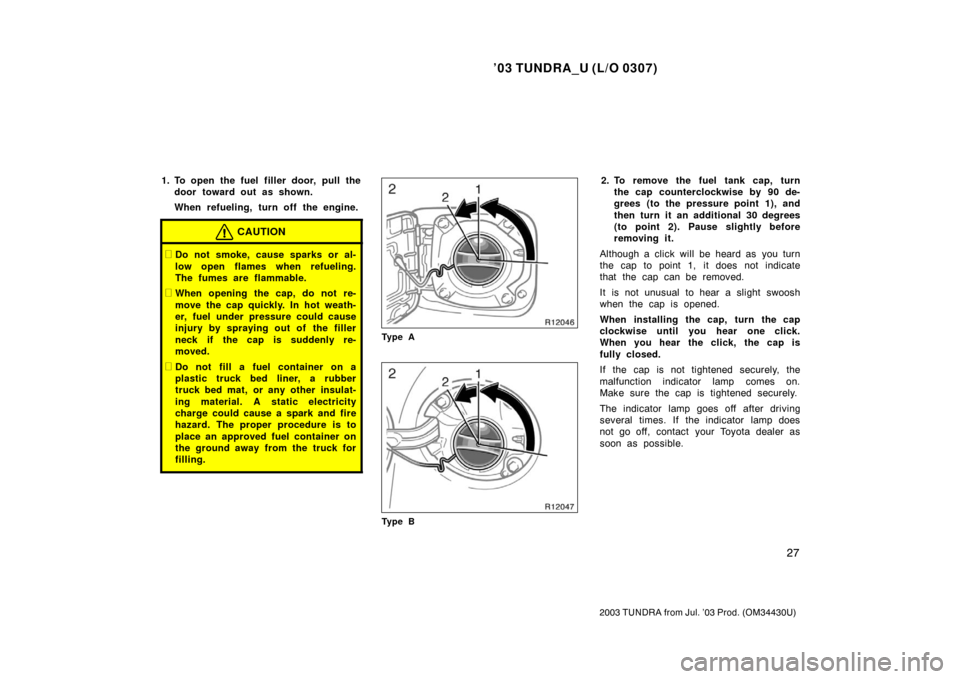
1. To open the fuel filler door, pull the
door toward out as shown.
When refueling, turn off the engine.
CAUTION
�Do not smoke, cause sparks or al-
low open flames when refueling.
The fumes are flammable.
�When opening the cap, do not re-
move the cap quickly. In hot weath-
er, fuel under pressure could cause
injury by spraying out of the filler
neck if the cap is suddenly re-
moved.
�Do not fill a fuel container on a
plastic truck bed liner, a rubber
truck bed mat, or any other insulat-
ing material. A static electricity
charge could cause a spark and fire
hazard. The proper procedure is to
place an approved fuel container on
the ground away from the truck for
filling.
Ty p e A
Ty p e B
2. To remove the fuel tank cap, turnthe cap counterclockwise by 90 de-
grees (to the pressure point 1), and
then turn it an additional 30 degrees
(to point 2). Pause slightly before
removing it.
Although a click will be heard as you turn
the cap to point 1, it does not indicate
that the cap can be removed.
It is not unusual to hear a slight swoosh
when the cap is opened.
When installing the cap, turn the cap
clockwise until you hear one click.
When you hear the click, the cap is
fully closed.
If the cap is not tightened securely, the
malfunction indicator lamp comes on.
Make sure the cap is tightened securely.
The indicator lamp goes off after driving
several times. If the indicator lamp does
not go off, contact your Toyota dealer as
soon as possible.