12-05-2003
���������
���
� �
��
��
���
��
�� ��
�
� ���
��� ����������� The satellite navigation system guides you, by means of ������ ���
�� ���� �� �������� (graphics), to
your chosen destination. The heart of the system lies in the use of a map data base and �!�
"���#��� !� �������$� �% �&'( . With
this system you can fix the positionof your vehicle by means of a satel-lite network. The system uses the following ele- ments:
– the CD-Rom drive,
– the configuration CD-Rom,
– the navigation CD-Rom,
– the last voice message recall con- trol,
– the control keypad,
– the CT monochrome display or the DT colour screen.
)&�*�+��'�����&
This is part of the RT3 radio/telephone. ,-
CD-Rom ejection button.
.- CD-Rom housing.
)&�����$������*�+��'This contains all the map data. It must be inserted in the drive, printed face upwards.
Use only CD-Roms approved by PEUGEOT.
)&��� ������&�'& �$&��&������������ Pressing for more than two seconds on the button at the end of the lights stalk repeats the last voice information.
Certain functions or services
described may vary depending on the version of the CD-Rom or the
country where the vehicle is sold.
For safety reasons, the inputting of navigationinformation by the drivermust be carried out when
the vehicle is stationary.
12-05-2003
���������
���
� ��/
�
0������1�&�&2)��&���������2��
����&'��&�3&%2����������
����&'��&�3&%2��������������4��)� �)� ��5��6������� 7 –
����������6��)&�����7 This allows you to '��&������the screen and thus select a function.
It also allows you: – with a 8 &����$8� type parameter, after selection, to ����&� &�����&��&� &the
value,
– with a 9�� �9type parameter, after opening the list, to �������)���$)the values.
– with '�2guidance, to increase or decrease the :��'.
– !�& ��$��)&�����7 This allows:
– ���& � to the list of controls (contextual menu) of the permanent display, if
there is no other display superimposed,
– ���6��'������ of the selected function or the modified value,
– &�&������ of a 8 &����$8� or 8�� �8� type parameter for modification.
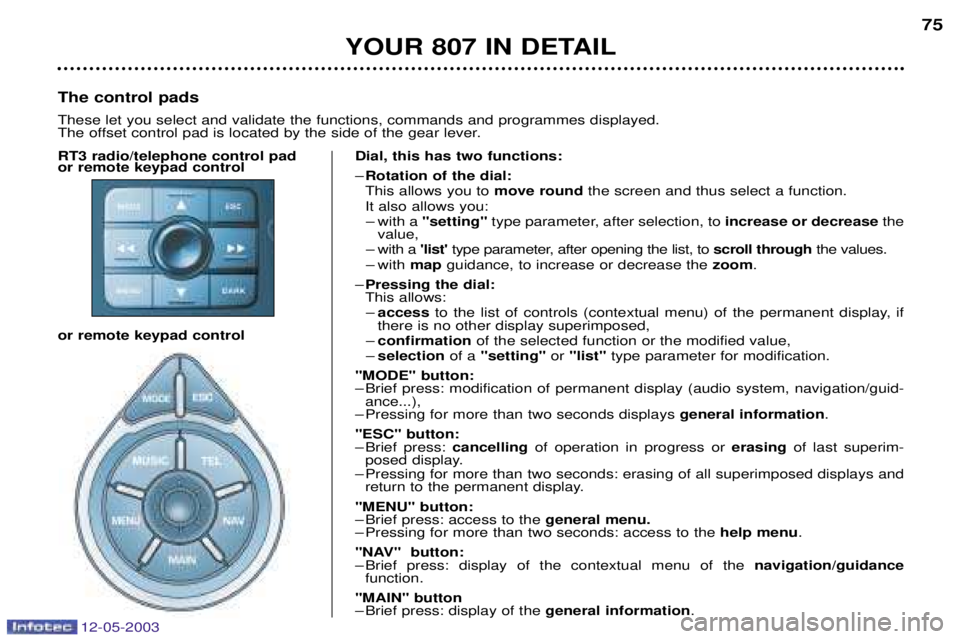
8����8 #�����7
– Brief press: modification of permanent display (audio system, navigation/guid- ance...),
– Pressing for more than two seconds displays $&�&������6��'�����.
8��*8�#�����7
– Brief press: ����&����$of operation in progress or &�� ��$of last superim-
posed display.
– Pressing for more than two seconds: erasing of all superimposed displays and return to the permanent display.
8��
�8�#�����7
– Brief press: access to the $&�&����'&��-
– Pressing for more than two seconds: access to the )&�2�'&��.
8
��8��#�����7
– Brief press: display of the contextual menu of the ����$�����1$������&�
function.
8��
8�#�����
– Brief press: display of the $&�&������6��'�����.
)&���������2�� These let you select and validate the functions, commands and programmes displayed.
The offset control pad is located by the side of the gear lever.
12-05-2003
��������� �
�������
3
������������
���-�.��;<:
For your PEUGEOT only use accessories and original parts approved by the manufacturer.
These accessories and parts are all adapted to your PEUGEOT, after being tested and approved for reliability and safety,
which PEUGEOT cannot guarantee for other products.
A wide choice of original accessories, approved by PEUGEOT, is available through the dealer network. They all carry the
PEUGEOT guarantee.
A ��(��0� 2 Anti-theft alarm, window engraving, wheel locks, first aid kit...
A �'&('"� 2 Arm rest, covers compatible with side air bags, mats, boot tray, sunroof, luggage net, door deflectors, cool box secured on the slides...
A �'&&)������'� 2 Audio systems, telephone, hands-free kit, speakers, amplifier, CD changer, navigation
systems, rear video kit, DVD player...
A� �)%�'&�%���� 2 Alloy wheels, trims, aluminium or PVC door sills, aluminium interior trim kit, mud flaps...
A ���%)"� 2 Tow bar, roof bars, roof box, snow chains, ski carrier, tailgate bicycle carrier, interior bicycle
carrier...
A ����$"�� 2 Booster seats and child seats, Isofix KIDDY seat, side sun blinds and rear blind...
A ������������!"'$)��% 2 Screenwash, interior and exterior maintenance and cleaning products...
Before installing any electrical accessory on your vehicle, contact a PEUGEOT dealer.