Page 65 of 184
����������
���������
���
� �$�
�*��<��.����-.�����)�����>-�,
<� ������
��
�����2������$�������� ���
������
��
������ ���
�
&�
��� � ��$
���������#����
�������
���� ���
�
&��
��
�*������<��.��� 2���), 6$
��!��$ �
#�$
��������
�$������!���$
����������
��� ���� ��$
������
��
���
�!��$�
���
��#�� �8�� ����8��� ������������
�������
�� �$����2���
������
���
�!��$�
���+
������ � � ���
����� �!� ��
� ��8� �� �� ����� ���#�
� �� �
�� ���� �!�
� ��
� /,�� �����*�
�
$���
� ����
�
� ����
���!!�
C����
���
���8��� �� ������
�������������������������
�!������ Buttons Associated
characters
[1] 1 or space
[2] 2 or A B C 2 or a b c 2
[3] 3 or D E F 3 or d e f 3
[4] 4 or G H I 4 or g h i 4
[5] 5 or J K L 5 or j k l 5
[6] 6 or M N O 6 or m n o 6
[7] 7 or P Q R S 7 or p q r s 7
[8] 8 or T U V 8 or t u v 8
[9] 9 or W X Y Z 9 or w x y z 9
[0] 0 or + (long press)
[#] # or P (long press)
[*] * or erasing of last character input (long press)
Page 79 of 184
12-05-2003
���������
���
� ��@
The most recent destinations are shown. There are three possible methods of defining the location to which youwish to travel:
– accept the last details input by means of the 8�<8function,
– input the details of your destina- tion,
– automatically input the details of your current location by means of the 8*���&�����������8 function.
�!���&����
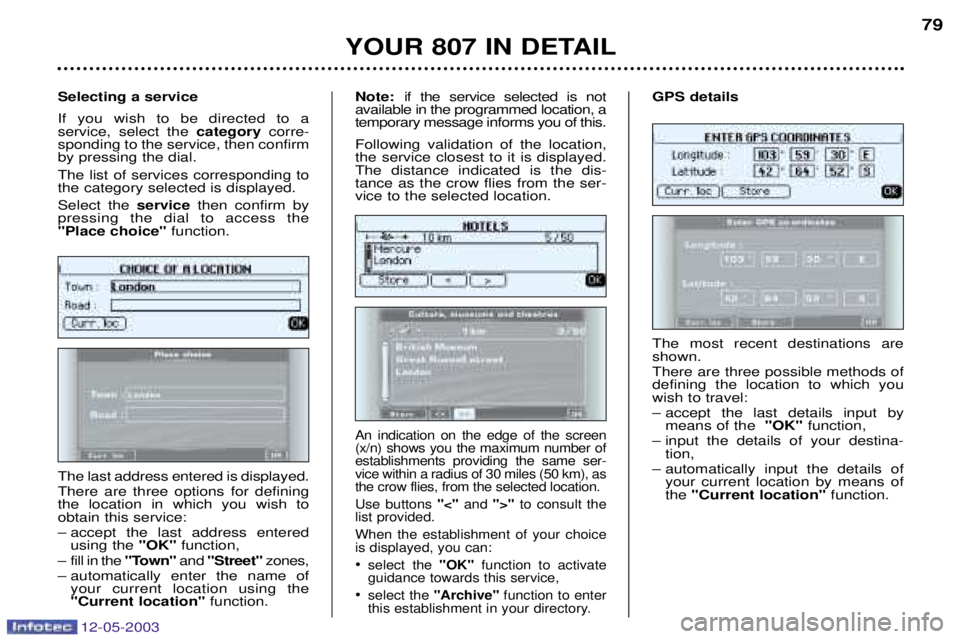
The last address entered is displayed. There are three options for defining the location in which you wish toobtain this service:
– accept the last address entered
using the 8�<8function,
– fill in the 8
�5�8�and 8���&&�8 zones,
– automatically enter the name of your current location using the
8*���&�����������8 function.
�&�&����$��� &����& If you wish to be directed to a service, select the
���&$��%corre-
sponding to the service, then confirmby pressing the dial. The list of services corresponding to the category selected is displayed. Select the &����&then confirm by
pressing the dial to access the
8!���&��)���&8 function.
An indication on the edge of the screen (x/n) shows you the maximum number ofestablishments providing the same ser-vice within a radius of 30 miles (50 km), asthe crow flies, from the selected location. Use buttons 8A8and 8B8to consult the
list provided.When the establishment of your choice is displayed, you can: select the 8�<8function to activate
guidance towards this service,
select the 8���)��&8 function to enter
this establishment in your directory.
��&7 if the service selected is not
available in the programmed location, a temporary message informs you of this. Following validation of the location, the service closest to it is displayed.The distance indicated is the dis-tance as the crow flies from the ser-vice to the selected location.
Page 175 of 184

12-05-2003
�����4�����=�� This video assembly will enable the rear passengers to pass the timepleasantly while watching theirfavourite film or playing theirfavourite game, by means, in partic-
ular, of the connection of a DVDplayer or games console. The rear video kit consists of:
– a 4/3, 6.8 inch, LCD colour monitor,
– two high frequency, wireless, stereo headphones,
– a remote control,
– a base with two wired headphone outputs, a courtesy light with its switch and a monitor release button,
– three audio/video sockets in the glove compartment . The monitor's remote control incor-porates the following controls:
,
"POWER" button to switch the
monitor on/off.
7, "SOURCE" button for selection of
the input source, AV1 or AV2.
>, "SETUP" button for selection of
the settings.
�, "VOL �" and "VOL �" buttons to
change the settings or increase/decrease the volume atthe wired headphones.
�, Housing for the two LR03 batteries.
3, "MUTE" button to cut off/restore
the volume at the wired head-phones.
:, "DOMELIGHT" button to switch
the courtesy light on/off remotely.
��������� �
�������
�?
The monitor has left/right and up/down position adjustment. It canalso be stored in its base by folding itand pushing it to lock it. Once stored,
the supply, and that of the wireless
headphones, is cut off automaticallyafter approximately fifteen minutes. The rear video kit accepts all types of
audio/video source, PAL/NTSC com-
patible, such as: DVD player, cam-
corder, games console, ... These sources are connected to the three audio/video sockets, �4
*in
the glove compartment only as the
�47� sockets are not available.
Page 176 of 184
12-05-2003
��������� �
�������
3<
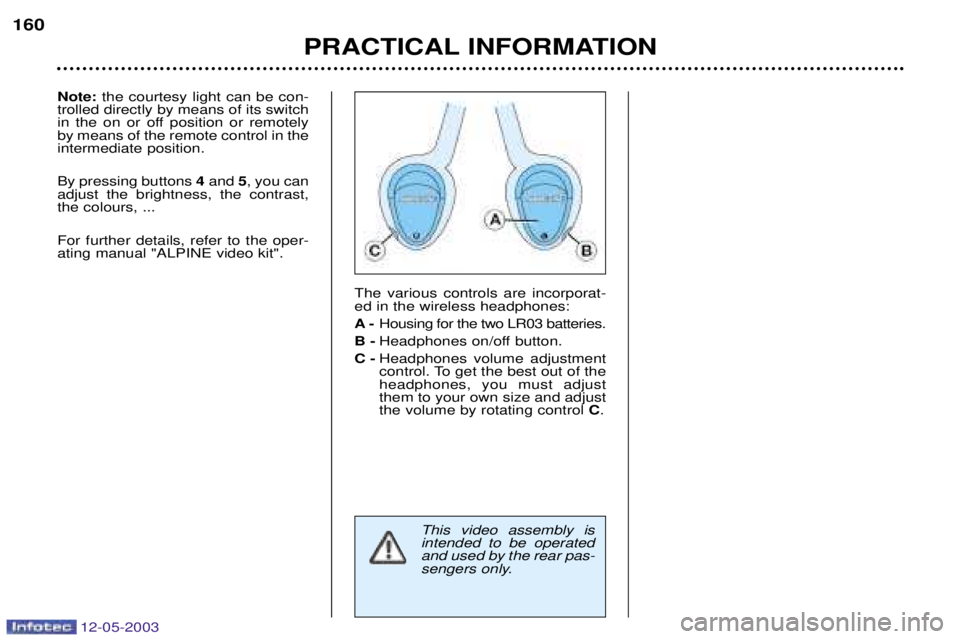
The various controls are incorporat- ed in the wireless headphones: �@Housing for the two LR03 batteries.
��@ Headphones on/off button.
��@ Headphones volume adjustment
control. To get the best out of theheadphones, you must adjustthem to your own size and adjustthe volume by rotating control �.
This video assembly is intended to be operatedand used by the rear pas-
sengers only.
'��2
the courtesy light can be con-
trolled directly by means of its switch
in the on or off position or remotelyby means of the remote control in theintermediate position. By pressing buttons �and �, you can
adjust the brightness, the contrast, the colours, ... For further details, refer to the oper- ating manual "ALPINE video kit".