2003 NISSAN TEANA Power
[x] Cancel search: PowerPage 1273 of 3502
WARNING CHIME
DI-67
C
D
E
F
G
H
I
J
L
MA
B
DI
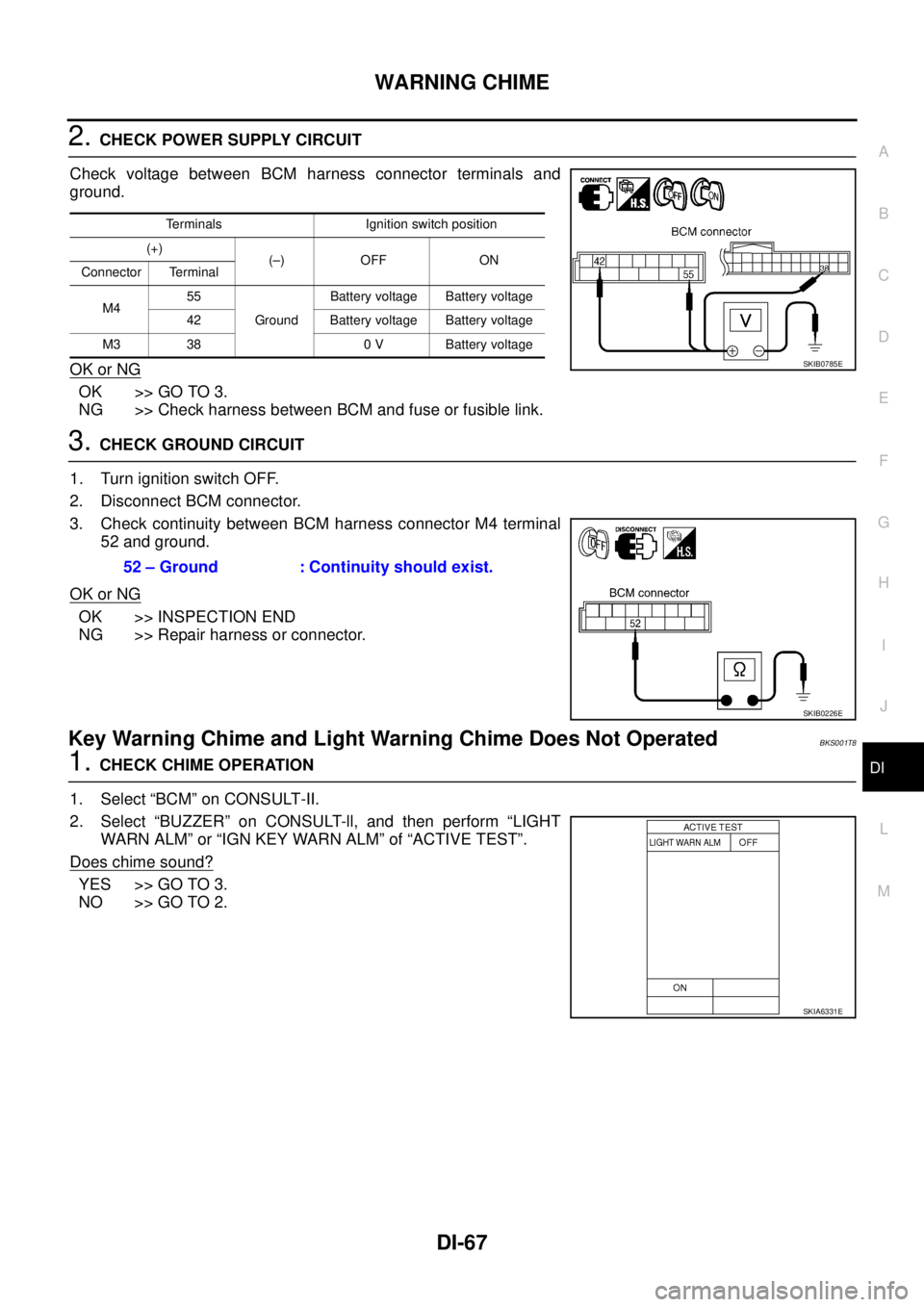
2. CHECK POWER SUPPLY CIRCUIT
Check voltage between BCM harness connector terminals and
ground.
OK or NG
OK >> GO TO 3.
NG >> Check harness between BCM and fuse or fusible link.
3. CHECK GROUND CIRCUIT
1. Turn ignition switch OFF.
2. Disconnect BCM connector.
3. Check continuity between BCM harness connector M4 terminal
52 and ground.
OK or NG
OK >> INSPECTION END
NG >> Repair harness or connector.
Key Warning Chime and Light Warning Chime Does Not OperatedBKS001T8
1. CHECK CHIME OPERATION
1. Select “BCM” on CONSULT-II.
2. Select “BUZZER” on CONSULT-ll, and then perform “LIGHT
WARN ALM” or “IGN KEY WARN ALM” of “ACTIVE TEST”.
Does chime sound?
YES >> GO TO 3.
NO >> GO TO 2.
Terminals Ignition switch position
(+)
(–) OFF ON
Connector Terminal
M455
GroundBattery voltage Battery voltage
42 Battery voltage Battery voltage
M3 38 0 V Battery voltage
SKIB0785E
52 – Ground : Continuity should exist.
SKIB0226E
SKIA6331E
Page 1274 of 3502
DI-68
WARNING CHIME
2. CHECK UNIFIED METER AND A/C AMP. INPUT SIGNAL
1. Select “METER A/C AMP” on CONSULT-II.
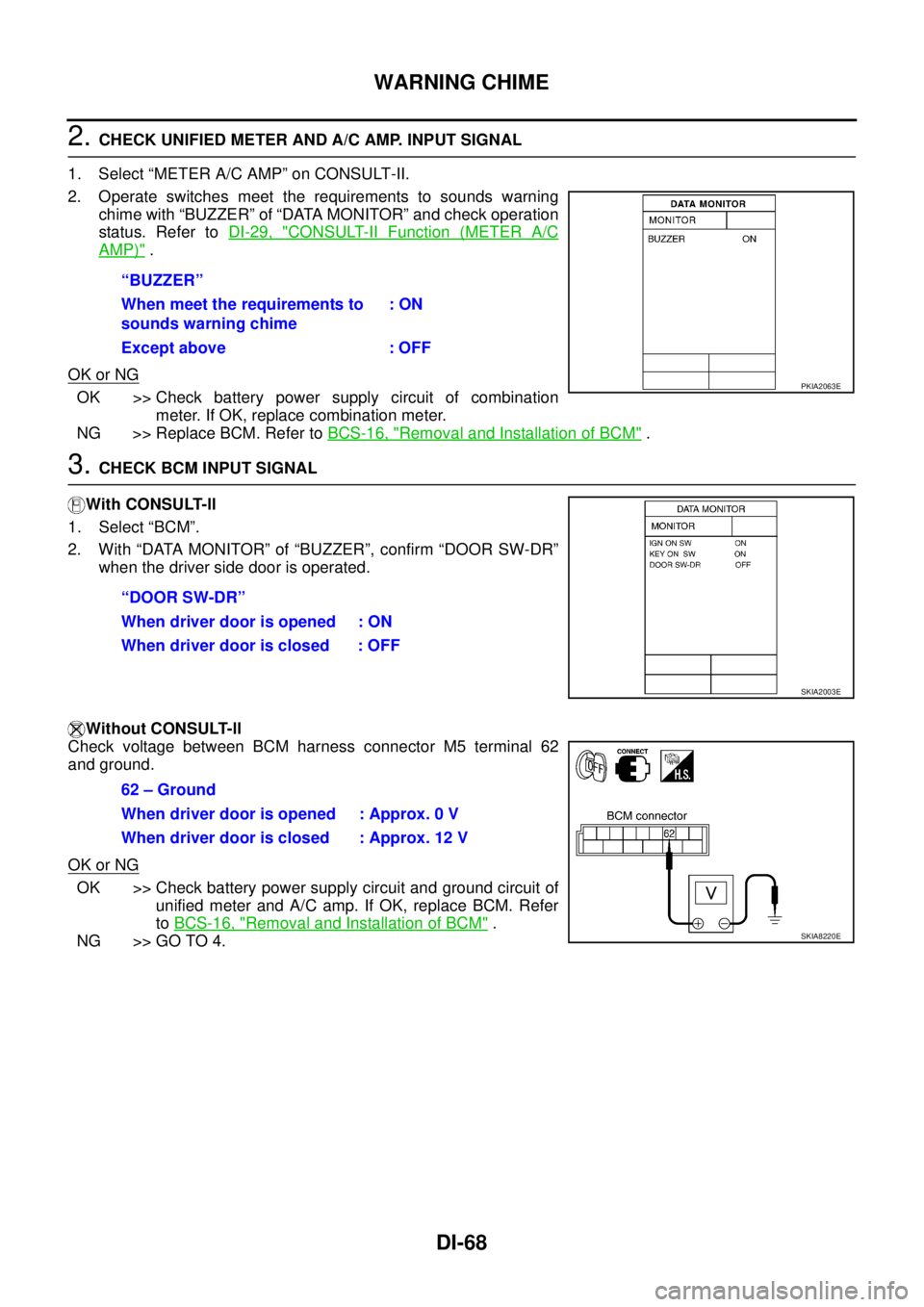
2. Operate switches meet the requirements to sounds warning
chime with “BUZZER” of “DATA MONITOR” and check operation
status. Refer to DI-29, "
CONSULT-II Function (METER A/C
AMP)" .
OK or NG
OK >> Check battery power supply circuit of combination
meter. If OK, replace combination meter.
NG >> Replace BCM. Refer to BCS-16, "
Removal and Installation of BCM" .
3. CHECK BCM INPUT SIGNAL
With CONSULT-ll
1. Select “BCM”.
2. With “DATA MONITOR” of “BUZZER”, confirm “DOOR SW-DR”
when the driver side door is operated.
Without CONSULT-ll
Check voltage between BCM harness connector M5 terminal 62
and ground.
OK or NG
OK >> Check battery power supply circuit and ground circuit of
unified meter and A/C amp. If OK, replace BCM. Refer
to BCS-16, "
Removal and Installation of BCM" .
NG >> GO TO 4.“BUZZER”
When meet the requirements to
sounds warning chime: ON
Except above : OFF
PKIA2063E
“DOOR SW-DR”
When driver door is opened : ON
When driver door is closed : OFF
SKIA2003E
62 – Ground
When driver door is opened : Approx. 0 V
When driver door is closed : Approx. 12 V
SKIA8220E
Page 1277 of 3502
WARNING CHIME
DI-71
C
D
E
F
G
H
I
J
L
MA
B
DI
5. CHECK KEY SWITCH CIRCUIT
1. Disconnect BCM connector.
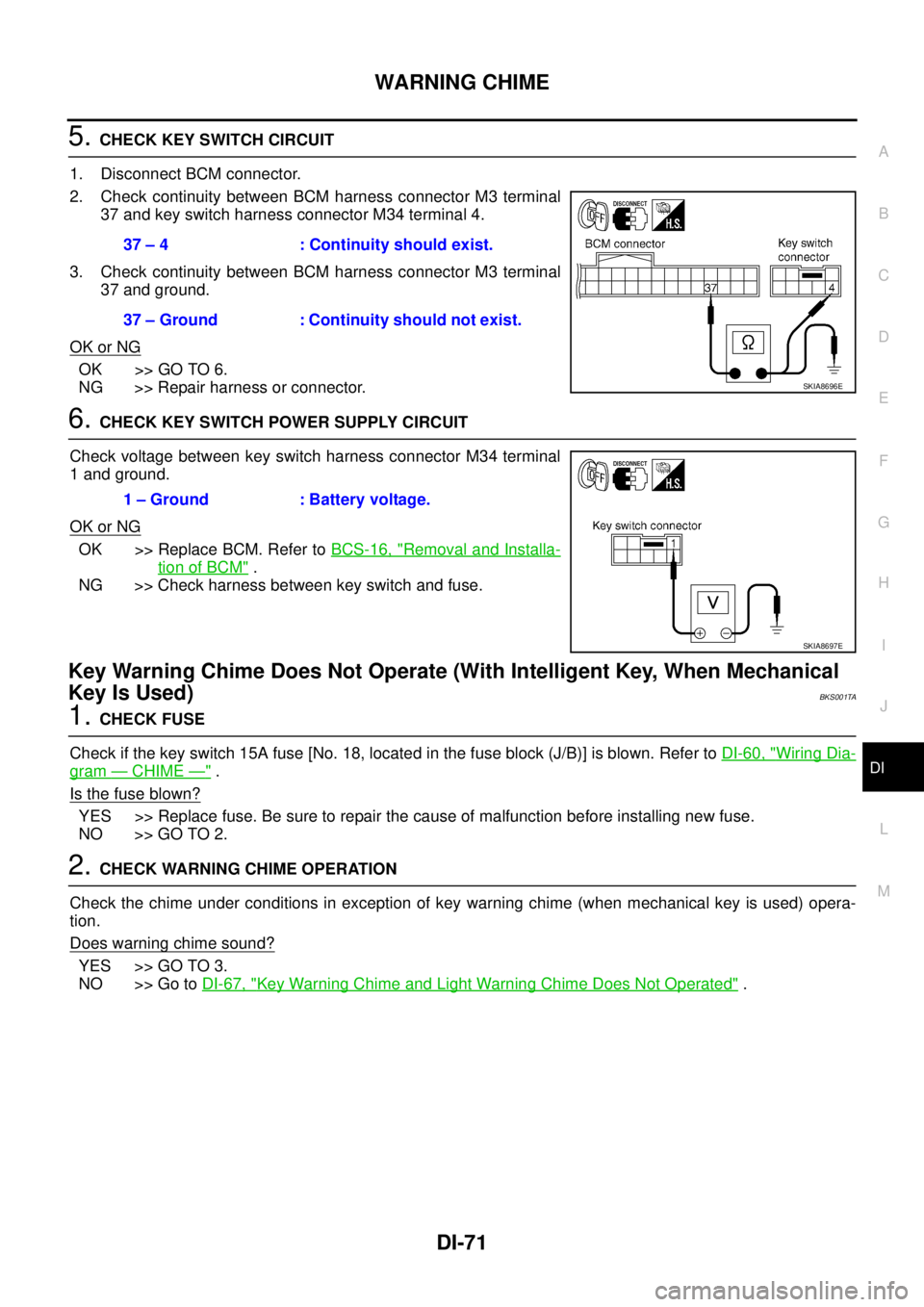
2. Check continuity between BCM harness connector M3 terminal
37 and key switch harness connector M34 terminal 4.
3. Check continuity between BCM harness connector M3 terminal
37 and ground.
OK or NG
OK >> GO TO 6.
NG >> Repair harness or connector.
6. CHECK KEY SWITCH POWER SUPPLY CIRCUIT
Check voltage between key switch harness connector M34 terminal
1 and ground.
OK or NG
OK >> Replace BCM. Refer to BCS-16, "Removal and Installa-
tion of BCM" .
NG >> Check harness between key switch and fuse.
Key Warning Chime Does Not Operate (With Intelligent Key, When Mechanical
Key Is Used)
BKS001TA
1. CHECK FUSE
Check if the key switch 15A fuse [No. 18, located in the fuse block (J/B)] is blown. Refer to DI-60, "
Wiring Dia-
gram — CHIME —" .
Is the fuse blown?
YES >> Replace fuse. Be sure to repair the cause of malfunction before installing new fuse.
NO >> GO TO 2.
2. CHECK WARNING CHIME OPERATION
Check the chime under conditions in exception of key warning chime (when mechanical key is used) opera-
tion.
Does warning chime sound?
YES >> GO TO 3.
NO >> Go to DI-67, "
Key Warning Chime and Light Warning Chime Does Not Operated" . 37 – 4 : Continuity should exist.
37 – Ground : Continuity should not exist.
SKIA8696E
1 – Ground : Battery voltage.
SKIA8697E
Page 1278 of 3502
DI-72
WARNING CHIME
3. CHECK BCM INPUT SIGNAL
With CONSULT-ll
1. Select “BCM”.
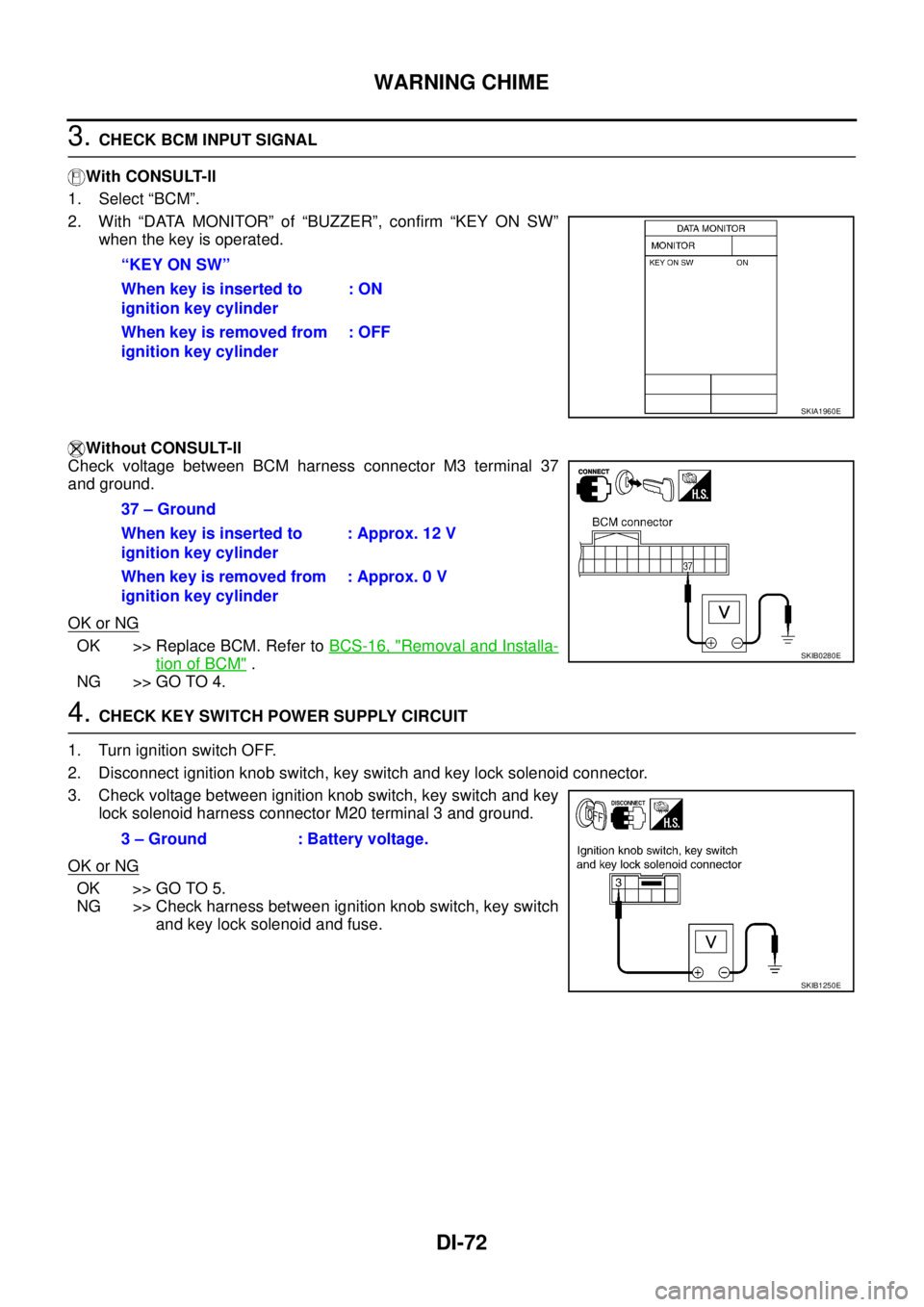
2. With “DATA MONITOR” of “BUZZER”, confirm “KEY ON SW”
when the key is operated.
Without CONSULT-ll
Check voltage between BCM harness connector M3 terminal 37
and ground.
OK or NG
OK >> Replace BCM. Refer to BCS-16, "Removal and Installa-
tion of BCM" .
NG >> GO TO 4.
4. CHECK KEY SWITCH POWER SUPPLY CIRCUIT
1. Turn ignition switch OFF.
2. Disconnect ignition knob switch, key switch and key lock solenoid connector.
3. Check voltage between ignition knob switch, key switch and key
lock solenoid harness connector M20 terminal 3 and ground.
OK or NG
OK >> GO TO 5.
NG >> Check harness between ignition knob switch, key switch
and key lock solenoid and fuse. “KEY ON SW”
When key is inserted to
ignition key cylinder: ON
When key is removed from
ignition key cylinder: OFF
SKIA1960E
37 – Ground
When key is inserted to
ignition key cylinder: Approx. 12 V
When key is removed from
ignition key cylinder: Approx. 0 V
SKIB0280E
3 – Ground : Battery voltage.
SKIB1250E
Page 1280 of 3502
DI-74
WARNING CHIME
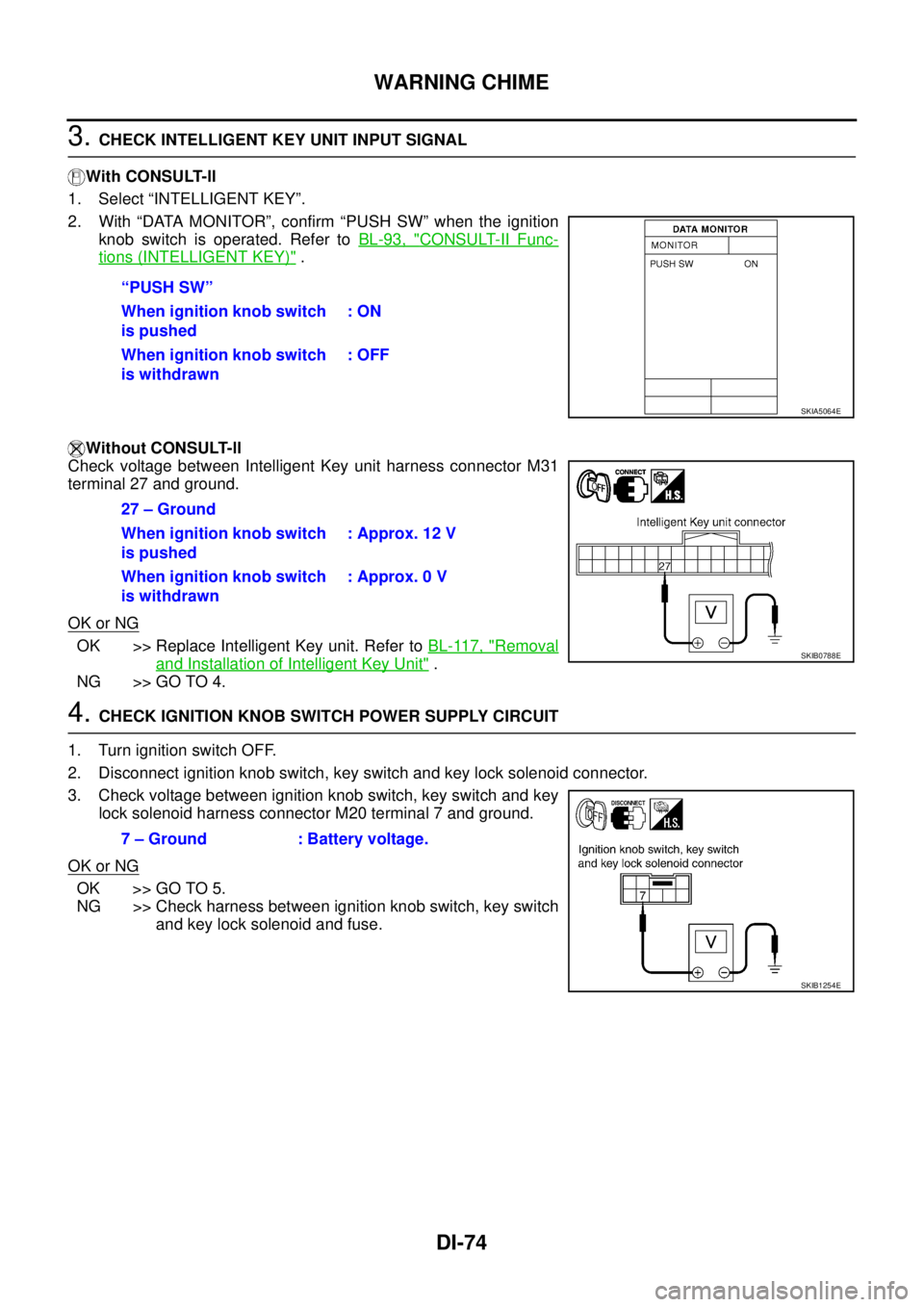
3. CHECK INTELLIGENT KEY UNIT INPUT SIGNAL
With CONSULT-ll
1. Select “INTELLIGENT KEY”.
2. With “DATA MONITOR”, confirm “PUSH SW” when the ignition
knob switch is operated. Refer to BL-93, "
CONSULT-II Func-
tions (INTELLIGENT KEY)" .
Without CONSULT-ll
Check voltage between Intelligent Key unit harness connector M31
terminal 27 and ground.
OK or NG
OK >> Replace Intelligent Key unit. Refer to BL-117, "Removal
and Installation of Intelligent Key Unit" .
NG >> GO TO 4.
4. CHECK IGNITION KNOB SWITCH POWER SUPPLY CIRCUIT
1. Turn ignition switch OFF.
2. Disconnect ignition knob switch, key switch and key lock solenoid connector.
3. Check voltage between ignition knob switch, key switch and key
lock solenoid harness connector M20 terminal 7 and ground.
OK or NG
OK >> GO TO 5.
NG >> Check harness between ignition knob switch, key switch
and key lock solenoid and fuse. “PUSH SW”
When ignition knob switch
is pushed: ON
When ignition knob switch
is withdrawn: OFF
SKIA5064E
27 – Ground
When ignition knob switch
is pushed: Approx. 12 V
When ignition knob switch
is withdrawn: Approx. 0 V
SKIB0788E
7 – Ground : Battery voltage.
SKIB1254E
Page 1283 of 3502
EC-1
ENGINE CONTROL SYSTEM
B ENGINE
CONTENTS
C
D
E
F
G
H
I
J
K
L
M
SECTION EC
A
EC
ENGINE CONTROL SYSTEM
QR
INDEX FOR DTC ...................................................... 10
DTC No. Index ....................................................... 10
Alphabetical Index .................................................. 12
PRECAUTIONS ........................................................ 14
Precautions for Supplemental Restraint System
(SRS) “AIR BAG” and “SEAT BELT PRE-TEN-
SIONER” ................................................................ 14
On Board Diagnostic (OBD) System of Engine ...... 14
Precaution .............................................................. 14
PREPARATION ......................................................... 18
Special Service Tools ............................................. 18
Commercial Service Tools ...................................... 19
ENGINE CONTROL SYSTEM .................................. 20
System Diagram ..................................................... 20
Multiport Fuel Injection (MFI) System .................... 21
Electronic Ignition (EI) System ............................... 23
Fuel Cut Control (At No Load and High Engine
Speed) .................................................................... 24
AIR CONDITIONING CUT CONTROL ..................... 25
Input/Output Signal Chart ....................................... 25
CAN COMMUNICATION .......................................... 26
System Description ................................................ 26
EVAPORATIVE EMISSION SYSTEM ....................... 27
Description ............................................................. 27
Component Inspection ........................................... 29
POSITIVE CRANKCASE VENTILATION ................. 30
Description ............................................................. 30
Component Inspection ........................................... 30
NATS (NISSAN ANTI-THEFT SYSTEM) .................. 32
Description ............................................................. 32
ON BOARD DIAGNOSTIC (OBD) SYSTEM ............ 33
Introduction ............................................................ 33
Two Trip Detection Logic ........................................ 33
Emission-related Diagnostic Information ................ 33
Malfunction Indicator (MI) ....................................... 36
BASIC SERVICE PROCEDURE .............................. 40
Basic Inspection ..................................................... 40
Idle Speed and Ignition Timing Check .................... 45
Procedure After Replacing ECM ............................ 47Accelerator Pedal Released Position Learning ...... 47
Throttle Valve Closed Position Learning ................. 47
Idle Air Volume Learning ........................................ 47
Fuel Pressure Check .............................................. 49
TROUBLE DIAGNOSIS ............................................ 52
Trouble Diagnosis Introduction ............................... 52
DTC Inspection Priority Chart ................................. 58
Fail-Safe Chart ....................................................... 59
Symptom Matrix Chart ............................................ 60
Engine Control Component Parts Location ............ 64
Vacuum Hose Drawing ........................................... 69
Circuit Diagram ....................................................... 70
ECM Harness Connector Terminal Layout ............. 72
ECM Terminals and Reference Value ..................... 72
CONSULT-II Function (ENGINE) ............................ 80
CONSULT-II Reference Value in Data Monitor Mode
... 90
Major Sensor Reference Graph in Data Monitor
Mode ....................................................................... 93
TROUBLE DIAGNOSIS - SPECIFICATION VALUE ... 95
Description .............................................................. 95
Testing Condition .................................................... 95
Inspection Procedure .............................................. 95
Diagnostic Procedure ............................................. 96
TROUBLE DIAGNOSIS FOR INTERMITTENT INCI-
DENT .......................................................................105
Description ............................................................105
Diagnostic Procedure ...........................................105
POWER SUPPLY AND GROUND CIRCUIT ...........106
Wiring Diagram .....................................................106
Diagnostic Procedure ...........................................107
Ground Inspection .................................................111
DTC U1000, U1001 CAN COMMUNICATION LINE .113
Description ............................................................113
On Board Diagnosis Logic ....................................113
DTC Confirmation Procedure ...............................113
Wiring Diagram .....................................................114
Diagnostic Procedure ...........................................115
DTC P0011 IVT CONTROL .....................................116
Description ............................................................116
Page 1284 of 3502

EC-2 CONSULT-II Reference Value in Data Monitor Mode
.116
On Board Diagnosis Logic ....................................117
DTC Confirmation Procedure ...............................117
Overall Function Check ........................................118
Wiring Diagram .....................................................119
Diagnostic Procedure ...........................................121
Component Inspection ..........................................123
Removal and Installation ......................................123
DTC P0102, P0103 MAF SENSOR .........................124
Component Description ........................................124
CONSULT-II Reference Value in Data Monitor Mode
.124
On Board Diagnosis Logic ....................................124
DTC Confirmation Procedure ...............................124
Wiring Diagram .....................................................126
Diagnostic Procedure ...........................................127
Component Inspection ..........................................129
Removal and Installation ......................................130
DTC P0117, P0118 ECT SENSOR ..........................131
Component Description ........................................131
On Board Diagnosis Logic ....................................131
DTC Confirmation Procedure ...............................132
Wiring Diagram .....................................................133
Diagnostic Procedure ...........................................134
Component Inspection ..........................................135
Removal and Installation ......................................135
DTC P0122, P0123 TP SENSOR ............................136
Component Description ........................................136
CONSULT-II Reference Value in Data Monitor Mode
.136
On Board Diagnosis Logic ....................................136
DTC Confirmation Procedure ...............................137
Wiring Diagram .....................................................138
Diagnostic Procedure ...........................................139
Component Inspection ..........................................142
Removal and Installation ......................................142
DTC P0132 HO2S1 .................................................143
Component Description ........................................143
CONSULT-II Reference Value in Data Monitor Mode
.143
On Board Diagnosis Logic ....................................143
DTC Confirmation Procedure ...............................144
Wiring Diagram .....................................................145
Diagnostic Procedure ...........................................146
Component Inspection ..........................................148
Removal and Installation ......................................149
DTC P0134 HO2S1 .................................................150
Component Description ........................................150
CONSULT-II Reference Value in Data Monitor Mode
.150
On Board Diagnosis Logic ....................................150
Overall Function Check ........................................151
Wiring Diagram .....................................................152
Diagnostic Procedure ...........................................153
Component Inspection ..........................................154
Removal and Installation ......................................156
DTC P0222, P0223 TP SENSOR ............................157
Component Description ........................................157CONSULT-II Reference Value in Data Monitor Mode
.157
On Board Diagnosis Logic ....................................157
DTC Confirmation Procedure ................................158
Wiring Diagram .....................................................159
Diagnostic Procedure ............................................160
Component Inspection ..........................................163
Removal and Installation .......................................163
DTC P0327, P0328 KS ............................................164
Component Description ........................................164
On Board Diagnosis Logic ....................................164
DTC Confirmation Procedure ................................164
Wiring Diagram .....................................................165
Diagnostic Procedure ............................................166
Component Inspection ..........................................168
Removal and Installation .......................................168
DTC P0335 CKP SENSOR (POS) ..........................169
Component Description ........................................169
CONSULT-II Reference Value in Data Monitor Mode
.169
On Board Diagnosis Logic ....................................169
DTC Confirmation Procedure ................................170
Wiring Diagram .....................................................171
Diagnostic Procedure ............................................173
Component Inspection ..........................................174
Removal and Installation .......................................175
DTC P0340 CMP SENSOR (PHASE) .....................176
Component Description ........................................176
CONSULT-II Reference Value in Data Monitor Mode
.176
On Board Diagnosis Logic ....................................176
DTC Confirmation Procedure ................................177
Wiring Diagram .....................................................178
Diagnostic Procedure ............................................179
Component Inspection ..........................................182
Removal and Installation .......................................182
DTC P0500 VSS ......................................................183
Description ............................................................183
On Board Diagnosis Logic ....................................183
DTC Confirmation Procedure ................................183
Overall Function Check .........................................184
Diagnostic Procedure ............................................184
DTC P0550 PSP SENSOR ......................................185
Component Description ........................................185
CONSULT-II Reference Value in Data Monitor Mode
.185
On Board Diagnosis Logic ....................................185
DTC Confirmation Procedure ................................185
Wiring Diagram .....................................................186
Diagnostic Procedure ............................................187
Component Inspection ..........................................189
Removal and Installation .......................................189
DTC P0605 ECM .....................................................190
Component Description ........................................190
On Board Diagnosis Logic ....................................190
DTC Confirmation Procedure ................................190
Diagnostic Procedure ............................................192
DTC P1065 ECM POWER SUPPLY ........................193
Component Description ........................................193
Page 1285 of 3502

EC-3
C
D
E
F
G
H
I
J
K
L
M
ECA
On Board Diagnosis Logic ................................... 193
DTC Confirmation Procedure ............................... 193
Wiring Diagram .................................................... 194
Diagnostic Procedure ........................................... 195
DTC P1121 ELECTRIC THROTTLE CONTROL
ACTUATOR ............................................................ 197
Component Description ........................................ 197
On Board Diagnosis Logic ................................... 197
DTC Confirmation Procedure ............................... 197
Diagnostic Procedure ........................................... 198
Removal and Installation ...................................... 199
DTC P1122 ELECTRIC THROTTLE CONTROL
FUNCTION .............................................................. 200
Description ........................................................... 200
On Board Diagnosis Logic ................................... 200
DTC Confirmation Procedure ............................... 200
Wiring Diagram .................................................... 201
Diagnostic Procedure ........................................... 202
Component Inspection ......................................... 206
Removal and Installation ...................................... 206
DTC P1124, P1126 THROTTLE CONTROL MOTOR
RELAY .................................................................... 207
Component Description ........................................ 207
CONSULT-II Reference Value in Data Monitor Mode
. 207
On Board Diagnosis Logic ................................... 207
DTC Confirmation Procedure ............................... 207
Wiring Diagram .................................................... 209
Diagnostic Procedure ........................................... 210
DTC P1128 THROTTLE CONTROL MOTOR ........ 213
Component Description ........................................ 213
On Board Diagnosis Logic ................................... 213
DTC Confirmation Procedure ............................... 213
Wiring Diagram .................................................... 214
Diagnostic Procedure ........................................... 215
Component Inspection ......................................... 216
Removal and Installation ...................................... 217
DTC P1217 ENGINE OVER TEMPERATURE ....... 218
System Description .............................................. 218
CONSULT-II Reference Value in Data Monitor Mode
. 219
On Board Diagnosis Logic ................................... 219
Overall Function Check ........................................ 220
Wiring Diagram .................................................... 222
Diagnostic Procedure ........................................... 224
Main 12 Causes of Overheating ........................... 227
Component Inspection ......................................... 228
DTC P1225 TP SENSOR ........................................ 229
Component Description ........................................ 229
On Board Diagnosis Logic ................................... 229
DTC Confirmation Procedure ............................... 229
Diagnostic Procedure ........................................... 230
Removal and Installation ...................................... 230
DTC P1226 TP SENSOR ........................................ 231
Component Description ........................................ 231
On Board Diagnosis Logic ................................... 231
DTC Confirmation Procedure ............................... 231
Diagnostic Procedure ........................................... 232
Removal and Installation ...................................... 232DTC P1229 SENSOR POWER SUPPLY ................233
On Board Diagnosis Logic ....................................233
DTC Confirmation Procedure ...............................233
Wiring Diagram .....................................................234
Diagnostic Procedure ...........................................236
DTC P1706 PNP SWITCH ......................................238
Component Description ........................................238
CONSULT-II Reference Value in Data Monitor Mode
.238
On Board Diagnosis Logic ....................................238
Overall Function Check ........................................238
Wiring Diagram .....................................................239
Diagnostic Procedure ...........................................240
DTC P1720 VSS ......................................................243
Description ............................................................243
CONSULT-II Reference Value in Data Monitor Mode
.243
On Board Diagnosis Logic ....................................243
DTC Confirmation Procedure ...............................243
Diagnostic Procedure ...........................................244
DTC P1805 BRAKE SWITCH .................................245
Description ............................................................245
CONSULT-II Reference Value in Data Monitor Mode
.245
On Board Diagnosis Logic ....................................245
DTC Confirmation Procedure ...............................245
Wiring Diagram .....................................................247
Diagnostic Procedure ...........................................248
Component Inspection ..........................................250
DTC P2122, P2123 APP SENSOR .........................251
Component Description ........................................251
CONSULT-II Reference Value in Data Monitor Mode
.251
On Board Diagnosis Logic ....................................251
DTC Confirmation Procedure ...............................252
Wiring Diagram .....................................................253
Diagnostic Procedure ...........................................254
Component Inspection ..........................................256
Removal and Installation ......................................257
DTC P2127, P2128 APP SENSOR .........................258
Component Description ........................................258
CONSULT-II Reference Value in Data Monitor Mode
.258
On Board Diagnosis Logic ....................................258
DTC Confirmation Procedure ...............................259
Wiring Diagram .....................................................260
Diagnostic Procedure ...........................................261
Component Inspection ..........................................264
Removal and Installation ......................................264
DTC P2135 TP SENSOR ........................................265
Component Description ........................................265
CONSULT-II Reference Value in Data Monitor Mode
.265
On Board Diagnosis Logic ....................................265
DTC Confirmation Procedure ...............................266
Wiring Diagram .....................................................267
Diagnostic Procedure ...........................................268
Component Inspection ..........................................271
Removal and Installation ......................................271