Page 74 of 265
When traveling with no heavy load or on a flat
road, select position 0.
WARNING
Xenon headlights are extremely bright
compared to conventional headlights. If
the xenon headlights hit the rearview
mirror of the vehicle ahead or the wind-
shield of the oncoming vehicle, the
driver of these vehicles may have diffi-
culty driving because of the brightness.
Use the headlight aiming control switch
to lower the light axis. See earlier in this
section for information on xenon head-
lights.DAYTIME RUNNING LIGHT SYSTEM
(CANADA ONLY)The fog lights automatically illuminate when the
engine is started. The daytime running lights
operate with the headlight switch in the OFF
position or in the
position.
The fog light may come on after turning the key
to the OFF position and immediately turning it to
the ON position. This is not a malfunction.The daytime running light will be turned off when
the headlight switch is turned to the AUTO or
position.
The daytime running light will remain on until the
ignition switch is turned to the ACC or OFF
position.
WARNING
When the daytime running light system
is active, tail lights on your vehicle are
not on. It is necessary at dusk to turn on
your headlights. Failure to do so could
cause an accident injuring yourself and
others.
INSTRUMENT BRIGHTNESS
CONTROLThe instrument brightness control operates
when the light switch is in the
or
position.
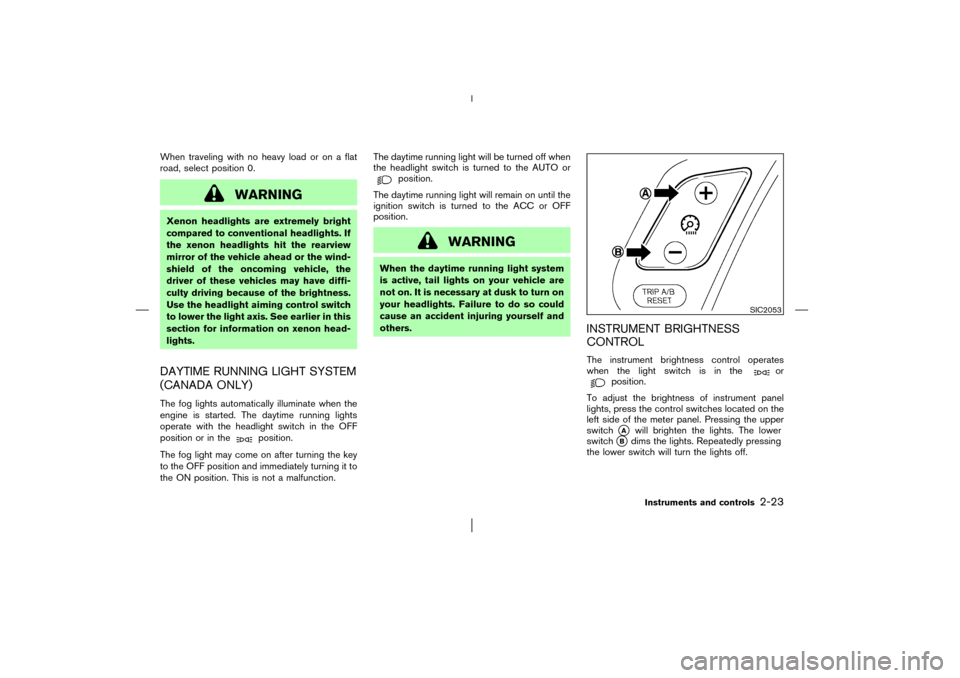
To adjust the brightness of instrument panel
lights, press the control switches located on the
left side of the meter panel. Pressing the upper
switch�A
will brighten the lights. The lower
switch
�B
dims the lights. Repeatedly pressing
the lower switch will turn the lights off.
SIC2053
Instruments and controls
2-23
�
03.1.28/Z50-D/V5.0
�
Page 75 of 265
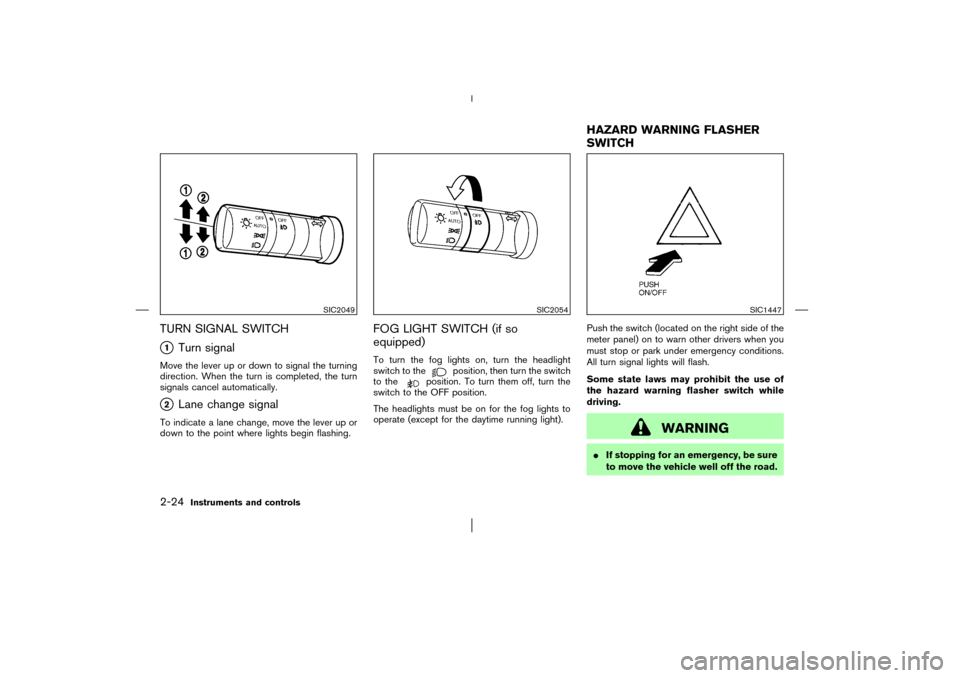
TURN SIGNAL SWITCH�1
Turn signal
Move the lever up or down to signal the turning
direction. When the turn is completed, the turn
signals cancel automatically.�2
Lane change signal
To indicate a lane change, move the lever up or
down to the point where lights begin flashing.
FOG LIGHT SWITCH (if so
equipped)To turn the fog lights on, turn the headlight
switch to the
position, then turn the switch
to the
position. To turn them off, turn the
switch to the OFF position.
The headlights must be on for the fog lights to
operate (except for the daytime running light).Push the switch (located on the right side of the
meter panel) on to warn other drivers when you
must stop or park under emergency conditions.
All turn signal lights will flash.
Some state laws may prohibit the use of
the hazard warning flasher switch while
driving.
WARNING
�If stopping for an emergency, be sure
to move the vehicle well off the road.
SIC2049
SIC2054
SIC1447
HAZARD WARNING FLASHER
SWITCH
2-24
Instruments and controls
�
03.1.28/Z50-D/V5.0
�
Page 76 of 265
�Do not use the hazard warning flash-
ers while moving on the highway un-
less unusual circumstances force you
to drive so slowly that your vehicle
might become a hazard to other traf-
fic.
�Turn signals do not work when the
hazard warning flasher lights are on.
The flasher can be actuated with the ignition
switch either off or on.
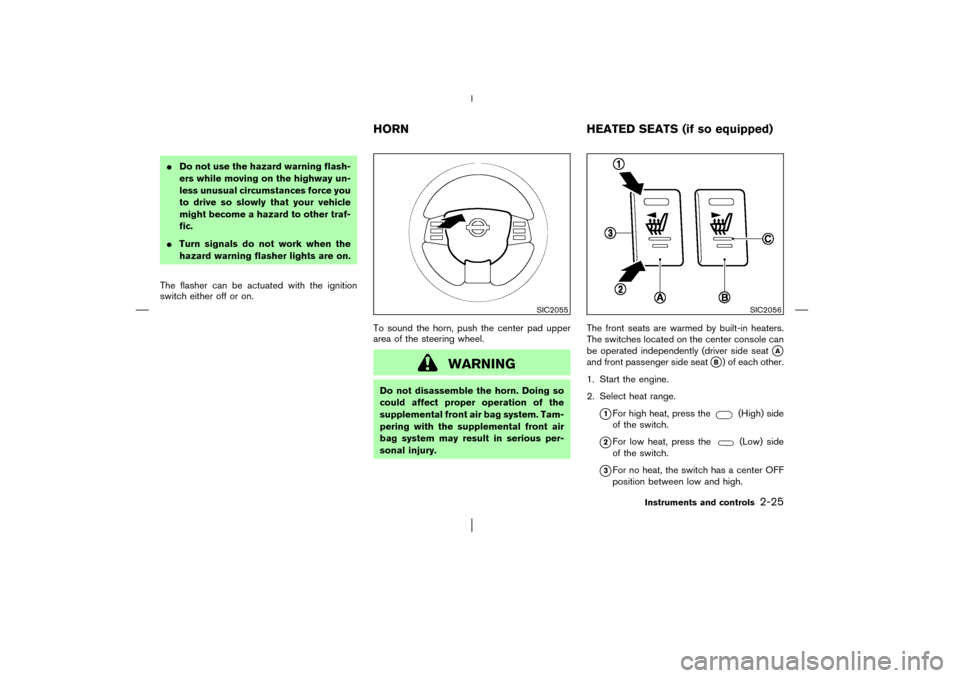
To sound the horn, push the center pad upper
area of the steering wheel.
WARNING
Do not disassemble the horn. Doing so
could affect proper operation of the
supplemental front air bag system. Tam-
pering with the supplemental front air
bag system may result in serious per-
sonal injury.The front seats are warmed by built-in heaters.
The switches located on the center console can
be operated independently (driver side seat
�A
and front passenger side seat
�B) of each other.
1. Start the engine.
2. Select heat range.
�1For high heat, press the
(High) side
of the switch.
�2For low heat, press the
(Low) side
of the switch.
�3For no heat, the switch has a center OFF
position between low and high.
SIC2055
SIC2056
HORNHEATED SEATS (if so equipped)
Instruments and controls
2-25
�
03.1.28/Z50-D/V5.0
�
Page 79 of 265
running. (If the engine is stopped,
this could result in a discharged bat-
tery.)
�Avoid using when the air conditioner,
headlights or rear window defroster
is on.
�Before inserting or disconnecting a
plug, be sure to turn off the power
switch of electrical accessory being
used or the ACC power of the vehicle.
�Push the plug in as far as it will go. If
good contact is not made, the plug
may overheat or the internal tem-
perature fuse may blow.
�When not in use, be sure to replace
the cover. Do not allow water to con-
tact the socket.
COIN BOX
WARNING
The coin box should not be used while
driving so full attention may be given to
vehicle operation.
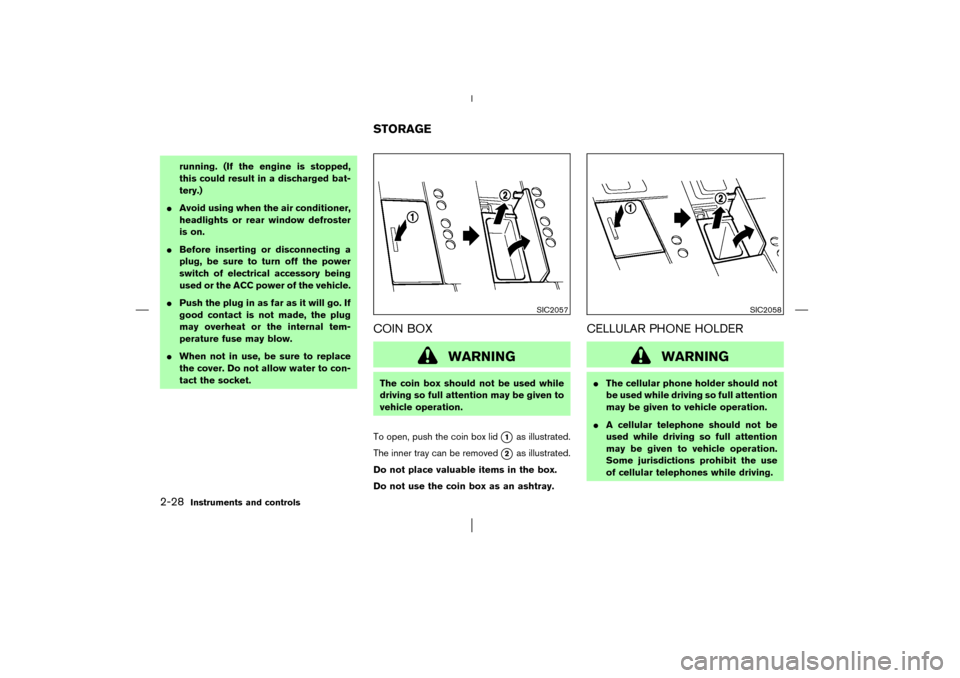
To open, push the coin box lid
�1
as illustrated.
The inner tray can be removed
�2
as illustrated.
Do not place valuable items in the box.
Do not use the coin box as an ashtray.
CELLULAR PHONE HOLDER
WARNING
�The cellular phone holder should not
be used while driving so full attention
may be given to vehicle operation.
�A cellular telephone should not be
used while driving so full attention
may be given to vehicle operation.
Some jurisdictions prohibit the use
of cellular telephones while driving.
SIC2057
SIC2058
STORAGE
2-28
Instruments and controls
�
03.1.28/Z50-D/V5.0
�
Page 80 of 265
�If a conversation in a moving vehicle
requires you to take notes, pull off
the road to a safe location and stop
your vehicle before doing so.
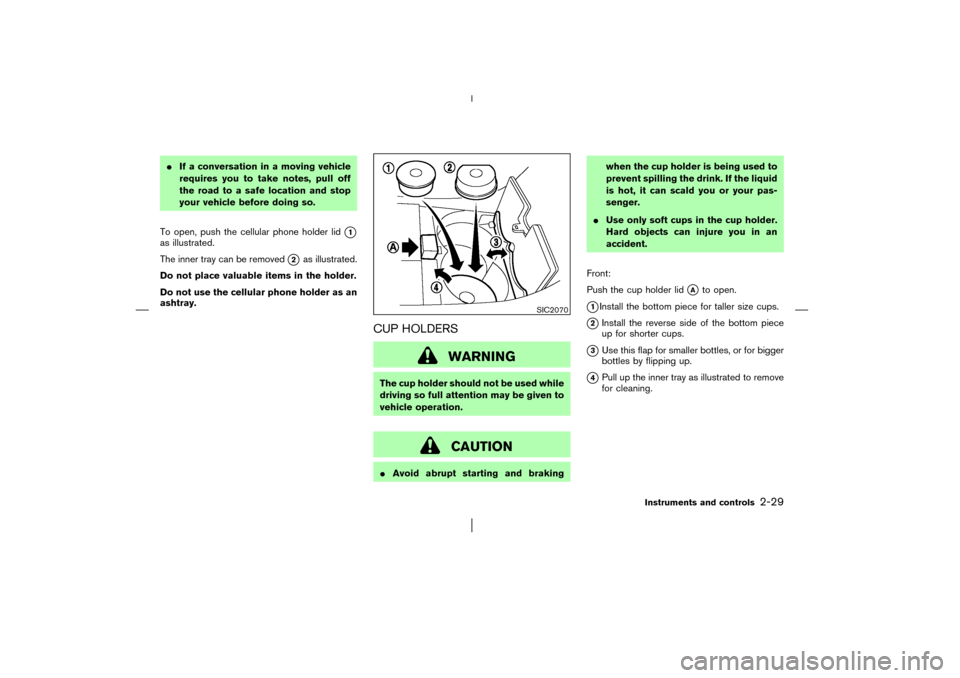
To open, push the cellular phone holder lid
�1
as illustrated.
The inner tray can be removed
�2
as illustrated.
Do not place valuable items in the holder.
Do not use the cellular phone holder as an
ashtray.
CUP HOLDERS
WARNING
The cup holder should not be used while
driving so full attention may be given to
vehicle operation.
CAUTION
�Avoid abrupt starting and brakingwhen the cup holder is being used to
prevent spilling the drink. If the liquid
is hot, it can scald you or your pas-
senger.
�Use only soft cups in the cup holder.
Hard objects can injure you in an
accident.
Front:
Push the cup holder lid
�A
to open.
�1Install the bottom piece for taller size cups.
�2Install the reverse side of the bottom piece
up for shorter cups.
�3Use this flap for smaller bottles, or for bigger
bottles by flipping up.
�4Pull up the inner tray as illustrated to remove
for cleaning.
SIC2070
Instruments and controls
2-29
�
03.1.28/Z50-D/V5.0
�
Page 81 of 265
Rear:
Push
�1
the cup holder to open.
GLOVE BOXWhen locking or unlocking the glove box, use
the master key.
The glove box may be opened by pulling the
handle.
WARNING
Keep glove box lid closed while driving
to help prevent injury in an accident or a
sudden stop.
SIC2067
SIC2059
2-30
Instruments and controls
�
03.1.28/Z50-D/V5.0
�
Page 82 of 265
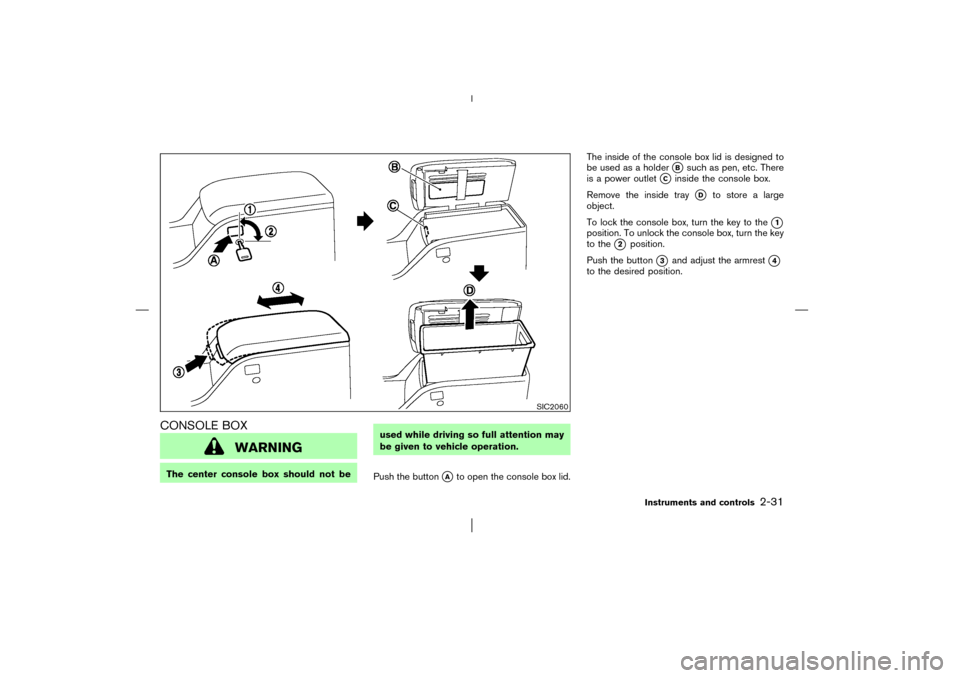
CONSOLE BOX
WARNING
The center console box should not beused while driving so full attention may
be given to vehicle operation.
Push the button
�A
to open the console box lid.The inside of the console box lid is designed to
be used as a holder
�B
such as pen, etc. There
is a power outlet
�C
inside the console box.
Remove the inside tray
�D
to store a large
object.
To lock the console box, turn the key to the
�1
position. To unlock the console box, turn the key
to the
�2
position.
Push the button
�3
and adjust the armrest
�4
to the desired position.
SIC2060
Instruments and controls
2-31
�
03.1.28/Z50-D/V5.0
�
Page 83 of 265
CARGO NET (if so equipped)The cargo net helps keep packages in the cargo
area from moving around while your vehicle is
driven.
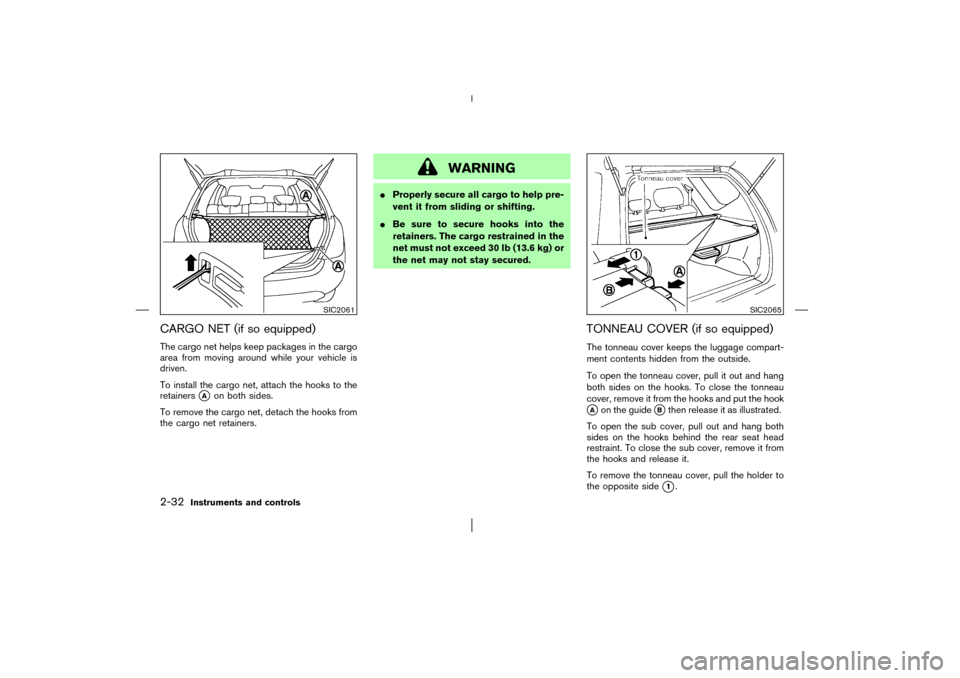
To install the cargo net, attach the hooks to the
retainers
�A
on both sides.
To remove the cargo net, detach the hooks from
the cargo net retainers.
WARNING
�Properly secure all cargo to help pre-
vent it from sliding or shifting.
�Be sure to secure hooks into the
retainers. The cargo restrained in the
net must not exceed 30 lb (13.6 kg) or
the net may not stay secured.
TONNEAU COVER (if so equipped)The tonneau cover keeps the luggage compart-
ment contents hidden from the outside.
To open the tonneau cover, pull it out and hang
both sides on the hooks. To close the tonneau
cover, remove it from the hooks and put the hook�Aon the guide
�Bthen release it as illustrated.
To open the subcover, pull out and hang both
sides on the hooks behind the rear seat head
restraint. To close the subcover, remove it from
the hooks and release it.
To remove the tonneau cover, pull the holder to
the opposite side�1.
SIC2061
SIC2065
2-32
Instruments and controls
�
03.1.28/Z50-D/V5.0
�