Page 2824 of 3189
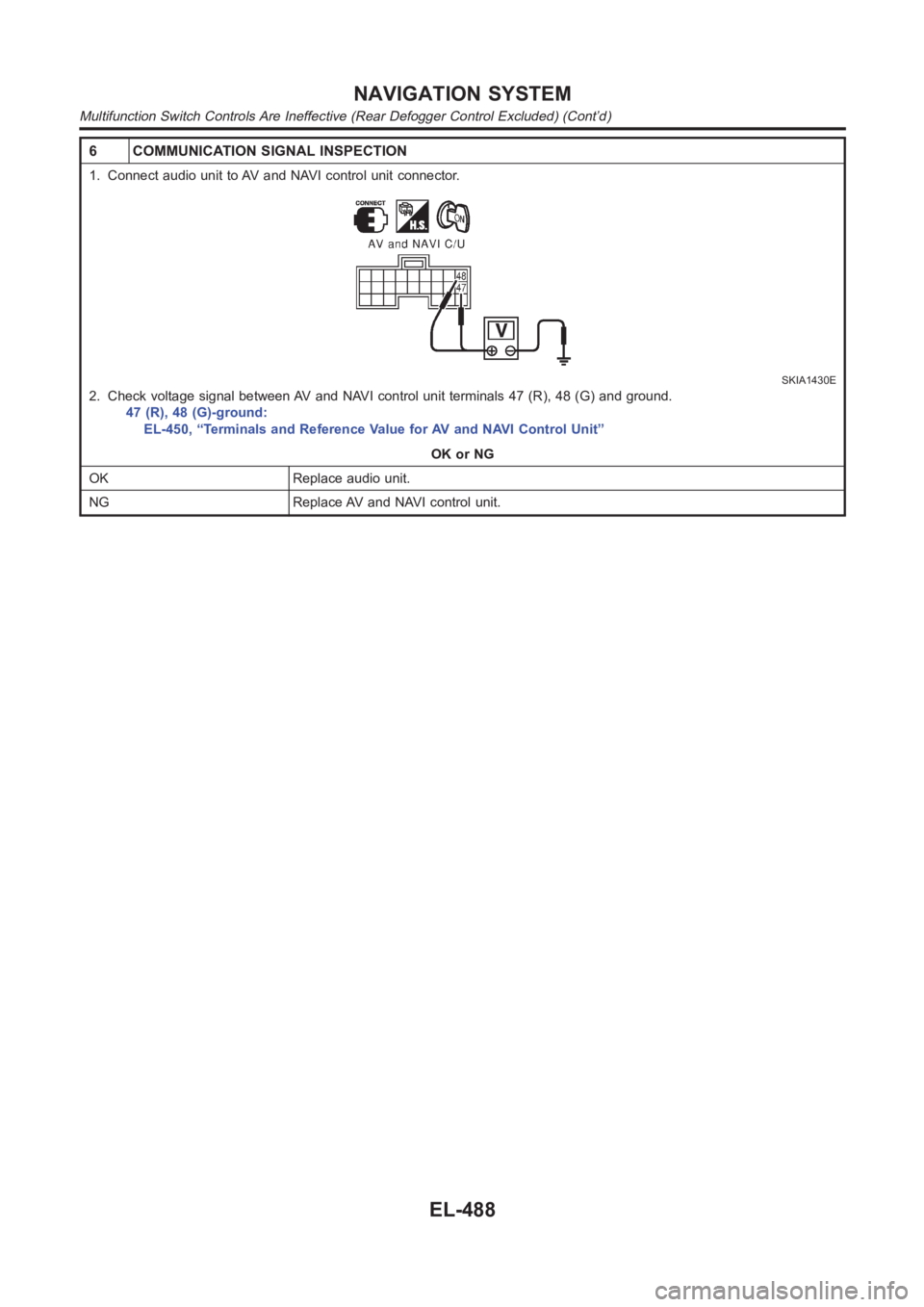
6 COMMUNICATION SIGNAL INSPECTION
1. Connect audio unit to AV and NAVI control unit connector.
SKIA1430E
2. Check voltage signal between AV and NAVI control unit terminals 47 (R), 48 (G) and ground.
47 (R), 48 (G)-ground:
EL-450, “Terminals and Reference Value for AV and NAVI Control Unit”
OK or NG
OK Replace audio unit.
NG Replace AV and NAVI control unit.
NAVIGATION SYSTEM
Multifunction Switch Controls Are Ineffective (Rear Defogger Control Excluded) (Cont’d)
EL-488
Page 2827 of 3189
Rear Defogger Does Not OperateNJEL0618
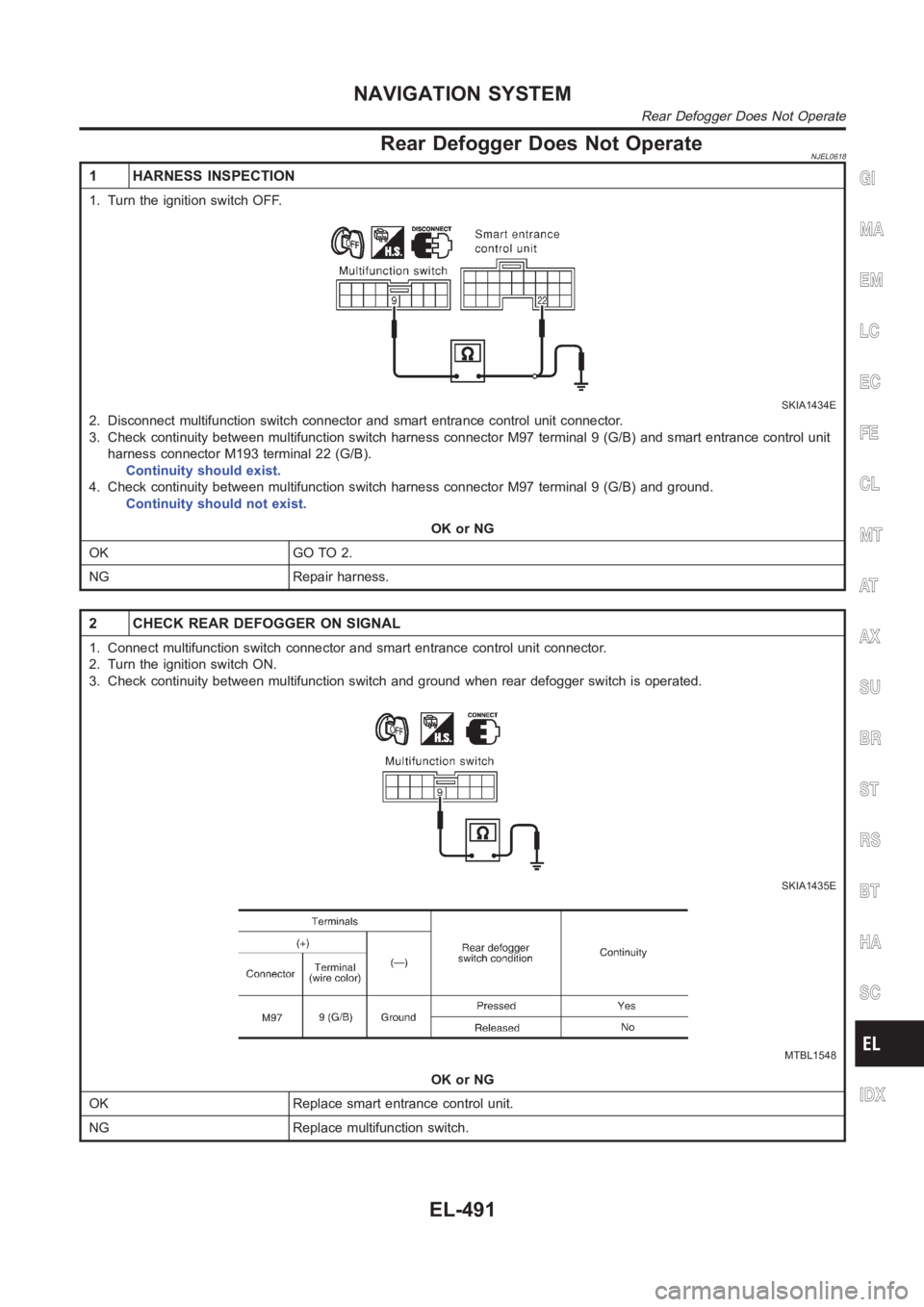
1 HARNESS INSPECTION
1. Turn the ignition switch OFF.
SKIA1434E
2. Disconnect multifunction switch connector and smart entrance controlunit connector.
3. Check continuity between multifunction switch harness connector M97 terminal 9 (G/B) and smart entrance control unit
harness connector M193 terminal 22 (G/B).
Continuity should exist.
4. Check continuity between multifunction switch harness connector M97 terminal 9 (G/B) and ground.
Continuity should not exist.
OK or NG
OK GO TO 2.
NG Repair harness.
2 CHECK REAR DEFOGGER ON SIGNAL
1. Connect multifunction switch connector and smart entrance control unit connector.
2. Turn the ignition switch ON.
3. Check continuity between multifunction switch and ground when rear defogger switch is operated.
SKIA1435E
MTBL1548
OK or NG
OK Replace smart entrance control unit.
NG Replace multifunction switch.
GI
MA
EM
LC
EC
FE
CL
MT
AT
AX
SU
BR
ST
RS
BT
HA
SC
IDX
NAVIGATION SYSTEM
Rear Defogger Does Not Operate
EL-491
Page 2828 of 3189
Rear Defogger Indicator Lamp Does Not
Illuminate
NJEL0619
1 CHECK POSITION OF IGNITION SWITCH
Is ignition switch ON?
YesorNo
Ye s G O T O 2 .
No Rear defogger does not operate if ignition switch is not ON.
2 CHECK OPERATION OF REAR DEFOGGER
Does rear defogger operate when rear defogger switch is turned ON? (Does fogging disappear?)
YesorNo
Ye s G O T O 3 .
No Check rear defogger system. Refer to EL-183, “Rear Defogger Does Not Operate”.
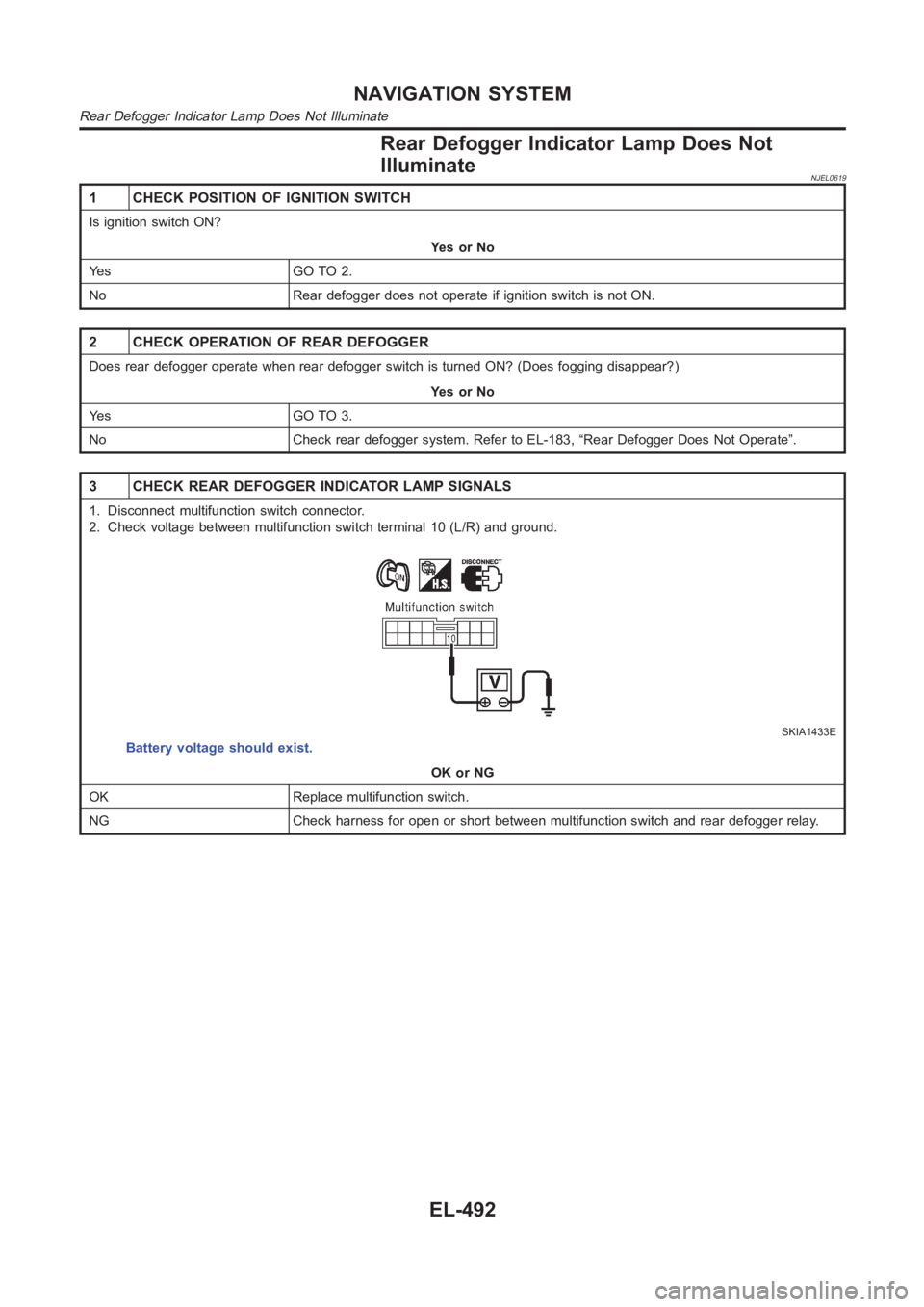
3 CHECK REAR DEFOGGER INDICATOR LAMP SIGNALS
1. Disconnect multifunction switch connector.
2. Check voltage between multifunction switch terminal 10 (L/R) and ground.
SKIA1433E
Battery voltage should exist.
OK or NG
OK Replace multifunction switch.
NG Check harness for open or short between multifunction switch and rear defogger relay.
NAVIGATION SYSTEM
Rear Defogger Indicator Lamp Does Not Illuminate
EL-492
Page 2832 of 3189
Display Does Not Change When Screen
Adjustment Is Performed
NJEL0624
1 CHECK SYMPTOM
Do other systems operate properly?
Do operate. Replace the display unit.
Do not operate. Check the problem again.
Day/Night Display Switching Is Not Done. Night
Illumination for AV and NAVI Control Unit Does
Not Illuminate
NJEL0625
1 VEHICLE SIGNAL CHECK
1. Start the engine.
2. Diagnose the following items with EL-462, “VEHICLE SIGNALS” in CONFIRMATION/ADJUSTMENT mode.
Lighting switch position 1: ON
Lighting switch OFF: OFF
OK or NG
OK Replace AV and NAVI control unit.
NG EL-472, “Illumination Control Signal Check”.
On Multifunction Switch, a Specific Switch
Does Not Operate in All Conditions
NJEL0626
1
Replace multifunction switch.
Driving Information Is Inaccurate. Maintenance
Information Is Inaccurate
NJEL0627
1 VEHICLE SPEED SIGNAL INSPECTION
Check vehicle speed signal. EL-471, “Vehicle Speed Signal Check”.
OK or NG
OK Replace AV and NAVI control unit.
NG Check combination meter system. EL-339, “Combination Meter Self-Diagnosis”
NAVIGATION SYSTEM
Display Does Not Change When Screen Adjustment Is Performed
EL-496