2003 NISSAN 350Z phone
[x] Cancel search: phonePage 4 of 227

NISSAN CUSTOMER CARE PROGRAM
NISSAN CARES ...
Both NISSAN and your NISSAN dealer are dedicated to serving all your automotive needs. Your satisfaction with your vehicle and your NISSAN dealer
are our primary concerns. Your NISSAN dealer is always available to assist you with all your automobile sales and service needs.
However, if there is something that your
NISSAN dealer cannot assist you with or you
would like to provide NISSAN directly with
comments or questions, please contact our
(NISSAN's) Consumer Affairs Department us-
ing our toll-free number:For U.S. mainland customers
1-800-NISSAN-1
(1-800-647-7261)
For Hawaii customers
(808) 836-0888 (Oahu Number)
For Canadian customers
1-800-387-0122
The Consumer Affairs Department will ask for
the following information:
Ð Your name, address, and telephone
number
Ð Vehicle identification number (on dash panel)
Ð Date of purchase
Ð Current odometer reading
Ð Your NISSAN dealer's name
Ð Your comments or questions
ORYou can write to NISSAN with the information
on the left at:
For U.S. mainland and Alaska customers
Nissan North America, Inc.
Consumer Affairs Department
P.O. Box 191
Gardena, California 90248-0191
For Hawaii customers
Nissan Motor Corporation in Hawaii
2880 Kilihau St.
Honolulu, Hawaii 96819
For Canada customers
Nissan Canada Inc.
5290 Orbitor Drive
Mississauga, Ontario L4W 4Z5
We appreciate your interest in NISSAN and thank you for buying a quality NISSAN vehicle.
Z
02.9.13/Z33-D/V5.0
X
Page 66 of 227
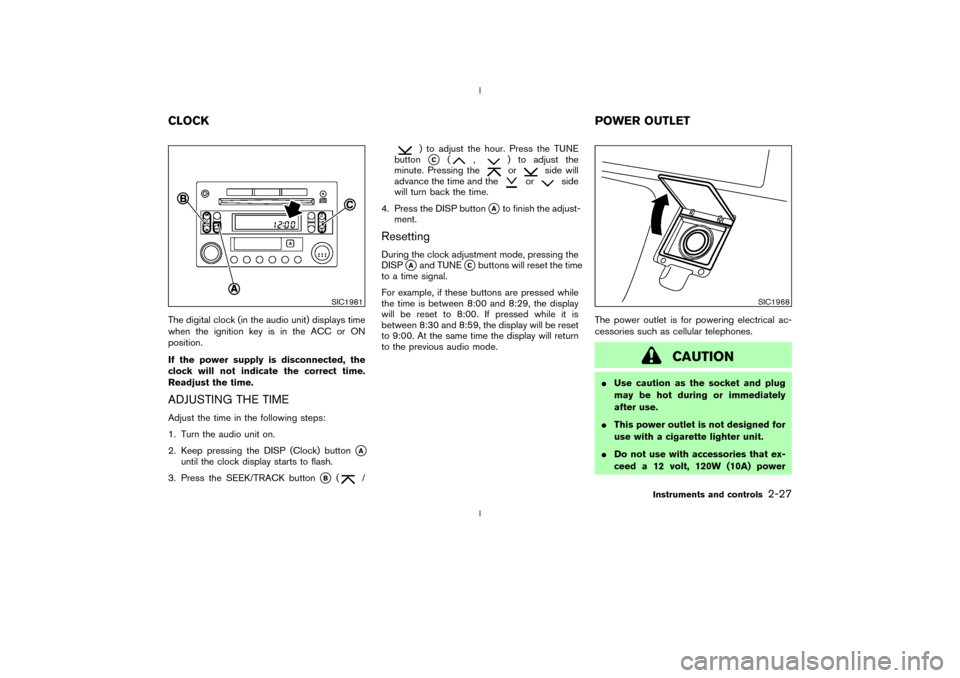
The digital clock (in the audio unit) displays time
when the ignition key is in the ACC or ON
position.
If the power supply is disconnected, the
clock will not indicate the correct time.
Readjust the time.ADJUSTING THE TIMEAdjust the time in the following steps:
1. Turn the audio unit on.
2. Keep pressing the DISP (Clock) button
qA
until the clock display starts to flash.
3. Press the SEEK/TRACK button
qB
(
/
) to adjust the hour. Press the TUNE
buttonqC
(
,
) to adjust the
minute. Pressing theor
side will
advance the time and the
or
side
will turn back the time.
4. Press the DISP button
qAto finish the adjust-
ment.
ResettingDuring the clock adjustment mode, pressing the
DISP
qAand TUNE
qCbuttons will reset the time
to a time signal.
For example, if these buttons are pressed while
the time is between 8:00 and 8:29, the display
will be reset to 8:00. If pressed while it is
between 8:30 and 8:59, the display will be reset
to 9:00. At the same time the display will return
to the previous audio mode.The power outlet is for powering electrical ac-
cessories such as cellular telephones.
CAUTION
IUse caution as the socket and plug
may be hot during or immediately
after use.
IThis power outlet is not designed for
use with a cigarette lighter unit.
IDo not use with accessories that ex-
ceed a 12 volt, 120W (10A) power
SIC1981
SIC1968
CLOCKPOWER OUTLET
Instruments and controls
2-27
Z
02.9.13/Z33-D/V5.0
X
Page 78 of 227

light flashes rapidly (indicating successful pro-
gramming).
NOTE:
If programming a garage door opener, etc.,
it is advised to unplug the device during
the ªcyclingº process to prevent possible
damage to the garage door opener compo-
nents.OPERATING THE HomeLinkUNIVERSAL TRANSCEIVERThe HomeLink
Universal Transceiver (once
programmed) may now be used to activate the
garage door, etc. To operate, simply press the
appropriate programmed HomeLink
Universal
Transceiver button. The red indicator light will
illuminate while the signal is being transmitted.
PROGRAMMING TROUBLE
DIAGNOSISIf the HomeLink
does not quickly learn the
hand-held transmitter information:
Ireplace the hand-held transmitter batteries
with new batteries.
Iposition the hand-held transmitter with its
battery area facing away from the HomeLink
surface.Ipress and hold both the HomeLink
and
hand-held transmitter buttons without inter-
ruption.
Iposition the hand-held transmitter 2 to 5
inches (50 to 127 mm) away from the
HomeLink
surface. Hold the transmitter in
that position for up to 15 seconds. If
HomeLinkis not programmed within that
time, try holding the transmitter in another
position - keeping the indicator light in view at
all times.
If you continue to have programming difficulties,
please contact the NISSAN Consumer Affairs
Department. The phone numbers are located in
the Foreword of this Owner's Manual.
CLEARING THE PROGRAMMED
INFORMATIONIndividual buttons cannot be cleared, however to
clear all programming, press and hold the two
outside buttons and release when the indicator
light begins to flash (approximately 20 seconds).
REPROGRAMMING A SINGLE
HomeLink
BUTTON
To reprogram a HomeLink
Universal Trans-
ceiver button, complete the following.
1. Press and hold the desired HomeLink
but-
ton.Do notrelease the button until step 4
has been completed.
2. When the indicator light begins to flash
slowly (after 20 seconds), position the hand-
held transmitter 2 to 5 inches (50 to 127 mm)
away from the HomeLink
surface.
3. Press and hold the hand-held transmitter
button.
4. The HomeLink
indicator light will flash, first
slowly and then rapidly. When the indicator
light begins to flash rapidly, release both
buttons.
The HomeLinkUniversal Transceiver button
has now been reprogrammed. The new device
can be activated by pushing the HomeLink
button that was just programmed. This proce-
dure will not affect any other programmed
HomeLink
buttons.
IF YOUR VEHICLE IS STOLENIf your vehicle is stolen, you should change the
codes of any non-rolling code device that has
Instruments and controls
2-39
Z
02.9.13/Z33-D/V5.0
X
Page 98 of 227

4 Heater, air conditioner and audio systemsVentilators ................................................................................ 4-2
Center ................................................................................. 4-2
Side ..................................................................................... 4-2
Heater and air conditioner (Automatic) ............................ 4-3
Automatic operation ........................................................ 4-4
Manual operation .............................................................. 4-4
Operating tips ................................................................... 4-5
Servicing air conditioner ...................................................... 4-6
Audio system........................................................................... 4-6FM radio reception .......................................................... 4-7
AM radio reception .......................................................... 4-7
Audio operation precautions ......................................... 4-7
FM-AM radio with compact disc (CD) player .......... 4-9
FM-AM radio with cassette player and compact disc
(CD) changer .................................................................. 4-13
CD care and cleaning .................................................. 4-19
Antenna ............................................................................ 4-19
Car phone or CB radio .................................................... 4-19
Z
02.9.13/Z33-D/V5.0
X
Page 103 of 227
The air conditioning system in your NISSAN
vehicle is charged with a refrigerant designed
with the environment in mind.This refrigerant
will not harm the earth's ozone layer.How-
ever, special charging equipment and lubricant
are required when servicing your NISSAN air
conditioner. Using improper refrigerants or lubri-
cants will cause severe damage to your air
conditioning system. See ªCapacities and rec-
ommended fuel/lubricantsº in the ª9. Technical
and consumer informationº section for air con-
ditioning system refrigerant and lubricant recom-
mendations.
Your NISSAN dealer will be able to service your
environmentally friendly air conditioning system.
WARNING
The air conditioner system contains re-
frigerant under high pressure. To avoid
personal injury, any air conditioner ser-
vice should be done only by an experi-
enced technician with proper equip-
ment.Turn the ignition key to ACC or ON and press
the POWER, FM or AM button to turn on the
radio. If you listen to the radio with the engine not
running, the key should be turned to the ACC
position.
Radio reception is affected by station signal
strength, distance from radio transmitter, build-
ings, bridges, mountains and other external in-
fluences. Intermittent changes in reception qual-
ity normally are caused by these external
influences.
Using a cellular phone in or near the ve-
hicle may influence radio reception quality.
Radio receptionYour radio system is equipped with state-of-the-
art electronic circuits to enhance radio recep-
tion. These circuits are designed to extend re-
ception range, and to enhance the quality of that
reception.
However there are some general characteristics
of both FM and AM radio signals that can affect
radio reception quality in a moving vehicle, even
when the finest equipment is used. These char-
acteristics are completely normal in a given
reception area, and do not indicate any malfunc-
tion in your radio system.
Remember that a moving vehicle is not the ideal
place to listen to a radio. Because of the move-ment, reception conditions will constantly
change. Buildings, terrain, signal distance and
interference from other vehicles can work
against ideal reception. Described below are
some of the factors that can affect your radio
reception.
SERVICING AIR CONDITIONER AUDIO SYSTEM4-6
Heater, air conditioner and audio systems
Z
02.9.13/Z33-D/V5.0
X
Page 116 of 227
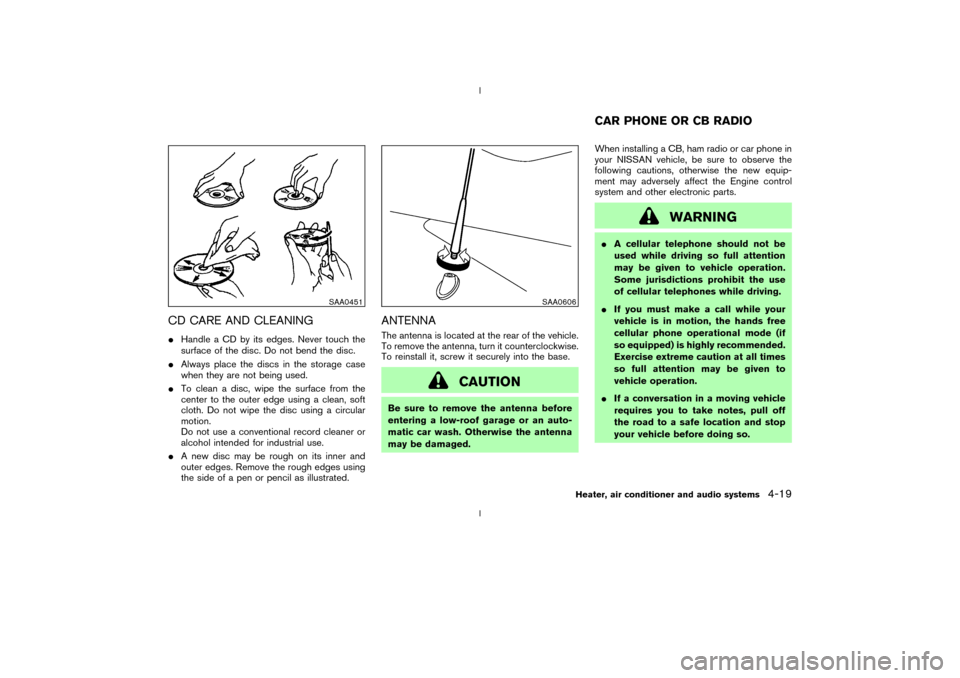
CD CARE AND CLEANINGIHandle a CD by its edges. Never touch the
surface of the disc. Do not bend the disc.
IAlways place the discs in the storage case
when they are not being used.
ITo clean a disc, wipe the surface from the
center to the outer edge using a clean, soft
cloth. Do not wipe the disc using a circular
motion.
Do not use a conventional record cleaner or
alcohol intended for industrial use.
IA new disc may be rough on its inner and
outer edges. Remove the rough edges using
the side of a pen or pencil as illustrated.
ANTENNAThe antenna is located at the rear of the vehicle.
To remove the antenna, turn it counterclockwise.
To reinstall it, screw it securely into the base.
CAUTION
Be sure to remove the antenna before
entering a low-roof garage or an auto-
matic car wash. Otherwise the antenna
may be damaged.When installing a CB, ham radio or car phone in
your NISSAN vehicle, be sure to observe the
following cautions, otherwise the new equip-
ment may adversely affect the Engine control
system and other electronic parts.
WARNING
IA cellular telephone should not be
used while driving so full attention
may be given to vehicle operation.
Some jurisdictions prohibit the use
of cellular telephones while driving.
IIf you must make a call while your
vehicle is in motion, the hands free
cellular phone operational mode (if
so equipped) is highly recommended.
Exercise extreme caution at all times
so full attention may be given to
vehicle operation.
IIf a conversation in a moving vehicle
requires you to take notes, pull off
the road to a safe location and stop
your vehicle before doing so.
SAA0451
SAA0606
CAR PHONE OR CB RADIO
Heater, air conditioner and audio systems
4-19
Z
02.9.13/Z33-D/V5.0
X
Page 217 of 227

A genuine NISSAN Service Manual is the best
source of service and repair information for your
vehicle. Filled with wiring diagrams, illustrations
and step-by-step diagnostic and adjustment
procedures, this manual is the same one used by
the factory trained technicians working at autho-
rized NISSAN dealerships. Also available are
genuine NISSAN Owner's Manuals, and genu-
ine NISSAN Service and Owner's Manuals for
older NISSAN models.In the USA:
For current pricing and availability of genuine
NISSAN Service Manualsfor the 2000 model
year and later, contact:
Tweddle Litho Company
1-800-639-8841
www.nissan-techinfo.com
For current pricing and availability of genuine
NISSAN Service Manualsfor the 1999 model
year and prior, see a NISSAN dealer, or contact:
DDS Distribution Services, Ltd.
20770 Westwood Dr.
Strongsville OH 44136
1-800-247-5321For current pricing and availability of genuine
NISSAN Owner's Manualsfor the 2003
model year and prior, see a NISSAN dealer, or
contact:
DDS Distribution Services, Ltd.
20770 Westwood Dr.
Strongsville OH 44136
1-800-247-5321
In Canada:
To purchase a copy of a genuine NISSAN
Service Manual or Owner's Manual please con-
tact your nearest NISSAN dealer. For the phone
number and location of a NISSAN Dealer in your
area call the NISSAN Satisfaction Center at
1-800-387-0122 and a bilingual
NISSAN representative will assist you.
Also available are Genuine NISSAN Service and
Owner's Manuals for older NISSAN models.
IN THE EVENT OF A COLLISIONUnfortunately, accidents do occur. In this unlikely
event, there is some important information you
should know. Many insurance companies rou-
tinely authorize the use of non-genuine collision
parts in order to cut costs, among other reasons.
OWNER'S MANUAL/SERVICE
MANUAL ORDER INFORMATION9-22
Technical and consumer information
Z
02.9.13/Z33-D/V5.0
X
Page 220 of 227

10 Index
A
ABS (Anti-lock brake system)................................ 5-20
Air bag ON/OFF switch .......................................... 1-21
Air bag system
Front (See supplemental front air bag
system) .................................................................. 1-11
Side and curtain (See supplemental side air bag
and curtain side-impact air bag system) ...... 1-13
Air bag warning labels ............................................. 1-16
Air bag warning light .................................... 1-16, 2-14
Air cleaner housing filter.......................................... 8-18
Air conditioner
Air conditioner operation ..................................... 4-3
Air conditioner service ................................ 4-3, 4-6
Air conditioner specification label .................. 9-12
Air conditioning system refrigerant and lubricant
recommendations ......................................... 4-6, 9-6
Heater and air conditioner (automatic)............ 4-3
Alcohol, drugs and driving......................................... 5-5
Anchor point location, Top tether strap ............. 1-27
Anti-lock Brake System (ABS) .............................. 5-20
Anti-lock brake warning light.................................. 2-11
Appearance care
Exterior appearance care .................................... 7-2
Interior appearance care ..................................... 7-4
Ashtrays (See cigarette lighter and ashtray)...... 2-28
Audible reminders ..................................................... 2-16
Audio operation precautions ..................................... 4-7Audio system ................................................................ 4-6
Autochanger
Compact Disc (CD) ........................................... 4-17
Automatic
Anti-glare inside mirror ...................................... 3-13
Automatic transmission fluid (ATF) ................ 8-12
Driving with automatic transmission........ 5-5, 5-9
Transmission selector lever lock release ...... 5-12
Avoiding collision and rollover .................................. 5-4
B
Battery .......................................................................... 8-15
Battery saver system ......................................... 2-22
Battery replacement, (See remote keyless entry
system) ........................................................................... 3-7
Before starting the engine ......................................... 5-8
Belts (See drive belts) ............................................. 8-17
Brake
Anti-lock brake system (ABS) ......................... 5-20
Brake and clutch fluid ....................................... 8-13
Brake booster ...................................................... 8-22
Brake fluid............................................................. 8-13
Brake pedal .......................................................... 8-21
Brake pedal check ............................................. 8-21
Brake system ....................................................... 5-20
Parking brake check............................... 5-14, 8-21
Parking brake operation .................................... 5-14
Warning light ....................................................... 2-12Break-in schedule ..................................................... 5-17
Bulb check/instrument panel.................................. 2-11
Bulb replacement ...................................................... 8-25
C
Capacities and recommended fuel/lubricants...... 9-2
Car phone or CB radio............................................ 4-19
Cassette player (See audio system) .................... 4-16
Catalytic converter, Three way catalyst ................. 5-3
CD care and cleaning .............................................. 4-19
Child restraints ........................................................... 1-25
Top tether strap anchor point location ......... 1-27
Installation on front passenger seat............... 1-28
Precautions on child restraints........................ 1-25
With top tether strap ......................................... 1-27
Child safety ................................................................. 1-20
Chimes, Audible reminders..................................... 2-16
Cigarette lighter and ashtray .................................. 2-28
Circuit breaker, Fusible link .................................... 8-23
Cleaning exterior and interior .......................... 7-2, 7-4
Clock ............................................................................ 2-27
Clutch fluid.................................................................. 8-14
Cold weather driving ................................................ 5-24
Compact Disc (CD) changer operation .............. 4-17
Compact Disc (CD) player (See audio
system) ......................................................................... 4-11
Compact spare tire ................................................... 8-33
Console box................................................................ 2-31
Z
02.9.13/Z33-D/V5.0
X