Page 47 of 150
44 Audio
Tape operation
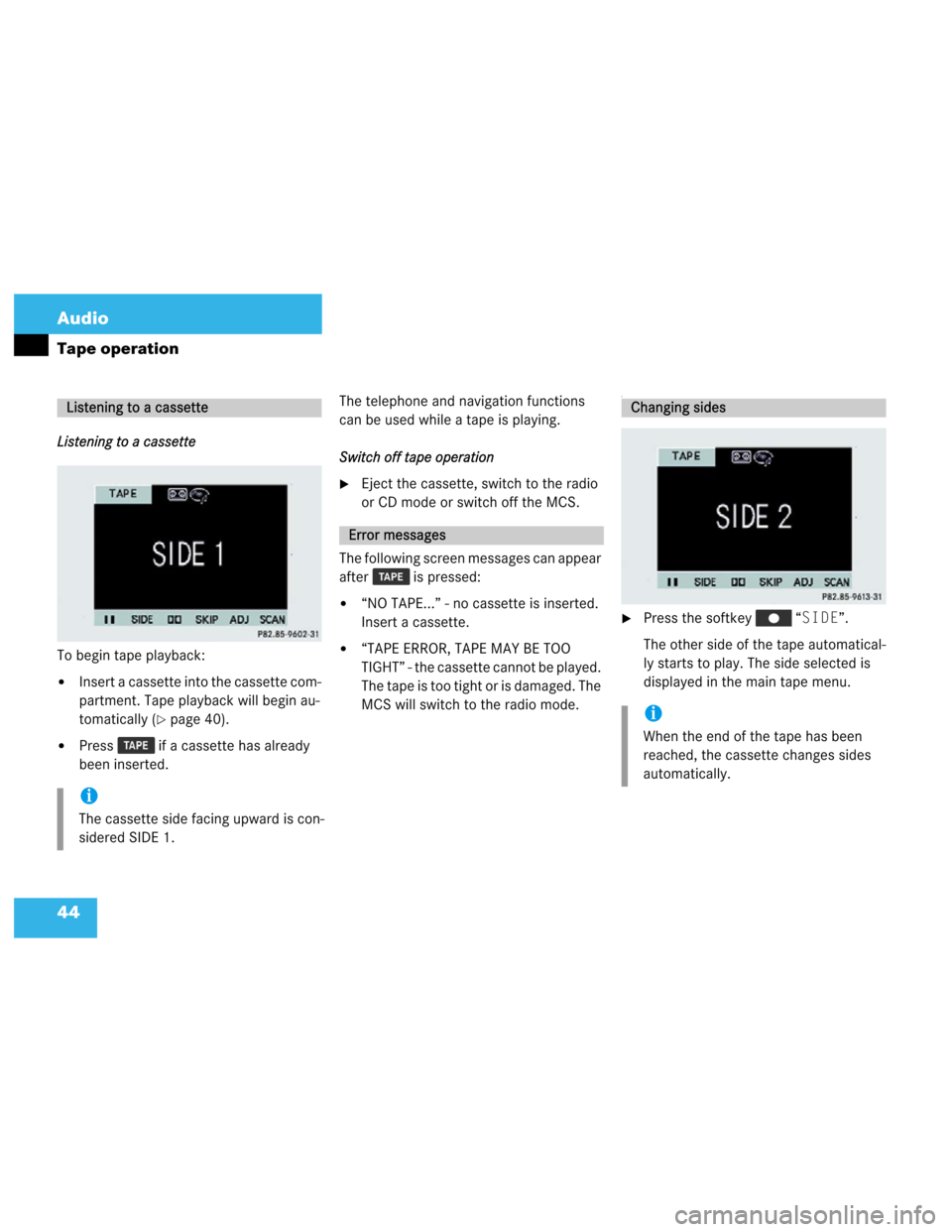
Listening to a cassette
To begin tape playback:
�Insert a cassette into the cassette com-
partment. Tape playback will begin au-
tomatically (
�page 40).
�Press if a cassette has already
been inserted.The telephone and navigation functions
can be used while a tape is playing.
Switch off tape operation
�Eject the cassette, switch to the radio
or CD mode or switch off the MCS.
The following screen messages can appear
after is pressed:
�“NO TAPE...” - no cassette is inserted.
Insert a cassette.
�“TAPE ERROR, TAPE MAY BE TOO
TIGHT” - the cassette cannot be played.
The tape is too tight or is damaged. The
MCS will switch to the radio mode.
I
�Press the softkey “SIDE”.
The other side of the tape automatical-
ly starts to play. The side selected is
displayed in the main tape menu.
Listening to a cassette
i
The cassette side facing upward is con-
sidered SIDE 1.
Error messages
Changing sides
i
When the end of the tape has been
reached, the cassette changes sides
automatically.
Page 50 of 150
47 Audio
Tape operation
Cancelling blank skip
�Press the highlighted softkey
“SKIP”.
This function provides the optimum play-
back of tapes recorded with Dolby B.Activating Dolby B�Press the softkey .
The Dolby B mode is activated when
the is highlighted in the softkey
menu.
Cancelling Dolby B
�Press the highlighted softkey
.
Activating pause
�Press the softkey “II”.
The tape stops playing and “PAUSE” is
displayed in the tape menu.
Cancelling pause
�Press the softkey “PLAY”.
Dolby B (noise reduction)
i
The Dolby noise reduction system is
manufactured under license by Dolby
Laboratories Licensing Corporation.
The word Dolby and the double-D sym-
bol are trademarks of Dolby Labo-
ratories Licensing Corporation.
Pause
i
The tape stops playing if you send or
receive a phone call.
Page 59 of 150
56 Audio
CD operation
MCS with single CD player*
CD operation begins:
�Automatically, by inserting a CD
(
�page 51)
The playback starts at Track 1.
�By pressing when a CD is already
inserted in the CD slot, playback starts
at Track 1.
The telephone functions can be used while
a CD is playing.
To stop CD playback
�Eject the CD, switch to the radio or
tape mode, or switch off the MCS.MCS with CD changer*
CD changer operation begins:
�Press when CDs are inserted in
the CD changer (
�page 52).
The playback starts at Track 1 of the
first CD.
The telephone and navigation functions
can be used while a CD is playing.
To stop CD playback
�Switch to the radio or tape mode or
switch off the MCS.
Switching CD operation on and off
i
The navigation functions can be used
while a CD is playing in the CD-changer.
MCS with navigation system:
Navigation is only possible when a nav-
igation DVD is inserted in the single CD
player.
Page 65 of 150
62 Audio
CD operation
Activating the pause
�Press the softkey “II”.
The CD stops playing and “PAUSE”
appears in the display.
Cancelling pause
�Press the softkey “PLAY”.When this function is selected, the main
CD menu displays the current track and
elapsed time.
�Press the softkey “TIME”.
The total numbers of tracks and the to-
tal playing time are displayed.
To return
�Press the softkey “TIME”.
or
�Wait 4 seconds to automatically return
to the main CD menu.
Pause
i
The CD stops playing if a phone call is
sent or received.
Elapsed time display
Page 68 of 150
65 Telephone
Importantnotes
Telephoneoperation
Emergencycall
Page 69 of 150

66 Telephone
Important notes
Important notes
In this chapter you will find detailed infor-
mation on telephone functions, emergency
call, and service numbers.
1 Observe all legal requirements.�
Please read the “Telephone” chapter
before attempting to operate your tele-
phone.
�Always drive with extreme caution
when you operate the hands-free tele-
phone.
�For safety reasons, you should not use
the mobile telephone handset to make
a call while driving the vehicle.
�If the signal strength is very weak (dis-
play in the symbol field of all menus),
wait until reception improves before
making a call.
WarningG
Some jurisdictions prohibit the driver from
using a cellular telephone while driving a ve-
hicle. Whether or not prohibited by law, for
safety reasons, the driver should not use the
cellular telephone while the vehicle is in mo-
tion. Stop the vehicle in a safe location be-
fore answering or placing a call.
If you nonetheless choose to use the cellular
phone while driving, please use the hands-
free device and be sure to pay attention to
the traffic situation at all times. Use the cel-
lular phone
1 only when road, weather and
traffic conditions permit.
Never operate radio transmitters equipped
with a built-in or attached antenna (i.e. with-
out being connected to an external antenna)
from inside the vehicle while the engine is
running. Doing so could lead to malfunction
of the vehicle’s electronic systems, possibly
resulting in an accident and/or personal in-
jury.
!
Radio transmitters, such as a portable
telephone or a citizens band unit,
should be used inside the vehicle only
if they are connected to a separate ex-
terior antenna that has been approved
by Mercedes-Benz.
Page 70 of 150

67 Telephone
Important notes
�Close the windows to reduce outside
noise when you use hands-free opera-
tion.
�A brief disconnection from the cellular
network is not a malfunction. A brief
disconnection can occur when the net-
work switches areas. The phone auto-
matically tries to sign on to a network
again.
�If the message “PLEASE ENTER
UNLOCK CODE” appears, enter the
unlock code to enable all telephone
functions.
Entering the unlock code (
�page 72).In the following situations, it is not possible
or not yet possible to use the telephone:
�The telephone is already unlocked but
is not registered or not yet registered in
the network.
The message “NO SERVICE” ap-
pears. The telephone tries to register
into an existing network. If the network
is available, the telephone is ready for
use.
The above message also appears if the
network is no longer available due to
weak signals.
�The message “TELEPHONE NOT
ATTACHED” appears.
Please attach the telephone.
�The message “PHONE IS OFF...”
appears.
Please switch on the telephone.
It is not possible to make a call in the fol-
lowing situations. One of the following
messages appears:
�“SYSTEM BUSY”
Dialing has failed because system is
busy.
�“NO SERVICE”
Dialing has failed because a network
cannot be received.
Page 71 of 150
68 Telephone
Telephone operation
Telephone operation
Quick reference


