Page 78 of 399
78 Safety and SecurityDriving safety systems
The SBC brake system is automatically ac-
tivated when you:�
unlock the vehicle with the key or the
KEYLESS-GO*
�
open the driver’s or passenger door
�
turn the key in the starter switch to
position1
�
in vehicles with KEYLESS-GO*, press
start/stop button on selector lever
once
�
depress the brake pedal
�
release the parking brake
Warning!
G
The SBC brake system requires electrical
power to operate.
A malfunction in the vehicle’s power supply
or electrical system may impair brake sys-
tem operation and switch it into its
limp-home (emergency operation) mode. In
such a case, the red brake warning lamp
(�page 291) and warning messages in the
instrument cluster (
�page 305) light up
while driving. To brake, the driver must then
apply significantly greater brake pedal pres-
sure and depress the pedal much further to
obtain the expected braking effect. If neces-
sary, apply full pressure to the brake pedal.
Brakes are only applied to the front wheels.
Stopping distance is increased!
If there is a malfunction in the SBC brake
system, we recommend that the vehicle be
transported with all wheels off the ground
using flatbed or appropriate wheel lift/dolly
equipment. A tow bar must be used if cir-
cumstances do not permit the use of the
recommended towing methods and the ve-
hicle requires towing with all four wheels on
the ground. Towing the vehicle with all four
wheels on the ground is only permissible
for distances up to 30 miles (50 km) and at
a speed not to exceed 30 mph (50 km/h).
For more information, refer to "Towing the
vehicle" (
�page 348).
ProCarManuals.com
Page 99 of 399
99 Controls in detail
Locking and unlocking
Separately unlocking the trunk�
Pull the mechanical key out of the
SmartKey (
�page 329).
�
Insert the mechanical key in the trunk
lid lock.
�
Turn the key completely to the left to
position1, see above.
You can now open the trunk (
�page 96).
Automatic central locking
The doors and the trunk automatically lock
when the ignition is switched on and the
wheels are turning at vehicle speeds of ap-
proximately 9 mph (15 km/h) or more.
You can open a locked door from the in-
side. Open door only when conditions are
safe to do so.
You can deactivate the automatic locking
mode over the control system
(
�page 142).
iUnlocking the trunk with the mechani-
cal key will trigger the anti-theft alarm
system. To cancel the alarm, do one of
the following:�
Press button Œor ‹on the
SmartKey.
�
Insert the SmartKey in the starter
switch.
iThe doors unlock automatically after an
accident if the force of the impact ex-
ceeds a preset threshold.
The vehicle automatically locks when
the ignition is switched on and the
wheels are turning at vehicle speeds of
approximately 9 mph (15 km/h) or
more. You could therefore lock yourself
out when the vehicle�
is pushed
�
is on a test stand
ProCarManuals.com
Page 102 of 399
102 Controls in detailSeats
SeatsInformation on seat adjustment can be
found in the "Getting started" section
(�page 35).
Easy-entry/exit feature*
With the easy-entry/exit feature activated,
the steering wheel tilts upwards and the
driver’s seat moves to the rear.
This allows easier entry into and exit from
the vehicle when the driver’s door is
opened. However, the engine must be
turned off.
When the SmartKey is inserted in the start-
er switch and the driver’s door is closed,
the steering wheel and the driver’s seat re-
turn to their last set positions.You can activate the following functions:
�
Steering column:
Only the steering column is adjusted.
�
Steering column and seat:
The steering column and the seat are
adjusted.
The easy-entry/exit feature can be
switched on or off in the individual setting
menu
Convenience
- Easy-entry feature
activate
(�page 143).
Warning!
G
You must ensure that no one can become
trapped or injured by the moving steering
wheel and driver’s seat when the
easy-entry / exit feature is activated, the
driver’s door is being opened and the engine
is turned off or the SmartKey removed from
the starter switch. Do not leave children un-
attended in the vehicle, or with access to an
unlocked vehicle. Unsupervised use of vehi-
cle equipment may cause serious personal
injury.
iTo cancel seat/steering wheel move-
ment, do one of the following:�
Press seat adjustment switch
(�page 28).
�
Move steering column stalk
(�page 38).
�
Press the memory switch
(�page 28).
ProCarManuals.com
Page 109 of 399

109 Controls in detail
Memory function
Memory function
You can store up to three different settings
per key.
The following settings are saved for each
stored position:�
Driver’s seat and backrest position
�
Steering wheel position
�
Driver’s side exterior rear view mirror
position
�
Passenger side exterior rear view mir-
ror position
�
Front passenger seat position
These key-dependent memory settings
can be deactivated if desired
(
�page 110).
!Prior to operating the vehicle, the driv-
er should check and adjust the seat
height, seat position fore and aft, and
backrest angle if necessary, to ensure
adequate control, reach and comfort.
The head restraint should also be ad-
justed for proper height. Also see the
section on airbags (
�page 57) for
more information on proper seat posi-
tioning.
In addition, adjust the steering wheel to
ensure adequate control, reach, opera-
tion and comfort. Both the inside and
outside rear view mirrors should be ad-
justed for adequate rear vision.
Fasten seat belts. Infants and small
children should be seated in a properly
secured restraint system that complies
with U.S. Federal Motor Vehicle Safety
Standard 213 and Canadian Motor Ve-
hicle Safety Standard 213.
Warning!
G
Do not activate the memory function while
driving. Activating the memory function
while driving could cause the driver to lose
control of the vehicle.
ProCarManuals.com
Page 110 of 399

110 Controls in detailMemory functionThe memory button is located on the door.
MMemory button
1,2,3Stored positions�
Be sure that the ignition is switched on
or the relevant door is open and the
SmartKey is inserted in the starter
switch.
Storing positions into memory�
Adjust the seats, steering wheel and
rear view mirrors to the desired posi-
tion (
�page 34).
�
Press memory buttonM.
�
Release memory button and press
stored position button 1, 2 or 3 within
three seconds.
All the settings are stored at the select-
ed position.
Recalling positions from memory�
On memory button, press and hold
stored position button1, 2 or3 until
the seat, steering wheel and rear view
mirrors have fully moved to the stored
positions.iReleasing the button immediately
stops movement to the stored posi-
tions.Warning!
G
Do not operate the power seats using the
memory button if the backrest is in an ex-
cessively reclined position. Doing so could
cause damage to front or rear seats.
First move backrest to an upright position.
ProCarManuals.com
Page 111 of 399
111 Controls in detail
Memory function
Storing parking position
For easier parking you can adjust the pas-
senger exterior rear view mirror so that you
can see the right rear wheel as soon as you
engage reverse gearR.
The exterior rear view mirror returns to its
previously stored driving position�
10 seconds after you put the gear se-
lector lever out of positionR
�
immediately once you exceed a speed
of approx. 6 mph (10 km/h)
�
immediately when you press the button
for the driver’s side mirror
You can store a parking position for the
passenger exterior rear view mirror for
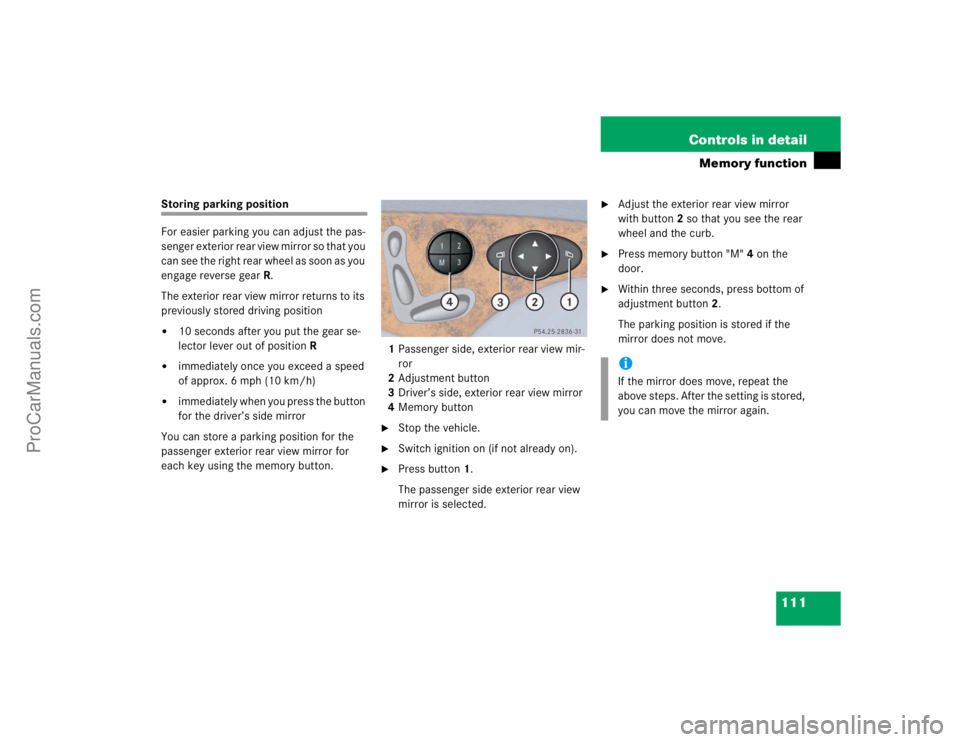
each key using the memory button.1Passenger side, exterior rear view mir-
ror
2Adjustment button
3Driver’s side, exterior rear view mirror
4Memory button
�
Stop the vehicle.
�
Switch ignition on (if not already on).
�
Press button1.
The passenger side exterior rear view
mirror is selected.
�
Adjust the exterior rear view mirror
with button2 so that you see the rear
wheel and the curb.
�
Press memory button "M" 4 on the
door.
�
Within three seconds, press bottom of
adjustment button2.
The parking position is stored if the
mirror does not move.iIf the mirror does move, repeat the
above steps. After the setting is stored,
you can move the mirror again.
ProCarManuals.com
Page 112 of 399

112 Controls in detailLighting
LightingFor notes on how to switch on the head-
lamps and use the turn signals, see the
"Getting started" section (
�page 46).
Exterior lamp switch
The exterior lamp switch is located on the
dashboard to the left of the steering wheel.MOff
UAutomatic headlamp mode
CParking lamps (also side marker
lamps, tail lamps, license plate
lamps, instrument panel lamps)
Canada only:
When engine is running, the low
beam is also switched on.
BParking lamps plus low beam or
high beam headlamps (combination
switch pushed forward).
ˆStanding lamps, right (turn left one
stop)
‚Standing lamps, left (turn left two
stops)
iIf you remove the key and open the
driver’s door while the parking lamps or
low beam headlamps are switched on,
then �
a warning sounds
�
$ appears in the multifunction
display
�
the message
Turn off lamps!
ap-
pears in the multifunction display
iWith the daytime running lamp mode
activated and the engine running, the
low beam headlamps cannot be
switched off manually.
ProCarManuals.com
Page 121 of 399

121 Controls in detail
Control system
Control system
The control system is activated as soon as
the key in the starter switch is turned to
position1. The control system enables you
to�
call up information about your vehicle
�
change vehicle settings.
For example, you can use the control sys-
tem to find out when your vehicle is next
due for service, to set the language for
messages in the instrument cluster dis-
play, and much more.
The control system relays information to
the multifunction display.
Multifunction display
1Segment ring
2Standard display
3Trip odometer
iThe displays for the audio systems (ra-
dio, CD player, cassette player) will ap-
pear in English, regardless of the
language selected.
Warning!
G
A driver’s attention to the road must always
be his /her primary focus when driving.
For your safety and the safety of others, se-
lecting features through the multifunction
steering wheel should only be done by the
driver when traffic and road conditions per-
mit it to be done safely.
Bear in mind that at a speed of just 30 mph
(approximately 50 km/h), your vehicle is
covering a distance of 44 feet (approximate-
ly 13.5 m) every second.
ProCarManuals.com