Page 166 of 399

166 Controls in detailClimate controlAdjusting air distribution
Adjusting manually
Use air distribution control5 (
�page 164)
to adjust the air distribution.
�
Press air distribution rocker switch5
(�page 164).
The indicator lamp on the U button
goes out.The current air distribution appears in
the air distribution display10.
Adjusting automatically
�
Press the U button.
The indicator lamp on the button
comes on. The air distribution and vol-
ume is adjusted automatically.
Adjusting center air outlets:
The thumbwheels for left2 and right6
center air outlets are automatically posi-
tioned for optimum interior airflow. In this
position, center air outlet4 and swiveling
left and right center outlets3 and5 are ful-
ly opened.Heating:
Only in manual mode is it possible to lower
the temperature in the headroom by regu-
lating the cold-airflow using thumbwheel7
(
�page 162).
Windshield fogged on the outside
�
Switch the windshield wipers on.
�
Press the U button.
Adjusting air volume
Adjusting manually
Five blower speeds are available.�
Press˜ to decrease orQ to in-
crease air volume to the desired level.
The
Auto
display disappears and the
automatic mode is switched off. The
selected blower speed is shown in the
display.
Symbol
Function
a
Directs air through the
center, side and rear
passenger compartment
air outlets
Z
Directs air to the win-
dows
X
Directs air into the entire
vehicle interior
Y
Directs air to the foot-
wells
ProCarManuals.com
Page 173 of 399
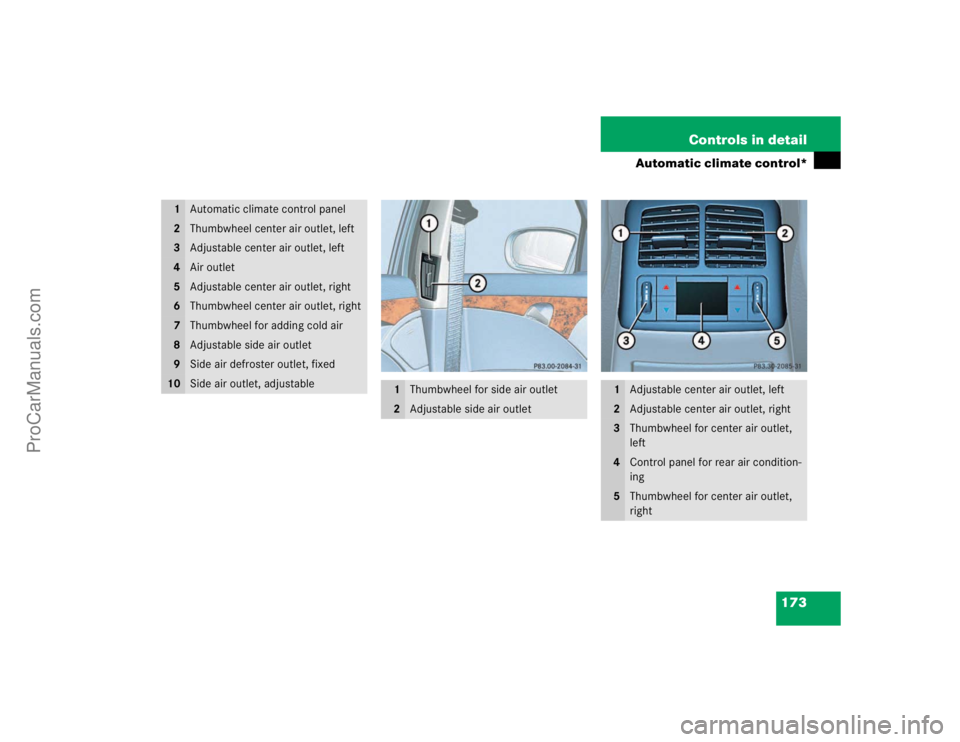
173 Controls in detail
Automatic climate control*
1
Automatic climate control panel
2
Thumbwheel center air outlet, left
3
Adjustable center air outlet, left
4
Air outlet
5
Adjustable center air outlet, right
6
Thumbwheel center air outlet, right
7
Thumbwheel for adding cold air
8
Adjustable side air outlet
9
Side air defroster outlet, fixed
10
Side air outlet, adjustable
1
Thumbwheel for side air outlet
2
Adjustable side air outlet
1
Adjustable center air outlet, left
2
Adjustable center air outlet, right
3
Thumbwheel for center air outlet,
left
4
Control panel for rear air condition-
ing
5
Thumbwheel for center air outlet,
right
ProCarManuals.com
Page 182 of 399

182 Controls in detailAutomatic climate control*Residual heat and ventilation
With the engine switched off, it is possible
to continue to heat or ventilate the interior
for up to 30 minutes. This feature makes
use of the residual heat produced by the
engine.
Activating�
Turn the key in the starter switch to
position1 o r r e m o ve i t f r o m t h e s t a r t e r
switch.
�
Press buttonT.
The indicator lamp on buttonT
comes on.
Deactivating
�
Press buttonT.
The indicator lamp on buttonT
goes out.The residual heat is automatically turned
off
�
when the ignition is switched on
�
after about 30 minutes
�
if the battery voltage drops
Rear air conditioning
1Swiveling left rear center air outlet
2Swiveling right rear center air outlet
3Thumbwheel, left rear center air outlet
4Temperature rocker switch, left
5Display
6Temperature rocker switch, right
7Thumbwheel, right rear center air out-
let
iHow long the system will provide heat-
ing depends on the coolant tempera-
ture and the temperature set by the
operator. The blower will run at speed
setting1 regardless of the air distribu-
tion control setting.
ProCarManuals.com
Page 194 of 399
194 Controls in detailDriving systems
Driving systemsThe following driving systems are ex-
plained on the following pages:�
Cruise control
�
Distronic*
�
AIRMATIC DC*
�
Park assist (Parktronic*)
The BAS, ABS, ESP and SBC driving sys-
tems are described in the "Safety and Se-
curity" section (
�page 73).
Cruise control
Cruise control automatically maintains the
speed you set for your vehicle.
Use of cruise control is recommended for
driving at a constant speed for extended
periods of time. You can set any speed
over 20 mph (30 km/h).
The cruise control function is operated by
means of the cruise control lever.
The cruise control lever is the uppermost
lever found on the left-hand side of the
steering column (
�page 20).
Warning!
G
Cruise control is a convenience system de-
signed to assist the driver during vehicle op-
eration. The driver must always remain
responsible for the vehicle speed and for
safe brake operation.
Only use cruise control if the traffic and
weather conditions make it advisable to
travel at a steady speed.�
The use of cruise control can be danger-
ous on winding roads or in heavy traffic
because conditions do not allow safe
driving at a steady speed.
�
The use of cruise control can be danger-
ous on slippery roads. Rapid changes in
tire traction can result in wheel spin and
loss of control.
�
Deactivate cruise control when driving
in fog.
The "Resume" function should only be oper-
ated if the driver is fully aware of the previ-
ously set speed and wishes to resume this
particular preset speed.
ProCarManuals.com
Page 198 of 399
198 Controls in detailDriving systemsWarning!
G
Distronic cannot take street and traffic con-
ditions into account. Only use Distronic if
the weather and traffic conditions make it
advisable to travel at a steady speed.Warning!
G
Use of Distronic can be dangerous on slip-
pery roads. Rapid changes in tire traction
can result in wheel spin and loss of control.
Distronic does not act upon adverse sight
distance conditions. Do not use Distronic
during conditions of fog and heavy rain,
snow or sleet.
Warning!
G
Close attention to road and traffic condi-
tions is imperative at all times, regardless of
whether or not Distronic is activated.
Use of Distronic can be dangerous on wind-
ing roads or in heavy traffic because condi-
tions do not allow safe driving at a steady
speed.
Distronic will not react to stationary objects
in the roadway (e.g. a stopped vehicle in a
traffic jam or a disabled vehicle). Distronic
will also not respond to oncoming vehicles.
Switch off Distronic:�
when changing from the left to the right
lane if vehicles are moving more slowly
in the left lane
�
when entering a turn lane or highway off
ramp
�
in complex driving situations, such as in
highway construction zones
In these situations, Distronic will continue to
maintain the set speed unless deactivated.
Distronic is designed and intended only to
maintain a set speed and keep a set dis-
tance from moving objects in front of it.Warning!
G
The "Resume" function should only be oper-
ated if the driver is fully aware of the previ-
ously set speed and wishes to resume this
particular preset speed.
ProCarManuals.com
Page 204 of 399
204 Controls in detailDriving systemsDeactivating Distronic
There are several ways to deactivate the
Distronic system:�
Briefly tip the cruise control lever in the
direction of arrow3 (
�page 201).
or
�
Step on the brake pedal.
Distronic will be deactivated. The last
speed set will be stored into memory.Distronic deactivates automatically when:
�
you set the parking brake
�
you drive slower than 25 mph
(Canada: 40 km/h)
�
the ESP is active (
�page 75) or you de-
activate the ESP
�
you move the transmission selector le-
ver into positionN
A si gnal wi ll s ound. T he
Distronic off
message appears in the multifunction
display for approximately five seconds.Setting the following distance in
Distronic
You can set the specified following dis-
tance for Distronic by varying the time set-
ting between 1.0 and 2.0 seconds. Using
this time setting and the current speed of
your vehicle, Distronic calculates and sets
the required following distance to the vehi-
cle ahead. The set distance will be shown
in the multifunction display field.
The thumbwheel for making the time set-
ting is located on the lower section of the
center console.
iThe following message will appear in
the multifunction display for approxi-
mately five seconds:
Distronic off
.
The last stored speed is deleted when
you turn off the engine.
Warning!
G
Distronic switches off and releases the
brakes when the vehicle decelerates below
the minimum speed of approx. 25 mph
( 40 km / h) by operation of the system. At
that time the driver must apply the brakes in
order to reduce vehicle speed further or
bring it to a stop.
Warning!
G
It is up to the driver to exercise discretion to
select the appropriate setting given road
conditions, traffic, driver’s preferred driving
style and applicable laws and driving recom-
mendations for safe following distance.
ProCarManuals.com
Page 205 of 399
205 Controls in detail
Driving systems
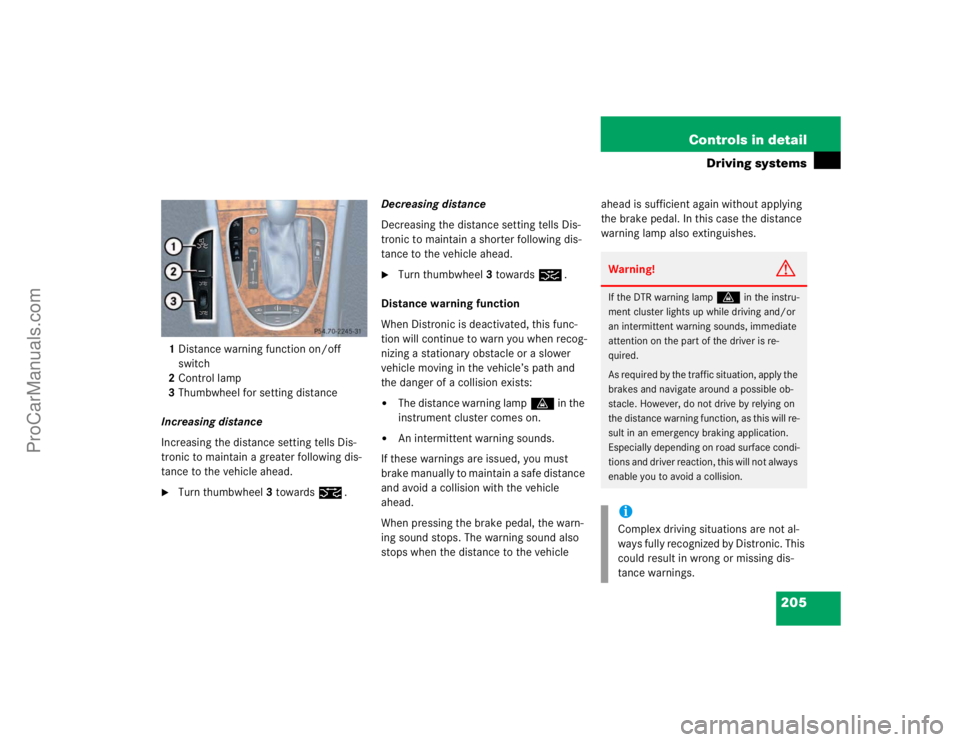
1Distance warning function on/off
switch
2Control lamp
3Thumbwheel for setting distance
Increasing distance
Increasing the distance setting tells Dis-
tronic to maintain a greater following dis-
tance to the vehicle ahead.�
Turn thumbwheel3 towards¯.Decreasing distance
Decreasing the distance setting tells Dis-
tronic to maintain a shorter following dis-
tance to the vehicle ahead.
�
Turn thumbwheel3 towards®.
Distance warning function
When Distronic is deactivated, this func-
tion will continue to warn you when recog-
nizing a stationary obstacle or a slower
vehicle moving in the vehicle’s path and
the danger of a collision exists:
�
The distance warning lampl in the
instrument cluster comes on.
�
An intermittent warning sounds.
If these warnings are issued, you must
brake manually to maintain a safe distance
and avoid a collision with the vehicle
ahead.
When pressing the brake pedal, the warn-
ing sound stops. The warning sound also
stops when the distance to the vehicle ahead is sufficient again without applying
the brake pedal. In this case the distance
warning lamp also extinguishes.
Warning!
G
If the DTR warning lamp
l
in the instru-
ment cluster lights up while driving and/or
an intermittent warning sounds, immediate
attention on the part of the driver is re-
quired.
As required by the traffic situation, apply the
brakes and navigate around a possible ob-
stacle. However, do not drive by relying on
the distance warning function, as this will re-
sult in an emergency braking application.
Especially depending on road surface condi-
tions and driver reaction, this will not always
enable you to avoid a collision.
iComplex driving situations are not al-
ways fully recognized by Distronic. This
could result in wrong or missing dis-
tance warnings.
ProCarManuals.com
Page 209 of 399
209 Controls in detail
Driving systems
AIRMATIC DC (Dual Control)*
Vehicle level control
Your vehicle automatically adjusts its ride
height to�
reduce fuel consumption
�
increase vehicle safety
The following vehicle chassis ride heights
are possible:
�
Normal
�
Raised
�
Lowered
The vehicle chassis ride height is raised or
lowered according to the selected level
setting and to the vehicle speed:
�
With increasing speed, ride height is re-
duced automatically by up to approxi-
mately 0.6 inch (15 mm) "Lowered"
level.
�
With decreasing speed, the ride height
is again raised to the "Normal" level.
Select the "Raised" level only when re-
quired by current driving conditions. Oth-
erwise
�
fuel consumption may increase
�
handling may be impairediThese height adjustments are so small
that you may not notice any change.
Warning!
G
To help avoid personal injury, keep hands
and feet away from wheel housing area, and
stay away from under the vehicle when low-
ering the vehicle chassis.
ProCarManuals.com