Page 26 of 399
26 At a glanceCenter consoleLower part
Item
Page
1
Ashtray
231
2
KEYLESS-GO* start/stop
button
33
3
Selector lever for automat-
ic transmission
43,
151
4
Parking assist (Parktronic
system)* deactivation
switch
212
5
Adaptive damping system
(ADS)* switch
209
Item
Page
6
Vehicle level control
switch*
209
7
Thumbwheel for setting
distance for Distronic*
204
8
Distance warning func-
tion* on/off switch
205
9
Program mode selector for
automatic transmission
155
ProCarManuals.com
Page 28 of 399
28 At a glanceDoor control panel
Door control panel
Item
Page
1
Door handle
93
2
Seat adjustment
35
3
Memory function (for stor-
ing seat, mirror and steer-
ing wheel settings)
109
4
Exterior rear view mirror
adjustment
39
5
Switches for opening/
closing front and rear side
windows, rear window
override switch
184
6
Trunk lid release switch,
Trunk lid opening/closing
system*
94
ProCarManuals.com
Page 34 of 399

34 Getting startedAdjusting
AdjustingSeatsWarning!
G
All seat, head restraint, steering wheel, and
rear view mirror adjustments, as well as fas-
tening of seat belts, must be done before
the vehicle is put into motion.Warning!
G
Do not adjust the driver’s seat while driving.
Adjusting the seat while driving could cause
the driver to lose control of the vehicle.
Never ride in a moving vehicle with the seat
back reclined. Sitting in an excessively re-
clined position can be dangerous. You could
slide under the seat belt in a collision. If you
slide under it, the belt would apply force at
the abdomen or neck. That could cause se-
rious or fatal injuries. The seat back and seat
belts provide the best restraint when the
wearer is in an upright position and belts are
properly positioned on the body.
Your seat must be adjusted so that you can
correctly fasten your seat belt (
�page 40).
Never place hands under the seat or near
any moving parts while a seat is being ad-
justed.
Warning!
G
When leaving the vehicle always remove the
key from the starter switch, take the Smart-
Key with KEYLESS-GO* (if so equipped) with
you, and lock your vehicle.
The power seats can also be operated with
the driver’s or passenger door open. Do not
leave children unattended in the vehicle, or
with access to an unlocked vehicle. Unsu-
pervised use of vehicle equipment may
cause serious personal injury.
Warning!
G
Children 12 years old and under must never
ride in the front seat, except in a
Mercedes-Benz authorized BabySmart
TM
compatible child seat, which operates with
the BabySmart
TM system installed in the ve-
hicle to deactivate the passenger front air-
bag when it is properly installed. Otherwise
they will be struck by the airbag when it in-
flates in a crash. If this happens, serious or
fatal injury will result.
According to accident statistics, children
are safer when properly restrained in the
rear seating positions than in the front seat-
ing positions. Infants and small children
must ride in back seats and be seated in an
appropriate infant or child restraint system,
which is properly secured with the vehicle’s
seat belt, fully in accordance with the child
seat manufacturer’s instructions.
ProCarManuals.com
Page 36 of 399

36 Getting startedAdjustingSeat cushion tilt�
Press the switch up or down in the di-
rection of arrow3 until your upper legs
are lightly supported.
Backrest tilt
�
Press the switch forward or backward
in the direction of arrow4 until your
arms are slightly angled when holding
the steering wheel.
Front head restraint height
�
Press the switch up or down in the di-
rection of arrow 5.
Front head restraint tilt
�
Manually adjust the angle of the head
restraint. Push or pull on the lower
edge of the head restraint cushion.
More information can be found in the
"Controls in detail" section (
�page 102).
Rear seat head restraints
The rear seat head restraints can be folded
backward for increased visibility.
Warning!
G
For your protection, drive only with properly
positioned head restraints.
Adjust head restraint to support the back of
the head approximately at ear level.
Do not drive the vehicle without the seat
head restraints. Head restraints are intend-
ed to help reduce injuries during an acci-
dent.
Warning!
G
For safety reasons, always drive with the
rear head restraints in the upright position
when the rear seats are occupied.
Keep the area around head restraints clear
of articles (e.g. clothing) to not obstruct the
folding operation of the head restraints.!The rear seat head restraints cannot be
adjusted.
ProCarManuals.com
Page 37 of 399
37 Getting started
Adjusting
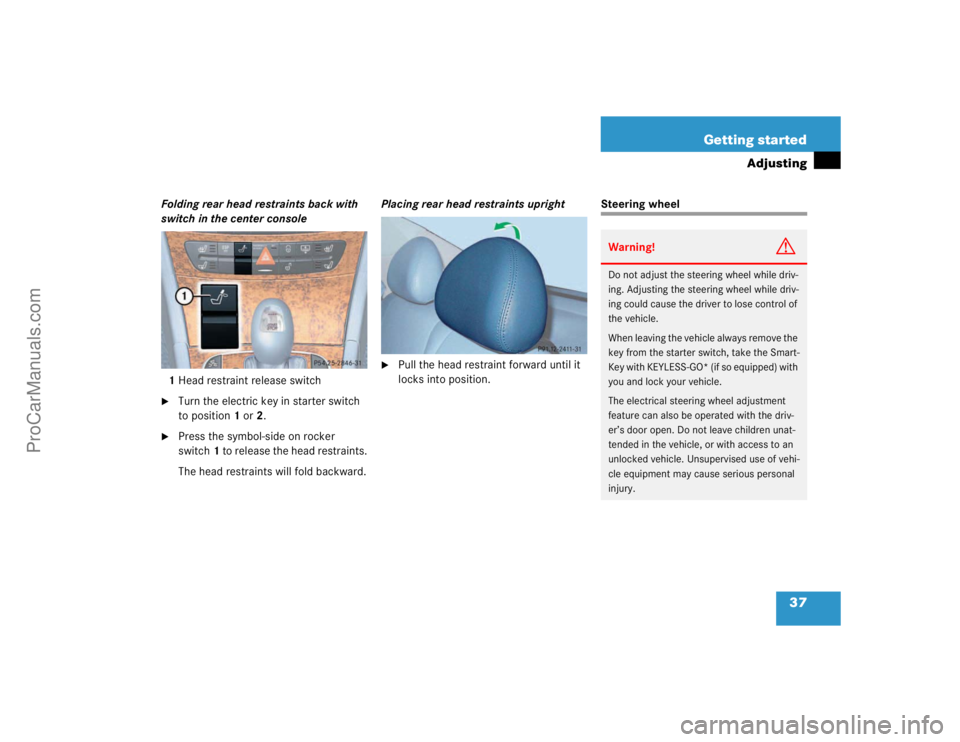
Folding rear head restraints back with
switch in the center console
1Head restraint release switch�
Turn the electric key in starter switch
to position1 or 2.
�
Press the symbol-side on rocker
switch1 to release the head restraints.
The head restraints will fold backward.Placing rear head restraints upright
�
Pull the head restraint forward until it
locks into position.
Steering wheelWarning!
G
Do not adjust the steering wheel while driv-
ing. Adjusting the steering wheel while driv-
ing could cause the driver to lose control of
the vehicle.
When leaving the vehicle always remove the
key from the starter switch, take the Smart-
Key with KEYLESS-GO* (if so equipped) with
you and lock your vehicle.
The electrical steering wheel adjustment
feature can also be operated with the driv-
er’s door open. Do not leave children unat-
tended in the vehicle, or with access to an
unlocked vehicle. Unsupervised use of vehi-
cle equipment may cause serious personal
injury.
ProCarManuals.com
Page 38 of 399

38 Getting startedAdjustingSteering wheel adjustment
The stalk is located on the steering column
(lower left).
1Steering column stalk, adjusts length
2Steering column stalk, adjusts height�
Turn the key in the starter switch to
position1or2.
or
�
Press the KEYLESS GO* start/stop
button once or twice.
or
�
Open the driver or passenger door.Steering column, lengthen or shorten
�
Move stalk forward or backward in the
direction of arrow 1 until a comfortable
steering wheel position is reached with
your arms slightly bent at the elbow.
Steering column, height
�
Move the stalk up or down in the direc-
tion of arrow 2. Make sure that your
legs can move freely and that all the
displays (including malfunction and in-
dicator lamps) on the instrument clus-
ter are clearly visible.
Mirrors
Adjust the inside and exterior rear view
mirrors before driving so that you have a
good view of the road and traffic condi-
tions.
Inside rear view mirror�
Manually adjust the inside rear view
mirror.
More information can be found in the
"Controls in detail" section (
�page 157).
Warning!
G
In the case of an accident liquid electrolyte
may escape the mirror housing if the mirror
glass breaks.
Electrolyte has an irritating effect. Do not al-
low the liquid to come into contact with
eyes, skin, clothing, or respiratory system.
In case it does, immediately flush affected
area with water, and seek medical help if
necessary.
ProCarManuals.com
Page 46 of 399

46 Getting startedDrivingAfter a cold start the automatic transmis-
sion engages at a higher revolution. This al-
lows the catalytic converter to reach its
operating temperature earlier.More information on driving can be found
in the "Operation" section (
�page 249).
Switching on headlampsExterior lamp switch1Off
2Low beam headlamps on�
Turn the switch toB.
More information can be found in the
"Controls in detail" section (
�page 112).
Turn signals and high beam
The combination switch is on the left of the
steering column.Combination switch1Turn signals, right
2Turn signals, left�
Press the combination switch up1 or
down2.
Warning!
G
On slippery road surfaces, never downshift
in order to obtain braking action. This could
result in drive wheel slip and reduced vehi-
cle control. Your vehicle’s ABS will not pre-
vent this type of loss of control.Warning!
G
It is dangerous to shift the selector lever out
ofPorN if the engine speed is higher than
idle speed. If your foot is not firmly on the
brake pedal, the vehicle could accelerate
quickly forward or in reverse. You could lose
control of the vehicle and hit someone or
something. Only shift into gear when the en-
gine is idling normally and when your right
foot is firmly on the brake pedal.
iTo signal minor directional changes,
move combination switch to point of
resistance only and release. The turn
signal blinks three times.
ProCarManuals.com
Page 50 of 399

50 Getting startedParking and locking
Parking and lockingYou have now completed your first drive.
You have properly stopped and parked
your vehicle. End your drive as follows.
Parking brake
1Parking brake
2Release handle�
Step firmly on parking brake1.
When the engine is running, the indica-
tor lamp ; (USA only) or 3
(Canada only) in the instrument cluster
will be illuminated.
Warning!
G
Wait until the vehicle is stationary before re-
moving the key from the starter switch. The
vehicle cannot be steered when the key is
removed.Warning!
G
With the engine not running, there is no
power assistance for the brake and steering
systems. In this case, it is important to keep
in mind that a considerably higher degree of
effort is necessary to stop or steer the vehi-
cle.
Warning!
G
Do not park this vehicle in areas where com-
bustible materials such as grass, hay or
leaves can come into contact with the hot
exhaust system, as these materials could be
ignited and cause a vehicle fire.
To reduce the risk of personal injury as a re-
sult of vehicle movement, before turning off
the engine and leaving the vehicle always:�
Keep right foot on brake pedal.
�
Firmly depress parking brake pedal.
�
Move the selector lever to positionP.
�
Slowly release brake pedal.
�
When parked on an incline, turn front
wheel towards the road curb.
�
Turn the key to starter switch position0
and remove, or press start- / stop button
(vehicles with KEYLESS-GO*).
�
Take the key or the SmartKey with KEY-
LESS-GO* (if so equipped) and lock ve-
hicle when leaving.
ProCarManuals.com

