2003 LINCOLN LS tow
[x] Cancel search: towPage 79 of 288

Alwaysremembertoturn on your headlamps at dusk or during
inclement weather. The Daytime Running Light (DRL) System
does not activate your tail lamps and generally may not provide
adequate lighting during these conditions. Failure to activate your
headlamps under these conditions may result in a collision.
High beams
Pull toward you until control stops
to activate. Repeat to deactivate.
Flash to pass
Pull toward you slightly to activate
and release to deactivate.
PANEL DIMMER CONTROL
Use to adjust the brightness of the
instrument panel during parklamp,
headlamp and autolamp operation.
•Rotate up to brighten.
•Rotate down to dim.
•Rotate fully up to turn on the
interior lights.
Note: The panel dimmer control is not active when the autolamp system
has determined that it is daytime.
Lights
79
Page 86 of 288
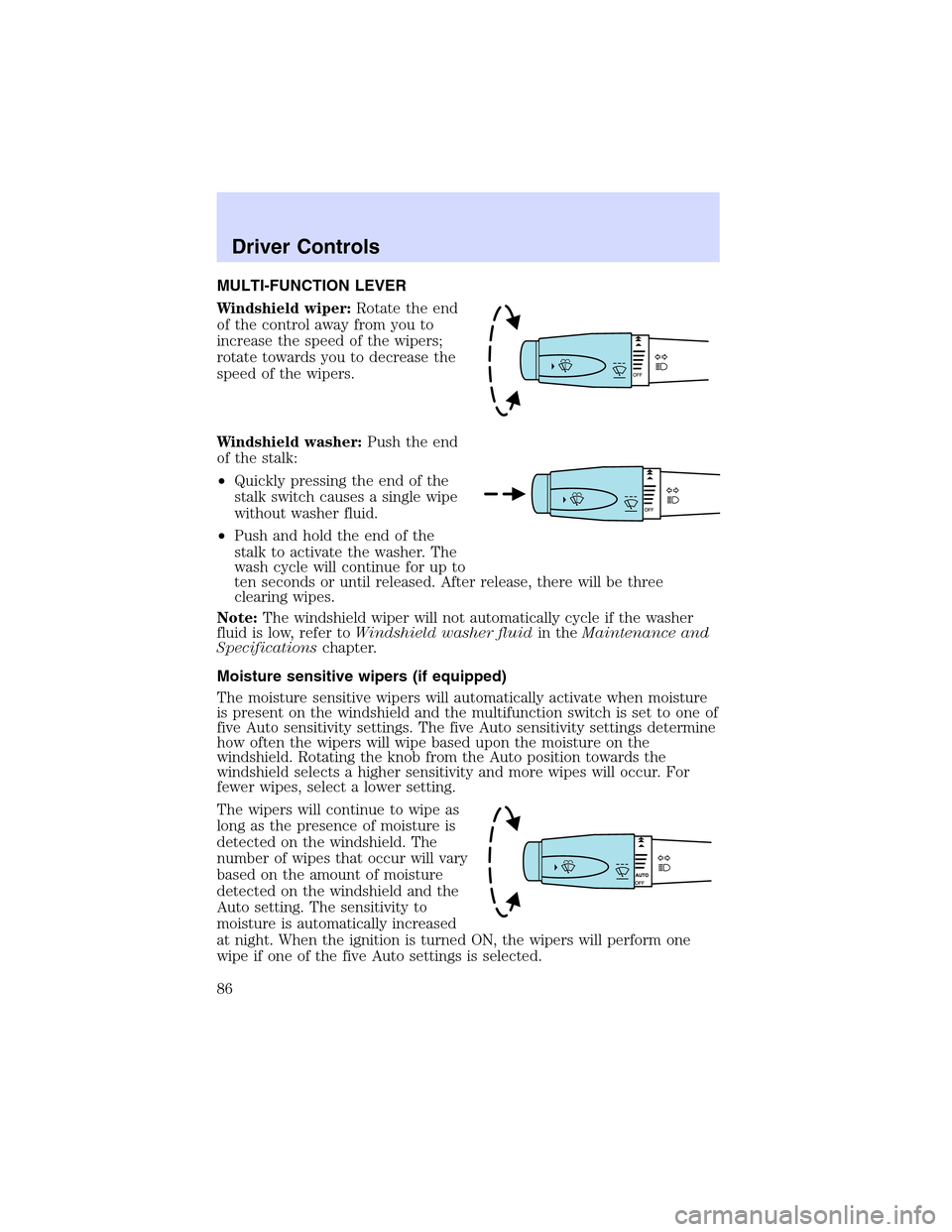
MULTI-FUNCTION LEVER
Windshield wiper:Rotate the end
of the control away from you to
increase the speed of the wipers;
rotate towards you to decrease the
speed of the wipers.
Windshield washer:Push the end
of the stalk:
•Quickly pressing the end of the
stalk switch causes a single wipe
without washer fluid.
•Push and hold the end of the
stalk to activate the washer. The
wash cycle will continue for up to
ten seconds or until released. After release, there will be three
clearing wipes.
Note:The windshield wiper will not automatically cycle if the washer
fluid is low, refer toWindshield washer fluidin theMaintenance and
Specificationschapter.
Moisture sensitive wipers (if equipped)
The moisture sensitive wipers will automatically activate when moisture
is present on the windshield and the multifunction switch is set to one of
five Auto sensitivity settings. The five Auto sensitivity settings determine
how often the wipers will wipe based upon the moisture on the
windshield. Rotating the knob from the Auto position towards the
windshield selects a higher sensitivity and more wipes will occur. For
fewer wipes, select a lower setting.
The wipers will continue to wipe as
long as the presence of moisture is
detected on the windshield. The
number of wipes that occur will vary
based on the amount of moisture
detected on the windshield and the
Auto setting. The sensitivity to
moisture is automatically increased
at night. When the ignition is turned ON, the wipers will perform one
wipe if one of the five Auto settings is selected.
Driver Controls
86
Page 87 of 288
More or less wiping may occur under the following conditions:
•on cool mornings with high humidity
•in very light mist or rain
•salty water/mist
•hydrophobic coating applied to the windshield such as Rain-X or wax
(use of these types of coatings are not recommended)
You can override the moisture sensitive wiper function by selecting
HIGH, LOW and OFF.
The moisture sensitive wiper feature should be turned OFF prior to
entering a car wash.
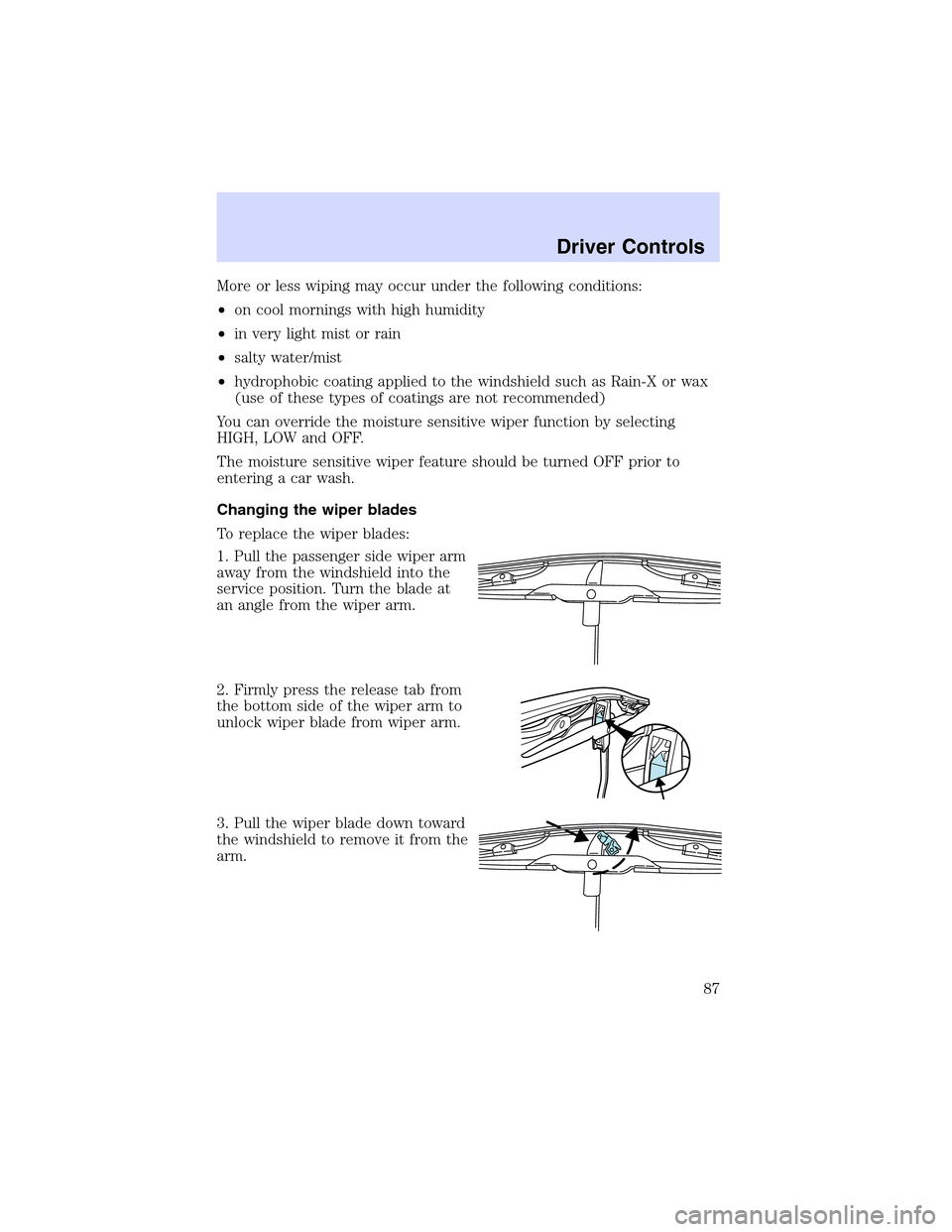
Changing the wiper blades
To replace the wiper blades:
1. Pull the passenger side wiper arm
away from the windshield into the
service position. Turn the blade at
an angle from the wiper arm.
2. Firmly press the release tab from
the bottom side of the wiper arm to
unlock wiper blade from wiper arm.
3. Pull the wiper blade down toward
the windshield to remove it from the
arm.
Driver Controls
87
Page 88 of 288

4. Attach the new wiper to the
wiper arm and reposition the clip
until it locks.
Repeat for driver’s side wiper arm.
POWER TILT/TELESCOPE STEERING COLUMN
The steering column can be
adjusted manually by moving the
four-way rocker adjustment control
located below the turn signal/wiper
control stalk. Hold the control to
adjust.
The telescope function is adjusted
by moving the control toward the
driver to telescope out and toward
the instrument panel to telescope
in.
The tilt function is adjusted by moving the control up or down.
Easy entry/exit feature
When you remove the key, the column will move, if this feature is
activated through the Message Center, to the full in and up position,
refer to theMessage Centerin theDriver Controlschapter. When the
key is inserted into the ignition, the column will return to the previous
setting.
Memory feature
The steering column positions are saved when doing a memory set
function and can be recalled along with the vehicle personality features
when a memory position is selected through the remote entry
transmitter, keyless entry keypad or memory switch on the driver’s door
(if equipped with memory feature). Refer toMemory seats/steering
column/mirrors/adjustable pedalsin theSeating and Safety
Restraintschapter.
If the steering column adjustment control is pressed during memory
recall it will cancel the automatic operation and the column will respond
to manual adjustment of the control.
Driver Controls
88
Page 95 of 288

Fold-away mirrors (if equipped)
Pull the side mirrors in carefully
when driving through a narrow
space, like an automatic car wash.
POWER ADJUSTABLE FOOT PEDALS
The accelerator and brake pedal
should only be adjusted when the
vehicle is stopped and the gearshift
lever is in the P (Park) position.
Press and hold the rocker control
(located on the instrument panel) to
adjust accelerator and brake pedal.
•Press the top of the control to
adjust the pedals away from you.
•Press the bottom of the control to adjust the pedals towards you.
Memory feature
The accelerator and brake pedal positions are saved when doing a
memory set function and can be recalled along with the vehicle
personality features when a memory position is selected through the
remote entry transmitter, keyless entry keypad or memory switch on the
driver’s door (if equipped with memory feature). Refer toMemory
seats/steering column/mirrors/adjustable pedalsin theSeating and
Safety Restraintschapter.
Never adjust the accelerator and brake pedal with feet on the
pedals while the vehicle is moving.
SPEED CONTROL
With speed control set, you can maintain a speed of 48 km/h (30 mph)
or more without keeping your foot on the pedal. Speed control does not
work at speeds below 48 km/h (30 mph).
Driver Controls
95
Page 113 of 288
PARK BRAKE ON & NEED SERVICE.Displayed when the park brake
is ON and malfunctioning. If the warning stays on or continues to come
on, contact your dealer as soon as possible.
PARK BRAKE ON.Displayed when the park brake is ON. If the
warning stays on after the park brake is off, contact your dealer as soon
as possible.
CHECK ENGINE TEMP.Displayed when the engine coolant is
overheating. Stop the vehicle as soon as safely possible, turn off the
engine and let it cool. Check the coolant and coolant level. Refer to
Engine coolantin theMaintenance and specificationschapter. If the
warning stays on or continues to come on, contact your dealer as soon as
possible.
CHECK CHARGING SYSTEM.Displayed when the electrical system is
not maintaining proper voltage. If you are operating electrical accessories
when the engine is idling at a low speed, turn off as many of the
electrical loads as soon as possible. If the warning stays on or comes on
when the engine is operating at normal speeds, have the electrical
system checked as soon as possible.
TRANSMISSION OVERHEATED.Indicates the transmission is
overheating. This warning may appear when towing heavy loads or when
driving in a low gear at a high speed for an extended period of time.
Stop the vehicle as soon as safely possible, turn off the engine and let it
cool. Check the transmission fluid and level. Refer toTransmission
fluidin theMaintenance and specificationschapter. If the warning
stays on or continues to come on, contact your dealer for transmission
service as soon as possible.
CHECK TRANSMISSION.Indicates the transmission is not operating
properly. If this warning stays on, contact your dealer as soon as
possible.
LOW FUEL LEVEL.Displayed when you have approximately 80 km (50
miles) to empty.
CHECK FUEL CAP.Displayed when the fuel filler cap is not properly
installed. Check the fuel filler cap for proper installation. Refer toFuel
filler capin theMaintenance and specificationschapter.
ETC-ENGINE FAILSAFE MODE.Displayed when the engine has
defaulted to a’limp-home’operation. If the warning stays on or continues
to come on, contact your dealer as soon as possible.
LOW BRAKE FLUID.Indicates the brake fluid level is low and the
brake system should be inspected immediately. Refer toChecking and
adding brake fluidin theMaintenance and specificationschapter.
Driver Controls
113
Page 120 of 288

KEYS
Your vehicle is equipped with two master keys and a valet key lock
system. The master key will access the driver’s door, trunk, glove box,
remote trunk release control and ignition. The valet key will access door
and ignition only.
Refer to theSecurilock Passive Anti-Theft Systemsection for
information on Securilock keys.
POWER DOOR LOCKS
Press the top of the control to
unlock all doors and the bottom to
lock all doors.
When the vehicle’s security system
is armed, the power door locks and
remote trunk release control are
disabled; these features will not
work until the security system is
disarmed.
Smart locks
With the key in any ignition position:
•The driver’s door will automatically unlock if it is locked by the
driver’s power lock control while the driver’s door is open.
•All doors will automatically unlock if the passenger’s door is locked by
the passenger’s power lock control while the passenger’s door is open.
The vehicle may still be locked with the key in the ignition, and
performing one of the following actions:
•Pressing the manual lock button on the door.
•Operating the remote entry transmitter.
•Operating the keyless entry keypad.
•Operating the driver’s door with a key.
Opening all windows and moonroof (if equipped)
You can open the vehicle’s windows and moonroof (if equipped) by using
the door key or the
control on the remote entry transmitter.
Turn the key toward the front of the vehicle and hold it for more than
two seconds to begin to open all the windows and moonroof. Releasing
the key to the center position will stop all motion.
Locks and Security
120
Page 121 of 288

Note:The ignition must be in the OFF position and the accessory delay
feature must not be activated in order for this feature to operate.
Closing all windows and moonroof (if equipped)
Note:This operation is only available using the door key.
You can close the vehicle’s windows and moonroof (if equipped) by using
the door key.
Turn the key toward the back of the vehicle and hold it for more than
two seconds to begin to close all the windows and moonroof. Releasing
the key to the center position will stop all motion.
Note:The ignition must be in the OFF position and the accessory delay
feature must not be activated in order for this feature to operate.
The rear windows do not have bounce-back protection. If an
obstruction occurs, turn the key toward the front of the vehicle
and hold for more than two seconds in order to reopen all the windows
and moonroof.
Before operating power windows and moonroofs, you should
verify that they are free of obstructions and ensure that children
and/or pets are not in the proximity of window openings.
Central locking/Two stage unlocking
When unlocking the driver door with the key, turn it once toward the
front of the vehicle to unlock that door only, if the two-stage unlocking is
enabled. Turn the key a second time to unlock all doors. When locking,
turn the key toward the back of the vehicle to lock all doors.
Two stage unlocking may be disabled (and the vehicle may be
programmed for all vehicle doors to unlock by pressing the
control or
by turning the key inside the driver’s door key cylinder once toward the
front of the vehicle) by simultaneously pressing the
andcontrols
on the remote entry transmitter for four seconds.
Note:The turn lamps will flash twice to confirm that a change to the
feature has occurred.
Locks and Security
121