2003 INFINITI G35 ignition
[x] Cancel search: ignitionPage 131 of 256
Compact disc (CD) changer
operation Turn the ignition key to the ACC or ON position
and insert the compact disc into the slot with
the label side facing up. The compact disc will
be guided automatically into the slot and start
playing.
After loading the disc, the number of tracks on
the disc and the play time will appear on the
display.
If the radio or tape is already operating, it will
automatically turn off and the compact disc will
play.
CAUTIONDo not force the compact disc into the
slot. This could damage the player.
If the system has been turned off while the
compact disc was playing, pushing the
ON z OFF/VOL control knob will start the com-
pact disc.
3.1 in (8 cm) diameter compact discs can also
be used without an adapter.
button:
To insert a CD in the CD changer, push the LOAD button for less than 1.5 seconds. Select
the loading slot by pushing the CD insert select
button (1 to 6), then insert the CD.
To insert 6 CDs to the CD changer in succes-
sion, push the LOAD button for more than 1.5
seconds.
The inserted slot numbers will illuminate on the
display.
PLAY:
When the DISC (CD play) button is pushed
with the system off and the compact disc
loaded, the system will turn on and the com-
pact disc will start to play.
When the DISC button is pushed with the
compact disc loaded with the tape or the radio
playing, the tape or radio will automatically be
turned off and the compact disc will start to
play.
FF (Fast Forward), REW
(Rewind):
When the (fast forward) or (rewind)
button is pushed while the compact disc is
being played, the compact disc will play while
fast forwarding or rewinding. When the button
is released, the compact disc will return to
normal play speed. APS (Automatic Program
Search) FF, APS REW:
When the (APS FF) button is pushed
while the compact disc is being played, the
program after the present one will start to play
from its beginning. Push several times to skip
through programs. The compact disc will ad-
vance the number of times the button is
pushed. (When the last program on the com-
pact disc is skipped through, the first program
will be played.) When the (APS REW)
button is pushed, the program being played
returns to its beginning. Push several times to
skip back through programs. The compact disc
will go back the number of times the button is
pushed.
CD PLAY button:
To change CD, push the CD play select button
(1 to 6).
SCAN tuning:
When the SCAN tuning button is pushed for
less than 1.5 seconds while the CD is being
played, the beginning of all the CD programs in
each track will be played for 10 seconds in
sequence.
When the SCAN tuning button is pushed for
more than 1.5 seconds while the CD is being
played, the first program in all the CDs will be Heater, air conditioner and audio systems
4-15
Z 02.7.29/V35-D/V5.0
X
Page 133 of 256
STEERING SWITCH FOR AUDIO
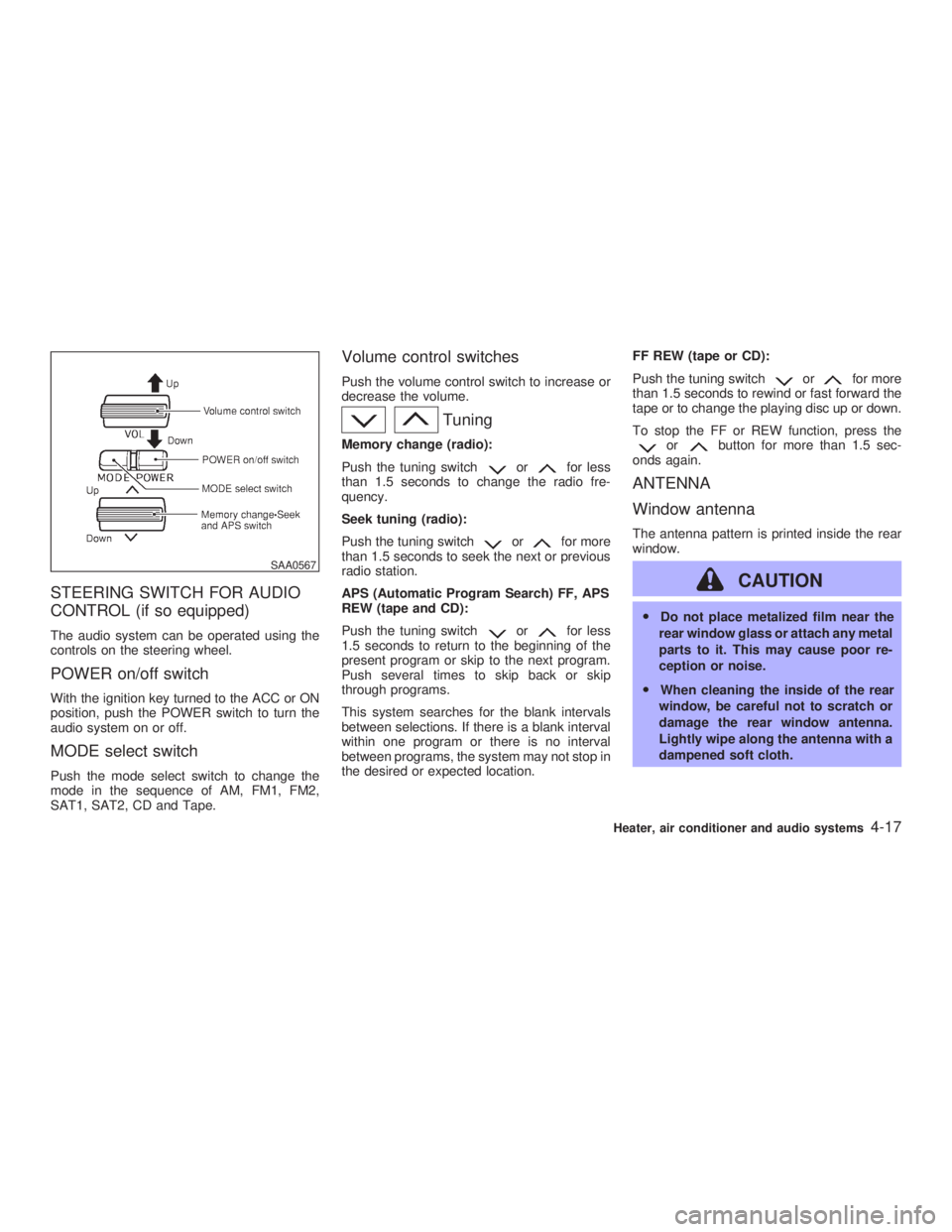
CONTROL (if so equipped) The audio system can be operated using the
controls on the steering wheel.
POWER on/off switch With the ignition key turned to the ACC or ON
position, push the POWER switch to turn the
audio system on or off.
MODE select switch Push the mode select switch to change the
mode in the sequence of AM, FM1, FM2,
SAT1, SAT2, CD and Tape. Volume control switches Push the volume control switch to increase or
decrease the volume.
TuningMemory change (radio):
Push the tuning switch or for less
than 1.5 seconds to change the radio fre-
quency.
Seek tuning (radio):
Push the tuning switch or for more
than 1.5 seconds to seek the next or previous
radio station.
APS (Automatic Program Search) FF, APS
REW (tape and CD):
Push the tuning switch or for less
1.5 seconds to return to the beginning of the
present program or skip to the next program.
Push several times to skip back or skip
through programs.
This system searches for the blank intervals
between selections. If there is a blank interval
within one program or there is no interval
between programs, the system may not stop in
the desired or expected location. FF REW (tape or CD):
Push the tuning switch or for more
than 1.5 seconds to rewind or fast forward the
tape or to change the playing disc up or down.
To stop the FF or REW function, press the
or button for more than 1.5 sec-
onds again.
ANTENNA
Window antenna The antenna pattern is printed inside the rear
window.
CAUTION O Do not place metalized film near the
rear window glass or attach any metal
parts to it. This may cause poor re-
ception or noise.
O When cleaning the inside of the rear
window, be careful not to scratch or
damage the rear window antenna.
Lightly wipe along the antenna with a
dampened soft cloth.SAA0567
Heater, air conditioner and audio systems
4-17
Z 02.7.29/V35-D/V5.0
X
Page 135 of 256
5 Starting and driving Precautions when starting and driving ...................... 5-2
Exhaust gas (Carbon monoxide).......................... 5-2
Three way catalyst ............................................... 5-3
Avoiding collision and rollover .............................. 5-3
Drinking alcohol/drugs and driving ....................... 5-4
Ignition switch............................................................ 5-4
Automatic transmission ........................................ 5-4
Manual transmission ............................................ 5-5
Key positions ........................................................ 5-6
Infiniti vehicle immobilizer system ....................... 5-6
Before starting the engine ......................................... 5-7
Starting the engine .................................................... 5-7
Driving the vehicle ..................................................... 5-8
Automatic transmission ........................................ 5-8
Manual transmission .......................................... 5-12
Parking brake .......................................................... 5-14
Cruise control .......................................................... 5-15
Precautions on cruise control ............................. 5-15
Cruise control operations ................................... 5-15
Break-in schedule ................................................... 5-17
Increasing fuel economy ......................................... 5-17
Parking/parking on hills ........................................... 5-18
Power steering ........................................................ 5-19
Brake system .......................................................... 5-19 Braking precautions............................................ 5-19
Anti-lock brake system (ABS) ........................... 5-20
Vehicle dynamics control (VDC) system................. 5-21
Cold weather driving ............................................... 5-23
Freeing a frozen door lock ................................. 5-23
Anti-freeze .......................................................... 5-23
Battery ................................................................ 5-23
Draining of coolant water ................................... 5-23
Tire equipment ................................................... 5-23
Special winter equipment ................................... 5-23
Driving on snow or ice ....................................... 5-24
Engine block heater (if so equipped) ................. 5-24
Z 02.7.29/V35-D/V5.0
X
Page 137 of 256

d. You have had an accident involv-
ing damage to the exhaust system,
underbody, or rear of the vehicle.
THREE WAY CATALYST The three way catalyst is an emission control
device installed in the exhaust system. Ex-
haust gases in the converter are burned at
high temperatures to help reduce pollutants.
WARNINGO The exhaust gas and the exhaust sys-
tem are very hot. Keep people, ani-
mals or flammable materials away
from the exhaust system compo-
nents.
O Do not stop or park the vehicle over
flammable materials such as dry
grass, waste paper or rags. They may
ignite and cause a fire. CAUTION O Do not use leaded gasoline. Deposits
from leaded gasoline seriously re-
duce the three way catalyst's ability
to help reduce exhaust pollutants.
O Keep your engine tuned up. Malfunc-
tions in the ignition, fuel injection, or
electrical systems can cause over-
rich fuel flow into the three way cata-
lyst, causing it to overheat. Do not
keep driving if the engine misfires, or
if noticeable loss of performance or
other unusual operating conditions
are detected. Have the vehicle in-
spected promptly by an authorized
INFINITI retailer.
O Avoid driving with an extremely low
fuel level. Running out of fuel could
cause the engine to misfire, damag-
ing the three way catalyst.
O Do not race the engine while warming
it up.
O Do not push or tow your vehicle to
start the engine. AVOIDING COLLISION AND
ROLLOVER
WARNING Failure to operate this vehicle in a safe
and prudent manner may result in loss
of control or an accident.
Be alert and drive defensively at all times.
Obey all traffic regulations. Avoid excessive
speed, high speed cornering, or sudden steer-
ing maneuvers, because these driving prac-
tices could cause you to lose control of your
vehicle. As with any vehicle, a loss of con-
trol could result in a collision with other
vehicles or objects, or cause the vehicle to
rollover, particularly if the loss of control
causes the vehicle to slide sideways. Be
attentive at all times, and avoid driving when
tired. Never drive when under the influence of
alcohol or drugs (including prescription or
over-the-counter drugs which may cause
drowsiness). Always wear your seat belt. See
ªSeat Beltsº in the ª1. Seats, restraints and
supplemental air bag systemsº section. Also
instruct your passengers to do so.
Starting and driving
5-3
Z 02.7.29/V35-D/V5.0
X
Page 138 of 256
DRINKING ALCOHOL/DRUGS AND
DRIVING
WARNINGNever drive under the influence of alco-
hol or drugs. Alcohol in the bloodstream
reduces coordination, delays reaction
time and impairs judgment. Driving after
drinking alcohol increases the likeli-
hood of being involved in an accident
injuring yourself and others. Addition-
ally, if you are injured in the accident,
alcohol can increase the severity of the
injury.
INFINITI is committed to safe driving. You
must not drive under the influence of alcohol.
Every year thousands of people are injured or
killed in alcohol related accidents. Although
the local laws vary on what is considered to be
legally intoxicated, the fact is that alcohol
affects all people differently and most people
underestimate the effects of alcohol.
Remember, drinking and driving don't mix!
And that's true for drugs too (over the counter,
prescription, and illegal drugs). Don't drive if your ability to operate your vehicle is impaired
by alcohol, drugs, or some other physical
condition.
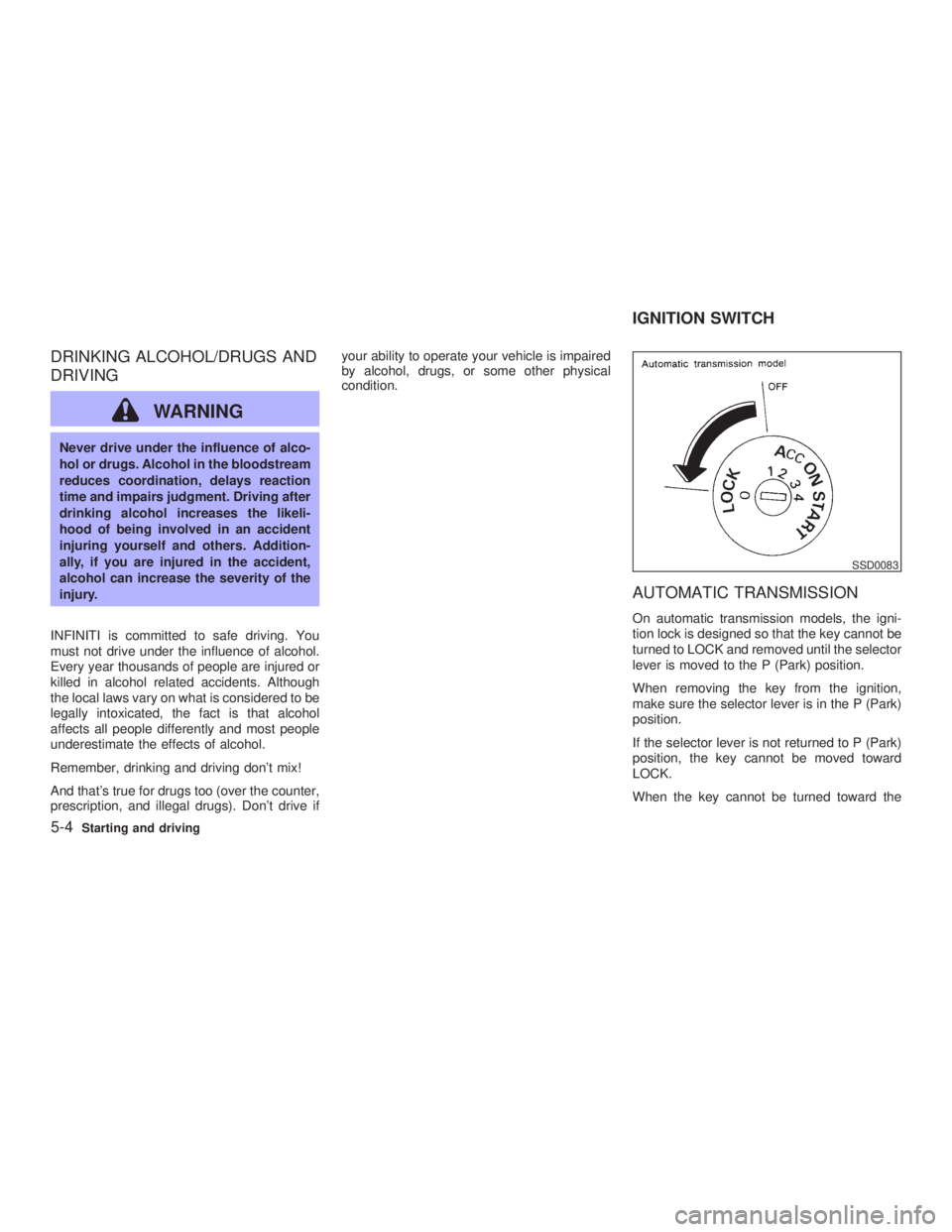
AUTOMATIC TRANSMISSION On automatic transmission models, the igni-
tion lock is designed so that the key cannot be
turned to LOCK and removed until the selector
lever is moved to the P (Park) position.
When removing the key from the ignition,
make sure the selector lever is in the P (Park)
position.
If the selector lever is not returned to P (Park)
position, the key cannot be moved toward
LOCK.
When the key cannot be turned toward the SSD0083
IGNITION SWITCH
5-4 Starting and driving
Z 02.7.29/V35-D/V5.0
X
Page 139 of 256
LOCK position, proceed as follows to remove
the key:
1. Move the selector lever into the P (Park)
position.
2. Turn the ignition key slightly in the ON
direction.
3. Turn the key toward the LOCK position.
4. Remove the key.
If the key is removed from the ignition switch,
the selector lever cannot be moved from P
(Park) position. The selector lever can be
moved if the ignition switch is in the ON
position and the foot brake pedal is de-
pressed.
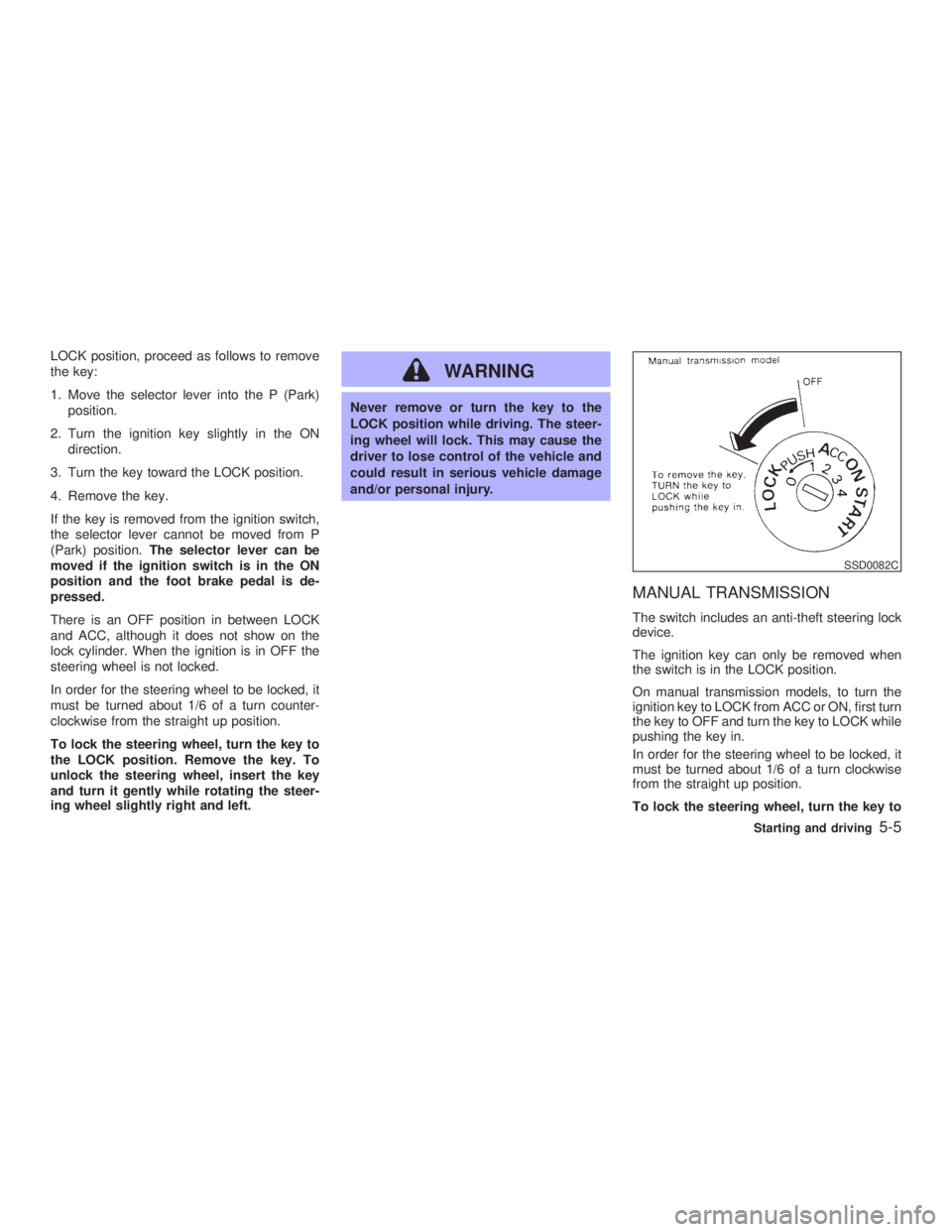
There is an OFF position in between LOCK
and ACC, although it does not show on the
lock cylinder. When the ignition is in OFF the
steering wheel is not locked.
In order for the steering wheel to be locked, it
must be turned about 1/6 of a turn counter-
clockwise from the straight up position.
To lock the steering wheel, turn the key to
the LOCK position. Remove the key. To
unlock the steering wheel, insert the key
and turn it gently while rotating the steer-
ing wheel slightly right and left. WARNING Never remove or turn the key to the
LOCK position while driving. The steer-
ing wheel will lock. This may cause the
driver to lose control of the vehicle and
could result in serious vehicle damage
and/or personal injury.
MANUAL TRANSMISSION The switch includes an anti-theft steering lock
device.
The ignition key can only be removed when
the switch is in the LOCK position.
On manual transmission models, to turn the
ignition key to LOCK from ACC or ON, first turn
the key to OFF and turn the key to LOCK while
pushing the key in.
In order for the steering wheel to be locked, it
must be turned about 1/6 of a turn clockwise
from the straight up position.
To lock the steering wheel, turn the key to SSD0082C
Starting and driving
5-5
Z 02.7.29/V35-D/V5.0
X
Page 140 of 256
the LOCK position. Remove the key. To
unlock the steering wheel, insert the key
and turn it gently while rotating the steer-
ing wheel slightly right and left.
WARNINGNever remove or turn the key to the
LOCK position while driving. The steer-
ing wheel will lock. This may cause the
driver to lose control of the vehicle and
could result in serious vehicle damage
and/or personal injury.
KEY POSITIONS The switch includes an anti-theft steering lock
device.
LOCK (Normal parking position) (0)
The ignition key can only be removed when
the switch is in this position.
OFF (1)
The engine can be turned off without locking
the steering wheel.
The ignition lock is designed so that the key
cannot be turned to LOCK and removed until the selector lever is moved to the P (Park)
position.
ACC (Accessories) (2)
This position activates electrical accessories
such as the radio when the engine is not
running.
ON (Normal operating position) (3)
This position turns on the ignition system and
the electrical accessories.
START (4)
This position activates the starter motor, start-
ing the engine.
INFINITI VEHICLE IMMOBILIZER
SYSTEM The Infiniti Vehicle Immobilizer System will not
allow the engine to start without the use of the
registered Infiniti Vehicle Immobilizer System
key.
If the engine fails to start using the registered
Infiniti Vehicle Immobilizer System key, it may
be due to interference caused by another
Infiniti Vehicle Immobilizer System key, an
automated toll road device or automated pay-
ment device on the key ring. Restart the en-
gine using the following procedures: 1. Leave the ignition switch in the ON position
for approximately 5 seconds.
2. Turn the ignition switch to the OFF or LOCK
position and wait approximately 10 sec-
onds.
3. Repeat step 1 and 2 again.
4. Restart the engine while holding the device
(which may have caused the interference)
separate from the registered Infiniti Vehicle
Immobilizer System key.
If this procedure allows the engine to start,
INFINITI recommends placing the registered
Infiniti Vehicle Immobilizer System key on a
separate key ring to avoid interference from
other devices.
5-6 Starting and driving
Z 02.7.29/V35-D/V5.0
X
Page 141 of 256
O Make sure the area around the vehicle is
clear.
O Maintenance items should be checked pe-
riodically, e.g., each time you check engine
oil.
O Check that all windows and lights are clean.
O Visually inspect tires for their appearance
and condition. Also, check tires for proper
inflation.
O Lock all doors.
O Position seat and adjust head restraints.
O Adjust inside and outside mirrors.
O Fasten seat belts and ask all passengers to
do likewise.
O Check the operation of warning lights when
key is turned to the ON (3) position. 1. Apply the parking brake.
2. Automatic transmission:
Move the selector lever to P (Park) or N
(Neutral). (P preferred.)
The starter is designed not to operate if the
selector lever is in one of the driving posi-
tions.
Manual transmission:
Move the shift lever to N (Neutral) position,
and depress the clutch pedal to the floor
while cranking the engine.
The starter is designed not to operate un-
less the clutch pedal is fully depressed.
3. Crank the engine with your foot off the
accelerator pedal by turning the ignition
key to START. Release the key when the
engine starts. If the engine starts, but fails
to run, repeat the above procedure.
O If the engine is very hard to start in ex-
tremely cold weather or when restarting,
depress the accelerator pedal a little (ap-
proximately 1/5 to the floor) and hold it then
crank the engine. Release the key and the
accelerator pedal when the engine starts.
O If the engine is very hard to start because it
is flooded, depress the accelerator pedal all the way to the floor and hold it. Crank the
engine for 5 to 6 seconds. After cranking
the engine, release the accelerator pedal.
Crank the engine with your foot off the
accelerator pedal by turning the ignition
key to START. Release the key when the
engine starts. If the engine starts, but fails
to run, repeat the above procedure.
CAUTION Do not operate the starter for more than
15 seconds at a time. If the engine does
not start, turn the key off and wait 10
seconds before cranking again, other-
wise the starter could be damaged.
4. Warm-up
Allow the engine to idle for at least 30
seconds after starting. Drive at moderate
speed for a short distance first, especially in
cold weather.BEFORE STARTING THE ENGINE STARTING THE ENGINE
Starting and driving
5-7
Z 02.7.29/V35-D/V5.0
X